Solved Intel core i3 Turbo boost

bala2289

New member
Member
VIP
Local time
7:56 PM
Messages
101
Location
india
Hi,
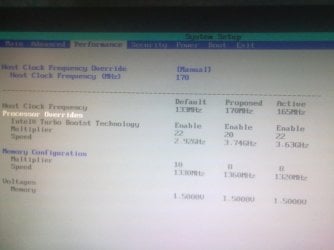
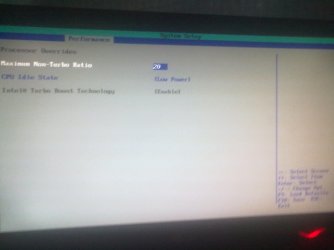
I have an core i3 530 processor. Decided to overclock it and went into bios settings and saw turbo boost enabled. Can someone please explain how is this possible, coz i "read" that turbo boost is not available in i3.
My motherboard intel dh55pj with latest bios doesnt show the option to change cpu voltages. Please help..:D:D:D
 

Attachments

  • 12042013015.jpg
    12042013015.jpg
    147.1 KB · Views: 19
  • 12042013013.jpg
    12042013013.jpg
    129 KB · Views: 17

My Computer

Computer type
PC/Desktop
Computer Manufacturer/Model Number
Intel
OS
windows 7 ultimate x32
CPU
core i3 530 @ 3.63 ghz
Motherboard
Intel dh55pj
Memory
4 gb ddr3 1333mhz
Graphics Card(s)
Sapphire radeon 7770 1gb Ghz Edition
Monitor(s) Displays
lg 19"
Screen Resolution
1368*768
Hard Drives
Seagate 500gb @ 7200 rpm
PSU
Zebronics 450 w
Case
Zebronics
Cooling
Cooler master Tx3 Evo cpu and cooler master 120mm Inlet fan
Mouse
Lenovo razer 1600 dpi laser
Internet Speed
8 Mbps dsl
Antivirus
Avast Free
Browser
Chrome
I believe the TurboBoost option is still available within your BIOS since your motherboard supports i5 and i7 CPUs also, the setting may have been enabled by default.

Motherboard Documentation - Intel DH55PJ

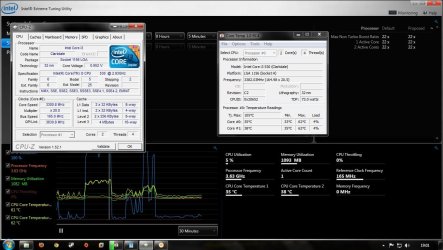
Does that mean my processor supports it? Please look at the attached image. Note that the multiplier value in cpuz and core temp shows as 20 and core speed is 3.3. But look at the background in the intel xtreme tuning utility it shows as 3.63 and 22 multiplier. Cpuz and core temp also shows 22 at times but the screenshot was taken when it was at 20. Im confused. :confused: Should i leave the multiplier value at 20 or 22???
 

Attachments

  • oc.jpg
    oc.jpg
    265 KB · Views: 21

My Computer

Computer type
PC/Desktop
Computer Manufacturer/Model Number
Intel
OS
windows 7 ultimate x32
CPU
core i3 530 @ 3.63 ghz
Motherboard
Intel dh55pj
Memory
4 gb ddr3 1333mhz
Graphics Card(s)
Sapphire radeon 7770 1gb Ghz Edition
Monitor(s) Displays
lg 19"
Screen Resolution
1368*768
Hard Drives
Seagate 500gb @ 7200 rpm
PSU
Zebronics 450 w
Case
Zebronics
Cooling
Cooler master Tx3 Evo cpu and cooler master 120mm Inlet fan
Mouse
Lenovo razer 1600 dpi laser
Internet Speed
8 Mbps dsl
Antivirus
Avast Free
Browser
Chrome

My Computer

Computer type
PC/Desktop
Computer Manufacturer/Model Number
Intel
OS
windows 7 ultimate x32
CPU
core i3 530 @ 3.63 ghz
Motherboard
Intel dh55pj
Memory
4 gb ddr3 1333mhz
Graphics Card(s)
Sapphire radeon 7770 1gb Ghz Edition
Monitor(s) Displays
lg 19"
Screen Resolution
1368*768
Hard Drives
Seagate 500gb @ 7200 rpm
PSU
Zebronics 450 w
Case
Zebronics
Cooling
Cooler master Tx3 Evo cpu and cooler master 120mm Inlet fan
Mouse
Lenovo razer 1600 dpi laser
Internet Speed
8 Mbps dsl
Antivirus
Avast Free
Browser
Chrome
TurboBoost automatically switches on when the CPU is under a certain level of load, i3's don't support TurboBoost, so I doubt TurboBoost would take any effect.

Have you cleared your BIOS?
 

My Computer

Computer type
Laptop
TurboBoost automatically switches on when the CPU is under a certain level of load, i3's don't support TurboBoost, so I doubt TurboBoost would take any effect.

Have you cleared your BIOS?
Nope, i doubt clearing bios wont be much of a help when a feature doesnt allow to change its value(greyed), resetting it wont help i guess. Correct me if im wrong.:D
Fact is I'm lazy now to clear bios :p
 

My Computer

Computer type
PC/Desktop
Computer Manufacturer/Model Number
Intel
OS
windows 7 ultimate x32
CPU
core i3 530 @ 3.63 ghz
Motherboard
Intel dh55pj
Memory
4 gb ddr3 1333mhz
Graphics Card(s)
Sapphire radeon 7770 1gb Ghz Edition
Monitor(s) Displays
lg 19"
Screen Resolution
1368*768
Hard Drives
Seagate 500gb @ 7200 rpm
PSU
Zebronics 450 w
Case
Zebronics
Cooling
Cooler master Tx3 Evo cpu and cooler master 120mm Inlet fan
Mouse
Lenovo razer 1600 dpi laser
Internet Speed
8 Mbps dsl
Antivirus
Avast Free
Browser
Chrome
From all my knowledge and I've found, i3's can't use TurboBoost and don't support the TurboBoost feature, the option could be greyed out since the setting may not actually be active, due the processor you have.
 

My Computer

Computer type
Laptop
From all my knowledge and I've found, i3's can't use TurboBoost and don't support the TurboBoost feature, the option could be greyed out since the setting may not actually be active, due the processor you have.

Even I think the same but just curious :D:D:D
 

My Computer

Computer type
PC/Desktop
Computer Manufacturer/Model Number
Intel
OS
windows 7 ultimate x32
CPU
core i3 530 @ 3.63 ghz
Motherboard
Intel dh55pj
Memory
4 gb ddr3 1333mhz
Graphics Card(s)
Sapphire radeon 7770 1gb Ghz Edition
Monitor(s) Displays
lg 19"
Screen Resolution
1368*768
Hard Drives
Seagate 500gb @ 7200 rpm
PSU
Zebronics 450 w
Case
Zebronics
Cooling
Cooler master Tx3 Evo cpu and cooler master 120mm Inlet fan
Mouse
Lenovo razer 1600 dpi laser
Internet Speed
8 Mbps dsl
Antivirus
Avast Free
Browser
Chrome
From all my knowledge and I've found, i3's can't use TurboBoost and don't support the TurboBoost feature, the option could be greyed out since the setting may not actually be active, due the processor you have.

Even I think the same but just curious :D:D:D

xBR already gave the exact explanation. Turbo boost is greyed out because your processor does not simply support it. What if you suddenly decide to upgrade to i5 or i7? That is the reason why it's there.
 

My Computer

Computer type
PC/Desktop
OS
Windows 7 Home Premium x64
From all my knowledge and I've found, i3's can't use TurboBoost and don't support the TurboBoost feature, the option could be greyed out since the setting may not actually be active, due the processor you have.

Even I think the same but just curious :D:D:D

xBR already gave the exact explanation. Turbo boost is greyed out because your processor does not simply support it. What if you suddenly decide to upgrade to i5 or i7? That is the reason why it's there.

Okay then leaving multiplier at x22 :D Thanks guys
 

My Computer

Computer type
PC/Desktop
Computer Manufacturer/Model Number
Intel
OS
windows 7 ultimate x32
CPU
core i3 530 @ 3.63 ghz
Motherboard
Intel dh55pj
Memory
4 gb ddr3 1333mhz
Graphics Card(s)
Sapphire radeon 7770 1gb Ghz Edition
Monitor(s) Displays
lg 19"
Screen Resolution
1368*768
Hard Drives
Seagate 500gb @ 7200 rpm
PSU
Zebronics 450 w
Case
Zebronics
Cooling
Cooler master Tx3 Evo cpu and cooler master 120mm Inlet fan
Mouse
Lenovo razer 1600 dpi laser
Internet Speed
8 Mbps dsl
Antivirus
Avast Free
Browser
Chrome
I believe the TurboBoost option is still available within your BIOS since your motherboard supports i5 and i7 CPUs also, the setting may have been enabled by default.

Motherboard Documentation - Intel DH55PJ

Does that mean my processor supports it? Please look at the attached image. Note that the multiplier value in cpuz and core temp shows as 20 and core speed is 3.3. But look at the background in the intel xtreme tuning utility it shows as 3.63 and 22 multiplier. Cpuz and core temp also shows 22 at times but the screenshot was taken when it was at 20. Im confused. :confused: Should i leave the multiplier value at 20 or 22???
bala you are reading it wrong both say 3.3ghz the QpI link is like HT for AMD it is the Hyperthreading speed
 

My Computer

Computer type
PC/Desktop
Computer Manufacturer/Model Number
CoreI7-6700K MrFingerIII Special Builds
OS
Windows 10 Home Premium 64bit sp1
CPU
Intel I7-6700K @ 4.6 Ghz 1.344 volts everyday OC
Motherboard
Asrock Fatality K6 Z170 Socket 1151
Memory
32GB G-Skill TridentZ 3200mhz 16-18-18-38 DDR4
Graphics Card(s)
Sli Gigabyte Windforce GTX 980 G1
Sound Card
AC97 Creative Rage Tactic 3D Headphones Bluetooth
Monitor(s) Displays
27" Asus ROG Swift PG278Q G-Sync 48" Vizio Smart HD TV
Screen Resolution
2560x1440p 27"- 48" Currently Gaming at 2560x1440p Res 2K
Hard Drives
250GB Samsung Evo840SSD Seagate baracuda 500 GB WD Mybook 500Gb 1TB Seagate Barracuda
PSU
HX1050w Corsair Silver 80plus certified crosfire/sli
Case
Enthod Pro Full Tower
Cooling
Corsair H110i GT 280 mm High Performance WaterBlock
Keyboard
Logitech wireless keyboard
Mouse
Logitech wireless mouse
Internet Speed
Cox Cable 100+ mb
Antivirus
WebRoot Spysweeper with Antivirus
Browser
IE-10, Chrome, Opera
Other Info
My Other Rig is a AMD FX8320E @4.6Ghz 16GB Ballistic Sport Ram
Mobo Asrock Fatality 990FX 120GB OCZ SSD 1TB Seagate Barracuda Corsair H75 Cooling PSU Corsair CX750
GPU GTX Gigabyte 970G1
Back
Top