Solved Intel Turbo Boost Difficulties

laungst

New member
Local time
11:21 AM
Messages
23
Okay, okay. I frequently play Gamecube/ Wii (mostly Gamecube) games on Dolphin Emulator. However, my processor (a laptop i7) is just on the verge of being able to run them. For example: Super Mario Sunshine runs just under 90% speed on high-ish settings without turbo boost. When my processor turbo-boosts, I can run the game flawlessly on highest settings.

For whatever reason, sometimes it just doesn't turbo boost, or it starts and stops.
For example: When I start a game, I look at the turbo boost monitor and its turbo boosting almost as high as it will go. Ill put the game in fullscreen and play it for a little while (with it running perfectly), then ill notice a sudden frame drop. At that point I go back and look at the turbo boost monitor and its stuck at basic speed, not turbo boosting.

Sometimes it wont turbo boost at all, sometimes I can play for hours with it running the whole time, sometimes it starts and stops. And I always make sure I have all background/ any other programs closed to ensure its under the same conditions.

Can anyone give me any advice on what the problem might be or how to fix it?
 

My Computer

Computer type
PC/Desktop
Computer Manufacturer/Model Number
ASUS G74SX-BBK11
OS
Windows 7 Home Premium 64bit
CPU
Intel Core i7 2720QM @ 2.20GHz
Motherboard
ASUSTeK Computer Inc. G74Sx (CPU 1)
Memory
8 GB
Graphics Card(s)
NVIDIA GeForce GTX 560M
Screen Resolution
1920x1080
Hard Drives
977GB Seagate ST1000LM024 HN-M101MBB (SATA)
128 GB SSD
Internet Speed
~20 Mbps
If your Bios allows turn off overspeed protection turn on enhanced turbo and bump the core multipliers up. Don't go to high laptops can heat up quick.
 

My Computer

Computer type
PC/Desktop
Computer Manufacturer/Model Number
Dude Build
OS
Windows 10 Pro X64
CPU
Intel(R) Core(TM) i5-3570K CPU OC@ 4.5GHZ Turbo
Motherboard
MSI Z77A-G45 Gaming
Memory
8.00 GB DDR3 1600Mhz
Graphics Card(s)
MSI Gaming X GTX 1070
Sound Card
Realtek High Definition
Monitor(s) Displays
Dell S23O9W, HP L1710
Screen Resolution
DELL-1920 x 1080 HP-1280 x1024
Hard Drives
Crucial m4 256 SSD, WD 7200RPM 500GB WD 1TB
PSU
Seasonic X650 GOLD
Case
Zalman Z12
Cooling
Antec Kuhler 920
Keyboard
Logitech
Mouse
MSI DS100 Interceptor
Internet Speed
50 down and 5 up
Antivirus
MSE
Browser
Chrome, IE 11
Other Info
Logitech X-620 Speakers
Sounds like your laptop is getting very hot and thus turning off turbo boost. Try monitoring your CPU temps while gaming since many laptop BIOS disable turbo boost when the CPU reaches 85 degrees Celsius. I recommend Real Temp 3.70 to monitor temps to a log file since Real Temp also shows the multiplier of the CPU aside from the temps.
 

My Computer

Computer type
Laptop
Computer Manufacturer/Model Number
Dell Optiplex SX270, Lenovo Z470
OS
Windows 7 Professional x64 SP1
CPU
Intel® Pentium® 4 @ 2.26 GHz, Intel Core i7-2670QM @ 2.20 GH
Motherboard
Dell, Lenovo
Memory
512MB Dual channel DDR SDRAM @ 400MHz 2.5-3-3-7, 8 GB DDR3
Graphics Card(s)
Intel 82865G, Nvidia GeForce 520M Graphics
Sound Card
SoundMax Integrated Audio, Integrated HD Audio
Monitor(s) Displays
LG W1952
Screen Resolution
1440x900, 1366 x 768
Hard Drives
40 GB 2.5" IDE 4200 RPM HDD, 500 GB 5400 RPM Sata 1.5 + 32 GB SSD
PSU
Dell 145 Watt, Lenovo 120 Watt Power Adapter
Case
Optiplex SX270 Small Form Factor, Laptop
Cooling
Dell Proprietary Air Cooling, Stock laptop cooling
Keyboard
Dell SK-8125 USB Keyboard
Mouse
Dell PS/2 2 button ball mouse with wheel scroll
Internet Speed
300 Mbit down / 20 Mbps up Time Warner Cable
Antivirus
MSE, Malwarebytes Scanner
Browser
Internet (Aizawa) Explorer 11
Other Info
Running Windows Server 2012 Datacenter on a virtual machine to run Metro Apps.
I just opened my 8 month old business lappy and installed a 256gb ssd for the 128gb and I was floored at the build up of dust. Hit it with compressed air the stuff just poured out. Keep things clean, I blow out my desktop rig every other month or quarterly at least, I'm thinking I will just add the lappy to the program.
 

My Computer

Computer type
PC/Desktop
Computer Manufacturer/Model Number
A blend of brains, brawn and dumb luck.
OS
Windows 7 Ultimate 64
CPU
i7 3770k OC'd 4.6 @ 1.17v, also FX 8120 & i5 miniITX
Motherboard
MSI P67A-GD80 b3
Memory
32 gb G.Skill Sniper DDR3 10-12-12-31 @ 2133
Graphics Card(s)
XFX Radeon 7870 2GB DDR5
Sound Card
Sound Blaster Z Series Card
Monitor(s) Displays
(2) LG LED 23" 1920 x 1080 2ms Monitors via mini d-port
Screen Resolution
1680 X 1050 p
Hard Drives
Samsung 256 gb 830 SSD sata III
(1) 1 tb WD Black
(2) 1 tb Hitachi deskmates/sata II
(2) 1 tb WD green/sata II
(2) 3 tb Seagate Barracuda
(1) 120 gb OCZ Vertex SS
(1) Drobo 5N w/5 Seagate 3tb
PSU
EVGA modular 1000G2 80% gold rating & APC 1200 RS
Case
CoolerMaster Storm Styker
Cooling
7 case fans 140mm & 120mm, NZXT Kraken X60
Keyboard
(2) Logitech Illuminated Keyboards (1) usb (1) wireless
Mouse
Logitech G700 & T-BC21 - nano nx for the laptop
Internet Speed
Basic 120mbps down
Antivirus
Trend Micro Titanium Max Security & Malwarebytes Premium
Browser
Chrome and IE 10
Other Info
5 Noctua case fans + 3 Noctua in p/p on NZXT cooler
Integrated hot swap drive bays for 2.5" Drives
(2) Lite-on dvd/cd/Blu Ray optical 22X
Integrated fan controller and led on/off
HP Officejet Pro 8630 all-n-one
Hot-swappable 3.5" hard drive bay
Netgear Nighthawk router
Asus USB 3 & sata 6 PCIe card
Vantec IDE to sata adptr./Ultra sata adptr
Lenovo L420 i5 lappy with m sata
Drobo 5N advanced NAS
Sounds like your laptop is getting very hot and thus turning off turbo boost. Try monitoring your CPU temps while gaming since many laptop BIOS disable turbo boost when the CPU reaches 85 degrees Celsius. I recommend Real Temp 3.70 to monitor temps to a log file since Real Temp also shows the multiplier of the CPU aside from the temps.

This was indeed my problem.
I would ask what my next step is in raising the degrees in which it switches it off, but I don't think I want to risk the longevity of my processor considering this is a laptop and parts can't simply be replaced.

From now on I suppose that I'll keep an eye on the temperature and let it sit for a minute or two if it gets too hot.

Thanks for the help :)
 

My Computer

Computer type
PC/Desktop
Computer Manufacturer/Model Number
ASUS G74SX-BBK11
OS
Windows 7 Home Premium 64bit
CPU
Intel Core i7 2720QM @ 2.20GHz
Motherboard
ASUSTeK Computer Inc. G74Sx (CPU 1)
Memory
8 GB
Graphics Card(s)
NVIDIA GeForce GTX 560M
Screen Resolution
1920x1080
Hard Drives
977GB Seagate ST1000LM024 HN-M101MBB (SATA)
128 GB SSD
Internet Speed
~20 Mbps
Sounds like your laptop is getting very hot and thus turning off turbo boost. Try monitoring your CPU temps while gaming since many laptop BIOS disable turbo boost when the CPU reaches 85 degrees Celsius. I recommend Real Temp 3.70 to monitor temps to a log file since Real Temp also shows the multiplier of the CPU aside from the temps.

This was indeed my problem.
I would ask what my next step is in raising the degrees in which it switches it off, but I don't think I want to risk the longevity of my processor considering this is a laptop and parts can't simply be replaced.

From now on I suppose that I'll keep an eye on the temperature and let it sit for a minute or two if it gets too hot.

Thanks for the help :)


use a program called "game booster" by iobit. it will shut down unnecessary programs, processes, and services, and free up some resources. by doin this, ur CPU will have less to deal with while you play the game, and also keep it cooler. also you can take apart your laptop, and clean out the heat sync and intakes. if you cant take it apart, simply just use a tooth brush against the intake and brush ur intakes teeth for a good 2 mins. then just blow it out. it helped me a few times.
 

My Computer

Computer type
PC/Desktop
Computer Manufacturer/Model Number
Custom Build
OS
Windows 7 Professional x64
CPU
AMD FX 4300 @ 4.2 GHZ
Motherboard
MSI 970A-G43
Memory
G.SKILL Ripjaws X Series 8GB
Graphics Card(s)
PNY GTX 560 Ti OC
Sound Card
Realtek ALC892
Monitor(s) Displays
20" Hanns-G HL203
Screen Resolution
1600x900
Hard Drives
WD Caviar Black 500GB 7200RPM
PSU
Corsair CX500M
Case
Athena Power- Black Widow
Cooling
Cooler Master GeminII S524
Keyboard
Logitech K360 LE
Mouse
Rocketfish Nano
Internet Speed
60Mbps Down 8Mbps Up
Other Info
Dell Studio 1458 Laptop Setup:

Windows 7 Home Premium~
Intel Core i5 560M @3.2GHZ~
6GB DDR3 RAM~
ATI Mobility Radeon 540v 512MB~
Intel 330 Sata III 120GB SSD~
Illuminated Keyboard
Sounds like your laptop is getting very hot and thus turning off turbo boost. Try monitoring your CPU temps while gaming since many laptop BIOS disable turbo boost when the CPU reaches 85 degrees Celsius. I recommend Real Temp 3.70 to monitor temps to a log file since Real Temp also shows the multiplier of the CPU aside from the temps.

This was indeed my problem.
I would ask what my next step is in raising the degrees in which it switches it off, but I don't think I want to risk the longevity of my processor considering this is a laptop and parts can't simply be replaced.

From now on I suppose that I'll keep an eye on the temperature and let it sit for a minute or two if it gets too hot.

Thanks for the help :)

Another suggestion is to use throttlestop 5.00 by Tech Inferno. This program will definitely bypass that BIOS CPU throttling and you risk having a thermal shutdown when the CPU reaches 100 oC while locking the multiplier to "turbo". In other words, Turbo Boost will not turn off until you reach a thermal shutdown which is dangerous not just for your CPU, but also for the OS and HDD. I suggest to keep the multiplier at 2.5 or 2.6 GHz while gaming.

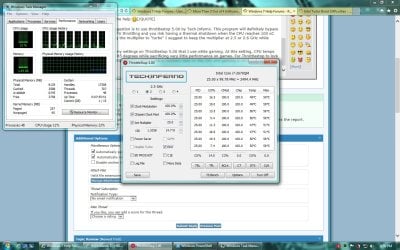
I show you my settings on Throttlestop 5.00 that I use while gaming. At this setting, CPU temps only reache 85 degrees while sacrificing very little performance on games. For Throttlestop to lock the CPU multiplier, you need to put a constant load on the CPU and gaming is obviously an example.

Untitled.jpg
 

My Computer

Computer type
Laptop
Computer Manufacturer/Model Number
Dell Optiplex SX270, Lenovo Z470
OS
Windows 7 Professional x64 SP1
CPU
Intel® Pentium® 4 @ 2.26 GHz, Intel Core i7-2670QM @ 2.20 GH
Motherboard
Dell, Lenovo
Memory
512MB Dual channel DDR SDRAM @ 400MHz 2.5-3-3-7, 8 GB DDR3
Graphics Card(s)
Intel 82865G, Nvidia GeForce 520M Graphics
Sound Card
SoundMax Integrated Audio, Integrated HD Audio
Monitor(s) Displays
LG W1952
Screen Resolution
1440x900, 1366 x 768
Hard Drives
40 GB 2.5" IDE 4200 RPM HDD, 500 GB 5400 RPM Sata 1.5 + 32 GB SSD
PSU
Dell 145 Watt, Lenovo 120 Watt Power Adapter
Case
Optiplex SX270 Small Form Factor, Laptop
Cooling
Dell Proprietary Air Cooling, Stock laptop cooling
Keyboard
Dell SK-8125 USB Keyboard
Mouse
Dell PS/2 2 button ball mouse with wheel scroll
Internet Speed
300 Mbit down / 20 Mbps up Time Warner Cable
Antivirus
MSE, Malwarebytes Scanner
Browser
Internet (Aizawa) Explorer 11
Other Info
Running Windows Server 2012 Datacenter on a virtual machine to run Metro Apps.
Back
Top