Solved Interesting booting issue

I did recreate it, but it failed on the last step, I couldn't make it active. Either way, it probably wouldn't have solved the issue as with the fresh installation it's still present.
 
Last edited:

My Computer

OS
Windows 7 Professional x64
CPU
Intel Core i5-2500K @ 3.30Ghz (Overclocked to 4.50Ghz)
Motherboard
ASUS P8P67
Memory
G.Skill DDR3 8GB /1600 KIT
Graphics Card(s)
ASUS Geforce GTX 560 @ 1GB (Slightly overclocked)
Sound Card
ASUS Xonar DX
Monitor(s) Displays
2x Samsung Syncmaster BX2331
Screen Resolution
2x 1920x1080
Hard Drives
SSD: OCZ Agility 3 @ 60GB (Primary Drive);
HDD: Western Digital Caviar Black @ 1TB
PSU
GIGABYTE Superb 720
Case
Nexus version1 Silent System
Cooling
Built-in + Corsair Air Series A70 (CPU)
Keyboard
Logitech K120
Mouse
Razer Imperator
Internet Speed
~120 Mbps DL
There is something wrong with your 100mb System partition which doesn't have normal markings but is labeled "EFI System Partition" as it might have been from the factory.

NO problems with EFI System or FAT, System Reseved partitions.
As the ASUS P8P67 has a EFI BIOS.

Fat System Reserved.png

4) The oddest (is there such a word? :O) thing of all though is that even with Windows uninstalled and my drives removed from my computer I still see the Windows Boot Manager option in my BIOS (although obviously when I tried to boot form it it did not do anything). Is it possible for an OS to integrate itself to the BIOS, therefore to create a relation between them?

YES, As the ASUS P8P67 has a EFI BIOS.
Extensible Firmware Interface - Wikipedia, the free encyclopedia

All you needed to do was

You need to Physically disconnect the HD Disk1.
Make the Windows 7 HD, disk0 & first HD boot in BIOS.

Than do a startup Repair:
Startup Repair
Note: You may need to do startup repair 3 to 4 times.
Startup Repair - Run 3 Separate Times
 
Last edited:

My Computer

OS
ME/XP/Vista/Win7
If you deleted and then recreated a 100mb partition NTFS Primary partition it would be perfectly capable of being marked Active. All you had to do is ask back and we would have helped you do it.

Instead you reinstalled but again did not delete the 100mb partition during install so the installer could issue the correct 100mb System Reserved partition as it does when all partitions are deleted by the installer before install.

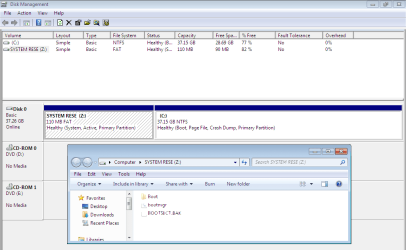
The concern with your Disk mgmt screenshot before is that the 100mb was an odd ghost partition and no others were marked System showing where the boot files were placed. Is Win7 partition now marked System?

Is the original issue solved?
 
@theog I tried disconnecting disk 1 then repairing but it didn't work. I don't see the point in doing that though, that drive has nothing to do with my Windows.

@greg Nope, unfortunately I'm right at where I was before the re-installation. The disk management window looks exactly the same. I DID delete all partitions of my drive before the installation. The current 100MB one is brand new, came with Windows.
 
Last edited:

My Computer

OS
Windows 7 Professional x64
CPU
Intel Core i5-2500K @ 3.30Ghz (Overclocked to 4.50Ghz)
Motherboard
ASUS P8P67
Memory
G.Skill DDR3 8GB /1600 KIT
Graphics Card(s)
ASUS Geforce GTX 560 @ 1GB (Slightly overclocked)
Sound Card
ASUS Xonar DX
Monitor(s) Displays
2x Samsung Syncmaster BX2331
Screen Resolution
2x 1920x1080
Hard Drives
SSD: OCZ Agility 3 @ 60GB (Primary Drive);
HDD: Western Digital Caviar Black @ 1TB
PSU
GIGABYTE Superb 720
Case
Nexus version1 Silent System
Cooling
Built-in + Corsair Air Series A70 (CPU)
Keyboard
Logitech K120
Mouse
Razer Imperator
Internet Speed
~120 Mbps DL
You know it came with Windows latest install because it says "System Reserved" instead of EFI? Is it marked System Active as it should be?

Post back a screenshot of the maximized Disk Mgmt map with listings.

Theog has identified the mobo as having a specialized EFI boot partition. If it is not booting Win7 perhaps what it will take to rid it is wiping the HD or using Diskpart "Delete Partition Override" command, as is done with a manufacturer's locked EISA partition which also becomes useless after reinstall.

Is it still interfering with smooth boot by Win7?
 
4) The oddest (is there such a word? :O) thing of all though is that even with Windows uninstalled and my drives removed from my computer I still see the Windows Boot Manager option in my BIOS (although obviously when I tried to boot form it it did not do anything). Is it possible for an OS to integrate itself to the BIOS, therefore to create a relation between them?

YES, As the ASUS P8P67 has a EFI BIOS.
Extensible Firmware Interface - Wikipedia, the free encyclopedia

All you needed to do was

You need to Physically disconnect the HD Disk1.
Make the Windows 7 HD, disk0 & first HD boot in BIOS.

Than do a startup Repair:
Startup Repair
Note: You may need to do startup repair 3 to 4 times.
Startup Repair - Run 3 Separate Times


@theog I tried disconnecting disk 1 then repairing but it didn't work. I don't see the point in doing that though, that drive has nothing to do with my Windows.


I said to you, you need to Physically disconnect the HD Disk1, to make sure you had no boot problems with the HD.

[highlight]I did not tell you to delete the EFI BIOS & Windows 7 bootloader partition.[/highlight]

Which will show in Disk Management as a EFI System Partition.

Asus EFI BIOS video
 

My Computer

OS
ME/XP/Vista/Win7
Diskmanagement.jpg
 

My Computer

OS
Windows 7 Professional x64
CPU
Intel Core i5-2500K @ 3.30Ghz (Overclocked to 4.50Ghz)
Motherboard
ASUS P8P67
Memory
G.Skill DDR3 8GB /1600 KIT
Graphics Card(s)
ASUS Geforce GTX 560 @ 1GB (Slightly overclocked)
Sound Card
ASUS Xonar DX
Monitor(s) Displays
2x Samsung Syncmaster BX2331
Screen Resolution
2x 1920x1080
Hard Drives
SSD: OCZ Agility 3 @ 60GB (Primary Drive);
HDD: Western Digital Caviar Black @ 1TB
PSU
GIGABYTE Superb 720
Case
Nexus version1 Silent System
Cooling
Built-in + Corsair Air Series A70 (CPU)
Keyboard
Logitech K120
Mouse
Razer Imperator
Internet Speed
~120 Mbps DL
Once again, I did physically remove the HD Disk1 and the ran a Startup Repair but it didn't do anything. Also, the current installation was actually run with my HD Disk1 physically removed. It has absolutely nothing to do with the issue.
 

My Computer

OS
Windows 7 Professional x64
CPU
Intel Core i5-2500K @ 3.30Ghz (Overclocked to 4.50Ghz)
Motherboard
ASUS P8P67
Memory
G.Skill DDR3 8GB /1600 KIT
Graphics Card(s)
ASUS Geforce GTX 560 @ 1GB (Slightly overclocked)
Sound Card
ASUS Xonar DX
Monitor(s) Displays
2x Samsung Syncmaster BX2331
Screen Resolution
2x 1920x1080
Hard Drives
SSD: OCZ Agility 3 @ 60GB (Primary Drive);
HDD: Western Digital Caviar Black @ 1TB
PSU
GIGABYTE Superb 720
Case
Nexus version1 Silent System
Cooling
Built-in + Corsair Air Series A70 (CPU)
Keyboard
Logitech K120
Mouse
Razer Imperator
Internet Speed
~120 Mbps DL
Can you confirm the Boot Menu you described before is still appearing, exactly how it appears and how you respond to it?

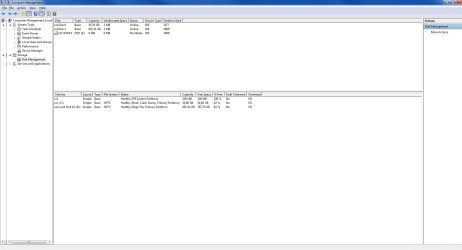
The drive map has disappeared off your Disk Mgmt screenshot. See if you can reinstate it on the View tab.

Also click on the 100mb partition to Explore it and post back what it finds - maybe the System boot files are indeed there but not labeled.

When you reboot, tap F8 repeatedly and firmly to see if Repair My Computer is on the Advanced Boot Options and if it is functional.

As this is a very rare situation with this mobo, we will take our time to fully understand it and what your options are to get it booting the way you want.

Theog will hopefully fill us in on what he knows about how to get rid of the annoying boot menu. Others have wiped the HD to clean install Win7 without the EFI partition using Diskpart Clean command from DVD Repair Command Line.

Do you see any settings in BIOS Setup to disable the EFI boot menu?
 
My bad, you got me wrong in the beginning. The boot options which I was talking about are located in my BIOS and Windows Boot Manager is an option to boot from. Windows is only able to run from there even though it should be able to run from the "C: drive" option, my OCZ Agility 3. Once I start-up via the Windows Boot Manager option, there is no window appearing but the OS boots normally, although there is a typing line appearing on the top which probably shouldn't.

Here's a new screenshot:
Diskmanagement.png

It does not give me any options on the EFI System Partition. :S

I will try that right now, thanks.
 

My Computer

OS
Windows 7 Professional x64
CPU
Intel Core i5-2500K @ 3.30Ghz (Overclocked to 4.50Ghz)
Motherboard
ASUS P8P67
Memory
G.Skill DDR3 8GB /1600 KIT
Graphics Card(s)
ASUS Geforce GTX 560 @ 1GB (Slightly overclocked)
Sound Card
ASUS Xonar DX
Monitor(s) Displays
2x Samsung Syncmaster BX2331
Screen Resolution
2x 1920x1080
Hard Drives
SSD: OCZ Agility 3 @ 60GB (Primary Drive);
HDD: Western Digital Caviar Black @ 1TB
PSU
GIGABYTE Superb 720
Case
Nexus version1 Silent System
Cooling
Built-in + Corsair Air Series A70 (CPU)
Keyboard
Logitech K120
Mouse
Razer Imperator
Internet Speed
~120 Mbps DL
This will be the norm as more OEM manufacturer's start using EFI BIOS.

IMO, I would leave EFI BIOS partition alone.

If you would like to see what you can do in the EFI BIOS, have a look at video I linked to in post 26.
 

My Computer

OS
ME/XP/Vista/Win7
Yeah maybe it's normal... but on a previous installation I was able to boot from my Hard Drive. I don't like changes! Either way, I'm starting to give up... I mean, if a complete and proper re-install couldn't solve this, then what can?

Thank you for helping me still.
 

My Computer

OS
Windows 7 Professional x64
CPU
Intel Core i5-2500K @ 3.30Ghz (Overclocked to 4.50Ghz)
Motherboard
ASUS P8P67
Memory
G.Skill DDR3 8GB /1600 KIT
Graphics Card(s)
ASUS Geforce GTX 560 @ 1GB (Slightly overclocked)
Sound Card
ASUS Xonar DX
Monitor(s) Displays
2x Samsung Syncmaster BX2331
Screen Resolution
2x 1920x1080
Hard Drives
SSD: OCZ Agility 3 @ 60GB (Primary Drive);
HDD: Western Digital Caviar Black @ 1TB
PSU
GIGABYTE Superb 720
Case
Nexus version1 Silent System
Cooling
Built-in + Corsair Air Series A70 (CPU)
Keyboard
Logitech K120
Mouse
Razer Imperator
Internet Speed
~120 Mbps DL
Hello again.


If you really wanted to experiment you could over-write the boot order of the HDD and use diskpart to create a single Primary partition to do another clean install to see if that clears it up.


   Note

If that doesn't work, after another clean, use diskpart to create, format and mark Active a single 100GB partition to see if that works, use Step Two #2 in the SSD/HDD tutorial for reference.
 

My Computer

Computer Manufacturer/Model Number
* BFK Customs *
OS
W 7 64-bit Ultimate
CPU
Intel Q9550 Yorkfield
Motherboard
ASUS P5Q Pro
Memory
8GB Dominator 8500C5D
Graphics Card(s)
ATI : XFX 5870
Sound Card
Realtek HD Audio 7-1
Monitor(s) Displays
1x 47" LCD HDMI & 3x 26" LCD HDMI
Screen Resolution
1920x1080P & 1920x1200
Hard Drives
1x 80GB Intel X25-M G2 SSD : 1x 500GB & 1x 640GB WD Caviar Black(s)
PSU
Corsair 620HX
Case
Cooler Master RC-690
Cooling
Tuniq Tower 120, 2x 140mm and 3x 120mm case fans
Keyboard
Microsoft 500
Mouse
Razer Diamondback 3G
Internet Speed
14 Mb/s
Other Info
1x Koutech 3Gb/s SATA HDD Hot Swap Rack
This is a question I would ask Asus. Normally I would convert GPT to MBR disk, wipe the HD and reinstall expecting to get the Win7 100mb System Reserved partition per usual.

However there may be a setting in the BIOS governing this and that should be known for sure ahead.

You can also unplug DISK0 for now, plug its cable into Disk1 then do a test install to a partition you have created by shrinking D. Partition or Volume - Shrink

You have plenty of space to test it there. You will not get the 100mb Sys Reserved partition but you'll know for sure if you can boot an MBR disk from BIOS, and if so you can replug Disk0, convert, wipe it and safely install just as you have successfully tested on DISK1.
 
Last edited:
To sum it up then, these are my last questions: What do you think, why is there a Windows Boot Manager BIOS option and why am I not able to boot from Windows' disk?
 

My Computer

OS
Windows 7 Professional x64
CPU
Intel Core i5-2500K @ 3.30Ghz (Overclocked to 4.50Ghz)
Motherboard
ASUS P8P67
Memory
G.Skill DDR3 8GB /1600 KIT
Graphics Card(s)
ASUS Geforce GTX 560 @ 1GB (Slightly overclocked)
Sound Card
ASUS Xonar DX
Monitor(s) Displays
2x Samsung Syncmaster BX2331
Screen Resolution
2x 1920x1080
Hard Drives
SSD: OCZ Agility 3 @ 60GB (Primary Drive);
HDD: Western Digital Caviar Black @ 1TB
PSU
GIGABYTE Superb 720
Case
Nexus version1 Silent System
Cooling
Built-in + Corsair Air Series A70 (CPU)
Keyboard
Logitech K120
Mouse
Razer Imperator
Internet Speed
~120 Mbps DL
As the ASUS P8P67 has a EFI BIOS.
Extensible Firmware Interface - Wikipedia, the free encyclopedia

   Information
Disk device compatibility

In addition to the standard PC disk partition scheme, which uses a master boot record (MBR), EFI works with a new partitioning scheme: GUID Partition Table (GPT). GPT does not suffer from many of the limitations of DOS MBR. In particular, the DOS MBR limits on the number and size of disk partitions (up to 4 partitions per disk, up to 2.2 TB (2.2 × 1012 bytes) per disk) are relaxed. GPT allows for a maximum disk and partition size of 9.4 ZB (9.4 × 1021 bytes). The EFI specification does not prescribe any particular file system. The only Microsoft Windows versions that can boot from disks larger than 2.2 TB, are 64-bit Windows Vista/7, Windows Server 2008 and later, as well as the Itanium versions of Windows Server 2003 and Windows XP.


Asus EFI BIOS video
 

My Computer

OS
ME/XP/Vista/Win7
Have you read through the BIOS settings in your mobo's manual? They are usually pretty detailed and informative. Anything you don't understand, make a note of it and look it up online later. You may even want to look at the online manual in case it has been updated. With every new board I go step by step through every one of my BIOS settings using the manual. I've worked on plenty of different motherboards and know most BIOS settings but I seem to learn something new every time. You may want to check the motherboard manufacturers forums too, maybe others have had a simmilar issue with that motherboard.

ASUSTeK Computer Inc. - Motherboards- ASUS P8P67

It's always best to get the BIOS set up before installing the OS. Unless you know what you are changing and why, it's not wise to go changing BIOS settings after the OS is installed.

Now, about your EFI BIOS -
The new ASUS EFI BIOS is an Extensible Firmware Interface that complies with uEFI architecture, offering a user-friendly interface that goes beyond traditional keyboard-only BIOS controls to enable more flexible and convenient mouse input. Users can easily navigate the new EFI BIOS with the same smoothness as their operating system. The term "BIOS" in this user manual refers to "EFI BIOS" unless otherwise specified.

So, you can use a USB mouse instead of using the keyboard when setting up your BIOS.

I did not see anything about a "Windows Boot Manager" option in the manual for your BIOS.

Good Luck
 

My Computer

OS
Windows 7 Ultimate x64
CPU
AMD 1100T x6 9MB 3.3GHz
Motherboard
Foxconn A7DA-S 3.0 AM3
Memory
G.SKILL 8GB DDR3-1333 2048MB x 4
Graphics Card(s)
Zotac Nvidia GTX275 896MB @ 723/1603/1260
Sound Card
7.1 channel HDA, Realtek® ALC888-GR
Monitor(s) Displays
42" Viewsonic 1080p N4280p
Hard Drives
HD1 : Barracuda 750GB 32MB Cache (ST375033 0AS)
HD2 : WD Caviar Black 1TB 32MB Cache (WDC WD10 01FALS-00J7B1)
PSU
Corsair Tx750w
Case
Cooler Master Centurion 5
What listings do you have in msconfig>Boot tab, or on EasyBCD 2.0 (still a free version) listings page when you install it to Win7?

If a Windows 7 Boot Manager still shows up without any OS's listed then using Diskpart to clean the boot sector is next: Clean and Clean All with Diskpart Command. This will wipe the HD.

But I would run the test install Barefoot and I proposed just above first to know for sure an MBR HD will boot as normal with that BIOS.
 
msconfig only shows my Windows 7 installed.

I really do not want to reinstall Windows again... I am pretty sure that before this installation I wiped the whole disk. My setup should be fully GPT compatible. Also, when I selected the destination drive for the W7 install, it didn't let me choose my 1TB HDD, which is MBR. It seems the mobo wants a GPT disk.
 

My Computer

OS
Windows 7 Professional x64
CPU
Intel Core i5-2500K @ 3.30Ghz (Overclocked to 4.50Ghz)
Motherboard
ASUS P8P67
Memory
G.Skill DDR3 8GB /1600 KIT
Graphics Card(s)
ASUS Geforce GTX 560 @ 1GB (Slightly overclocked)
Sound Card
ASUS Xonar DX
Monitor(s) Displays
2x Samsung Syncmaster BX2331
Screen Resolution
2x 1920x1080
Hard Drives
SSD: OCZ Agility 3 @ 60GB (Primary Drive);
HDD: Western Digital Caviar Black @ 1TB
PSU
GIGABYTE Superb 720
Case
Nexus version1 Silent System
Cooling
Built-in + Corsair Air Series A70 (CPU)
Keyboard
Logitech K120
Mouse
Razer Imperator
Internet Speed
~120 Mbps DL
Back
Top