JavaScript is disabled. For a better experience, please enable JavaScript in your browser before proceeding.
You are using an out of date browser. It may not display this or other websites correctly.
You should upgrade or use an
alternative browser .
Internet Explorer 9 Jump List
New member
Power User
VIP
I recently re instailled Windows, and i updated it to IE9. But my jump list dont work. If i right click all i get in In private borowsing and open new tab.
Any ideas?
All other jump lists work
Computer type PC/Desktop Computer Manufacturer/Model Number Custom Build OS Windows 7 Professional 64bit CPU Intel Core i5 - 2500K @ 3.30GHz Motherboard Gigabyte Z77-HD3 Memory 4GB DDR3 Graphics Card(s) EVGA Nvidia GeForce GT 740 2GB DDR3 Screen Resolution 1680 x 1050 Hard Drives 1T Samaung HD/ 1T toshiba external drive/ 1T western digital external drive/ 2T seagate external drive/ 250gb samaung SSD PSU Antec 430W Keyboard Microsoft Wireless Keyboard 800 Mouse Microsoft Wireless Mouse 1000 Antivirus AVG Browser Internet Explorer
Administrator
Staff member
Hello Mitchell,
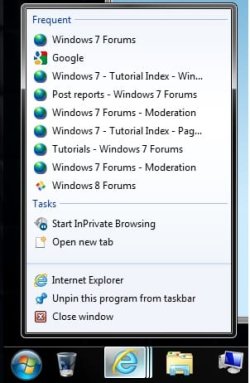
Do you have the bottom 3 items in the jump list below as well?
If so, then it may take a bit after opening sites before they show up in the "Frequent" area of the jump list.
Computer type PC/Desktop Computer Manufacturer/Model Number Self built custom OS 64-bit Windows 11 Pro for Workstations CPU Intel i7-8700K OC'd to 5 GHz Motherboard ASUS ROG Maximus XI Formula Z390 Memory 64 GB (4x16GB) G.SKILL TridentZ RGB DDR4 3600 MHz Graphics Card(s) ASUS ROG-STRIX-GTX1080TI-O11G-GAMING Sound Card Integrated Monitor(s) Displays 2 x Samsung Odyssey G7 27" Screen Resolution 2560x1440 Hard Drives 1TB Samsung 990 PRO M.2,
4TB Samsung 990 PRO PRO M.2,
TerraMaster F8 SSD Plus NAS PSU Seasonic Prime Titanium 850W Case Thermaltake Core P3 Cooling Corsair Hydro H115i Keyboard Logitech wireless K800 Mouse Logitech MX Master 4 Internet Speed 2 Gb/s Download and 100 Mb/s Upload Antivirus Malwarebyte Anti-Malware Premium Browser Google Chrome Other Info Logitech Z625 speaker system,
Logitech BRIO 4K Pro webcam,
HP Color LaserJet Pro MFP M477fdn,
APC SMART-UPS RT 1000 XL - SURT1000XLI,
Galaxy S23 Plus phone
New member
Power User
VIP
One thing I noticed: With 64bit IE9 you don't get any jump list items but they are all there with the 32bit version.
New member
Power User
VIP
Thread Starter
well im running the 32bit version
I do have the Close windows, unpin, and Intrenet Explorer down bottom.
However i vist the sites like 10 times a day and not one site has appeared on there
Computer type PC/Desktop Computer Manufacturer/Model Number Custom Build OS Windows 7 Professional 64bit CPU Intel Core i5 - 2500K @ 3.30GHz Motherboard Gigabyte Z77-HD3 Memory 4GB DDR3 Graphics Card(s) EVGA Nvidia GeForce GT 740 2GB DDR3 Screen Resolution 1680 x 1050 Hard Drives 1T Samaung HD/ 1T toshiba external drive/ 1T western digital external drive/ 2T seagate external drive/ 250gb samaung SSD PSU Antec 430W Keyboard Microsoft Wireless Keyboard 800 Mouse Microsoft Wireless Mouse 1000 Antivirus AVG Browser Internet Explorer
Administrator
Staff member
Mitchell,
You might see if toggling
recent items off and back on may help them to slowly populate afterwards.
You might also see if
resetting the jump lists may help them to slowly populate afterwards.
Computer type PC/Desktop Computer Manufacturer/Model Number Self built custom OS 64-bit Windows 11 Pro for Workstations CPU Intel i7-8700K OC'd to 5 GHz Motherboard ASUS ROG Maximus XI Formula Z390 Memory 64 GB (4x16GB) G.SKILL TridentZ RGB DDR4 3600 MHz Graphics Card(s) ASUS ROG-STRIX-GTX1080TI-O11G-GAMING Sound Card Integrated Monitor(s) Displays 2 x Samsung Odyssey G7 27" Screen Resolution 2560x1440 Hard Drives 1TB Samsung 990 PRO M.2,
4TB Samsung 990 PRO PRO M.2,
TerraMaster F8 SSD Plus NAS PSU Seasonic Prime Titanium 850W Case Thermaltake Core P3 Cooling Corsair Hydro H115i Keyboard Logitech wireless K800 Mouse Logitech MX Master 4 Internet Speed 2 Gb/s Download and 100 Mb/s Upload Antivirus Malwarebyte Anti-Malware Premium Browser Google Chrome Other Info Logitech Z625 speaker system,
Logitech BRIO 4K Pro webcam,
HP Color LaserJet Pro MFP M477fdn,
APC SMART-UPS RT 1000 XL - SURT1000XLI,
Galaxy S23 Plus phone
Mitchell,
You might see if toggling
recent items off and back on may help them to slowly populate afterwards.
You might also see if
resetting the jump lists may help them to slowly populate afterwards.
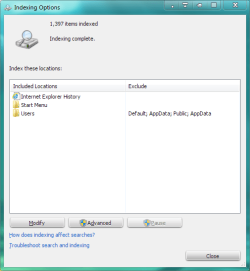
I've mentioned this before. I had the same issue of no jumplists with IE. My problem was that Internet Explorer History was not checked for indexing in the indexing options. When I checked it, the jumplists appeared.
Computer Manufacturer/Model Number Averatec 6130HS-20 OS Windows 7 Professional 32-bit (6.1, Build 7600) CPU Intel(R) Pentium(R) 4 3.00 GHz HT Memory 2.0 GB Graphics Card(s) ATI Mobility Radeon 9600 64MB Sound Card Realtek AC'97 Audio Screen Resolution 1280 x 800 Hard Drives Seagate 96023A 60GB 7200RPM -
Seagate FreeAgentDesktop 250GB Cooling 20 Inch Box Fan Mouse Targus PAWM10 Wireless Optical Laptop Mouse
Administrator
Staff member
Thank you Greg. Hopefully that is the issue for Mitchell as well.
Computer type PC/Desktop Computer Manufacturer/Model Number Self built custom OS 64-bit Windows 11 Pro for Workstations CPU Intel i7-8700K OC'd to 5 GHz Motherboard ASUS ROG Maximus XI Formula Z390 Memory 64 GB (4x16GB) G.SKILL TridentZ RGB DDR4 3600 MHz Graphics Card(s) ASUS ROG-STRIX-GTX1080TI-O11G-GAMING Sound Card Integrated Monitor(s) Displays 2 x Samsung Odyssey G7 27" Screen Resolution 2560x1440 Hard Drives 1TB Samsung 990 PRO M.2,
4TB Samsung 990 PRO PRO M.2,
TerraMaster F8 SSD Plus NAS PSU Seasonic Prime Titanium 850W Case Thermaltake Core P3 Cooling Corsair Hydro H115i Keyboard Logitech wireless K800 Mouse Logitech MX Master 4 Internet Speed 2 Gb/s Download and 100 Mb/s Upload Antivirus Malwarebyte Anti-Malware Premium Browser Google Chrome Other Info Logitech Z625 speaker system,
Logitech BRIO 4K Pro webcam,
HP Color LaserJet Pro MFP M477fdn,
APC SMART-UPS RT 1000 XL - SURT1000XLI,
Galaxy S23 Plus phone