Internet Explorer Compatibility View Updates

How to Receive Internet Explorer Compatibility View Updates

   Information
This will show you how to receive or not receive Internet Explorer Compatibility View updates through Windows Updates (typically, every 2 months) for a list of web sites that should be displayed in Compatibility View. These list updates are automatically added or removed from the Compatibilty View Settings list of web sites.
   Note
Sites on this list are based on feedback from other IE customers: specifically, for what high-volume sites did other users click the Compatibility View button on. The data Microsoft collects from IE users is the top level domain of the website and whether the user chose Compatibility View while visiting that site (please see the IE Privacy Policy for more information). For more details, see: IEBlog : Compatibility View Improvements to come in IE


OPTION ONE

In Internet Explorer "Compatibility View Settings"


NOTE: This will allow you to turn on or off receiving Compatibility View Updates at any time you like.
1. Open Internet Explorer.

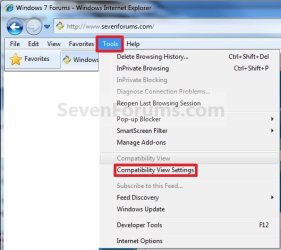
2. Click/tap on the Tools Menu Bar item. (See screenshot below)
Tool_Menu_2.jpg
A) Go to step 4.
OR

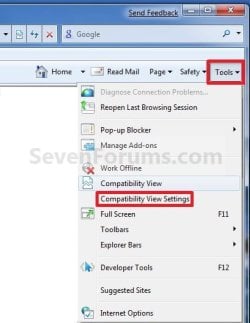
3. Click/tap on the Tools Command Bar button. (See screenshot below)
Tools_Button-2.jpg
4. Click/tap on Compatibility View Settings. (See screenshots above)

5. To Turn On and Receive Compatibility View Updates
NOTE: This is the default setting.
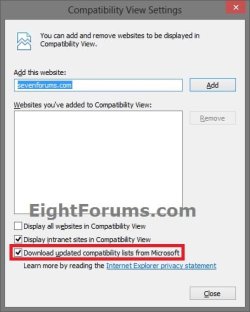
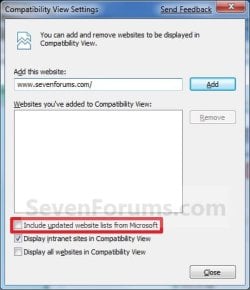
A) Check the Include updated website lists from Microsoft (IE8/IE9) or Downloaded updated compatibility lists from Microsoft (IE10) box. (See screenshot below step 7)

B) Go to step 7.
6. To Turn Off and not Receive Compatibility View Updates
A) Uncheck the Include updated website lists from Microsoft or Downloaded updated compatibility lists from Microsoft (IE10) box. (See screenshot below step 7)
7. Click/tap on the Close button. (See screenshots below)
Update_List.jpgIE10.jpg
8. Close Internet Explorer when done.


OPTION TWO

Using a REG File Download


NOTE: This will allow you to turn on or off receiving Compatibility View Updates at any time you like.
1. To Turn Off and not Receive Compatibility View Updates
A) Click/tap on the Download button below to download the file below, and go to step 3 below.
Turn_Off_IE_ Compatibility_View_Updates.reg

Download


2. To Turn On and Receive Compatibility View Updates
NOTE: This is the default setting.
A) Click/tap on the Download button below to download the file below, and go to step 3 below.
Turn_On_Compatibility_View_Updates.reg

Download


3. Save the REG file to your desktop.

4. Double click/tap on the REG file to merge it.

5. Click/tap on Run, Yes (UAC-Windows 7/8) or Continue (UAC-Vista), Yes, and OK when prompted to approve the merge.

6. When done, you can delete the downloaded .reg file if you like.
That's it,
Shawn


Attachments

Last edited:
Compatibility View


Hi Brick, Thank You so much for the easy to understand instructions for turning off Compatibility View. I was so happy with your method. Beverly


My Computer

OS
Windows 7 Home Premium, 64 bit operating system
You're most welcome Beverly, and welcome to Seven Forums. :)
 

My Computer

Computer type
PC/Desktop
Computer Manufacturer/Model Number
Self built custom
OS
64-bit Windows 11 Pro for Workstations
CPU
Intel i7-8700K OC'd to 5 GHz
Motherboard
ASUS ROG Maximus XI Formula Z390
Memory
64 GB (4x16GB) G.SKILL TridentZ RGB DDR4 3600 MHz
Graphics Card(s)
ASUS ROG-STRIX-GTX1080TI-O11G-GAMING
Sound Card
Integrated
Monitor(s) Displays
2 x Samsung Odyssey G7 27"
Screen Resolution
2560x1440
Hard Drives
1TB Samsung 990 PRO M.2,
4TB Samsung 990 PRO PRO M.2,
TerraMaster F8 SSD Plus NAS
PSU
Seasonic Prime Titanium 850W
Case
Thermaltake Core P3
Cooling
Corsair Hydro H115i
Keyboard
Logitech wireless K800
Mouse
Logitech MX Master 4
Internet Speed
2 Gb/s Download and 100 Mb/s Upload
Antivirus
Malwarebyte Anti-Malware Premium
Browser
Google Chrome
Other Info
Logitech Z625 speaker system,
Logitech BRIO 4K Pro webcam,
HP Color LaserJet Pro MFP M477fdn,
APC SMART-UPS RT 1000 XL - SURT1000XLI,
Galaxy S23 Plus phone
Great tutorial. I d/l the disable reg file but still had the same problem. did a search of the reg with "BrowserEmulation" and found 3 more locations. I set the flags to 0 and my problem went away. I'm not sure which one actually fixed the problem as I edited them all at the same time.

Hope someone may find this info to be useful.

1. this one is from you.
[HKEY_CURRENT_USER\Software\Microsoft\Internet Explorer\BrowserEmulation]
"AllSitesCompatibilityMode"=dword:00000000

2.
[HKEY_CURRENT_USER\Software\Policies\Microsoft\Internet Explorer\BrowserEmulation]
"AllSitesCompatibilityMode"=dword:00000000

3.
[HKEY_USERS\S-1-5-21-4105843126-57720304-1097551233-1001\Software\Microsoft\Internet Explorer\BrowserEmulation]
"AllSitesCompatibilityMode"=dword:00000000

4.
[HKEY_USERS\S-1-5-21-4105843126-57720304-1097551233-1001\Software\Policies\Microsoft\Internet Explorer\BrowserEmulation]
"AllSitesCompatibilityMode"=dword:00000000
 

My Computer

Computer Manufacturer/Model Number
MS_7549
OS
Windows 7 Pro x64
CPU
AMD Athlon II X4
Motherboard
Microstar
Memory
4gb
Monitor(s) Displays
HP S2031
Hard Drives
Seagate 500gb
WD 500 gb
Hello Henry, and welcome to Seven Forums.

The AllSitesCompatibilityMode DWORD is the registry entry that is added and set by Group Policy for all users instead of the tutorial only setting the MSCompatibilityMode DWORD from the "Compatibility View Settings" GUI. I have added the AllSitesCompatibilityMode entries to the REG file download that will also turn off the Group Policy setting as well to help others that run into the same issue you did. :)

Group Policy locations for "Turn on Internet Explorer 7 Standards Mode""

Computer Configuration\Administrative Templates\Windows Components\Internet Explorer\Compatibility View

and

User Configuration\Administrative Templates\Windows Components\Internet Explorer\Compatibility View

#2 is most likely the one that fixed this for you. The entries you have with the longer S-1-5...... number is user account and computer specific, and cannot be used by anyone else.

Thank you,
Shawn
 

My Computer

Computer type
PC/Desktop
Computer Manufacturer/Model Number
Self built custom
OS
64-bit Windows 11 Pro for Workstations
CPU
Intel i7-8700K OC'd to 5 GHz
Motherboard
ASUS ROG Maximus XI Formula Z390
Memory
64 GB (4x16GB) G.SKILL TridentZ RGB DDR4 3600 MHz
Graphics Card(s)
ASUS ROG-STRIX-GTX1080TI-O11G-GAMING
Sound Card
Integrated
Monitor(s) Displays
2 x Samsung Odyssey G7 27"
Screen Resolution
2560x1440
Hard Drives
1TB Samsung 990 PRO M.2,
4TB Samsung 990 PRO PRO M.2,
TerraMaster F8 SSD Plus NAS
PSU
Seasonic Prime Titanium 850W
Case
Thermaltake Core P3
Cooling
Corsair Hydro H115i
Keyboard
Logitech wireless K800
Mouse
Logitech MX Master 4
Internet Speed
2 Gb/s Download and 100 Mb/s Upload
Antivirus
Malwarebyte Anti-Malware Premium
Browser
Google Chrome
Other Info
Logitech Z625 speaker system,
Logitech BRIO 4K Pro webcam,
HP Color LaserJet Pro MFP M477fdn,
APC SMART-UPS RT 1000 XL - SURT1000XLI,
Galaxy S23 Plus phone
Back
Top