
Internet Explorer InPrivate Browsing Enable or Disable

How to Enable or Disable Internet Explorer InPrivate Browsing


   Information
InPrivate Browsing prevents Internet Explorer 8, Internet Explorer 9, and Internet Explorer 10 from storing data about a user's browsing session. This includes cookies, temporary Internet files, history, and other data. Toolbars and extensions are disabled by default.

This tutorial will show you how to enable or disable the ability to use the InPrivate Browsing feature in IE8, IE9, or IE10 for all or specific users on the computer.

You must be logged in as an administrator to be able to do the steps in this tutorial.

   Note
When disabled, the InPrivate Browsing option in Internet Explorer will be grayed out and not be able to open and turn on Inprivate Browsing.
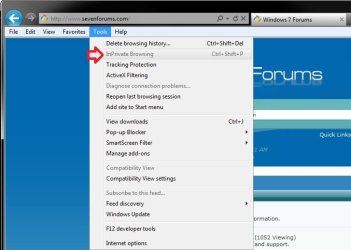
Example.jpg

   Warning
This can only be done while logged in as a administrator.

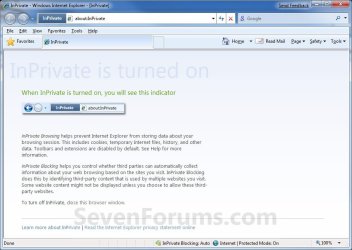
EXAMPLE: Internet Explorer InPrivate Browsing
NOTE: This is the default window you will see when you open a InPrivate Browsing window when it is enabled. Notice how you will have a InPrivate indicator to the left of the address bar to let you know that you have InPrivate Browsing turned on.
InPrivate.jpg


OPTION ONE

To Enable or Disable "IE InPrivate Browsing" using a REG File Download


NOTE: This option will affect all users on the computer.
1. To Enable InPrivate Browsing in IE9 or IE10 for All Users
NOTE: This is the default setting.
A) Click/tap on the Download button below to download the file below.
Enable_InPrivate_Browsing.reg

Download


B) Go to step 3.
2. To Disable InPrivate Browsing in IE9 or IE10 for All Users
A) Click/tap on the Download button below to download the file below.
Disable_InPrivate_Browsing.reg

Download


3. Save the .reg file to the desktop.

4. Double click/tap on the downloaded .reg file to merge it.

5. Click/tap on Run, Yes (UAC-Windows 7/8) or Continue (UAC-Vista), Yes, and OK when prompted.

6. Log off and log on, or restart the computer to fully apply.

7. When done, you can delete the downloaded .reg file if you like.


OPTION TWO

To Enable or Disable "IE InPrivate Browsing" in Local Group Policy Editor


1. Open the all users, specific users or groups, or all users except administrators Local Group Policy Editor for how you want this policy applied.

2. If you have Internet Explorer 8 Installed
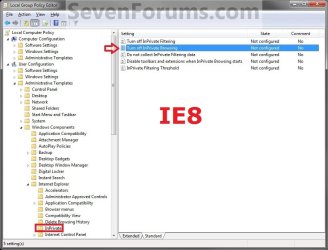
A) In the left pane, click/tap on to expand User Configuration, Administrative Templates, Windows Components, Internet Explorer, and InPrivate. (See screenshot below)
Group_Policy_IE8.jpg
B) Go to step 4.
3. If you have IE9 or IE10 Installed
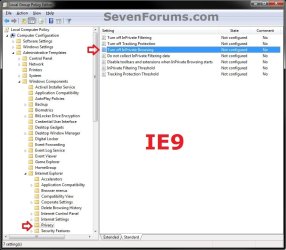
A) In the left pane, click/tap on to expand User Configuration, Administrative Templates, Windows Components, Internet Explorer, and Privacy. (see screenshot below)
GPEDIT-IE9.jpg
4. In the right pane, double click/tap on Turn off InPrivate Browsing to edit it. (see screenshot above)

5. To Enable InPrivate Browsing
A) Select (dot) either Not Configured or Disabled. (see screenshot below step 7)
NOTE: Not Configured is the default setting.

B) Go to step 7.
6. To Disable InPrivate Browsing
A) Select (dot) Enabled. (see screenshot below step 7)
7. Click/tap on OK. (See screenshot below)
Edit.jpg
8. Close the Local Group Policy Editor window.

9. If open, close and reopen Internet Explorer to fully apply.
That's it,
Shawn


Attachments

Last edited:
i will do it tomorrow as I won't have time to do it today but I will let you know if the inplace install works, Thanks for your help.
Dan
 

My Computer My Computer

OS
To many to list
CPU
1156 i7 860 2.8Ghz
Motherboard
ASUS P7P55 LX
Memory
16GB 4x 4GB Team
Graphics Card(s)
ATI HD 5670
Screen Resolution
1920 x 1080
Hard Drives
3 x 1TB Seagate
PSU
600w
Case
Gigabyte
Internet Speed
10 MB/S Slow I Know
You're welcome Dan. I hope it goes smoothly and works properly afterwards.
 

My Computer My Computer

Computer type
PC/Desktop
Computer Manufacturer/Model Number
Self built custom
OS
64-bit Windows 11 Pro for Workstations
CPU
Intel i7-8700K OC'd to 5 GHz
Motherboard
ASUS ROG Maximus XI Formula Z390
Memory
64 GB (4x16GB) G.SKILL TridentZ RGB DDR4 3600 MHz
Graphics Card(s)
ASUS ROG-STRIX-GTX1080TI-O11G-GAMING
Sound Card
Integrated
Monitor(s) Displays
2 x Samsung Odyssey G7 27"
Screen Resolution
2560x1440
Hard Drives
1TB Samsung 990 PRO M.2,
4TB Samsung 990 PRO PRO M.2,
TerraMaster F8 SSD Plus NAS
PSU
Seasonic Prime Titanium 850W
Case
Thermaltake Core P3
Cooling
Corsair Hydro H115i
Keyboard
Logitech wireless K800
Mouse
Logitech MX Master 4
Internet Speed
2 Gb/s Download and 100 Mb/s Upload
Antivirus
Malwarebyte Anti-Malware Premium
Browser
Google Chrome
Other Info
Logitech Z625 speaker system,
Logitech BRIO 4K Pro webcam,
HP Color LaserJet Pro MFP M477fdn,
APC SMART-UPS RT 1000 XL - SURT1000XLI,
Galaxy S23 Plus phone
This is really great.
The menu option is GONE :) nice
The short cut ctrl-shift+p does NOT work any more. Really nice.

But if I type about:inpraivate in the adressbar, I get an InPrivate session just the same. NOT so nice.

What do we do now? Were our efforts in vain?
 

My Computer My Computer

Computer Manufacturer/Model Number
hp
OS
windows 7 enterprise x64
CPU
amd AthlonX2 64
Motherboard
yes
Memory
4GB
Graphics Card(s)
yes
Sound Card
yes
Monitor(s) Displays
yes
Hard Drives
yes
PSU
yes
Case
hp
Cooling
standard fan
context menu (right-click) menu

This worked great but the option is still viewable (granted greyed out) on the context menu. Is there any way to remove it from the menu? I'm using Windows 8 and IE 10.

Thanks!
 

My Computer My Computer

OS
Windows 8
Hello needhelp2013, and welcome to Seven Forums.

Not that I'm aware of. When disabled, it just grays it out and prevents IE from being able to open in inprivate mode. :(
 

My Computer My Computer

Computer type
PC/Desktop
Computer Manufacturer/Model Number
Self built custom
OS
64-bit Windows 11 Pro for Workstations
CPU
Intel i7-8700K OC'd to 5 GHz
Motherboard
ASUS ROG Maximus XI Formula Z390
Memory
64 GB (4x16GB) G.SKILL TridentZ RGB DDR4 3600 MHz
Graphics Card(s)
ASUS ROG-STRIX-GTX1080TI-O11G-GAMING
Sound Card
Integrated
Monitor(s) Displays
2 x Samsung Odyssey G7 27"
Screen Resolution
2560x1440
Hard Drives
1TB Samsung 990 PRO M.2,
4TB Samsung 990 PRO PRO M.2,
TerraMaster F8 SSD Plus NAS
PSU
Seasonic Prime Titanium 850W
Case
Thermaltake Core P3
Cooling
Corsair Hydro H115i
Keyboard
Logitech wireless K800
Mouse
Logitech MX Master 4
Internet Speed
2 Gb/s Download and 100 Mb/s Upload
Antivirus
Malwarebyte Anti-Malware Premium
Browser
Google Chrome
Other Info
Logitech Z625 speaker system,
Logitech BRIO 4K Pro webcam,
HP Color LaserJet Pro MFP M477fdn,
APC SMART-UPS RT 1000 XL - SURT1000XLI,
Galaxy S23 Plus phone
Do you have any information on the issue Cosm0 raised on Mar 2012?
 

My Computer My Computer

OS
Windows 8
This is really great.
The menu option is GONE :) nice
The short cut ctrl-shift+p does NOT work any more. Really nice.

But if I type about:inprivate in the adressbar, I get an InPrivate session just the same. NOT so nice.

What do we do now? Were our efforts in vain?

Do you have any information on the issue Cosm0 raised on Mar 2012?

Sorry I missed your post Cosm0. :(

about:inprivate only displays information about InPrivate browsing, and does not actually open IE in it.
about-inprivate.jpg
Only when you see the blue InPrivate box to the left of the address bar in IE like below is when you are in it.
52945d1265651819-internet-explorer-inprivate-browsing-enable-disable-inprivate.jpg


My Computer My Computer

Computer type
PC/Desktop
Computer Manufacturer/Model Number
Self built custom
OS
64-bit Windows 11 Pro for Workstations
CPU
Intel i7-8700K OC'd to 5 GHz
Motherboard
ASUS ROG Maximus XI Formula Z390
Memory
64 GB (4x16GB) G.SKILL TridentZ RGB DDR4 3600 MHz
Graphics Card(s)
ASUS ROG-STRIX-GTX1080TI-O11G-GAMING
Sound Card
Integrated
Monitor(s) Displays
2 x Samsung Odyssey G7 27"
Screen Resolution
2560x1440
Hard Drives
1TB Samsung 990 PRO M.2,
4TB Samsung 990 PRO PRO M.2,
TerraMaster F8 SSD Plus NAS
PSU
Seasonic Prime Titanium 850W
Case
Thermaltake Core P3
Cooling
Corsair Hydro H115i
Keyboard
Logitech wireless K800
Mouse
Logitech MX Master 4
Internet Speed
2 Gb/s Download and 100 Mb/s Upload
Antivirus
Malwarebyte Anti-Malware Premium
Browser
Google Chrome
Other Info
Logitech Z625 speaker system,
Logitech BRIO 4K Pro webcam,
HP Color LaserJet Pro MFP M477fdn,
APC SMART-UPS RT 1000 XL - SURT1000XLI,
Galaxy S23 Plus phone
Is there a way to remove inprivate browsing but still let the user think it's working?

In Firefox we used to just delete the in private browsing file and the user would click on "in private" and think they were using it but it really wasn't working. Now the group uses IE and we've upgraded to Windows 7 from XP.
 

My Computer My Computer

Computer type
Laptop
OS
Windows 8 32 bit
Hello Hairy, and welcome to Seven Forums.

Sorry, but when InPrivate Browsing has been disabled it's option will be grayed out. :(
 

My Computer My Computer

Computer type
PC/Desktop
Computer Manufacturer/Model Number
Self built custom
OS
64-bit Windows 11 Pro for Workstations
CPU
Intel i7-8700K OC'd to 5 GHz
Motherboard
ASUS ROG Maximus XI Formula Z390
Memory
64 GB (4x16GB) G.SKILL TridentZ RGB DDR4 3600 MHz
Graphics Card(s)
ASUS ROG-STRIX-GTX1080TI-O11G-GAMING
Sound Card
Integrated
Monitor(s) Displays
2 x Samsung Odyssey G7 27"
Screen Resolution
2560x1440
Hard Drives
1TB Samsung 990 PRO M.2,
4TB Samsung 990 PRO PRO M.2,
TerraMaster F8 SSD Plus NAS
PSU
Seasonic Prime Titanium 850W
Case
Thermaltake Core P3
Cooling
Corsair Hydro H115i
Keyboard
Logitech wireless K800
Mouse
Logitech MX Master 4
Internet Speed
2 Gb/s Download and 100 Mb/s Upload
Antivirus
Malwarebyte Anti-Malware Premium
Browser
Google Chrome
Other Info
Logitech Z625 speaker system,
Logitech BRIO 4K Pro webcam,
HP Color LaserJet Pro MFP M477fdn,
APC SMART-UPS RT 1000 XL - SURT1000XLI,
Galaxy S23 Plus phone
Thanks - guess disabling it is no longer an option for our group.
 

My Computer My Computer

Computer type
Laptop
OS
Windows 8 32 bit
Well, if you don't want them to be able to use it, then disabling it would prevent that. It's just that it's going to be obvious that it was disabled.
 

My Computer My Computer

Computer type
PC/Desktop
Computer Manufacturer/Model Number
Self built custom
OS
64-bit Windows 11 Pro for Workstations
CPU
Intel i7-8700K OC'd to 5 GHz
Motherboard
ASUS ROG Maximus XI Formula Z390
Memory
64 GB (4x16GB) G.SKILL TridentZ RGB DDR4 3600 MHz
Graphics Card(s)
ASUS ROG-STRIX-GTX1080TI-O11G-GAMING
Sound Card
Integrated
Monitor(s) Displays
2 x Samsung Odyssey G7 27"
Screen Resolution
2560x1440
Hard Drives
1TB Samsung 990 PRO M.2,
4TB Samsung 990 PRO PRO M.2,
TerraMaster F8 SSD Plus NAS
PSU
Seasonic Prime Titanium 850W
Case
Thermaltake Core P3
Cooling
Corsair Hydro H115i
Keyboard
Logitech wireless K800
Mouse
Logitech MX Master 4
Internet Speed
2 Gb/s Download and 100 Mb/s Upload
Antivirus
Malwarebyte Anti-Malware Premium
Browser
Google Chrome
Other Info
Logitech Z625 speaker system,
Logitech BRIO 4K Pro webcam,
HP Color LaserJet Pro MFP M477fdn,
APC SMART-UPS RT 1000 XL - SURT1000XLI,
Galaxy S23 Plus phone
Tagged
 

My Computer My Computer

Computer type
PC/Desktop
Computer Manufacturer/Model Number
Dell T7600 Precision
OS
Microsoft Windows 7 Professional 64-bit 7601 Multiprocessor Free Service Pack 1
CPU
Intel(R) Xeon(R) CPU E5-2630 0 @ 2.30GHz
Motherboard
Dell Inc. 0VHRW1
Memory
16.00 GB
Graphics Card(s)
(1) LogMeIn Mirror Driver (2) NVIDIA Quadro 4000
Sound Card
(1) NVIDIA High Definition Audio (2) Realtek High Definiti
Screen Resolution
1920 x 1200 x 32 bits (4294967296 colors) @ 59 Hz
Hard Drives
(1) ATA ST500DM002-1BD14 SCSI Disk Device (2) Generic Ultra HS-SD/MMC USB Device (3) Generic- Compact Flash USB Device (4) Generic- MS/MS-Pro USB Device (5) Generic- SD/MMC USB Device (6) Generic- SM/xD Picture USB Device
Internet Speed
9.59 Mbps Down 9.06 Mbps UP
Antivirus
Trend Micro Security Agent
Browser
IE 10
Back
Top