Solved Internet not working yet network is connected.

Matthew Harbuz

New member
Local time
8:45 AM
Messages
24
Location
Nottingham
Hi there, im new to this forum so forgive me if I do anything that im not supposed to.

none of the programs that use internet (steam, spotify, google chrome) work and yet it says i am connected to the network and that i have internet connection.

I have ticked the box that says "obtain DNS server automatically" or something to that extent and it worked... for about 20 seconds, then the internet stopped working again. I looked again and saw that the box i had previously ticked was unticked. Please help.

P.S. could you speak in simple terms, I'm not too good with networking and DNS. :p

EDIT: there's nothing wrong with my router, all my other devices (iPhone, smart TV, family computer) are working fine and have internet access.
 
Last edited:

My Computer

Computer type
PC/Desktop
Computer Manufacturer/Model Number
custom build
OS
Windows 7 Home Premium 64 Bit
CPU
AMD A-10 6800k
Motherboard
ASUS F2A55-M LE
Memory
Samsung 8GB dual DDR3 1333MHz
Graphics Card(s)
EVGA 770 2GB
Monitor(s) Displays
acer LED 1920X1080
Hard Drives
Seagate 500GB
Velociraptor 1TB
Antivirus
Microsoft Security Essentials
Browser
Google Chrome
Hi from Sevenforums,

Can you provide an ipconfig/all
 

My Computer

Computer Manufacturer/Model Number
HP Compaq 6715B
OS
Windows 7 Ultimate x64
CPU
AMD turion 64x2 TL-64 2.2Ghz
Motherboard
HC030
Memory
Sodimm DDR2 4GB
Graphics Card(s)
ATI Radeon 1250 128MB IGP
Hard Drives
Fujitsu Siemens 500GB sata 3.0 Gb/s

My Computer

Computer type
Laptop
Computer Manufacturer/Model Number
Employer provided Dell Latitude
OS
W7 Pro SP1 64bit
CPU
i7
Memory
8GB
Graphics Card(s)
Intel HD Graphics
Hard Drives
crappy SSD
Antivirus
Employer mandated Symantec Endpoint Protection
Browser
Pale Moon 64bit, IE11 64bit & Chrome 64bit
Hi from Sevenforums,

Can you provide an ipconfig/all

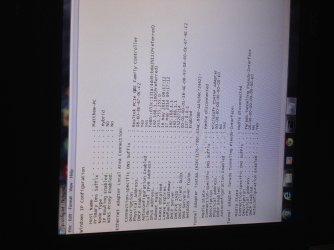
Here it is, took a pic of it, thought it wild be quicker, hope you can see it all.

Sorry that it's side ways I don't know why it's done that...
 

Attachments

  • image.jpg
    image.jpg
    949.8 KB · Views: 7

My Computer

Computer type
PC/Desktop
Computer Manufacturer/Model Number
custom build
OS
Windows 7 Home Premium 64 Bit
CPU
AMD A-10 6800k
Motherboard
ASUS F2A55-M LE
Memory
Samsung 8GB dual DDR3 1333MHz
Graphics Card(s)
EVGA 770 2GB
Monitor(s) Displays
acer LED 1920X1080
Hard Drives
Seagate 500GB
Velociraptor 1TB
Antivirus
Microsoft Security Essentials
Browser
Google Chrome
Do all the other things you have that the internet works have Bullgrard as a anti virus?
 

My Computer

Computer type
PC/Desktop
Computer Manufacturer/Model Number
Home made Desktop
OS
Windows 10 Pro. 64/ version 1709 Windows 7 Pro/64
CPU
Intel i7-6800K @ 4.3
Motherboard
ASUS X-99 Deluxe II
Memory
Corsair Platinum 16 gig @2400
Graphics Card(s)
EVGA GTX 1070 OC
Monitor(s) Displays
Asus 27" LED LCD/VE278Q
Screen Resolution
1920-1080 or 1280-720 HDMI
Hard Drives
INTEL SSD 730-240 Gb Sata 3.0/
PSU
EVGA Platium 1200W
Case
Phanteks Luxe Tempered Glass 8 fans/ one radiator
Cooling
XSPC/ Water Cooled CPU
Keyboard
Das 4 Professional
Mouse
Logitech M705/MX Anywhere 2-S
Internet Speed
100 mbits
Antivirus
Microsoft Security Essentials/ Malwarebytes Premium 3.0/ SAS
Browser
I.E. 11 default/Firefox/ ISP Time Warner Cable/Spectrum
Other Info
LG BluRay Burner/
Sound system-KLipsch-THX/
Icy Dock ssd Hot Swap bays.

My Computer

Computer type
PC/Desktop
Computer Manufacturer/Model Number
custom build
OS
Windows 7 Home Premium 64 Bit
CPU
AMD A-10 6800k
Motherboard
ASUS F2A55-M LE
Memory
Samsung 8GB dual DDR3 1333MHz
Graphics Card(s)
EVGA 770 2GB
Monitor(s) Displays
acer LED 1920X1080
Hard Drives
Seagate 500GB
Velociraptor 1TB
Antivirus
Microsoft Security Essentials
Browser
Google Chrome

My Computer

Computer type
PC/Desktop
Computer Manufacturer/Model Number
Home made Desktop
OS
Windows 10 Pro. 64/ version 1709 Windows 7 Pro/64
CPU
Intel i7-6800K @ 4.3
Motherboard
ASUS X-99 Deluxe II
Memory
Corsair Platinum 16 gig @2400
Graphics Card(s)
EVGA GTX 1070 OC
Monitor(s) Displays
Asus 27" LED LCD/VE278Q
Screen Resolution
1920-1080 or 1280-720 HDMI
Hard Drives
INTEL SSD 730-240 Gb Sata 3.0/
PSU
EVGA Platium 1200W
Case
Phanteks Luxe Tempered Glass 8 fans/ one radiator
Cooling
XSPC/ Water Cooled CPU
Keyboard
Das 4 Professional
Mouse
Logitech M705/MX Anywhere 2-S
Internet Speed
100 mbits
Antivirus
Microsoft Security Essentials/ Malwarebytes Premium 3.0/ SAS
Browser
I.E. 11 default/Firefox/ ISP Time Warner Cable/Spectrum
Other Info
LG BluRay Burner/
Sound system-KLipsch-THX/
Icy Dock ssd Hot Swap bays.
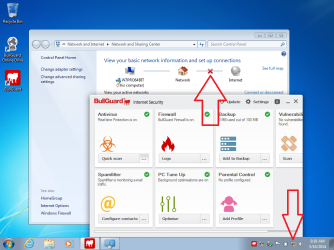
I installed Bullguard antivirus (and later Bullguard Internet Security) into a W7 Virtual Machine to see if there was any feature that would change the DNS. I did not see DNS get changed, but please use MSE during troubleshooting (as Layback Bear suggested). Doing so greatly simplifies things. You can go back to Bullguard later (if you wish).


For what it is worth, Bullguard blocked the connection to the server that let's the operating system know that there is an internet connection, but the browser and ping worked.

bullguard.png


After you get MSE installed, you might want to work thru the steps mentioned here:
http://www.sevenforums.com/tutorial...ation-conflicts-performing-clean-startup.html
 

My Computer

Computer type
Laptop
Computer Manufacturer/Model Number
Employer provided Dell Latitude
OS
W7 Pro SP1 64bit
CPU
i7
Memory
8GB
Graphics Card(s)
Intel HD Graphics
Hard Drives
crappy SSD
Antivirus
Employer mandated Symantec Endpoint Protection
Browser
Pale Moon 64bit, IE11 64bit & Chrome 64bit

My Computer

Computer type
PC/Desktop
Computer Manufacturer/Model Number
custom build
OS
Windows 7 Home Premium 64 Bit
CPU
AMD A-10 6800k
Motherboard
ASUS F2A55-M LE
Memory
Samsung 8GB dual DDR3 1333MHz
Graphics Card(s)
EVGA 770 2GB
Monitor(s) Displays
acer LED 1920X1080
Hard Drives
Seagate 500GB
Velociraptor 1TB
Antivirus
Microsoft Security Essentials
Browser
Google Chrome
I installed Bullguard antivirus (and later Bullguard Internet Security) into a W7 Virtual Machine to see if there was any feature that would change the DNS. I did not see DNS get changed, but please use MSE during troubleshooting (as Layback Bear suggested). Doing so greatly simplifies things. You can go back to Bullguard later (if you wish).


For what it is worth, Bullguard blocked the connection to the server that let's the operating system know that there is an internet connection, but the browser and ping worked.

View attachment 318019


After you get MSE installed, you might want to work thru the steps mentioned here:
http://www.sevenforums.com/tutorial...ation-conflicts-performing-clean-startup.html

Well how do I install MSE if I have no internet access?
BTW I uninstalled bullguard and still have no internet access

Should I go ahead and trouble shoot by doing a clean startup?
Should I reinstall Bullgaurd before doing so?
 
Last edited:

My Computer

Computer type
PC/Desktop
Computer Manufacturer/Model Number
custom build
OS
Windows 7 Home Premium 64 Bit
CPU
AMD A-10 6800k
Motherboard
ASUS F2A55-M LE
Memory
Samsung 8GB dual DDR3 1333MHz
Graphics Card(s)
EVGA 770 2GB
Monitor(s) Displays
acer LED 1920X1080
Hard Drives
Seagate 500GB
Velociraptor 1TB
Antivirus
Microsoft Security Essentials
Browser
Google Chrome

My Computer

Computer type
Laptop
Computer Manufacturer/Model Number
Employer provided Dell Latitude
OS
W7 Pro SP1 64bit
CPU
i7
Memory
8GB
Graphics Card(s)
Intel HD Graphics
Hard Drives
crappy SSD
Antivirus
Employer mandated Symantec Endpoint Protection
Browser
Pale Moon 64bit, IE11 64bit & Chrome 64bit
You can try installing MSE using the safe mode with networking or you can download the entire MSE file onto a flash drive using your other computer.

Download Microsoft Security Essentials from Official Microsoft Download Center

You can also download the signature file from the middle of this web page:
https://www.microsoft.com/security/portal/definitions/adl.aspx?wa=wsignin1.0

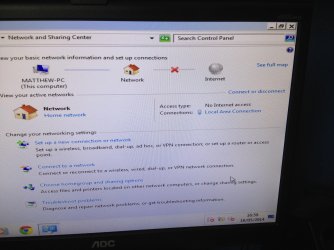
Ok so I've booted the computer in safe mode with networking and it looks like this... In normal mode it says that I'm connected and that everything is fine...
 

Attachments

  • image.jpg
    image.jpg
    1,004.1 KB · Views: 1

My Computer

Computer type
PC/Desktop
Computer Manufacturer/Model Number
custom build
OS
Windows 7 Home Premium 64 Bit
CPU
AMD A-10 6800k
Motherboard
ASUS F2A55-M LE
Memory
Samsung 8GB dual DDR3 1333MHz
Graphics Card(s)
EVGA 770 2GB
Monitor(s) Displays
acer LED 1920X1080
Hard Drives
Seagate 500GB
Velociraptor 1TB
Antivirus
Microsoft Security Essentials
Browser
Google Chrome
Go ahead and install MSE via the links provided and a flash drive/stick.

Then try the clean boot troubleshooting.

Since the connectivity issue might be caused by malware, we don't want you connected to the internet without some level of antivirus install.

It sure sounds like some app is actively changing your DNS settings. If you correct your DNS settings while in the safe mode with networking - do they hold or get changed back?
 
Last edited:

My Computer

Computer type
Laptop
Computer Manufacturer/Model Number
Employer provided Dell Latitude
OS
W7 Pro SP1 64bit
CPU
i7
Memory
8GB
Graphics Card(s)
Intel HD Graphics
Hard Drives
crappy SSD
Antivirus
Employer mandated Symantec Endpoint Protection
Browser
Pale Moon 64bit, IE11 64bit & Chrome 64bit
Go ahead and install MSE via the links provided and a flash drive/stick.

Then try the clean boot troubleshooting.

Since the connectivity issue might be caused by malware, we don't want you connected to the internet without some level of antivirus install.

It sure sounds like some app is actively changing your DNS settings. If you correct your DNS settings while in the safe mode with networking - do the hold or get changed back?

Alright well I'm at the cricket now so I'll probably have to do that tomorrow. (Just if you wonder why I don't reply today)
 

My Computer

Computer type
PC/Desktop
Computer Manufacturer/Model Number
custom build
OS
Windows 7 Home Premium 64 Bit
CPU
AMD A-10 6800k
Motherboard
ASUS F2A55-M LE
Memory
Samsung 8GB dual DDR3 1333MHz
Graphics Card(s)
EVGA 770 2GB
Monitor(s) Displays
acer LED 1920X1080
Hard Drives
Seagate 500GB
Velociraptor 1TB
Antivirus
Microsoft Security Essentials
Browser
Google Chrome
From your Ipconfig /all Your DNS is 127.0.0.1 which is pointing at itself which isn't a DNS server.

Do an ipconfig /all from a machine which has internet access and post please.
 

My Computer

Computer Manufacturer/Model Number
HP Compaq 6715B
OS
Windows 7 Ultimate x64
CPU
AMD turion 64x2 TL-64 2.2Ghz
Motherboard
HC030
Memory
Sodimm DDR2 4GB
Graphics Card(s)
ATI Radeon 1250 128MB IGP
Hard Drives
Fujitsu Siemens 500GB sata 3.0 Gb/s
From your Ipconfig /all Your DNS is 127.0.0.1 which is pointing at itself which isn't a DNS server.

Do an ipconfig /all from a machine which has internet access and post please.

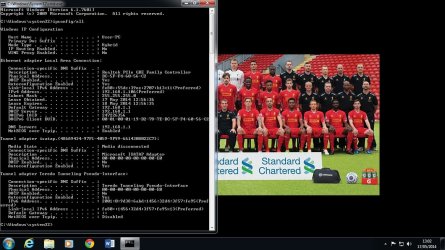
OK here is the ipconfig/all from the family computer which has internet access (sorry for the background, that's my brothers :p
 

Attachments

  • ipconfig.jpg
    ipconfig.jpg
    149.6 KB · Views: 3

My Computer

Computer type
PC/Desktop
Computer Manufacturer/Model Number
custom build
OS
Windows 7 Home Premium 64 Bit
CPU
AMD A-10 6800k
Motherboard
ASUS F2A55-M LE
Memory
Samsung 8GB dual DDR3 1333MHz
Graphics Card(s)
EVGA 770 2GB
Monitor(s) Displays
acer LED 1920X1080
Hard Drives
Seagate 500GB
Velociraptor 1TB
Antivirus
Microsoft Security Essentials
Browser
Google Chrome
nvidia networking controller for windows 7 32bit is missing

nvidia networking controller for windows 7 32bit is missing!

can anyone help me? when i open the device manager and view network adapter i saw nvidia networking controller that has this exclamation point (" ! ") and also my lan ports is totaly not blinking. thanks and need help.
 

My Computer

Computer type
PC/Desktop
Computer Manufacturer/Model Number
Asrock
OS
Windows 7 Ultimate x64
CPU
Amd
Motherboard
asrock n68c-s-ucc
Memory
ddr3
Graphics Card(s)
NVIDIA GeForce
Hard Drives
seagate
Antivirus
avast
Browser
google chrome
nvidia networking controller for windows 7 32bit is missing!

can anyone help me? when i open the device manager and view network adapter i saw nvidia networking controller that has this exclamation point (" ! ") and also my lan ports is totaly not blinking. thanks and need help.

Could you start your own thread please, trying to solve 2 different problems on the same thread will confuse things.
 

My Computer

Computer type
PC/Desktop
Computer Manufacturer/Model Number
custom build
OS
Windows 7 Home Premium 64 Bit
CPU
AMD A-10 6800k
Motherboard
ASUS F2A55-M LE
Memory
Samsung 8GB dual DDR3 1333MHz
Graphics Card(s)
EVGA 770 2GB
Monitor(s) Displays
acer LED 1920X1080
Hard Drives
Seagate 500GB
Velociraptor 1TB
Antivirus
Microsoft Security Essentials
Browser
Google Chrome
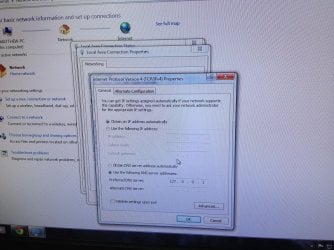
Ok so I've booted the computer in a clean startup, checked the box that says "Obtain DNS server address automatically" opened chrome, browsed the internet for about 10 seconds and then it didn't work again. Checked the DNS server and it had changed to this as it always does.

I'm at my wits end here...
 

Attachments

  • image.jpg
    image.jpg
    1,006.5 KB · Views: 1

My Computer

Computer type
PC/Desktop
Computer Manufacturer/Model Number
custom build
OS
Windows 7 Home Premium 64 Bit
CPU
AMD A-10 6800k
Motherboard
ASUS F2A55-M LE
Memory
Samsung 8GB dual DDR3 1333MHz
Graphics Card(s)
EVGA 770 2GB
Monitor(s) Displays
acer LED 1920X1080
Hard Drives
Seagate 500GB
Velociraptor 1TB
Antivirus
Microsoft Security Essentials
Browser
Google Chrome
Download Process Monitor to a USB flash drive.
There is nothing to install.
Just unzip and copy Procmon.exe to the desktop of the problematic computer.

Start Process Monitor (run as admin).
Accept the EULA.

When it starts for the first time, it automatically starts gathering data.
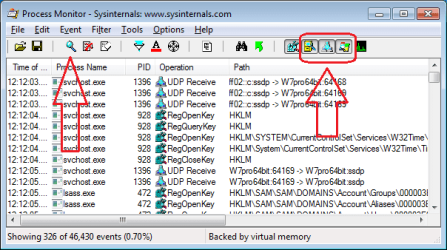
You can stop that via the button/icon with the magnifying glass.
Then de-select the 3 buttons/icons shown in the right part of this image:

PM1.png


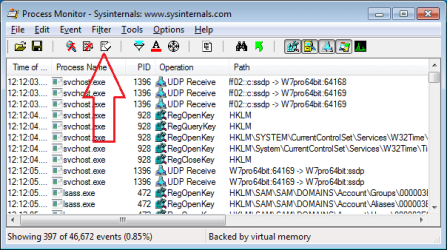
Clear the data that was gathered:

PM2.png


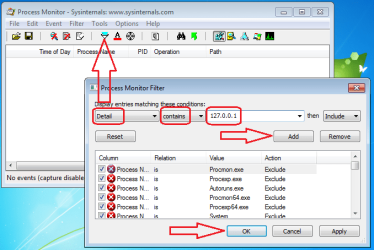
Add a filter for the IP address of interest:

PM3.png


Add a second filter for the registry action of interest:

PM4.png


Start the data collection process.
(Use the same magnifying glass button/icon that you see in screenshot #1.)

Manually change the DNS setting back to automatic.
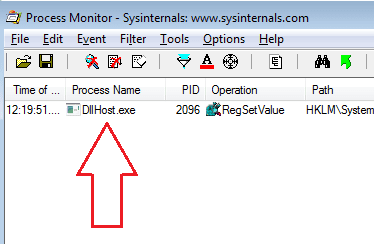
Then let's see if Process Monitor can find the app that changes it back to 127....


If I use the Windows interface to set the 127... IP as the DNS value, then I see this:

PM5.png


Hopefully, these steps will find the offending app on your computer. Unfortunately, there is a chance that the offending app calls another app to do that actual change to the registry and/or the offending app hides itself from Process Monitor.
 

My Computer

Computer type
Laptop
Computer Manufacturer/Model Number
Employer provided Dell Latitude
OS
W7 Pro SP1 64bit
CPU
i7
Memory
8GB
Graphics Card(s)
Intel HD Graphics
Hard Drives
crappy SSD
Antivirus
Employer mandated Symantec Endpoint Protection
Browser
Pale Moon 64bit, IE11 64bit & Chrome 64bit
Back
Top