Internet on/off intermittently

iolar

New member
Local time
9:14 AM
Messages
10
Hi

"The default gateway is not available" I keep getting after I try to repair the connection, which is alot lately. Ever since I installed wins 7 I've been getting this problem.

I have latest drivers for my modem and Graphics card

Any help would be great
Thank you
Mike
 

My Computer

Computer Manufacturer/Model Number
Alienware Aurora
OS
Windows 7 Home Premium 64 bit
CPU
I7 920
Memory
8GB
Graphics Card(s)
2x Ati 5870's CF
Monitor(s) Displays
Alienware 23"
Screen Resolution
1920x1080
Hi iolar, from the surface of things it looks like you have an issue with either not specifying the correct gateway IP in your tcp/ip, or you macine was unable to get past your router to your ISP for it.

How is your machine connected to the network?
 

My Computer

Computer Manufacturer/Model Number
Lenovo ThinkPad T60
OS
Windows 7 Ultimate 64Bit
CPU
GenuineIntel Intel(R) Core(TM) DuoCore T2400 @ 1.83GHz
Motherboard
Intel(R) 82801G (ICH7 Family)
Memory
2.00 GB
Graphics Card(s)
Mobile Intel(R) 945 Express Chipset
Sound Card
SoundMAX Integrated Digital HD Audio
Monitor(s) Displays
ThinkPad Display
Screen Resolution
1400x1050
Hard Drives
100Gb SATA
Keyboard
Standard Keyboard
Mouse
HID-compliant Mouse
Internet Speed
Cable Broadband - 54Mbps
Other Info
Intel(R) PRO/1000 PL Network Connection
11a/b/g Wireless LAN Mini PCI Express Adapter
alongwith the above, provide the scrnshot of ur TCP/IP properties window and IPCONFIG /ALL results
 

My Computer

Computer Manufacturer/Model Number
MacBook Pro
OS
Lion
CPU
i5
Memory
4GB
Graphics Card(s)
Intel
Screen Resolution
1200x800
Hard Drives
Seagate FreeAgent GO 250GB Ext. HDD

My Computer

Computer Manufacturer/Model Number
Custom
OS
Windows 7 Professional x64
CPU
Intel i7 2600K OC'd @ 4620 MHz
Motherboard
Asus P8Z68-V Pro
Memory
16GB GSkill Sniper 2133 Mhz (4x4GB)
Graphics Card(s)
EVGA GeForce GTX 480 SuperClocked+
Sound Card
Realtek High Definition Audio
Monitor(s) Displays
2x Acer S273HLbmii 27"
Screen Resolution
2 x 1920x1080
Hard Drives
64GB Crucial M4 SSD

Storage: Hitachi 1TB 5400RPM, Samsung 1.5TB 5400RPM
PSU
Corsair HW Series 750w (modular)
Case
Cooler Master HAF 932 Advanced Blue Edition
Cooling
CM Hyper 212+ CPU cooler, 3x 230mm + 1x 140mm case fans
Keyboard
Logitech MK320 (wireless)
Mouse
Logitech MK320 (wireless)
Internet Speed
30 Mb/s : 2 Mb/s
Hi all

thanks for the replies - just to add some more info that was asked for.

aem - Im connected to the network by ethernet cable to a wireless modem.

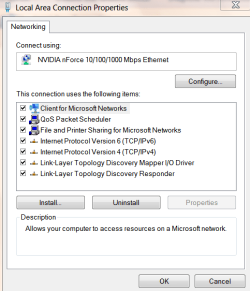
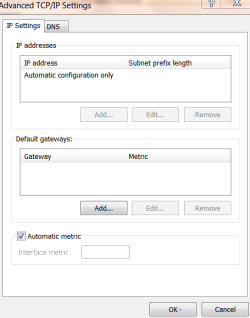
dre@ms , Im not very tech savvy but ive snipped these screenshots of what I think you mean.

sldmseen - thanks Il check that thread out now
 

Attachments

  • Capture.PNG
    Capture.PNG
    14.7 KB · Views: 3
  • Capture1.PNG
    Capture1.PNG
    14.2 KB · Views: 2
  • Capture3.PNG
    Capture3.PNG
    9.6 KB · Views: 2

My Computer

Computer Manufacturer/Model Number
Alienware Aurora
OS
Windows 7 Home Premium 64 bit
CPU
I7 920
Memory
8GB
Graphics Card(s)
2x Ati 5870's CF
Monitor(s) Displays
Alienware 23"
Screen Resolution
1920x1080
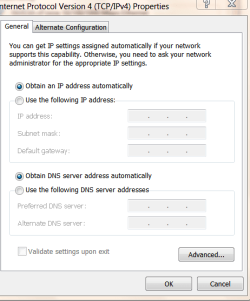
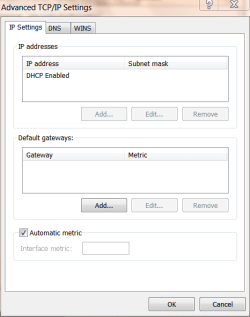
tnx for the snip, but u have to take the IPv4 details rather than IPv6.
 

My Computer

Computer Manufacturer/Model Number
MacBook Pro
OS
Lion
CPU
i5
Memory
4GB
Graphics Card(s)
Intel
Screen Resolution
1200x800
Hard Drives
Seagate FreeAgent GO 250GB Ext. HDD
ah ok
 

Attachments

  • Capture4.PNG
    Capture4.PNG
    13.8 KB · Views: 6
  • Capture6.PNG
    Capture6.PNG
    10.6 KB · Views: 2

My Computer

Computer Manufacturer/Model Number
Alienware Aurora
OS
Windows 7 Home Premium 64 bit
CPU
I7 920
Memory
8GB
Graphics Card(s)
2x Ati 5870's CF
Monitor(s) Displays
Alienware 23"
Screen Resolution
1920x1080
First, try to ping your modem and check..wats the result?
Second, change your ethernet cable.
Third, are you able to get steady connection thru wireless?
Fourth, set a static IP and check.
IP - 192.168.0.5
Subnet - 255.255.255.0
Gateway - 192.168.0.1 (IP of your modem)
 

My Computer

Computer Manufacturer/Model Number
MacBook Pro
OS
Lion
CPU
i5
Memory
4GB
Graphics Card(s)
Intel
Screen Resolution
1200x800
Hard Drives
Seagate FreeAgent GO 250GB Ext. HDD
Well since you are connecting directly to the wirless modem, and you can't get the default gateway from the ISP (assuming it is set to auto configure - DHCP on the modem), i would think there is an issue either with the ISP or your modem. Are you able to log into your modem's control panel.

Trying to connect wirelessly would let you know if it's the modem or ISP.
 

My Computer

Computer Manufacturer/Model Number
Lenovo ThinkPad T60
OS
Windows 7 Ultimate 64Bit
CPU
GenuineIntel Intel(R) Core(TM) DuoCore T2400 @ 1.83GHz
Motherboard
Intel(R) 82801G (ICH7 Family)
Memory
2.00 GB
Graphics Card(s)
Mobile Intel(R) 945 Express Chipset
Sound Card
SoundMAX Integrated Digital HD Audio
Monitor(s) Displays
ThinkPad Display
Screen Resolution
1400x1050
Hard Drives
100Gb SATA
Keyboard
Standard Keyboard
Mouse
HID-compliant Mouse
Internet Speed
Cable Broadband - 54Mbps
Other Info
Intel(R) PRO/1000 PL Network Connection
11a/b/g Wireless LAN Mini PCI Express Adapter
Modem

what are the status of the lights on the modem when this happens do they all stay green what kind of modem and or router if it's DSL check filters
 

My Computer

Computer Manufacturer/Model Number
Custom Built
OS
Windows 7 Ultimate 32 bit
CPU
AMD Athlon 64 X2 4200+ Overclocked to 3.0Ghz
Motherboard
Biostar TF560 A2+
Memory
2 Gigs of G.Skill DDR2 800
Graphics Card(s)
HIS ATI Radeon HD 2600 Pro With IceQ cooler
Sound Card
6.1 Channel Sound Blaster Live 24 Bit
Monitor(s) Displays
Dual 20.5 " LG Flatrons W2052TO
Screen Resolution
1152x864
Hard Drives
Dual 36 Gig 10,000 RPM Raptors
PSU
430 watt Seasonic 80%+ Dual 12v Rails 2x80mm fans
Case
CHIEFMAX YA-5X
Cooling
4-80mm case fans 1-140mm case fan freezer 64 Pro CPU cooler
Keyboard
Saitek Eclipse II
Mouse
A4Tech wireless battery free optical scroll mouse
Internet Speed
1.5 meg down 384 up
Other Info
Logisys LED fan/light controller and dual 16" LED sticks mounted inside top of case all fans are LED all lighting is blue
DVD RW and CD RW both and Memory card reader
Back
Top