Internet shows connected but unable to access Internet

arrethyn

New member
Local time
10:25 AM
Messages
8
A warning in advance: this is going to be a fairly long post. I don't know a ton about troubleshooting but I'm not computer illiterate and I've tried quite an array of tests while trying to fix things on my own.

First of all my laptop is an:
HP Presario V6000(GB115AV)
I'm running windows 7, I upgraded from vista last october. I had problems once back in january with being unable to download windows updates. At the time I found something suggesting that this could be due to a corrupted download and so I reinstalled win 7 and everything worked fine.

Now about 2 weeks ago I started up my laptop and although it showed up as being connected under network connections none of my applications which require the internet work.

Edit: I know that the problem isn't my ISP or the network I'm on since both the computer I'm currently using to post this(my parent's desktop) and my laptop connect to the same network. And no were not using a router, we can only have 1 computer connected at a time. We simply unplug the ethernet cable from one computer and put it into the other.

I've looked at my ipconfig settings and everything looks fine. I even tried ipconfig /release and ipconfig /renew as well as ipconfig /dnsflush just to be safe. No luck with any of that.

Then I went and looked at the system logs, and found that ever since about november of last year there have been intermittent problems with the BITS service not starting. More recently BITS has not been starting and I've been getting error messages that server{long number string, if you'd like me to post it I can} did not register with DCOM within the required timeout.

I tried reinstalling win 7(since it fixed my problem before) but no luck this time. Since then I've been trying to make sure that all my drivers are up to date as several posts about intermittant(note: my problem is constant not intermittent) internet connectivity issues seemed to lead back to drivers needing updates. However as far as I can tell all my device drivers are up to date.

I downloaded some diagnostic tools, I ran HotCPUTesterLite through its diagnostic test(6 hours) twice and it didn't turn up any hardware errors. One of the tools I downloaded pointed out that my bios was rather old so I updated that (most recent version was for december 2008).

I can't figure out what is causing my problem, unless it is windows 7 itself. If anyone can shed some light here I'd greatly appreciate it or it looks like I may have to revert back to vista till microsoft gets things fixed.
 
Last edited:

My Computer My Computer

At a glance

windows 7 home premium 32 bit1.73 gigahertz intel core duo 22040 MB rammobile intel(r) 945 express chipset family
Computer Manufacturer/Model Number
HP Presario V6000(GB115AV
OS
windows 7 home premium 32 bit
CPU
1.73 gigahertz intel core duo 2
Motherboard
Quanta 30BB 66.3E
Memory
2040 MB ram
Graphics Card(s)
mobile intel(r) 945 express chipset family
Sound Card
Conextant High definition audio
Monitor(s) Displays
Generic PnP monitor
Hard Drives
Fujitsu MHW2120BH 120GB
PSU
Microsoft AC Adapter
no ideas? I'm just about ready to give up and try doing a factory reset back to vista and hope that fixes things.

Edit: Just found out additional info about my network adapter, apparently theres been no downloads for it on the intel download center for OS's after win XP. But on a different page it said that there is "in box support" for it. Would this mean that the appropriate driver was included in my win 7 install, or that my adapter is outdated for win 7 and that is causing my problem? For Reference my computer is less than 3 years old and came initially installed with vista on it. My adapter is the Intel(R) Pro 100/VE Network Connection.
 

My Computer My Computer

At a glance

windows 7 home premium 32 bit1.73 gigahertz intel core duo 22040 MB rammobile intel(r) 945 express chipset family
Computer Manufacturer/Model Number
HP Presario V6000(GB115AV
OS
windows 7 home premium 32 bit
CPU
1.73 gigahertz intel core duo 2
Motherboard
Quanta 30BB 66.3E
Memory
2040 MB ram
Graphics Card(s)
mobile intel(r) 945 express chipset family
Sound Card
Conextant High definition audio
Monitor(s) Displays
Generic PnP monitor
Hard Drives
Fujitsu MHW2120BH 120GB
PSU
Microsoft AC Adapter
I stumbled across an article on a somewhat unrelated but similar internet problem where someone suggested using the Microsoft Network Monitor utility to see if there was anything odd going on. I downloaded it and run it and everything seems to check out except that I noticed a very large number of ARP Requests from 192.168.1.1(I'm guessing this is my dsl modem though I'm not 100% certain on that) to addresses varying from 192.168.1.2 to 192.168.1.254 seemingly cycling through them, though not in numerical order. The message associated with the request is that '192.168.1.1 asks for 192.168.1.X(Insert number here)'

Now I know next to nothing about ARP, all I know comes from reading a couple articles on it that I googled but this seems somewhat odd, as if the modem is unable to resolve an IP address for my computer? In case it helps at all the preferred IP for my computer is 192.168.1.42
 

My Computer My Computer

At a glance

windows 7 home premium 32 bit1.73 gigahertz intel core duo 22040 MB rammobile intel(r) 945 express chipset family
Computer Manufacturer/Model Number
HP Presario V6000(GB115AV
OS
windows 7 home premium 32 bit
CPU
1.73 gigahertz intel core duo 2
Motherboard
Quanta 30BB 66.3E
Memory
2040 MB ram
Graphics Card(s)
mobile intel(r) 945 express chipset family
Sound Card
Conextant High definition audio
Monitor(s) Displays
Generic PnP monitor
Hard Drives
Fujitsu MHW2120BH 120GB
PSU
Microsoft AC Adapter
Hello arrethyn, and welcome to Windows Seven Forums.

I believe the problem is because you unplug one computer from your dsl modem and then plug a different computer into the dsl modem. If you are going to continue to do that, you should first power off the dsl modem and your computer, then power on the modem and wait for it to boot completely, then power on the computer connected to the modem. You will have to do this every time you switch computers.

If I may, I will try to explain in less technical language the reason for this. Your dsl modem looks on the computer connected to it for a valid network adapter MAC address. Basically it assumes the identity of the computer connected to it. When you remove the first computer and connect a second computer, its network adapter has a different MAC address so neither the computer nor the modem can communicate with each other. When you power off the dsl modem before connecting a computer, you allow the modem to search for the MAC adapter address allowing it to connect correctly.

An inexpensive wireless router will eliminate this altogether. The router pretends to be the computer connected to the dsl modem and communicates with it. From the router software you can see the IP address assigned to your account by your provider. The router then assigns its own network address to each computer by means of the MAC address of the adapters in each computer. The router then keeps track of the activity of each computer and directs the traffic accordingly.

This address: 192.168.???.??? is ONLY used within a local network, or between a router and the computers connected to it. It is never assigned to any location in the WWW. Since you connect directly to your dsl modem, you do not have a network and therefore the address serves no function for you. With a router, you would have a "home network" and the router would assign a similar address to each of your computers.

Also with a wireless enabled router, you could have the desktop connected via a cable and you laptop connected without a cable. Nice feature!

Hope this helps!
Robert
 

My Computer My Computer

At a glance

...
OS
...
I just tried this, I turned off my modem, unplugged the ethernet cable from the computer I'm currently using and plugged it into my laptop that has the problem. I then turned the modem back on and waited for it to fully start up and show connected on my laptop. However I still cannot get any internet applications to work. I would also like to note that while I usually use this setup, and it has worked for several years, I have also tried to use my laptop with other networks(wireless ones in case that is somehow significant) that I had previously used and now I'm getting the same scenario on them.

Thanks a lot for your help though, I don't know whether or not failing to turn off the modem is part of my problem but unfortunately it isn't the entire problem.
 

My Computer My Computer

At a glance

windows 7 home premium 32 bit1.73 gigahertz intel core duo 22040 MB rammobile intel(r) 945 express chipset family
Computer Manufacturer/Model Number
HP Presario V6000(GB115AV
OS
windows 7 home premium 32 bit
CPU
1.73 gigahertz intel core duo 2
Motherboard
Quanta 30BB 66.3E
Memory
2040 MB ram
Graphics Card(s)
mobile intel(r) 945 express chipset family
Sound Card
Conextant High definition audio
Monitor(s) Displays
Generic PnP monitor
Hard Drives
Fujitsu MHW2120BH 120GB
PSU
Microsoft AC Adapter
I just tried this, I turned off my modem, unplugged the ethernet cable from the computer I'm currently using and plugged it into my laptop that has the problem. I then turned the modem back on and waited for it to fully start up and show connected on my laptop. However I still cannot get any internet applications to work. I would also like to note that while I usually use this setup, and it has worked for several years, I have also tried to use my laptop with other networks(wireless ones in case that is somehow significant) that I had previously used and now I'm getting the same scenario on them.

Thanks a lot for your help though, I don't know whether or not failing to turn off the modem is part of my problem but unfortunately it isn't the entire problem.
I think I missed it, if so I am sorry, what OS is on the laptop?

The wired network adapter and the wireless network adapter are two separate hardware devices, so if neither have ever connected it is possibly not an adapter issue?

If they used to work, what has changed between then and now?

Cheers!
 

My Computer My Computer

At a glance

...
OS
...
The OS is windows 7 32-bit. And yes neither my wired or wireless connections are working, and both of them used to.

To the best of my knowledge nothing changed software wise between when it was working and when it stopped. However most of the time my laptop sits on the desk in my family room logged in so I suppose I should ask my family again if anyone was installing/uninstalling anything that could have caused the issue.
 

My Computer My Computer

At a glance

windows 7 home premium 32 bit1.73 gigahertz intel core duo 22040 MB rammobile intel(r) 945 express chipset family
Computer Manufacturer/Model Number
HP Presario V6000(GB115AV
OS
windows 7 home premium 32 bit
CPU
1.73 gigahertz intel core duo 2
Motherboard
Quanta 30BB 66.3E
Memory
2040 MB ram
Graphics Card(s)
mobile intel(r) 945 express chipset family
Sound Card
Conextant High definition audio
Monitor(s) Displays
Generic PnP monitor
Hard Drives
Fujitsu MHW2120BH 120GB
PSU
Microsoft AC Adapter
The OS is windows 7 32-bit. And yes neither my wired or wireless connections are working, and both of them used to.

To the best of my knowledge nothing changed software wise between when it was working and when it stopped. However most of the time my laptop sits on the desk in my family room logged in so I suppose I should ask my family again if anyone was installing/uninstalling anything that could have caused the issue.
First have a look in the "Device Manager" (type device manager in the start search box) and see if there is a driver installed for both network devices, open their properties to see if they are "Working Correctly."

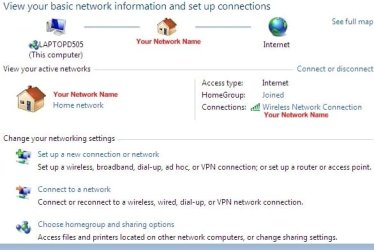
Please open the "Network and Sharing Center" on your laptop while it is connected to the modem and let us know what is there?

setup_homegroup_01.jpg

This screen shot shows a wireless network, for a wired you should see "Local Area Connection" in its place. Click on the "Local Area Connection" link to see what is connected, there is the "Details" tab and the "Properties" tab that may show missing or not working connections? Any big red Xs anywhere?

Have you tried any of the Windows Diagnostics on any of these screens?

Cheers!
 

My Computer My Computer

At a glance

...
OS
...
Inside the device manager both devices show that they are 'working correctly' and when I try to search for updated drivers it shows that they have the most up to date available. Also I have tried searching the internet for a manual update for the adapter that works with my wired connection. It is an intel adapter and the intel site shows that as you can see from a previous post that Ive got the most up to date driver intel has to offer.

Edit: Just found out additional info about my network adapter, apparently theres been no downloads for it on the intel download center for OS's after win XP. But on a different page it said that there is "in box support" for it. Would this mean that the appropriate driver was included in my win 7 install, or that my adapter is outdated for win 7 and that is causing my problem? For Reference my computer is less than 3 years old and came initially installed with vista on it. My adapter is the Intel(R) Pro 100/VE Network Connection.


On my network connections screen it shows that I am connected to the internet. I can screen shot it if that would be helpful but it is essentially a copy of what you posted except with valid connections instead of the red indicating no connection. When I run the network diagnostics it asks if I am having a problem reaching a specific site or something else, no matter which options I choose it ends up at a screen saying that the troubleshooter can't find the problem.
 

My Computer My Computer

At a glance

windows 7 home premium 32 bit1.73 gigahertz intel core duo 22040 MB rammobile intel(r) 945 express chipset family
Computer Manufacturer/Model Number
HP Presario V6000(GB115AV
OS
windows 7 home premium 32 bit
CPU
1.73 gigahertz intel core duo 2
Motherboard
Quanta 30BB 66.3E
Memory
2040 MB ram
Graphics Card(s)
mobile intel(r) 945 express chipset family
Sound Card
Conextant High definition audio
Monitor(s) Displays
Generic PnP monitor
Hard Drives
Fujitsu MHW2120BH 120GB
PSU
Microsoft AC Adapter
Inside the device manager both devices show that they are 'working correctly' and when I try to search for updated drivers it shows that they have the most up to date available. Also I have tried searching the internet for a manual update for the adapter that works with my wired connection. It is an intel adapter and the intel site shows that as you can see from a previous post that Ive got the most up to date driver intel has to offer.

Edit: Just found out additional info about my network adapter, apparently theres been no downloads for it on the intel download center for OS's after win XP. But on a different page it said that there is "in box support" for it. Would this mean that the appropriate driver was included in my win 7 install, or that my adapter is outdated for win 7 and that is causing my problem? For Reference my computer is less than 3 years old and came initially installed with vista on it. My adapter is the Intel(R) Pro 100/VE Network Connection.


On my network connections screen it shows that I am connected to the internet. I can screen shot it if that would be helpful but it is essentially a copy of what you posted except with valid connections instead of the red indicating no connection. When I run the network diagnostics it asks if I am having a problem reaching a specific site or something else, no matter which options I choose it ends up at a screen saying that the troubleshooter can't find the problem.
Well ... you have done some homework! Impressive ;)

The Intel pro100 should be perfectly compatible ...

One other source of problems is the Anti Virus / Firewall software. You temporarily disable them and see if you can connect?

Did Windows use the Home, Work, or Public settings for your network / Internet connection?

Cheers!
 

My Computer My Computer

At a glance

...
OS
...
I uninstalled my anti-virus(Kaspersky) a couple days ago because I got tired of having it prompt me to enter my product key and then fail to validate since it couldn't access the internet.

However I just uninstalled a spyware protection/pop up blocker and now my internet is working again! Guess I should have really thought of this before but thank you so much for helping me out.
 

My Computer My Computer

At a glance

windows 7 home premium 32 bit1.73 gigahertz intel core duo 22040 MB rammobile intel(r) 945 express chipset family
Computer Manufacturer/Model Number
HP Presario V6000(GB115AV
OS
windows 7 home premium 32 bit
CPU
1.73 gigahertz intel core duo 2
Motherboard
Quanta 30BB 66.3E
Memory
2040 MB ram
Graphics Card(s)
mobile intel(r) 945 express chipset family
Sound Card
Conextant High definition audio
Monitor(s) Displays
Generic PnP monitor
Hard Drives
Fujitsu MHW2120BH 120GB
PSU
Microsoft AC Adapter
I uninstalled my anti-virus(Kaspersky) a couple days ago because I got tired of having it prompt me to enter my product key and then fail to validate since it couldn't access the internet.

However I just uninstalled a spyware protection/pop up blocker and now my internet is working again! Guess I should have really thought of this before but thank you so much for helping me out.
That is no problem at all! I am glad you got it sorted!

I have learned a lot hanging around these guys (and ladies) here at Seven Forums. Especially when there are so many variables it helps to start at the beginning and check off the possibilities one at a time. I love it when a plan comes together!

Happy surfing!
Robert
 

My Computer My Computer

At a glance

...
OS
...
Same Exact Thing

I am having this exact same issue, have run all the tests, flushes, resets, driver updates...
Just removed the anti-virus software which is Microsoft Security Essentials and this did not help either. This is a fairly new install of Windows 7. I performed a reboot and when it came back up, Internet shows as connected, but when I go to a website, it won't resolve. I can get to network resources just fine, including our own company intranet (which I built).


My next move is to log in under the another domain account and test internet there... and possibly remove my personal profile and rebuild.

Anyone have any better ideas?
 

My Computer My Computer

At a glance

Windows 7 Pro x64
OS
Windows 7 Pro x64
Inside the device manager both devices show that they are 'working correctly' and when I try to search for updated drivers it shows that they have the most up to date available. Also I have tried searching the internet for a manual update for the adapter that works with my wired connection. It is an intel adapter and the intel site shows that as you can see from a previous post that Ive got the most up to date driver intel has to offer.

Edit: Just found out additional info about my network adapter, apparently theres been no downloads for it on the intel download center for OS's after win XP. But on a different page it said that there is "in box support" for it. Would this mean that the appropriate driver was included in my win 7 install, or that my adapter is outdated for win 7 and that is causing my problem? For Reference my computer is less than 3 years old and came initially installed with vista on it. My adapter is the Intel(R) Pro 100/VE Network Connection.


On my network connections screen it shows that I am connected to the internet. I can screen shot it if that would be helpful but it is essentially a copy of what you posted except with valid connections instead of the red indicating no connection. When I run the network diagnostics it asks if I am having a problem reaching a specific site or something else, no matter which options I choose it ends up at a screen saying that the troubleshooter can't find the problem.
Well ... you have done some homework! Impressive ;)

The Intel pro100 should be perfectly compatible ...

One other source of problems is the Anti Virus / Firewall software. You temporarily disable them and see if you can connect?

Did Windows use the Home, Work, or Public settings for your network / Internet connection?

Cheers!

Iseeyou did you mention the button on the Laptop to make sure ( Router ) it's ON .. or was there a laptop involved in this ? Just asking.. that happened to me.. after I checked it.. everything came together as we had been trying to get the 2 to do.
 

My Computer My Computer

At a glance

Windows 8 - 64-bit2.2GHz Intel Pentium dual-core B960 processor...8GB DDR3Intel HD Graphics with 128MB of dedicated sys...
Computer type
Laptop
Computer Manufacturer/Model Number
Gateway 17.3" LCD Intel Dual-Core, 8GB RAM 1TB HDD Windows 8 Laptop
OS
Windows 8 - 64-bit
CPU
2.2GHz Intel Pentium dual-core B960 processor with 2MB L3 ca
Memory
8GB DDR3
Graphics Card(s)
Intel HD Graphics with 128MB of dedicated system memory
Monitor(s) Displays
17.3" Ultrabright HD widescreen LED-backlit LCD
Screen Resolution
1280 X 1024
Hard Drives
1TB hard drive-1000 GB HDD
DVD-Super Multi DL drive
PSU
Intel B960 processor
Case
XXXXX
Cooling
XXXXX
Keyboard
Multi Gesture Touchpad
Mouse
USB - portable mouse... I added this
Antivirus
Avast
Browser
I E 10
Other Info
I see nothing about Motherboard info.
I'm not sure about Sound Card
Ports :(3) USB 2.0, (1) HDMI, (1) VGA, (1) Headphone out, (1) Microphone in, (1) Ethernet LAN

•Fast Wi-Fi wireless and wired Gigabit Ethernet networking
•HDMI output
•Kensington lock slot
I have no idea what all this actually means
alexdwhite,
To help us try to keep problems, advice, solutions, etc separate,
would you be so good as to start a new problem stating your problem, your hardware and your software,
Thanks,
karl
 

My Computer My Computer

At a glance

MS Windows 7 Ultimate SP1 64-bitAMD A10-4600M6.00 GB Dual-Channel DDR3 @ 798MHz (11-11-12-28)AMD Radeon HD 7660G
Computer Manufacturer/Model Number
Toshiba Satellite S875D-S7239 laptop
OS
MS Windows 7 Ultimate SP1 64-bit
CPU
AMD A10-4600M
Motherboard
AMD Pumori (Socket FT1)
Memory
6.00 GB Dual-Channel DDR3 @ 798MHz (11-11-12-28)
Graphics Card(s)
AMD Radeon HD 7660G
Sound Card
High Definition Audio Device
Monitor(s) Displays
Generic PnP Monitor (1600x900@60Hz)
Screen Resolution
1600x900@60Hz
Hard Drives
SSD 119GB Corsair CSSD-V128GB2 ATA Device
Keyboard
Standard PS/2 Keyboard
Mouse
HP Wireless Optical Mobile Mouse Model FHA-3410
Internet Speed
What the local pub, local coffee shop offers.
Other Info
Optical Drive:MATSHITA BD-CMB UJ160B ATA Device


Also have an Asus ha1002xp netbook with Win 7 Ultimate installed.
Iseeyou did you mention the button on the Laptop to make sure ( Router ) it's ON .. or was there a laptop involved in this ?
The button the laptop controls the Wireless electronics in the laptop only. It can turn it on or off.

You do have a "Reset" button on your router. If you press and release the reset button on the router, it restarts the router (like a reboot) and does not change any of your settings. However, if you press and hold the reset button on the router for 10 seconds or so, it erases all you settings and returns the router settings back to the way they were from the factory (no user name or password for example).

Cheers!
Robert
 

My Computer My Computer

At a glance

...
OS
...
Iseeyou did you mention the button on the Laptop to make sure ( Router ) it's ON .. or was there a laptop involved in this ?
The button the laptop controls the Wireless electronics in the laptop only. It can turn it on or off.

You do have a "Reset" button on your router. If you press and release the reset button on the router, it restarts the router (like a reboot) and does not change any of your settings. However, if you press and hold the reset button on the router for 10 seconds or so, it erases all you settings and returns the router settings back to the way they were from the factory (no user name or password for example).

Cheers!
Robert

Robert hello.. I'm staying away from the RESET button...mine is working great now. ..thanks to you all who helped me get this working correctly.:D
 

My Computer My Computer

At a glance

Windows 8 - 64-bit2.2GHz Intel Pentium dual-core B960 processor...8GB DDR3Intel HD Graphics with 128MB of dedicated sys...
Computer type
Laptop
Computer Manufacturer/Model Number
Gateway 17.3" LCD Intel Dual-Core, 8GB RAM 1TB HDD Windows 8 Laptop
OS
Windows 8 - 64-bit
CPU
2.2GHz Intel Pentium dual-core B960 processor with 2MB L3 ca
Memory
8GB DDR3
Graphics Card(s)
Intel HD Graphics with 128MB of dedicated system memory
Monitor(s) Displays
17.3" Ultrabright HD widescreen LED-backlit LCD
Screen Resolution
1280 X 1024
Hard Drives
1TB hard drive-1000 GB HDD
DVD-Super Multi DL drive
PSU
Intel B960 processor
Case
XXXXX
Cooling
XXXXX
Keyboard
Multi Gesture Touchpad
Mouse
USB - portable mouse... I added this
Antivirus
Avast
Browser
I E 10
Other Info
I see nothing about Motherboard info.
I'm not sure about Sound Card
Ports :(3) USB 2.0, (1) HDMI, (1) VGA, (1) Headphone out, (1) Microphone in, (1) Ethernet LAN

•Fast Wi-Fi wireless and wired Gigabit Ethernet networking
•HDMI output
•Kensington lock slot
I have no idea what all this actually means
Connected to internet but cannot display web page!! SIMPLE FIX

If you think your connected to the internet and not real sure about it. Open up your Network and Sharing Center. Its usually in your control panel if not on your start menu already. Ok now open up "Change adapter setting". Right click on what ever connection you are using, This will work for LAN and Wi-Fi both.

Now click on status. And if its showing you are sending and receiving "Bytes". But you are just simply not able to display web pages in what ever Internet Browser you are using. (IE, Firefox, Chrome, Etc...,)
This is a very simple fix!

Open up your Task Manager and Click on "Services" tab. Scroll down until you find "WinHttpAutoProxySvc" look straight over to the right underneath the "Status" and if it says "Stopped" in the "Status" column, Right click on it and "Start" it. And TADA!!! It works. :D Now you should be able to connect to web pages once again.
 

My Computer My Computer

At a glance

Win 7Q66006 Gig CorsairATI HD3500
Computer Manufacturer/Model Number
Asus
OS
Win 7
CPU
Q6600
Motherboard
Asus P5E3 Wi-Fi@ Deluxe
Memory
6 Gig Corsair
Graphics Card(s)
ATI HD3500
Sound Card
Stock
Monitor(s) Displays
HP W2207H
Back
Top