Internet stoped after a while

Vandalissm

New member
Local time
7:02 PM
Messages
4
hello
i have a problem with my connection since i change my os from xp to 7
im using wireless modem zte mf626
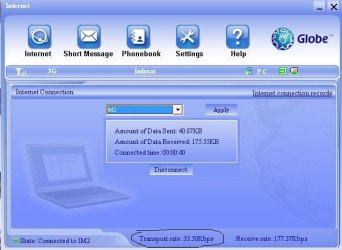
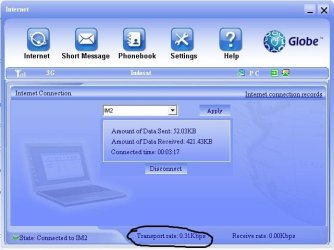
my internet connection transfer rate suddenly went down after a while
this is never happened before when im still usning xp
before :
2.JPG
after a while my internet connection transfer reduced and its same as disconected
Capture.JPG
any solution on solving this problem

thanks in advance
 

My Computer

OS
Windows 7 Ultimate
Hi Vandalissm welcome to Sevenforums.

Is the internet connection active at the point where the drop happens? I mean, are you actively doing something on the net, like downloading, or is the connection idling.

If the connection is meant to be busy, what is it meant to be busy doing, I have a similar modem to you (the next one up actually), and have experienced an issue like this, but the causes vary, so a few questions will help pin it down :)
 

My Computer

Computer type
PC/Desktop
Computer Manufacturer/Model Number
Medion Erazer (note to self: insert model number) - with custom additions
OS
Windows 10 Pro x64
CPU
Intel Core i5 7400 @ 3.00GHz
Motherboard
OEM supllied with PC
Memory
8GB 2133Mhz DDR4 (OEM supplied)
Graphics Card(s)
Gygabyte Windforce GTX 1050Ti (Factory Overclocked)
Sound Card
Realtek
Monitor(s) Displays
Acer Al1980 + HKC
Screen Resolution
1360*768(HKC) / 1280*1024(Acer)
Hard Drives
1TB Toshiba
1TB WD Caviar Green
120GB Samsung Evo 840
PSU
OEM supplied (no power rating on case)
Case
OEM Supplied
Cooling
Stock
Keyboard
Logitech Wireless
Mouse
Logitect Wireless
Internet Speed
40Mb/s Down 10Mb/s Up
Antivirus
Defender
Browser
Firefox
yes, its happen when i use it for gaming or downloading something not on idle time
 

My Computer

OS
Windows 7 Ultimate
Are you by chance torrenting when it happens?
 

My Computer

Computer type
PC/Desktop
Computer Manufacturer/Model Number
Medion Erazer (note to self: insert model number) - with custom additions
OS
Windows 10 Pro x64
CPU
Intel Core i5 7400 @ 3.00GHz
Motherboard
OEM supllied with PC
Memory
8GB 2133Mhz DDR4 (OEM supplied)
Graphics Card(s)
Gygabyte Windforce GTX 1050Ti (Factory Overclocked)
Sound Card
Realtek
Monitor(s) Displays
Acer Al1980 + HKC
Screen Resolution
1360*768(HKC) / 1280*1024(Acer)
Hard Drives
1TB Toshiba
1TB WD Caviar Green
120GB Samsung Evo 840
PSU
OEM supplied (no power rating on case)
Case
OEM Supplied
Cooling
Stock
Keyboard
Logitech Wireless
Mouse
Logitect Wireless
Internet Speed
40Mb/s Down 10Mb/s Up
Antivirus
Defender
Browser
Firefox
nope, im jst downloading and gaming
i dont even have torrent atm
is it my modem's error ?
 

My Computer

OS
Windows 7 Ultimate
It could frankly be any number of things, but here is a list of what I find to be the most common stuff with mine.

Btw, over here, "wireless broadband" is called "mobile broadband" so I'll be calling it that, so I don't confuse myself :)

Firstly, I actually had that particular modem at one point. I found it to be slow and unreliable. Now I may have just had a dodgy one, my friend also had one, and had the same issues, so I doubt it;s a fluke but it's something to consider. I managed to convince my provider to replace it with a better one, (the ZTE MF112, which ironically is actually newer, despite the lower number)

I find that with any mobile broadband connection, especially at peak times (evenings/weekends) the connection has a habit of just occasionally crapping out. Basically the mobile "cell" (the antennae that the mobile connection is made through) can only handle so much, and if lots of people are using their phones/dongles (modems) then it overloads, and you have to restart the connection to get any sensible speed out of it. This is why I asked about torrenting, torrenting overloads the connection very quickly. Disconnecting/reconnecting fixes it in most cases. This is actually mainly due to contention: http://www.sevenforums.com/network-...tion-what-how-works-why-my-internet-slow.html

Next thing to consider is latency (response times, or "ping". Mobile broadband has a terrible ping. I have honestly never seen anything short of 150ms even from a relatively local site like BBC. Slow response times, unfortunately mean a slow connection. At peak times I have seen this go up to 300ms or even more. This obviously adds on to the problem that I described above.

Of course it is possible that it's a modem problem. The first thing I would suggest is to uninstall the driver and reinstall it. First uninstall the connection software using Revo: Download Revo Uninstaller Freeware - Free and Full Download - Uninstall software, remove programs, solve uninstall problems (the free version will be more than adequate). This will make sure that any left over bits will also be deleted. One thing to note about Revo is that if it finds leftover registry keys, the one's in bold are safe to delete, and the one's that aren't should be left.

Once it's been uninstalled, just check Device Manager, (Control Panel>Hardware and Sound>Device Manager) to check it's uninstalled the modem too, if it hasn't, right click it and then click "Uninstall" then unplug the modem, plug it back in and reinstall it.

I would also seriously recommend not using the connection manager. On my machine at least, it has a detrimental effect on my connection. Once you have connected once, there is no need to run it, the connection will be listed under the standard network connections list on the bottom right of the taskbar (the thing that looks like a computer with a big red X on it)

If none of that helps, I would suggest getting onto your provider. THey will probably run you through a load of pointless diagnostics, but they may also after all that replace the modem for something better, or at least be able to give you an idea of what's going on.

 

My Computer

Computer type
PC/Desktop
Computer Manufacturer/Model Number
Medion Erazer (note to self: insert model number) - with custom additions
OS
Windows 10 Pro x64
CPU
Intel Core i5 7400 @ 3.00GHz
Motherboard
OEM supllied with PC
Memory
8GB 2133Mhz DDR4 (OEM supplied)
Graphics Card(s)
Gygabyte Windforce GTX 1050Ti (Factory Overclocked)
Sound Card
Realtek
Monitor(s) Displays
Acer Al1980 + HKC
Screen Resolution
1360*768(HKC) / 1280*1024(Acer)
Hard Drives
1TB Toshiba
1TB WD Caviar Green
120GB Samsung Evo 840
PSU
OEM supplied (no power rating on case)
Case
OEM Supplied
Cooling
Stock
Keyboard
Logitech Wireless
Mouse
Logitect Wireless
Internet Speed
40Mb/s Down 10Mb/s Up
Antivirus
Defender
Browser
Firefox
thank you very much for this
ill try it :D
 

My Computer

OS
Windows 7 Ultimate
Back
Top