Internet via ethernal cable not working only wireless.

andreiyy12

New member
Local time
4:13 PM
Messages
4
My internet doesn't work, i just bought a new pc, i installed windows 7 on it then installed all the drivers from the motherboard cd, network drivers etc. However when i plug in a external internet cable it doesn't work, it says that the cable isn't connected but it is, only one orange light is flashing. I have tested the internet cable and it works on my other pc. Only wireless works. Device manager displays my network adapter as; Intel Ethernet Connection I27-V
Motherboard: Gygabite Z87X-D3H

Any help will be much appreciated.
 

My Computer My Computer

Computer type
PC/Desktop
OS
Windows 7 ultimate x64
My internet doesn't work, i just bought a new pc, i installed windows 7 on it then installed all the drivers from the motherboard cd, network drivers etc. However when i plug in a external internet cable it doesn't work, it says that the cable isn't connected but it is, only one orange light is flashing. I have tested the internet cable and it works on my other pc. Only wireless works. Device manager displays my network adapter as; Intel Ethernet Connection I27-V
Motherboard: Gygabite Z87X-D3H

Any help will be much appreciated.

Hmmm usually Windows 7 comes preinstalled on a new PC, better off with a clean install anyway as this eliminates all the preinstalled bloatware that the manufacture of the PC typically installs.

At any rate, have you tried going to the Windows Update Center using the wireless connection to install all the updates for your new system?

Installing the driver for the Intel Ethernet Connection I27-V directly from the Intel site may also work. :)
https://downloadcenter.intel.com/Detail_Desc.aspx?DwnldID=18713
 

My Computer My Computer

Computer type
PC/Desktop
Computer Manufacturer/Model Number
Home built
OS
Windows 7 Ult, Windows 8.1 Pro,
CPU
Q9650-4.275GHz, E8600 4.5GHz, E6750-3.8GHz
Motherboard
Evga 780i FTW
Memory
G.Skill PC2 9600 1200Mhz 5 5 5 15 2T
Graphics Card(s)
GTX480
Sound Card
Asus Xonar D2
Monitor(s) Displays
HannsG
Screen Resolution
1680X1050
Hard Drives
GSkill Phoenix Pro 120GB SSD
PSU
ThermalTake Toughpower 1000Watt modular
Case
ThermalTake XaserV
Cooling
Xigmatek S1283
Keyboard
Logitech G15
Mouse
Logitech G9
Internet Speed
T1
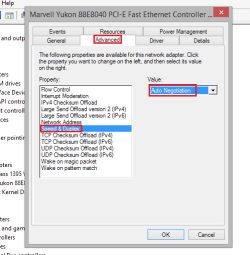
This is can be caused by a Speed and Duplex Mismatch. Can you go to Device Manager and right click your Ethernet card and then go to Properties.

Once in Properties, click on the 'Advanced' tab and then in the side bar click on 'Speed and Duplex'. Please change the value to 'Auto Negotiation'

speed&duplex.png

Once applied please reboot the machine and then test.

Hope This Helps,
Josh :)
 

My Computer My Computer

Computer type
PC/Desktop
Computer Manufacturer/Model Number
Custom Built
OS
Windows 7 Professional x64 SP1 ; Windows Server 2012 R2 Standard
CPU
Intel Core i5 2400 @ 3.10GHz
Motherboard
Foxconn H67MP-S/-V/H67MP
Memory
8.0GB DDR3 @ 665MHz (2GBx4)
Graphics Card(s)
AMD Radeon HD 6870
Sound Card
Realtek High Definition Audio
Monitor(s) Displays
AOC 2243W & SMB1930NW
Screen Resolution
1440x900 & 1920x1080
Hard Drives
977GB Seagate ST31000524AS ATA Drive (SATA)
250GB WD iSCSI attached Drive
PSU
750W Gaming PSU
Case
Novatech Night
Cooling
Fan
Keyboard
Dell Standard PS/2 Keyboard
Mouse
R.A.T 07 Gaming Mouse
Internet Speed
Download: 10 Mbps Ping: 30ms Upload: 0.81 Mbps
Browser
Google Chrome
Other Info
Optiarc DVD RW AD-5260S ATA Device
I have Intel(R) Ethernet Connection I217-V can you tell me what i have to change in this ? And yes my speed is Auto Negotiation .
 

My Computer My Computer

Computer type
PC/Desktop
OS
Windows 7 ultimate x64
I installed the driver and rebooted but nothing works . ;((
 

My Computer My Computer

Computer type
PC/Desktop
OS
Windows 7 ultimate x64
Any clues on how to deal with it ?
 

My Computer My Computer

Computer type
PC/Desktop
OS
Windows 7 ultimate x64
right click on the network icon and run the troubleshooter.
 

My Computer My Computer

Computer type
PC/Desktop
Computer Manufacturer/Model Number
Skylake Special #666
OS
Windows 10 Pro x64
CPU
Intel Core i7 6700K
Motherboard
Asus Sabertooth Z170 Mark 1
Memory
GSkill TridentZ RGB 16GB 3600 16-16-16-36
Graphics Card(s)
EVGA GTX 980 Ti SC x2
Sound Card
Realtek High Definition
Monitor(s) Displays
AOC G2460PG
Screen Resolution
1920 x 1080 144Hz
Hard Drives
Samsung 860 Pro 256GB, Seagate Barracuda 4TB x2
PSU
EVGA 1000 P2, EVGA White Custom Braided Cables
Case
Corsair Vengeance C70 Gunmetal Black
Cooling
Corsair H100i v2, Corsair ML120 x2, Thermal Grizzly Kryonaut
Keyboard
Logitech G910 Orion Spectrum
Mouse
Logitech G700s
Internet Speed
Verizon Fios Quantum Gateway 75/75
Antivirus
Windows Defender, Malwarebytes Free 3.8.3
Browser
Chrome
Other Info
Corsair SP120 x4, LG Blu-ray Drive, Durabrand HT-395 100 Watt Dolby Digital Amp, Corsair H2100 Wireless 7.1 Headset
I installed the driver and rebooted but nothing works . ;((

I'd have to see the ipconfig/all from this machine in order to help you. :)
 

My Computer My Computer

Computer type
PC/Desktop
Computer Manufacturer/Model Number
Home built
OS
Windows 7 Ult, Windows 8.1 Pro,
CPU
Q9650-4.275GHz, E8600 4.5GHz, E6750-3.8GHz
Motherboard
Evga 780i FTW
Memory
G.Skill PC2 9600 1200Mhz 5 5 5 15 2T
Graphics Card(s)
GTX480
Sound Card
Asus Xonar D2
Monitor(s) Displays
HannsG
Screen Resolution
1680X1050
Hard Drives
GSkill Phoenix Pro 120GB SSD
PSU
ThermalTake Toughpower 1000Watt modular
Case
ThermalTake XaserV
Cooling
Xigmatek S1283
Keyboard
Logitech G15
Mouse
Logitech G9
Internet Speed
T1
Back
Top