Solved Internet working everywhere but the browsers!?

ironmaiden96

New member
Local time
3:36 PM
Messages
6
Hey!
I am, as you can tell by the title, experiencing some internet issues with my web browsers.
Here's the deal: Every program that uses internet works just fine, though there might be a slight delay connecting at first, but they're working (ex. Skype, Origin, Windows Mail App). However, the browsers are barely loading any pages or not loading at all. If I'm lucky it will load but it takes such a long time! But most of the times it just gives up. I dunno wtf is wrong. I can chat with my friends on skype, talk and play online games samontainously but i can't load up fricking Facebook? Waaat.
Also, all my other internet devices are working smoothly, downloaded a file a day ago on my ipad, which I'm using to write this on, at 1.5mb/s no probs at all. So I am really lost what the problem might be. Here's what I've tried that ppl told on other forums that hasn't worked:

-Restarting PC, seems to work for around 20-30mins but then the shit is back suddenly and nothing loads...
Scanning for malware using both Spybot and Malwarebytes (Full scan) Nothing found
Scanning for viruses using F-Secure internet security, none found
Running CHKDSK in command prompt, no problems found
Running ipconfig /renew, no change
Running ipconfig /flushdns, no change
Running netsh int ip reset resetlog.txt, seemed to solve it but only for 30mins or so, prolly coz of the restart
Running netsh winsock reset, same as above
Disabling the bonjour service and restart, same as above
Booting in Safe Mode with networking, browsing and everything worked flawlessly, booted back to regular mode where it worked for 30min and...
Disabling ipv6 protocol, no change
Setting my ipv4 settings to obtain automatically, no change
Running Advanced SystemCare Pro's diskcleaner and regcleaner, no change
Clearing internet cache, cookies, history, no change
Scanning for fragments, none

So as you see I've tried a lot of stuff. This is my last resort basically. If anyone have any idea what might be causing this problem, please, leave a comment! I really need your help! I haven't installed anything recently or anything so I don't know why all of a sudden I got this...

My specs:
Windows 8 Pro 64bit
asrock z77 pro3 mobo
intel i5 2500K
120GB Corsair GT3 SSD
500Gb hdd
2tb hdd
Nvidia GTX 660
8gb 1600mhz Corsair Vengeance LP RAM
Internet connected via cable to the router

Thanks in advance!
 

My Computer My Computer

OS
Windows 7 Ultimate x64
Have you allowed the browsers in your firewall?
 

My Computer My Computer

Computer type
PC/Desktop
Computer Manufacturer/Model Number
Custom Build
OS
Windows 7 Ultimate x64
CPU
FX 8350 @ 4.8ghz, turbo clocked to 5.4ghz
Motherboard
Asus Sabertooth FX990 Gen 3.0 R2.0
Memory
Mushkin Enhanced Blackline 16GB 1760mhz 10-10-9-24 T1
Graphics Card(s)
Gigabyte-660 Windforce OC- GPU Clock 1212MHz /3504MHz ram
Sound Card
Creative Sound Blaster Recon3D PCIe Sound Card
Monitor(s) Displays
Samsung SyncMaster S27B350H (HDMI)
Screen Resolution
1920x1080 60HZ
Hard Drives
1 x SSD Crucial M4 256GB (Primary OS)
3 x HDD WD 1TB
4 x HDD 2TB
1 x HDD 160GB (Secondary Backup OS)
Raid SATA III 6GB/s 4-port PCI-e Controller Card, Marvel 88SE9215 chipset
PSU
Chieftec-650-14CS (Modular) 80 Plus Gold-650 Watt
Case
Akasa Venom Toxic Gaming Big tower ( Custom Black ) Ver 2.0
Cooling
Water 2.0 PRO / GEIL Cyclone VRM / 6x120mm 2x220mm 2x140mm
Keyboard
Logitech G19
Mouse
Wireless Notebook Presenter Mouse 8000
Internet Speed
Fiber GBS
Antivirus
Don't Announce it to the world :)
Browser
Gotta have at least 1!
Hey!
I am, as you can tell by the title, experiencing some internet issues with my web browsers.
Here's the deal: Every program that uses internet works just fine, though there might be a slight delay connecting at first, but they're working (ex. Skype, Origin, Windows Mail App). However, the browsers are barely loading any pages or not loading at all. If I'm lucky it will load but it takes such a long time! But most of the times it just gives up. I dunno wtf is wrong. I can chat with my friends on skype, talk and play online games samontainously but i can't load up fricking Facebook? Waaat.
Also, all my other internet devices are working smoothly, downloaded a file a day ago on my ipad, which I'm using to write this on, at 1.5mb/s no probs at all. So I am really lost what the problem might be. Here's what I've tried that ppl told on other forums that hasn't worked:

-Restarting PC, seems to work for around 20-30mins but then the shit is back suddenly and nothing loads...
Scanning for malware using both Spybot and Malwarebytes (Full scan) Nothing found
Scanning for viruses using F-Secure internet security, none found
Running CHKDSK in command prompt, no problems found
Running ipconfig /renew, no change
Running ipconfig /flushdns, no change
Running netsh int ip reset resetlog.txt, seemed to solve it but only for 30mins or so, prolly coz of the restart
Running netsh winsock reset, same as above
Disabling the bonjour service and restart, same as above
Booting in Safe Mode with networking, browsing and everything worked flawlessly, booted back to regular mode where it worked for 30min and...
Disabling ipv6 protocol, no change
Setting my ipv4 settings to obtain automatically, no change
Running Advanced SystemCare Pro's diskcleaner and regcleaner, no change
Clearing internet cache, cookies, history, no change
Scanning for fragments, none

So as you see I've tried a lot of stuff. This is my last resort basically. If anyone have any idea what might be causing this problem, please, leave a comment! I really need your help! I haven't installed anything recently or anything so I don't know why all of a sudden I got this...

My specs:
Windows 8 Pro 64bit
asrock z77 pro3 mobo
intel i5 2500K
120GB Corsair GT3 SSD
500Gb hdd
2tb hdd
Nvidia GTX 660
8gb 1600mhz Corsair Vengeance LP RAM
Internet connected via cable to the router

Thanks in advance!

If you can post a screen shot of the ipconfig/all it would be helpful. :)
 

My Computer My Computer

Computer type
PC/Desktop
Computer Manufacturer/Model Number
Home built
OS
Windows 7 Ult, Windows 8.1 Pro,
CPU
Q9650-4.275GHz, E8600 4.5GHz, E6750-3.8GHz
Motherboard
Evga 780i FTW
Memory
G.Skill PC2 9600 1200Mhz 5 5 5 15 2T
Graphics Card(s)
GTX480
Sound Card
Asus Xonar D2
Monitor(s) Displays
HannsG
Screen Resolution
1680X1050
Hard Drives
GSkill Phoenix Pro 120GB SSD
PSU
ThermalTake Toughpower 1000Watt modular
Case
ThermalTake XaserV
Cooling
Xigmatek S1283
Keyboard
Logitech G15
Mouse
Logitech G9
Internet Speed
T1
If I may. This could of caused all the problems.
From post #1

Running Advanced SystemCare Pro's diskcleaner and regcleaner,
 

My Computer My Computer

Computer type
PC/Desktop
Computer Manufacturer/Model Number
Home made Desktop
OS
Windows 10 Pro. 64/ version 1709 Windows 7 Pro/64
CPU
Intel i7-6800K @ 4.3
Motherboard
ASUS X-99 Deluxe II
Memory
Corsair Platinum 16 gig @2400
Graphics Card(s)
EVGA GTX 1070 OC
Monitor(s) Displays
Asus 27" LED LCD/VE278Q
Screen Resolution
1920-1080 or 1280-720 HDMI
Hard Drives
INTEL SSD 730-240 Gb Sata 3.0/
PSU
EVGA Platium 1200W
Case
Phanteks Luxe Tempered Glass 8 fans/ one radiator
Cooling
XSPC/ Water Cooled CPU
Keyboard
Das 4 Professional
Mouse
Logitech M705/MX Anywhere 2-S
Internet Speed
100 mbits
Antivirus
Microsoft Security Essentials/ Malwarebytes Premium 3.0/ SAS
Browser
I.E. 11 default/Firefox/ ISP Time Warner Cable/Spectrum
Other Info
LG BluRay Burner/
Sound system-KLipsch-THX/
Icy Dock ssd Hot Swap bays.
Have you allowed the browsers in your firewall?

Well I have never had any problems with the firewall. And it's surely allowed. I don't think the firewall suddenly has decided to block all my browsers.

Hey!
I am, as you can tell by the title, experiencing some internet issues with my web browsers.
Here's the deal: Every program that uses internet works just fine, though there might be a slight delay connecting at first, but they're working (ex. Skype, Origin, Windows Mail App). However, the browsers are barely loading any pages or not loading at all. If I'm lucky it will load but it takes such a long time! But most of the times it just gives up. I dunno wtf is wrong. I can chat with my friends on skype, talk and play online games samontainously but i can't load up fricking Facebook? Waaat.
Also, all my other internet devices are working smoothly, downloaded a file a day ago on my ipad, which I'm using to write this on, at 1.5mb/s no probs at all. So I am really lost what the problem might be. Here's what I've tried that ppl told on other forums that hasn't worked:

-Restarting PC, seems to work for around 20-30mins but then the shit is back suddenly and nothing loads...
Scanning for malware using both Spybot and Malwarebytes (Full scan) Nothing found
Scanning for viruses using F-Secure internet security, none found
Running CHKDSK in command prompt, no problems found
Running ipconfig /renew, no change
Running ipconfig /flushdns, no change
Running netsh int ip reset resetlog.txt, seemed to solve it but only for 30mins or so, prolly coz of the restart
Running netsh winsock reset, same as above
Disabling the bonjour service and restart, same as above
Booting in Safe Mode with networking, browsing and everything worked flawlessly, booted back to regular mode where it worked for 30min and...
Disabling ipv6 protocol, no change
Setting my ipv4 settings to obtain automatically, no change
Running Advanced SystemCare Pro's diskcleaner and regcleaner, no change
Clearing internet cache, cookies, history, no change
Scanning for fragments, none

So as you see I've tried a lot of stuff. This is my last resort basically. If anyone have any idea what might be causing this problem, please, leave a comment! I really need your help! I haven't installed anything recently or anything so I don't know why all of a sudden I got this...

My specs:
Windows 8 Pro 64bit
asrock z77 pro3 mobo
intel i5 2500K
120GB Corsair GT3 SSD
500Gb hdd
2tb hdd
Nvidia GTX 660
8gb 1600mhz Corsair Vengeance LP RAM
Internet connected via cable to the router

Thanks in advance!

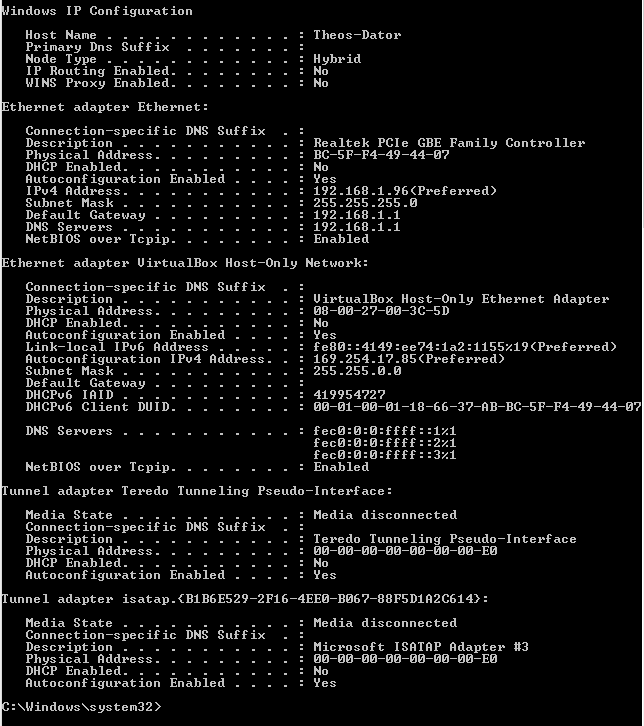
If you can post a screen shot of the ipconfig/all it would be helpful. :)
Here it is man :)
3affd3200fce5c0d34ef40ae0adbb317.png


If I may. This could of caused all the problems.
From post #1

Running Advanced SystemCare Pro's diskcleaner and regcleaner,

I've heard these programs might cause issues like this but since I've had it for surely over half a year with no trouble I highly doubt it suddenly became a problem...
 

My Computer My Computer

OS
Windows 7 Ultimate x64
Have you allowed the browsers in your firewall?

Well I have never had any problems with the firewall. And it's surely allowed. I don't think the firewall suddenly has decided to block all my browsers.

If you can post a screen shot of the ipconfig/all it would be helpful. :)
Here it is man :)
3affd3200fce5c0d34ef40ae0adbb317.png


...

In this case I'd say that the virtual box is the cause of the problem. Uninstall it completely then test your browsers, let me know what happens.
 

My Computer My Computer

Computer type
PC/Desktop
Computer Manufacturer/Model Number
Home built
OS
Windows 7 Ult, Windows 8.1 Pro,
CPU
Q9650-4.275GHz, E8600 4.5GHz, E6750-3.8GHz
Motherboard
Evga 780i FTW
Memory
G.Skill PC2 9600 1200Mhz 5 5 5 15 2T
Graphics Card(s)
GTX480
Sound Card
Asus Xonar D2
Monitor(s) Displays
HannsG
Screen Resolution
1680X1050
Hard Drives
GSkill Phoenix Pro 120GB SSD
PSU
ThermalTake Toughpower 1000Watt modular
Case
ThermalTake XaserV
Cooling
Xigmatek S1283
Keyboard
Logitech G15
Mouse
Logitech G9
Internet Speed
T1
Have you allowed the browsers in your firewall?

Well I have never had any problems with the firewall. And it's surely allowed. I don't think the firewall suddenly has decided to block all my browsers.

If you can post a screen shot of the ipconfig/all it would be helpful. :)
Here it is man :)
3affd3200fce5c0d34ef40ae0adbb317.png


...

In this case I'd say that the virtual box is the cause of the problem. Uninstall it completely then test your browsers, let me know what happens.

It's now gone but I don't think that was causing the problem though since no change now and no problems before...
 

My Computer My Computer

OS
Windows 7 Ultimate x64
If it worked in safe mode then something installed on the system like anti virus software or something else is causing the DNS problem. You can usually fix this through process of elimination.

In the mean time run the ipreset file below which will reset the network stack entirely.
 

Attachments

My Computer My Computer

Computer type
PC/Desktop
Computer Manufacturer/Model Number
Home built
OS
Windows 7 Ult, Windows 8.1 Pro,
CPU
Q9650-4.275GHz, E8600 4.5GHz, E6750-3.8GHz
Motherboard
Evga 780i FTW
Memory
G.Skill PC2 9600 1200Mhz 5 5 5 15 2T
Graphics Card(s)
GTX480
Sound Card
Asus Xonar D2
Monitor(s) Displays
HannsG
Screen Resolution
1680X1050
Hard Drives
GSkill Phoenix Pro 120GB SSD
PSU
ThermalTake Toughpower 1000Watt modular
Case
ThermalTake XaserV
Cooling
Xigmatek S1283
Keyboard
Logitech G15
Mouse
Logitech G9
Internet Speed
T1
If it worked in safe mode then something installed on the system like anti virus software or something else is causing the DNS problem. You can usually fix this through process of elimination.

In the mean time run the ipreset file below which will reset the network stack entirely.

I did run something like this before... But anyway I took my w8 usb stick and used the built in restore without losing files thing and now everything is back to normal :) Had to reinstall some programs and stuff but it was worth it :)
 

My Computer My Computer

OS
Windows 7 Ultimate x64
It's nice to know that feature works every now and then, hardly ever does, or I should say, hardly ever fixes anything without having consequences but I'm glad it worked in your case. :)
 

My Computer My Computer

Computer type
PC/Desktop
Computer Manufacturer/Model Number
Home built
OS
Windows 7 Ult, Windows 8.1 Pro,
CPU
Q9650-4.275GHz, E8600 4.5GHz, E6750-3.8GHz
Motherboard
Evga 780i FTW
Memory
G.Skill PC2 9600 1200Mhz 5 5 5 15 2T
Graphics Card(s)
GTX480
Sound Card
Asus Xonar D2
Monitor(s) Displays
HannsG
Screen Resolution
1680X1050
Hard Drives
GSkill Phoenix Pro 120GB SSD
PSU
ThermalTake Toughpower 1000Watt modular
Case
ThermalTake XaserV
Cooling
Xigmatek S1283
Keyboard
Logitech G15
Mouse
Logitech G9
Internet Speed
T1
Has anyone noticed that his DNS Servers are the same as the default gateway 192.168.1.1? Or am I too late?
 

My Computer My Computer

Computer type
PC/Desktop
Computer Manufacturer/Model Number
Custom Build
OS
Windows 7 Ultimate x64
CPU
FX 8350 @ 4.8ghz, turbo clocked to 5.4ghz
Motherboard
Asus Sabertooth FX990 Gen 3.0 R2.0
Memory
Mushkin Enhanced Blackline 16GB 1760mhz 10-10-9-24 T1
Graphics Card(s)
Gigabyte-660 Windforce OC- GPU Clock 1212MHz /3504MHz ram
Sound Card
Creative Sound Blaster Recon3D PCIe Sound Card
Monitor(s) Displays
Samsung SyncMaster S27B350H (HDMI)
Screen Resolution
1920x1080 60HZ
Hard Drives
1 x SSD Crucial M4 256GB (Primary OS)
3 x HDD WD 1TB
4 x HDD 2TB
1 x HDD 160GB (Secondary Backup OS)
Raid SATA III 6GB/s 4-port PCI-e Controller Card, Marvel 88SE9215 chipset
PSU
Chieftec-650-14CS (Modular) 80 Plus Gold-650 Watt
Case
Akasa Venom Toxic Gaming Big tower ( Custom Black ) Ver 2.0
Cooling
Water 2.0 PRO / GEIL Cyclone VRM / 6x120mm 2x220mm 2x140mm
Keyboard
Logitech G19
Mouse
Wireless Notebook Presenter Mouse 8000
Internet Speed
Fiber GBS
Antivirus
Don't Announce it to the world :)
Browser
Gotta have at least 1!
Has anyone noticed that his DNS Servers are the same as the default gateway 192.168.1.1? Or am I too late?

That's not unusual - the router is often the Primary DNS server and the Alternate DNS server often points to the ISP DNS server.

Sometimes public DNS servers are configured
8.8.8.8
8.8.4.4

are google DNS servers
 

My Computer My Computer

Computer type
Laptop
Computer Manufacturer/Model Number
HP Pavilion dv6-6c10us
OS
x64 (6.3.9600) Win8.1 Pro & soon dual boot x64 (6.1.7601) Win7_SP1 HomePrem
CPU
AMD A6-3420M APU with Radeon(tm) HD Graphics
Motherboard
Hewlett-Packard 1805
Memory
6.00 GB
Graphics Card(s)
AMD Radeon(TM) HD 6520G
Sound Card
(1) AMD High Definition Audio Device (2) IDT High Definiti
Monitor(s) Displays
HP W2072a 20" LCD (1600 x 900) @ 60 Hz
Screen Resolution
1366 x 768 x 32 bits (4294967296 colors) @ 60 Hz
Hard Drives
ST640LM0 00 HM641JI SATA Disk Device
Keyboard
Logitech k520 wireless KB
Mouse
Logitech m320 wireless mouse (bundled with KB)
Internet Speed
15/5 | 54 MB Wireless 'n'
Antivirus
Realtime: Defender or Avast | On-demand: Malwarebytes, ESET
Browser
IE 11 on Win8, IE 10 on win 7
Other Info
Media: [Gimp, Audacity, VLC] || Comm: [WEmail 2012, Skype] || Productivity: [OpenOffice,| Textpad] || Utils: [Sysinternals, cCleaner, Speccy, Defraggler]
Back
Top