is it 32 bit or 64 bit?

cooler2005

New member
Local time
2:51 PM
Messages
11
hi all!

I'm in a dilemma!

i freshly installed windows 7 64 bit on my pc but the dxdiag box says it's a 32 bit version...why is that?

my pc config is

intel core i5-750
intel h55tc
4gb ram
500gb hdd

why is this happening?
 

My Computer

OS
windows 7
Are you sure you used the right DVD when you installed. One DVD that you received was 32 bit the other 64 (if installed with DVD)

Go to search type version, and then click on show which OS you are using. Does it say 32 or 64?
 

My Computer

Computer type
PC/Desktop
Computer Manufacturer/Model Number
Dell XPS 420
OS
Windows 10, Home Clean Install
CPU
Intel Core2 processsor Q8200(2.33Ghz 1333FSB) Quad Core Tech
Motherboard
Dell
Memory
6 gb
Graphics Card(s)
ATI Radeon 256MB HD3650
Sound Card
Intergrated 7.1 Channel Audio
Monitor(s) Displays
Dell SP2009W 20"
Hard Drives
640 GB Serial ATA Hard drive
Cooling
Fan
Keyboard
Dell USB Keyboard
Mouse
Dell Premium Optical USB
Internet Speed
DSL 2.85
hi all!

I'm in a dilemma!

i freshly installed windows 7 64 bit on my pc but the dxdiag box says it's a 32 bit version...why is that?

my pc config is

intel core i5-750
intel h55tc
4gb ram
500gb hdd

why is this happening?

Where did you get the disk and what does it say on the label. Did you use the 32 bit serial instead of the 64 bit serial. We could use a lot more info.


Ken
 

My Computer

Computer Manufacturer/Model Number
HP Pavillion dv-7 1005 Tx
OS
Win 8 Release candidate 8400
CPU
[email protected]
Memory
4 gigs
Graphics Card(s)
Nvidia 9600M
Sound Card
HD built-in
Monitor(s) Displays
17" Wxga
Screen Resolution
1440x900
Cooling
none
Internet Speed
45Mb down 5Mb up
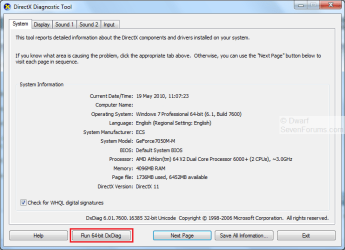
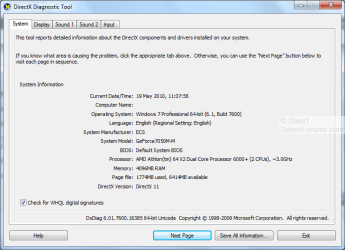
By default, dxdiag runs in 32-bit mode.
Capture.PNG
If you want the 64-bit version, simply click on Run 64-bit DxDiag.
Capture1.PNG
 
Last edited:

My Computer

Computer type
PC/Desktop
Computer Manufacturer/Model Number
Dwarf Dwf/11/2012 r09/2013
OS
Windows 8.1 Pro RTM x64
CPU
Intel Core-i5-3570K 4-core @ 3.4GHz (Ivy Bridge) (OC 4.4GHz)
Motherboard
ASRock Z77 Extreme4-M
Memory
4 x 4GB DDR3-1600 Corsair Vengeance CMZ8GX3M2A1600C9B (16GB)
Graphics Card(s)
MSI GeForce GTX770 Gaming OC 2GB
Sound Card
Realtek High Definition on board solution (ALC 898)
Monitor(s) Displays
ViewSonic VA1912w Widescreen (VGA)
Screen Resolution
1440x900
Hard Drives
OCZ Agility 3 SSD 120GB SATA III x2 (RAID 0)
Samsung HD501LJ 500GB SATA II x2
Hitachi HDS721010CLA332 1TB SATA II
Iomega 1.5TB Ext USB 2.0
WD 2.0TB Ext USB 3.0
PSU
XFX Pro Series 850W Semi-Modular
Case
Gigabyte IF233
Cooling
1 x 120mm Front Inlet 1 x 120mm Rear Exhaust
Keyboard
Microsoft Comfort Curve Keyboard 3000 (USB)
Mouse
Microsoft Comfort Mouse 3000 for Business (USB)
Internet Speed
NetGear DG834Gv3 ADSL Modem/Router (Ethernet) ~4.0 Mb/s (O2)
Antivirus
Avast! 8.0.1497
Browser
IE 11
Other Info
Optical Drive: HL-DT-ST BD-RE BH10LS30 SATA Bluray
Lexmark S305 Printer/Scanner/Copier (USB)
WEI Score: 8.1/8.1/8.5/8.5/8.25
Asus Eee PC 1011PX Netbook (Windows 7 x86 Starter)
Best way to tell what system type your OS is, is by going to Control Panel\System and Security\System and it gives the system type there.
 

My Computer

Computer Manufacturer/Model Number
self built
OS
Windows 7 Professional 64-bit
CPU
Intel E8400 3GHz
Motherboard
Intel DX48BT2
Memory
Kingston PC3-10700H 4Gb
Graphics Card(s)
XFX Radeon HD 5850 BlackEd.
Sound Card
Asus Xonar DG
Monitor(s) Displays
2x Samsung SM-T220HD 22"
Screen Resolution
1680x1050 on two monitors
Hard Drives
OCZ Vertex 2 120gb 3.5" (OS)
Seagate Momentus XT 500gb
Samsung F3 1Tb (games)
2x Samsung F1 1Tb
PSU
Thermaltake ToughPower 850w
Case
Thermaltake Armor
Cooling
Scythe Mugen II
Keyboard
Microsoft Comfort Curve USB
Mouse
Razer Diamondback 3G
Internet Speed
8128/443
By default, dxdiag runs in 32-bit mode.
View attachment 73797
If you want the 64-bit version, simply click on Run 64-bit DxDiag.
View attachment 73798

how do i run the 64 bit dxdiag???

can u tell exactly what is to be written on run?

i type "64-bit DxDiag" and it does'nt work...

thnks

i hate to be cynical but i had trouble believing you were serious about that question. the clue is in dwarf's post. examine it carefully. if you are uncomfortable with computers, i suggest you find live local professional help. if you are a computer professional, i suggest you get even more professional help. preferably from another profession, your GP can likely refer you.

if you look at the top dxdiag screen shot in his post (noted here as attachment 73797), there is a button marked 'run 64-bit dxdiag' lower left and highlighted in red, as he noted, run dxdiag 32 bit and CLICK THE BUTTON by moving your mouse pointer on top of it and pressing the left mouse button once till it clicks, it is not a command to type in the 'run' box.

i once had, as i am sure many here have, a customer who got an error message that said -hit any key to continue-, he of course called to ask where the 'any' key was as he couldn't find it on his keyboard.

and for those who may have been amongst those whole also proposed that 'any' key query, there are over 100 keys on the average keyboard. pick one at random, put your finger on it and quickly press down and release. that is one of the many 'any' keys. you may find that some of them have no effect and do not continue. if so, pick another at random until something happens. remember which ones did NOT work. they are in general 'special function' keys and are not just 'any' keys. they will also not work next time you get the message. the large key usually marked 'enter' is frequently a good choice for one that usually works, as is what typists refer to as the 'space' bar, the long skinny one at the bottom generally flanked by keys marked 'alt'. you keyboard may vary.

p.s. - da debble made me do this. if i have offended, sorry.

 
Last edited:

My Computer

Computer type
PC/Desktop
Computer Manufacturer/Model Number
Custom build Nanu by 3SX
OS
Win 7 ultimate x64 sp1
CPU
Intel i7 4 core 3770k ivy bridge o/c to 4.2ghz
Motherboard
Asus p8z77-i Deluxe
Memory
16 GB
Graphics Card(s)
Nvidia geforce GTX650
Sound Card
Realtek on mb
Monitor(s) Displays
24in. lcd/led
Screen Resolution
1920x1080
Hard Drives
128GB Kingston SSD
500GB seagate maximus xt hybrid
500GB hitachi HD
500GB external WD Passport usb3
PSU
Silverstone 450 watt
Case
Silverstone FT03 Black Fortress
Cooling
Water cooler
Keyboard
Logitech wireless kbd/mouse mk300
Mouse
Logitech wireless kbd/mouse mk300
Internet Speed
8mb adsl (actuall speed is around 6mb)
Other Info
Asus DSL-N55U wireless router
SONY BC-5850H 6X BLURAY writer
OUTPOST Security Suite
Back
Top