
This system set up for Flight Simulator X. Must be installed out side of the O.S. use full administrator in the process. Tweaked the OS to help with system resources being used. I have a couple of issues with Windows 7 Ultimate 64 Bit. May have broken the O.S. tweaking the OS. Flight Simulator X is running with out issues. This is the only issues with the O.S..
OS Windows 7 Ultimate 64 Bit. Administrator Log In Only no pass word. Just read in the forums not a good idea for daily use. Created a new user account. Can not install a Program as User must be logged in as Administrator. Want to install a Program as User? To see if the new user account will fix issues 1 thru 3.
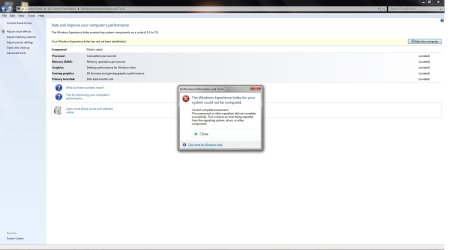
1. WEI? Get an error screen? See Screen shot below.
2. Cannot change Hardware Excelerator it is grayed out. The only way that can happen if there has been a change by the user in the OS is difficult to do according to Microsoft? Maybe I broke it or the GPU GTX 780 x 2 SLI?
3. Microsoft Combat Flight Simulator 2 will not set up properly on this system. Cannot change the Type of filtering for the textures requires Hardware Excelerator to be ticked (Enabled) on the interface in order to select difrent filtering. Greyed out.
Not sure If this should be done?
A fresh in stall windows 7 Ultimate 64 Bit to another hard drive and Multi Boot the OS? Not sure of the proper procedures? Not a permanent installation testing only it would not fix the C: Drive O.S..
http://www.sevenforums.com/installation-setup/24414-dual-boot-windows-7-twice.html
The forums and tutatorials are great very much appreciated. It is my lack of understanding that makes it a bit daunting.
Thank You
LarryA
OS Windows 7 Ultimate 64 Bit. Administrator Log In Only no pass word. Just read in the forums not a good idea for daily use. Created a new user account. Can not install a Program as User must be logged in as Administrator. Want to install a Program as User? To see if the new user account will fix issues 1 thru 3.
1. WEI? Get an error screen? See Screen shot below.
2. Cannot change Hardware Excelerator it is grayed out. The only way that can happen if there has been a change by the user in the OS is difficult to do according to Microsoft? Maybe I broke it or the GPU GTX 780 x 2 SLI?
3. Microsoft Combat Flight Simulator 2 will not set up properly on this system. Cannot change the Type of filtering for the textures requires Hardware Excelerator to be ticked (Enabled) on the interface in order to select difrent filtering. Greyed out.
Not sure If this should be done?
A fresh in stall windows 7 Ultimate 64 Bit to another hard drive and Multi Boot the OS? Not sure of the proper procedures? Not a permanent installation testing only it would not fix the C: Drive O.S..
http://www.sevenforums.com/installation-setup/24414-dual-boot-windows-7-twice.html
The forums and tutatorials are great very much appreciated. It is my lack of understanding that makes it a bit daunting.
Thank You
LarryA
Attachments
My Computer
- Computer type
- PC/Desktop
- Computer Manufacturer/Model Number
- Custom Build
- OS
- Windows 7 Ultimate 64 BIT
- CPU
- I 7 4930K @ 4.4 GHz
- Motherboard
- Asus Rampage lV Black Edition
- Memory
- G Skill Z Series 2133 MHz 16 Gb
- Graphics Card(s)
- Evga GTX 780 S.C. x 2 SLI
- Sound Card
- Peach Tree Nova 125SE DAC & Amp D-5 Speakers/Audeze LCD 2
- Monitor(s) Displays
- Dell Ultra Sharp Curved U3415W
- Screen Resolution
- 3440 X 1440
- Hard Drives
- C: Intel 730 Series 250Gb
4 x Western Digital Velocity Raptors 300 GB Each
1 x Western Digital Black Caviar 2 Tb Storage 5 GB Page Files & Temp Files moved from C: Drive, Media Files.
1 x Western Digital Black Caviar 2 Tb Removable back up.
- PSU
- Corsair AX 1500i
- Case
- CaseLabs Magnum 8
- Cooling
- Noctua Fans NFS12A x 11 & CPU Heat Sink Nh-D14
- Keyboard
- Enermax Aurora
- Mouse
- Logitech G3
- Internet Speed
- 100 Mbps
- Antivirus
- Norton Security 2015
- Browser
- Internet Explorer 10
- Other Info
- Various programs installed on 4 hard drives depending on usage. Air filters are custom by DEMCIFILTERS. Optic Drives None. System is built for Flight Simulator X and other flight sims. 3 x PDB boards for the fans and LCD lights. Really helps with cable management. Case fan RPM is a constant 1350 rpm extremely quiet system cannot hear the system running.


