Solved Item name in context menu changes itself

bl00keRs

New member
Local time
2:26 PM
Messages
14
I'd like to change the name of "Screen resolution" item in right click menu and it works... by the time.
I've been searching for this name whole C: partition and in the registry, and I found it there:
[HKEY_CLASSES_ROOT\Local Settings\MuiCache\28\5DB2B7D1], more specifically in the @C:\Windows\System32\display.dll,-4 file as the registry says. So, I double clicked on this value and changed data from "Screen resolution" to just "Resolution" and it works.

Few minutes later I've installed a program, and the name changed itself back to "Screen resolution". I don't remember if it happens during installation or just after but it's not happening in every application I'm installing, like the last one TeamViewer I installed today, and still have "Resolution" as I want.
So, I go back to the registry and want change it to "Resolution" again and what I see is that the catalog 28 has a new name 2B. Everything else is still the same (except the "Resolution" name too ofc)
Anyway, changed the name back to what I want and it works again. Thought it wasn't changed properly by my fault but I pissed me off when I installed graphics driver and Kaspersky and the name was back to original but this time there was not 28 or 2B catalog in the tree but a new one - 4F, next time it was 48 and right now it's 11E. I've tried to kill explorer.exe and check if it a trouble but not. I don't think it's due to shutdown/restart if it was done properly. I don't know what's going on.

Do you think that editing name directly in Windows\System32\display.dll may help?
 

My Computer

OS
None
Welcome to the Seven Forums

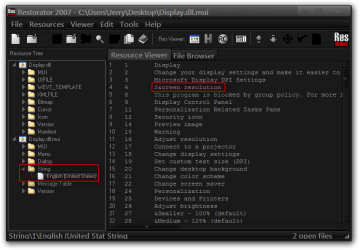
A lot of times the text is in the .mui of the same .dll, I looked at the Display.dll.mui and as you can see from the screenshot below shows the text you want to change.
Restorator 2007 - CUsersJerryDesktopDisplay.dll.mui.png

Being you're using a 64-bit system you also find that same Display.dll.mui in both C:\Windows\System32 and C:\Windows\SysWOW64

Jerry
 

My Computer

Computer type
Laptop
Computer Manufacturer/Model Number
Sager NP9170
OS
Win 7 Pro x64 / Win 10 Pro
CPU
Intel(R) Core(TM) i7-3630QM CPU @ 2.40GHz
Motherboard
CLEVO P170EM
Memory
12 GB
Graphics Card(s)
(1) Intel(R) HD Graphics 4000 (2) NVIDIA GeForce GTX 675M
Sound Card
(1) Realtek High Definition Audio (2) Intel(R) Display Aud
Monitor(s) Displays
17.3
Screen Resolution
1920x1080
Hard Drives
(1) Samsung 860 EVO 500GB(OS) (1) Samsung 860 EVO 500GB(Data)
Keyboard
Backlite
Antivirus
MSE, Malwarebytes Pro
Browser
Firefox
Other Info
DESKTOP: Custom-built.
OS: Win 10 Pro x64.
CASE: Rosewill R5.
CPU: Intel I5 4670K CPU @ 3.40GHz.
CPU COOLER: Cool Master Hyper 212 EVO.
MOTHERBOARD: Asus Z87-A.
MEMORY: Kingston HyperX 2x4 GB.
GPU: Nvidia Geforce 650 TI.
PSU: Corsair TX750.
DRIVES: (1) Samsung 840 120 GB SSD (2) Western Digital blue 500 GB 7200 RPM.
Alright. Never heard about .mui files for .dll. Thanks for help :D
 

My Computer

OS
None
You're Welcome, let us know if it works.
 

My Computer

Computer type
Laptop
Computer Manufacturer/Model Number
Sager NP9170
OS
Win 7 Pro x64 / Win 10 Pro
CPU
Intel(R) Core(TM) i7-3630QM CPU @ 2.40GHz
Motherboard
CLEVO P170EM
Memory
12 GB
Graphics Card(s)
(1) Intel(R) HD Graphics 4000 (2) NVIDIA GeForce GTX 675M
Sound Card
(1) Realtek High Definition Audio (2) Intel(R) Display Aud
Monitor(s) Displays
17.3
Screen Resolution
1920x1080
Hard Drives
(1) Samsung 860 EVO 500GB(OS) (1) Samsung 860 EVO 500GB(Data)
Keyboard
Backlite
Antivirus
MSE, Malwarebytes Pro
Browser
Firefox
Other Info
DESKTOP: Custom-built.
OS: Win 10 Pro x64.
CASE: Rosewill R5.
CPU: Intel I5 4670K CPU @ 3.40GHz.
CPU COOLER: Cool Master Hyper 212 EVO.
MOTHERBOARD: Asus Z87-A.
MEMORY: Kingston HyperX 2x4 GB.
GPU: Nvidia Geforce 650 TI.
PSU: Corsair TX750.
DRIVES: (1) Samsung 840 120 GB SSD (2) Western Digital blue 500 GB 7200 RPM.
Nope. Not worked for me. Can you check, please? Maybe something is wrong with my system.
 

My Computer

OS
None
Welcome to the Seven Forums

A lot of times the text is in the .mui of the same .dll, I looked at the Display.dll.mui and as you can see from the screenshot below shows the text you want to change.
View attachment 300677

Being you're using a 64-bit system you also find that same Display.dll.mui in both C:\Windows\System32 and C:\Windows\SysWOW64

Jerry
Jerry, all I see is a black hole. I wish you guys would not post black holes that are unreadable for an old man.
 

My Computer

Computer Manufacturer/Model Number
HP, Dell, Gateway, Toshiba - 4 laptops and 2 desktops
OS
Vista, Windows7, Mint Mate, Zorin, Windows 8
CPU
from 1.6GHz Duo to i7
Monitor(s) Displays
2x HP w2207
Hard Drives
5x HDD, 7x SSD, 12x Externals
Keyboard
with trackball - no mices
Mouse
Trackball mice
Internet Speed
DSL 6000
Nope. Not worked for me. Can you check, please? Maybe something is wrong with my system.
Did not work for me sorry I don't know where that text is at.

Jerry
 

My Computer

Computer type
Laptop
Computer Manufacturer/Model Number
Sager NP9170
OS
Win 7 Pro x64 / Win 10 Pro
CPU
Intel(R) Core(TM) i7-3630QM CPU @ 2.40GHz
Motherboard
CLEVO P170EM
Memory
12 GB
Graphics Card(s)
(1) Intel(R) HD Graphics 4000 (2) NVIDIA GeForce GTX 675M
Sound Card
(1) Realtek High Definition Audio (2) Intel(R) Display Aud
Monitor(s) Displays
17.3
Screen Resolution
1920x1080
Hard Drives
(1) Samsung 860 EVO 500GB(OS) (1) Samsung 860 EVO 500GB(Data)
Keyboard
Backlite
Antivirus
MSE, Malwarebytes Pro
Browser
Firefox
Other Info
DESKTOP: Custom-built.
OS: Win 10 Pro x64.
CASE: Rosewill R5.
CPU: Intel I5 4670K CPU @ 3.40GHz.
CPU COOLER: Cool Master Hyper 212 EVO.
MOTHERBOARD: Asus Z87-A.
MEMORY: Kingston HyperX 2x4 GB.
GPU: Nvidia Geforce 650 TI.
PSU: Corsair TX750.
DRIVES: (1) Samsung 840 120 GB SSD (2) Western Digital blue 500 GB 7200 RPM.
Must say that it's working. The name changes itself to the one in the 4th line in .mui file when I installed Photoshop. Maybe some item in the registry needs to be refreshed by installations to get it working.
 

My Computer

OS
None
Back
Top