Solved iTunes idling 25 cpu.

BorisTheAnimal

Furry Pride
Pro User
VIP
Local time
8:31 PM
Messages
1,411
Location
Milkyway
Hi,

been using iTunes almost my whole life and it has had ups and some downs but recently it has been idling with 25 in CPU in windows task manager, I tried resetting the winsock netsh as one site had suggested but nothing happened.

Please tell me if I have forgotten any info!

BTA
 

My Computer

Computer type
PC/Desktop
Computer Manufacturer/Model Number
Custom build
OS
Windows 7 Home Premium
CPU
i5-3570k
Motherboard
ASUS Sabertooth z77
Memory
16 GB DDR3 G Skill Sniper
Graphics Card(s)
GIGABYTE GeForce GTX 970 GV-N970WF3OC-4GD
Monitor(s) Displays
ASUS ROG PG278Q
Screen Resolution
2560x1440@60Hz/120Hz/144Hz
Hard Drives
56GB KINGSTON SVP200S37A60G
512GB Crucial MX100
1863GB Seagate ST2000DM001-1CH164
2795GB Seagate ST3000DM001-9YN166
PSU
Corsair GS800
Case
Storm Trooper Stryker White
Keyboard
Logitech G910 Orion Spark
Mouse
Logitech G502
Antivirus
MSE
Browser
Firefox/Chrome
Other Info
Logitech G633
Logitech Mouse Matt

My Computer

Computer type
PC/Desktop
Computer Manufacturer/Model Number
Custom Build
OS
Windows 7 Ultimate x64 SP1
CPU
AMD Phenom 2 1090T
Motherboard
Gigabyte GA-890FXA-UD5
Memory
2x8GB Kingston HyperX Fury Black 1600Mhz Unganged
Graphics Card(s)
MSI GTX 970 Gaming 4G
Sound Card
Realtek On-Board HD 7.1 Audio / Logitech G35
Monitor(s) Displays
3xAcer GD245HQ
Screen Resolution
1920x1080
Hard Drives
Samsung 850 Pro 512GB SSD - OS /
WD Caviar Black SATA 3 - 1 TBx2 - Dynamic RAID 0 /
WD Caviar Green SATA 2 - 640GBx2 - Dynamic RAID 0 /
WD Caviar Green SATA 2 - 640GB - Internal Backup /
Seagate Barracude SATA 3 - 3TB - External Backup/ Sync
PSU
HighPower 1000W
Case
Cooler Master HAF 932
Cooling
Noctua NH-D14
Keyboard
Logitech G19
Mouse
Logitech G500
Internet Speed
100/4 Mbit Cable (100GB quota)
Antivirus
ZoneAlarm Extreme Security / MBAM Pro / MBAE Free / SAS Free
Browser
IE 11 - Firefox - Chrome
Other Info
Logitech F710/ G27/ G940/ Z5500 // TrackIR 5 // Nvidia 3D Surround Vision
Did you update all Apple software? QuickTime, Bonjour etc.

Tried with another account yet? http://www.sevenforums.com/tutorials/181024-user-account-create.html
Also try a clean startup with Apple programs and services enabled, and see if it will behave. http://www.sevenforums.com/tutorial...ation-conflicts-performing-clean-startup.html

Well I do have the latest iTunes and from what I've been able to understand you cannot really update/install Bonjour separately. And update QuickTime yesterday and did fiddle around a bit with the account but cannot get past that step where you have to insert details about a credit card, I do have one I just don't feel confident about the security.
 

My Computer

Computer type
PC/Desktop
Computer Manufacturer/Model Number
Custom build
OS
Windows 7 Home Premium
CPU
i5-3570k
Motherboard
ASUS Sabertooth z77
Memory
16 GB DDR3 G Skill Sniper
Graphics Card(s)
GIGABYTE GeForce GTX 970 GV-N970WF3OC-4GD
Monitor(s) Displays
ASUS ROG PG278Q
Screen Resolution
2560x1440@60Hz/120Hz/144Hz
Hard Drives
56GB KINGSTON SVP200S37A60G
512GB Crucial MX100
1863GB Seagate ST2000DM001-1CH164
2795GB Seagate ST3000DM001-9YN166
PSU
Corsair GS800
Case
Storm Trooper Stryker White
Keyboard
Logitech G910 Orion Spark
Mouse
Logitech G502
Antivirus
MSE
Browser
Firefox/Chrome
Other Info
Logitech G633
Logitech Mouse Matt
I suggested another Windows account, not iTunes. It is to eliminate any issues with your current account. Don't forget to try a clean startup (with Apple programs/services enabled) too.

Additionally, you can try Safe Mode (with and without Networking).
 

My Computer

Computer type
PC/Desktop
Computer Manufacturer/Model Number
Custom Build
OS
Windows 7 Ultimate x64 SP1
CPU
AMD Phenom 2 1090T
Motherboard
Gigabyte GA-890FXA-UD5
Memory
2x8GB Kingston HyperX Fury Black 1600Mhz Unganged
Graphics Card(s)
MSI GTX 970 Gaming 4G
Sound Card
Realtek On-Board HD 7.1 Audio / Logitech G35
Monitor(s) Displays
3xAcer GD245HQ
Screen Resolution
1920x1080
Hard Drives
Samsung 850 Pro 512GB SSD - OS /
WD Caviar Black SATA 3 - 1 TBx2 - Dynamic RAID 0 /
WD Caviar Green SATA 2 - 640GBx2 - Dynamic RAID 0 /
WD Caviar Green SATA 2 - 640GB - Internal Backup /
Seagate Barracude SATA 3 - 3TB - External Backup/ Sync
PSU
HighPower 1000W
Case
Cooler Master HAF 932
Cooling
Noctua NH-D14
Keyboard
Logitech G19
Mouse
Logitech G500
Internet Speed
100/4 Mbit Cable (100GB quota)
Antivirus
ZoneAlarm Extreme Security / MBAM Pro / MBAE Free / SAS Free
Browser
IE 11 - Firefox - Chrome
Other Info
Logitech F710/ G27/ G940/ Z5500 // TrackIR 5 // Nvidia 3D Surround Vision
I suggested another Windows account, not iTunes. It is to eliminate any issues with your current account. Don't forget to try a clean startup (with Apple programs/services enabled) too.

Additionally, you can try Safe Mode (with and without Networking).

Oh I see well now I feel dumb.

Hm do you think that it might also be because of how much music I have in my library?
 

My Computer

Computer type
PC/Desktop
Computer Manufacturer/Model Number
Custom build
OS
Windows 7 Home Premium
CPU
i5-3570k
Motherboard
ASUS Sabertooth z77
Memory
16 GB DDR3 G Skill Sniper
Graphics Card(s)
GIGABYTE GeForce GTX 970 GV-N970WF3OC-4GD
Monitor(s) Displays
ASUS ROG PG278Q
Screen Resolution
2560x1440@60Hz/120Hz/144Hz
Hard Drives
56GB KINGSTON SVP200S37A60G
512GB Crucial MX100
1863GB Seagate ST2000DM001-1CH164
2795GB Seagate ST3000DM001-9YN166
PSU
Corsair GS800
Case
Storm Trooper Stryker White
Keyboard
Logitech G910 Orion Spark
Mouse
Logitech G502
Antivirus
MSE
Browser
Firefox/Chrome
Other Info
Logitech G633
Logitech Mouse Matt
We all have our moments :)

I would think it is not dependant on library size however can not be sure. Was it working previously? Hopefully, we can get some answers as you try the diagnostic steps in previous posts.
 

My Computer

Computer type
PC/Desktop
Computer Manufacturer/Model Number
Custom Build
OS
Windows 7 Ultimate x64 SP1
CPU
AMD Phenom 2 1090T
Motherboard
Gigabyte GA-890FXA-UD5
Memory
2x8GB Kingston HyperX Fury Black 1600Mhz Unganged
Graphics Card(s)
MSI GTX 970 Gaming 4G
Sound Card
Realtek On-Board HD 7.1 Audio / Logitech G35
Monitor(s) Displays
3xAcer GD245HQ
Screen Resolution
1920x1080
Hard Drives
Samsung 850 Pro 512GB SSD - OS /
WD Caviar Black SATA 3 - 1 TBx2 - Dynamic RAID 0 /
WD Caviar Green SATA 2 - 640GBx2 - Dynamic RAID 0 /
WD Caviar Green SATA 2 - 640GB - Internal Backup /
Seagate Barracude SATA 3 - 3TB - External Backup/ Sync
PSU
HighPower 1000W
Case
Cooler Master HAF 932
Cooling
Noctua NH-D14
Keyboard
Logitech G19
Mouse
Logitech G500
Internet Speed
100/4 Mbit Cable (100GB quota)
Antivirus
ZoneAlarm Extreme Security / MBAM Pro / MBAE Free / SAS Free
Browser
IE 11 - Firefox - Chrome
Other Info
Logitech F710/ G27/ G940/ Z5500 // TrackIR 5 // Nvidia 3D Surround Vision
We all have our moments :)

I would think it is not dependant on library size however can not be sure. Was it working previously? Hopefully, we can get some answers as you try the diagnostic steps in previous posts.

Yeah well after Googling a bunch, it's not just me. It seems that the new iTunes 12 isn't as great as the previous versions were, and people are reporting lag and high cpu so I'll just have to wait and see or try a new music app.

Got any suggestions?
 

My Computer

Computer type
PC/Desktop
Computer Manufacturer/Model Number
Custom build
OS
Windows 7 Home Premium
CPU
i5-3570k
Motherboard
ASUS Sabertooth z77
Memory
16 GB DDR3 G Skill Sniper
Graphics Card(s)
GIGABYTE GeForce GTX 970 GV-N970WF3OC-4GD
Monitor(s) Displays
ASUS ROG PG278Q
Screen Resolution
2560x1440@60Hz/120Hz/144Hz
Hard Drives
56GB KINGSTON SVP200S37A60G
512GB Crucial MX100
1863GB Seagate ST2000DM001-1CH164
2795GB Seagate ST3000DM001-9YN166
PSU
Corsair GS800
Case
Storm Trooper Stryker White
Keyboard
Logitech G910 Orion Spark
Mouse
Logitech G502
Antivirus
MSE
Browser
Firefox/Chrome
Other Info
Logitech G633
Logitech Mouse Matt
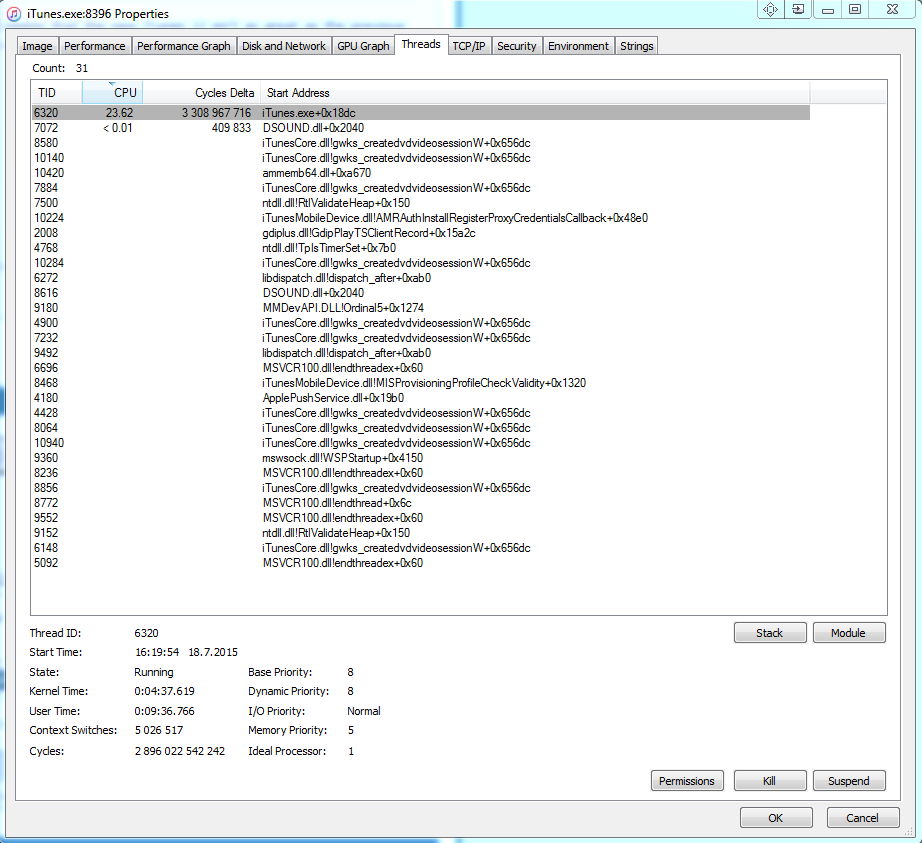
Hm after troubleshooting a bit and using Process Explorer, I might have found something, it might be a clue but I don't really know because I haven't used PE that much so I am not sure what it means.

7NHPxJ6.png


Would love to know what "iTunes.exe+0x18dc" means.
 

My Computer

Computer type
PC/Desktop
Computer Manufacturer/Model Number
Custom build
OS
Windows 7 Home Premium
CPU
i5-3570k
Motherboard
ASUS Sabertooth z77
Memory
16 GB DDR3 G Skill Sniper
Graphics Card(s)
GIGABYTE GeForce GTX 970 GV-N970WF3OC-4GD
Monitor(s) Displays
ASUS ROG PG278Q
Screen Resolution
2560x1440@60Hz/120Hz/144Hz
Hard Drives
56GB KINGSTON SVP200S37A60G
512GB Crucial MX100
1863GB Seagate ST2000DM001-1CH164
2795GB Seagate ST3000DM001-9YN166
PSU
Corsair GS800
Case
Storm Trooper Stryker White
Keyboard
Logitech G910 Orion Spark
Mouse
Logitech G502
Antivirus
MSE
Browser
Firefox/Chrome
Other Info
Logitech G633
Logitech Mouse Matt
Well gonna mark this one solved after I changed the look of iTunes, it seems that it is too heavy for iTunes to display all songs listed per artist per album.
 

My Computer

Computer type
PC/Desktop
Computer Manufacturer/Model Number
Custom build
OS
Windows 7 Home Premium
CPU
i5-3570k
Motherboard
ASUS Sabertooth z77
Memory
16 GB DDR3 G Skill Sniper
Graphics Card(s)
GIGABYTE GeForce GTX 970 GV-N970WF3OC-4GD
Monitor(s) Displays
ASUS ROG PG278Q
Screen Resolution
2560x1440@60Hz/120Hz/144Hz
Hard Drives
56GB KINGSTON SVP200S37A60G
512GB Crucial MX100
1863GB Seagate ST2000DM001-1CH164
2795GB Seagate ST3000DM001-9YN166
PSU
Corsair GS800
Case
Storm Trooper Stryker White
Keyboard
Logitech G910 Orion Spark
Mouse
Logitech G502
Antivirus
MSE
Browser
Firefox/Chrome
Other Info
Logitech G633
Logitech Mouse Matt
Back
Top