when i boot this HP mini, get JAVA update notice everytime,
and
i clicked install,
but
JAVA update failed to get installed every time,
will u help me this?
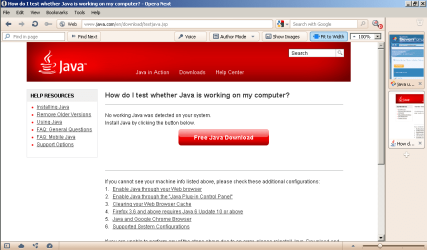
It looks like your Java was removed, but to be sure, go to Java + You - Under the big red /Free Java Download’ button in smaller print is a link to "Do I have Java?" Let Java scan your machine and see what the results are. If the scan says your machine doesn't have Java installed click the option to install the latest Java version (As of Aug 2011 - Version 6 Update 26). If the scan says you already have a previous version of Java installed, you can go to Control Panel, Programs and Features, left-click Java to highlight it, and Uninstall it.
You need to install both versions of Java (32-bit & 64-bit) if you are using a 64-bit system. Use the links provided above by A Guy to install the new Java app(s).
Then, even once you've downloaded Java, it may not be working correctly on your system. The Java (Sun) website offers a lot of help and suggestions. Here are some links that you might explore to see if the Java download is the problem: To find out if Java is working properly on your system visit: Test your Java Virtual Machine (JVM), and you can go to the Java website for the most recent Java downloads.
There are several different Java apps, and you may not have downloaded the correct one for your system (and for your needs). One common problem is that if you use 32-bit and 64-bit browsers interchangeably, you will need to install both 32-bit and 64-bit Java in order to have the Java plug-in for both browsers.
After installing Java, restart your browser and verify Java has been installed correctly. You can verify that it has been installed correctly by clicking this link.
My Computer
Computer Manufacturer/Model Number
HP Pavillion dv5t (generation 1)
OS
Vista 64 bit and 32 bit (SP2)
CPU
Intel(R) Core(TM)2 Duo Processor T9400 (2.53 GHz
Memory
4GB DDR2 System Memory (2 Dimm)
Graphics Card(s)
512 MB NVIDIA GeForce 9600M GT
Monitor(s) Displays
15.4" diagonal WSXGA+ High-Definition HP BrightView Widescre
Screen Resolution
1680 x 1050
Hard Drives
320GB 5400RPM SATA Hard Drive with HP ProtectSmart Hard Drive Protection
Keyboard
Built-in HP
Mouse
Built in - Synaptics TouchPad V6.5 on PS/2 Port
Internet Speed
Max
Other Info
~ Intel Next-Gen Wireless-N Mini-card w/Bluetooth ~ Blu-Ray ROM DVD+/-R/RW ~ Integ. HDTV Hybrid Tuner ~ 12 Cell Battery ~ MS Office (Home Premium) 2007 ~
Have a look in C:\users\(Username)\AppData\LocalLow\Sun\Java\jre1.7.0_x64 (1.6.27 for you?). There should be the MSI installer. Try running that. If no help, save to desktop and try to install in in safe mode with networking. You may need to d/l the SafeMSI to your desktop as well, to start the windows installer in safe mode.
If A Guy's suggestion doesn't work, you might want to consider contacting Java for help: Java Help. There's quite a bit of help available on the website. There's no phone support, but in addition to the self-help section above, they do have a fee-for-service Online Chat Support.
My Computer
Computer Manufacturer/Model Number
HP Pavillion dv5t (generation 1)
OS
Vista 64 bit and 32 bit (SP2)
CPU
Intel(R) Core(TM)2 Duo Processor T9400 (2.53 GHz
Memory
4GB DDR2 System Memory (2 Dimm)
Graphics Card(s)
512 MB NVIDIA GeForce 9600M GT
Monitor(s) Displays
15.4" diagonal WSXGA+ High-Definition HP BrightView Widescre
Screen Resolution
1680 x 1050
Hard Drives
320GB 5400RPM SATA Hard Drive with HP ProtectSmart Hard Drive Protection
Keyboard
Built-in HP
Mouse
Built in - Synaptics TouchPad V6.5 on PS/2 Port
Internet Speed
Max
Other Info
~ Intel Next-Gen Wireless-N Mini-card w/Bluetooth ~ Blu-Ray ROM DVD+/-R/RW ~ Integ. HDTV Hybrid Tuner ~ 12 Cell Battery ~ MS Office (Home Premium) 2007 ~