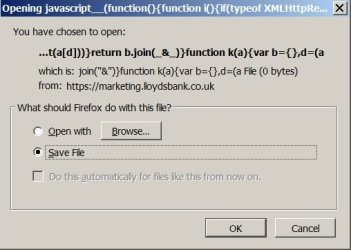
Javascript popup notice keeps appearing....?

Arcadian

New member
Member
VIP
Local time
10:26 PM
Messages
199
Having endless problems trying to resolve the slowing down even crashing on the Net probably caused by the Javascript notice in the attached pic. I've reinstalled Java twice, done a complete 3 hour registry cleanup with Zone Alarm (had for years and is excellent) and done a clear out with Junkware Removal Tool yet it still keeps appearing. The bank says it's a software fault and nothing to do with them.

Any help and advice very much appreciated....!!

Thanks :)
 

Attachments

  • Java notice.jpg
    Java notice.jpg
    55.6 KB · Views: 27

My Computer

Computer type
Laptop
Computer Manufacturer/Model Number
HP Presario CQ 56
OS
Windows 7 Home Premium 64bit
Antivirus
Zone Alarm
Browser
Firefox
Hi,
Not sure why you need Java from Oracle
Temp files delete,
Save it to your desktop,
Then right click it and click on Run this as administrator and Start the scanner,
Shut your machine down after it finishes if prompted to if not close button,
TFC - Temp File Cleaner by OldTimer Download - Geeks to Go Forum

After the above reset your browsers.
 

My Computer

Computer type
PC/Desktop
Computer Manufacturer/Model Number
Custom assembled by me :}
OS
Win-7-Pro64bit 7-H-Prem-64bit
CPU
i7-5930K 2nd i9-9940x both water blocked VRM's too
Motherboard
ASUS SABERTOOTH X99 2nd ASUS x299 Apex
Memory
Trident-z 3200C14 2nd Trident-z 3600C16
Graphics Card(s)
EVGA 1080ti ftw3 2nd Titan Xp both water blocked
Sound Card
Built-in Realtek
Monitor(s) Displays
1-AOC G2460PG 24"G-Sync 144Hz/ 2nd 1-ASUS VG248QE 24" 144Hz
Screen Resolution
1920 x 1080 144Hz
Hard Drives
2-Samsung M.2 Evo & Evo Plus
2-Samsung 850 EVO 500GB SSD's/ 3-2.5 W.D. Black 1tb-&3-1tb/3-3.5 WD Black 1tb hdd's
PSU
EVGA SuperNOVA 1000-P2 2nd 1200-P2
Case
2-Corsair Obsidian Series 450D Black ATX Mid Tower
Cooling
Custom water loops
Keyboard
Logitech G710+/ 2nd Logitech G910
Mouse
2-RedDragon M901 Perdition 16400 dpi Gaming mouse = wired
Internet Speed
Comcast Ping 19ms 89.31mbps download speed 6.12mbps upload
Antivirus
Malwarebytes Pro/ Superantispyware Pro
Browser
FireFox & Pale moon
Other Info
2nd ASUS X299 Apex/Intel i9-9940x with Custom water loop/7H-Prem-x64/Corsair 450D case/Ram Trident-z 3600C16 4x8gb / Samsung970Evo plus 500gb SSD/Dual ssd EZ swap evo/PSU EVGA SuperNova 1200w-P2 80+Platinum/GPU Titan Xp /8-ML-140 on push-pull on 2-280GTX rads
Amazing wonderful, notice gone - thanks !!

Not sure why Java was in Oracle in the first place as I've never understood any of it....lol ! :D

What was happening....?
 

My Computer

Computer type
Laptop
Computer Manufacturer/Model Number
HP Presario CQ 56
OS
Windows 7 Home Premium 64bit
Antivirus
Zone Alarm
Browser
Firefox
Hi very good
Keep TFC and run it once a month :)
As many people if you don't know what Java or Oracle is you might uninstall it fwiw I don't either so I never install it :)
It runs stuff people are unaware of and has many security holes and a horrible updating policy pretty much why it should be removed and never installed even if prompted to by a website.
If you want a universal browser use Chrome it has all of that stuff included in it,
Cheers.
 

My Computer

Computer type
PC/Desktop
Computer Manufacturer/Model Number
Custom assembled by me :}
OS
Win-7-Pro64bit 7-H-Prem-64bit
CPU
i7-5930K 2nd i9-9940x both water blocked VRM's too
Motherboard
ASUS SABERTOOTH X99 2nd ASUS x299 Apex
Memory
Trident-z 3200C14 2nd Trident-z 3600C16
Graphics Card(s)
EVGA 1080ti ftw3 2nd Titan Xp both water blocked
Sound Card
Built-in Realtek
Monitor(s) Displays
1-AOC G2460PG 24"G-Sync 144Hz/ 2nd 1-ASUS VG248QE 24" 144Hz
Screen Resolution
1920 x 1080 144Hz
Hard Drives
2-Samsung M.2 Evo & Evo Plus
2-Samsung 850 EVO 500GB SSD's/ 3-2.5 W.D. Black 1tb-&3-1tb/3-3.5 WD Black 1tb hdd's
PSU
EVGA SuperNOVA 1000-P2 2nd 1200-P2
Case
2-Corsair Obsidian Series 450D Black ATX Mid Tower
Cooling
Custom water loops
Keyboard
Logitech G710+/ 2nd Logitech G910
Mouse
2-RedDragon M901 Perdition 16400 dpi Gaming mouse = wired
Internet Speed
Comcast Ping 19ms 89.31mbps download speed 6.12mbps upload
Antivirus
Malwarebytes Pro/ Superantispyware Pro
Browser
FireFox & Pale moon
Other Info
2nd ASUS X299 Apex/Intel i9-9940x with Custom water loop/7H-Prem-x64/Corsair 450D case/Ram Trident-z 3600C16 4x8gb / Samsung970Evo plus 500gb SSD/Dual ssd EZ swap evo/PSU EVGA SuperNova 1200w-P2 80+Platinum/GPU Titan Xp /8-ML-140 on push-pull on 2-280GTX rads
I might add if you want to follow up on using a scanner to see what it finds see this,
Review Jacee’s instructions to run Adwcleaner here post #7,
Ignore the title of the thread,
http://www.sevenforums.com/system-security/316404-instant-savings-app.html
On the BleepingComputer site use the button that looks like this,
adwcleaner-button.JPG

Post the scan results.
 

My Computer

Computer type
PC/Desktop
Computer Manufacturer/Model Number
Custom assembled by me :}
OS
Win-7-Pro64bit 7-H-Prem-64bit
CPU
i7-5930K 2nd i9-9940x both water blocked VRM's too
Motherboard
ASUS SABERTOOTH X99 2nd ASUS x299 Apex
Memory
Trident-z 3200C14 2nd Trident-z 3600C16
Graphics Card(s)
EVGA 1080ti ftw3 2nd Titan Xp both water blocked
Sound Card
Built-in Realtek
Monitor(s) Displays
1-AOC G2460PG 24"G-Sync 144Hz/ 2nd 1-ASUS VG248QE 24" 144Hz
Screen Resolution
1920 x 1080 144Hz
Hard Drives
2-Samsung M.2 Evo & Evo Plus
2-Samsung 850 EVO 500GB SSD's/ 3-2.5 W.D. Black 1tb-&3-1tb/3-3.5 WD Black 1tb hdd's
PSU
EVGA SuperNOVA 1000-P2 2nd 1200-P2
Case
2-Corsair Obsidian Series 450D Black ATX Mid Tower
Cooling
Custom water loops
Keyboard
Logitech G710+/ 2nd Logitech G910
Mouse
2-RedDragon M901 Perdition 16400 dpi Gaming mouse = wired
Internet Speed
Comcast Ping 19ms 89.31mbps download speed 6.12mbps upload
Antivirus
Malwarebytes Pro/ Superantispyware Pro
Browser
FireFox & Pale moon
Other Info
2nd ASUS X299 Apex/Intel i9-9940x with Custom water loop/7H-Prem-x64/Corsair 450D case/Ram Trident-z 3600C16 4x8gb / Samsung970Evo plus 500gb SSD/Dual ssd EZ swap evo/PSU EVGA SuperNova 1200w-P2 80+Platinum/GPU Titan Xp /8-ML-140 on push-pull on 2-280GTX rads
Thanks for all the tips ! :cool:

I've used Firefox for so long now and so busy I guess better the devil you know than the one you don't....

The number of times when all options and avenues have been exhausted Win 7 forum has always been there !

Thanks again.... :)
 

My Computer

Computer type
Laptop
Computer Manufacturer/Model Number
HP Presario CQ 56
OS
Windows 7 Home Premium 64bit
Antivirus
Zone Alarm
Browser
Firefox
Hi and your welcome :)
Be sure to post Adwcleaners scan results ;)
Cheers.
 

My Computer

Computer type
PC/Desktop
Computer Manufacturer/Model Number
Custom assembled by me :}
OS
Win-7-Pro64bit 7-H-Prem-64bit
CPU
i7-5930K 2nd i9-9940x both water blocked VRM's too
Motherboard
ASUS SABERTOOTH X99 2nd ASUS x299 Apex
Memory
Trident-z 3200C14 2nd Trident-z 3600C16
Graphics Card(s)
EVGA 1080ti ftw3 2nd Titan Xp both water blocked
Sound Card
Built-in Realtek
Monitor(s) Displays
1-AOC G2460PG 24"G-Sync 144Hz/ 2nd 1-ASUS VG248QE 24" 144Hz
Screen Resolution
1920 x 1080 144Hz
Hard Drives
2-Samsung M.2 Evo & Evo Plus
2-Samsung 850 EVO 500GB SSD's/ 3-2.5 W.D. Black 1tb-&3-1tb/3-3.5 WD Black 1tb hdd's
PSU
EVGA SuperNOVA 1000-P2 2nd 1200-P2
Case
2-Corsair Obsidian Series 450D Black ATX Mid Tower
Cooling
Custom water loops
Keyboard
Logitech G710+/ 2nd Logitech G910
Mouse
2-RedDragon M901 Perdition 16400 dpi Gaming mouse = wired
Internet Speed
Comcast Ping 19ms 89.31mbps download speed 6.12mbps upload
Antivirus
Malwarebytes Pro/ Superantispyware Pro
Browser
FireFox & Pale moon
Other Info
2nd ASUS X299 Apex/Intel i9-9940x with Custom water loop/7H-Prem-x64/Corsair 450D case/Ram Trident-z 3600C16 4x8gb / Samsung970Evo plus 500gb SSD/Dual ssd EZ swap evo/PSU EVGA SuperNova 1200w-P2 80+Platinum/GPU Titan Xp /8-ML-140 on push-pull on 2-280GTX rads
Oops spoke too soon ! It's just started all over again....

You said something about Java's not needed do you mean go ahead, uninstall it and forget it altogether ?
 

My Computer

Computer type
Laptop
Computer Manufacturer/Model Number
HP Presario CQ 56
OS
Windows 7 Home Premium 64bit
Antivirus
Zone Alarm
Browser
Firefox
Hi,
Yes uninstall it if it's listed in Uninstall a program and your Firefox browser extensions
You might also check in Internet explorer by going to Start and Control Panel/ Internet options/ Programs/ Manage add-ons button
On the bottom left column where it says Show switch to Run without permissions too and review those listing for Java and or Oracle and disable them.
 

My Computer

Computer type
PC/Desktop
Computer Manufacturer/Model Number
Custom assembled by me :}
OS
Win-7-Pro64bit 7-H-Prem-64bit
CPU
i7-5930K 2nd i9-9940x both water blocked VRM's too
Motherboard
ASUS SABERTOOTH X99 2nd ASUS x299 Apex
Memory
Trident-z 3200C14 2nd Trident-z 3600C16
Graphics Card(s)
EVGA 1080ti ftw3 2nd Titan Xp both water blocked
Sound Card
Built-in Realtek
Monitor(s) Displays
1-AOC G2460PG 24"G-Sync 144Hz/ 2nd 1-ASUS VG248QE 24" 144Hz
Screen Resolution
1920 x 1080 144Hz
Hard Drives
2-Samsung M.2 Evo & Evo Plus
2-Samsung 850 EVO 500GB SSD's/ 3-2.5 W.D. Black 1tb-&3-1tb/3-3.5 WD Black 1tb hdd's
PSU
EVGA SuperNOVA 1000-P2 2nd 1200-P2
Case
2-Corsair Obsidian Series 450D Black ATX Mid Tower
Cooling
Custom water loops
Keyboard
Logitech G710+/ 2nd Logitech G910
Mouse
2-RedDragon M901 Perdition 16400 dpi Gaming mouse = wired
Internet Speed
Comcast Ping 19ms 89.31mbps download speed 6.12mbps upload
Antivirus
Malwarebytes Pro/ Superantispyware Pro
Browser
FireFox & Pale moon
Other Info
2nd ASUS X299 Apex/Intel i9-9940x with Custom water loop/7H-Prem-x64/Corsair 450D case/Ram Trident-z 3600C16 4x8gb / Samsung970Evo plus 500gb SSD/Dual ssd EZ swap evo/PSU EVGA SuperNova 1200w-P2 80+Platinum/GPU Titan Xp /8-ML-140 on push-pull on 2-280GTX rads
Uninstalled Java ok, but nothing in Firefox browser extensions. Also no sign of Java or Oracle in switch to "Run without permissions".... ??

Edit 1: Just found even with Java removed etc. still the same slowness/ crashing occurs together with the wretched notice....

Edit 2: Finally discovered it's Firefox for some reason as using Internet Explorer it works fine....

More later....
 
Last edited:

My Computer

Computer type
Laptop
Computer Manufacturer/Model Number
HP Presario CQ 56
OS
Windows 7 Home Premium 64bit
Antivirus
Zone Alarm
Browser
Firefox
Arcadian,
The screenshot in the original post shows the browser downloading/opening a javascript file. As you have probably guessed by now, that should not be happening. However, that problem has very little to do with the Java app from Oracle. https://java.com/en/download/faq/java_javascript.xml

In general, avoid automated tools that clean the Windows registry. The registry is too complicated to be throwing automated tools at it. Also, extra* registry entries are rarely the cause of slow downs. Missing registry entries can barf stuff. Automated tools can remove vital registry entries.


*empty, blank, no longer needed entries are just not a problem.
 
Last edited:

My Computer

Computer type
Laptop
Computer Manufacturer/Model Number
Employer provided Dell Latitude
OS
W7 Pro SP1 64bit
CPU
i7
Memory
8GB
Graphics Card(s)
Intel HD Graphics
Hard Drives
crappy SSD
Antivirus
Employer mandated Symantec Endpoint Protection
Browser
Pale Moon 64bit, IE11 64bit & Chrome 64bit
Finally sorted the problem via Firefox's help desk which was a bit involved, No Script being the cause and now removed together with Java and all's well.

However it's now raised the question about No Script itself which I've always found very useful in the past, but which if I understand it correctly is apparently required when using Java !

What to do.... ?

Thanks :)
 

My Computer

Computer type
Laptop
Computer Manufacturer/Model Number
HP Presario CQ 56
OS
Windows 7 Home Premium 64bit
Antivirus
Zone Alarm
Browser
Firefox
As I understand it:
No Script only blocks some javascript (JS) code. JS code can be used to do all sorts of bad stuff to the computer - including running Java apps.

Java is like an operating system. It runs as a virtual machine. Java apps run inside of the Java VM. Unfortunately, malicious Java apps can do bad things to the computer.

The best practice is: only install Java if you really need it. You probably don't need it.
 

My Computer

Computer type
Laptop
Computer Manufacturer/Model Number
Employer provided Dell Latitude
OS
W7 Pro SP1 64bit
CPU
i7
Memory
8GB
Graphics Card(s)
Intel HD Graphics
Hard Drives
crappy SSD
Antivirus
Employer mandated Symantec Endpoint Protection
Browser
Pale Moon 64bit, IE11 64bit & Chrome 64bit
Seems to continue working ok without Java so presumably there's no need for No Script any more ?
 

My Computer

Computer type
Laptop
Computer Manufacturer/Model Number
HP Presario CQ 56
OS
Windows 7 Home Premium 64bit
Antivirus
Zone Alarm
Browser
Firefox
No Script is still of value for what it does. I don't use it, so I cannot say how much trouble it is keep it working well. Maybe others can chime in.
 

My Computer

Computer type
Laptop
Computer Manufacturer/Model Number
Employer provided Dell Latitude
OS
W7 Pro SP1 64bit
CPU
i7
Memory
8GB
Graphics Card(s)
Intel HD Graphics
Hard Drives
crappy SSD
Antivirus
Employer mandated Symantec Endpoint Protection
Browser
Pale Moon 64bit, IE11 64bit & Chrome 64bit
Hi:

As UNI explained, "Java" (aka JRE) is NOT the same thing as "javascript".:)

Very few websites and applications require Java these days.
Because it is such a huge security vulnerability, if you don't absolutely need it, it's best to fully remove all traces of it from your system (especially old, outdated versions & leftovers), e.g. with a tool such as JavaRa
So, Java is something that is installed locally on your computer.
You would uninstall it and remove all remnants of it from the system.

As for javascript, it, too can be the source of security vulnerability. And some sites run so much javascript, that page loading and performance are compromised. So it's not a bad idea to block most of it on most websites.
Javascript is something used by websites & applications. It is NOT installed on your computer, like Java.
The approach here would be to use tools to block it when it's feasible to do so.

I have used NoScript for years in all of my Firefox installations, with absolutely no trouble at all. While it may be a bit over-engineered for the average user, with lots of configurable settings, I have found that the default settings + a few minor tweaks work just great. When I need to allow a particular script (temporarily or permanently) on a given web page, it's very easy to do. I think it's an important security extension for Firefox and wouldn't run Firefox without it. Blocking most javascript on most web pages allows Firefox to work better and more efficiently.

Add-on Home page: https://noscript.net/
Support site: https://noscript.net/forum
Support email: [email protected]

An additional layer of browser protection may be found with Malwarebytes Anti-Exploit.
There is a Free version that shields browsers, and a paid, Premium version which shields browsers and many other internet-facing applications.

Hope this helps,

MM

 

My Computer

Computer type
PC/Desktop
Computer Manufacturer/Model Number
Dell Studio XPS 8500
OS
OEM Windows 7 Ult (x64) SP1
CPU
Intel Core-i7 3770 @ 3.4 GHz
Motherboard
"Dell" branded
Memory
16 GB DDR3 SDRAM @ 1333 MHz
Graphics Card(s)
NVidia GeForce GT620 1 GB
Sound Card
THX TruStudio PC
Monitor(s) Displays
Dell U2410 Full HD
Hard Drives
2.0 TB SATA2 @ 7200 RPM
PSU
350W
Keyboard
MS 4000 Ergon - Wired
Mouse
Logitech Anywhere MX
Internet Speed
Cable HSI w/Turbo (router)
Antivirus
KIS-MBAM Premium-MBAE Premium
Browser
Fx (current version); IE
Other Info
And a Win7/64 Pro laptop; And a Win10/64 Pro desktop.
Excellent yes thanks MM now I get the picture. I've used Noscript for years too and prevented a couple of clickjacking attempts and one or two other important things but never got into the complicated selections as I'm definitely not a techie. So I'll do a final clear out of Java and join the No Script forum asap....

Thanks again everyone !! :D
 

My Computer

Computer type
Laptop
Computer Manufacturer/Model Number
HP Presario CQ 56
OS
Windows 7 Home Premium 64bit
Antivirus
Zone Alarm
Browser
Firefox
Uninstalled Java ok but a bit confused now....??

https://noscript.net/faq#qa1_7
________________________


1.7

Q: Have I got to disable JavaScript from Firefox options to browse safely with NoScript?
A: You must not disable JavaScript in Firefox! NoScript will allow/forbid scripts, but they have to be kept enabled by default, as it almost always is. On Firefox 24 or above this is an hidden about:config preference (javascript.enabled) which must preserve its default true value. On older Firefox versions only (23 or below) you may want to check that Tools|Options|Content|Enable JavaScript* option is still checked (JavaScript enabled), otherwise JavaScript is disabled everywhere even if allowed by NoScript.
*Under Preferences on Mac OS X, Edit|Preferences on Linux.
 

My Computer

Computer type
Laptop
Computer Manufacturer/Model Number
HP Presario CQ 56
OS
Windows 7 Home Premium 64bit
Antivirus
Zone Alarm
Browser
Firefox
Hi:

As far as Java uninstall -- go into the Windows control panel > programs (or use any utility that shows the full list of installed programs) and make sure you don't have remnants of old, outdated versions installed. Many folks end up with quite few old versions + the current one. That JavaRa tool is a good way to completely clear out all remnants, to reduce security vulnerability.

As far as that FAQ from the NS site:
There are 2 ways to disable javascript, EITHER internally from within Firefox itself, OR via the NoScript extension. If I understand that snippet correctly, it's saying that, if you disable javascript from within Firefox, then NoScript cannot do its job.
IOW, you cannot disable it both ways -- it's either/or.
Either disable it from within Firefox, OR use NoScript.
I personally find that using NoScript provides more granular and convenient end-user control.
If you disable it from within Firefox, it's pretty much all-or-none and it can keep you from viewing some "good" content on some sites.

Further clarification on this might be available at the NoScript forum or support email.

Cheers,
 

My Computer

Computer type
PC/Desktop
Computer Manufacturer/Model Number
Dell Studio XPS 8500
OS
OEM Windows 7 Ult (x64) SP1
CPU
Intel Core-i7 3770 @ 3.4 GHz
Motherboard
"Dell" branded
Memory
16 GB DDR3 SDRAM @ 1333 MHz
Graphics Card(s)
NVidia GeForce GT620 1 GB
Sound Card
THX TruStudio PC
Monitor(s) Displays
Dell U2410 Full HD
Hard Drives
2.0 TB SATA2 @ 7200 RPM
PSU
350W
Keyboard
MS 4000 Ergon - Wired
Mouse
Logitech Anywhere MX
Internet Speed
Cable HSI w/Turbo (router)
Antivirus
KIS-MBAM Premium-MBAE Premium
Browser
Fx (current version); IE
Other Info
And a Win7/64 Pro laptop; And a Win10/64 Pro desktop.
Thanks agreed, best to use No Script and see how it goes. Keep you posted....

Cheers :)
 

My Computer

Computer type
Laptop
Computer Manufacturer/Model Number
HP Presario CQ 56
OS
Windows 7 Home Premium 64bit
Antivirus
Zone Alarm
Browser
Firefox
Back
Top