Jump Lists - Reset and Clear All Items

How to Reset and Clear All Items in Windows 7 Jump Lists

   Information
This will show you how to completely reset and clear specific or all items in the Start Menu and Taskbar jump lists in Windows 7 to start fresh again.

This will only affect your currently logged in user account and no other users on the computer.

   Note
On a computer that is running Windows 7 or Windows Server 2008 R2, the Jump List of an application may disappear permanently when you use the application to open or save a new item. This issue occurs when there are 999 items in the Jump List already.


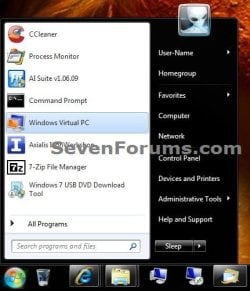
EXAMPLE: Start Menu Jump Lists Before and Reset
NOTE: You will need to click or hover on the arrow (if available) to the far right to see the Start Menu Recent or Pinned program's jump list.
Start_Menu-before.jpgStart_Menu-reset.jpg
EXAMPLE: Taskbar Jump Lists Before and Reset
NOTE: You will need to right click on the taskbar icons to see their jump list.
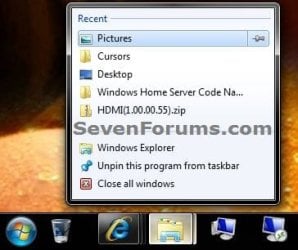
Taskbar-before.jpgTaskbar-reset.jpg


OPTION ONE

To Only Remove a Specific Item in a Jump List


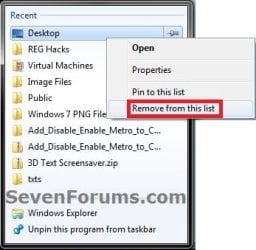
1. Open the program's jump list, right click on a unpinned item that you want to remove, and click on Remove from this list. (see screenshot below)
Remove.jpg
2. Repeat step 1 for any other item you wish to remove from this or any other program's jump list.


OPTION TWO

To Reset and Clear All Jump Lists Automatically with a BAT File


1. Click on the Download button below to download the file below, and save it to your desktop.
Reset_Recent_Jump_List_Items.bat

Download


2. Click or double click on the downloaded BAT file to open and run it.

3. If prompted, click on Run.
NOTE: If you like, you can stop getting the Run prompt by unblocking the downloaded .bat file.

4. You will now see a quick flash as the BAT file runs and restarts explorer.

5. Your jump lists have been reset and cleared to be empty now. It may take a day or two afterwards before the jump lists repopulate.


OPTION THREE

To Reset and Clear All Jump Lists in a Command Prompt


1. Open a command prompt.

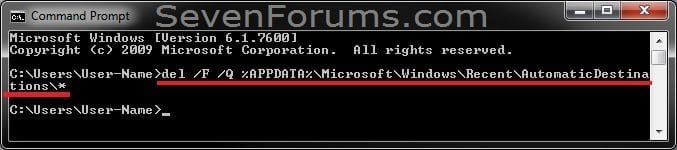
2. In the command prompt, "Copy and Paste" (or type) the command below and press enter. (see screenshot below)

Code:
del /F /Q %APPDATA%\Microsoft\Windows\Recent\AutomaticDestinations\*
CMD1.jpg
3. In the command prompt, "Copy and Paste" (or type) the command below and press enter. (see screenshot below)

Code:
del /F /Q %APPDATA%\Microsoft\Windows\Recent\CustomDestinations\*
CMD2.jpg
4. Close the command prompt.

5. Log off and on, or restart the computer to fully apply.

6. Your jump lists have been reset and cleared to be empty now. It may take a day or two afterwards before the jump lists repopulate.
That's it,
Shawn


Attachments

Last edited:
Works great Shawn, Thanks.
 

My Computer My Computer

Computer type
PC/Desktop
Computer Manufacturer/Model Number
Self Built
OS
Win 10 Pro x64
CPU
Intel I5-2500K @3.3GHz
Motherboard
Asrock P67 Extreme4
Memory
16GB G.Skill Ripjaws X (4x4GB)
Graphics Card(s)
EVGA GeForce 750 Ti SC 2GB
Sound Card
ASUS Xonar DG 5.1 Channels 24-bit 96KHz PCI Interface Sound
Monitor(s) Displays
auria eq2367
Screen Resolution
1920 x 1080
Hard Drives
250GB Samsung 850 EVO SSD
1TB WD Blue
1TB Hitachi
PSU
SeaSonic X 650W 80 Plus Gold
Case
Corsair Obsidian 750D
Cooling
Corsair H60, Three 140mm case fans
Keyboard
Logitech Wireless Keyboard K520
Mouse
Logitech Wireless Mouse M310
Internet Speed
Wave Broadband ~ 100 dn 5 up
Antivirus
Windows Defender, Malwarebytes Premium
Browser
Edge, IE11, Chrome
Other Info
Laptop specs: HP g7-1365dx /
CPU: AMD A6-3420M APU with Radeon(tm) HD Graphics /
RAM: Crucial 8Gb (2x4Gb) /
SSD: Crucial M4-CT128M4SSD2 ATA Device/ FW 000F /
GFX: AMD Radeon HD 6520G /
OS: Windows 10 Pro x64
Thank you Derek. :)
 

My Computer My Computer

Computer type
PC/Desktop
Computer Manufacturer/Model Number
Self built custom
OS
64-bit Windows 11 Pro for Workstations
CPU
Intel i7-8700K OC'd to 5 GHz
Motherboard
ASUS ROG Maximus XI Formula Z390
Memory
64 GB (4x16GB) G.SKILL TridentZ RGB DDR4 3600 MHz
Graphics Card(s)
ASUS ROG-STRIX-GTX1080TI-O11G-GAMING
Sound Card
Integrated
Monitor(s) Displays
2 x Samsung Odyssey G7 27"
Screen Resolution
2560x1440
Hard Drives
1TB Samsung 990 PRO M.2,
4TB Samsung 990 PRO PRO M.2,
TerraMaster F8 SSD Plus NAS
PSU
Seasonic Prime Titanium 850W
Case
Thermaltake Core P3
Cooling
Corsair Hydro H115i
Keyboard
Logitech wireless K800
Mouse
Logitech MX Master 4
Internet Speed
2 Gb/s Download and 100 Mb/s Upload
Antivirus
Malwarebyte Anti-Malware Premium
Browser
Google Chrome
Other Info
Logitech Z625 speaker system,
Logitech BRIO 4K Pro webcam,
HP Color LaserJet Pro MFP M477fdn,
APC SMART-UPS RT 1000 XL - SURT1000XLI,
Galaxy S23 Plus phone
Worked for me after a simple restart! My recent items were not displaying, despite being turned on, this fixed it for me :D
 

My Computer My Computer

OS
Windows 7
That's great new Merlin. Thank you for posting back with your results. :)
 

My Computer My Computer

Computer type
PC/Desktop
Computer Manufacturer/Model Number
Self built custom
OS
64-bit Windows 11 Pro for Workstations
CPU
Intel i7-8700K OC'd to 5 GHz
Motherboard
ASUS ROG Maximus XI Formula Z390
Memory
64 GB (4x16GB) G.SKILL TridentZ RGB DDR4 3600 MHz
Graphics Card(s)
ASUS ROG-STRIX-GTX1080TI-O11G-GAMING
Sound Card
Integrated
Monitor(s) Displays
2 x Samsung Odyssey G7 27"
Screen Resolution
2560x1440
Hard Drives
1TB Samsung 990 PRO M.2,
4TB Samsung 990 PRO PRO M.2,
TerraMaster F8 SSD Plus NAS
PSU
Seasonic Prime Titanium 850W
Case
Thermaltake Core P3
Cooling
Corsair Hydro H115i
Keyboard
Logitech wireless K800
Mouse
Logitech MX Master 4
Internet Speed
2 Gb/s Download and 100 Mb/s Upload
Antivirus
Malwarebyte Anti-Malware Premium
Browser
Google Chrome
Other Info
Logitech Z625 speaker system,
Logitech BRIO 4K Pro webcam,
HP Color LaserJet Pro MFP M477fdn,
APC SMART-UPS RT 1000 XL - SURT1000XLI,
Galaxy S23 Plus phone
Thanks Brink! I was adjusting to using the Jump lists, but Notepad would not cooperate. Its recent list did not populate. Still not getting some 3rd party apps to maintain a list, but I am working though it, and learning on the way. Seems that Notepad++ for example, does not add to its jumplist when a document is opened from the context-menu item that NP++ adds at install. But if I add it to the "open with" choices, and use that, it works.

More to learn about. But anyway, your Reset procedure encouraged me to keep poking at it. Thanks.
 

My Computer My Computer

Computer Manufacturer/Model Number
Dell XPS17 laptop
OS
Windows 7 Pro 64
CPU
i7 2760QM 2.4GHz
Memory
8GB
Graphics Card(s)
Intel HD/Nvidia GeForce 555M
Sound Card
RealTek
Monitor(s) Displays
Ntrig DuoSense digitzer, touchscreen
Hard Drives
750GB
Mouse
Synaptics touchpad
Sounds encouraging Peri. You might also report this to the creator of Notepad++ to see if they may be able to address it in their next version release.
 

My Computer My Computer

Computer type
PC/Desktop
Computer Manufacturer/Model Number
Self built custom
OS
64-bit Windows 11 Pro for Workstations
CPU
Intel i7-8700K OC'd to 5 GHz
Motherboard
ASUS ROG Maximus XI Formula Z390
Memory
64 GB (4x16GB) G.SKILL TridentZ RGB DDR4 3600 MHz
Graphics Card(s)
ASUS ROG-STRIX-GTX1080TI-O11G-GAMING
Sound Card
Integrated
Monitor(s) Displays
2 x Samsung Odyssey G7 27"
Screen Resolution
2560x1440
Hard Drives
1TB Samsung 990 PRO M.2,
4TB Samsung 990 PRO PRO M.2,
TerraMaster F8 SSD Plus NAS
PSU
Seasonic Prime Titanium 850W
Case
Thermaltake Core P3
Cooling
Corsair Hydro H115i
Keyboard
Logitech wireless K800
Mouse
Logitech MX Master 4
Internet Speed
2 Gb/s Download and 100 Mb/s Upload
Antivirus
Malwarebyte Anti-Malware Premium
Browser
Google Chrome
Other Info
Logitech Z625 speaker system,
Logitech BRIO 4K Pro webcam,
HP Color LaserJet Pro MFP M477fdn,
APC SMART-UPS RT 1000 XL - SURT1000XLI,
Galaxy S23 Plus phone
I will dig around for signs of interest, but they may not be too motivated. NP++ has had a functionality equal to the jump-lists for quite a while. Rather than remembering what it has opened lately, you just close the app the documents are not really closed. When the app re-opens, it restores tabs for all documents that were not explicitly closed in the last session. Somewhat like the session-saving tools in web browsers. It seems likely that there are other apps that are not integrated with the new features though.

It would be nice to have consistency of function, but it may be a while as the jump-list function is not as simple as associating an extension with an app. My primary interest is more understanding of how the jump-lists work, as this looks like an interesting area.

---Added:---
and now NP++ is working! Notepad started updating its jumplist right after I did your "Reset" process, but maybe NP++ needed a Windows shutdown/re-start? :confused:

The Jumplist feature gets more interesting as I get into it. It is different enough to be confusing as to what it is really doing, like: are the files in the hidden folders really "there" or is it just a junction/symlink? Or, at what part of the file "opening" does a does a document get added to the list? But the ability to, say, store a specific search (e.g. "date modified yesterday") is very promising. May cause me to re-think my whole way of finding my stuff. :)
 
Last edited:

My Computer My Computer

Computer Manufacturer/Model Number
Dell XPS17 laptop
OS
Windows 7 Pro 64
CPU
i7 2760QM 2.4GHz
Memory
8GB
Graphics Card(s)
Intel HD/Nvidia GeForce 555M
Sound Card
RealTek
Monitor(s) Displays
Ntrig DuoSense digitzer, touchscreen
Hard Drives
750GB
Mouse
Synaptics touchpad
Works great, thanks!

Saved me from having to make another thread about this.


:cool:
 

My Computer My Computer

OS
Win 7 Ultimate x64
You're most welcome Monsoon. :)
 

My Computer My Computer

Computer type
PC/Desktop
Computer Manufacturer/Model Number
Self built custom
OS
64-bit Windows 11 Pro for Workstations
CPU
Intel i7-8700K OC'd to 5 GHz
Motherboard
ASUS ROG Maximus XI Formula Z390
Memory
64 GB (4x16GB) G.SKILL TridentZ RGB DDR4 3600 MHz
Graphics Card(s)
ASUS ROG-STRIX-GTX1080TI-O11G-GAMING
Sound Card
Integrated
Monitor(s) Displays
2 x Samsung Odyssey G7 27"
Screen Resolution
2560x1440
Hard Drives
1TB Samsung 990 PRO M.2,
4TB Samsung 990 PRO PRO M.2,
TerraMaster F8 SSD Plus NAS
PSU
Seasonic Prime Titanium 850W
Case
Thermaltake Core P3
Cooling
Corsair Hydro H115i
Keyboard
Logitech wireless K800
Mouse
Logitech MX Master 4
Internet Speed
2 Gb/s Download and 100 Mb/s Upload
Antivirus
Malwarebyte Anti-Malware Premium
Browser
Google Chrome
Other Info
Logitech Z625 speaker system,
Logitech BRIO 4K Pro webcam,
HP Color LaserJet Pro MFP M477fdn,
APC SMART-UPS RT 1000 XL - SURT1000XLI,
Galaxy S23 Plus phone
Wow thats fast !, thank you for the great tutorial Shawn works brilliant :D

Ciara ... X
 

My Computer My Computer

Computer Manufacturer/Model Number
Home Built
OS
Windows 7 Professional 64-bit SP1
CPU
Intel E8400
Motherboard
MSI P35 Neo
Memory
4GB Crucial Ballistix
Graphics Card(s)
ATI ASUS Radeon HD 4830
Sound Card
Realtek ALC888 on Board
Monitor(s) Displays
Asus 22-inch VH226H Widescreen
Screen Resolution
1920 x 1080
Hard Drives
Two Western Digital 500GB
PSU
Hiper HPU-4M 530W
Case
Thermaltake Tsunami Dream Black
Cooling
Air/Fans
Keyboard
Saitek Eclipse
Mouse
Razer
Internet Speed
Sky Broadband
Other Info
USB Hub/Card Reader - 2 Pen Drives, 1 Phone Dock
You're most welcome Ciara. Thank you.
smile.gif
 

My Computer My Computer

Computer type
PC/Desktop
Computer Manufacturer/Model Number
Self built custom
OS
64-bit Windows 11 Pro for Workstations
CPU
Intel i7-8700K OC'd to 5 GHz
Motherboard
ASUS ROG Maximus XI Formula Z390
Memory
64 GB (4x16GB) G.SKILL TridentZ RGB DDR4 3600 MHz
Graphics Card(s)
ASUS ROG-STRIX-GTX1080TI-O11G-GAMING
Sound Card
Integrated
Monitor(s) Displays
2 x Samsung Odyssey G7 27"
Screen Resolution
2560x1440
Hard Drives
1TB Samsung 990 PRO M.2,
4TB Samsung 990 PRO PRO M.2,
TerraMaster F8 SSD Plus NAS
PSU
Seasonic Prime Titanium 850W
Case
Thermaltake Core P3
Cooling
Corsair Hydro H115i
Keyboard
Logitech wireless K800
Mouse
Logitech MX Master 4
Internet Speed
2 Gb/s Download and 100 Mb/s Upload
Antivirus
Malwarebyte Anti-Malware Premium
Browser
Google Chrome
Other Info
Logitech Z625 speaker system,
Logitech BRIO 4K Pro webcam,
HP Color LaserJet Pro MFP M477fdn,
APC SMART-UPS RT 1000 XL - SURT1000XLI,
Galaxy S23 Plus phone
Works as advertised, however I did find that you don't really need to reboot - restarting explorer.exe will do. :)
 

My Computer My Computer

Computer Manufacturer/Model Number
ThinkPad T43 (2668-44G)
OS
Win7 Professional, former XP (that is what I know), learned computing on 95 / DOS
CPU
Intel, Pentium M 1,86 GHz
Memory
2 x 512 MB
Graphics Card(s)
ATI Mobility Radeon X300
Sound Card
Creative SoundBlaster Audigy 2ZS Notebook PCMCIA
Monitor(s) Displays
Inbuilt!
Screen Resolution
1024 x 768 :(
Hard Drives
Having 40GB of space in the system I make use of other computers in our home network, and USB sticks...
Keyboard
Ahh, the legendary ThinkPad keyboard...
Mouse
UltraNav, but I exclusively use the TrackPoint
Internet Speed
Should be 8 Mb/s, varies from almost that to a fifth of that
Other Info
Calculator: HP 50g, running RPN (solely, of course), making good use of macros and some key layout editing, not to mention the all-important unit system editing software Unitman.

Once in a while I try to program a Mindstorms NXT with the supplied LabView-based program. Need to find another programming language for it...
Hi,

I ran the batch file three days ago, I've shutdown, restarted or logged-off/on several times since - and the Jump lists are NOT getting repopulated, yet the MRU lists in Word, PDF xChange, Irfan View etc, are intact.

What I would like is this :

to have the Jump Lists populate as documents are opened, and have them cleared when I shutdown, restart or log-off, except for the items I explicitly pin to the Jump List, which would persist until I explicitly remove them.

Is this possible.

thanks pjd
 
Last edited:

My Computer My Computer

Computer type
PC/Desktop
Computer Manufacturer/Model Number
generic - made to spec
OS
Win 7 Professional 64bit
CPU
I5 650 @ 3.2GHz
Motherboard
Gigabyte H55M-UD2H
Memory
6G
Graphics Card(s)
AMD Radeon R7 200 Series
Sound Card
whatever is on mobo
Monitor(s) Displays
1 x 24" Samsung
Screen Resolution
1920x1200
Hard Drives
Internal 1x256GB Toshiba SSD
Internal 1x2TB
External 2 slot USB 3.0 dock (various drives)
External 1 500GB USB 2.0 drive
PSU
850W Antech Modular
Case
Shiny Black Aluminium
Cooling
extra fans - sucker in front, blower at back - noisy & cool
Keyboard
Microsoft USB Dual Receiver Wireless Keyboard
Mouse
Microsoft USB Dual Receiver Wireless Mouse
Internet Speed
20/1Mbps down/up
Antivirus
MSE
Browser
Firefox and Chrome
Other Info
Hitachi USB 3.0 adapter
Hello pjd,

You could use the tutorial below to set Windows to clear recent items on exit.

http://www.sevenforums.com/tutorials/8176-clear-recent-items-documents-exit-windows-7-a.html


Double check to see if you have a Recent Items folder at the location below.

%APPDATA%\Microsoft\Windows

If not, and you have a Recent folder instead, then do what's in the blue note box at the top of the tutorial below to see if it helps.

In addition, double check using the same tutorial below to make sure that you have recent items turned on.

http://www.sevenforums.com/tutorials/2013-recent-items-turn-off.html
 

My Computer My Computer

Computer type
PC/Desktop
Computer Manufacturer/Model Number
Self built custom
OS
64-bit Windows 11 Pro for Workstations
CPU
Intel i7-8700K OC'd to 5 GHz
Motherboard
ASUS ROG Maximus XI Formula Z390
Memory
64 GB (4x16GB) G.SKILL TridentZ RGB DDR4 3600 MHz
Graphics Card(s)
ASUS ROG-STRIX-GTX1080TI-O11G-GAMING
Sound Card
Integrated
Monitor(s) Displays
2 x Samsung Odyssey G7 27"
Screen Resolution
2560x1440
Hard Drives
1TB Samsung 990 PRO M.2,
4TB Samsung 990 PRO PRO M.2,
TerraMaster F8 SSD Plus NAS
PSU
Seasonic Prime Titanium 850W
Case
Thermaltake Core P3
Cooling
Corsair Hydro H115i
Keyboard
Logitech wireless K800
Mouse
Logitech MX Master 4
Internet Speed
2 Gb/s Download and 100 Mb/s Upload
Antivirus
Malwarebyte Anti-Malware Premium
Browser
Google Chrome
Other Info
Logitech Z625 speaker system,
Logitech BRIO 4K Pro webcam,
HP Color LaserJet Pro MFP M477fdn,
APC SMART-UPS RT 1000 XL - SURT1000XLI,
Galaxy S23 Plus phone
Hey, could I revive this thread? I‘ve a related problem which I wasn‘t able to resolve for hours :(.
 

My Computer My Computer

OS
Windows 10 Pro x64
Hello Zydrius, :)

What problem are you having?
 

My Computer My Computer

Computer type
PC/Desktop
Computer Manufacturer/Model Number
Self built custom
OS
64-bit Windows 11 Pro for Workstations
CPU
Intel i7-8700K OC'd to 5 GHz
Motherboard
ASUS ROG Maximus XI Formula Z390
Memory
64 GB (4x16GB) G.SKILL TridentZ RGB DDR4 3600 MHz
Graphics Card(s)
ASUS ROG-STRIX-GTX1080TI-O11G-GAMING
Sound Card
Integrated
Monitor(s) Displays
2 x Samsung Odyssey G7 27"
Screen Resolution
2560x1440
Hard Drives
1TB Samsung 990 PRO M.2,
4TB Samsung 990 PRO PRO M.2,
TerraMaster F8 SSD Plus NAS
PSU
Seasonic Prime Titanium 850W
Case
Thermaltake Core P3
Cooling
Corsair Hydro H115i
Keyboard
Logitech wireless K800
Mouse
Logitech MX Master 4
Internet Speed
2 Gb/s Download and 100 Mb/s Upload
Antivirus
Malwarebyte Anti-Malware Premium
Browser
Google Chrome
Other Info
Logitech Z625 speaker system,
Logitech BRIO 4K Pro webcam,
HP Color LaserJet Pro MFP M477fdn,
APC SMART-UPS RT 1000 XL - SURT1000XLI,
Galaxy S23 Plus phone
Thank you for responding :). I thought a little bit and drew a conclusion that it would be better to create a separate thread as my problem is only partly related to the problem you‘re talking about in your tutorial. Also, this shall catch more attention from other people who may provide a working solution. Here‘s the link.
 

My Computer My Computer

OS
Windows 10 Pro x64
:thumbsup:
 

My Computer My Computer

Computer type
PC/Desktop
Computer Manufacturer/Model Number
Self built custom
OS
64-bit Windows 11 Pro for Workstations
CPU
Intel i7-8700K OC'd to 5 GHz
Motherboard
ASUS ROG Maximus XI Formula Z390
Memory
64 GB (4x16GB) G.SKILL TridentZ RGB DDR4 3600 MHz
Graphics Card(s)
ASUS ROG-STRIX-GTX1080TI-O11G-GAMING
Sound Card
Integrated
Monitor(s) Displays
2 x Samsung Odyssey G7 27"
Screen Resolution
2560x1440
Hard Drives
1TB Samsung 990 PRO M.2,
4TB Samsung 990 PRO PRO M.2,
TerraMaster F8 SSD Plus NAS
PSU
Seasonic Prime Titanium 850W
Case
Thermaltake Core P3
Cooling
Corsair Hydro H115i
Keyboard
Logitech wireless K800
Mouse
Logitech MX Master 4
Internet Speed
2 Gb/s Download and 100 Mb/s Upload
Antivirus
Malwarebyte Anti-Malware Premium
Browser
Google Chrome
Other Info
Logitech Z625 speaker system,
Logitech BRIO 4K Pro webcam,
HP Color LaserJet Pro MFP M477fdn,
APC SMART-UPS RT 1000 XL - SURT1000XLI,
Galaxy S23 Plus phone
Win10 rollback broke my jump lists, this post fixed it!

Hey thanks a lot for this solution, it worked for me! :):party::thumbsup:

I had done a rollback from Windows 10 to Windows 7 Pro and that had somehow broken the application-specific jump lists. Am glad I stumbled upon this post!
 

My Computer My Computer

Computer type
Laptop
Computer Manufacturer/Model Number
Lenovo T510
OS
Windows 7 Pro x64
CPU
Intel Core i7 M 620 @ 2.67GHz
Memory
8 GB
Graphics Card(s)
NVIDIA NVS 3100M
Antivirus
360 Total Security
Browser
Chrome, Firefox
Back
Top