Jumpy Mouse

huffman

New member
Pro User
Local time
9:22 AM
Messages
715
This applies to both my Win 7 PC and my Win 10 PC. My wireless mouses are really jumpy at times (most of time really).
Someone told me it was because of the proximity to my wireless phone (Magic Jack).


I am just wondering if there is someway to make them not to act that way (besides either moving the phones or PC's). I have the movement set to absolute minimum.


My wife's Win 10 notebook is upstairs and she never mentioned having this issue with same type mouse.


Any suggestions is appreciated.
 

My Computer

OS
Windows 7 Pro
CPU
Intel(R) Pentium(R) Duel CPU E2200 2.20 Ghz
Motherboard
GA-G41M-ES2L
Memory
4 gb 2.96 Usable
Graphics Card(s)
Onboard
Sound Card
Onboard
Hard Drives
2 - 1TB WD Sata Drives
Since all domestic wireless things (cordless phones, thermometers, baby minders and mice for example) all work with the same band of assigned frequencies there will be conflicts. Try more separation or a wired mouse/keyboard.
Art.
 

My Computer

Computer type
PC/Desktop
Computer Manufacturer/Model Number
Home built
OS
Win7 sp1 Pro 64bit / XP sp2 Pro (games only)
CPU
Intel Core 2 Duo E8400 @ 3.00GHz
Motherboard
Intel Corporation DP35DP (CPU1)
Memory
8.00 GB Dual-Channel DDR2 @ 400MHz (5-5-5-18)
Graphics Card(s)
1024MB GeForce GTX 560
Sound Card
NVIDIA High Definition Audio
Monitor(s) Displays
SyncMaster (2048x1152@60Hz)
Hard Drives
240GB Sandisc Extreme Pro SSD
244GB Seagate ST3250410AS
488GB Seagate ST500DM002-1BD142
931GB Western Digital WDC WD1003FZEX
PSU
Corsair 720
Case
ATX
Keyboard
HID Keyboard Device Logitech
Mouse
HID-compliant mouse Microsoft
Other Info
TSSTcorp CDDVDW SH-S223L

HL-DT-ST BD-RE BH12LS35
What is the pointer speed in Mouse, in the Control Panel?
 

My Computer

Computer type
Laptop
Computer Manufacturer/Model Number
Dell M6500 Precision Work Station
OS
Windows 7 Pro SP1 64 bit
Memory
8 GB
Screen Resolution
1920x
Internet Speed
30 Mbps
Antivirus
Norton Security
Browser
IE 11
I had the same issue with a bluetooth mouse. It could be drivers.


But i guess wireless means 2.4GHz with a usb dongle, in which case:
This happens form time to time. They have custom protocols but mostly use the same transmission technique. If one device has no error detection in its protocol it behaves weirdly if something interferes.


However, some people have wires somewhere (charging-/power-cables for your Laptop/Desktop/...) near the receiver, which can cause trouble. Maybe use one side of your laptop for cables and the other for the wireless dongle.
Using a metal desk also was a problem once... Also mousepads with metal in it like to interfere (even nice looking metal-ornaments).
 

My Computer

OS
Windows 7 Ultimate x64
To rule out the driver or a driver conflict, I'd either temporally power off the Magic Jack, or move it somewhere far away. Then see if the mouse jumps again. If there are other wireless devices near by, power those off or move them as well for testing.

If the mouse still jumps then it could be the driver or a driver conflict.

What is the brand and model of the mouse?
 

My Computer

Computer type
PC/Desktop
OS
Windows 7 Ultimate x64
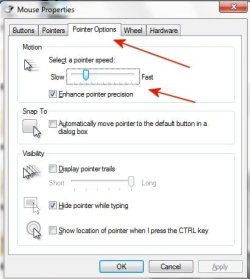
Here is my mouse speed setting: What the heck is with this site. I can not place an image in my response?


Anyway I had recently got a new mouse and had NOT reset the speed. I reduced the speed to about 25%. That seemed to help some. I just hope it is enough.


Wondering One, tDwtp that confirms what I had been told about conflicts with phones and such


F22 Simpilot, I really don't have the option of moving my Windows 7 PC . My Win 10 PC is about 25 feet from the Magic Jack power and it is NOT as jumpy as the win 7 pc. I guess one solution is to get a wired mouse and see if that helps.


Thanks for the responses.
 

Attachments

  • mouse.jpg
    mouse.jpg
    25.5 KB · Views: 22

My Computer

OS
Windows 7 Pro
CPU
Intel(R) Pentium(R) Duel CPU E2200 2.20 Ghz
Motherboard
GA-G41M-ES2L
Memory
4 gb 2.96 Usable
Graphics Card(s)
Onboard
Sound Card
Onboard
Hard Drives
2 - 1TB WD Sata Drives
You said changing the pointer speed helped. Did that remove the jitters completely? Just wanted to be sure I understood since you also mentioned trying a wired mouse.
 

My Computer

Computer type
Laptop
Computer Manufacturer/Model Number
Dell M6500 Precision Work Station
OS
Windows 7 Pro SP1 64 bit
Memory
8 GB
Screen Resolution
1920x
Internet Speed
30 Mbps
Antivirus
Norton Security
Browser
IE 11
wither 2, it was minor help but did NOT fix the issue. For $7 (cheap wired mouse) the problem is gone.
 

My Computer

OS
Windows 7 Pro
CPU
Intel(R) Pentium(R) Duel CPU E2200 2.20 Ghz
Motherboard
GA-G41M-ES2L
Memory
4 gb 2.96 Usable
Graphics Card(s)
Onboard
Sound Card
Onboard
Hard Drives
2 - 1TB WD Sata Drives
Have you tested the wireless mouse on your wife's machine? You said she has a "similar" type mouse but I suppose that means it's not the same model.
 

My Computer

Computer type
Laptop
Computer Manufacturer/Model Number
Dell M6500 Precision Work Station
OS
Windows 7 Pro SP1 64 bit
Memory
8 GB
Screen Resolution
1920x
Internet Speed
30 Mbps
Antivirus
Norton Security
Browser
IE 11
Replacing a mouse with a new one, is usually a good fix for an errant mouse.


I just replaced a jittery mouse with an "iHOME" wired mouse from "Big Lots" for $5.00.


Works great! I never touched the setting for Mouse in the control panel.;)


:cool:
 

My Computer

Computer type
PC/Desktop
Computer Manufacturer/Model Number
Various
OS
Win 7 Pro, SP1, x86, Win-11/Pro/64
CPU
AMD
Motherboard
Various
Memory
8GB Crucial
Graphics Card(s)
Various
Sound Card
OnBoard
Monitor(s) Displays
Acer 21.5"
Hard Drives
Crucial SSD, 500 GB
PSU
OEM
Case
SFF Slim Line Case
Cooling
OEM
Keyboard
eMachines
Mouse
Logitech Wireless
Internet Speed
varies
Antivirus
Windows Defender/Super Anti-Spyware
Browser
Firefox
You didn't answer my question.
 

My Computer

Computer type
Laptop
Computer Manufacturer/Model Number
Dell M6500 Precision Work Station
OS
Windows 7 Pro SP1 64 bit
Memory
8 GB
Screen Resolution
1920x
Internet Speed
30 Mbps
Antivirus
Norton Security
Browser
IE 11
You didn't answer my question.


To answer others question either, i suggest to use Buggy Mouse script combined with the AutoHotKey software.


Buggy-Mouse.ahk — Fix a buggy mouse.
Stop it from double-clicking when you try to single-click.
Buggy Mouse

It's a well known problem with most of the Razer mouses and others speedy ones. I do enable the script when it becomes too tricky using the left mouse click.
 
Last edited:

My Computer

Computer type
PC/Desktop
Computer Manufacturer/Model Number
Custom Build
OS
Windows 7 Professional SP1 - x64 [Non-UEFI Boot]
CPU
Ivy Bridge Core i5 3570K (Delidded)
Motherboard
Asus P8Z77-V LE PLUS
Memory
G.Skill "Ares" DDR3 PC3-12800 - 1600MHz (16Gb)
Graphics Card(s)
Asus Dual-RX480-O4G
Sound Card
Creative Sound Blaster Z w/5.1 sound system
Monitor(s) Displays
Asus IPS 23"
Screen Resolution
16/9
Hard Drives
Internal:
500Go Sata 6Gb/s (x2)
500Go Sata 3Gb/s (x2)
SSD 60Go Sata 6Gb/s
PSU
In Win C 900W Series 80+ Platinum
Case
Thermaltake Chaser A71
Cooling
Custom Water Cooling Loop
Keyboard
Cooler Master QuickFire XTi
Mouse
Razer Imperator 2012 (4G)
Antivirus
MSE
Browser
IE 11.0.xxx Rtm
Other Info
"Raid0" with Intel Smart Response Technology (HDD/SSD)
Back
Top