
Just built a new computer and set up Windows 7 Professional 64bit. I've installed all available updates.
I have windows update set to notify me but not download or install so I choose when to do that.
I keep getting the same two available updates and installing them successfully:
- Security Update for .NET Framework 3.5.1 on Windows 7 and Windows Server 2008 R2 SP1 fo x64- based Systems (KB2446710)
- Security Update for .NET Framework 3.5.1 on Windows 7 and Windows Server 2008 R2 SP1 fo x64- based Systems (KB2478662)
They always install successfully but they keep coming back.
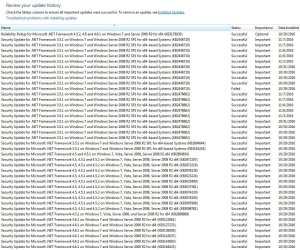
If I go to the update install history, I see many instances of these two being installed.
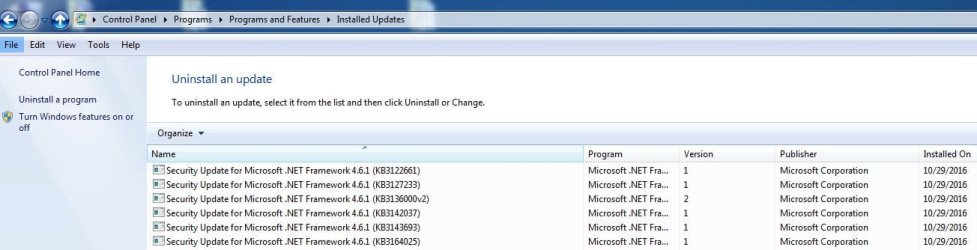
If I go to Programs and Features and Installed Updates I only see .NET Framework 4.6.1.
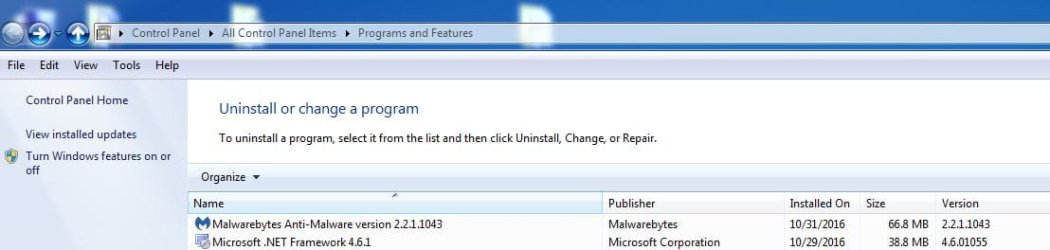
And If I just go to Programs and Features I also see 4.6.1.
I've run chkdsk and also SFC with no problems.
Not sure why I have two versions of .NET and why I keep getting 3.5.1 over and over.
Should I try to uninstall both version then run windows update again? Should I run the windows update troubleshooter app?
Thank you.
I've attached some screenshots.
I have windows update set to notify me but not download or install so I choose when to do that.
I keep getting the same two available updates and installing them successfully:
- Security Update for .NET Framework 3.5.1 on Windows 7 and Windows Server 2008 R2 SP1 fo x64- based Systems (KB2446710)
- Security Update for .NET Framework 3.5.1 on Windows 7 and Windows Server 2008 R2 SP1 fo x64- based Systems (KB2478662)
They always install successfully but they keep coming back.
If I go to the update install history, I see many instances of these two being installed.
If I go to Programs and Features and Installed Updates I only see .NET Framework 4.6.1.
And If I just go to Programs and Features I also see 4.6.1.
I've run chkdsk and also SFC with no problems.
Not sure why I have two versions of .NET and why I keep getting 3.5.1 over and over.
Should I try to uninstall both version then run windows update again? Should I run the windows update troubleshooter app?
Thank you.
I've attached some screenshots.
Attachments
My Computer
At a glance
Windows 7 Ultimate 64bit SP1 w/latest updatesIntel Core i7-980X Extreme Edition Gulftown 3...G.SKILL Ripjaws Series 24GB (6 x 4GB) 240-Pin...EVGA GeForce GTX 980 Ti SC+
- Computer type
- PC/Desktop
- OS
- Windows 7 Ultimate 64bit SP1 w/latest updates
- CPU
- Intel Core i7-980X Extreme Edition Gulftown 3.33GHz
- Motherboard
- MSI Big Bang-XPower LGA 1366 Intel X58 with latest Bios v1.7
- Memory
- G.SKILL Ripjaws Series 24GB (6 x 4GB) 240-Pin DDR3 SDRAM
- Graphics Card(s)
- EVGA GeForce GTX 980 Ti SC+
- Sound Card
- Creative Sound Blaster X-Fi Titanium Fatal1ty
- Monitor(s) Displays
- Dell UltraSharp U3011 30-inch Widescreen
- Screen Resolution
- 2560x1600
- Hard Drives
- --1st Hard Drive: - SAMSUNG 850 PRO 256GB SSD
--2nd Hard Drive - SAMSUNG 850 PRO 256GB SSD
--3rd Hard Drive: - Western Digital VelociRaptor WD1000DHTZ
--4th Hard Drive: -Seagate Barracuda XT 2TB 7200 RPM 64MB Cache
- PSU
- CORSAIR Professional Series AX1200 1200W
- Case
- COOLER MASTER HAF X RC-942-KKN1 ATX Full Tower
- Cooling
- CoolIT Systems VAN-R120 Vantage A.L.C. Liquid Cooler
- Keyboard
- Logitech MX 5500 Revolution Bluetooth Cordless Keyboard
- Mouse
- Logitech MX 5500 Revolution Bluetooth Cordless Mouse
- Internet Speed
- 100 Mbps download / 40 Mbps upload
- Antivirus
- Norton Internet Secutiry 2015
- Browser
- Firefox
- Other Info
- --Card Reader: Nippon Labs Delux 3.5" Internal Card Reader/Writer
--Speakers: - Altec Lansing ADA995 5.1 surround speakers
--Webcam: Logitech HD Pro C920 1080p Widescreen
--Microphone: Telex M-560 Super-Directional USB Digital Microphone


