Keep getting same two net framework updates

magicant

New member
Member
Local time
12:37 PM
Messages
52
Just built a new computer and set up Windows 7 Professional 64bit. I've installed all available updates.

I have windows update set to notify me but not download or install so I choose when to do that.

I keep getting the same two available updates and installing them successfully:

- Security Update for .NET Framework 3.5.1 on Windows 7 and Windows Server 2008 R2 SP1 fo x64- based Systems (KB2446710)

- Security Update for .NET Framework 3.5.1 on Windows 7 and Windows Server 2008 R2 SP1 fo x64- based Systems (KB2478662)

They always install successfully but they keep coming back.

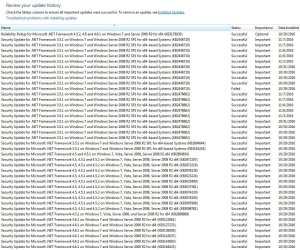
If I go to the update install history, I see many instances of these two being installed.
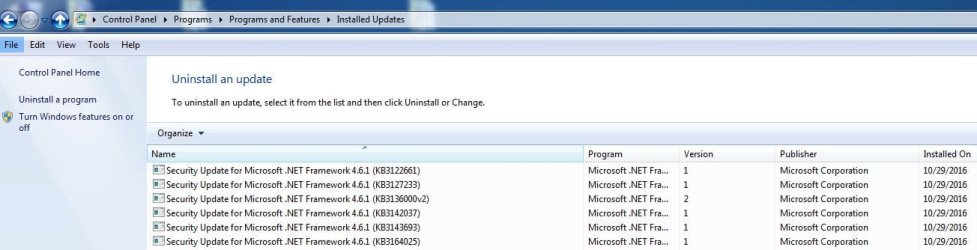
If I go to Programs and Features and Installed Updates I only see .NET Framework 4.6.1.
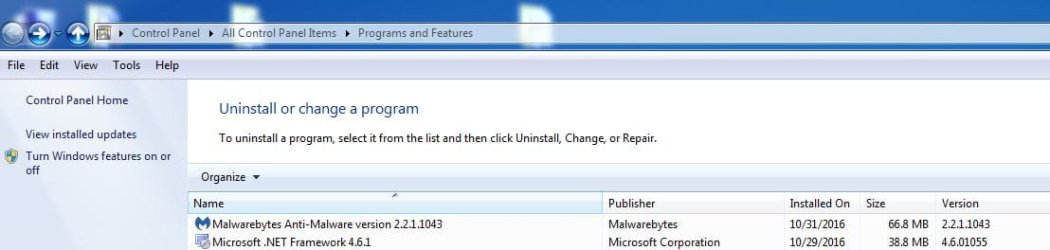
And If I just go to Programs and Features I also see 4.6.1.

I've run chkdsk and also SFC with no problems.

Not sure why I have two versions of .NET and why I keep getting 3.5.1 over and over.
Should I try to uninstall both version then run windows update again? Should I run the windows update troubleshooter app?

Thank you.

I've attached some screenshots.
 

Attachments
  • 1.JPG
    1.JPG
    251.4 KB · Views: 1
  • 2.JPG
    2.JPG
    64 KB · Views: 1
  • 3.JPG
    3.JPG
    41.9 KB · Views: 1

My Computer My Computer

At a glance

Windows 7 Ultimate 64bit SP1 w/latest updatesIntel Core i7-980X Extreme Edition Gulftown 3...G.SKILL Ripjaws Series 24GB (6 x 4GB) 240-Pin...EVGA GeForce GTX 980 Ti SC+
Computer type
PC/Desktop
OS
Windows 7 Ultimate 64bit SP1 w/latest updates
CPU
Intel Core i7-980X Extreme Edition Gulftown 3.33GHz
Motherboard
MSI Big Bang-XPower LGA 1366 Intel X58 with latest Bios v1.7
Memory
G.SKILL Ripjaws Series 24GB (6 x 4GB) 240-Pin DDR3 SDRAM
Graphics Card(s)
EVGA GeForce GTX 980 Ti SC+
Sound Card
Creative Sound Blaster X-Fi Titanium Fatal1ty
Monitor(s) Displays
Dell UltraSharp U3011 30-inch Widescreen
Screen Resolution
2560x1600
Hard Drives
--1st Hard Drive: - SAMSUNG 850 PRO 256GB SSD
--2nd Hard Drive - SAMSUNG 850 PRO 256GB SSD
--3rd Hard Drive: - Western Digital VelociRaptor WD1000DHTZ
--4th Hard Drive: -Seagate Barracuda XT 2TB 7200 RPM 64MB Cache
PSU
CORSAIR Professional Series AX1200 1200W
Case
COOLER MASTER HAF X RC-942-KKN1 ATX Full Tower
Cooling
CoolIT Systems VAN-R120 Vantage A.L.C. Liquid Cooler
Keyboard
Logitech MX 5500 Revolution Bluetooth Cordless Keyboard
Mouse
Logitech MX 5500 Revolution Bluetooth Cordless Mouse
Internet Speed
100 Mbps download / 40 Mbps upload
Antivirus
Norton Internet Secutiry 2015
Browser
Firefox
Other Info
--Card Reader: Nippon Labs Delux 3.5" Internal Card Reader/Writer
--Speakers: - Altec Lansing ADA995 5.1 surround speakers
--Webcam: Logitech HD Pro C920 1080p Widescreen
--Microphone: Telex M-560 Super-Directional USB Digital Microphone
If they show up under installed updates just right click on them and select hide. As for seeing .net 3.5 if you click on Turn windows feature on or off from programs and features you should see it there. It shows up for me there.
 

My Computers My Computers

  • At a glance

    Windows 7 pro/Windows 10 ProIntel i7 860 Quad core 2.8 ghz8 gbATI Radeon HD 5770 1 gb ram
    Computer type
    PC/Desktop
    Computer Manufacturer/Model Number
    HP Pavillion Elite HPE-250f
    OS
    Windows 7 pro/Windows 10 Pro
    CPU
    Intel i7 860 Quad core 2.8 ghz
    Memory
    8 gb
    Graphics Card(s)
    ATI Radeon HD 5770 1 gb ram
    Monitor(s) Displays
    Alienware 25 AW2521HF & Viewsonic
    Screen Resolution
    1920 x1080 & 1680x1050
    Hard Drives
    WD blue 1 tb & 500 gb.
    Browser
    FF of course.
    Other Info
    https://www.bestbuy.com/site/hp-pavilion-elite-desktop-intel-core-i7-processor-8gb-memory-1tb-hard-drive/9921493.p?skuId=9921493
  • At a glance

    Windows 2012 R2 Data center/Linux Minti3 9100 3.6GHz, 8M cache, 4C/4T8GB 2666MT/s DDR4 ECC UDIMM
    Computer type
    PC/Desktop
    System Manufacturer/Model Number
    Dell Poweredge T140
    OS
    Windows 2012 R2 Data center/Linux Mint
    CPU
    i3 9100 3.6GHz, 8M cache, 4C/4T
    Memory
    8GB 2666MT/s DDR4 ECC UDIMM
    Monitor(s) Displays
    Viewsonic
    Screen Resolution
    1680x1050
    Hard Drives
    1 TB & 750 GB
    Other Info
    https://www.dell.com/en-us/work/shop/productdetailstxn/poweredge-t140?~ck=bt
I know I can hide them but I'm thinking something is wrong since they keep showing up. This doesn't happen on 3 other Windows 7 machines I have. So I would rather fix the problem instead of just hiding them.

Also, I do see it under program features. But am I supposed to have 3.5.1 and also 4.6.1? Are they different or should 4.6.1 be the only version I have since it is a later version?

Thank you for the response.
 

My Computer My Computer

At a glance

Windows 7 Ultimate 64bit SP1 w/latest updatesIntel Core i7-980X Extreme Edition Gulftown 3...G.SKILL Ripjaws Series 24GB (6 x 4GB) 240-Pin...EVGA GeForce GTX 980 Ti SC+
Computer type
PC/Desktop
OS
Windows 7 Ultimate 64bit SP1 w/latest updates
CPU
Intel Core i7-980X Extreme Edition Gulftown 3.33GHz
Motherboard
MSI Big Bang-XPower LGA 1366 Intel X58 with latest Bios v1.7
Memory
G.SKILL Ripjaws Series 24GB (6 x 4GB) 240-Pin DDR3 SDRAM
Graphics Card(s)
EVGA GeForce GTX 980 Ti SC+
Sound Card
Creative Sound Blaster X-Fi Titanium Fatal1ty
Monitor(s) Displays
Dell UltraSharp U3011 30-inch Widescreen
Screen Resolution
2560x1600
Hard Drives
--1st Hard Drive: - SAMSUNG 850 PRO 256GB SSD
--2nd Hard Drive - SAMSUNG 850 PRO 256GB SSD
--3rd Hard Drive: - Western Digital VelociRaptor WD1000DHTZ
--4th Hard Drive: -Seagate Barracuda XT 2TB 7200 RPM 64MB Cache
PSU
CORSAIR Professional Series AX1200 1200W
Case
COOLER MASTER HAF X RC-942-KKN1 ATX Full Tower
Cooling
CoolIT Systems VAN-R120 Vantage A.L.C. Liquid Cooler
Keyboard
Logitech MX 5500 Revolution Bluetooth Cordless Keyboard
Mouse
Logitech MX 5500 Revolution Bluetooth Cordless Mouse
Internet Speed
100 Mbps download / 40 Mbps upload
Antivirus
Norton Internet Secutiry 2015
Browser
Firefox
Other Info
--Card Reader: Nippon Labs Delux 3.5" Internal Card Reader/Writer
--Speakers: - Altec Lansing ADA995 5.1 surround speakers
--Webcam: Logitech HD Pro C920 1080p Widescreen
--Microphone: Telex M-560 Super-Directional USB Digital Microphone
Hi,
Net has a fix program option in uninstall a program I'd use it
First run option 3 here to clear the history
Windows Update - Reset
 

My Computer My Computer

At a glance

Win-7-Pro64bit 7-H-Prem-64biti7-5930K 2nd i9-9940x both water blocked VRM'...Trident-z 3200C14 2nd Trident-z 3600C16EVGA 1080ti ftw3 2nd Titan Xp both water blocked
Computer type
PC/Desktop
Computer Manufacturer/Model Number
Custom assembled by me :}
OS
Win-7-Pro64bit 7-H-Prem-64bit
CPU
i7-5930K 2nd i9-9940x both water blocked VRM's too
Motherboard
ASUS SABERTOOTH X99 2nd ASUS x299 Apex
Memory
Trident-z 3200C14 2nd Trident-z 3600C16
Graphics Card(s)
EVGA 1080ti ftw3 2nd Titan Xp both water blocked
Sound Card
Built-in Realtek
Monitor(s) Displays
1-AOC G2460PG 24"G-Sync 144Hz/ 2nd 1-ASUS VG248QE 24" 144Hz
Screen Resolution
1920 x 1080 144Hz
Hard Drives
2-Samsung M.2 Evo & Evo Plus
2-Samsung 850 EVO 500GB SSD's/ 3-2.5 W.D. Black 1tb-&3-1tb/3-3.5 WD Black 1tb hdd's
PSU
EVGA SuperNOVA 1000-P2 2nd 1200-P2
Case
2-Corsair Obsidian Series 450D Black ATX Mid Tower
Cooling
Custom water loops
Keyboard
Logitech G710+/ 2nd Logitech G910
Mouse
2-RedDragon M901 Perdition 16400 dpi Gaming mouse = wired
Internet Speed
Comcast Ping 19ms 89.31mbps download speed 6.12mbps upload
Antivirus
Malwarebytes Pro/ Superantispyware Pro
Browser
FireFox & Pale moon
Other Info
2nd ASUS X299 Apex/Intel i9-9940x with Custom water loop/7H-Prem-x64/Corsair 450D case/Ram Trident-z 3600C16 4x8gb / Samsung970Evo plus 500gb SSD/Dual ssd EZ swap evo/PSU EVGA SuperNova 1200w-P2 80+Platinum/GPU Titan Xp /8-ML-140 on push-pull on 2-280GTX rads
Well I figured out the problem, but no solution.

I ran the repair for 4.5.1 from the uninstall.change option.
I also downloaded and ran the Microsoft .NET Framework Repair Tool.
And I downloaded and ran the windows update troubleshooter.

I didn't do the history reset yet as I was hoping to avoid that. I have a lot of updates installed and I like being able to see what is installed.

Checking for updates after the above show all up to date.

However, the problem (I found from some research) is after I run a disk cleanup with the advanced option of cleaning up system files, it deletes something regarding net framework and makes windows update reinstall them. I've forums forums where other people had this problem in the paste. But I did not find a solution.

I usually run this advanced cleanup after installing a bunch of updates to get rid of junk. I do it regularly on 3 other machines and I've never had this problem.

Any ideas why this is happening, and only happening to this machine?

For now I will just run regular disk cleanup and avoid the cleaning of system files. But any suggestions would be appreciated.

Thank you.
 

My Computer My Computer

At a glance

Windows 7 Ultimate 64bit SP1 w/latest updatesIntel Core i7-980X Extreme Edition Gulftown 3...G.SKILL Ripjaws Series 24GB (6 x 4GB) 240-Pin...EVGA GeForce GTX 980 Ti SC+
Computer type
PC/Desktop
OS
Windows 7 Ultimate 64bit SP1 w/latest updates
CPU
Intel Core i7-980X Extreme Edition Gulftown 3.33GHz
Motherboard
MSI Big Bang-XPower LGA 1366 Intel X58 with latest Bios v1.7
Memory
G.SKILL Ripjaws Series 24GB (6 x 4GB) 240-Pin DDR3 SDRAM
Graphics Card(s)
EVGA GeForce GTX 980 Ti SC+
Sound Card
Creative Sound Blaster X-Fi Titanium Fatal1ty
Monitor(s) Displays
Dell UltraSharp U3011 30-inch Widescreen
Screen Resolution
2560x1600
Hard Drives
--1st Hard Drive: - SAMSUNG 850 PRO 256GB SSD
--2nd Hard Drive - SAMSUNG 850 PRO 256GB SSD
--3rd Hard Drive: - Western Digital VelociRaptor WD1000DHTZ
--4th Hard Drive: -Seagate Barracuda XT 2TB 7200 RPM 64MB Cache
PSU
CORSAIR Professional Series AX1200 1200W
Case
COOLER MASTER HAF X RC-942-KKN1 ATX Full Tower
Cooling
CoolIT Systems VAN-R120 Vantage A.L.C. Liquid Cooler
Keyboard
Logitech MX 5500 Revolution Bluetooth Cordless Keyboard
Mouse
Logitech MX 5500 Revolution Bluetooth Cordless Mouse
Internet Speed
100 Mbps download / 40 Mbps upload
Antivirus
Norton Internet Secutiry 2015
Browser
Firefox
Other Info
--Card Reader: Nippon Labs Delux 3.5" Internal Card Reader/Writer
--Speakers: - Altec Lansing ADA995 5.1 surround speakers
--Webcam: Logitech HD Pro C920 1080p Widescreen
--Microphone: Telex M-560 Super-Directional USB Digital Microphone
Screenshot the updates, lump them in a Document.

Roy
 

My Computer My Computer

At a glance

W7 home premium 32bit/W7HP 64bit/w10 tp insid...E5300 dual core3gbNvidia Geforce 7100 Nforce 630i
Computer type
PC/Desktop
Computer Manufacturer/Model Number
medionl/Aspire 6930G/acer x55a
OS
W7 home premium 32bit/W7HP 64bit/w10 tp insider ring
CPU
E5300 dual core
Motherboard
medion MS7366
Memory
3gb
Graphics Card(s)
Nvidia Geforce 7100 Nforce 630i
Monitor(s) Displays
avixc
Internet Speed
n (isp resticted to 72)
Antivirus
mse/pands
Browser
palemoon
Other Info
Belkin Fd7050 n USB using Railink RT2870 drivers, more upto date
I suppose I could do that (actually thought of it) however on some old forums where people had this problem, clearing the windows update history still didn't solve it. I'll give it a try but I'm not hopefull. I don't understand why it doesn't happen on the 3 other computers I have which I also built and set up windows 7 on.

If anyone on here has had a similar problem and has a suggestion let me know.
When I do the clear history I'll report back.

Thanks.
 

My Computer My Computer

At a glance

Windows 7 Ultimate 64bit SP1 w/latest updatesIntel Core i7-980X Extreme Edition Gulftown 3...G.SKILL Ripjaws Series 24GB (6 x 4GB) 240-Pin...EVGA GeForce GTX 980 Ti SC+
Computer type
PC/Desktop
OS
Windows 7 Ultimate 64bit SP1 w/latest updates
CPU
Intel Core i7-980X Extreme Edition Gulftown 3.33GHz
Motherboard
MSI Big Bang-XPower LGA 1366 Intel X58 with latest Bios v1.7
Memory
G.SKILL Ripjaws Series 24GB (6 x 4GB) 240-Pin DDR3 SDRAM
Graphics Card(s)
EVGA GeForce GTX 980 Ti SC+
Sound Card
Creative Sound Blaster X-Fi Titanium Fatal1ty
Monitor(s) Displays
Dell UltraSharp U3011 30-inch Widescreen
Screen Resolution
2560x1600
Hard Drives
--1st Hard Drive: - SAMSUNG 850 PRO 256GB SSD
--2nd Hard Drive - SAMSUNG 850 PRO 256GB SSD
--3rd Hard Drive: - Western Digital VelociRaptor WD1000DHTZ
--4th Hard Drive: -Seagate Barracuda XT 2TB 7200 RPM 64MB Cache
PSU
CORSAIR Professional Series AX1200 1200W
Case
COOLER MASTER HAF X RC-942-KKN1 ATX Full Tower
Cooling
CoolIT Systems VAN-R120 Vantage A.L.C. Liquid Cooler
Keyboard
Logitech MX 5500 Revolution Bluetooth Cordless Keyboard
Mouse
Logitech MX 5500 Revolution Bluetooth Cordless Mouse
Internet Speed
100 Mbps download / 40 Mbps upload
Antivirus
Norton Internet Secutiry 2015
Browser
Firefox
Other Info
--Card Reader: Nippon Labs Delux 3.5" Internal Card Reader/Writer
--Speakers: - Altec Lansing ADA995 5.1 surround speakers
--Webcam: Logitech HD Pro C920 1080p Widescreen
--Microphone: Telex M-560 Super-Directional USB Digital Microphone
Hi,
You can still see updates that have been installed you just go to uninstall a program and view installed updates instead.

Clearing the update history also reset the services too as well as clearing the updates cache.

P.S.
I do not use clean up system files it was buggy when MS released it and it still is :)
 

My Computer My Computer

At a glance

Win-7-Pro64bit 7-H-Prem-64biti7-5930K 2nd i9-9940x both water blocked VRM'...Trident-z 3200C14 2nd Trident-z 3600C16EVGA 1080ti ftw3 2nd Titan Xp both water blocked
Computer type
PC/Desktop
Computer Manufacturer/Model Number
Custom assembled by me :}
OS
Win-7-Pro64bit 7-H-Prem-64bit
CPU
i7-5930K 2nd i9-9940x both water blocked VRM's too
Motherboard
ASUS SABERTOOTH X99 2nd ASUS x299 Apex
Memory
Trident-z 3200C14 2nd Trident-z 3600C16
Graphics Card(s)
EVGA 1080ti ftw3 2nd Titan Xp both water blocked
Sound Card
Built-in Realtek
Monitor(s) Displays
1-AOC G2460PG 24"G-Sync 144Hz/ 2nd 1-ASUS VG248QE 24" 144Hz
Screen Resolution
1920 x 1080 144Hz
Hard Drives
2-Samsung M.2 Evo & Evo Plus
2-Samsung 850 EVO 500GB SSD's/ 3-2.5 W.D. Black 1tb-&3-1tb/3-3.5 WD Black 1tb hdd's
PSU
EVGA SuperNOVA 1000-P2 2nd 1200-P2
Case
2-Corsair Obsidian Series 450D Black ATX Mid Tower
Cooling
Custom water loops
Keyboard
Logitech G710+/ 2nd Logitech G910
Mouse
2-RedDragon M901 Perdition 16400 dpi Gaming mouse = wired
Internet Speed
Comcast Ping 19ms 89.31mbps download speed 6.12mbps upload
Antivirus
Malwarebytes Pro/ Superantispyware Pro
Browser
FireFox & Pale moon
Other Info
2nd ASUS X299 Apex/Intel i9-9940x with Custom water loop/7H-Prem-x64/Corsair 450D case/Ram Trident-z 3600C16 4x8gb / Samsung970Evo plus 500gb SSD/Dual ssd EZ swap evo/PSU EVGA SuperNova 1200w-P2 80+Platinum/GPU Titan Xp /8-ML-140 on push-pull on 2-280GTX rads
Hi magicant,
This link may explain what is going on:
https://support.microsoft.com/en-us/kb/976982
"Other .NET Framework update installation issues"
Regards,
itconcerned

Late Note (11/9):

In my case it was caused by Windows Update Clean Up, so I downloaded and ran as administrator the "Script Reset Windows Update Agent" option 2 among others from TechNet:

Script Reset Windows Update Agent

and checked for updates for about 5 minutes and I have got only optional updates offered (Lang Packs and Skype).

itconcerned
 
Last edited:

My Computer My Computer

At a glance

Windows 7 Ultimate x64 / Linux Mint 19 MATE VM
Computer type
PC/Desktop
Computer Manufacturer/Model Number
Custom Build
OS
Windows 7 Ultimate x64 / Linux Mint 19 MATE VM
I just tried everything but still no luck.

I ran the files to reset/register the windows update agent, ran the reset windows update agent, rant the .NET cleanup tool to remove all .NET framework installations, restarted and reinstalled the individual .NET framework files, ran the .NET framework repair tool to check for errors and restarted.

Windows update showed all up to date.

I ran the disk cleanup with system files, restarted, and once again windows update showed the need to install those 2 .NET framework files.

I guess I will just stop running advanced disk cleanup on this computer. I just don't understand why it doesn't happen on my other 3 computers with the same version of windows.
 

My Computer My Computer

At a glance

Windows 7 Ultimate 64bit SP1 w/latest updatesIntel Core i7-980X Extreme Edition Gulftown 3...G.SKILL Ripjaws Series 24GB (6 x 4GB) 240-Pin...EVGA GeForce GTX 980 Ti SC+
Computer type
PC/Desktop
OS
Windows 7 Ultimate 64bit SP1 w/latest updates
CPU
Intel Core i7-980X Extreme Edition Gulftown 3.33GHz
Motherboard
MSI Big Bang-XPower LGA 1366 Intel X58 with latest Bios v1.7
Memory
G.SKILL Ripjaws Series 24GB (6 x 4GB) 240-Pin DDR3 SDRAM
Graphics Card(s)
EVGA GeForce GTX 980 Ti SC+
Sound Card
Creative Sound Blaster X-Fi Titanium Fatal1ty
Monitor(s) Displays
Dell UltraSharp U3011 30-inch Widescreen
Screen Resolution
2560x1600
Hard Drives
--1st Hard Drive: - SAMSUNG 850 PRO 256GB SSD
--2nd Hard Drive - SAMSUNG 850 PRO 256GB SSD
--3rd Hard Drive: - Western Digital VelociRaptor WD1000DHTZ
--4th Hard Drive: -Seagate Barracuda XT 2TB 7200 RPM 64MB Cache
PSU
CORSAIR Professional Series AX1200 1200W
Case
COOLER MASTER HAF X RC-942-KKN1 ATX Full Tower
Cooling
CoolIT Systems VAN-R120 Vantage A.L.C. Liquid Cooler
Keyboard
Logitech MX 5500 Revolution Bluetooth Cordless Keyboard
Mouse
Logitech MX 5500 Revolution Bluetooth Cordless Mouse
Internet Speed
100 Mbps download / 40 Mbps upload
Antivirus
Norton Internet Secutiry 2015
Browser
Firefox
Other Info
--Card Reader: Nippon Labs Delux 3.5" Internal Card Reader/Writer
--Speakers: - Altec Lansing ADA995 5.1 surround speakers
--Webcam: Logitech HD Pro C920 1080p Widescreen
--Microphone: Telex M-560 Super-Directional USB Digital Microphone
Back
Top