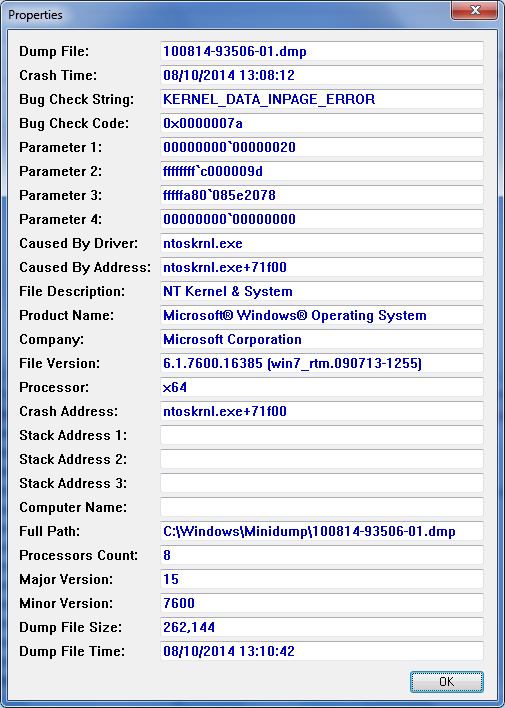
KERNEL_DATA_INPAGE_ERROR BSOD 0x0000007a on Resume from sleep

jonnyhotchkiss

New member
Member
VIP
Local time
7:23 AM
Messages
260
Hi all.

This intermittent issue continues to cause system failure, on resume from (long) sleep.


Hibernation is disabled.


Details attached.


SPEC: Win 7 Ultimate 64-bit, Dell XPS L502x


fmIc75K.png
 

My Computer My Computer

Computer type
Laptop
Computer Manufacturer/Model Number
Dell
OS
Windows 7 Ultimate 64bit
CPU
2.2
Memory
8Gb
Graphics Card(s)
NVIDIA
Screen Resolution
1280/762
Mouse
built in pad || iphone || MS wireless
Internet Speed
100MB
Antivirus
Avast
Browser
Chrome, Chrome portable
Code:
ERROR_CODE: (NTSTATUS) 0xc000009d - STATUS_DEVICE_NOT_CONNECTED

DISK_HARDWARE_ERROR: There was error with disk hardware
Test your HDD using Seatools. http://www.sevenforums.com/tutorials/313457-seatools-dos-windows-how-use.html

Let us know the result.

Also, free up the startup. Windows does not need any other program to auto start with it, but the auto start programs often conflicts and causes various problems including BSODs.

  1. Click on the Start button
  2. Type “msconfig (without quotes), click the resulting link. It will open the System Configuration window.
  3. Select the “Startup” tab.
  4. Deselect all items other than the antivirus and teh touchpad driver, SynTPenh
  5. Apply > OK
  6. Accept then restart.
Daemon Tools, Alcohol 120% and Power Archiver Pro uses SCSI Pass Through Direct (SPTD), which is a well known BSOD causer. Uninstall Daemon Tools at first. Then download SPTD standalone installer from Disk-Tools.com, and execute the downloaded file as guided below :

  • Double click to open it.
  • Click this button only:
  • 2012-12-13_224441.jpg
  • If it is grayed out, as in the picture, there is no more SPTD in your system, and you just close the window.
 

My Computer My Computer

Computer type
PC/Desktop
Computer Manufacturer/Model Number
Self Assembled
OS
Microsoft Windows 10 Pro Insider Preview 64-bit
CPU
Intel(R) Core(TM) i3-4130 CPU @ 3.40GHz
Motherboard
Gigabyte Technology Co., Ltd. B85M-D3H
Memory
Corsair Vengence 4GB x2 (8.00GB Dual-Channel DDR3 @ 798MHz)
Graphics Card(s)
2047MB GeForce GTS 450 (ZOTAC International)
Sound Card
Onboard (Realtek High Definition Audio)
Monitor(s) Displays
LG Flatron E2040T
Screen Resolution
1600x900
Hard Drives
Western Digital 1 TB
Seagate 500 GB
PSU
Corsair VS550
Case
Cooler Master K380
Cooling
Cooler Master Seidon 120V Plus
Keyboard
Logitech MK260r
Mouse
Logitech MK260r
Internet Speed
PMPL Broadband
Antivirus
Windows Defender + MBAM
Browser
Firefox
Other Info
Dell Studio 15" Laptop
Thanks for the tips.

I'm using the native virtualisation offered by Windows 7. I have several builds. Typically(!!), it's my fossil-build that DOESN'T exhibit this issue (ever).


All builds use Daemon and the same 750G internal HD, making me think it's an OS config / device driver cause...


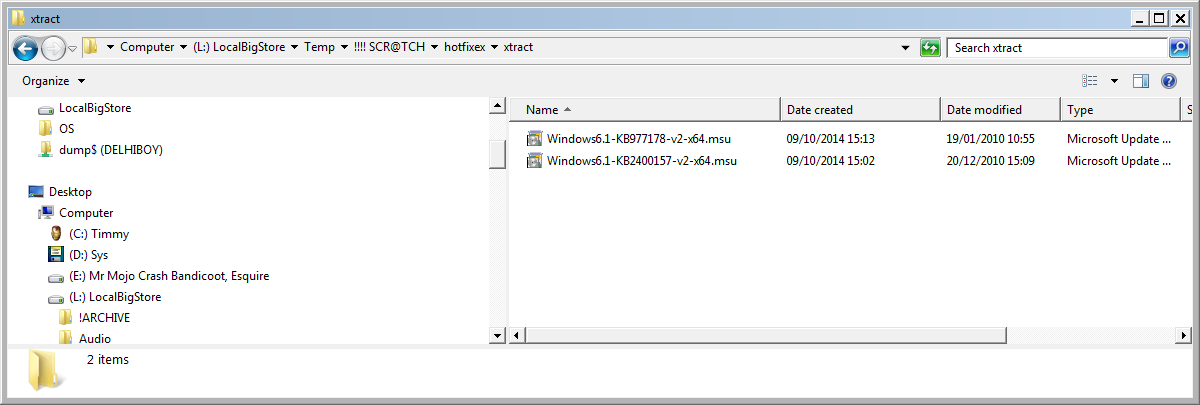
Having said that, I wonder if this hotfix could resolve - You receive various Stop error messages in Windows 7 or in Windows Server 2008 R2 when you try to resume a computer that has a large SATA hard disk


Will check my (old, working) build to see if that update's on there... brb!
 

My Computer My Computer

Computer type
Laptop
Computer Manufacturer/Model Number
Dell
OS
Windows 7 Ultimate 64bit
CPU
2.2
Memory
8Gb
Graphics Card(s)
NVIDIA
Screen Resolution
1280/762
Mouse
built in pad || iphone || MS wireless
Internet Speed
100MB
Antivirus
Avast
Browser
Chrome, Chrome portable
tried to run the hotfix, it obtained the Windows6.1-KB977178-v2-x86 edition (not sure why x64 wasn't detected on download) spotted the all platforms link and just installed the hotfix...

Now, interestingly, whilst glancing at the dm log collector report on the working OS, the installed hotfixes report doesn't mention that the other OS (that doesn't have this problem) has this hotfix installed.

I'm very skeptical that this will resolve (my HD is only 750G for a start), but will try...


Another report I found online identified a bad msahci.sys driver, fixed by installing newer intel rapid drivers or something... this sounds familiar. Prior to this, however, I think an SP(1) update will have to be tried...

Status: Resolution #1 (hotfix Windows6.1-KB977178-v2-x64) being monitored....

Thanks again!
 

My Computer My Computer

Computer type
Laptop
Computer Manufacturer/Model Number
Dell
OS
Windows 7 Ultimate 64bit
CPU
2.2
Memory
8Gb
Graphics Card(s)
NVIDIA
Screen Resolution
1280/762
Mouse
built in pad || iphone || MS wireless
Internet Speed
100MB
Antivirus
Avast
Browser
Chrome, Chrome portable
I would say you again to take the suggestions and report accordingly.

Dont find fixes abruptly.
 

My Computer My Computer

Computer type
PC/Desktop
Computer Manufacturer/Model Number
Self Assembled
OS
Microsoft Windows 10 Pro Insider Preview 64-bit
CPU
Intel(R) Core(TM) i3-4130 CPU @ 3.40GHz
Motherboard
Gigabyte Technology Co., Ltd. B85M-D3H
Memory
Corsair Vengence 4GB x2 (8.00GB Dual-Channel DDR3 @ 798MHz)
Graphics Card(s)
2047MB GeForce GTS 450 (ZOTAC International)
Sound Card
Onboard (Realtek High Definition Audio)
Monitor(s) Displays
LG Flatron E2040T
Screen Resolution
1600x900
Hard Drives
Western Digital 1 TB
Seagate 500 GB
PSU
Corsair VS550
Case
Cooler Master K380
Cooling
Cooler Master Seidon 120V Plus
Keyboard
Logitech MK260r
Mouse
Logitech MK260r
Internet Speed
PMPL Broadband
Antivirus
Windows Defender + MBAM
Browser
Firefox
Other Info
Dell Studio 15" Laptop
That's very good advice. I wish I'd followed it.

Currently unable to login, following restart. Stuck "preparing desktop" after installing kb977178.

suspect a corrupted profile. I Mounted the volume, is it possible to sfc an offline volume, and will it detect user profile corruption?

the ntuser.dat doesn't appear to have a .bak. not sure how to proceed.

Only able to load windows in safe mode.
 

My Computer My Computer

Computer type
Laptop
Computer Manufacturer/Model Number
Dell
OS
Windows 7 Ultimate 64bit
CPU
2.2
Memory
8Gb
Graphics Card(s)
NVIDIA
Screen Resolution
1280/762
Mouse
built in pad || iphone || MS wireless
Internet Speed
100MB
Antivirus
Avast
Browser
Chrome, Chrome portable
Sometimes it takes time to install an update.

It is not a profile, but something related to the HDD.

You should have paid attention to my suggestions at first; before searching for online solutions. Every single BSOD is different from another one; there is no unique fix, mostly.

If needed, uninstall the update in safe mode and continue from seatools test. Both the short and long test.
 

My Computer My Computer

Computer type
PC/Desktop
Computer Manufacturer/Model Number
Self Assembled
OS
Microsoft Windows 10 Pro Insider Preview 64-bit
CPU
Intel(R) Core(TM) i3-4130 CPU @ 3.40GHz
Motherboard
Gigabyte Technology Co., Ltd. B85M-D3H
Memory
Corsair Vengence 4GB x2 (8.00GB Dual-Channel DDR3 @ 798MHz)
Graphics Card(s)
2047MB GeForce GTS 450 (ZOTAC International)
Sound Card
Onboard (Realtek High Definition Audio)
Monitor(s) Displays
LG Flatron E2040T
Screen Resolution
1600x900
Hard Drives
Western Digital 1 TB
Seagate 500 GB
PSU
Corsair VS550
Case
Cooler Master K380
Cooling
Cooler Master Seidon 120V Plus
Keyboard
Logitech MK260r
Mouse
Logitech MK260r
Internet Speed
PMPL Broadband
Antivirus
Windows Defender + MBAM
Browser
Firefox
Other Info
Dell Studio 15" Laptop
cannot login with existing or new account

You're right again. The update took a long time, but it did complete. I closed all applications and restarted... and haven't been able to get in since (exc. using safe mode).

Removed the hotfix, restarted, still unable to login. Created a new user account in safe mode using cmd (as the "user accounts" applet stops responding once you click "create new account"...) but I was unable to log into the new account or the old account. I'm talking > 30 minutes "preparing a desktop" (I think, with the new account, it didn't even get there... stuck @ "wait for User Profile Service..."

Considering retiring that particular volume (new DAW with Reaper et al), I can quickly mount and collect any downloads/dox etc, and restart trying the fix the original, occasional annoyance that is the BSOD on resume from sleep. It's pretty goosed.
 

My Computer My Computer

Computer type
Laptop
Computer Manufacturer/Model Number
Dell
OS
Windows 7 Ultimate 64bit
CPU
2.2
Memory
8Gb
Graphics Card(s)
NVIDIA
Screen Resolution
1280/762
Mouse
built in pad || iphone || MS wireless
Internet Speed
100MB
Antivirus
Avast
Browser
Chrome, Chrome portable
Ok, after breaking the new build by installing the hotfix, and attempting (to no avail) to system restore from safe mode / w. cmd prompt (the only way I could login to ANY account after restarting to complete the updates) I found some reg backups (default/sam/software/security/system) in a regbackup in windows\config...

I noticed that I didn't have Service Pack 1 installed.
Since installing, I've gone to standby, and resumed successfully, on several occasions.
Just now, I opened my lid to resume from sleep. I noticed the laptop wasn't plugged in (the battery is highly degraded).


The moment it connected to power, it blue-screened - this time 0x000000f4 (CRITICAL TERMINATION again).


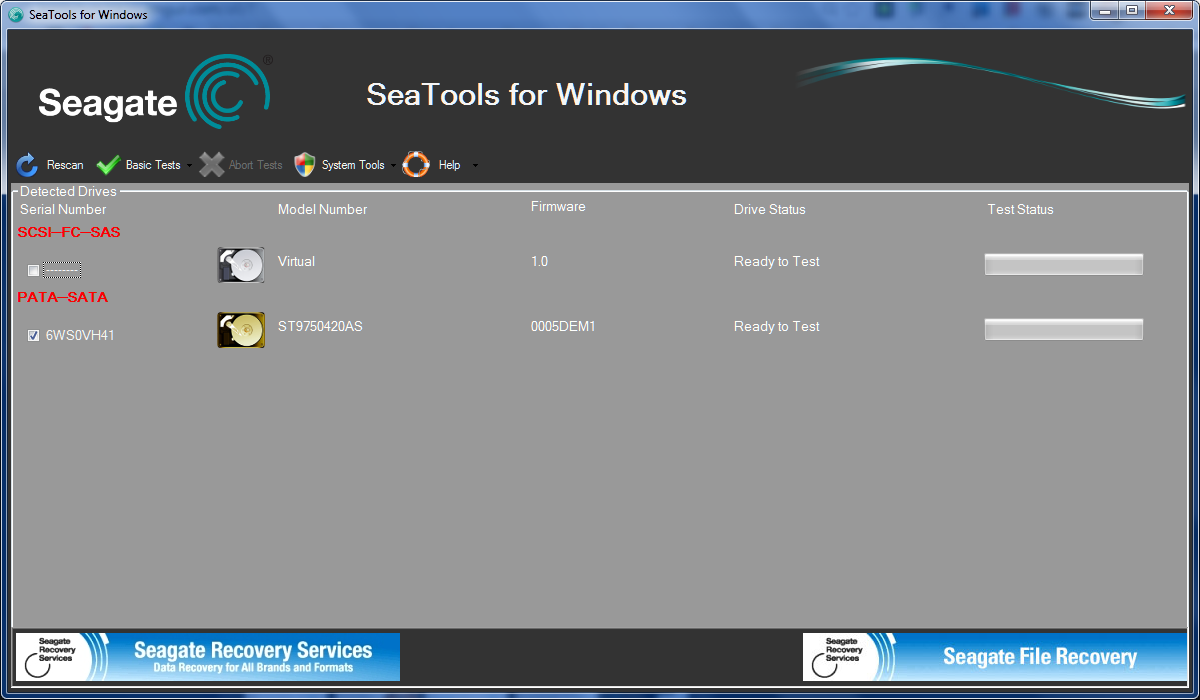
Just installed SeaTools for windows.


Assuming I should run on the physical drive?


DkmBhXD.png


Thanks again...
 

My Computer My Computer

Computer type
Laptop
Computer Manufacturer/Model Number
Dell
OS
Windows 7 Ultimate 64bit
CPU
2.2
Memory
8Gb
Graphics Card(s)
NVIDIA
Screen Resolution
1280/762
Mouse
built in pad || iphone || MS wireless
Internet Speed
100MB
Antivirus
Avast
Browser
Chrome, Chrome portable
Yes, test the physical drive. Take both the short generic test and the long generic test.
 

My Computer My Computer

Computer type
PC/Desktop
Computer Manufacturer/Model Number
Self Assembled
OS
Microsoft Windows 10 Pro Insider Preview 64-bit
CPU
Intel(R) Core(TM) i3-4130 CPU @ 3.40GHz
Motherboard
Gigabyte Technology Co., Ltd. B85M-D3H
Memory
Corsair Vengence 4GB x2 (8.00GB Dual-Channel DDR3 @ 798MHz)
Graphics Card(s)
2047MB GeForce GTS 450 (ZOTAC International)
Sound Card
Onboard (Realtek High Definition Audio)
Monitor(s) Displays
LG Flatron E2040T
Screen Resolution
1600x900
Hard Drives
Western Digital 1 TB
Seagate 500 GB
PSU
Corsair VS550
Case
Cooler Master K380
Cooling
Cooler Master Seidon 120V Plus
Keyboard
Logitech MK260r
Mouse
Logitech MK260r
Internet Speed
PMPL Broadband
Antivirus
Windows Defender + MBAM
Browser
Firefox
Other Info
Dell Studio 15" Laptop
Preliminary results:

SMART Scan: Passed


RPPNwUc.png


Short DST: Passed


DbUeR2T.png


Short Generic: Pass


q4cS6ro.png
 

My Computer My Computer

Computer type
Laptop
Computer Manufacturer/Model Number
Dell
OS
Windows 7 Ultimate 64bit
CPU
2.2
Memory
8Gb
Graphics Card(s)
NVIDIA
Screen Resolution
1280/762
Mouse
built in pad || iphone || MS wireless
Internet Speed
100MB
Antivirus
Avast
Browser
Chrome, Chrome portable
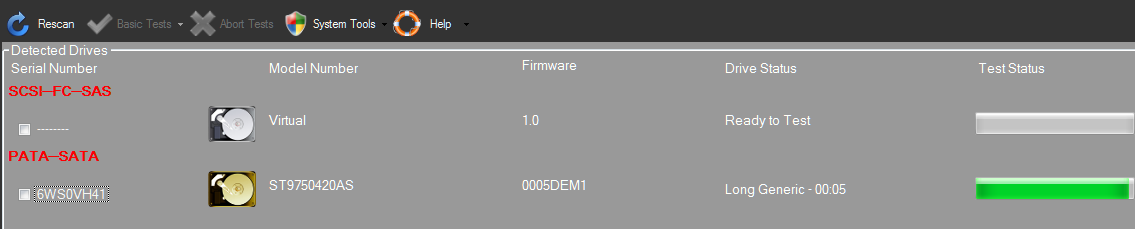
Just got back to an message re the long time taken by the long scan (due to large HD size etc).

It looks like the test has finished, but incomplete (no abort option).


9rM6vT5.png
 

My Computer My Computer

Computer type
Laptop
Computer Manufacturer/Model Number
Dell
OS
Windows 7 Ultimate 64bit
CPU
2.2
Memory
8Gb
Graphics Card(s)
NVIDIA
Screen Resolution
1280/762
Mouse
built in pad || iphone || MS wireless
Internet Speed
100MB
Antivirus
Avast
Browser
Chrome, Chrome portable
The test is not finished. It will be finished only when the blue bar is complete.

Long generic takes a long time. The windows version takes longer time if it detects any bad sectors etc.

I will suggest you to leave the program on running for a few more hours.
 

My Computer My Computer

Computer type
PC/Desktop
Computer Manufacturer/Model Number
Self Assembled
OS
Microsoft Windows 10 Pro Insider Preview 64-bit
CPU
Intel(R) Core(TM) i3-4130 CPU @ 3.40GHz
Motherboard
Gigabyte Technology Co., Ltd. B85M-D3H
Memory
Corsair Vengence 4GB x2 (8.00GB Dual-Channel DDR3 @ 798MHz)
Graphics Card(s)
2047MB GeForce GTS 450 (ZOTAC International)
Sound Card
Onboard (Realtek High Definition Audio)
Monitor(s) Displays
LG Flatron E2040T
Screen Resolution
1600x900
Hard Drives
Western Digital 1 TB
Seagate 500 GB
PSU
Corsair VS550
Case
Cooler Master K380
Cooling
Cooler Master Seidon 120V Plus
Keyboard
Logitech MK260r
Mouse
Logitech MK260r
Internet Speed
PMPL Broadband
Antivirus
Windows Defender + MBAM
Browser
Firefox
Other Info
Dell Studio 15" Laptop
OK, the long test finished (passed). The error doesn't occur EVERY time, but it does still happen a lot (a recent resume from a very short sleep resulted in BSOD)
 

My Computer My Computer

Computer type
Laptop
Computer Manufacturer/Model Number
Dell
OS
Windows 7 Ultimate 64bit
CPU
2.2
Memory
8Gb
Graphics Card(s)
NVIDIA
Screen Resolution
1280/762
Mouse
built in pad || iphone || MS wireless
Internet Speed
100MB
Antivirus
Avast
Browser
Chrome, Chrome portable

My Computer My Computer

Computer type
PC/Desktop
Computer Manufacturer/Model Number
Self Assembled
OS
Microsoft Windows 10 Pro Insider Preview 64-bit
CPU
Intel(R) Core(TM) i3-4130 CPU @ 3.40GHz
Motherboard
Gigabyte Technology Co., Ltd. B85M-D3H
Memory
Corsair Vengence 4GB x2 (8.00GB Dual-Channel DDR3 @ 798MHz)
Graphics Card(s)
2047MB GeForce GTS 450 (ZOTAC International)
Sound Card
Onboard (Realtek High Definition Audio)
Monitor(s) Displays
LG Flatron E2040T
Screen Resolution
1600x900
Hard Drives
Western Digital 1 TB
Seagate 500 GB
PSU
Corsair VS550
Case
Cooler Master K380
Cooling
Cooler Master Seidon 120V Plus
Keyboard
Logitech MK260r
Mouse
Logitech MK260r
Internet Speed
PMPL Broadband
Antivirus
Windows Defender + MBAM
Browser
Firefox
Other Info
Dell Studio 15" Laptop
Is this just guesswork?

You do understand that I'm choosing to send my laptop to sleep (when going between rooms and power supplies, when saving power etc), and that this is a feature I would like to continue to use, albeit withhout having to restart from fatal errors {almost} every time, on almost all virtual builds on the same hard drive of the same laptop running the same OS..

Happy to try this, but don't see how it'll affect the issue at hand.

Monitoring...
 

My Computer My Computer

Computer type
Laptop
Computer Manufacturer/Model Number
Dell
OS
Windows 7 Ultimate 64bit
CPU
2.2
Memory
8Gb
Graphics Card(s)
NVIDIA
Screen Resolution
1280/762
Mouse
built in pad || iphone || MS wireless
Internet Speed
100MB
Antivirus
Avast
Browser
Chrome, Chrome portable
Its ok.
 

My Computer My Computer

Computer type
PC/Desktop
Computer Manufacturer/Model Number
Self Assembled
OS
Microsoft Windows 10 Pro Insider Preview 64-bit
CPU
Intel(R) Core(TM) i3-4130 CPU @ 3.40GHz
Motherboard
Gigabyte Technology Co., Ltd. B85M-D3H
Memory
Corsair Vengence 4GB x2 (8.00GB Dual-Channel DDR3 @ 798MHz)
Graphics Card(s)
2047MB GeForce GTS 450 (ZOTAC International)
Sound Card
Onboard (Realtek High Definition Audio)
Monitor(s) Displays
LG Flatron E2040T
Screen Resolution
1600x900
Hard Drives
Western Digital 1 TB
Seagate 500 GB
PSU
Corsair VS550
Case
Cooler Master K380
Cooling
Cooler Master Seidon 120V Plus
Keyboard
Logitech MK260r
Mouse
Logitech MK260r
Internet Speed
PMPL Broadband
Antivirus
Windows Defender + MBAM
Browser
Firefox
Other Info
Dell Studio 15" Laptop
not related to hard disk sleep

OK, so I changed the advanced power settings, as advised, but the OS fell over at the first resume from sleep.

Does anyone know how to interpret a memory stack dump? I've installed the debugging app but don't know what I'm looking at.
 

My Computer My Computer

Computer type
Laptop
Computer Manufacturer/Model Number
Dell
OS
Windows 7 Ultimate 64bit
CPU
2.2
Memory
8Gb
Graphics Card(s)
NVIDIA
Screen Resolution
1280/762
Mouse
built in pad || iphone || MS wireless
Internet Speed
100MB
Antivirus
Avast
Browser
Chrome, Chrome portable
Back to driver / software candidates for system instability ...

I have a hotfix folder, on my old build (that I'm currently using, that does NOT appear to fall over when resuming from sleep). I'm wondering if one of these is the key (or even if it's reg-related - lots of things were tried over time to resolve various erroneous events

ie

"L:\!ARCHIVE\OS\Fixes\windows6.1-KB976932-X64.exe"

and

cB40Ujw.png


Reluctant to run willy-nilly after I burned my self last time!

Here's the list of installed updates on the good OS

I had thought, "if I put SP1 on then maybe that'll fix it"... but then read users having the issue since installing Service Pack 1...

I've ended up turning on windows update as well as installing service pack 1 on almost all builds.. but that hasn't fixed this BSOD.

I think it's Intel / NVIDIA (graphics) and am considering installing Intel RAID drivers as advised here...

Hypothesis: If PC is OK in safe mode, it's "driver related" (driver is not loaded, malfunction not manifested / error not exhibited)...

ERGO (love that word :) if I uninstall the NVIDIA device driver, and have no issue, it's NVIDIA
Similarly for Intel and the device drivers for the graphics card that's also running in the XPS.. and then perhaps back to Intel and NVIDIA...

NB: I had followed the steps excruciatingly outlined, re installing the exact versions of the device drivers in the exact order, to avoid conflicts... Now I'm not sure which drivers are the latest, vs which are the version "recommended by the manufacturer" (Dell).

Lots of variables.

Will update when I decide what I'm gonna try next! (Have lots of builds I can test, and easy to clone them - VHD is very cool... but I fear that THAT is actually the cause!!)

 

My Computer My Computer

Computer type
Laptop
Computer Manufacturer/Model Number
Dell
OS
Windows 7 Ultimate 64bit
CPU
2.2
Memory
8Gb
Graphics Card(s)
NVIDIA
Screen Resolution
1280/762
Mouse
built in pad || iphone || MS wireless
Internet Speed
100MB
Antivirus
Avast
Browser
Chrome, Chrome portable
Results with Intel RAID for SATA

OK, recently inspired by my uncle resolving his BSODs by combofixing, I'm having another stab at this...

A lot of chatter re dick corruption and sfc/chkdsk-fixing. I don't think this is the cause of my issues, cause I am using the same physical disk, but each OS is a VHD on that disk. The only VHD-OS I'm currently certain isn't affected by these is my oldest VHD. It has Service Pack 1, and Windows Updates prompts me for important updates (I install almost all).


The new kids on the block, all clean, free of erroneous installs and over-inflated registry hives, are slim and trim, and responsive... but not reliable (yet!) re "resume from sleep".


So I've just installed Intel's RAID driver, and after two necessary restarts, the software is installed.
It said it had updated the driver, but the drivers don't look new.


0Il9iK5.png


I also don't know if it's possible/necessary to update the VHD driver that's in use.


Q1 Is there some software which tells you which drivers should be updated?

Performing sleep (with Intel RAID running) on "CRASH1"


Wg1RS7m.png


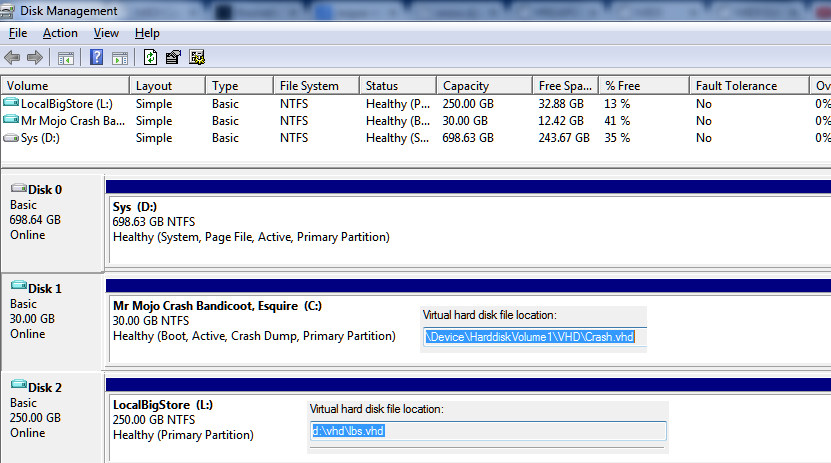
Just snapped the above, noticed the VHD path for C: differs, will compare to others to see if that's a factor.


mvCNasN.png
 

My Computer My Computer

Computer type
Laptop
Computer Manufacturer/Model Number
Dell
OS
Windows 7 Ultimate 64bit
CPU
2.2
Memory
8Gb
Graphics Card(s)
NVIDIA
Screen Resolution
1280/762
Mouse
built in pad || iphone || MS wireless
Internet Speed
100MB
Antivirus
Avast
Browser
Chrome, Chrome portable
Back
Top