I am having this weird problem.
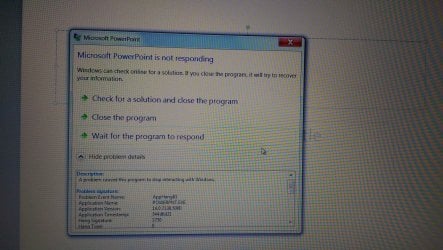
When i try to use keyboard, whatever is open in front of me hangs. Be it the file explorer, start menu, office etc... And Description says " A problem caused this program to stop interacting with windows".
This problem is random and occurs few times every day. When i restart the system, it becomes ok for a while but then again the same.
No recent change in drivers or windows copy. Using the exact same copy since 3 years and no problem. Have reinstalled 3 times and still end up with same problem.
Problem doesn't go away even after fully updating the windows.
I have tried running sfc /scannow but it didn't find anything. Though system ran fine all day after running this command, but next day the same.
Tried uninstalling Keyboard/USB root hub drivers and restart but no result again.
And yeah, on windows 8.1 everything runs fine and stable. Problem is only in Windows 7.
A shot for example
When i try to use keyboard, whatever is open in front of me hangs. Be it the file explorer, start menu, office etc... And Description says " A problem caused this program to stop interacting with windows".
This problem is random and occurs few times every day. When i restart the system, it becomes ok for a while but then again the same.
No recent change in drivers or windows copy. Using the exact same copy since 3 years and no problem. Have reinstalled 3 times and still end up with same problem.
Problem doesn't go away even after fully updating the windows.
I have tried running sfc /scannow but it didn't find anything. Though system ran fine all day after running this command, but next day the same.
Tried uninstalling Keyboard/USB root hub drivers and restart but no result again.
And yeah, on windows 8.1 everything runs fine and stable. Problem is only in Windows 7.
A shot for example
Attachments
My Computer
- Computer type
- Laptop
- Computer Manufacturer/Model Number
- Dell XPS L702X
- OS
- Windows 7 Ultimate SP1 X64
- CPU
- Intel Core i7-2760QM
- Motherboard
- Intel HM67
- Memory
- Samsung 16GB DDR3 1333MHz
- Graphics Card(s)
- Nvidia Geforce GT 555M
- Screen Resolution
- 1920x1080
- Hard Drives
- Samsung 860 EVO 500GB
Toshiba 1TB 5400RPM
 I wonder why i am facing it all of a sudden after so many years of smooth sailing with 7.