Keyboard Layout - Change

How to Change the Keyboard Layout in Windows 7

   Information
This will show you how to change the keyboard layout to customize your keyboard for a specific input language or format. The keyboard layout controls which characters appear on the screen when you press the keys on your keyboard. Some input languages have several keyboard layouts; others have only one. This can make it easier to enter text or edit documents in multiple languages.

   Warning

Before you will be able to change the Keyboard layout, you must add a input language and keyboard layout that you want to use first.


OPTION ONE

To Change Default Input Language and Keyboard Layout


NOTE: This will allow you to select an added input language and keyboard layout to use as the default for all input fields in Windows 7.
1. Open the Control Panel (icons view), and click on the Region and Language icon.

2. Click on the Keyboards and Languages tab, then click on the Change keyboards button. (see screenshot below)
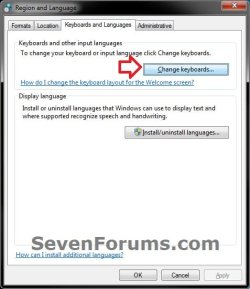
Change_Default.jpg
3. In the Defualt input language section, click on the drop box and select a added input language and keyboard layout. (see screenshots below)
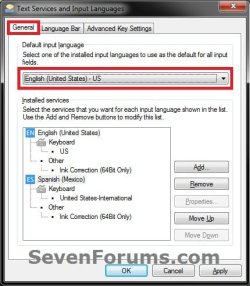
Change_Default-1.jpgChange_Default-2.jpg
4. Click on OK. (see screenshots above)

5. Click on OK. (see screenshot below step 2)


OPTION TWO

To Change Keyboard Layout from Language Bar


NOTE: The input language you select in this option will only stay set until you log out, shut down, or restart the computer. Afterwards, it will reset to the default input method set in OPTION ONE until changed.
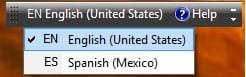
1. Click on the Language bar (on taskbar (default) or desktop), then select (check) a input language with the keyboard layout you want to use. (see screenshots below)
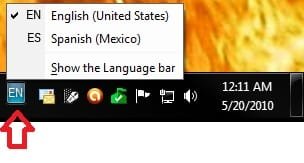
Change-1_Taskbar.jpgChange-1_Desktop.jpg


OPTION THREE

To Change Keyboard Layout from the Welcome Screen


NOTE: For example, on the CTRL+ALT+DELETE screen. The input language you select in this option will only stay set until you log out, shut down, or restart the computer. Afterwards, it will reset to the default input method set in OPTION ONE until changed.
1. On the Welcome screen, click the Keyboard layout button
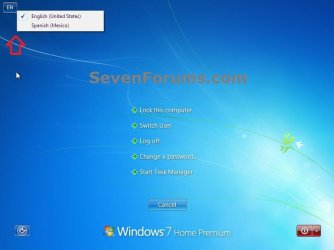
attachment.php
, and then select a input language with the keyboard layout you want to use. (see screenshot below)
Change_Lock-2.jpg
That's it,
Shawn


Attachments

  • GetContent.jpg
    GetContent.jpg
    7.7 KB · Views: 132,753
Last edited:
Good one Shawn !!
 

My Computer

Computer Manufacturer/Model Number
Samsung NP550P5C-S02IN
OS
Windows 7 Ultimate - 64-bit | Windows 8 Pro - 64-bit
CPU
Intel® Core™ i7 Processor 3,610QM (2.30Hz, 6MB L3 Cach
Memory
8 GB
Graphics Card(s)
NVIDIA® GeForce® GT 650M 2GB Graphics, Optimus™ techno
Sound Card
SoundAlive™ JBL 3 Speakers (With sub-Woofer)
Monitor(s) Displays
39.62cm (15.6) SuperBright 300nit HD+ LED Display
Screen Resolution
1,600 x 900, Anti-Reflective
Hard Drives
1TB S-ATA II Hard Drive (5,400RPM)
Thank you Shyam. :)
 

My Computer

Computer type
PC/Desktop
Computer Manufacturer/Model Number
Self built custom
OS
64-bit Windows 11 Pro for Workstations
CPU
Intel i7-8700K OC'd to 5 GHz
Motherboard
ASUS ROG Maximus XI Formula Z390
Memory
64 GB (4x16GB) G.SKILL TridentZ RGB DDR4 3600 MHz
Graphics Card(s)
ASUS ROG-STRIX-GTX1080TI-O11G-GAMING
Sound Card
Integrated
Monitor(s) Displays
2 x Samsung Odyssey G7 27"
Screen Resolution
2560x1440
Hard Drives
1TB Samsung 990 PRO M.2,
4TB Samsung 990 PRO PRO M.2,
TerraMaster F8 SSD Plus NAS
PSU
Seasonic Prime Titanium 850W
Case
Thermaltake Core P3
Cooling
Corsair Hydro H115i
Keyboard
Logitech wireless K800
Mouse
Logitech MX Master 4
Internet Speed
2 Gb/s Download and 100 Mb/s Upload
Antivirus
Malwarebyte Anti-Malware Premium
Browser
Google Chrome
Other Info
Logitech Z625 speaker system,
Logitech BRIO 4K Pro webcam,
HP Color LaserJet Pro MFP M477fdn,
APC SMART-UPS RT 1000 XL - SURT1000XLI,
Galaxy S23 Plus phone
OK. So I did all of that and I don't think it's helping me. See here's the deal. I write a lot in French. What I've been doing so far is like a circus acrobatic routine. Let's say I want to get é. I have to press and hold Alt. Then using the Numeric Keypad (the numbers across the top row of the keyboard don't work) type 130. Alt+130 = é. Alt+0201 = É. See? Sometimes it's a 3-digit code, sometimes 4. I am getting to know many of them because I've used them a lot.

Now here's where it gets complicated. Some of the keys in the Numeric Keypad have a second function if you turn on NumLock. For example, the 4 key in the Numeric Keypad isn't actually a 4 unless you turn on NumLock. If you are trying to enter one of these key sequences for an accented letter and 4 is in your sequence and you forget to turn on NumLock, then you accidentally type Alt+LeftArrow. That, as we all know, navigates to the previous page in your browser. Which is not very nice when you're trying to type French stuff into a text form on a web page. So, sometimes I have to turn on NumLock, and after that, Alt+0249 = ù. NumLock;Alt+136 = ê. But you have to remember to turn NumLock off to restore the Insert and Delete keys in the Numeric Keypad, keys which are crucial for the Cut/Copy/Paste operations.

So. I have turned on the French Canadian keyboard. First off, the keyboard layout preview screen is pretty useless because it doesn't actually show you what all the keys do. Like what do you get if you modify keys with Shift? Or Alt? Or . . . something else? The only "foreign" character that shows is é where ? used to be. Actually, the preview shows É but what you get is é. If you modify the key with Shift, you get É: That's not a whole lot of help. There's so many other characters with accents in French: âàêôûùî and I'm just scratching the surface. It's actually much worse because what I type in Metapad is not the same results as what I get in the browser. I experimented a little while composing this post and it's really not pretty.

Well, here I thought turning on an alternate keyboard would simplify my life. I changed to the Frecnh Canadian keyboard, went into Notepad (actually Metapad), and hit every key on the keyboard, shifted and unshifted. I even ran through the keyboard modifying keys with Alt. I'm not getting all the accented letters that I need. It's not any simplification over the cumbersome Alt+digits approach.

What I really want to be able to do is tell the system that when I'm in alternate keyboard mode, I want certain characters to result when I use key sequences of my own choosing. Truly customize my keyboard. Like maybe Alt+e is é and Alt+E is É, and Ctrl+Alt+e is è, stuff like that. A user-defined keyboard map.

Help?
 

My Computer

Computer type
PC/Desktop
Computer Manufacturer/Model Number
ASUS (assembled myself)
OS
Windows 7 Professional 64-bit
CPU
Intel Core i7-4790K Quad CPU @ 4.00 GHz
Motherboard
ASUS Z97-AR, Intel Z97 Express chipset, ATX form factor
Memory
2x4G DDR3 1600MHz DIMMs
Graphics Card(s)
Intel HD Graphics 4600 on mobo; NVidia GeForce GT 710 PCI-E
Sound Card
Realtek High Definition Audio, integrated on mobo
Monitor(s) Displays
Dell SE2417HGX, 20.5"x11.5" viewable area; 32" Toshiba HDTV
Screen Resolution
1920 x 1080 @ 60 Hz, 32-bit color depth
Hard Drives
Western Digital 500G SATA
Seagate 150G SATA
2 x Seagate 6T SATA
2 x Seagate 18T SATA
PSU
EVGA 500B (500 Watts)
Case
NZXT H230 mid-tower
Cooling
CPU fan, PSU fan, 2 case fans, NVidia fan
Keyboard
Perixx 513H
Mouse
Touch pad integrated into keyboard
Internet Speed
Intel Ethernet Conn(2)I218-V, on mobo, ISP=cableTV 400Mbps
Antivirus
Comodo
Browser
Firefox
Other Info
Ext'l DVD rec: LG HL-DT-ST DVDRAM GP10NB20 USB
Monitor conn to VideoPort via HDMI-to-VideoPort adap
Realtek ALC892 8-channel High Definition Audio CODEC featuring Crystal Sound 2
Audio conn to surr recv via 25' optical S/PDIF TOSLINK audio cable
SYSINFO: 11 NIC ports but only 1 actively conn via DHCP to ISP
ISP bundled w/ cable TV+cell, claims 400Mbps,
but really 50 million bytes/sec
In Brink's list of FREE Great Programs for Windows 7 I found a program called KeyTweak. It looks like it has potential but I think it just maps one key to another. I need something a little more than that: map a key sequence to a key. I guess you could call that mapping a macro to a key. Anybody have any experience with KeyTweak (or any other product) that might help?
 
Last edited:

My Computer

Computer type
PC/Desktop
Computer Manufacturer/Model Number
ASUS (assembled myself)
OS
Windows 7 Professional 64-bit
CPU
Intel Core i7-4790K Quad CPU @ 4.00 GHz
Motherboard
ASUS Z97-AR, Intel Z97 Express chipset, ATX form factor
Memory
2x4G DDR3 1600MHz DIMMs
Graphics Card(s)
Intel HD Graphics 4600 on mobo; NVidia GeForce GT 710 PCI-E
Sound Card
Realtek High Definition Audio, integrated on mobo
Monitor(s) Displays
Dell SE2417HGX, 20.5"x11.5" viewable area; 32" Toshiba HDTV
Screen Resolution
1920 x 1080 @ 60 Hz, 32-bit color depth
Hard Drives
Western Digital 500G SATA
Seagate 150G SATA
2 x Seagate 6T SATA
2 x Seagate 18T SATA
PSU
EVGA 500B (500 Watts)
Case
NZXT H230 mid-tower
Cooling
CPU fan, PSU fan, 2 case fans, NVidia fan
Keyboard
Perixx 513H
Mouse
Touch pad integrated into keyboard
Internet Speed
Intel Ethernet Conn(2)I218-V, on mobo, ISP=cableTV 400Mbps
Antivirus
Comodo
Browser
Firefox
Other Info
Ext'l DVD rec: LG HL-DT-ST DVDRAM GP10NB20 USB
Monitor conn to VideoPort via HDMI-to-VideoPort adap
Realtek ALC892 8-channel High Definition Audio CODEC featuring Crystal Sound 2
Audio conn to surr recv via 25' optical S/PDIF TOSLINK audio cable
SYSINFO: 11 NIC ports but only 1 actively conn via DHCP to ISP
ISP bundled w/ cable TV+cell, claims 400Mbps,
but really 50 million bytes/sec
Never mind

After several further abortive attempts to make heads or tails of the keyboards I had activated using the instructions in this tutorial, I began, somewhat in desperation, to search Google for freeware that might help me. Along the way, I stumbled upon this. Now all I have to say is this . . . .

DUH!!!!
 

My Computer

Computer type
PC/Desktop
Computer Manufacturer/Model Number
ASUS (assembled myself)
OS
Windows 7 Professional 64-bit
CPU
Intel Core i7-4790K Quad CPU @ 4.00 GHz
Motherboard
ASUS Z97-AR, Intel Z97 Express chipset, ATX form factor
Memory
2x4G DDR3 1600MHz DIMMs
Graphics Card(s)
Intel HD Graphics 4600 on mobo; NVidia GeForce GT 710 PCI-E
Sound Card
Realtek High Definition Audio, integrated on mobo
Monitor(s) Displays
Dell SE2417HGX, 20.5"x11.5" viewable area; 32" Toshiba HDTV
Screen Resolution
1920 x 1080 @ 60 Hz, 32-bit color depth
Hard Drives
Western Digital 500G SATA
Seagate 150G SATA
2 x Seagate 6T SATA
2 x Seagate 18T SATA
PSU
EVGA 500B (500 Watts)
Case
NZXT H230 mid-tower
Cooling
CPU fan, PSU fan, 2 case fans, NVidia fan
Keyboard
Perixx 513H
Mouse
Touch pad integrated into keyboard
Internet Speed
Intel Ethernet Conn(2)I218-V, on mobo, ISP=cableTV 400Mbps
Antivirus
Comodo
Browser
Firefox
Other Info
Ext'l DVD rec: LG HL-DT-ST DVDRAM GP10NB20 USB
Monitor conn to VideoPort via HDMI-to-VideoPort adap
Realtek ALC892 8-channel High Definition Audio CODEC featuring Crystal Sound 2
Audio conn to surr recv via 25' optical S/PDIF TOSLINK audio cable
SYSINFO: 11 NIC ports but only 1 actively conn via DHCP to ISP
ISP bundled w/ cable TV+cell, claims 400Mbps,
but really 50 million bytes/sec
:thumbsup:
 

My Computer

Computer type
PC/Desktop
Computer Manufacturer/Model Number
Self built custom
OS
64-bit Windows 11 Pro for Workstations
CPU
Intel i7-8700K OC'd to 5 GHz
Motherboard
ASUS ROG Maximus XI Formula Z390
Memory
64 GB (4x16GB) G.SKILL TridentZ RGB DDR4 3600 MHz
Graphics Card(s)
ASUS ROG-STRIX-GTX1080TI-O11G-GAMING
Sound Card
Integrated
Monitor(s) Displays
2 x Samsung Odyssey G7 27"
Screen Resolution
2560x1440
Hard Drives
1TB Samsung 990 PRO M.2,
4TB Samsung 990 PRO PRO M.2,
TerraMaster F8 SSD Plus NAS
PSU
Seasonic Prime Titanium 850W
Case
Thermaltake Core P3
Cooling
Corsair Hydro H115i
Keyboard
Logitech wireless K800
Mouse
Logitech MX Master 4
Internet Speed
2 Gb/s Download and 100 Mb/s Upload
Antivirus
Malwarebyte Anti-Malware Premium
Browser
Google Chrome
Other Info
Logitech Z625 speaker system,
Logitech BRIO 4K Pro webcam,
HP Color LaserJet Pro MFP M477fdn,
APC SMART-UPS RT 1000 XL - SURT1000XLI,
Galaxy S23 Plus phone
Not so fast . . .

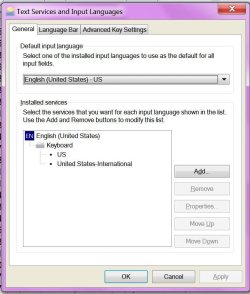
OK so the international keyboard works, as they say, à la merveille. Except . . . Why else would I be posting except for an except? So here's what my "Text Services and Input Languages" dialog shows on the General tab:

attachment.php


I would show you what is in the drop down list of selectable languages but the Snipping Tool makes the list collapse as soon as I try to snip something. So you can see that my only language is English US and there's just the 2 keyboards defined, which are the only 2 entries hiding in that drop down list.

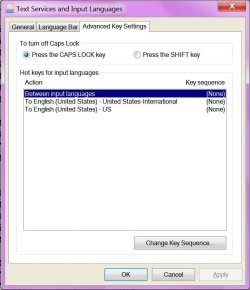
Now here's what I've got on the Advanced Key Settings tab:

attachment.php


This confirms I have NO key sequences defined for switching languages, keyboards, nothing, zip, zilch, nada, rien.

So riddle me this, Batman. How come my system keeps applying the International keyboard when I haven't asked for it? It seems to happen every few minutes. I keep setting it back to the US keyboard but the International keyboard keeps hijacking my system. What's up with this?
 

Attachments

  • General.JPG
    General.JPG
    66.5 KB · Views: 42,127
  • Keys.JPG
    Keys.JPG
    55.7 KB · Views: 46,321

My Computer

Computer type
PC/Desktop
Computer Manufacturer/Model Number
ASUS (assembled myself)
OS
Windows 7 Professional 64-bit
CPU
Intel Core i7-4790K Quad CPU @ 4.00 GHz
Motherboard
ASUS Z97-AR, Intel Z97 Express chipset, ATX form factor
Memory
2x4G DDR3 1600MHz DIMMs
Graphics Card(s)
Intel HD Graphics 4600 on mobo; NVidia GeForce GT 710 PCI-E
Sound Card
Realtek High Definition Audio, integrated on mobo
Monitor(s) Displays
Dell SE2417HGX, 20.5"x11.5" viewable area; 32" Toshiba HDTV
Screen Resolution
1920 x 1080 @ 60 Hz, 32-bit color depth
Hard Drives
Western Digital 500G SATA
Seagate 150G SATA
2 x Seagate 6T SATA
2 x Seagate 18T SATA
PSU
EVGA 500B (500 Watts)
Case
NZXT H230 mid-tower
Cooling
CPU fan, PSU fan, 2 case fans, NVidia fan
Keyboard
Perixx 513H
Mouse
Touch pad integrated into keyboard
Internet Speed
Intel Ethernet Conn(2)I218-V, on mobo, ISP=cableTV 400Mbps
Antivirus
Comodo
Browser
Firefox
Other Info
Ext'l DVD rec: LG HL-DT-ST DVDRAM GP10NB20 USB
Monitor conn to VideoPort via HDMI-to-VideoPort adap
Realtek ALC892 8-channel High Definition Audio CODEC featuring Crystal Sound 2
Audio conn to surr recv via 25' optical S/PDIF TOSLINK audio cable
SYSINFO: 11 NIC ports but only 1 actively conn via DHCP to ISP
ISP bundled w/ cable TV+cell, claims 400Mbps,
but really 50 million bytes/sec
In your first screenshot, are you able to select and remove the "United States-International" input language to stop it from somehow being set as default?
 

My Computer

Computer type
PC/Desktop
Computer Manufacturer/Model Number
Self built custom
OS
64-bit Windows 11 Pro for Workstations
CPU
Intel i7-8700K OC'd to 5 GHz
Motherboard
ASUS ROG Maximus XI Formula Z390
Memory
64 GB (4x16GB) G.SKILL TridentZ RGB DDR4 3600 MHz
Graphics Card(s)
ASUS ROG-STRIX-GTX1080TI-O11G-GAMING
Sound Card
Integrated
Monitor(s) Displays
2 x Samsung Odyssey G7 27"
Screen Resolution
2560x1440
Hard Drives
1TB Samsung 990 PRO M.2,
4TB Samsung 990 PRO PRO M.2,
TerraMaster F8 SSD Plus NAS
PSU
Seasonic Prime Titanium 850W
Case
Thermaltake Core P3
Cooling
Corsair Hydro H115i
Keyboard
Logitech wireless K800
Mouse
Logitech MX Master 4
Internet Speed
2 Gb/s Download and 100 Mb/s Upload
Antivirus
Malwarebyte Anti-Malware Premium
Browser
Google Chrome
Other Info
Logitech Z625 speaker system,
Logitech BRIO 4K Pro webcam,
HP Color LaserJet Pro MFP M477fdn,
APC SMART-UPS RT 1000 XL - SURT1000XLI,
Galaxy S23 Plus phone
Food for thought

Thanks for taking an interest here, Brink.

Setting a default. Never thought about that idea. But now that I'm looking at the dialog with that in mind, I see that in fact I already had set the standard keyboard as my default. The way I switch from one keyboard to the other is with the little icon that shows up toward the right edge of my Taskbar (which I have docked across the bottom of my screen). Simply selecting one or the other keyboard should not change the default. And removing the international keyboard from the list in that dialog is kind of defeating my purposes. I mean, I just added that keyboard to the list because I wanted to use it, because I use it regularly, just not 100% of the time. I do occasionally ;) lapse into my native language and don't want to have to do the extra things I'm perfectly willing to do when every other word has some sort of accent in it. So I do want both those keyboards there. Removing one of them isn't really a solution. Plus, changing keyboards does not entail opening that dialog, so if switching keyboards via the icon is somehow having an impact on the broader settings dialog . . . well, I'd call that a bug. Wouldn't you?

I'd be curious to know if anybody else has seen this. It happened once while I composing my preceding post in this thread. And then it happened about 5 minutes later, after I had signed off this site. But I have to say it hasn't happened in the intervening several hours. Maybe it just needed some extra time to settle in.:sarc: Those pesky bits . . .
 

My Computer

Computer type
PC/Desktop
Computer Manufacturer/Model Number
ASUS (assembled myself)
OS
Windows 7 Professional 64-bit
CPU
Intel Core i7-4790K Quad CPU @ 4.00 GHz
Motherboard
ASUS Z97-AR, Intel Z97 Express chipset, ATX form factor
Memory
2x4G DDR3 1600MHz DIMMs
Graphics Card(s)
Intel HD Graphics 4600 on mobo; NVidia GeForce GT 710 PCI-E
Sound Card
Realtek High Definition Audio, integrated on mobo
Monitor(s) Displays
Dell SE2417HGX, 20.5"x11.5" viewable area; 32" Toshiba HDTV
Screen Resolution
1920 x 1080 @ 60 Hz, 32-bit color depth
Hard Drives
Western Digital 500G SATA
Seagate 150G SATA
2 x Seagate 6T SATA
2 x Seagate 18T SATA
PSU
EVGA 500B (500 Watts)
Case
NZXT H230 mid-tower
Cooling
CPU fan, PSU fan, 2 case fans, NVidia fan
Keyboard
Perixx 513H
Mouse
Touch pad integrated into keyboard
Internet Speed
Intel Ethernet Conn(2)I218-V, on mobo, ISP=cableTV 400Mbps
Antivirus
Comodo
Browser
Firefox
Other Info
Ext'l DVD rec: LG HL-DT-ST DVDRAM GP10NB20 USB
Monitor conn to VideoPort via HDMI-to-VideoPort adap
Realtek ALC892 8-channel High Definition Audio CODEC featuring Crystal Sound 2
Audio conn to surr recv via 25' optical S/PDIF TOSLINK audio cable
SYSINFO: 11 NIC ports but only 1 actively conn via DHCP to ISP
ISP bundled w/ cable TV+cell, claims 400Mbps,
but really 50 million bytes/sec

My Computer

Computer type
PC/Desktop
Computer Manufacturer/Model Number
Self built custom
OS
64-bit Windows 11 Pro for Workstations
CPU
Intel i7-8700K OC'd to 5 GHz
Motherboard
ASUS ROG Maximus XI Formula Z390
Memory
64 GB (4x16GB) G.SKILL TridentZ RGB DDR4 3600 MHz
Graphics Card(s)
ASUS ROG-STRIX-GTX1080TI-O11G-GAMING
Sound Card
Integrated
Monitor(s) Displays
2 x Samsung Odyssey G7 27"
Screen Resolution
2560x1440
Hard Drives
1TB Samsung 990 PRO M.2,
4TB Samsung 990 PRO PRO M.2,
TerraMaster F8 SSD Plus NAS
PSU
Seasonic Prime Titanium 850W
Case
Thermaltake Core P3
Cooling
Corsair Hydro H115i
Keyboard
Logitech wireless K800
Mouse
Logitech MX Master 4
Internet Speed
2 Gb/s Download and 100 Mb/s Upload
Antivirus
Malwarebyte Anti-Malware Premium
Browser
Google Chrome
Other Info
Logitech Z625 speaker system,
Logitech BRIO 4K Pro webcam,
HP Color LaserJet Pro MFP M477fdn,
APC SMART-UPS RT 1000 XL - SURT1000XLI,
Galaxy S23 Plus phone
Another thought occurs to me

Interesting idea, Shawn. I ran through that dialog. My system already showed US non-international as the currect setting for all 3 of Current User, Welcome Screen, and New User Accounts. Nonetheless, I clicked the 2 check boxes at the bottom & let it go ahead & set those things. I mean, I don't see how it could hurt. The possibility of me ever creating another user account on this system are, as they say, vanishingly small. I have only ever logged on as me & I'm the only user of this machine. This ID is the Administrator & it's the only one that I've ever used here.

However, another possibility occurs to me. It would seem counter-intuitive if it's true but I'll put it forward just to see what you think. Could it be that the setting could be different in the browser compared to the text editor compared to the spreadsheet processor compared to . . . . ? The system doesn't keep track application by application what the keyboard is set to, does it? I suppose someone might like that kind of flexibility but for myself, I wouldn't like to have to keep track at that level of granularity. I consider the keyboard a system-level resource whose properties are global, meaning the same in all applications at any given moment.

So what do you think?
 

My Computer

Computer type
PC/Desktop
Computer Manufacturer/Model Number
ASUS (assembled myself)
OS
Windows 7 Professional 64-bit
CPU
Intel Core i7-4790K Quad CPU @ 4.00 GHz
Motherboard
ASUS Z97-AR, Intel Z97 Express chipset, ATX form factor
Memory
2x4G DDR3 1600MHz DIMMs
Graphics Card(s)
Intel HD Graphics 4600 on mobo; NVidia GeForce GT 710 PCI-E
Sound Card
Realtek High Definition Audio, integrated on mobo
Monitor(s) Displays
Dell SE2417HGX, 20.5"x11.5" viewable area; 32" Toshiba HDTV
Screen Resolution
1920 x 1080 @ 60 Hz, 32-bit color depth
Hard Drives
Western Digital 500G SATA
Seagate 150G SATA
2 x Seagate 6T SATA
2 x Seagate 18T SATA
PSU
EVGA 500B (500 Watts)
Case
NZXT H230 mid-tower
Cooling
CPU fan, PSU fan, 2 case fans, NVidia fan
Keyboard
Perixx 513H
Mouse
Touch pad integrated into keyboard
Internet Speed
Intel Ethernet Conn(2)I218-V, on mobo, ISP=cableTV 400Mbps
Antivirus
Comodo
Browser
Firefox
Other Info
Ext'l DVD rec: LG HL-DT-ST DVDRAM GP10NB20 USB
Monitor conn to VideoPort via HDMI-to-VideoPort adap
Realtek ALC892 8-channel High Definition Audio CODEC featuring Crystal Sound 2
Audio conn to surr recv via 25' optical S/PDIF TOSLINK audio cable
SYSINFO: 11 NIC ports but only 1 actively conn via DHCP to ISP
ISP bundled w/ cable TV+cell, claims 400Mbps,
but really 50 million bytes/sec
Could be. It wouldn't be the first time that software used it's own settings instead of was set as default in Windows.

When it happens next, see if there's any specific program or action that it keeps happening after.
 

My Computer

Computer type
PC/Desktop
Computer Manufacturer/Model Number
Self built custom
OS
64-bit Windows 11 Pro for Workstations
CPU
Intel i7-8700K OC'd to 5 GHz
Motherboard
ASUS ROG Maximus XI Formula Z390
Memory
64 GB (4x16GB) G.SKILL TridentZ RGB DDR4 3600 MHz
Graphics Card(s)
ASUS ROG-STRIX-GTX1080TI-O11G-GAMING
Sound Card
Integrated
Monitor(s) Displays
2 x Samsung Odyssey G7 27"
Screen Resolution
2560x1440
Hard Drives
1TB Samsung 990 PRO M.2,
4TB Samsung 990 PRO PRO M.2,
TerraMaster F8 SSD Plus NAS
PSU
Seasonic Prime Titanium 850W
Case
Thermaltake Core P3
Cooling
Corsair Hydro H115i
Keyboard
Logitech wireless K800
Mouse
Logitech MX Master 4
Internet Speed
2 Gb/s Download and 100 Mb/s Upload
Antivirus
Malwarebyte Anti-Malware Premium
Browser
Google Chrome
Other Info
Logitech Z625 speaker system,
Logitech BRIO 4K Pro webcam,
HP Color LaserJet Pro MFP M477fdn,
APC SMART-UPS RT 1000 XL - SURT1000XLI,
Galaxy S23 Plus phone
I may be on to something

I've got a Firefox window open side by side with a Metapad window. When I hover the mouse over the language button while the browser is in the foreground, it tells me US International. When I switch tasks to Metapad and hover the mouse again, it tells me US. In fact, if I just leave the mouse hovering over the button in the Taskbar, as I Alt+Tab repeatedly back and forth between FF & MP, the hover text over the button changes back and forth between the 2 keyboard settings.

So you're telling me that applications can query the state of the language setting & select whatever they want from the list of installed things you can see in the dialog we've been discussing here? As long as they can't pick something I haven't made available there, then I suppose that's OK. I have to say it would be a bit rude of an application to not simply accede to whatever I have already set. Even always reverting to the default is, to my mind, a bug.

Well, at least now I know. It's something I have to pay attention to. I don't like it, but as long as I know about it, I can be on my toes & recognize what's going on. If I want to change the keyboard setting in either application, of course that works. It's not like it's stuck in either setting. It's just that I've been expecting that if I set it while I happened to be in the browser, I would still have the same setting if I switched tasks to something else. Apparently the answer to that is . . . . IT AIN'T NECESSARILY SO! (with apologies to George and Ira)
 

My Computer

Computer type
PC/Desktop
Computer Manufacturer/Model Number
ASUS (assembled myself)
OS
Windows 7 Professional 64-bit
CPU
Intel Core i7-4790K Quad CPU @ 4.00 GHz
Motherboard
ASUS Z97-AR, Intel Z97 Express chipset, ATX form factor
Memory
2x4G DDR3 1600MHz DIMMs
Graphics Card(s)
Intel HD Graphics 4600 on mobo; NVidia GeForce GT 710 PCI-E
Sound Card
Realtek High Definition Audio, integrated on mobo
Monitor(s) Displays
Dell SE2417HGX, 20.5"x11.5" viewable area; 32" Toshiba HDTV
Screen Resolution
1920 x 1080 @ 60 Hz, 32-bit color depth
Hard Drives
Western Digital 500G SATA
Seagate 150G SATA
2 x Seagate 6T SATA
2 x Seagate 18T SATA
PSU
EVGA 500B (500 Watts)
Case
NZXT H230 mid-tower
Cooling
CPU fan, PSU fan, 2 case fans, NVidia fan
Keyboard
Perixx 513H
Mouse
Touch pad integrated into keyboard
Internet Speed
Intel Ethernet Conn(2)I218-V, on mobo, ISP=cableTV 400Mbps
Antivirus
Comodo
Browser
Firefox
Other Info
Ext'l DVD rec: LG HL-DT-ST DVDRAM GP10NB20 USB
Monitor conn to VideoPort via HDMI-to-VideoPort adap
Realtek ALC892 8-channel High Definition Audio CODEC featuring Crystal Sound 2
Audio conn to surr recv via 25' optical S/PDIF TOSLINK audio cable
SYSINFO: 11 NIC ports but only 1 actively conn via DHCP to ISP
ISP bundled w/ cable TV+cell, claims 400Mbps,
but really 50 million bytes/sec
Visual cue

It would be a good idea to have some sort of visual cue to alert you to the fact that the keyboard has changed. See, the 2 icons I was seeing were so similar they may as well have been the same. Yes, there's the Change Icon button buried about 3 layers deep in the dialog but the icons offered were all either boring, dull, or not very interesting. Not that I'm one to be redundant or anything. So I thought why not create my own icon? I tried to do that with Paint but it didn't seem to offer that option. Then I remembered I have GIMP. I can't remember now why I got that behemoth of an application. I'm not putting it down, don't get me wrong. But I'm not much of an artist and the couple of times I tried in the past to do anything with it, it was just too overwhelming and intimidating. But I thought I'd give it a try to turn a JPEG I've got into an icon. And it turned out to be ridiculously easy & intuitive, despite the fact that it took about a minute and a half to launch. The image of a sledgehammer crushing a peanut comes to mind, gee I wonder why . . . Anyway, now, when my system goes to the International keyboard, I see this:

Icon.JPG

This is a snip of the right end of my Taskbar. The little fuzzy thing at the left is my icon for the International keyboard. I hope it looks vaguely familiar.

Interesting aside. When I launched the Snipping Tool, I had to switch the keyboard even though I already had the International keyboard selected in Firefox. Every time the Snipper came to foreground, the keyboard would revert to default. I'm beginning to believe the keyboard setting is indeed something managed by the system, rather than selected by the application, and the system keeps track of the most recent keyboard setting for each currently running application. I'm sure if I cared enough to look, I'd find a little pocket of bloat dedicated to this feature somewhere in my Registry. But note that I was careful to say "currently running." After creating the above attachment & closing the Snipper, I just reopened it to see what would happen. The keyboard reverted to default. So the memory of who uses which keyboard lasts only until the application is closed. At least for some applications. I need to experiment a whole lot more to figure out if that's true for all applications.

In any case, it's a good idea to assign alternate icons that really look alternate, because the default icon management with this keyboard feature doesn't give you a whole lot of visually striking help.
 

My Computer

Computer type
PC/Desktop
Computer Manufacturer/Model Number
ASUS (assembled myself)
OS
Windows 7 Professional 64-bit
CPU
Intel Core i7-4790K Quad CPU @ 4.00 GHz
Motherboard
ASUS Z97-AR, Intel Z97 Express chipset, ATX form factor
Memory
2x4G DDR3 1600MHz DIMMs
Graphics Card(s)
Intel HD Graphics 4600 on mobo; NVidia GeForce GT 710 PCI-E
Sound Card
Realtek High Definition Audio, integrated on mobo
Monitor(s) Displays
Dell SE2417HGX, 20.5"x11.5" viewable area; 32" Toshiba HDTV
Screen Resolution
1920 x 1080 @ 60 Hz, 32-bit color depth
Hard Drives
Western Digital 500G SATA
Seagate 150G SATA
2 x Seagate 6T SATA
2 x Seagate 18T SATA
PSU
EVGA 500B (500 Watts)
Case
NZXT H230 mid-tower
Cooling
CPU fan, PSU fan, 2 case fans, NVidia fan
Keyboard
Perixx 513H
Mouse
Touch pad integrated into keyboard
Internet Speed
Intel Ethernet Conn(2)I218-V, on mobo, ISP=cableTV 400Mbps
Antivirus
Comodo
Browser
Firefox
Other Info
Ext'l DVD rec: LG HL-DT-ST DVDRAM GP10NB20 USB
Monitor conn to VideoPort via HDMI-to-VideoPort adap
Realtek ALC892 8-channel High Definition Audio CODEC featuring Crystal Sound 2
Audio conn to surr recv via 25' optical S/PDIF TOSLINK audio cable
SYSINFO: 11 NIC ports but only 1 actively conn via DHCP to ISP
ISP bundled w/ cable TV+cell, claims 400Mbps,
but really 50 million bytes/sec
Nar, I don't mean that the app will change your input language, but use its own instead.
 

My Computer

Computer type
PC/Desktop
Computer Manufacturer/Model Number
Self built custom
OS
64-bit Windows 11 Pro for Workstations
CPU
Intel i7-8700K OC'd to 5 GHz
Motherboard
ASUS ROG Maximus XI Formula Z390
Memory
64 GB (4x16GB) G.SKILL TridentZ RGB DDR4 3600 MHz
Graphics Card(s)
ASUS ROG-STRIX-GTX1080TI-O11G-GAMING
Sound Card
Integrated
Monitor(s) Displays
2 x Samsung Odyssey G7 27"
Screen Resolution
2560x1440
Hard Drives
1TB Samsung 990 PRO M.2,
4TB Samsung 990 PRO PRO M.2,
TerraMaster F8 SSD Plus NAS
PSU
Seasonic Prime Titanium 850W
Case
Thermaltake Core P3
Cooling
Corsair Hydro H115i
Keyboard
Logitech wireless K800
Mouse
Logitech MX Master 4
Internet Speed
2 Gb/s Download and 100 Mb/s Upload
Antivirus
Malwarebyte Anti-Malware Premium
Browser
Google Chrome
Other Info
Logitech Z625 speaker system,
Logitech BRIO 4K Pro webcam,
HP Color LaserJet Pro MFP M477fdn,
APC SMART-UPS RT 1000 XL - SURT1000XLI,
Galaxy S23 Plus phone
Experiment

So input language is an attribute the operating system exposes to applications and they get to choose? They can choose only those things I've got listed in the Text Services and Input Languages dialog, right? They can't choose from the larger list of all languages, right? By that, I mean the list you get when you click the Add button on the General tab in that dialog. They can't see the full list, just the ones I've selected, right?

I just ran a little experiment with Metapad. I had 2 Metapad windows open, one with the default keyboard, one with the optional keyboard. I saved both files, thus closing all Metapad sessions. (I didn't have more Metapad sessions going, something I often do.) I then reopened each of those files. They both opened with the default keyboard. I guess all that proves is that Metapad does not remember whatever keyboard was set last time it closed. It also means the system isn't remembering the keyboard setting from session to session on behalf of applications. It appears to be something the system reemembers on behalf of open applications only so long as they remain open.

Then it occurred to me perhaps the order in which I saved the 2 files might matter, as in do I first close the session with the alternate keyboard or the default keyboard? So I ran another experiment. I created a file with the alternate keyboard & then closed Metapad. And it was the only Metapad session running. When I reopened that file, the keyboard was back to default. So at least Metapad isn't remembering the keyboard setting. Plus the system doesn't appear to be making any attempt to remember whatever the keyboard was last time it had been running.

I'm just trying to understand how this works. I can't help :geek: myself.
 

My Computer

Computer type
PC/Desktop
Computer Manufacturer/Model Number
ASUS (assembled myself)
OS
Windows 7 Professional 64-bit
CPU
Intel Core i7-4790K Quad CPU @ 4.00 GHz
Motherboard
ASUS Z97-AR, Intel Z97 Express chipset, ATX form factor
Memory
2x4G DDR3 1600MHz DIMMs
Graphics Card(s)
Intel HD Graphics 4600 on mobo; NVidia GeForce GT 710 PCI-E
Sound Card
Realtek High Definition Audio, integrated on mobo
Monitor(s) Displays
Dell SE2417HGX, 20.5"x11.5" viewable area; 32" Toshiba HDTV
Screen Resolution
1920 x 1080 @ 60 Hz, 32-bit color depth
Hard Drives
Western Digital 500G SATA
Seagate 150G SATA
2 x Seagate 6T SATA
2 x Seagate 18T SATA
PSU
EVGA 500B (500 Watts)
Case
NZXT H230 mid-tower
Cooling
CPU fan, PSU fan, 2 case fans, NVidia fan
Keyboard
Perixx 513H
Mouse
Touch pad integrated into keyboard
Internet Speed
Intel Ethernet Conn(2)I218-V, on mobo, ISP=cableTV 400Mbps
Antivirus
Comodo
Browser
Firefox
Other Info
Ext'l DVD rec: LG HL-DT-ST DVDRAM GP10NB20 USB
Monitor conn to VideoPort via HDMI-to-VideoPort adap
Realtek ALC892 8-channel High Definition Audio CODEC featuring Crystal Sound 2
Audio conn to surr recv via 25' optical S/PDIF TOSLINK audio cable
SYSINFO: 11 NIC ports but only 1 actively conn via DHCP to ISP
ISP bundled w/ cable TV+cell, claims 400Mbps,
but really 50 million bytes/sec
It all depends on the specific program and program developer. If they make the app fully Windows compatible and compliant, then usually the program should use the same as what you have Windows set for.

Otherwise, it's a toss up of what the program will use. Some programs just have their own settings.
 

My Computer

Computer type
PC/Desktop
Computer Manufacturer/Model Number
Self built custom
OS
64-bit Windows 11 Pro for Workstations
CPU
Intel i7-8700K OC'd to 5 GHz
Motherboard
ASUS ROG Maximus XI Formula Z390
Memory
64 GB (4x16GB) G.SKILL TridentZ RGB DDR4 3600 MHz
Graphics Card(s)
ASUS ROG-STRIX-GTX1080TI-O11G-GAMING
Sound Card
Integrated
Monitor(s) Displays
2 x Samsung Odyssey G7 27"
Screen Resolution
2560x1440
Hard Drives
1TB Samsung 990 PRO M.2,
4TB Samsung 990 PRO PRO M.2,
TerraMaster F8 SSD Plus NAS
PSU
Seasonic Prime Titanium 850W
Case
Thermaltake Core P3
Cooling
Corsair Hydro H115i
Keyboard
Logitech wireless K800
Mouse
Logitech MX Master 4
Internet Speed
2 Gb/s Download and 100 Mb/s Upload
Antivirus
Malwarebyte Anti-Malware Premium
Browser
Google Chrome
Other Info
Logitech Z625 speaker system,
Logitech BRIO 4K Pro webcam,
HP Color LaserJet Pro MFP M477fdn,
APC SMART-UPS RT 1000 XL - SURT1000XLI,
Galaxy S23 Plus phone
Something a bit weird after exiting the International keyboard

I've noticed this a couple of times now so it's not an accident & I'm not imagining it. When the International keyboard is in effect, the Right Alt key is "captive." It has special functions, as described in that MS Knowledge Base article I cited a few posts back. But when you switch back to the default keyboard, it's supposed to "liberate" the Right Alt key to let it become functional again, like for activating the Menu Bar in any window. But I have noticed a few times now that sometimes, intermittently, the Right Alt key remains "captive." You can click it all you want, it won't do anything. And this in applications that you may or may not have been using previously under the International keyboard. The solution is to reactivate the International keyboard & then immediately revert to the default keyboard. That "liberates" the Right Alt key and things are normal from then on. Very strange.
 

My Computer

Computer type
PC/Desktop
Computer Manufacturer/Model Number
ASUS (assembled myself)
OS
Windows 7 Professional 64-bit
CPU
Intel Core i7-4790K Quad CPU @ 4.00 GHz
Motherboard
ASUS Z97-AR, Intel Z97 Express chipset, ATX form factor
Memory
2x4G DDR3 1600MHz DIMMs
Graphics Card(s)
Intel HD Graphics 4600 on mobo; NVidia GeForce GT 710 PCI-E
Sound Card
Realtek High Definition Audio, integrated on mobo
Monitor(s) Displays
Dell SE2417HGX, 20.5"x11.5" viewable area; 32" Toshiba HDTV
Screen Resolution
1920 x 1080 @ 60 Hz, 32-bit color depth
Hard Drives
Western Digital 500G SATA
Seagate 150G SATA
2 x Seagate 6T SATA
2 x Seagate 18T SATA
PSU
EVGA 500B (500 Watts)
Case
NZXT H230 mid-tower
Cooling
CPU fan, PSU fan, 2 case fans, NVidia fan
Keyboard
Perixx 513H
Mouse
Touch pad integrated into keyboard
Internet Speed
Intel Ethernet Conn(2)I218-V, on mobo, ISP=cableTV 400Mbps
Antivirus
Comodo
Browser
Firefox
Other Info
Ext'l DVD rec: LG HL-DT-ST DVDRAM GP10NB20 USB
Monitor conn to VideoPort via HDMI-to-VideoPort adap
Realtek ALC892 8-channel High Definition Audio CODEC featuring Crystal Sound 2
Audio conn to surr recv via 25' optical S/PDIF TOSLINK audio cable
SYSINFO: 11 NIC ports but only 1 actively conn via DHCP to ISP
ISP bundled w/ cable TV+cell, claims 400Mbps,
but really 50 million bytes/sec
Back
Top