Keyboard Layout - Change

How to Change the Keyboard Layout in Windows 7

   Information
This will show you how to change the keyboard layout to customize your keyboard for a specific input language or format. The keyboard layout controls which characters appear on the screen when you press the keys on your keyboard. Some input languages have several keyboard layouts; others have only one. This can make it easier to enter text or edit documents in multiple languages.

   Warning

Before you will be able to change the Keyboard layout, you must add a input language and keyboard layout that you want to use first.


OPTION ONE

To Change Default Input Language and Keyboard Layout


NOTE: This will allow you to select an added input language and keyboard layout to use as the default for all input fields in Windows 7.
1. Open the Control Panel (icons view), and click on the Region and Language icon.

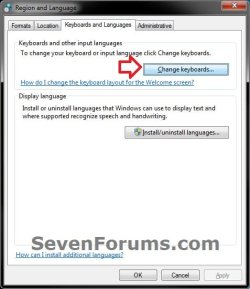
2. Click on the Keyboards and Languages tab, then click on the Change keyboards button. (see screenshot below)
Change_Default.jpg
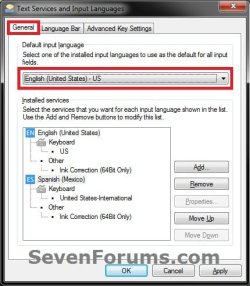
3. In the Defualt input language section, click on the drop box and select a added input language and keyboard layout. (see screenshots below)
Change_Default-1.jpgChange_Default-2.jpg
4. Click on OK. (see screenshots above)

5. Click on OK. (see screenshot below step 2)


OPTION TWO

To Change Keyboard Layout from Language Bar


NOTE: The input language you select in this option will only stay set until you log out, shut down, or restart the computer. Afterwards, it will reset to the default input method set in OPTION ONE until changed.
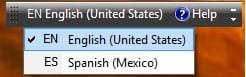
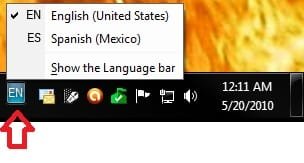
1. Click on the Language bar (on taskbar (default) or desktop), then select (check) a input language with the keyboard layout you want to use. (see screenshots below)
Change-1_Taskbar.jpgChange-1_Desktop.jpg


OPTION THREE

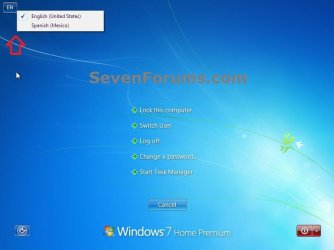
To Change Keyboard Layout from the Welcome Screen


NOTE: For example, on the CTRL+ALT+DELETE screen. The input language you select in this option will only stay set until you log out, shut down, or restart the computer. Afterwards, it will reset to the default input method set in OPTION ONE until changed.
1. On the Welcome screen, click the Keyboard layout button
attachment.php
, and then select a input language with the keyboard layout you want to use. (see screenshot below)
Change_Lock-2.jpg
That's it,
Shawn


Attachments

  • GetContent.jpg
    GetContent.jpg
    7.7 KB · Views: 132,753
Last edited:
Auto adjust

I've just noticed that if I click MB2 on the Language Bar icon, there's an option named Auto Adjust and it's got a check mark beside it, something I never did, at least not knowingly. I've been trying to find something that discusses what that is but I can't find it. The built-in Help and Support is no help & I haven't been able to find mention of it in any discussion on this site. I'm about to try Google but I decided to come here first. If I find anything, I'll post back.
 

My Computer

Computer type
PC/Desktop
Computer Manufacturer/Model Number
ASUS (assembled myself)
OS
Windows 7 Professional 64-bit
CPU
Intel Core i7-4790K Quad CPU @ 4.00 GHz
Motherboard
ASUS Z97-AR, Intel Z97 Express chipset, ATX form factor
Memory
2x4G DDR3 1600MHz DIMMs
Graphics Card(s)
Intel HD Graphics 4600 on mobo; NVidia GeForce GT 710 PCI-E
Sound Card
Realtek High Definition Audio, integrated on mobo
Monitor(s) Displays
Dell SE2417HGX, 20.5"x11.5" viewable area; 32" Toshiba HDTV
Screen Resolution
1920 x 1080 @ 60 Hz, 32-bit color depth
Hard Drives
Western Digital 500G SATA
Seagate 150G SATA
2 x Seagate 6T SATA
2 x Seagate 18T SATA
PSU
EVGA 500B (500 Watts)
Case
NZXT H230 mid-tower
Cooling
CPU fan, PSU fan, 2 case fans, NVidia fan
Keyboard
Perixx 513H
Mouse
Touch pad integrated into keyboard
Internet Speed
Intel Ethernet Conn(2)I218-V, on mobo, ISP=cableTV 400Mbps
Antivirus
Comodo
Browser
Firefox
Other Info
Ext'l DVD rec: LG HL-DT-ST DVDRAM GP10NB20 USB
Monitor conn to VideoPort via HDMI-to-VideoPort adap
Realtek ALC892 8-channel High Definition Audio CODEC featuring Crystal Sound 2
Audio conn to surr recv via 25' optical S/PDIF TOSLINK audio cable
SYSINFO: 11 NIC ports but only 1 actively conn via DHCP to ISP
ISP bundled w/ cable TV+cell, claims 400Mbps,
but really 50 million bytes/sec
Still a mystery

Well, what I've found on Google is that the world is FULL of people who don't like the thing that Windows does, changing the keyboard layout when you change tasks. I did find a couple of other people who also discovered that currently active tasks can have different keyboard layouts assigned and they revert to default on next launch.

As for the Auto Adjust feature, I found 2 references to it that said, in passing, they disabled the check mark in the process of doing something else, but then added the comment, "whatever that means." So the mystery is intact. What does that check mark give me? What happens if I turn it off? I don't really mind the way things are now. So I have to switch keyboards when I switch tasks. Or at least be aware that they can be different. Big deal. But something like that check mark should be documented & I'm not finding the documentation. In the Text Services and Input Languages dialog, F1 doesn't activate Help. It doesn't even do anything.

This is getting annoying.
 

My Computer

Computer type
PC/Desktop
Computer Manufacturer/Model Number
ASUS (assembled myself)
OS
Windows 7 Professional 64-bit
CPU
Intel Core i7-4790K Quad CPU @ 4.00 GHz
Motherboard
ASUS Z97-AR, Intel Z97 Express chipset, ATX form factor
Memory
2x4G DDR3 1600MHz DIMMs
Graphics Card(s)
Intel HD Graphics 4600 on mobo; NVidia GeForce GT 710 PCI-E
Sound Card
Realtek High Definition Audio, integrated on mobo
Monitor(s) Displays
Dell SE2417HGX, 20.5"x11.5" viewable area; 32" Toshiba HDTV
Screen Resolution
1920 x 1080 @ 60 Hz, 32-bit color depth
Hard Drives
Western Digital 500G SATA
Seagate 150G SATA
2 x Seagate 6T SATA
2 x Seagate 18T SATA
PSU
EVGA 500B (500 Watts)
Case
NZXT H230 mid-tower
Cooling
CPU fan, PSU fan, 2 case fans, NVidia fan
Keyboard
Perixx 513H
Mouse
Touch pad integrated into keyboard
Internet Speed
Intel Ethernet Conn(2)I218-V, on mobo, ISP=cableTV 400Mbps
Antivirus
Comodo
Browser
Firefox
Other Info
Ext'l DVD rec: LG HL-DT-ST DVDRAM GP10NB20 USB
Monitor conn to VideoPort via HDMI-to-VideoPort adap
Realtek ALC892 8-channel High Definition Audio CODEC featuring Crystal Sound 2
Audio conn to surr recv via 25' optical S/PDIF TOSLINK audio cable
SYSINFO: 11 NIC ports but only 1 actively conn via DHCP to ISP
ISP bundled w/ cable TV+cell, claims 400Mbps,
but really 50 million bytes/sec
Interesting. You might test it for a day with the "Auto Adjust" checked and uncheck to see what differences you notice.
 

My Computer

Computer type
PC/Desktop
Computer Manufacturer/Model Number
Self built custom
OS
64-bit Windows 11 Pro for Workstations
CPU
Intel i7-8700K OC'd to 5 GHz
Motherboard
ASUS ROG Maximus XI Formula Z390
Memory
64 GB (4x16GB) G.SKILL TridentZ RGB DDR4 3600 MHz
Graphics Card(s)
ASUS ROG-STRIX-GTX1080TI-O11G-GAMING
Sound Card
Integrated
Monitor(s) Displays
2 x Samsung Odyssey G7 27"
Screen Resolution
2560x1440
Hard Drives
1TB Samsung 990 PRO M.2,
4TB Samsung 990 PRO PRO M.2,
TerraMaster F8 SSD Plus NAS
PSU
Seasonic Prime Titanium 850W
Case
Thermaltake Core P3
Cooling
Corsair Hydro H115i
Keyboard
Logitech wireless K800
Mouse
Logitech MX Master 4
Internet Speed
2 Gb/s Download and 100 Mb/s Upload
Antivirus
Malwarebyte Anti-Malware Premium
Browser
Google Chrome
Other Info
Logitech Z625 speaker system,
Logitech BRIO 4K Pro webcam,
HP Color LaserJet Pro MFP M477fdn,
APC SMART-UPS RT 1000 XL - SURT1000XLI,
Galaxy S23 Plus phone
Much later that lifetime . . .

I never noticed a single impact from the setting or non-setting of that Auto Adjust check mark.

And it seems that the reversion to default keyboard is working as designed. You can change to an alternate keyboard only within a task and only for the duration of that task. The keyboard can be different in every task you have running, but as soon as you close a task, the system forgets that you used that keyboard with that application. The next time you launch that application, you get your default keyboard and you need to select your alternate keyboard again if you want to use it again. Oh well . . . :rolleyes:
 

My Computer

Computer type
PC/Desktop
Computer Manufacturer/Model Number
ASUS (assembled myself)
OS
Windows 7 Professional 64-bit
CPU
Intel Core i7-4790K Quad CPU @ 4.00 GHz
Motherboard
ASUS Z97-AR, Intel Z97 Express chipset, ATX form factor
Memory
2x4G DDR3 1600MHz DIMMs
Graphics Card(s)
Intel HD Graphics 4600 on mobo; NVidia GeForce GT 710 PCI-E
Sound Card
Realtek High Definition Audio, integrated on mobo
Monitor(s) Displays
Dell SE2417HGX, 20.5"x11.5" viewable area; 32" Toshiba HDTV
Screen Resolution
1920 x 1080 @ 60 Hz, 32-bit color depth
Hard Drives
Western Digital 500G SATA
Seagate 150G SATA
2 x Seagate 6T SATA
2 x Seagate 18T SATA
PSU
EVGA 500B (500 Watts)
Case
NZXT H230 mid-tower
Cooling
CPU fan, PSU fan, 2 case fans, NVidia fan
Keyboard
Perixx 513H
Mouse
Touch pad integrated into keyboard
Internet Speed
Intel Ethernet Conn(2)I218-V, on mobo, ISP=cableTV 400Mbps
Antivirus
Comodo
Browser
Firefox
Other Info
Ext'l DVD rec: LG HL-DT-ST DVDRAM GP10NB20 USB
Monitor conn to VideoPort via HDMI-to-VideoPort adap
Realtek ALC892 8-channel High Definition Audio CODEC featuring Crystal Sound 2
Audio conn to surr recv via 25' optical S/PDIF TOSLINK audio cable
SYSINFO: 11 NIC ports but only 1 actively conn via DHCP to ISP
ISP bundled w/ cable TV+cell, claims 400Mbps,
but really 50 million bytes/sec
Back
Top