
Kingston 256GB USB

anandwadhwa

New member
Local time
3:33 AM
Messages
9
Hi I recently bought
Kingston 256GB USB it comes with a default exFAT format is it possible to format it using FAT32 the reason of buying it is to load the images on it and play it back on digital photo frames which unfortunately doesnt detect exFAT. I have a laptop with windows 7 and 64 bit
 

My Computer

Computer Manufacturer/Model Number
Kingston 256GB USB
OS
Windows 7 64 bit
Hello Anandwadhwa, and welcome to Seven Forums.

You could, but you would have to break into 32GB partitions (3 primary (Dk. Blue) and the rest logical (Lt. blue). You would start off by shrinking the 256GB drive (256-32=224*1024=229376) by 229376 MB leaving 32GB. Next, keep shrinking each one by one leaving 32GB per partition. (1GB=1024MB).

You will also not be able to have file's that are 4GB+ in size on a FAT32 partition.

Hope this helps some,
Shawn
 

My Computer

Computer type
PC/Desktop
Computer Manufacturer/Model Number
Self built custom
OS
64-bit Windows 11 Pro for Workstations
CPU
Intel i7-8700K OC'd to 5 GHz
Motherboard
ASUS ROG Maximus XI Formula Z390
Memory
64 GB (4x16GB) G.SKILL TridentZ RGB DDR4 3600 MHz
Graphics Card(s)
ASUS ROG-STRIX-GTX1080TI-O11G-GAMING
Sound Card
Integrated
Monitor(s) Displays
2 x Samsung Odyssey G7 27"
Screen Resolution
2560x1440
Hard Drives
1TB Samsung 990 PRO M.2,
4TB Samsung 990 PRO PRO M.2,
TerraMaster F8 SSD Plus NAS
PSU
Seasonic Prime Titanium 850W
Case
Thermaltake Core P3
Cooling
Corsair Hydro H115i
Keyboard
Logitech wireless K800
Mouse
Logitech MX Master 4
Internet Speed
2 Gb/s Download and 100 Mb/s Upload
Antivirus
Malwarebyte Anti-Malware Premium
Browser
Google Chrome
Other Info
Logitech Z625 speaker system,
Logitech BRIO 4K Pro webcam,
HP Color LaserJet Pro MFP M477fdn,
APC SMART-UPS RT 1000 XL - SURT1000XLI,
Galaxy S23 Plus phone
Hello Anandwadhwa, and welcome to Seven Forums.

You could, but you would have to break into 32GB partitions (3 primary (Dk. Blue) and the rest logical (Lt. blue). You would start off by shrinking the 256GB drive (256-32=224*1024=229376) by 229376 MB leaving 32GB. Next, keep shrinking each one by one leaving 32GB per partition. (1GB=1024MB).

You will also not be able to have file's that are 4GB+ in size on a FAT32 partition.

Hope this helps some,
Shawn


Thanks Shawn for the info but the drive doesnt allow me to shrink the volume as the shrink volume is greyed out is there any way to shrink it I am sure that the drive is not write protected
 

My Computer

Computer Manufacturer/Model Number
Kingston 256GB USB
OS
Windows 7 64 bit
Could you post a screenshot of the drive in Disk Management (diskmgmt.msc) to see if we may be able to spot something wrong? :)
 

My Computer

Computer type
PC/Desktop
Computer Manufacturer/Model Number
Self built custom
OS
64-bit Windows 11 Pro for Workstations
CPU
Intel i7-8700K OC'd to 5 GHz
Motherboard
ASUS ROG Maximus XI Formula Z390
Memory
64 GB (4x16GB) G.SKILL TridentZ RGB DDR4 3600 MHz
Graphics Card(s)
ASUS ROG-STRIX-GTX1080TI-O11G-GAMING
Sound Card
Integrated
Monitor(s) Displays
2 x Samsung Odyssey G7 27"
Screen Resolution
2560x1440
Hard Drives
1TB Samsung 990 PRO M.2,
4TB Samsung 990 PRO PRO M.2,
TerraMaster F8 SSD Plus NAS
PSU
Seasonic Prime Titanium 850W
Case
Thermaltake Core P3
Cooling
Corsair Hydro H115i
Keyboard
Logitech wireless K800
Mouse
Logitech MX Master 4
Internet Speed
2 Gb/s Download and 100 Mb/s Upload
Antivirus
Malwarebyte Anti-Malware Premium
Browser
Google Chrome
Other Info
Logitech Z625 speaker system,
Logitech BRIO 4K Pro webcam,
HP Color LaserJet Pro MFP M477fdn,
APC SMART-UPS RT 1000 XL - SURT1000XLI,
Galaxy S23 Plus phone
I will do that but do you reckon this is becuase the USB is empty that is why I could not shrink the volume.

Also please let me know whether the command format drive:/FS FAT32 will allow me to format the USB in FAT32 format
 

My Computer

Computer Manufacturer/Model Number
Kingston 256GB USB
OS
Windows 7 64 bit
If the drive has not been initialized (RAW) or formated already, then that may be why it's grayed out. Seing the screenshot will help determine better what may be wrong though.

Unfortunately, the command will not work with it as 256GB. It will start working to a point, but it will eventually give you an error at the very end telling you that the volume is to large for FAT32 after waiting all that time. :(
 
Last edited:

My Computer

Computer type
PC/Desktop
Computer Manufacturer/Model Number
Self built custom
OS
64-bit Windows 11 Pro for Workstations
CPU
Intel i7-8700K OC'd to 5 GHz
Motherboard
ASUS ROG Maximus XI Formula Z390
Memory
64 GB (4x16GB) G.SKILL TridentZ RGB DDR4 3600 MHz
Graphics Card(s)
ASUS ROG-STRIX-GTX1080TI-O11G-GAMING
Sound Card
Integrated
Monitor(s) Displays
2 x Samsung Odyssey G7 27"
Screen Resolution
2560x1440
Hard Drives
1TB Samsung 990 PRO M.2,
4TB Samsung 990 PRO PRO M.2,
TerraMaster F8 SSD Plus NAS
PSU
Seasonic Prime Titanium 850W
Case
Thermaltake Core P3
Cooling
Corsair Hydro H115i
Keyboard
Logitech wireless K800
Mouse
Logitech MX Master 4
Internet Speed
2 Gb/s Download and 100 Mb/s Upload
Antivirus
Malwarebyte Anti-Malware Premium
Browser
Google Chrome
Other Info
Logitech Z625 speaker system,
Logitech BRIO 4K Pro webcam,
HP Color LaserJet Pro MFP M477fdn,
APC SMART-UPS RT 1000 XL - SURT1000XLI,
Galaxy S23 Plus phone
:cry: ok understood I will forward you the screenshot
 

My Computer

Computer Manufacturer/Model Number
Kingston 256GB USB
OS
Windows 7 64 bit
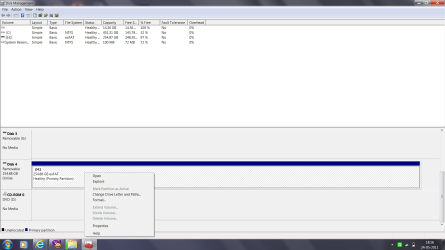
pls find the screen shot as you can see the area is grey out please suggest
 

Attachments

  • screenshot.png
    screenshot.png
    57.5 KB · Views: 227

My Computer

Computer Manufacturer/Model Number
Kingston 256GB USB
OS
Windows 7 64 bit
It appears that you may need to format it as NTFS first. Afterwards, you should be able to shrink the partition enough to create a second 32GB partition with. Next, you could format the 32GB partition as FAT32.

Be sure to backup anything that you do not want to lose on that disk first though.
 

My Computer

Computer type
PC/Desktop
Computer Manufacturer/Model Number
Self built custom
OS
64-bit Windows 11 Pro for Workstations
CPU
Intel i7-8700K OC'd to 5 GHz
Motherboard
ASUS ROG Maximus XI Formula Z390
Memory
64 GB (4x16GB) G.SKILL TridentZ RGB DDR4 3600 MHz
Graphics Card(s)
ASUS ROG-STRIX-GTX1080TI-O11G-GAMING
Sound Card
Integrated
Monitor(s) Displays
2 x Samsung Odyssey G7 27"
Screen Resolution
2560x1440
Hard Drives
1TB Samsung 990 PRO M.2,
4TB Samsung 990 PRO PRO M.2,
TerraMaster F8 SSD Plus NAS
PSU
Seasonic Prime Titanium 850W
Case
Thermaltake Core P3
Cooling
Corsair Hydro H115i
Keyboard
Logitech wireless K800
Mouse
Logitech MX Master 4
Internet Speed
2 Gb/s Download and 100 Mb/s Upload
Antivirus
Malwarebyte Anti-Malware Premium
Browser
Google Chrome
Other Info
Logitech Z625 speaker system,
Logitech BRIO 4K Pro webcam,
HP Color LaserJet Pro MFP M477fdn,
APC SMART-UPS RT 1000 XL - SURT1000XLI,
Galaxy S23 Plus phone
it doesnt allow me to format in any other format except the default exFAT can you guide me if there is any other procedure to format USB in NTFS
 

My Computer

Computer Manufacturer/Model Number
Kingston 256GB USB
OS
Windows 7 64 bit
Well, you might give the free program Partition Manager Home Edition a try to see if it may be able to do this for you. It doesn't seem like Disk Management is going to let you.
 

My Computer

Computer type
PC/Desktop
Computer Manufacturer/Model Number
Self built custom
OS
64-bit Windows 11 Pro for Workstations
CPU
Intel i7-8700K OC'd to 5 GHz
Motherboard
ASUS ROG Maximus XI Formula Z390
Memory
64 GB (4x16GB) G.SKILL TridentZ RGB DDR4 3600 MHz
Graphics Card(s)
ASUS ROG-STRIX-GTX1080TI-O11G-GAMING
Sound Card
Integrated
Monitor(s) Displays
2 x Samsung Odyssey G7 27"
Screen Resolution
2560x1440
Hard Drives
1TB Samsung 990 PRO M.2,
4TB Samsung 990 PRO PRO M.2,
TerraMaster F8 SSD Plus NAS
PSU
Seasonic Prime Titanium 850W
Case
Thermaltake Core P3
Cooling
Corsair Hydro H115i
Keyboard
Logitech wireless K800
Mouse
Logitech MX Master 4
Internet Speed
2 Gb/s Download and 100 Mb/s Upload
Antivirus
Malwarebyte Anti-Malware Premium
Browser
Google Chrome
Other Info
Logitech Z625 speaker system,
Logitech BRIO 4K Pro webcam,
HP Color LaserJet Pro MFP M477fdn,
APC SMART-UPS RT 1000 XL - SURT1000XLI,
Galaxy S23 Plus phone
Thanks for sending the link to the program it does allow me to create partitions and then format those in FAT32 I am creating 3 partitions as primary each of 32GB as mentioned by you and allocating the remaining as logical but I get a message saying that windows can only recognize the first partition is there any way that all the partitions are recognized by windows
 

My Computer

Computer Manufacturer/Model Number
Kingston 256GB USB
OS
Windows 7 64 bit
hi I have created the partitions as mentioned by you 3 primary and rest logical and then i formatted them. After doing this as soon as I copy the images it starts to copy and after certain amount of time it copies the pictures but i cannot open those as i get the message that either the pictures are corrupted or deosnt support the format. Please can you suggest the way to handle this issue it looks like something somewhere is not working
 

My Computer

Computer Manufacturer/Model Number
Kingston 256GB USB
OS
Windows 7 64 bit
Please note that none of the image size is more than 4MB and the total file size is less than 4GB to be precise 3.87GB
 

My Computer

Computer Manufacturer/Model Number
Kingston 256GB USB
OS
Windows 7 64 bit
Back
Top