Solved Laggy Windows 7, possibly due to corrupt files

Yoshisatsu

New member
Member
Local time
8:00 AM
Messages
13
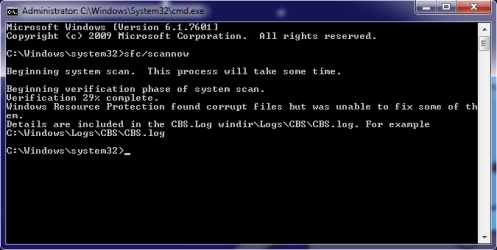
When googling a fix on a laggy Windows 7, one of the steps for diagnosis was to open up cmd.exe as an admin and run sfc/scannow. And after doing so, at 29% Verification, cmd notified me that:
"Windows Resource Protection found corrupt files but was unable to fix some of them."

And I when I attempt to open the log, it says access denied, probably because I'm not using the correct program.
 

Attachments
  • Windows7CMDError.png
    Windows7CMDError.png
    10.6 KB · Views: 12

My Computer My Computer

At a glance

Windows 7 Ultimate 64bit
OS
Windows 7 Ultimate 64bit
It may just be the file is locked rather than using an incorrect program. Try copying the file to your Desktop, then open the copy.
 

My Computer My Computer

At a glance

Windows 7 Ultimate x64
OS
Windows 7 Ultimate x64
Ok, I can open the file now, what exactly should I be looking for?
 

My Computer My Computer

At a glance

Windows 7 Ultimate 64bit
OS
Windows 7 Ultimate 64bit
So I should just run the Windows 7 Installation CD to fix the corrupt files since running cmd won't fix them?
 

My Computer My Computer

At a glance

Windows 7 Ultimate 64bit
OS
Windows 7 Ultimate 64bit

My Computer My Computer

At a glance

Windows 10 Home x64INTEL Core i5-750 Quad-Core 3.37GHzHyperX Fury Black Series 8GB (2 x 4GB) 1866MhzEVGA GeForce GTX 750 Superclocked 1GB 128-Bit...
Computer type
PC/Desktop
OS
Windows 10 Home x64
CPU
INTEL Core i5-750 Quad-Core 3.37GHz
Motherboard
ASUS P7P55D
Memory
HyperX Fury Black Series 8GB (2 x 4GB) 1866Mhz
Graphics Card(s)
EVGA GeForce GTX 750 Superclocked 1GB 128-Bit GDDR5
Monitor(s) Displays
LG 32MA68HY 32" IPS
Screen Resolution
1920 x 1080
Hard Drives
Samsung 840 Evo 120GB, SEAGATE 500GB Barracuda® 7200.12, SATA 3 Gb/s, 7200 RPM, 16MB cache
PSU
ANTEC TruePower New TP-550, 80 PLUS, 550W
Case
ANTEC Three Hundred Illusion
Cooling
COOLER MASTER Hyper 212 Plus, 4 x 120mm 1 x 140mm Noctua's
Internet Speed
85 + Mbps
Antivirus
Avast
Browser
Vivaldi
Great suggestion Bill!!
 

My Computer My Computer

At a glance

Windows 7 Ultimate x64
OS
Windows 7 Ultimate x64
After creating a repair disk and attempting the repair via cmd with the command:
"sfc /scannow /offbootdir=c:\ /offwindir=c:\windows"

It gave me the message saying something along the lines of "Windows Correction cannot begin repair"

So I resorted to System Restoring to my most recent Windows update which was a critical update, around 4-5 days ago. If that doesn't work, then I am planning to reinstall from scratch.
 

My Computer My Computer

At a glance

Windows 7 Ultimate 64bit
OS
Windows 7 Ultimate 64bit
After running cmd and running the program sfc/scannow, I still have an incorrectable error at 29%, so I guess my only option now is to reinstall Windows 7 :/ Guess I'll just back up all the files I can and drivers too.
 

My Computer My Computer

At a glance

Windows 7 Ultimate 64bit
OS
Windows 7 Ultimate 64bit
After running cmd and running the program sfc/scannow, I still have an incorrectable error at 29%, so I guess my only option now is to reinstall Windows 7 :/ Guess I'll just back up all the files I can and drivers too.

Yes, that would be a good idea, it will allow you to have a easier install.
 

My Computer My Computer

Computer type
Laptop
When you ran the command "sfc /scannow /offbootdir=c:\ /offwindir=c:\windows" did you confirm the Windows installation on your hard drive really was identified as being on drive C? When booting from alternate media the drive letters assigned are very often different than what you'd expect. Maybe you got that error message because there was no installation found on the drive you specified in that command. Also pay close attention to Method 2, Step 3 in the tutorial posted by A Guy regarding the System Reserved partition and drive letters.

In the end you may find it best to do a reinstall. Hard to say without knowing how damaged your installation is. You have to spend some time to prepare (identify all of your software, license keys, etc.) and then more time afterward setting everything up, but you can end up with a "brand new" system. Pick the install tutorial that best fits your situation and then read through the whole procedure. Make sure you understand each step so that you are properly prepared. Just ask if you have questions.
 

My Computer My Computer

At a glance

Windows 7 Ultimate x64
OS
Windows 7 Ultimate x64
Yep, I only have a C: drive so I don't see how Windows can be anywhere else :/ But yeah, I plan on simply reinstalling Windows onto my computer and hopefully everything will run as it did before. I am running Windows on a self made computer so is there anything I should be worried about when customizing my install?
 

My Computer My Computer

At a glance

Windows 7 Ultimate 64bit
OS
Windows 7 Ultimate 64bit
Yep, I only have a C: drive so I don't see how Windows can be anywhere else :/

Just wanted to make sure you read and understood my prior post; often it's not drive C: when booting from alternate media, even though you always see it as drive C: when booting normally. There's got to be a reason you received that error...

It will run as it did before, after you do the install, unless you've got hardware issues. Just install as you did before and you should have no issues (except I would also do a Diskpart clean command to ensure your drive's MBR is clean (keep in mind this also wipes out references to all data on the disk so make sure it's all backed up)). See here:

http://www.sevenforums.com/tutorials/52129-disk-clean-clean-all-diskpart-command.html
 

My Computer My Computer

At a glance

Windows 7 Ultimate x64
OS
Windows 7 Ultimate x64
Yoshisatu: You have one other option to consider before comitting to a re-install.

The System Update Readiness Tool (SURT) contains updated cabinet files (so it's a large download) that can fix many missing or currupt system files. I use it as a companion to SFC when SFC can't do it's job.

Win7 x86 SURT

Win7 x64 SURT

I provided links to both, but if I read your specs correctly, you'll want the x64 tool
 

My Computer My Computer

At a glance

x64 (6.3.9600) Win8.1 Pro & soon dual boot x6...AMD A6-3420M APU with Radeon(tm) HD Graphics6.00 GBAMD Radeon(TM) HD 6520G
Computer type
Laptop
Computer Manufacturer/Model Number
HP Pavilion dv6-6c10us
OS
x64 (6.3.9600) Win8.1 Pro & soon dual boot x64 (6.1.7601) Win7_SP1 HomePrem
CPU
AMD A6-3420M APU with Radeon(tm) HD Graphics
Motherboard
Hewlett-Packard 1805
Memory
6.00 GB
Graphics Card(s)
AMD Radeon(TM) HD 6520G
Sound Card
(1) AMD High Definition Audio Device (2) IDT High Definiti
Monitor(s) Displays
HP W2072a 20" LCD (1600 x 900) @ 60 Hz
Screen Resolution
1366 x 768 x 32 bits (4294967296 colors) @ 60 Hz
Hard Drives
ST640LM0 00 HM641JI SATA Disk Device
Keyboard
Logitech k520 wireless KB
Mouse
Logitech m320 wireless mouse (bundled with KB)
Internet Speed
15/5 | 54 MB Wireless 'n'
Antivirus
Realtime: Defender or Avast | On-demand: Malwarebytes, ESET
Browser
IE 11 on Win8, IE 10 on win 7
Other Info
Media: [Gimp, Audacity, VLC] || Comm: [WEmail 2012, Skype] || Productivity: [OpenOffice,| Textpad] || Utils: [Sysinternals, cCleaner, Speccy, Defraggler]
Slartybart, my good sir, you have my thanks. It may be a little early to celebrate but I've surpassed the 29% verification error on the cmd.
 

My Computer My Computer

At a glance

Windows 7 Ultimate 64bit
OS
Windows 7 Ultimate 64bit
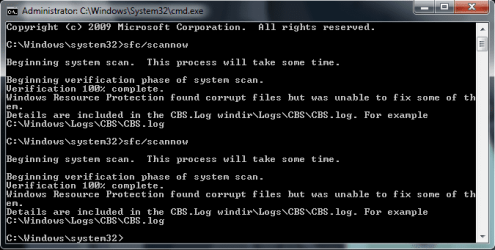
Welp, spoke too soon, got another error at 100% :/ I'll try running the SURT and the repair disk again.
 

Attachments

  • Windows7CMDError2.png
    Windows7CMDError2.png
    14.1 KB · Views: 4

My Computer My Computer

At a glance

Windows 7 Ultimate 64bit
OS
Windows 7 Ultimate 64bit
Yoshisatsu: So you ran SURT and it completed without error, then you ran SFC?
Did you exercise Option Three in the SFC tutorial? Basically searches the SFC output and writes a short version for analysis. Looking at the short version might tell you whether more SFC runs would help.

Definitely keep everyone up-to-date on your progress. Just a note: unlike the SFC log, you can look at the SURT log. It has a similar format - I tend to just go to the end of the file and work backwards. If there's an error at the end that should provide enough information - but sometimes you have to look back a little farther. I think you can use the same Findstr on the SURT log - just direct it to a different file.

The SURT log is in \Windows\Logs - same place as the SFC log.

Yeah, we'll hold off on the celebrations until your system is stable again.
 

My Computer My Computer

At a glance

x64 (6.3.9600) Win8.1 Pro & soon dual boot x6...AMD A6-3420M APU with Radeon(tm) HD Graphics6.00 GBAMD Radeon(TM) HD 6520G
Computer type
Laptop
Computer Manufacturer/Model Number
HP Pavilion dv6-6c10us
OS
x64 (6.3.9600) Win8.1 Pro & soon dual boot x64 (6.1.7601) Win7_SP1 HomePrem
CPU
AMD A6-3420M APU with Radeon(tm) HD Graphics
Motherboard
Hewlett-Packard 1805
Memory
6.00 GB
Graphics Card(s)
AMD Radeon(TM) HD 6520G
Sound Card
(1) AMD High Definition Audio Device (2) IDT High Definiti
Monitor(s) Displays
HP W2072a 20" LCD (1600 x 900) @ 60 Hz
Screen Resolution
1366 x 768 x 32 bits (4294967296 colors) @ 60 Hz
Hard Drives
ST640LM0 00 HM641JI SATA Disk Device
Keyboard
Logitech k520 wireless KB
Mouse
Logitech m320 wireless mouse (bundled with KB)
Internet Speed
15/5 | 54 MB Wireless 'n'
Antivirus
Realtime: Defender or Avast | On-demand: Malwarebytes, ESET
Browser
IE 11 on Win8, IE 10 on win 7
Other Info
Media: [Gimp, Audacity, VLC] || Comm: [WEmail 2012, Skype] || Productivity: [OpenOffice,| Textpad] || Utils: [Sysinternals, cCleaner, Speccy, Defraggler]
Oh hey,

Have you rebooted since all these SURT / SFC runs? Worth a shot if one of the files were fixed by SURT, but still locked by the system.

also note that when either of these utils run, they create pending rename and delete files that windows acts upon at some point as part of CBS. I haven't quite figured that out. I have quite a list myself and I'm looking for a way to force windows to process them. I might was well look now since it could help you too.
 

My Computer My Computer

At a glance

x64 (6.3.9600) Win8.1 Pro & soon dual boot x6...AMD A6-3420M APU with Radeon(tm) HD Graphics6.00 GBAMD Radeon(TM) HD 6520G
Computer type
Laptop
Computer Manufacturer/Model Number
HP Pavilion dv6-6c10us
OS
x64 (6.3.9600) Win8.1 Pro & soon dual boot x64 (6.1.7601) Win7_SP1 HomePrem
CPU
AMD A6-3420M APU with Radeon(tm) HD Graphics
Motherboard
Hewlett-Packard 1805
Memory
6.00 GB
Graphics Card(s)
AMD Radeon(TM) HD 6520G
Sound Card
(1) AMD High Definition Audio Device (2) IDT High Definiti
Monitor(s) Displays
HP W2072a 20" LCD (1600 x 900) @ 60 Hz
Screen Resolution
1366 x 768 x 32 bits (4294967296 colors) @ 60 Hz
Hard Drives
ST640LM0 00 HM641JI SATA Disk Device
Keyboard
Logitech k520 wireless KB
Mouse
Logitech m320 wireless mouse (bundled with KB)
Internet Speed
15/5 | 54 MB Wireless 'n'
Antivirus
Realtime: Defender or Avast | On-demand: Malwarebytes, ESET
Browser
IE 11 on Win8, IE 10 on win 7
Other Info
Media: [Gimp, Audacity, VLC] || Comm: [WEmail 2012, Skype] || Productivity: [OpenOffice,| Textpad] || Utils: [Sysinternals, cCleaner, Speccy, Defraggler]
Back
Top