Laptop EXCRUCIATINGLY slow

TechN00b

New member
Local time
5:42 PM
Messages
31
Just a preface, I truly am a scrublord when it comes to computers so if I'm semi-delusional, please forgive me.
I believe that My laptop got attacked by malware. I clicked on a wrong link while searching google and something came up saying I had to pay money. I couldnt close the tab or window so I ctrl-alt-del'd to get rid of it. After that moment, my laptop began to run worse and worse. Chrome takes 5 minutes to launch. Skype takes 5 minutes. Everything takes forever. I tried to do a system restore to before this happened and my laptop is still running slower than usual and takes forever to load things. So that brought me here; what should I do? I can provide any info that you guys see fit and i will try my best to do it swiftly and promptly given speedy replies and efforts to help. Thank you for any support <3
 

My Computer My Computer

Computer type
Laptop
Computer Manufacturer/Model Number
Sony VAIO PCG-61317L
OS
Windows 7 Home Premium 64bit
CPU
Intel Core i3 M380 @2.3GHz
Memory
4GB

My Computer My Computer

Computer type
PC/Desktop
Computer Manufacturer/Model Number
Lenovo
OS
Windows 7 Home Premium 64-Bit SP1
CPU
Intel Core i7 2600
Motherboard
Lenovo
Memory
8.00 GB Dual-Channel DDR3
Graphics Card(s)
1024MB GeForce GT 420
Sound Card
Intergrated Realtex ALC888S
Monitor(s) Displays
LG W40 series Widescreen
Screen Resolution
1920 by 1080 widescreen
Hard Drives
932GB Hitachi HDS TB
External drive 640 GB also
PSU
300W
Case
Tower
Cooling
yes came installed
Keyboard
Lenovo
Mouse
Laser wirless 5000
Antivirus
MBAM / Superantispyware pro paid for.
Browser
Google /
Other Info
PLDS DVD-RW DH16ABSH
I'd also run SuperAntiSpyware, it's linked in my signature.
 

My Computer My Computer

Computer type
PC/Desktop
Computer Manufacturer/Model Number
Custom Build
OS
W7 Pro x64 SP1 | W10 Pro IP x64 | W8.1 Pro x64 VM | Linux Mint VM
CPU
i7-4790k @ 4GHz (4.4GHz Boost)
Motherboard
ASUS Sabertooth Z87 (BIOS Rev 2004)
Memory
16GB DDR3 Kingston HyperX Fury @ 1600MHz CL 9-9-9-27
Graphics Card(s)
EVGA GTX 980 Classified
Sound Card
Realtek Onboard
Monitor(s) Displays
Samsung S27D390
Screen Resolution
1920 x 1080
Hard Drives
240GB Intel 520 Series SSD |
Samsung 850 EVO 120GB SSD |
2TB WD Caviar Black |
2TB WD Caviar Green
PSU
Corsair HX850-80 Gold Modular
Case
Cooler Master Silencio 650
Cooling
Corsair H80i w/2 x Corsair SP120 | 2 x 120mm Noctua NF-S12B
Keyboard
Microsoft Sidewinder X4
Mouse
Gigabyte M6900 optical
Internet Speed
152mb
Antivirus
F-Secure
Browser
Firefox 38.0
Other Info
Backup Rig: Win 7 Pro 64-bit | AMD A10-5800k | ASUS F2A85-V Pro | 8GB Samsung DDR3 @1600MHz | 120GB Toshiba SDD | 2TB Seagate HDD | Cooler Master Silencio 550
Would i be able to load my computer in safe mode with networking do that i could hopefully download these programs quicker and still get it to work?
 

My Computer My Computer

Computer type
Laptop
Computer Manufacturer/Model Number
Sony VAIO PCG-61317L
OS
Windows 7 Home Premium 64bit
CPU
Intel Core i3 M380 @2.3GHz
Memory
4GB
Yes, if necessary run both full scans in Safe Mode with Networking.

Then establish a Clean Boot, check System Files, replace any bloated AV with a free lightweight one, and the other steps to Clean Up Factory Bloatware.
 
Sure, boot to Safe Mode with Networking.
 

My Computer My Computer

Computer type
PC/Desktop
Computer Manufacturer/Model Number
Lenovo IdeaCenter 450
OS
Windows 10 Pro X64
CPU
Intel Quad Core i7-4770 @ 3.4Ghz
Memory
16.0GB PC3-12800 DDR3 SDRAM 1600 MHz
Graphics Card(s)
Intel Integrated HD Graphics
Sound Card
Realtek HD Audio
Monitor(s) Displays
HP 22" LCD
Screen Resolution
1680 x 1050
Hard Drives
250GB Samsung EVO SATA-3 SSD
2TB Seagate ST2000DM001 SATA-2
1.5TB Seagate ST3150041AS SATA
Keyboard
Dell USB
Mouse
Lenovo USB
Internet Speed
Cable via Road Runner 3MB Upload, 30MB Download
Antivirus
Windows Defender, MBAM Pro, MBAE
Browser
Seamonkey
Other Info
UEFI/GPT
PLDS DVD-RW DH16AERSH
So i run the two programs and then i did what u linked, correct?
 

My Computer My Computer

Computer type
Laptop
Computer Manufacturer/Model Number
Sony VAIO PCG-61317L
OS
Windows 7 Home Premium 64bit
CPU
Intel Core i3 M380 @2.3GHz
Memory
4GB
Yes, report back on results as you go as there may be other steps indicated.
 
MBAM said that there are no threats. SAS is currently running. 39 adware: tracking cookie threats so far after ~58000 items scanned
 

My Computer My Computer

Computer type
Laptop
Computer Manufacturer/Model Number
Sony VAIO PCG-61317L
OS
Windows 7 Home Premium 64bit
CPU
Intel Core i3 M380 @2.3GHz
Memory
4GB
SAScame back saying 132 file items were threats
 

My Computer My Computer

Computer type
Laptop
Computer Manufacturer/Model Number
Sony VAIO PCG-61317L
OS
Windows 7 Home Premium 64bit
CPU
Intel Core i3 M380 @2.3GHz
Memory
4GB
Did you clean them out at the end of the scan?
 

My Computer My Computer

Computer type
PC/Desktop
Computer Manufacturer/Model Number
Custom Build
OS
W7 Pro x64 SP1 | W10 Pro IP x64 | W8.1 Pro x64 VM | Linux Mint VM
CPU
i7-4790k @ 4GHz (4.4GHz Boost)
Motherboard
ASUS Sabertooth Z87 (BIOS Rev 2004)
Memory
16GB DDR3 Kingston HyperX Fury @ 1600MHz CL 9-9-9-27
Graphics Card(s)
EVGA GTX 980 Classified
Sound Card
Realtek Onboard
Monitor(s) Displays
Samsung S27D390
Screen Resolution
1920 x 1080
Hard Drives
240GB Intel 520 Series SSD |
Samsung 850 EVO 120GB SSD |
2TB WD Caviar Black |
2TB WD Caviar Green
PSU
Corsair HX850-80 Gold Modular
Case
Cooler Master Silencio 650
Cooling
Corsair H80i w/2 x Corsair SP120 | 2 x 120mm Noctua NF-S12B
Keyboard
Microsoft Sidewinder X4
Mouse
Gigabyte M6900 optical
Internet Speed
152mb
Antivirus
F-Secure
Browser
Firefox 38.0
Other Info
Backup Rig: Win 7 Pro 64-bit | AMD A10-5800k | ASUS F2A85-V Pro | 8GB Samsung DDR3 @1600MHz | 120GB Toshiba SDD | 2TB Seagate HDD | Cooler Master Silencio 550
Yes, i got rid of them, ran another full scan then a critical point scan. Nothing else came up. Im about to try MBAM one more time.
 

My Computer My Computer

Computer type
Laptop
Computer Manufacturer/Model Number
Sony VAIO PCG-61317L
OS
Windows 7 Home Premium 64bit
CPU
Intel Core i3 M380 @2.3GHz
Memory
4GB
MBAM wouldnt load for me so i shut down my computer and tried relaunching it and going into safe mode with networking and now it says "failure configuring windows updates reverting changes. Do not turn off your computer". Is this a major issue? Keep in mind this is while trying to launch the computer into safe mode with networking. I havnt tried booting it up normally, im going to wait on a reply from someone on here first.
 

My Computer My Computer

Computer type
Laptop
Computer Manufacturer/Model Number
Sony VAIO PCG-61317L
OS
Windows 7 Home Premium 64bit
CPU
Intel Core i3 M380 @2.3GHz
Memory
4GB
Try starting normally.

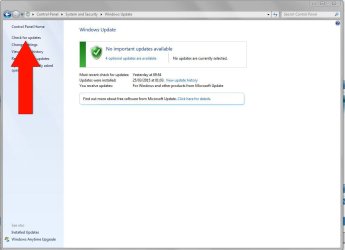
Check for Updates to install all Important and Optional.
 
How do i check for updates?
 

My Computer My Computer

Computer type
Laptop
Computer Manufacturer/Model Number
Sony VAIO PCG-61317L
OS
Windows 7 Home Premium 64bit
CPU
Intel Core i3 M380 @2.3GHz
Memory
4GB
Click on Start > Control Panel > System & Security > Windows Update > Check for Updates

Capture.JPG
 

My Computer My Computer

Computer type
PC/Desktop
Computer Manufacturer/Model Number
Custom Build
OS
W7 Pro x64 SP1 | W10 Pro IP x64 | W8.1 Pro x64 VM | Linux Mint VM
CPU
i7-4790k @ 4GHz (4.4GHz Boost)
Motherboard
ASUS Sabertooth Z87 (BIOS Rev 2004)
Memory
16GB DDR3 Kingston HyperX Fury @ 1600MHz CL 9-9-9-27
Graphics Card(s)
EVGA GTX 980 Classified
Sound Card
Realtek Onboard
Monitor(s) Displays
Samsung S27D390
Screen Resolution
1920 x 1080
Hard Drives
240GB Intel 520 Series SSD |
Samsung 850 EVO 120GB SSD |
2TB WD Caviar Black |
2TB WD Caviar Green
PSU
Corsair HX850-80 Gold Modular
Case
Cooler Master Silencio 650
Cooling
Corsair H80i w/2 x Corsair SP120 | 2 x 120mm Noctua NF-S12B
Keyboard
Microsoft Sidewinder X4
Mouse
Gigabyte M6900 optical
Internet Speed
152mb
Antivirus
F-Secure
Browser
Firefox 38.0
Other Info
Backup Rig: Win 7 Pro 64-bit | AMD A10-5800k | ASUS F2A85-V Pro | 8GB Samsung DDR3 @1600MHz | 120GB Toshiba SDD | 2TB Seagate HDD | Cooler Master Silencio 550
Alright, I'll do that. Additionally, I just booted my computer up normally- my computer is still slow. It is not AS SLOW as before I did the scans however, pages take 20-30 seconds to load. speedtest took about a minute or two to load- surprisingly, both my download and upload are better than they were in previous tests (20/5). I still feel like something is wrong though, as I said, my computer is still running slowly. Also of note, it was SUPER slow after first being booted up. I have skype set up to load as soon as I log on but I dont think that would also be contributing to the issue because I've had that set even before my computer started being slow. Any additional comments are appreciated as are the previous ones. I'm gonna go check for updates now.
 

My Computer My Computer

Computer type
Laptop
Computer Manufacturer/Model Number
Sony VAIO PCG-61317L
OS
Windows 7 Home Premium 64bit
CPU
Intel Core i3 M380 @2.3GHz
Memory
4GB

My Computer My Computer

Computer type
Laptop
Computer Manufacturer/Model Number
Sony VAIO PCG-61317L
OS
Windows 7 Home Premium 64bit
CPU
Intel Core i3 M380 @2.3GHz
Memory
4GB
If you`re using a hard drive, defragment it 4 to 5 times.

Run disk cleanup 3 to 4 times.

Click the start orb, then All Programs, then Accessories, then System Tools.
 

My Computer My Computer

Computer type
PC/Desktop
Computer Manufacturer/Model Number
Skylake Special #666
OS
Windows 10 Pro x64
CPU
Intel Core i7 6700K
Motherboard
Asus Sabertooth Z170 Mark 1
Memory
GSkill TridentZ RGB 16GB 3600 16-16-16-36
Graphics Card(s)
EVGA GTX 980 Ti SC x2
Sound Card
Realtek High Definition
Monitor(s) Displays
AOC G2460PG
Screen Resolution
1920 x 1080 144Hz
Hard Drives
Samsung 860 Pro 256GB, Seagate Barracuda 4TB x2
PSU
EVGA 1000 P2, EVGA White Custom Braided Cables
Case
Corsair Vengeance C70 Gunmetal Black
Cooling
Corsair H100i v2, Corsair ML120 x2, Thermal Grizzly Kryonaut
Keyboard
Logitech G910 Orion Spectrum
Mouse
Logitech G700s
Internet Speed
Verizon Fios Quantum Gateway 75/75
Antivirus
Windows Defender, Malwarebytes Free 3.8.3
Browser
Chrome
Other Info
Corsair SP120 x4, LG Blu-ray Drive, Durabrand HT-395 100 Watt Dolby Digital Amp, Corsair H2100 Wireless 7.1 Headset
Alright, can you please explain to me how to do that? Im sorry, Im not the most technologically experienced person with computers.
 

My Computer My Computer

Computer type
Laptop
Computer Manufacturer/Model Number
Sony VAIO PCG-61317L
OS
Windows 7 Home Premium 64bit
CPU
Intel Core i3 M380 @2.3GHz
Memory
4GB
Back
Top