laptop restarts one second into loading screen

skrillek

New member
Member
VIP
Local time
10:02 AM
Messages
237
Location
southampton
anyone that can help me is a god.

my sisters TOSHIBA NB200 restarts one second into windows xp loading screen, the hdd works perfectly in my pc but when i put in into this laptop it doesnt load. any ideas?

TOSHIBA NB200-12W
 

My Computer

Computer type
PC/Desktop
Computer Manufacturer/Model Number
Custom Build
OS
64 bit windows 7 home professional SP1
CPU
intel i5 3570k 3.4ghz quad core
Motherboard
ASUS P8-Z77-V LX
Memory
DDR3 16GB 1600MHZ
Graphics Card(s)
ASUS AMD R9 270X OC
Sound Card
SB Audigy
Monitor(s) Displays
Novatech
Screen Resolution
1920 - 1080 60HZ
Hard Drives
3 X 500G
seagate momentus xt 750
PSU
850w
Case
novatech
Cooling
1 blue led outtake + 1 blue led Intake 1 cpu 1 gpu 1 psu
Keyboard
aula
Mouse
Mad Cats ( R.A.T 3 )
Internet Speed
300 mbps
Antivirus
Avast
Browser
Firefox
Now forgive me skrillek but which hard drive are we talking about the drive from your machine to her machine or her drive to your machine??

IF you are using two different OS's then of course the receiving machine will not work.:confused:
 

My Computer

Computer type
PC/Desktop
Computer Manufacturer/Model Number
Own build (new) Desk1 / Asus ROG Win 7 / Desk2 1st build
OS
Desk1 7 Home Prem / Desk2 10 Pro / Main lap Asus ROG 10 Pro 2 laptop Toshiba 7 Pro Asus P2520 7 & 10
CPU
Desk1 i5 3750K / Laptop i7 GTX 860M / Desk2 i5 2500
Motherboard
Desk1 Asus P877-V / Desk2 Gigabyte H67 UD3H / Laptop ?
Memory
Desk1 8GB (1866) / Desk2 16GB (1333) / Laptop 8Gb DDR3
Graphics Card(s)
Desk 1& 2NVidia GTX 650 & Laptops on board Intel
Sound Card
Desk 1 & 2 -XONAR DG Realtek High Def audio Laptop
Monitor(s) Displays
Desk 1 Benq HD 2450 / Desk2 Philips 24" / Laptop 17.5"
Screen Resolution
1920x1080 D1 & D2 & Laptop 1
Hard Drives
Desk1 Samsung 120GB 830 SSD
Asus ROG 256GB 850 Pro SSD
Desk2 Samsung 840 256 SSD
Toshiba 120GB EVO
PSU
Desk 1 Corsair HX 1050/ Laptop ? / Desk 2 Corsair HX 650
Case
Desk 1 Cooler HAF XM ? Toshiba laptop / Desk2 Coolermaster
Cooling
Fans on all Desk1 -2 Desk2 - all Coolermasters 5 Laptop ?
Keyboard
Desk 1 MS Sidewinder X6 Desk 2 MS Sidewinder X 4
Mouse
Desk 1&2 - Gigabyte MS 900 gamer - laptop - Logitec wireless
Internet Speed
ADSL2+
Other Info
One other Desktop (tester) and spare Toshba laptop both with SSD's
Running Kaspersky 2016 ISS on all machines config'd identically
Logitec audio stereo systems on each machine (x3)
Canon MG5250MFC
Router/modem TP-Link running WPA2SK
No I'm using my set up wich is 7 to install xp on hers when I take out her hdd and use it in my pc when hers doesn't work, this way I know its not the hdd playing up cos I can run xp on my pc with her hdd so it must be something else, the ram I have run with mem test over night and its fine so I'm kinda stuck now
 

My Computer

Computer type
PC/Desktop
Computer Manufacturer/Model Number
Custom Build
OS
64 bit windows 7 home professional SP1
CPU
intel i5 3570k 3.4ghz quad core
Motherboard
ASUS P8-Z77-V LX
Memory
DDR3 16GB 1600MHZ
Graphics Card(s)
ASUS AMD R9 270X OC
Sound Card
SB Audigy
Monitor(s) Displays
Novatech
Screen Resolution
1920 - 1080 60HZ
Hard Drives
3 X 500G
seagate momentus xt 750
PSU
850w
Case
novatech
Cooling
1 blue led outtake + 1 blue led Intake 1 cpu 1 gpu 1 psu
Keyboard
aula
Mouse
Mad Cats ( R.A.T 3 )
Internet Speed
300 mbps
Antivirus
Avast
Browser
Firefox
No I'm using my set up wich is 7 to install xp on hers when I take out her hdd and use it in my pc when hers doesn't work, this way I know its not the hdd playing up cos I can run xp on my pc with her hdd so it must be something else, the ram I have run with mem test over night and its fine so I'm kinda stuck now
Hmm mate you have got me there the only way that I can think that could happen is if the XP was originally on your machine as the XP OS (if OEM) would be tied to that board:confused:

Just out of interest can you get into the BIOS on your sisters machine?
 

My Computer

Computer type
PC/Desktop
Computer Manufacturer/Model Number
Own build (new) Desk1 / Asus ROG Win 7 / Desk2 1st build
OS
Desk1 7 Home Prem / Desk2 10 Pro / Main lap Asus ROG 10 Pro 2 laptop Toshiba 7 Pro Asus P2520 7 & 10
CPU
Desk1 i5 3750K / Laptop i7 GTX 860M / Desk2 i5 2500
Motherboard
Desk1 Asus P877-V / Desk2 Gigabyte H67 UD3H / Laptop ?
Memory
Desk1 8GB (1866) / Desk2 16GB (1333) / Laptop 8Gb DDR3
Graphics Card(s)
Desk 1& 2NVidia GTX 650 & Laptops on board Intel
Sound Card
Desk 1 & 2 -XONAR DG Realtek High Def audio Laptop
Monitor(s) Displays
Desk 1 Benq HD 2450 / Desk2 Philips 24" / Laptop 17.5"
Screen Resolution
1920x1080 D1 & D2 & Laptop 1
Hard Drives
Desk1 Samsung 120GB 830 SSD
Asus ROG 256GB 850 Pro SSD
Desk2 Samsung 840 256 SSD
Toshiba 120GB EVO
PSU
Desk 1 Corsair HX 1050/ Laptop ? / Desk 2 Corsair HX 650
Case
Desk 1 Cooler HAF XM ? Toshiba laptop / Desk2 Coolermaster
Cooling
Fans on all Desk1 -2 Desk2 - all Coolermasters 5 Laptop ?
Keyboard
Desk 1 MS Sidewinder X6 Desk 2 MS Sidewinder X 4
Mouse
Desk 1&2 - Gigabyte MS 900 gamer - laptop - Logitec wireless
Internet Speed
ADSL2+
Other Info
One other Desktop (tester) and spare Toshba laptop both with SSD's
Running Kaspersky 2016 ISS on all machines config'd identically
Logitec audio stereo systems on each machine (x3)
Canon MG5250MFC
Router/modem TP-Link running WPA2SK
Yes I can and the os that was on the laptop is the same I'm trying to install, the only thing I can think of is if the something on the mb has broken...
 

My Computer

Computer type
PC/Desktop
Computer Manufacturer/Model Number
Custom Build
OS
64 bit windows 7 home professional SP1
CPU
intel i5 3570k 3.4ghz quad core
Motherboard
ASUS P8-Z77-V LX
Memory
DDR3 16GB 1600MHZ
Graphics Card(s)
ASUS AMD R9 270X OC
Sound Card
SB Audigy
Monitor(s) Displays
Novatech
Screen Resolution
1920 - 1080 60HZ
Hard Drives
3 X 500G
seagate momentus xt 750
PSU
850w
Case
novatech
Cooling
1 blue led outtake + 1 blue led Intake 1 cpu 1 gpu 1 psu
Keyboard
aula
Mouse
Mad Cats ( R.A.T 3 )
Internet Speed
300 mbps
Antivirus
Avast
Browser
Firefox
I'm a bit stumped here, which rig was the OS in when it was installed?
 

My Computer

Computer type
PC/Desktop
Computer Manufacturer/Model Number
Custom Build
OS
W7 Pro x64 SP1 | W10 Pro IP x64 | W8.1 Pro x64 VM | Linux Mint VM
CPU
i7-4790k @ 4GHz (4.4GHz Boost)
Motherboard
ASUS Sabertooth Z87 (BIOS Rev 2004)
Memory
16GB DDR3 Kingston HyperX Fury @ 1600MHz CL 9-9-9-27
Graphics Card(s)
EVGA GTX 980 Classified
Sound Card
Realtek Onboard
Monitor(s) Displays
Samsung S27D390
Screen Resolution
1920 x 1080
Hard Drives
240GB Intel 520 Series SSD |
Samsung 850 EVO 120GB SSD |
2TB WD Caviar Black |
2TB WD Caviar Green
PSU
Corsair HX850-80 Gold Modular
Case
Cooler Master Silencio 650
Cooling
Corsair H80i w/2 x Corsair SP120 | 2 x 120mm Noctua NF-S12B
Keyboard
Microsoft Sidewinder X4
Mouse
Gigabyte M6900 optical
Internet Speed
152mb
Antivirus
F-Secure
Browser
Firefox 38.0
Other Info
Backup Rig: Win 7 Pro 64-bit | AMD A10-5800k | ASUS F2A85-V Pro | 8GB Samsung DDR3 @1600MHz | 120GB Toshiba SDD | 2TB Seagate HDD | Cooler Master Silencio 550
The broken laptop is xp and my working pc is windows 7, I took the hdd out of the broken laptop and formated it on my working pc. Then installed xp on the laptops hdd on my pc. Then I ran the laptop hdd on my pc and it works, I then put it in the laptop and it still doesn't work
 

My Computer

Computer type
PC/Desktop
Computer Manufacturer/Model Number
Custom Build
OS
64 bit windows 7 home professional SP1
CPU
intel i5 3570k 3.4ghz quad core
Motherboard
ASUS P8-Z77-V LX
Memory
DDR3 16GB 1600MHZ
Graphics Card(s)
ASUS AMD R9 270X OC
Sound Card
SB Audigy
Monitor(s) Displays
Novatech
Screen Resolution
1920 - 1080 60HZ
Hard Drives
3 X 500G
seagate momentus xt 750
PSU
850w
Case
novatech
Cooling
1 blue led outtake + 1 blue led Intake 1 cpu 1 gpu 1 psu
Keyboard
aula
Mouse
Mad Cats ( R.A.T 3 )
Internet Speed
300 mbps
Antivirus
Avast
Browser
Firefox
I could be wrong here but I think the HDD should be in the laptop when you install the OS for it to work on the laptop. What was the initial problem with it that required a new install?
 

My Computer

Computer type
PC/Desktop
Computer Manufacturer/Model Number
Custom Build
OS
W7 Pro x64 SP1 | W10 Pro IP x64 | W8.1 Pro x64 VM | Linux Mint VM
CPU
i7-4790k @ 4GHz (4.4GHz Boost)
Motherboard
ASUS Sabertooth Z87 (BIOS Rev 2004)
Memory
16GB DDR3 Kingston HyperX Fury @ 1600MHz CL 9-9-9-27
Graphics Card(s)
EVGA GTX 980 Classified
Sound Card
Realtek Onboard
Monitor(s) Displays
Samsung S27D390
Screen Resolution
1920 x 1080
Hard Drives
240GB Intel 520 Series SSD |
Samsung 850 EVO 120GB SSD |
2TB WD Caviar Black |
2TB WD Caviar Green
PSU
Corsair HX850-80 Gold Modular
Case
Cooler Master Silencio 650
Cooling
Corsair H80i w/2 x Corsair SP120 | 2 x 120mm Noctua NF-S12B
Keyboard
Microsoft Sidewinder X4
Mouse
Gigabyte M6900 optical
Internet Speed
152mb
Antivirus
F-Secure
Browser
Firefox 38.0
Other Info
Backup Rig: Win 7 Pro 64-bit | AMD A10-5800k | ASUS F2A85-V Pro | 8GB Samsung DDR3 @1600MHz | 120GB Toshiba SDD | 2TB Seagate HDD | Cooler Master Silencio 550
I could be wrong here but I think the HDD should be in the laptop when you install the OS for it to work on the laptop. What was the initial problem with it that required a new install?
Hmm Boozad I am thinking what copy of XP is involved here an OEM in which case it is tied to the laptop board and if it is a retail (very rare animal) how many times has it been usd?? To be honest if the XP is retail and has only been used once it should install on that drive if it is the only one hooked up. Therefore it is going to be tied to that other board so what happens when the drive is returned to the laptop and even if it works is it going to work for very long??

I am going to ask anyway but is this laptop really worth it? and not forgetting the end of support for XP is just around the corner:confused:
 

My Computer

Computer type
PC/Desktop
Computer Manufacturer/Model Number
Own build (new) Desk1 / Asus ROG Win 7 / Desk2 1st build
OS
Desk1 7 Home Prem / Desk2 10 Pro / Main lap Asus ROG 10 Pro 2 laptop Toshiba 7 Pro Asus P2520 7 & 10
CPU
Desk1 i5 3750K / Laptop i7 GTX 860M / Desk2 i5 2500
Motherboard
Desk1 Asus P877-V / Desk2 Gigabyte H67 UD3H / Laptop ?
Memory
Desk1 8GB (1866) / Desk2 16GB (1333) / Laptop 8Gb DDR3
Graphics Card(s)
Desk 1& 2NVidia GTX 650 & Laptops on board Intel
Sound Card
Desk 1 & 2 -XONAR DG Realtek High Def audio Laptop
Monitor(s) Displays
Desk 1 Benq HD 2450 / Desk2 Philips 24" / Laptop 17.5"
Screen Resolution
1920x1080 D1 & D2 & Laptop 1
Hard Drives
Desk1 Samsung 120GB 830 SSD
Asus ROG 256GB 850 Pro SSD
Desk2 Samsung 840 256 SSD
Toshiba 120GB EVO
PSU
Desk 1 Corsair HX 1050/ Laptop ? / Desk 2 Corsair HX 650
Case
Desk 1 Cooler HAF XM ? Toshiba laptop / Desk2 Coolermaster
Cooling
Fans on all Desk1 -2 Desk2 - all Coolermasters 5 Laptop ?
Keyboard
Desk 1 MS Sidewinder X6 Desk 2 MS Sidewinder X 4
Mouse
Desk 1&2 - Gigabyte MS 900 gamer - laptop - Logitec wireless
Internet Speed
ADSL2+
Other Info
One other Desktop (tester) and spare Toshba laptop both with SSD's
Running Kaspersky 2016 ISS on all machines config'd identically
Logitec audio stereo systems on each machine (x3)
Canon MG5250MFC
Router/modem TP-Link running WPA2SK
Everybody seemed to avoid this question, and maybe it was the right thing to do, but I want to make sure everything is checked out: did you try booting into safe mode?
As other people said above, you might just need to send it to a service so they can install the XP that is tied to it, but as far as I know, when that is involved, there usually is a partition on the HDD from where you can fresh install the OS (at least that's how it goes for w8 being tied to the board, as my laptop is, for some reason -.-)
 

My Computer

Computer type
PC/Desktop
Computer Manufacturer/Model Number
Custom build
OS
Windows 7 ultimate x64
CPU
AMD Athlon II x2 245
Motherboard
Asrock N68C-GS FX
Memory
6 GB DDR3 1800 mhz
Graphics Card(s)
nVidia GeForce GT220
Sound Card
Creative SB Audigy SE
Monitor(s) Displays
Acer V226HQL
Screen Resolution
1920x1080
Browser
Google Chrome
I'm wondering what was stopping the OS being installed while the HDD was in the laptop.
 

My Computer

Computer type
PC/Desktop
Computer Manufacturer/Model Number
Custom Build
OS
W7 Pro x64 SP1 | W10 Pro IP x64 | W8.1 Pro x64 VM | Linux Mint VM
CPU
i7-4790k @ 4GHz (4.4GHz Boost)
Motherboard
ASUS Sabertooth Z87 (BIOS Rev 2004)
Memory
16GB DDR3 Kingston HyperX Fury @ 1600MHz CL 9-9-9-27
Graphics Card(s)
EVGA GTX 980 Classified
Sound Card
Realtek Onboard
Monitor(s) Displays
Samsung S27D390
Screen Resolution
1920 x 1080
Hard Drives
240GB Intel 520 Series SSD |
Samsung 850 EVO 120GB SSD |
2TB WD Caviar Black |
2TB WD Caviar Green
PSU
Corsair HX850-80 Gold Modular
Case
Cooler Master Silencio 650
Cooling
Corsair H80i w/2 x Corsair SP120 | 2 x 120mm Noctua NF-S12B
Keyboard
Microsoft Sidewinder X4
Mouse
Gigabyte M6900 optical
Internet Speed
152mb
Antivirus
F-Secure
Browser
Firefox 38.0
Other Info
Backup Rig: Win 7 Pro 64-bit | AMD A10-5800k | ASUS F2A85-V Pro | 8GB Samsung DDR3 @1600MHz | 120GB Toshiba SDD | 2TB Seagate HDD | Cooler Master Silencio 550
Well for example my laptop has a boot protection, I am unable to change the boot settings from BIOS in order to boot from CD or USB and I cannot start the install of another windows while under windows, I get an error telling me to use the pre-installed copy from the HDD.
Might be the same over here.
 

My Computer

Computer type
PC/Desktop
Computer Manufacturer/Model Number
Custom build
OS
Windows 7 ultimate x64
CPU
AMD Athlon II x2 245
Motherboard
Asrock N68C-GS FX
Memory
6 GB DDR3 1800 mhz
Graphics Card(s)
nVidia GeForce GT220
Sound Card
Creative SB Audigy SE
Monitor(s) Displays
Acer V226HQL
Screen Resolution
1920x1080
Browser
Google Chrome
Yes breaker the original install is tied to the board especially if it is an OEM. Now the safe mode question did not come up because the OP did say the laptop was not working at all with the drive and anyway if you don't have a working OS on it it cannot do that.

My concerns are that the OS installed via the OP's machine is now tied to that the non laptop board and is going to be thrown up as non genuine if the XP "takes" on that laptop. I am just wondering how old this laptop is to be honest and is it worth the hassle of trying to get it going especially with an OS that is shortly going to lose support.

What are your thoughts on that because to me it doesn't make a lot of sense.
 

My Computer

Computer type
PC/Desktop
Computer Manufacturer/Model Number
Own build (new) Desk1 / Asus ROG Win 7 / Desk2 1st build
OS
Desk1 7 Home Prem / Desk2 10 Pro / Main lap Asus ROG 10 Pro 2 laptop Toshiba 7 Pro Asus P2520 7 & 10
CPU
Desk1 i5 3750K / Laptop i7 GTX 860M / Desk2 i5 2500
Motherboard
Desk1 Asus P877-V / Desk2 Gigabyte H67 UD3H / Laptop ?
Memory
Desk1 8GB (1866) / Desk2 16GB (1333) / Laptop 8Gb DDR3
Graphics Card(s)
Desk 1& 2NVidia GTX 650 & Laptops on board Intel
Sound Card
Desk 1 & 2 -XONAR DG Realtek High Def audio Laptop
Monitor(s) Displays
Desk 1 Benq HD 2450 / Desk2 Philips 24" / Laptop 17.5"
Screen Resolution
1920x1080 D1 & D2 & Laptop 1
Hard Drives
Desk1 Samsung 120GB 830 SSD
Asus ROG 256GB 850 Pro SSD
Desk2 Samsung 840 256 SSD
Toshiba 120GB EVO
PSU
Desk 1 Corsair HX 1050/ Laptop ? / Desk 2 Corsair HX 650
Case
Desk 1 Cooler HAF XM ? Toshiba laptop / Desk2 Coolermaster
Cooling
Fans on all Desk1 -2 Desk2 - all Coolermasters 5 Laptop ?
Keyboard
Desk 1 MS Sidewinder X6 Desk 2 MS Sidewinder X 4
Mouse
Desk 1&2 - Gigabyte MS 900 gamer - laptop - Logitec wireless
Internet Speed
ADSL2+
Other Info
One other Desktop (tester) and spare Toshba laptop both with SSD's
Running Kaspersky 2016 ISS on all machines config'd identically
Logitec audio stereo systems on each machine (x3)
Canon MG5250MFC
Router/modem TP-Link running WPA2SK
I really should have been more clear, I don't think it is oem because I see the windows xp loading screen for a second befroe it shuts off. I couldn't rull off the fact there might have been a virus on it so that's why I wipped it so I'm not getting the original os off of it even if there was.
And I tried loading it in safe mode.
And I'm not lieing to you when I say it took an hour to boot up. I knew this laptop was bad but no. Computer should have to take this long to boot up, let along running applications like facebook. It would just crash and I thought it had so many problems I would just start over.
 

My Computer

Computer type
PC/Desktop
Computer Manufacturer/Model Number
Custom Build
OS
64 bit windows 7 home professional SP1
CPU
intel i5 3570k 3.4ghz quad core
Motherboard
ASUS P8-Z77-V LX
Memory
DDR3 16GB 1600MHZ
Graphics Card(s)
ASUS AMD R9 270X OC
Sound Card
SB Audigy
Monitor(s) Displays
Novatech
Screen Resolution
1920 - 1080 60HZ
Hard Drives
3 X 500G
seagate momentus xt 750
PSU
850w
Case
novatech
Cooling
1 blue led outtake + 1 blue led Intake 1 cpu 1 gpu 1 psu
Keyboard
aula
Mouse
Mad Cats ( R.A.T 3 )
Internet Speed
300 mbps
Antivirus
Avast
Browser
Firefox
I would really like to see this machine as the specs pulled up are wellquite amazingly abysmal just the RAM alone is woeful.

The other query I have is why are you quoting two different machines? The NB200 is listed as a netbook
Toshiba NB200 Specifications - Laptop & Notebook computers and as you can see comes with XP installed so it would be an OEM and the NB200-12W also a netbook Toshiba NB200-12W - Toshiba comes with 7 also an OEM!!

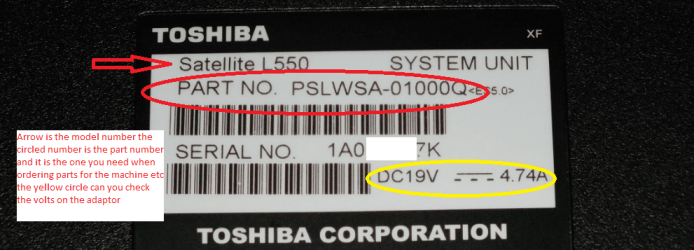
Can you make sure of the model and the PART NO number/s before we go any further as it is becoming quite bizarre. See pic.

The XP disk I am fairly sure is not the one that the machine was installed from because I don't think the netbooks as a general rule come with an optical drive so it is not an option.
If you posted before you wiped the drive then we could have helped out there because there is a way of going back to what is known as a factory default but depending on how you wiped the drive really is the crux of what you can do with it now.

For example if you wiped the drive using the DISKPART clean all or the Partition Wizard disk wipe then the disk will be totally clean of anything except the 0's or 1's that you may have instructed the wiping process to use so in essence a brand new drive that would require formatting etc etc

You could also check the volts on the machines adaptor and even take out the battery and check it for volts.
 

Attachments

  • PART NO.PNG
    PART NO.PNG
    112.5 KB · Views: 1

My Computer

Computer type
PC/Desktop
Computer Manufacturer/Model Number
Own build (new) Desk1 / Asus ROG Win 7 / Desk2 1st build
OS
Desk1 7 Home Prem / Desk2 10 Pro / Main lap Asus ROG 10 Pro 2 laptop Toshiba 7 Pro Asus P2520 7 & 10
CPU
Desk1 i5 3750K / Laptop i7 GTX 860M / Desk2 i5 2500
Motherboard
Desk1 Asus P877-V / Desk2 Gigabyte H67 UD3H / Laptop ?
Memory
Desk1 8GB (1866) / Desk2 16GB (1333) / Laptop 8Gb DDR3
Graphics Card(s)
Desk 1& 2NVidia GTX 650 & Laptops on board Intel
Sound Card
Desk 1 & 2 -XONAR DG Realtek High Def audio Laptop
Monitor(s) Displays
Desk 1 Benq HD 2450 / Desk2 Philips 24" / Laptop 17.5"
Screen Resolution
1920x1080 D1 & D2 & Laptop 1
Hard Drives
Desk1 Samsung 120GB 830 SSD
Asus ROG 256GB 850 Pro SSD
Desk2 Samsung 840 256 SSD
Toshiba 120GB EVO
PSU
Desk 1 Corsair HX 1050/ Laptop ? / Desk 2 Corsair HX 650
Case
Desk 1 Cooler HAF XM ? Toshiba laptop / Desk2 Coolermaster
Cooling
Fans on all Desk1 -2 Desk2 - all Coolermasters 5 Laptop ?
Keyboard
Desk 1 MS Sidewinder X6 Desk 2 MS Sidewinder X 4
Mouse
Desk 1&2 - Gigabyte MS 900 gamer - laptop - Logitec wireless
Internet Speed
ADSL2+
Other Info
One other Desktop (tester) and spare Toshba laptop both with SSD's
Running Kaspersky 2016 ISS on all machines config'd identically
Logitec audio stereo systems on each machine (x3)
Canon MG5250MFC
Router/modem TP-Link running WPA2SK
Back
Top