Latest Version of Malwarebytes

Ok mate I might try this one although I will be watching it as I know that an Australian installed Kaspersky for example like the one I loaded onto a machine I sent my brother in the UK would not work there but it definitely quotes $AUD's.:)

'Tis true that KL licenses have regional filters regarding purchase/activation to prevent piracy and resale in countries at a high price of licenses purchased in another country at a low price. (I am a long-time KIS user.)

AFAIK, there are currently no such regional purchase/activation restrictions for MBAM.

You just want to be sure that you are buying a valid lifetime license from a valid seller, especially if it is a "download only" purchase with no boxed CD.
This is especially true now that lifetime consumer licenses are "at a premium", as resellers move out their remaining stock.

HTH,
MM
 

My Computer My Computer

Computer type
PC/Desktop
Computer Manufacturer/Model Number
Dell Studio XPS 8500
OS
OEM Windows 7 Ult (x64) SP1
CPU
Intel Core-i7 3770 @ 3.4 GHz
Motherboard
"Dell" branded
Memory
16 GB DDR3 SDRAM @ 1333 MHz
Graphics Card(s)
NVidia GeForce GT620 1 GB
Sound Card
THX TruStudio PC
Monitor(s) Displays
Dell U2410 Full HD
Hard Drives
2.0 TB SATA2 @ 7200 RPM
PSU
350W
Keyboard
MS 4000 Ergon - Wired
Mouse
Logitech Anywhere MX
Internet Speed
Cable HSI w/Turbo (router)
Antivirus
KIS-MBAM Premium-MBAE Premium
Browser
Fx (current version); IE
Other Info
And a Win7/64 Pro laptop; And a Win10/64 Pro desktop.
Hello. I checked out this new version some days ago (the new 2.0 one) and the interface was just ugly I couldn't stand it. Is there anyway to make it look cleaner? The moment it was finished installing huge popups came from the system tray telling me to "your definitions are not up to date! You should update!!" and a "your computer has never been scanned!" pop-up. Why the huge pop-ups? Why can't there just be a small window telling "you need to update definitions" and "do you want to do a first time scan"? I won't bother scanning as it takes 2 hours (at least in the 1.75 version which I reverted back to). I also heard that the new version's scan is a bit slower than before.

Has anyone tried the new 2.0 version and what was your experience? For now I'm gonna stick to the 1.75 version and just update the definitions.
I sure wouldn't use an ugly interface, that's for sure. IT can't be good if it's ugly. I got the big popups too on initial install, they did scare me.
 

My Computer My Computer

Computer type
PC/Desktop
Computer Manufacturer/Model Number
Home Built Desktop By DataTech
OS
Windows 7 Ultimate X64 SP1
CPU
Intel i5-2550K, Differing ~4.4-4.8GHz No built in GPU
Motherboard
ASUS P8Z68-V PRO/GEN3
Memory
16GB G.Skill Sniper 1866MHz @ 2133MHz 2x8GB
Graphics Card(s)
ASUS GTX650TIB-DC2OC-2GD5, (650TI Boost)
Sound Card
Onboard Realtek 5-1
Monitor(s) Displays
Samsung P2570HD
Screen Resolution
1920x1080
Hard Drives
Samsung 840 Pro 256GB SSD for OS, 500GB Seagate Constellation (Enterprise drive) for Data
PSU
Corsair HX650W
Case
Inwin Dragon Rider
Cooling
Hyper 212 EVO w/two Noctua fans, push-pull, @1300 RPM
Keyboard
E-Z Eyes, bright yellow keys with large characters
Mouse
steelseries SENSEI Laser Pro Gaming
Internet Speed
48-51Mbs Mbs down, 11 Mbs up Xfinity Cable
Antivirus
Norton Internet Security 2013
Browser
IE 10, Opera, Pale Moon if needed
Other Info
4 case fans, LG BluRay-RE, ASUS DVD-RW, Mr. Fusion power supply, 1.21 gigawatts.
Yeah, they sure are scary, lol. Do the pop-ups nag one all the time or is it one time only or can they be disabled? And can the new UI be changed in any way? I like the v.1.75 UI, it's nice and clean, no clutter. According to the version log posted here they can at least be reduced...
 

My Computer My Computer

Computer type
Laptop
Computer Manufacturer/Model Number
HP
OS
Windows 7 x64 Home Premium SP1
CPU
Intel Pentium 6100 dual core
Memory
4GB
Graphics Card(s)
ATI mobility radeon 5470, 512 MB RAM
Screen Resolution
1366 x 768
Mouse
Logitech M100
Internet Speed
42 Mbps Dual Carrier 4G
Antivirus
Microsoft security essentials, MSE
Browser
Palemoon
Yes, the scary, garish color scheme was the first thing (partially) fixed with the latest build (2.0.1).:)
Notifications and dashboard banners have been toned down, as well.

More fixes (~30 bugs) will be in the next release in a few weeks.
This includes more granular user control of the many notifications and popups.
It's a tough call, as it tends to be a "Goldilocks and Three Bears" issue.

As a long-time user and forum volunteer myself, I share most of your observations.
These new "changes" are not all necessarily improvements, especially cosmetically.
(The GUI layout was probably necessary to accommodate all the new features and options. But the change to the overly obtrusive, "rogue" color scheme was not....)

The team is quite responsive to customer feedback.
In order to make your opinions known to them, you might want to consider posting over at the forum.
There is at least one thread dedicated to "issues" with the new UI.

Just a humble suggestion from a home user unaffiliated with the company,

MM
 
Last edited:

My Computer My Computer

Computer type
PC/Desktop
Computer Manufacturer/Model Number
Dell Studio XPS 8500
OS
OEM Windows 7 Ult (x64) SP1
CPU
Intel Core-i7 3770 @ 3.4 GHz
Motherboard
"Dell" branded
Memory
16 GB DDR3 SDRAM @ 1333 MHz
Graphics Card(s)
NVidia GeForce GT620 1 GB
Sound Card
THX TruStudio PC
Monitor(s) Displays
Dell U2410 Full HD
Hard Drives
2.0 TB SATA2 @ 7200 RPM
PSU
350W
Keyboard
MS 4000 Ergon - Wired
Mouse
Logitech Anywhere MX
Internet Speed
Cable HSI w/Turbo (router)
Antivirus
KIS-MBAM Premium-MBAE Premium
Browser
Fx (current version); IE
Other Info
And a Win7/64 Pro laptop; And a Win10/64 Pro desktop.
Thanks. But I don't know if I really want to register, I will probably just wait for the next update(s). Btw, what color does the GUI have now? Is it grey/white like it was before?
 

My Computer My Computer

Computer type
Laptop
Computer Manufacturer/Model Number
HP
OS
Windows 7 x64 Home Premium SP1
CPU
Intel Pentium 6100 dual core
Memory
4GB
Graphics Card(s)
ATI mobility radeon 5470, 512 MB RAM
Screen Resolution
1366 x 768
Mouse
Logitech M100
Internet Speed
42 Mbps Dual Carrier 4G
Antivirus
Microsoft security essentials, MSE
Browser
Palemoon
Thanks. But I don't know if I really want to register, I will probably just wait for the next update(s).

Well, they are unlikely to be able to acknowledge or respond to your feedback if they can't "hear" it.
(I'm sure that staff probably peruse these outside forums from time to time, but the best way to be heard is to provide them with the direct feedback they have actively solicited.)
"Squeaky wheel/grease" sort of thing.;)
It only takes a minute to two to register at the forum.
Entirely up to you.:D

Btw, what color does the GUI have now? Is it grey/white like it was before?

It's a VERY bright blue with rather bright green and red (now orange) buttons.
Challenging for those with poor eyesight or who are color-blind.
Some like it (probably mostly young folks of the digital generations).
Some don't care for it (mostly old geezers like me, who preferred the frumpy, calm, quiet 1.xx GUI).

You'll find ample screenshots (albeit of the now outdated 2.0.00 GUI) in the user guide:

Malwarebytes Anti-Malware 2.0 Help Documentation
http://downloads.malwarebytes.org/asset/mbamuserguide.pdf

Some -- but not all -- of the KB topics and videos have been updated for 2.xx here:

Malwarebytes | Customer Support Center

Cheers,

MM
 

My Computer My Computer

Computer type
PC/Desktop
Computer Manufacturer/Model Number
Dell Studio XPS 8500
OS
OEM Windows 7 Ult (x64) SP1
CPU
Intel Core-i7 3770 @ 3.4 GHz
Motherboard
"Dell" branded
Memory
16 GB DDR3 SDRAM @ 1333 MHz
Graphics Card(s)
NVidia GeForce GT620 1 GB
Sound Card
THX TruStudio PC
Monitor(s) Displays
Dell U2410 Full HD
Hard Drives
2.0 TB SATA2 @ 7200 RPM
PSU
350W
Keyboard
MS 4000 Ergon - Wired
Mouse
Logitech Anywhere MX
Internet Speed
Cable HSI w/Turbo (router)
Antivirus
KIS-MBAM Premium-MBAE Premium
Browser
Fx (current version); IE
Other Info
And a Win7/64 Pro laptop; And a Win10/64 Pro desktop.
Thanks again, I will check these links out.
 

My Computer My Computer

Computer type
Laptop
Computer Manufacturer/Model Number
HP
OS
Windows 7 x64 Home Premium SP1
CPU
Intel Pentium 6100 dual core
Memory
4GB
Graphics Card(s)
ATI mobility radeon 5470, 512 MB RAM
Screen Resolution
1366 x 768
Mouse
Logitech M100
Internet Speed
42 Mbps Dual Carrier 4G
Antivirus
Microsoft security essentials, MSE
Browser
Palemoon
Hi:

All of the previous scan types are still there.
They have been renamed (much to the consternation of some us long-time users).;)

Flash ---> Hyper (available only to paid users of MBAM Premium (formerly PRO), and generally not recommended for routine use (TBH, it was a user request a long while back that has been retained).

HTH,

MM

;)

A Guy

Dazed and confused, maybe it was the bright colors...Apologies. :shock:
 

My Computer My Computer

Computer type
PC/Desktop
Computer Manufacturer/Model Number
1. HP p6733w Desktop 2. HP Envy 700-515xt Desktop
OS
1. Windows 7 Home Premium sp1 - 64bit 2. Windows 7 Pro sp1 - 64bit
CPU
1. AMD Phenom II x2 511 3.4GHz 2. Intel i7-4790 Quad 4.0GHz
Motherboard
1. N-Alvorix-RS880-uATX 2. Kaili2
Memory
1. 5 GB - DDR3 2. 8GB DDR3-1600MHz
Graphics Card(s)
Integrated 1. ATI Radeon 4200 2. Intel HD Graphics 4600
Sound Card
1. Realtek High Definition Audio 2. Realtek (Neutered Beats)
Monitor(s) Displays
1. Acer V193L 2. HP 2311 Series Wide LCD
Screen Resolution
1. 1280 x 1024 2. 1920 x 1080
Hard Drives
1. 750 GB - 7200 RPM SATA 2. 1TB 7200 RPM SATA
PSU
1. 250w 2. 300w
Cooling
Stock
Keyboard
Logitech USB keyboard
Mouse
Logitech USB optical mouse
Internet Speed
1.0 - 2.0 mbps
Antivirus
Eset Smart Security v9.0.349.0
Browser
Pale Moon
No, problem, @scr.
Trust me, the new scan names have flummoxed many folks.
There *was* a rationale (e.g. "Flash" was confusing because it sounded like "Adobe Flash Player, so it was renamed; and the "Custom" scan really does permit the user to customize what is scanned).
Having said that, I am still perplexed by the "Threat" scan -- if *it* scans for threats, what do the other scans look for????? :roflmao:

Speaking of scans, I have seen in this thread a number of users reporting longer scan times, slower scans and "freezes".
Some of this might be "normal".
The new scanning engine in 2.xx is more robust than in 1.xx
Here is a list of other factors that also contribute to scan times:

[quote name="AdvancedSetup" post="811422" timestamp="1396315975"]
Time taken is due to a many factors some which can be dealt with and others not as easily.

Size of disk
Disk type
Disk speed
Disk caching
CPU speed
Controller type and speed
Operating System used
Amount of files
Amount of folders
Amount of archived files such as zip, rar, sfx, etc.
Rootkit scan or not
PUM/PUP scans
Other security programs running at the same time that may potentially be monitoring all file accesses by any other process.
Drive integrity - if a drive is failing it can take a long time to ignore and bypass sectors on a disk or simply fail period and hang the scan.
Other ongoing disk I/O processes
System being infected can also affect speed of scans

https://forums.malwarebytes.org/index.php?showtopic=145429#entry811422
In particular, archive scanning (which has been around since version 1.75) and the new anti-rootkit (ARK) scanning will both increase scan times.
Disabling ARK scanning might improve your scan times.
EDIT: Also, ARK scanning on encrypted drives (BitLocker, TrueCrypt, SecureDoc, etc) is not supported; so this could cause an error message or scan failure.

However, if users are experiencing serious performance problems, then I would respectfully reiterate the suggestion to post over at their support forum.
No amount of in-house beta testing can replace usage in the wild in a range of real-world environments.
So reporting of any issues will help the team to sort out any problems, squash bugs, & improve performance.

Just a humble suggestion,

MM
 

My Computer My Computer

Computer type
PC/Desktop
Computer Manufacturer/Model Number
Dell Studio XPS 8500
OS
OEM Windows 7 Ult (x64) SP1
CPU
Intel Core-i7 3770 @ 3.4 GHz
Motherboard
"Dell" branded
Memory
16 GB DDR3 SDRAM @ 1333 MHz
Graphics Card(s)
NVidia GeForce GT620 1 GB
Sound Card
THX TruStudio PC
Monitor(s) Displays
Dell U2410 Full HD
Hard Drives
2.0 TB SATA2 @ 7200 RPM
PSU
350W
Keyboard
MS 4000 Ergon - Wired
Mouse
Logitech Anywhere MX
Internet Speed
Cable HSI w/Turbo (router)
Antivirus
KIS-MBAM Premium-MBAE Premium
Browser
Fx (current version); IE
Other Info
And a Win7/64 Pro laptop; And a Win10/64 Pro desktop.
Well this morning my new Malwarebytes doing a custom scan stuck and was still stuck after reboot, disabled via msconfig reboot and now its back to normal, I hope bug fixes are on there way.
 

My Computer My Computer

Computer type
PC/Desktop
Computer Manufacturer/Model Number
Home Built
OS
Win 7 Pro x64, Win 10 Pro x64, Linux Light x86
CPU
Core i7 3770K
Motherboard
Gigabyte GA-Z77P-D3
Memory
Crucial Ballistix Sport 8GB
Graphics Card(s)
ASUS GeForce GTX 650 Ti
Sound Card
On board
Monitor(s) Displays
ASUS 22 W/S
Screen Resolution
1920 x 1080
Hard Drives
Intel 320 Series SSD, WD Caviar Black 1TB
PSU
Corsair CX 750w
Case
Black Night
Cooling
120mm fans front/back, Coolermaster Hyper 212 Evo
Keyboard
Razer Blackwidow Expert 2013 Mechanical Keyboard
Mouse
Logitech G300 Gaming Mouse
Internet Speed
20mb Unlimited
Antivirus
ZA Antivirus + Firewall
Browser
Cyberfox
Other Info
Powered USB Hub, External Drives 3 x 1TB, Phone Dock.
No, problem, @scr.
Trust me, the new scan names have flummoxed many folks.
There *was* a rationale (e.g. "Flash" was confusing because it sounded like "Adobe Flash Player, so it was renamed; and the "Custom" scan really does permit the user to customize what is scanned).
Having said that, I am still perplexed by the "Threat" scan -- if *it* scans for threats, what do the other scans look for????? :roflmao:

Speaking of scans, I have seen in this thread a number of users reporting longer scan times, slower scans and "freezes".
Some of this might be "normal".
The new scanning engine in 2.xx is more robust than in 1.xx
Here is a list of other factors that also contribute to scan times:

[quote name="AdvancedSetup" post="811422" timestamp="1396315975"]
Time taken is due to a many factors some which can be dealt with and others not as easily.

Size of disk
Disk type
Disk speed
Disk caching
CPU speed
Controller type and speed
Operating System used
Amount of files
Amount of folders
Amount of archived files such as zip, rar, sfx, etc.
Rootkit scan or not
PUM/PUP scans
Other security programs running at the same time that may potentially be monitoring all file accesses by any other process.
Drive integrity - if a drive is failing it can take a long time to ignore and bypass sectors on a disk or simply fail period and hang the scan.
Other ongoing disk I/O processes
System being infected can also affect speed of scans

https://forums.malwarebytes.org/index.php?showtopic=145429#entry811422
In particular, archive scanning (which has been around since version 1.75) and the new anti-rootkit (ARK) scanning will both increase scan times.
Disabling ARK scanning might improve your scan times.
EDIT: Also, ARK scanning on encrypted drives (BitLocker, TrueCrypt, SecureDoc, etc) is not supported; so this could cause an error message or scan failure.

However, if users are experiencing serious performance problems, then I would respectfully reiterate the suggestion to post over at their support forum.
No amount of in-house beta testing can replace usage in the wild in a range of real-world environments.
So reporting of any issues will help the team to sort out any problems, squash bugs, & improve performance.

Just a humble suggestion,

MM

I still say it was the bright colors that confused me, that's my excuse and I'm sticking to it ;)

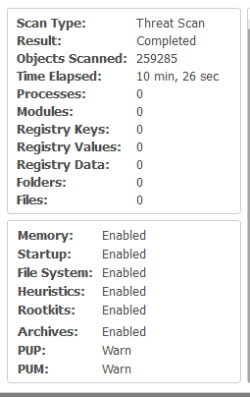
As far as speed goes I think it's about the same for me as v1.75 even with scan for rootkits enabled. I Keep my C: drive to a minimum, it's a spinner. It keeps backups small and fast as well as faster scans.

My last scan:
 

Attachments

  • MBAMScan.png
    MBAMScan.png
    4.7 KB · Views: 38

My Computer My Computer

Computer type
PC/Desktop
Computer Manufacturer/Model Number
1. HP p6733w Desktop 2. HP Envy 700-515xt Desktop
OS
1. Windows 7 Home Premium sp1 - 64bit 2. Windows 7 Pro sp1 - 64bit
CPU
1. AMD Phenom II x2 511 3.4GHz 2. Intel i7-4790 Quad 4.0GHz
Motherboard
1. N-Alvorix-RS880-uATX 2. Kaili2
Memory
1. 5 GB - DDR3 2. 8GB DDR3-1600MHz
Graphics Card(s)
Integrated 1. ATI Radeon 4200 2. Intel HD Graphics 4600
Sound Card
1. Realtek High Definition Audio 2. Realtek (Neutered Beats)
Monitor(s) Displays
1. Acer V193L 2. HP 2311 Series Wide LCD
Screen Resolution
1. 1280 x 1024 2. 1920 x 1080
Hard Drives
1. 750 GB - 7200 RPM SATA 2. 1TB 7200 RPM SATA
PSU
1. 250w 2. 300w
Cooling
Stock
Keyboard
Logitech USB keyboard
Mouse
Logitech USB optical mouse
Internet Speed
1.0 - 2.0 mbps
Antivirus
Eset Smart Security v9.0.349.0
Browser
Pale Moon
Thanks. But I don't know if I really want to register, I will probably just wait for the next update(s). Btw, what color does the GUI have now? Is it grey/white like it was before?
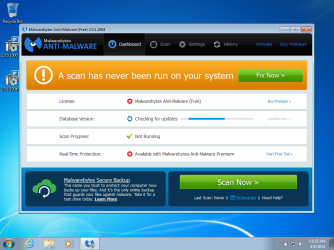
No - they did not (and probably will not) go back to gray.

version 2.0.0.1000
2.0.0.1000.png

version 2.0.1.1004
2.0.1.1004.png
 

My Computer My Computer

Computer type
Laptop
Computer Manufacturer/Model Number
Employer provided Dell Latitude
OS
W7 Pro SP1 64bit
CPU
i7
Memory
8GB
Graphics Card(s)
Intel HD Graphics
Hard Drives
crappy SSD
Antivirus
Employer mandated Symantec Endpoint Protection
Browser
Pale Moon 64bit, IE11 64bit & Chrome 64bit
Just ran a rootkit only scan...BSOD. So I'll skip that for now (shame :() The active protection works fine. Scans are considerably slower, and many freezes while scanning, but not a deal breaker as I usually scan once a week. A Guy
 

My Computer My Computer

Computer type
PC/Desktop
OS
Windows 10 Home x64
CPU
INTEL Core i5-750 Quad-Core 3.37GHz
Motherboard
ASUS P7P55D
Memory
HyperX Fury Black Series 8GB (2 x 4GB) 1866Mhz
Graphics Card(s)
EVGA GeForce GTX 750 Superclocked 1GB 128-Bit GDDR5
Monitor(s) Displays
LG 32MA68HY 32" IPS
Screen Resolution
1920 x 1080
Hard Drives
Samsung 840 Evo 120GB, SEAGATE 500GB Barracuda® 7200.12, SATA 3 Gb/s, 7200 RPM, 16MB cache
PSU
ANTEC TruePower New TP-550, 80 PLUS, 550W
Case
ANTEC Three Hundred Illusion
Cooling
COOLER MASTER Hyper 212 Plus, 4 x 120mm 1 x 140mm Noctua's
Internet Speed
85 + Mbps
Antivirus
Avast
Browser
Vivaldi
What I want to know is how this crap of a product got through the testing phase? This thing has more bugs then swiss cheese. And honestly, it looks like a Fake program even with the enhancements and smaller dialog boxes.
 

My Computer My Computer

Computer type
PC/Desktop
Computer Manufacturer/Model Number
Custom Built
OS
Windows 10 Pro
CPU
AMD Ryzen 5 2400G Processor with Radeon RX Vega 11 Graphics
Motherboard
ASRock X470 Master SLI/AC AM4 AMD Promontory X470 SATA 6Gb/s
Memory
G.SKILL Ripjaws V Series 16GB (2 x 8GB) 288-Pin DDR4 SDRAM D
Graphics Card(s)
2047MB NVIDIA GeForce GTX 1060 6GB (EVGA)
Sound Card
Motherboard Built in
Monitor(s) Displays
Acer R240HY bidx 23.8-Inch IPS HDMI DVI VGA (1920 x 1080) Wi
Screen Resolution
1920 x 1080
Hard Drives
1TB Sandisk SSD PLUS (Main drive)
500 GB Seagate 7200 RPM (Games)
500 GB Western Digital 7200 RPM (Virtual Machines)
PSU
CORSAIR TX Series TX650M 650W 80+ Gold Modular Power Supply
Case
CORSAIR CARBIDE SPEC-02 Mid-Tower Gaming Case, Red LED Fan
Cooling
220mm, two 120mm, and four 60mm fans
Keyboard
Wired Dell keyboard
Mouse
Wireless Logitech mouse
Internet Speed
250mb down, 30mb up
Antivirus
Panda Cloud Antivirus
Browser
Chrome-ish x64
Other Info
Your awesome for reading this.
What I want to know is how this crap of a product got through the testing phase? This thing has more bugs then swiss cheese. And honestly, it looks like a Fake program even with the enhancements and smaller dialog boxes.
The bugs are partly the fault of the users. If more users had actively taken part in beta testing, these bugs had a chance at being found/fixed.

There is no excuse for designing an app that looks like the very rouge programs they hope to eradicate.
 

My Computer My Computer

Computer type
Laptop
Computer Manufacturer/Model Number
Employer provided Dell Latitude
OS
W7 Pro SP1 64bit
CPU
i7
Memory
8GB
Graphics Card(s)
Intel HD Graphics
Hard Drives
crappy SSD
Antivirus
Employer mandated Symantec Endpoint Protection
Browser
Pale Moon 64bit, IE11 64bit & Chrome 64bit
Users are supposed to be an additional factor in bug testing. Not the main source. It looks to me like Malwarebytes themselves didn't even test their product. I usually am a huge fan of malwarebytes, but they defiantly screwed something up here.
 

My Computer My Computer

Computer type
PC/Desktop
Computer Manufacturer/Model Number
Custom Built
OS
Windows 10 Pro
CPU
AMD Ryzen 5 2400G Processor with Radeon RX Vega 11 Graphics
Motherboard
ASRock X470 Master SLI/AC AM4 AMD Promontory X470 SATA 6Gb/s
Memory
G.SKILL Ripjaws V Series 16GB (2 x 8GB) 288-Pin DDR4 SDRAM D
Graphics Card(s)
2047MB NVIDIA GeForce GTX 1060 6GB (EVGA)
Sound Card
Motherboard Built in
Monitor(s) Displays
Acer R240HY bidx 23.8-Inch IPS HDMI DVI VGA (1920 x 1080) Wi
Screen Resolution
1920 x 1080
Hard Drives
1TB Sandisk SSD PLUS (Main drive)
500 GB Seagate 7200 RPM (Games)
500 GB Western Digital 7200 RPM (Virtual Machines)
PSU
CORSAIR TX Series TX650M 650W 80+ Gold Modular Power Supply
Case
CORSAIR CARBIDE SPEC-02 Mid-Tower Gaming Case, Red LED Fan
Cooling
220mm, two 120mm, and four 60mm fans
Keyboard
Wired Dell keyboard
Mouse
Wireless Logitech mouse
Internet Speed
250mb down, 30mb up
Antivirus
Panda Cloud Antivirus
Browser
Chrome-ish x64
Other Info
Your awesome for reading this.
I have to agree with Andrew,
This is pretty basic stuff,
Upgrading = failure in allot the licenses being acknowledged protection mode disabled,
Custom scans including rootkit = did no one ever use this :D

The only solution offered so far as I've seen is use mabm clean ?
 

My Computer My Computer

Computer type
PC/Desktop
Computer Manufacturer/Model Number
Custom assembled by me :}
OS
Win-7-Pro64bit 7-H-Prem-64bit
CPU
i7-5930K 2nd i9-9940x both water blocked VRM's too
Motherboard
ASUS SABERTOOTH X99 2nd ASUS x299 Apex
Memory
Trident-z 3200C14 2nd Trident-z 3600C16
Graphics Card(s)
EVGA 1080ti ftw3 2nd Titan Xp both water blocked
Sound Card
Built-in Realtek
Monitor(s) Displays
1-AOC G2460PG 24"G-Sync 144Hz/ 2nd 1-ASUS VG248QE 24" 144Hz
Screen Resolution
1920 x 1080 144Hz
Hard Drives
2-Samsung M.2 Evo & Evo Plus
2-Samsung 850 EVO 500GB SSD's/ 3-2.5 W.D. Black 1tb-&3-1tb/3-3.5 WD Black 1tb hdd's
PSU
EVGA SuperNOVA 1000-P2 2nd 1200-P2
Case
2-Corsair Obsidian Series 450D Black ATX Mid Tower
Cooling
Custom water loops
Keyboard
Logitech G710+/ 2nd Logitech G910
Mouse
2-RedDragon M901 Perdition 16400 dpi Gaming mouse = wired
Internet Speed
Comcast Ping 19ms 89.31mbps download speed 6.12mbps upload
Antivirus
Malwarebytes Pro/ Superantispyware Pro
Browser
FireFox & Pale moon
Other Info
2nd ASUS X299 Apex/Intel i9-9940x with Custom water loop/7H-Prem-x64/Corsair 450D case/Ram Trident-z 3600C16 4x8gb / Samsung970Evo plus 500gb SSD/Dual ssd EZ swap evo/PSU EVGA SuperNova 1200w-P2 80+Platinum/GPU Titan Xp /8-ML-140 on push-pull on 2-280GTX rads
Just ran a rootkit only scan...BSOD. So I'll skip that for now (shame :() The active protection works fine. Scans are considerably slower, and many freezes while scanning, but not a deal breaker as I usually scan once a week. A Guy

What I want to know is how this crap of a product got through the testing phase? This thing has more bugs then swiss cheese. And honestly, it looks like a Fake program even with the enhancements and smaller dialog boxes.

Users are supposed to be an additional factor in bug testing. Not the main source. It looks to me like Malwarebytes themselves didn't even test their product. I usually am a huge fan of malwarebytes, but they defiantly screwed something up here.
I would not even call myself a fan of mbam... but I do write stuff for others and have to beg for beta testers.

You posted your comment right after A Guy posted his about BSOD. I took your comment as being somewhat tied to A Guy's post. Those developing mbam can only test a tiny fraction of combinations of software. Beta testing does the rest of that kind of testing. mbam + other software = BSOD for A Guy. Did you expect those developing mbam to have a computer with the exact combination of software that A Guy has?
 

My Computer My Computer

Computer type
Laptop
Computer Manufacturer/Model Number
Employer provided Dell Latitude
OS
W7 Pro SP1 64bit
CPU
i7
Memory
8GB
Graphics Card(s)
Intel HD Graphics
Hard Drives
crappy SSD
Antivirus
Employer mandated Symantec Endpoint Protection
Browser
Pale Moon 64bit, IE11 64bit & Chrome 64bit
I have to agree with Andrew,
This is pretty basic stuff,
Upgrading = failure in allot the licenses being acknowledged protection mode disabled,
Custom scans including rootkit = did no one ever use this :D

The only solution offered so far as I've seen is use mabm clean ?
I've only been reading this thread - not the threads on the mbam forums - so maybe I missed what you meant by "Custom scans including rootkit = did no one ever use this". Can you please elaborate?
 

My Computer My Computer

Computer type
Laptop
Computer Manufacturer/Model Number
Employer provided Dell Latitude
OS
W7 Pro SP1 64bit
CPU
i7
Memory
8GB
Graphics Card(s)
Intel HD Graphics
Hard Drives
crappy SSD
Antivirus
Employer mandated Symantec Endpoint Protection
Browser
Pale Moon 64bit, IE11 64bit & Chrome 64bit
Sorry, my post was not talking about the bsod. I was talking about the multiple other bugs. I understand the testing phase/process quite a bit, and I believe that any decent company should have had this tested better then what was presented here.

I also am seeing bug reports on multiple things on malwarebytes forums that I have been able to reproduce, and have sent in bug reports via email. I get that there are thousands of possible ways for a system to be configured, but some of this stuff was clearly not tested at all. A majority of these bugs is not even caused by third party programs being the reason. Which is another point that eradicates the whole excuse that they didn't have enough users to test.

Scanning is the the whole point of this software, if it cannot even do that well, what is the point?

Also, its pretty bad that in a VM and clean install of windows and just their product, I find TEN bugs in their software by using it for 5 minutes. 10!

I just don't get it. What was malwarebytes thinking here?

I have to agree with Andrew,
This is pretty basic stuff,
Upgrading = failure in allot the licenses being acknowledged protection mode disabled,
Custom scans including rootkit = did no one ever use this :D

The only solution offered so far as I've seen is use mabm clean ?
I've only been reading this thread - not the threads on the mbam forums - so maybe I missed what you meant by "Custom scans including rootkit = did no one ever use this". Can you please elaborate?


I believe they were referring to the multiple freezing and some files being accidentally skipped when supposedly scanning when this feature is enabled.
 

My Computer My Computer

Computer type
PC/Desktop
Computer Manufacturer/Model Number
Custom Built
OS
Windows 10 Pro
CPU
AMD Ryzen 5 2400G Processor with Radeon RX Vega 11 Graphics
Motherboard
ASRock X470 Master SLI/AC AM4 AMD Promontory X470 SATA 6Gb/s
Memory
G.SKILL Ripjaws V Series 16GB (2 x 8GB) 288-Pin DDR4 SDRAM D
Graphics Card(s)
2047MB NVIDIA GeForce GTX 1060 6GB (EVGA)
Sound Card
Motherboard Built in
Monitor(s) Displays
Acer R240HY bidx 23.8-Inch IPS HDMI DVI VGA (1920 x 1080) Wi
Screen Resolution
1920 x 1080
Hard Drives
1TB Sandisk SSD PLUS (Main drive)
500 GB Seagate 7200 RPM (Games)
500 GB Western Digital 7200 RPM (Virtual Machines)
PSU
CORSAIR TX Series TX650M 650W 80+ Gold Modular Power Supply
Case
CORSAIR CARBIDE SPEC-02 Mid-Tower Gaming Case, Red LED Fan
Cooling
220mm, two 120mm, and four 60mm fans
Keyboard
Wired Dell keyboard
Mouse
Wireless Logitech mouse
Internet Speed
250mb down, 30mb up
Antivirus
Panda Cloud Antivirus
Browser
Chrome-ish x64
Other Info
Your awesome for reading this.
Back
Top