Left 4 Dead crash on Win 7 32 bit

zw3ackz

New member
Local time
2:18 PM
Messages
5
Location
Philippines
Help please, my left 4 dead keeps on crashing whenever I played it, I have already upgraded my videocard driver to its latest driver version downloaded from NVIDIA...

Operating System: Windows 7 Starter 32-bit (6.1, Build 7601)
BIOS: Ver: 08.00.14
Processor: Pentium(R) Dual-Core CPU E6600 @ 3.06GHz
Memory: 2048MB RAM
Page file: 1653MB used, 2440 available
DirectX Version: DirectX 11

Video Card
Name: NVIDIA GeForce 8400GS
Approx. Total memory: 1746 MB
Driver Ver: 8.17.12.8026
Driver Model: WDDM 1.1
 

My Computer My Computer

At a glance

Windows 7 32 bitPentium(R) Dual-Core CPU E5500 @2.80GHzKingston DDR2 800 2GigNVIDIA GeForce 9500 GT 1Gig
Computer Manufacturer/Model Number
own assembled desktop
OS
Windows 7 32 bit
CPU
Pentium(R) Dual-Core CPU E5500 @2.80GHz
Motherboard
ASUS P5KPL-AM EPU
Memory
Kingston DDR2 800 2Gig
Graphics Card(s)
NVIDIA GeForce 9500 GT 1Gig
Sound Card
OnBoard
Monitor(s) Displays
LG 17" WS
Hard Drives
SeaGate 240Gig
Case
ATX
Cooling
Case Fan
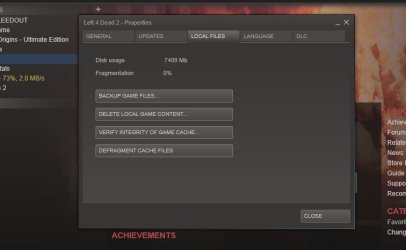
Have you tried veryfing the integrety of the Game cache?
 

My Computer My Computer

At a glance

Windows 7 Home Premium 64bitIntel Core i7 2700k8GB Mushkin Redline Ridgebacks @1866EVGA GTX570 SC
Computer Manufacturer/Model Number
Custom (Self Build)
OS
Windows 7 Home Premium 64bit
CPU
Intel Core i7 2700k
Motherboard
eVGA P67 SLI
Memory
8GB Mushkin Redline Ridgebacks @1866
Graphics Card(s)
EVGA GTX570 SC
Sound Card
XiFi Titanium HD
Monitor(s) Displays
LG W2453V
Screen Resolution
1920x1080
Hard Drives
Intel 320 80GB -- Intel X25-V 40GB --WD Black 1TB x2 -- WD Blue 640GB
PSU
Seasonic x750
Case
Corsair 600T SE White
Cooling
eVGA Superclocked CPU Cooler
Keyboard
Saitek Cyborg
Antivirus
Kaspersky
Browser
IE
Other Info
LG BD/DVD
Need Help

may i know please how to do that "Have you tried veryfing the integrety of the Game cache?"


thanks...
 

My Computer My Computer

At a glance

Windows 7 32 bitPentium(R) Dual-Core CPU E5500 @2.80GHzKingston DDR2 800 2GigNVIDIA GeForce 9500 GT 1Gig
Computer Manufacturer/Model Number
own assembled desktop
OS
Windows 7 32 bit
CPU
Pentium(R) Dual-Core CPU E5500 @2.80GHz
Motherboard
ASUS P5KPL-AM EPU
Memory
Kingston DDR2 800 2Gig
Graphics Card(s)
NVIDIA GeForce 9500 GT 1Gig
Sound Card
OnBoard
Monitor(s) Displays
LG 17" WS
Hard Drives
SeaGate 240Gig
Case
ATX
Cooling
Case Fan
l4d2

open steam, right click l4d2
click properties
click the local files tab and select verify integrity of game cache

hope this helps
 

Attachments

  • Capture.JPG
    Capture.JPG
    31.8 KB · Views: 72

My Computer My Computer

At a glance

Windows 7 X64 BitIntel(R) Core(TM)i7-4771 CPU @ 3.50GHCorsair 4x8 Vengeance (32GB)NVIDIA GeForce GTX780
Computer type
PC/Desktop
OS
Windows 7 X64 Bit
CPU
Intel(R) Core(TM)i7-4771 CPU @ 3.50GH
Motherboard
Asus Sabertooth Z87
Memory
Corsair 4x8 Vengeance (32GB)
Graphics Card(s)
NVIDIA GeForce GTX780
Monitor(s) Displays
LG
Screen Resolution
1920x1080
PSU
Corsair CX750
Case
Corsair 200 series
Cooling
H80i Liquid Cooler
Keyboard
Microsoft
Mouse
Microsoft
Internet Speed
good times-500-850 kbs bad times-50-100 kbs
Back
Top