Less RAM Usage

psydex

New member
Member
Local time
6:46 PM
Messages
35
Location
Plovdiv , Bulgaria
I'm using Win7 (x86) with P4 3.2 GHz and 512 RAM and i know it's recomended to be 1 GB of RAM but it works well on 512 too . I want to ask if it's possible to reduse the RAM Usage in some way because now it's 80-90% ? :rolleyes:
 

My Computer

OS
Windows 7
CPU
Pentium 4 (3.2GHz)
Memory
512 MB RAM
Graphics Card(s)
Radeon X550
Monitor(s) Displays
Samsung SyncMaster 710n
Case
Bevod
Keyboard
Pleomax
I'm using Win7 (x86) with P4 3.2 GHz and 512 RAM and i know it's recomended to be 1 GB of RAM but it works well on 512 too . I want to ask if it's possible to reduse the RAM Usage in some way because now it's 80-90% ? :rolleyes:


Hi psydex.......;)

just buy another 512mb stick of RAM for your machine, or better still buy 1gb, its cheap as chips now..

alternatively you could look to disable the unused services on W7, via the ''BLACK VIPER'' guide.
 

My Computer

Computer Manufacturer/Model Number
myself
OS
SEVEN x64
CPU
Q9450 @ 3.6GHZ 1.34v
Motherboard
ASUS P5K PREMIUM P35
Memory
8GB 1066 buffalo firestix @ 1152mhz CL5
Graphics Card(s)
Sapphire HD 5970 + GTX260 (physX)
Sound Card
Creative X-FI Xtreme Gamer
Monitor(s) Displays
SAMSUNG 20'' & SAMSUNG 23'' (dual screens)
Screen Resolution
2048x1152 & 1680x1050
Hard Drives
1x seagate 160gb IDE & 1x seagate 160gb SATA
PSU
XCILIO 850w (78A)
Case
CM590 1x 120x38mm & 2x92x38mm / 4x 120x25mm
Cooling
AC7 PRO @ 92x38mm blower, Lamptron military bus bay controll
Keyboard
LOGITECH E110
Mouse
logitech NX5
Internet Speed
2MB
Other Info
its a continual ''work in progress''....
Recently i planned to buy 2 GB of RAM but i decided to delay it
Thanx anyway , i'll check Black Viper's Guide
 

My Computer

OS
Windows 7
CPU
Pentium 4 (3.2GHz)
Memory
512 MB RAM
Graphics Card(s)
Radeon X550
Monitor(s) Displays
Samsung SyncMaster 710n
Case
Bevod
Keyboard
Pleomax
I'm using Win7 (x86) with P4 3.2 GHz and 512 RAM and i know it's recomended to be 1 GB of RAM but it works well on 512 too . I want to ask if it's possible to reduse the RAM Usage in some way because now it's 80-90% ? :rolleyes:


Sure its possible. stop indexing as much as you can. turn off WMP sharing service. Go vipers site and kill unneeded services.

But really 512?

Ken
 

My Computer

Computer Manufacturer/Model Number
HP Pavillion dv-7 1005 Tx
OS
Win 8 Release candidate 8400
CPU
[email protected]
Memory
4 gigs
Graphics Card(s)
Nvidia 9600M
Sound Card
HD built-in
Monitor(s) Displays
17" Wxga
Screen Resolution
1440x900
Cooling
none
Internet Speed
45Mb down 5Mb up
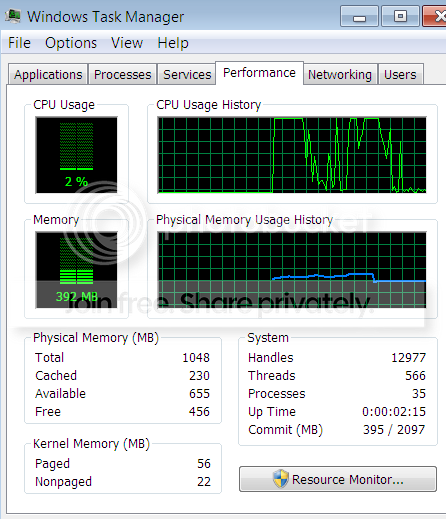
I guess it is possible to run in 512MBs. Mine uses less than 400MBs, but I have not really installed a lot of programs yet.
Note: the snip was taken shortly after booting the system. That explains the high CPU usage history.


w7RAM.png
 
Last edited:

My Computer

Computer Manufacturer/Model Number
HP, Dell, Gateway, Toshiba - 4 laptops and 2 desktops
OS
Vista, Windows7, Mint Mate, Zorin, Windows 8
CPU
from 1.6GHz Duo to i7
Monitor(s) Displays
2x HP w2207
Hard Drives
5x HDD, 7x SSD, 12x Externals
Keyboard
with trackball - no mices
Mouse
Trackball mice
Internet Speed
DSL 6000
I'm using Win7 (x86) with P4 3.2 GHz and 512 RAM and i know it's recomended to be 1 GB of RAM but it works well on 512 too . I want to ask if it's possible to reduse the RAM Usage in some way because now it's 80-90% ? :rolleyes:
But really 512?

Yes!
What about disableing WMP sharing ...?
 

My Computer

OS
Windows 7
CPU
Pentium 4 (3.2GHz)
Memory
512 MB RAM
Graphics Card(s)
Radeon X550
Monitor(s) Displays
Samsung SyncMaster 710n
Case
Bevod
Keyboard
Pleomax
Reminds me of my first XP computer.

Windows Media Player shares a bunch of material with connected devices and such. If you don't use WMP, then you can turn those services off.
 

My Computer

Computer Manufacturer/Model Number
Zen Productions
OS
Windows 7 Ultimate x64
CPU
Intel i7-860
Motherboard
Gigabyte GA-P55A-UD4P
Memory
Corsair Dominator 1600Mhz, 8-8-8-24 1.65v 2x2GB
Graphics Card(s)
ATI Radeon 5770 HD
Sound Card
Intel High Definition Sound
Monitor(s) Displays
Samsung P2570HD
Screen Resolution
1920x1080
Hard Drives
Western Digital Caviar Black 500gb
PSU
Corsair CMPSU-750HX 750W
Case
Antec p183
Cooling
Corsair H50 Water Cooler
Keyboard
Logitech G110
Mouse
Logitech MX Revolution
Internet Speed
768 mb/s

My Computer

OS
Windows 7
CPU
Pentium 4 (3.2GHz)
Memory
512 MB RAM
Graphics Card(s)
Radeon X550
Monitor(s) Displays
Samsung SyncMaster 710n
Case
Bevod
Keyboard
Pleomax
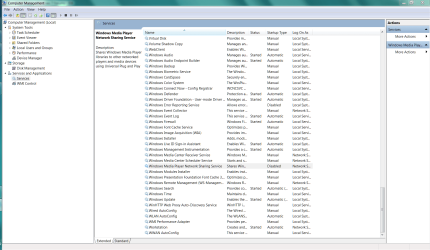
Right Click Computer
Manage
Services

Double Click target service
Disable

.
 

Attachments

  • Capture.PNG
    Capture.PNG
    88.3 KB · Views: 236
I would avoid BlackViper's website like the plague. There's a reason he's known around the web as QuackViper. Hell, I've seen boards ban users for recommending his website. It's been shown throughout the last several versions of windows that disabling unused services does very little to reduce memory footprint, if anything at all.

Use CCleaner or whatever other program you prefer to watch your unneccessary start up applications. Aside from that, leave the OS alone, and look into adding some memory. On a system like that, the memory upgrade will be your best bang for the buck upgrade.
 

My Computer

OS
Windows 7 Ultimate x64 SP1
CPU
Intel Core i7-2600
Motherboard
Gigabyte GA-P67A-UD3P-B3
Memory
12 GB Patriot Extreme DDR3-1333
Graphics Card(s)
Nvidia GTX 470
Monitor(s) Displays
Dell UltraSharp 2209WA
Hard Drives
OCZ Agility3 240 GB, WD5001AALS, WD7501AALS
PSU
OCZ ModStream 700W
Case
CoolerMaster HAF 912 Advanced
Cooling
CoolerMaster Hyper 212 Plus
Under normal circumstances, I can readily find agreement with DeaconFrost's suggestion regarding the disabling of services.

Not in this application, however.

512MB RAM is a serious limitation. The OP is attempting to make a working system with that limitation, not to make a best case working system.
 
Also, besides disabling unwanted services, open msconfig and disable all startup items which are doing nothing and eating memory. ;)
 

My Computer

Computer Manufacturer/Model Number
Samsung NP530U4B-S02IN
OS
Windows® 8 Pro (64-bit)
CPU
Intel® Core™ i5 Processor 2467M (1.60GHz, 3MB L3 Cache)
Motherboard
Samsung Electronics
Memory
6GB DDR3 System Memory at 1,333MHz (on BD 4GB + 2GB x 1)
Graphics Card(s)
AMD Radeon™ HD7550M 1GB DDR3 (Ext. Graphic)
Sound Card
Realtek High Definition Audio
Monitor(s) Displays
35.56cm (14.0) SuperBright 300nit HD LED Display
Screen Resolution
1366x768
Hard Drives
1TB S-ATA II Hard Drive (5400RPM) with ExpressCache 16GB SSD
Internet Speed
sucks
Antivirus
Microsoft Security Essentials
Browser
Google Chrome (Sync enabled)

My Computer

OS
Windows 7
CPU
Pentium 4 (3.2GHz)
Memory
512 MB RAM
Graphics Card(s)
Radeon X550
Monitor(s) Displays
Samsung SyncMaster 710n
Case
Bevod
Keyboard
Pleomax
Back
Top