
Libraries Folder - Add or Remove from Navigation Pane

How to Add or Remove "Libraries" Folder from the Navigation Pane in Windows 7

   Information
Libraries let you access and arrange items from one or more folders quickly without moving them from their original location. Libraries themselves don't store your files or folders. Instead, they point to different locations on a hard disk or external drive attached to your computer. This gives you easy access to a category of files no matter where they are stored. For instance, if you have music files on your hard disk and on an external drive, you can access all of your music files from within the "Music" library.


For more information about Windows 7 Libraries see:
This will show you how to add or remove the Libraries folder and all Library folders in the Windows Explorer Navigation Pane in Windows 7.

   Note
When Libraries is removed from the Navigation Pane, the pinned Windows Explorer icon on the taskbar will still open to the Libaries location by default unless you change the default open to target location for the pinned Windows Explorer taskbar icon.
Taskbar_Windows_Explorer.jpg
   Tip
The default Libaries folders are located at the hidden locations below.

For all users
C:\Users\Public\Libraries

For current user only
C:\Users\(user-name)\AppData\Roaming\Microsoft\Windows\Libraries

   Warning

  • You can only do this while logged into an administrator account.
  • This will affect all user account's on the computer.

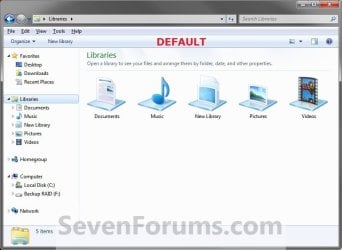
EXAMPLE: Libraries in Navigation Pane
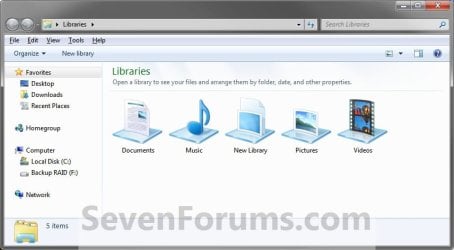
NOTE: This is the Libraries group added (default) (left screenshot below) and removed (right screenshot below) from the Navigation Pane. Default.jpg
Libraries_Removed.jpg

Here's How: 1. Open the Start Menu and type regedit.exe in the search line, then press enter.

2. If prompted by UAC, then click on Yes.

3. In Regedit, go to the location below: (See screenshot below step 4)
Code:
HKEY_CLASSES_ROOT\CLSID\{031E4825-7B94-4dc3-B131-E946B44C8DD5}\ShellFolder
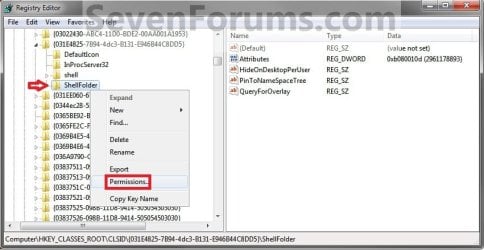
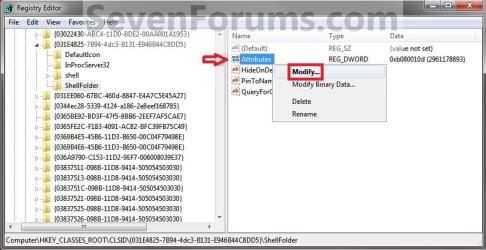
4. In the left pane of regedit, right click on the ShellFolder key and click on Permissions. (See screenshot below) Step1.jpg
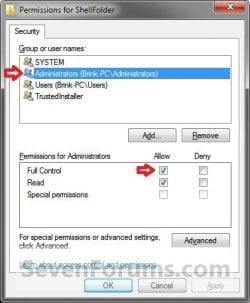
5. At the top, select the Administrators group. At the bottom, check the Allow box to the right of Full Control and click on OK. (See screenshot below) Step2.jpg
6. In the right pane of regedit, right click on Attributes and click on Modify. (See screenshot below) Step3.jpg
7. To Add All Libraries Back to the Navigation Pane
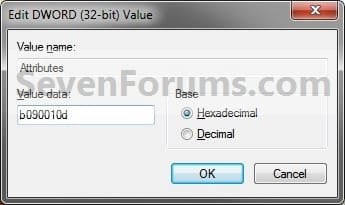
NOTE: This is the default setting. A) Type in b080010d and click on OK. (see screenshot below) Step4B.jpg
B) Go to step 9.
8. To Remove All Libraries from the Navigation Pane A) Type in b090010d and click on OK. (see screenshot below) Step4A.jpg
9. If you have 64-bit Windows 7 Installed
   Note

To also add or remove Libraries from the "Open" and "Save as" type windows as well in 64-bit Windows 7, you will also need to do this step.

If you have a 32-bit Windows 7 installed, then skip this step since doing steps 1 to 7/8 will add or remove Libraries from the "Open" and "Save as" type windows as well.
A) In Regedit, go to the location below:

Code:
HKEY_LOCAL_MACHINE\SOFTWARE\Wow6432Node\Classes\CLSID\{031E4825-7B94-4dc3-B131-E946B44C8DD5}\ShellFolder
B) Repeat steps 4 to 7/8 above.
10. Close regedit.

11. Log off and log on, or restart the computer to apply.


   Tip
If you removed Libraries, then you may also would like to use the tutorial below to have the user folders in the Start Menu to open to your C:\Users\(user-name) location instead of it's library folder location.

How to Make Windows 7 Start Menu User Folder Buttons Open to Users Instead of Libraries Location


That's it,
Shawn


Related Tutorials

 
Last edited:
Many thanks for this - finally I can say goodbye to the extremely annoying Libraries and Homegroup! :party:

Still can't believe they made Windows 7 almost un-customizable without the use of reg-edit or third-party software...
 

My Computer

OS
Windows 7 Home Premium x64
You're welcome MrLove, and welcome to seven Forums. :)

They would, but everytime they try they get threatened to be sued for engaging in "anticompetitive activity" claiming that this will put the 3rd party software companies out of business.
 

My Computer

Computer type
PC/Desktop
Computer Manufacturer/Model Number
Self built custom
OS
64-bit Windows 11 Pro for Workstations
CPU
Intel i7-8700K OC'd to 5 GHz
Motherboard
ASUS ROG Maximus XI Formula Z390
Memory
64 GB (4x16GB) G.SKILL TridentZ RGB DDR4 3600 MHz
Graphics Card(s)
ASUS ROG-STRIX-GTX1080TI-O11G-GAMING
Sound Card
Integrated
Monitor(s) Displays
2 x Samsung Odyssey G7 27"
Screen Resolution
2560x1440
Hard Drives
1TB Samsung 990 PRO M.2,
4TB Samsung 990 PRO PRO M.2,
TerraMaster F8 SSD Plus NAS
PSU
Seasonic Prime Titanium 850W
Case
Thermaltake Core P3
Cooling
Corsair Hydro H115i
Keyboard
Logitech wireless K800
Mouse
Logitech MX Master 4
Internet Speed
2 Gb/s Download and 100 Mb/s Upload
Antivirus
Malwarebyte Anti-Malware Premium
Browser
Google Chrome
Other Info
Logitech Z625 speaker system,
Logitech BRIO 4K Pro webcam,
HP Color LaserJet Pro MFP M477fdn,
APC SMART-UPS RT 1000 XL - SURT1000XLI,
Galaxy S23 Plus phone
Thank you. What, is that really so? Still, it wouldn't explain the removal of many great features of the XP Explorer, would it?
 

My Computer

OS
Windows 7 Home Premium x64
Oh, yes. It was responsible for "Search" being removed from the Start Menu dark right pane as a button, and from context menus.

Explorer was most likely just them trying to have a new easier to use design.
 

My Computer

Computer type
PC/Desktop
Computer Manufacturer/Model Number
Self built custom
OS
64-bit Windows 11 Pro for Workstations
CPU
Intel i7-8700K OC'd to 5 GHz
Motherboard
ASUS ROG Maximus XI Formula Z390
Memory
64 GB (4x16GB) G.SKILL TridentZ RGB DDR4 3600 MHz
Graphics Card(s)
ASUS ROG-STRIX-GTX1080TI-O11G-GAMING
Sound Card
Integrated
Monitor(s) Displays
2 x Samsung Odyssey G7 27"
Screen Resolution
2560x1440
Hard Drives
1TB Samsung 990 PRO M.2,
4TB Samsung 990 PRO PRO M.2,
TerraMaster F8 SSD Plus NAS
PSU
Seasonic Prime Titanium 850W
Case
Thermaltake Core P3
Cooling
Corsair Hydro H115i
Keyboard
Logitech wireless K800
Mouse
Logitech MX Master 4
Internet Speed
2 Gb/s Download and 100 Mb/s Upload
Antivirus
Malwarebyte Anti-Malware Premium
Browser
Google Chrome
Other Info
Logitech Z625 speaker system,
Logitech BRIO 4K Pro webcam,
HP Color LaserJet Pro MFP M477fdn,
APC SMART-UPS RT 1000 XL - SURT1000XLI,
Galaxy S23 Plus phone
thank your very much for your effort, especially for your comments here:
http://www.sevenforums.com/tutorials/2863-windows-explorer-taskbar-icon-change-open-target-10.html
well, it maked me aware since i used a .reg file from here:
How To Disable and Remove Libraries from Windows 7 Explorer « My Digital Life
and now i can't roll back those settings by the .reg file they also provide because it seems to be for 32bit windows only (mine is x64). also comments by Lars and Mr. Marcus (commentators there, who mentioned my problem) couldn't really help me as i'm not familiar with .reg files edition stuff BUT i'm very aware now to keep my OS 100% clean. may i ask you to help me to roll back my original reg settings (i mean those settings i have had before i ran the remove-libraries.reg file)?
 

My Computer

OS
win 7 x64
CPU
i7 920@3,8
Motherboard
GA-X58A-UD5
Memory
3x2GB OCZ3P1333LVA6GK
Graphics Card(s)
GTX 470 SOC
Sound Card
onboard
Monitor(s) Displays
iiyama ProLite E2403WS
Screen Resolution
1920x1200
Hard Drives
1 SSD
2x2TB HDD
PSU
MODU 87+ (620W)
Case
none
Cooling
all on air..
Keyboard
eVolution Barracuda XT 745
Mouse
Diamondback
Internet Speed
100MBit down
thank your very much for your effort, especially for your comments here:
http://www.sevenforums.com/tutorials/2863-windows-explorer-taskbar-icon-change-open-target-10.html
well, it maked me aware since i used a .reg file from here:
How To Disable and Remove Libraries from Windows 7 Explorer « My Digital Life
and now i can't roll back those settings by the .reg file they also provide because it seems to be for 32bit windows only (mine is x64). also comments by Lars and Mr. Marcus (commentators there, who mentioned my problem) couldn't really help me as i'm not familiar with .reg files edition stuff BUT i'm very aware now to keep my OS 100% clean. may i ask you to help me to roll back my original reg settings (i mean those settings i have had before i ran the remove-libraries.reg file)?

Hello Leitz,

I agree, that is such a horrible way to remove the libraries. The REG file a created below will undo the method used at that link, and hopefully restore the libraries after merging the REG file and restarting the computer.

Hope this helps,
Shawn
 

Attachments

Last edited:

My Computer

Computer type
PC/Desktop
Computer Manufacturer/Model Number
Self built custom
OS
64-bit Windows 11 Pro for Workstations
CPU
Intel i7-8700K OC'd to 5 GHz
Motherboard
ASUS ROG Maximus XI Formula Z390
Memory
64 GB (4x16GB) G.SKILL TridentZ RGB DDR4 3600 MHz
Graphics Card(s)
ASUS ROG-STRIX-GTX1080TI-O11G-GAMING
Sound Card
Integrated
Monitor(s) Displays
2 x Samsung Odyssey G7 27"
Screen Resolution
2560x1440
Hard Drives
1TB Samsung 990 PRO M.2,
4TB Samsung 990 PRO PRO M.2,
TerraMaster F8 SSD Plus NAS
PSU
Seasonic Prime Titanium 850W
Case
Thermaltake Core P3
Cooling
Corsair Hydro H115i
Keyboard
Logitech wireless K800
Mouse
Logitech MX Master 4
Internet Speed
2 Gb/s Download and 100 Mb/s Upload
Antivirus
Malwarebyte Anti-Malware Premium
Browser
Google Chrome
Other Info
Logitech Z625 speaker system,
Logitech BRIO 4K Pro webcam,
HP Color LaserJet Pro MFP M477fdn,
APC SMART-UPS RT 1000 XL - SURT1000XLI,
Galaxy S23 Plus phone
thank your very much, Shawn!
i got only one question left: is it ok to use it right now? because i followed the steps of this tutorial (this thread) before i asked for help. i didn't restart or log off yet. should i redo those reg edits before i run the .reg file you just attached? i could just do it (just redo tutorial edits first), but i'm curious about the effects it may have. your file must change completely other keys, right? but for not, there will be potentially harmful incompatibility, right? please tell me, for full clearance.

UPDATE: well, i just redid edits i made by this tutorial, then run the Restore_Libraries.reg and got the same message as before:shock:
 
Last edited:

My Computer

OS
win 7 x64
CPU
i7 920@3,8
Motherboard
GA-X58A-UD5
Memory
3x2GB OCZ3P1333LVA6GK
Graphics Card(s)
GTX 470 SOC
Sound Card
onboard
Monitor(s) Displays
iiyama ProLite E2403WS
Screen Resolution
1920x1200
Hard Drives
1 SSD
2x2TB HDD
PSU
MODU 87+ (620W)
Case
none
Cooling
all on air..
Keyboard
eVolution Barracuda XT 745
Mouse
Diamondback
Internet Speed
100MBit down
You're most welcome Leitz.

After merging the restore REG and restarting to restore libraries, you may need to redo the tutorial again to have it applied.
 

My Computer

Computer type
PC/Desktop
Computer Manufacturer/Model Number
Self built custom
OS
64-bit Windows 11 Pro for Workstations
CPU
Intel i7-8700K OC'd to 5 GHz
Motherboard
ASUS ROG Maximus XI Formula Z390
Memory
64 GB (4x16GB) G.SKILL TridentZ RGB DDR4 3600 MHz
Graphics Card(s)
ASUS ROG-STRIX-GTX1080TI-O11G-GAMING
Sound Card
Integrated
Monitor(s) Displays
2 x Samsung Odyssey G7 27"
Screen Resolution
2560x1440
Hard Drives
1TB Samsung 990 PRO M.2,
4TB Samsung 990 PRO PRO M.2,
TerraMaster F8 SSD Plus NAS
PSU
Seasonic Prime Titanium 850W
Case
Thermaltake Core P3
Cooling
Corsair Hydro H115i
Keyboard
Logitech wireless K800
Mouse
Logitech MX Master 4
Internet Speed
2 Gb/s Download and 100 Mb/s Upload
Antivirus
Malwarebyte Anti-Malware Premium
Browser
Google Chrome
Other Info
Logitech Z625 speaker system,
Logitech BRIO 4K Pro webcam,
HP Color LaserJet Pro MFP M477fdn,
APC SMART-UPS RT 1000 XL - SURT1000XLI,
Galaxy S23 Plus phone
my UPDATE almost came up in the same second as your reply:p
did you see it before you replied?

EDIT: Brink, Shawn, is anybody there? have you noticed the error message?

EDIT2: did log off and back on. libraries are there now but why came the error and what does it mean? is my registry still partially broken?
 
Last edited:

My Computer

OS
win 7 x64
CPU
i7 920@3,8
Motherboard
GA-X58A-UD5
Memory
3x2GB OCZ3P1333LVA6GK
Graphics Card(s)
GTX 470 SOC
Sound Card
onboard
Monitor(s) Displays
iiyama ProLite E2403WS
Screen Resolution
1920x1200
Hard Drives
1 SSD
2x2TB HDD
PSU
MODU 87+ (620W)
Case
none
Cooling
all on air..
Keyboard
eVolution Barracuda XT 745
Mouse
Diamondback
Internet Speed
100MBit down
Leitz,

That fine. This just means that some of the entries in the REG file were not changed in your registry since you didn't modify and change the permissions for them. There would be no need to have those entries added then, but they were just added to be safe. :)
 
Last edited:

My Computer

Computer type
PC/Desktop
Computer Manufacturer/Model Number
Self built custom
OS
64-bit Windows 11 Pro for Workstations
CPU
Intel i7-8700K OC'd to 5 GHz
Motherboard
ASUS ROG Maximus XI Formula Z390
Memory
64 GB (4x16GB) G.SKILL TridentZ RGB DDR4 3600 MHz
Graphics Card(s)
ASUS ROG-STRIX-GTX1080TI-O11G-GAMING
Sound Card
Integrated
Monitor(s) Displays
2 x Samsung Odyssey G7 27"
Screen Resolution
2560x1440
Hard Drives
1TB Samsung 990 PRO M.2,
4TB Samsung 990 PRO PRO M.2,
TerraMaster F8 SSD Plus NAS
PSU
Seasonic Prime Titanium 850W
Case
Thermaltake Core P3
Cooling
Corsair Hydro H115i
Keyboard
Logitech wireless K800
Mouse
Logitech MX Master 4
Internet Speed
2 Gb/s Download and 100 Mb/s Upload
Antivirus
Malwarebyte Anti-Malware Premium
Browser
Google Chrome
Other Info
Logitech Z625 speaker system,
Logitech BRIO 4K Pro webcam,
HP Color LaserJet Pro MFP M477fdn,
APC SMART-UPS RT 1000 XL - SURT1000XLI,
Galaxy S23 Plus phone
Hello Shawn, I know how busy you are but have you had a go at the Permissions for this in Windows 8 yet, I was fooling around with it the other day but didn't get very far and gave up. :o
 

My Computer

Computer Manufacturer/Model Number
* BFK Customs *
OS
W 7 64-bit Ultimate
CPU
Intel Q9550 Yorkfield
Motherboard
ASUS P5Q Pro
Memory
8GB Dominator 8500C5D
Graphics Card(s)
ATI : XFX 5870
Sound Card
Realtek HD Audio 7-1
Monitor(s) Displays
1x 47" LCD HDMI & 3x 26" LCD HDMI
Screen Resolution
1920x1080P & 1920x1200
Hard Drives
1x 80GB Intel X25-M G2 SSD : 1x 500GB & 1x 640GB WD Caviar Black(s)
PSU
Corsair 620HX
Case
Cooler Master RC-690
Cooling
Tuniq Tower 120, 2x 140mm and 3x 120mm case fans
Keyboard
Microsoft 500
Mouse
Razer Diamondback 3G
Internet Speed
14 Mb/s
Other Info
1x Koutech 3Gb/s SATA HDD Hot Swap Rack
Hello Ted,

No problem. I have it on the list of "to further pursue" in the W8 RTM, but I'll do some more digging tonight with it. I didn't have much luck in the RP & earlier either.
 

My Computer

Computer type
PC/Desktop
Computer Manufacturer/Model Number
Self built custom
OS
64-bit Windows 11 Pro for Workstations
CPU
Intel i7-8700K OC'd to 5 GHz
Motherboard
ASUS ROG Maximus XI Formula Z390
Memory
64 GB (4x16GB) G.SKILL TridentZ RGB DDR4 3600 MHz
Graphics Card(s)
ASUS ROG-STRIX-GTX1080TI-O11G-GAMING
Sound Card
Integrated
Monitor(s) Displays
2 x Samsung Odyssey G7 27"
Screen Resolution
2560x1440
Hard Drives
1TB Samsung 990 PRO M.2,
4TB Samsung 990 PRO PRO M.2,
TerraMaster F8 SSD Plus NAS
PSU
Seasonic Prime Titanium 850W
Case
Thermaltake Core P3
Cooling
Corsair Hydro H115i
Keyboard
Logitech wireless K800
Mouse
Logitech MX Master 4
Internet Speed
2 Gb/s Download and 100 Mb/s Upload
Antivirus
Malwarebyte Anti-Malware Premium
Browser
Google Chrome
Other Info
Logitech Z625 speaker system,
Logitech BRIO 4K Pro webcam,
HP Color LaserJet Pro MFP M477fdn,
APC SMART-UPS RT 1000 XL - SURT1000XLI,
Galaxy S23 Plus phone
Thanks mate, no hurry eh. ;)
 

My Computer

Computer Manufacturer/Model Number
* BFK Customs *
OS
W 7 64-bit Ultimate
CPU
Intel Q9550 Yorkfield
Motherboard
ASUS P5Q Pro
Memory
8GB Dominator 8500C5D
Graphics Card(s)
ATI : XFX 5870
Sound Card
Realtek HD Audio 7-1
Monitor(s) Displays
1x 47" LCD HDMI & 3x 26" LCD HDMI
Screen Resolution
1920x1080P & 1920x1200
Hard Drives
1x 80GB Intel X25-M G2 SSD : 1x 500GB & 1x 640GB WD Caviar Black(s)
PSU
Corsair 620HX
Case
Cooler Master RC-690
Cooling
Tuniq Tower 120, 2x 140mm and 3x 120mm case fans
Keyboard
Microsoft 500
Mouse
Razer Diamondback 3G
Internet Speed
14 Mb/s
Other Info
1x Koutech 3Gb/s SATA HDD Hot Swap Rack
Ted,

Great news. I just tested this in Windows 8 Pro RTM, and it works perfectly now. :party:

I'll write up separate tutorials on it and the others tonight over at Eight Forums.
 
Last edited:

My Computer

Computer type
PC/Desktop
Computer Manufacturer/Model Number
Self built custom
OS
64-bit Windows 11 Pro for Workstations
CPU
Intel i7-8700K OC'd to 5 GHz
Motherboard
ASUS ROG Maximus XI Formula Z390
Memory
64 GB (4x16GB) G.SKILL TridentZ RGB DDR4 3600 MHz
Graphics Card(s)
ASUS ROG-STRIX-GTX1080TI-O11G-GAMING
Sound Card
Integrated
Monitor(s) Displays
2 x Samsung Odyssey G7 27"
Screen Resolution
2560x1440
Hard Drives
1TB Samsung 990 PRO M.2,
4TB Samsung 990 PRO PRO M.2,
TerraMaster F8 SSD Plus NAS
PSU
Seasonic Prime Titanium 850W
Case
Thermaltake Core P3
Cooling
Corsair Hydro H115i
Keyboard
Logitech wireless K800
Mouse
Logitech MX Master 4
Internet Speed
2 Gb/s Download and 100 Mb/s Upload
Antivirus
Malwarebyte Anti-Malware Premium
Browser
Google Chrome
Other Info
Logitech Z625 speaker system,
Logitech BRIO 4K Pro webcam,
HP Color LaserJet Pro MFP M477fdn,
APC SMART-UPS RT 1000 XL - SURT1000XLI,
Galaxy S23 Plus phone
Thanks Shawn! :party:
 

My Computer

Computer Manufacturer/Model Number
* BFK Customs *
OS
W 7 64-bit Ultimate
CPU
Intel Q9550 Yorkfield
Motherboard
ASUS P5Q Pro
Memory
8GB Dominator 8500C5D
Graphics Card(s)
ATI : XFX 5870
Sound Card
Realtek HD Audio 7-1
Monitor(s) Displays
1x 47" LCD HDMI & 3x 26" LCD HDMI
Screen Resolution
1920x1080P & 1920x1200
Hard Drives
1x 80GB Intel X25-M G2 SSD : 1x 500GB & 1x 640GB WD Caviar Black(s)
PSU
Corsair 620HX
Case
Cooler Master RC-690
Cooling
Tuniq Tower 120, 2x 140mm and 3x 120mm case fans
Keyboard
Microsoft 500
Mouse
Razer Diamondback 3G
Internet Speed
14 Mb/s
Other Info
1x Koutech 3Gb/s SATA HDD Hot Swap Rack

My Computer

Computer type
PC/Desktop
Computer Manufacturer/Model Number
Self built custom
OS
64-bit Windows 11 Pro for Workstations
CPU
Intel i7-8700K OC'd to 5 GHz
Motherboard
ASUS ROG Maximus XI Formula Z390
Memory
64 GB (4x16GB) G.SKILL TridentZ RGB DDR4 3600 MHz
Graphics Card(s)
ASUS ROG-STRIX-GTX1080TI-O11G-GAMING
Sound Card
Integrated
Monitor(s) Displays
2 x Samsung Odyssey G7 27"
Screen Resolution
2560x1440
Hard Drives
1TB Samsung 990 PRO M.2,
4TB Samsung 990 PRO PRO M.2,
TerraMaster F8 SSD Plus NAS
PSU
Seasonic Prime Titanium 850W
Case
Thermaltake Core P3
Cooling
Corsair Hydro H115i
Keyboard
Logitech wireless K800
Mouse
Logitech MX Master 4
Internet Speed
2 Gb/s Download and 100 Mb/s Upload
Antivirus
Malwarebyte Anti-Malware Premium
Browser
Google Chrome
Other Info
Logitech Z625 speaker system,
Logitech BRIO 4K Pro webcam,
HP Color LaserJet Pro MFP M477fdn,
APC SMART-UPS RT 1000 XL - SURT1000XLI,
Galaxy S23 Plus phone


Thanks Shawn, well done mate!
thumbs.gif
 

My Computer

Computer Manufacturer/Model Number
* BFK Customs *
OS
W 7 64-bit Ultimate
CPU
Intel Q9550 Yorkfield
Motherboard
ASUS P5Q Pro
Memory
8GB Dominator 8500C5D
Graphics Card(s)
ATI : XFX 5870
Sound Card
Realtek HD Audio 7-1
Monitor(s) Displays
1x 47" LCD HDMI & 3x 26" LCD HDMI
Screen Resolution
1920x1080P & 1920x1200
Hard Drives
1x 80GB Intel X25-M G2 SSD : 1x 500GB & 1x 640GB WD Caviar Black(s)
PSU
Corsair 620HX
Case
Cooler Master RC-690
Cooling
Tuniq Tower 120, 2x 140mm and 3x 120mm case fans
Keyboard
Microsoft 500
Mouse
Razer Diamondback 3G
Internet Speed
14 Mb/s
Other Info
1x Koutech 3Gb/s SATA HDD Hot Swap Rack
Thanks ... ... and ... ... I wonder, is there a way ...

Hi Brink

Thank you for a brilliant set of guides on removing unwanted functions from the Explorer Pane. :thumbsup:

Your instructions are very easy to follow, the only thing I might add would be "how to backup the registry to the desktop". I do this as a matter of routine, and delete the backup after a few days when I am happy my system is OK.

Also, I wonder, is there a way to remove the option "Include in Library" from the Explorer tool bar ? If so, it would be a useful addition to your guide on "how to remove libraries from Explorer".

Thanks again for your really helpful guides
 
Last edited:

My Computer

Computer Manufacturer/Model Number
Custom
OS
Windows 7 Ultimate 64 bit SP1
CPU
3.30 gigahertz Intel Core i5-2500K (running at 4ghz)
Motherboard
Gigabyte Z68MX-UD2H-B3 Rev 1.3
Memory
8 Gig (2 x 4Gig) Corsair Vengeance 1600hz DDR3
Graphics Card(s)
On board Intel(R) HD Graphics 3000
Sound Card
On board High Definition Audio Device
Monitor(s) Displays
BenQ BL2410PT 24ins (no PWM)
Screen Resolution
1920 x 1080
Hard Drives
Corsair Force 3 SSD SCSI Disk Device (60.02 GB)
Hitachi HDS721616PLA380 ATA Device [Hard drive] (160.04 GB)
Hitachi HDS721616PLA380 SCSI Disk Device (160.04 GB)
PSU
Serena ATX 650
Case
Mini ATX
Cooling
Freezer Extreme

My Computer

Computer type
PC/Desktop
Computer Manufacturer/Model Number
Self built custom
OS
64-bit Windows 11 Pro for Workstations
CPU
Intel i7-8700K OC'd to 5 GHz
Motherboard
ASUS ROG Maximus XI Formula Z390
Memory
64 GB (4x16GB) G.SKILL TridentZ RGB DDR4 3600 MHz
Graphics Card(s)
ASUS ROG-STRIX-GTX1080TI-O11G-GAMING
Sound Card
Integrated
Monitor(s) Displays
2 x Samsung Odyssey G7 27"
Screen Resolution
2560x1440
Hard Drives
1TB Samsung 990 PRO M.2,
4TB Samsung 990 PRO PRO M.2,
TerraMaster F8 SSD Plus NAS
PSU
Seasonic Prime Titanium 850W
Case
Thermaltake Core P3
Cooling
Corsair Hydro H115i
Keyboard
Logitech wireless K800
Mouse
Logitech MX Master 4
Internet Speed
2 Gb/s Download and 100 Mb/s Upload
Antivirus
Malwarebyte Anti-Malware Premium
Browser
Google Chrome
Other Info
Logitech Z625 speaker system,
Logitech BRIO 4K Pro webcam,
HP Color LaserJet Pro MFP M477fdn,
APC SMART-UPS RT 1000 XL - SURT1000XLI,
Galaxy S23 Plus phone
Shawn, thank you once again. These tutorials are helpful every time I reinstall Windows. What would we do without this information?

It is really stupid of Microsoft not allowing the user to customise these things. The navigation pane is something users look at and use all day long, it's the central hub of the computer interface, and yet it never occurred to Microsoft that users might want to customise it so that it only contains things we want, and no way to make sub-folders? Crazy.
 

My Computer

OS
Windows 7 Home Premium 64bit
Back
Top