Libraries Icons - Change

How to Change a Library Icon in Windows 7

   Information
This will show you how to change any Windows 7 Library icon to any icon that you would like instead of the default icon.

   Note
If you would like to use a custom library icon (.ico file) on your computer and would like it to also have it display on another computer that joined or is added to the homegroup as well, then you will need to make sure that the .ico file you are using is saved at a location that each computer on the homegroup as full access to first. For example, in a C:\Users\Public folder or shared user folder.

   Tip
For more on libraries managed code, see: Windows 7 Libraries - Managed Code - Windows 7 for Developers

   Warning
You will need to use a 256x256 pixel icon that was made for Windows 7 and Vista for them to display properly at all of the available icon view sizes in Windows 7. For more about these type of icons, see: Icons in Windows Vista


OPTION ONE

To Change a Library Icon Using the "Libraries Icons" Program


1. If you have not already, then click on the Download button below and download and save the ZIP file below to your desktop. Next, extract (drag and drop) the LibraryIconChanger.exe file from within the ZIP file.
Replace_Librarie_Icons_by_bluefisch200.zip

Download


2. Run the LibraryIconChanger.exe file.
NOTE: This is a standalone EXE file that only runs and does not install on your computer.

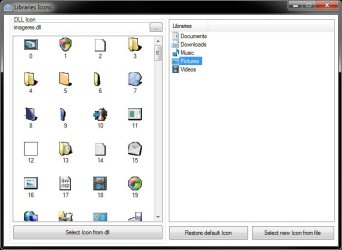
3. In the right pane, select (highlight) the library that you want to change or restore the default icon of. (see screenshot below)
Libraries_Icons.jpg
4. Do either step 5, 6, or 7 below for what you would like to do.

5. To Change a Library Icon with a Icon from a DLL File
NOTE: By default, the available DLL icons are from the C:\Windows\System32\imageres.dll file. If you would like to select a icon from within a different DLL icon, then click on the browse browse.jpg button, navigate to, and select the DLL file.
A) In the left pane, select an available icon, and click on the Select Icon from dll button. (see screenshot below step 3)

B) Go to step 8.
6. To Change a Library Icon with a Icon File of Your Choice
A) Click on the Select new Icon from file button. (see screenshot below step 3)

B) Navigate to and select a .ico file that you want to use, then click on Open.

C) Go to step 8.
7. To Restore the Default Icon of a Library
A) Click on the Restore default icon button. (see screenshot below step 3)

B) Continue on to step 8.
8. Close the Libraries Icons program. (see screenshot below step 3)

9. Log off and log on, or restart the computer to apply.


OPTION TWO

To Manually Change a Library Icon


1. Set Folder Options to Show hidden files, folders, and drives.

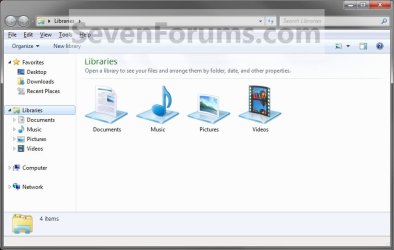
2. In Windows Explorer, navigate to the location below for the library you want to change the icon of. (See screenshot below)
Libraries folder: (ex: Documents, Music, Pictures, Videos)
C:\Users\(User Name)\AppData\Roaming\Microsoft\Windows\Libraries
For "Recorded TV" Library
C:\Users\Public\Libraries
Libraries.jpg
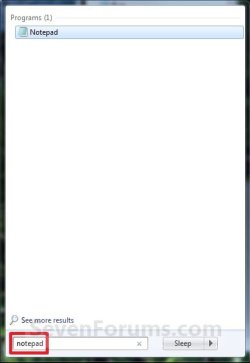
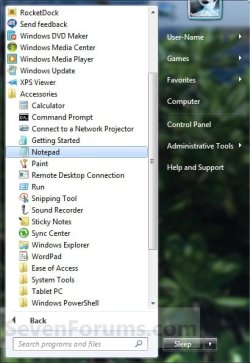
3. Open Notepad by one of the methods below. (See screenshots below)
Start_Menu1.jpg

Start_Menu2.jpg

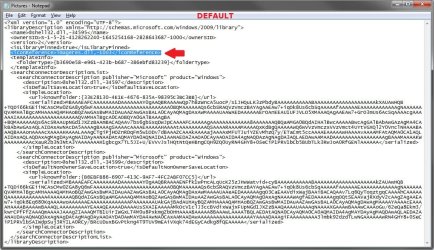
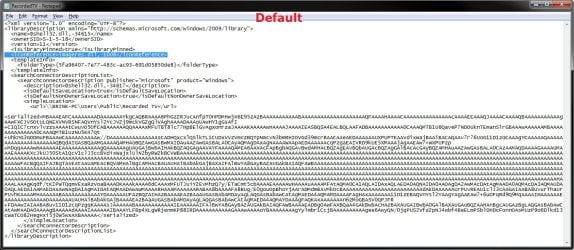
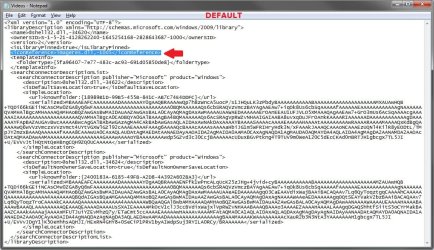
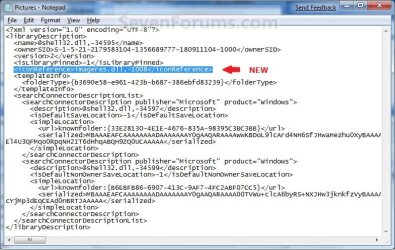
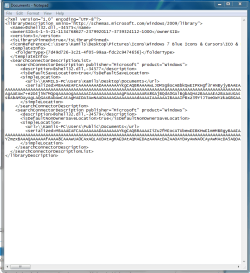
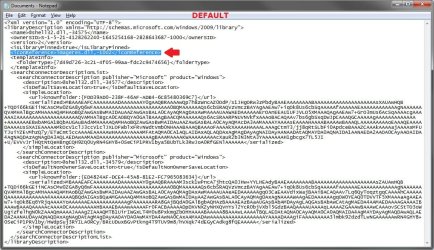
4. Drag the Library icon (from step 2) that you want to change into the blank Notepad and drop it. (See screenshots below)


NOTE: Libraries are .xml files, so they can be edited in Notepad. These are the default entries for the Libraries.
  • Documents default- <iconReference>imageres.dll,-1002</iconReference>
  • Music default - <iconReference>imageres.dll,-1004</iconReference>
  • Pictures default - <iconReference>imageres.dll,-1003</iconReference>
  • Recorded TV default - <iconReference>imageres.dll,-1008</iconReference>
  • Videos default - <iconReference>imageres.dll,-1005</iconReference>
Documents.jpg

Music.jpg

Pictures.jpg

Recorded_TV.jpg

Videos.jpg

5. To Use a Custom Icon of Yours
A) Look for the line below. (See screenshots above)
NOTE: If this is a new Library that you have created, then the line will not be there and you will need to add the <iconReference>"path to icon w/file extension"</iconReference> line directly under the <isLibraryPinned>-1</isLibraryPinned> line entry.
<iconReference>"path to icon w/file extension"</iconReference>
B) In Notepad, substitute path to icon w/file extension in quotes to the full path of the custom icon that you want to use for the default Library icon instead.

C) Go to step 7.
6. To Use another Windows 7 Icon
A) Download and install the free program IconViewer.
NOTE: Be sure to download the correct 32-bit or 64-bit version for your Windows 7.

B) In Windows Explorer navigate to the .exe (ex: for program icons) or .dll (ex: Windows 7 icons) file that contains the icon that you want to use for the default Library icon, then right click on the file, click on Properties, and the Icons tab. (See screenshot below)
NOTE: The most common Windows 7 icons come from the C:\Windows\System32\imageres.dll file.

C) Look for the line below. (See screenshots below step 4)
NOTE: If this is a new Library that you have created, then the line will not be there and you will need to add the <iconReference>path to icon w/file extension,-icon#</iconReference> line directly under the <isLibraryPinned>-1</isLibraryPinned> line entry.
<iconReference>path to icon w/file extension,-icon#</iconReference>
D) In Notepad, substitute path to icon w/file extension to the full path of the file that includes the icon you want from step 6B, then substitute icon# with the icon number under the icon you want from step 6B. (See screenshot below)
NOTE: If the file that includes the icon you want in step 6B is in the C:\Windows\System32 folder, then you will just need to type in the file name instead of the full path.


FOR EXAMPLE:
  • Let's say I want to change the Pictures Library icon to the icon #1008 (step 6B) included in the C:\Windows\System32\imageres.dll file. I would use imageres.dll,-1008. (See screenshot below)
  • Let's say the icon #1008 (step 6B) was included in the C:\Program Files\imageres.dll file. I would use C:\Program Files\imageres.dll,-1008 instead.
imageres_Properties.jpg
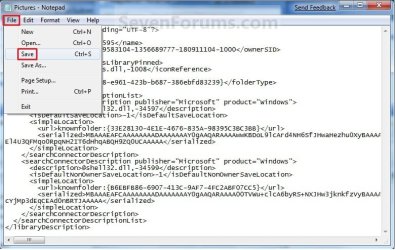
7. In Notepad, click on File and Save, then close Notepad. (See screenshot below)
Save.jpg
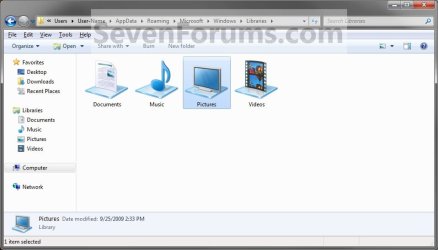
8. The Library icon will now be changed. (See screenshot below)
NOTE: For example, the default Pictures Library icon.
New_Library_Icon.jpg
9. Repeat steps 3 to 8 if you would like to change any more Library icons.

10. When done, set Folder Options to Don't show hidden files, folders, and drives.

11. Log off and log on, or restart the computer to fully apply the icon change to all locations for this library folder.
That's it,
Shawn


Related Tutorials


Attachments

  • New_Pictures.jpg
    New_Pictures.jpg
    81.4 KB · Views: 384
Last edited:
You're welcome. You would have to leave the icon at the location specified for it to continue to work. You might give other locations a try (Ex: My Documents) a try to see if it will from there so you can store the icon there as well.
 

My Computer My Computer

Computer type
PC/Desktop
Computer Manufacturer/Model Number
Self built custom
OS
64-bit Windows 11 Pro for Workstations
CPU
Intel i7-8700K OC'd to 5 GHz
Motherboard
ASUS ROG Maximus XI Formula Z390
Memory
64 GB (4x16GB) G.SKILL TridentZ RGB DDR4 3600 MHz
Graphics Card(s)
ASUS ROG-STRIX-GTX1080TI-O11G-GAMING
Sound Card
Integrated
Monitor(s) Displays
2 x Samsung Odyssey G7 27"
Screen Resolution
2560x1440
Hard Drives
1TB Samsung 990 PRO M.2,
4TB Samsung 990 PRO PRO M.2,
TerraMaster F8 SSD Plus NAS
PSU
Seasonic Prime Titanium 850W
Case
Thermaltake Core P3
Cooling
Corsair Hydro H115i
Keyboard
Logitech wireless K800
Mouse
Logitech MX Master 4
Internet Speed
2 Gb/s Download and 100 Mb/s Upload
Antivirus
Malwarebyte Anti-Malware Premium
Browser
Google Chrome
Other Info
Logitech Z625 speaker system,
Logitech BRIO 4K Pro webcam,
HP Color LaserJet Pro MFP M477fdn,
APC SMART-UPS RT 1000 XL - SURT1000XLI,
Galaxy S23 Plus phone
doesnt work

it worked right before i told the computer to restart then once it restarted it went back and now i can't open that folder
 

Attachments

  • icoss.PNG
    icoss.PNG
    31.9 KB · Views: 158
  • Documents.png
    Documents.png
    18.3 KB · Views: 3,247

My Computer My Computer

Computer Manufacturer/Model Number
Dell XPS M1730
OS
Microsoft Windows 7 x64
CPU
Intel X7900 @3.0GHz
Memory
4GB DDR2 @677MHz
Graphics Card(s)
Nvidia GeForce 8700m GT x2
Sound Card
HD AUDIO
Hello Sm0ke, and welcome to Seven Forums.

Double check to make sure that you did not make a mistake in notepad. If you are not able to, then run a sfc /scannow command to see if it can fix it for you. If not, then you can do a System Restore using a restore point dated before this.

Hope this helps,
Shawn
 

My Computer My Computer

Computer type
PC/Desktop
Computer Manufacturer/Model Number
Self built custom
OS
64-bit Windows 11 Pro for Workstations
CPU
Intel i7-8700K OC'd to 5 GHz
Motherboard
ASUS ROG Maximus XI Formula Z390
Memory
64 GB (4x16GB) G.SKILL TridentZ RGB DDR4 3600 MHz
Graphics Card(s)
ASUS ROG-STRIX-GTX1080TI-O11G-GAMING
Sound Card
Integrated
Monitor(s) Displays
2 x Samsung Odyssey G7 27"
Screen Resolution
2560x1440
Hard Drives
1TB Samsung 990 PRO M.2,
4TB Samsung 990 PRO PRO M.2,
TerraMaster F8 SSD Plus NAS
PSU
Seasonic Prime Titanium 850W
Case
Thermaltake Core P3
Cooling
Corsair Hydro H115i
Keyboard
Logitech wireless K800
Mouse
Logitech MX Master 4
Internet Speed
2 Gb/s Download and 100 Mb/s Upload
Antivirus
Malwarebyte Anti-Malware Premium
Browser
Google Chrome
Other Info
Logitech Z625 speaker system,
Logitech BRIO 4K Pro webcam,
HP Color LaserJet Pro MFP M477fdn,
APC SMART-UPS RT 1000 XL - SURT1000XLI,
Galaxy S23 Plus phone
?

i can use the folder now i fixed it but i still cant use my icon
 

My Computer My Computer

Computer Manufacturer/Model Number
Dell XPS M1730
OS
Microsoft Windows 7 x64
CPU
Intel X7900 @3.0GHz
Memory
4GB DDR2 @677MHz
Graphics Card(s)
Nvidia GeForce 8700m GT x2
Sound Card
HD AUDIO
Go ahead and upload the icon file in a ZIP file, and I'll test it on my system to see if it may be a issue with it or something else.
 

My Computer My Computer

Computer type
PC/Desktop
Computer Manufacturer/Model Number
Self built custom
OS
64-bit Windows 11 Pro for Workstations
CPU
Intel i7-8700K OC'd to 5 GHz
Motherboard
ASUS ROG Maximus XI Formula Z390
Memory
64 GB (4x16GB) G.SKILL TridentZ RGB DDR4 3600 MHz
Graphics Card(s)
ASUS ROG-STRIX-GTX1080TI-O11G-GAMING
Sound Card
Integrated
Monitor(s) Displays
2 x Samsung Odyssey G7 27"
Screen Resolution
2560x1440
Hard Drives
1TB Samsung 990 PRO M.2,
4TB Samsung 990 PRO PRO M.2,
TerraMaster F8 SSD Plus NAS
PSU
Seasonic Prime Titanium 850W
Case
Thermaltake Core P3
Cooling
Corsair Hydro H115i
Keyboard
Logitech wireless K800
Mouse
Logitech MX Master 4
Internet Speed
2 Gb/s Download and 100 Mb/s Upload
Antivirus
Malwarebyte Anti-Malware Premium
Browser
Google Chrome
Other Info
Logitech Z625 speaker system,
Logitech BRIO 4K Pro webcam,
HP Color LaserJet Pro MFP M477fdn,
APC SMART-UPS RT 1000 XL - SURT1000XLI,
Galaxy S23 Plus phone
Folders

These are all the ones i want to change
 

Attachments

My Computer My Computer

Computer Manufacturer/Model Number
Dell XPS M1730
OS
Microsoft Windows 7 x64
CPU
Intel X7900 @3.0GHz
Memory
4GB DDR2 @677MHz
Graphics Card(s)
Nvidia GeForce 8700m GT x2
Sound Card
HD AUDIO

My Computer My Computer

Computer type
PC/Desktop
Computer Manufacturer/Model Number
Self built custom
OS
64-bit Windows 11 Pro for Workstations
CPU
Intel i7-8700K OC'd to 5 GHz
Motherboard
ASUS ROG Maximus XI Formula Z390
Memory
64 GB (4x16GB) G.SKILL TridentZ RGB DDR4 3600 MHz
Graphics Card(s)
ASUS ROG-STRIX-GTX1080TI-O11G-GAMING
Sound Card
Integrated
Monitor(s) Displays
2 x Samsung Odyssey G7 27"
Screen Resolution
2560x1440
Hard Drives
1TB Samsung 990 PRO M.2,
4TB Samsung 990 PRO PRO M.2,
TerraMaster F8 SSD Plus NAS
PSU
Seasonic Prime Titanium 850W
Case
Thermaltake Core P3
Cooling
Corsair Hydro H115i
Keyboard
Logitech wireless K800
Mouse
Logitech MX Master 4
Internet Speed
2 Gb/s Download and 100 Mb/s Upload
Antivirus
Malwarebyte Anti-Malware Premium
Browser
Google Chrome
Other Info
Logitech Z625 speaker system,
Logitech BRIO 4K Pro webcam,
HP Color LaserJet Pro MFP M477fdn,
APC SMART-UPS RT 1000 XL - SURT1000XLI,
Galaxy S23 Plus phone
what sizes? i tried a 256 png but didnt work do i have to restart
256x256
128x128
64x64.png
 

My Computer My Computer

Computer Manufacturer/Model Number
Dell XPS M1730
OS
Microsoft Windows 7 x64
CPU
Intel X7900 @3.0GHz
Memory
4GB DDR2 @677MHz
Graphics Card(s)
Nvidia GeForce 8700m GT x2
Sound Card
HD AUDIO
Sm0ke,

You can use the link above to see the sizes needed to create a Vista icon. It's the same for Windows 7. That program at the link has a trial version that you can use to create the icons with for free.
 

My Computer My Computer

Computer type
PC/Desktop
Computer Manufacturer/Model Number
Self built custom
OS
64-bit Windows 11 Pro for Workstations
CPU
Intel i7-8700K OC'd to 5 GHz
Motherboard
ASUS ROG Maximus XI Formula Z390
Memory
64 GB (4x16GB) G.SKILL TridentZ RGB DDR4 3600 MHz
Graphics Card(s)
ASUS ROG-STRIX-GTX1080TI-O11G-GAMING
Sound Card
Integrated
Monitor(s) Displays
2 x Samsung Odyssey G7 27"
Screen Resolution
2560x1440
Hard Drives
1TB Samsung 990 PRO M.2,
4TB Samsung 990 PRO PRO M.2,
TerraMaster F8 SSD Plus NAS
PSU
Seasonic Prime Titanium 850W
Case
Thermaltake Core P3
Cooling
Corsair Hydro H115i
Keyboard
Logitech wireless K800
Mouse
Logitech MX Master 4
Internet Speed
2 Gb/s Download and 100 Mb/s Upload
Antivirus
Malwarebyte Anti-Malware Premium
Browser
Google Chrome
Other Info
Logitech Z625 speaker system,
Logitech BRIO 4K Pro webcam,
HP Color LaserJet Pro MFP M477fdn,
APC SMART-UPS RT 1000 XL - SURT1000XLI,
Galaxy S23 Plus phone
so i downloaded the program but the instructions aren't clear at all as what sizes they should be as far as i know they should be 256x256 vista automatically scales them down so im assuming windows 7 does to....still havent figured out how to do change my icons
 

My Computer My Computer

Computer Manufacturer/Model Number
Dell XPS M1730
OS
Microsoft Windows 7 x64
CPU
Intel X7900 @3.0GHz
Memory
4GB DDR2 @677MHz
Graphics Card(s)
Nvidia GeForce 8700m GT x2
Sound Card
HD AUDIO
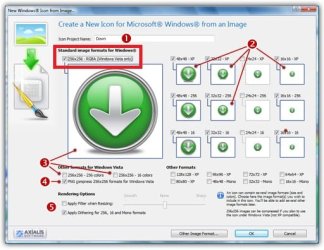
PNG files work best. Checking the box (boxed in red below) for Vista usually works just fine.

Vista.jpg
 

My Computer My Computer

Computer type
PC/Desktop
Computer Manufacturer/Model Number
Self built custom
OS
64-bit Windows 11 Pro for Workstations
CPU
Intel i7-8700K OC'd to 5 GHz
Motherboard
ASUS ROG Maximus XI Formula Z390
Memory
64 GB (4x16GB) G.SKILL TridentZ RGB DDR4 3600 MHz
Graphics Card(s)
ASUS ROG-STRIX-GTX1080TI-O11G-GAMING
Sound Card
Integrated
Monitor(s) Displays
2 x Samsung Odyssey G7 27"
Screen Resolution
2560x1440
Hard Drives
1TB Samsung 990 PRO M.2,
4TB Samsung 990 PRO PRO M.2,
TerraMaster F8 SSD Plus NAS
PSU
Seasonic Prime Titanium 850W
Case
Thermaltake Core P3
Cooling
Corsair Hydro H115i
Keyboard
Logitech wireless K800
Mouse
Logitech MX Master 4
Internet Speed
2 Gb/s Download and 100 Mb/s Upload
Antivirus
Malwarebyte Anti-Malware Premium
Browser
Google Chrome
Other Info
Logitech Z625 speaker system,
Logitech BRIO 4K Pro webcam,
HP Color LaserJet Pro MFP M477fdn,
APC SMART-UPS RT 1000 XL - SURT1000XLI,
Galaxy S23 Plus phone
figured it out thanx
 

My Computer My Computer

Computer Manufacturer/Model Number
Dell XPS M1730
OS
Microsoft Windows 7 x64
CPU
Intel X7900 @3.0GHz
Memory
4GB DDR2 @677MHz
Graphics Card(s)
Nvidia GeForce 8700m GT x2
Sound Card
HD AUDIO
You're welcome. Enjoy the new icons. :)
 

My Computer My Computer

Computer type
PC/Desktop
Computer Manufacturer/Model Number
Self built custom
OS
64-bit Windows 11 Pro for Workstations
CPU
Intel i7-8700K OC'd to 5 GHz
Motherboard
ASUS ROG Maximus XI Formula Z390
Memory
64 GB (4x16GB) G.SKILL TridentZ RGB DDR4 3600 MHz
Graphics Card(s)
ASUS ROG-STRIX-GTX1080TI-O11G-GAMING
Sound Card
Integrated
Monitor(s) Displays
2 x Samsung Odyssey G7 27"
Screen Resolution
2560x1440
Hard Drives
1TB Samsung 990 PRO M.2,
4TB Samsung 990 PRO PRO M.2,
TerraMaster F8 SSD Plus NAS
PSU
Seasonic Prime Titanium 850W
Case
Thermaltake Core P3
Cooling
Corsair Hydro H115i
Keyboard
Logitech wireless K800
Mouse
Logitech MX Master 4
Internet Speed
2 Gb/s Download and 100 Mb/s Upload
Antivirus
Malwarebyte Anti-Malware Premium
Browser
Google Chrome
Other Info
Logitech Z625 speaker system,
Logitech BRIO 4K Pro webcam,
HP Color LaserJet Pro MFP M477fdn,
APC SMART-UPS RT 1000 XL - SURT1000XLI,
Galaxy S23 Plus phone
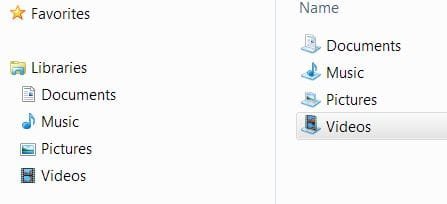
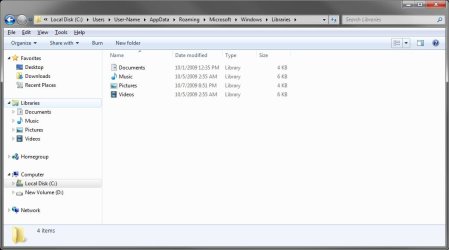
My library icons on the left will change every so often. Sometimes they are identical to the ones on the right but most of the time they are as displayed in my snippet.

The XML is pointing to the correct icon (the ones on the right side).

So what gives?
 

Attachments

  • Capture.JPG
    Capture.JPG
    15 KB · Views: 210

My Computer My Computer

Computer Manufacturer/Model Number
Asus CG5290
OS
Windows 7 x64 RTM Retail
CPU
Intel i7-920 Quad @ 4.0Ghz. Stepping D0.
Motherboard
Asus Rampage II GENE
Memory
9GB DDR3 @ 1600 Mhz. 9-8-8-24-CR1
Graphics Card(s)
XFX ATI HD5870 @ 900/1300
Sound Card
SupremeFX X/Fi HD Audio onboard
Monitor(s) Displays
Samsung 24" WS
Screen Resolution
1920x1200
Hard Drives
OCZ AGILITY-EX (64 GB, SATA-II, SSD SLC NAND Flash)
Hitachi HDT721010SLA360 (1 TB, 7200 RPM, SATA-II)
Cavalry (500 GB, 7200 RPM, eSATA-II)
PSU
Antec TruePower 650 Watts
Case
Ugly but functional.
Cooling
Oversized heat sink, lots and lots of fans.
Keyboard
MS
Mouse
MS wireless explorer
Internet Speed
101/15 - Optimum Online Ultra
Hello Streetwolf,

This is normal in the left image since it is using small icons. When using a larger icon size in the main part of the window, the library icons will then have the glass shelf included.

At what location was the right image taken at, and what are the folder view settings for it?
 

My Computer My Computer

Computer type
PC/Desktop
Computer Manufacturer/Model Number
Self built custom
OS
64-bit Windows 11 Pro for Workstations
CPU
Intel i7-8700K OC'd to 5 GHz
Motherboard
ASUS ROG Maximus XI Formula Z390
Memory
64 GB (4x16GB) G.SKILL TridentZ RGB DDR4 3600 MHz
Graphics Card(s)
ASUS ROG-STRIX-GTX1080TI-O11G-GAMING
Sound Card
Integrated
Monitor(s) Displays
2 x Samsung Odyssey G7 27"
Screen Resolution
2560x1440
Hard Drives
1TB Samsung 990 PRO M.2,
4TB Samsung 990 PRO PRO M.2,
TerraMaster F8 SSD Plus NAS
PSU
Seasonic Prime Titanium 850W
Case
Thermaltake Core P3
Cooling
Corsair Hydro H115i
Keyboard
Logitech wireless K800
Mouse
Logitech MX Master 4
Internet Speed
2 Gb/s Download and 100 Mb/s Upload
Antivirus
Malwarebyte Anti-Malware Premium
Browser
Google Chrome
Other Info
Logitech Z625 speaker system,
Logitech BRIO 4K Pro webcam,
HP Color LaserJet Pro MFP M477fdn,
APC SMART-UPS RT 1000 XL - SURT1000XLI,
Galaxy S23 Plus phone
Hello Streetwolf,

This is normal in the left image since it is using small icons. When using a larger icon size in the main part of the window, the library icons will then have the glass shelf included.

At what location was the right image taken at, and what are the folder view settings for it?

right side is "C:\Users\Gary\AppData\Roaming\Microsoft\Windows\Libraries"

The thing is the left side at times will have the same icon as the right side. It can flip-flop a few times a day.
 

My Computer My Computer

Computer Manufacturer/Model Number
Asus CG5290
OS
Windows 7 x64 RTM Retail
CPU
Intel i7-920 Quad @ 4.0Ghz. Stepping D0.
Motherboard
Asus Rampage II GENE
Memory
9GB DDR3 @ 1600 Mhz. 9-8-8-24-CR1
Graphics Card(s)
XFX ATI HD5870 @ 900/1300
Sound Card
SupremeFX X/Fi HD Audio onboard
Monitor(s) Displays
Samsung 24" WS
Screen Resolution
1920x1200
Hard Drives
OCZ AGILITY-EX (64 GB, SATA-II, SSD SLC NAND Flash)
Hitachi HDT721010SLA360 (1 TB, 7200 RPM, SATA-II)
Cavalry (500 GB, 7200 RPM, eSATA-II)
PSU
Antec TruePower 650 Watts
Case
Ugly but functional.
Cooling
Oversized heat sink, lots and lots of fans.
Keyboard
MS
Mouse
MS wireless explorer
Internet Speed
101/15 - Optimum Online Ultra
Strange. I'm not sure why you would have the glass shelves with the small icons. Mine do not unless I use larger icons. :confused:

Libraries.jpg
 

My Computer My Computer

Computer type
PC/Desktop
Computer Manufacturer/Model Number
Self built custom
OS
64-bit Windows 11 Pro for Workstations
CPU
Intel i7-8700K OC'd to 5 GHz
Motherboard
ASUS ROG Maximus XI Formula Z390
Memory
64 GB (4x16GB) G.SKILL TridentZ RGB DDR4 3600 MHz
Graphics Card(s)
ASUS ROG-STRIX-GTX1080TI-O11G-GAMING
Sound Card
Integrated
Monitor(s) Displays
2 x Samsung Odyssey G7 27"
Screen Resolution
2560x1440
Hard Drives
1TB Samsung 990 PRO M.2,
4TB Samsung 990 PRO PRO M.2,
TerraMaster F8 SSD Plus NAS
PSU
Seasonic Prime Titanium 850W
Case
Thermaltake Core P3
Cooling
Corsair Hydro H115i
Keyboard
Logitech wireless K800
Mouse
Logitech MX Master 4
Internet Speed
2 Gb/s Download and 100 Mb/s Upload
Antivirus
Malwarebyte Anti-Malware Premium
Browser
Google Chrome
Other Info
Logitech Z625 speaker system,
Logitech BRIO 4K Pro webcam,
HP Color LaserJet Pro MFP M477fdn,
APC SMART-UPS RT 1000 XL - SURT1000XLI,
Galaxy S23 Plus phone
here's a fairly vanilla W7 that I run under VBOX. Same arrangement as before.
 

Attachments

  • Capture.JPG
    Capture.JPG
    14.9 KB · Views: 197

My Computer My Computer

Computer Manufacturer/Model Number
Asus CG5290
OS
Windows 7 x64 RTM Retail
CPU
Intel i7-920 Quad @ 4.0Ghz. Stepping D0.
Motherboard
Asus Rampage II GENE
Memory
9GB DDR3 @ 1600 Mhz. 9-8-8-24-CR1
Graphics Card(s)
XFX ATI HD5870 @ 900/1300
Sound Card
SupremeFX X/Fi HD Audio onboard
Monitor(s) Displays
Samsung 24" WS
Screen Resolution
1920x1200
Hard Drives
OCZ AGILITY-EX (64 GB, SATA-II, SSD SLC NAND Flash)
Hitachi HDT721010SLA360 (1 TB, 7200 RPM, SATA-II)
Cavalry (500 GB, 7200 RPM, eSATA-II)
PSU
Antec TruePower 650 Watts
Case
Ugly but functional.
Cooling
Oversized heat sink, lots and lots of fans.
Keyboard
MS
Mouse
MS wireless explorer
Internet Speed
101/15 - Optimum Online Ultra
Maybe be a difference in your copy of Windows 7? Where did you get it at?

This is the ISO file name and verison I got from the latest RTM version from TechNet.

en_windows_7_ultimate_x64_dvd_X15-65922.iso
 

My Computer My Computer

Computer type
PC/Desktop
Computer Manufacturer/Model Number
Self built custom
OS
64-bit Windows 11 Pro for Workstations
CPU
Intel i7-8700K OC'd to 5 GHz
Motherboard
ASUS ROG Maximus XI Formula Z390
Memory
64 GB (4x16GB) G.SKILL TridentZ RGB DDR4 3600 MHz
Graphics Card(s)
ASUS ROG-STRIX-GTX1080TI-O11G-GAMING
Sound Card
Integrated
Monitor(s) Displays
2 x Samsung Odyssey G7 27"
Screen Resolution
2560x1440
Hard Drives
1TB Samsung 990 PRO M.2,
4TB Samsung 990 PRO PRO M.2,
TerraMaster F8 SSD Plus NAS
PSU
Seasonic Prime Titanium 850W
Case
Thermaltake Core P3
Cooling
Corsair Hydro H115i
Keyboard
Logitech wireless K800
Mouse
Logitech MX Master 4
Internet Speed
2 Gb/s Download and 100 Mb/s Upload
Antivirus
Malwarebyte Anti-Malware Premium
Browser
Google Chrome
Other Info
Logitech Z625 speaker system,
Logitech BRIO 4K Pro webcam,
HP Color LaserJet Pro MFP M477fdn,
APC SMART-UPS RT 1000 XL - SURT1000XLI,
Galaxy S23 Plus phone
I got it from Torrent. I too am a subscriber of Technet so I just grabbed the key. As far as I know all the Hashes matched.

My virtual W7 is from the same source with a different key. Gotta love Technet.
 

My Computer My Computer

Computer Manufacturer/Model Number
Asus CG5290
OS
Windows 7 x64 RTM Retail
CPU
Intel i7-920 Quad @ 4.0Ghz. Stepping D0.
Motherboard
Asus Rampage II GENE
Memory
9GB DDR3 @ 1600 Mhz. 9-8-8-24-CR1
Graphics Card(s)
XFX ATI HD5870 @ 900/1300
Sound Card
SupremeFX X/Fi HD Audio onboard
Monitor(s) Displays
Samsung 24" WS
Screen Resolution
1920x1200
Hard Drives
OCZ AGILITY-EX (64 GB, SATA-II, SSD SLC NAND Flash)
Hitachi HDT721010SLA360 (1 TB, 7200 RPM, SATA-II)
Cavalry (500 GB, 7200 RPM, eSATA-II)
PSU
Antec TruePower 650 Watts
Case
Ugly but functional.
Cooling
Oversized heat sink, lots and lots of fans.
Keyboard
MS
Mouse
MS wireless explorer
Internet Speed
101/15 - Optimum Online Ultra
Back
Top