Libraries - Restore Default

How to Restore the Default Libraries in Windows 7 and Windows 8


   Information
In case you have a missing Library, this will show you how to restore all of the default Libraries in Windows 7.
   Note
Libraries let you access and arrange items from one or more folders quickly without moving them from their original location. Libraries themselves don't store your files or folders. Instead, they point to different locations on a hard disk or external drive attached to your computer. This gives you easy access to a category of files no matter where they are stored. For instance, if you have music files on your hard disk and on an external drive, you can access all of your music files from within the "Music" library.

Here's a list of the default libraries, as well as the folders you can access in each library:
  • Documents library -Use this library to access the Personal Documents folder, where you can store word-processing documents, spreadsheets, presentations, and other text-related files. By default, files that you move, copy, or save to the Documents library are stored in the Personal Documents folder.
  • Pictures library - Use this library to access the Personal Pictures folder, where you can store digital pictures, whether you get them from your camera, scanner, or in e‑mail from other people. By default, files that you move, copy, or save to the Pictures library are stored in the Personal Pictures folder.
  • Music library - Use this library to access your Personal Music folder, where you can store digital music, such as songs that you copy from an audio CD or download from the Internet. By default, files that you move, copy, or save to the Music library are stored in the Personal Music folder.
  • Videos library - Use this library to access your Personal Videos folder, where you can store videos, such as clips from your digital camera or camcorder, or video files that you download from the Internet. By default, files that you move, copy, or save to the Videos library are stored in the Personal Videos folder.
For more information about Windows 7 Libraries see:
   Tip
The full path to the hidden Libraries folder is below.

C:\Users\(User-Name)\AppData\Roaming\Microsoft\Windows\Libraries

OR

%AppData%\Microsoft\Windows\Libraries


EXAMPLE: Default Libraries
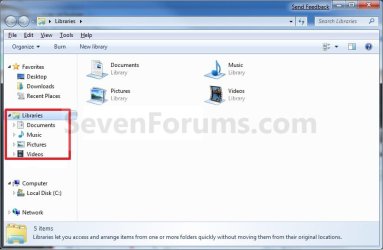
Default_Libraries.jpg


OPTION ONE

To Restore Default Libraries using "Restore Default Libraries"


1. Open Windows Explorer.

2. Right click or press and hold on Libraries in the navigation pane, and click/tap on Restore Default Libraries. (see screenshot below)
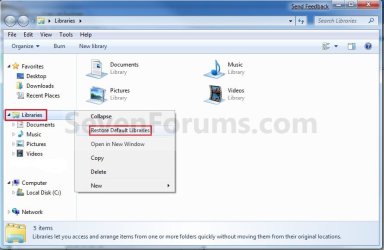
Libraries.jpg


OPTION TWO

To Restore Default Libraries by Unhiding them


   Note
This option is only helpful if your library or libraries have been hidden.

1. For how, see: How to Fix Libraries when Hidden and Empty in Windows 7 and Windows 8


OPTION THREE

To Restore Default Libraries using a REG File


   Note
This option will restore the default registry entries for the default libraries of all users.

You must be logged in as an administrator to be able to do this option.


1. If OPTION ONE and OPTION TWO above didn't help, then click/tap on the download button below to download the below.
Restore_Default_Libraries.reg


Download


2. Save the .reg file to your desktop.

3. Double click/tap on the .reg file to merge it.

4. If prompted, click/tap on Run, Yes (UAC), Yes, and OK to approve merging the .reg file.

5. Restart the computer to apply.

6. You can now delete the downloaded .reg file if you like.

That's it,
Shawn


Attachments

Last edited:
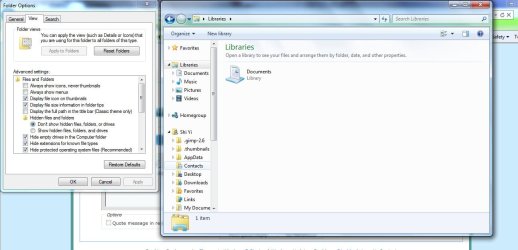
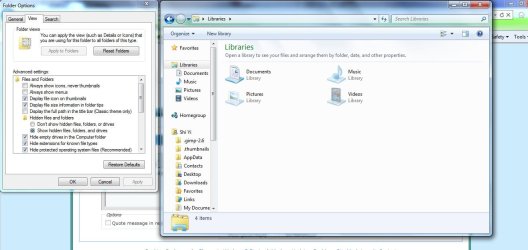
I updated, but it didn't seem to work. In fact now my music and pictures libraries are also hidden.
hide icons new.jpgshow icons new.jpg

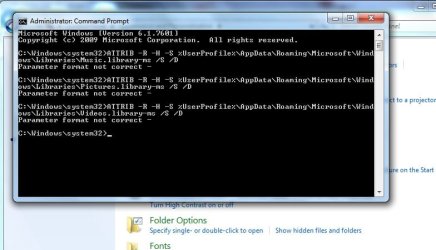
And I tried out the command prompt again.
error new.jpg

:confused: I have no idea why my computer is so strange, and I'm so sorry that I have to keep asking for help, so thanks a lot.
 

My Computer

OS
Windows 7 Home Premium
Dawn,

Aa a test, create a new administrator account to see if the library folders are hidden in it as well when you are logged in it. If not, then you might consider copying what you want from the old account's user folders into the new account's user folders. Plus, copy any shortcuts from the Start Menu not already in the new account's Start Menu. After everything checks out, you could delete the old user account.
 

My Computer

Computer type
PC/Desktop
Computer Manufacturer/Model Number
Self built custom
OS
64-bit Windows 11 Pro for Workstations
CPU
Intel i7-8700K OC'd to 5 GHz
Motherboard
ASUS ROG Maximus XI Formula Z390
Memory
64 GB (4x16GB) G.SKILL TridentZ RGB DDR4 3600 MHz
Graphics Card(s)
ASUS ROG-STRIX-GTX1080TI-O11G-GAMING
Sound Card
Integrated
Monitor(s) Displays
2 x Samsung Odyssey G7 27"
Screen Resolution
2560x1440
Hard Drives
1TB Samsung 990 PRO M.2,
4TB Samsung 990 PRO PRO M.2,
TerraMaster F8 SSD Plus NAS
PSU
Seasonic Prime Titanium 850W
Case
Thermaltake Core P3
Cooling
Corsair Hydro H115i
Keyboard
Logitech wireless K800
Mouse
Logitech MX Master 4
Internet Speed
2 Gb/s Download and 100 Mb/s Upload
Antivirus
Malwarebyte Anti-Malware Premium
Browser
Google Chrome
Other Info
Logitech Z625 speaker system,
Logitech BRIO 4K Pro webcam,
HP Color LaserJet Pro MFP M477fdn,
APC SMART-UPS RT 1000 XL - SURT1000XLI,
Galaxy S23 Plus phone
I think I'll do it in a few weeks, because I won't be around for a while. I'll post what happens then.
 

My Computer

OS
Windows 7 Home Premium
Ok. :)
 

My Computer

Computer type
PC/Desktop
Computer Manufacturer/Model Number
Self built custom
OS
64-bit Windows 11 Pro for Workstations
CPU
Intel i7-8700K OC'd to 5 GHz
Motherboard
ASUS ROG Maximus XI Formula Z390
Memory
64 GB (4x16GB) G.SKILL TridentZ RGB DDR4 3600 MHz
Graphics Card(s)
ASUS ROG-STRIX-GTX1080TI-O11G-GAMING
Sound Card
Integrated
Monitor(s) Displays
2 x Samsung Odyssey G7 27"
Screen Resolution
2560x1440
Hard Drives
1TB Samsung 990 PRO M.2,
4TB Samsung 990 PRO PRO M.2,
TerraMaster F8 SSD Plus NAS
PSU
Seasonic Prime Titanium 850W
Case
Thermaltake Core P3
Cooling
Corsair Hydro H115i
Keyboard
Logitech wireless K800
Mouse
Logitech MX Master 4
Internet Speed
2 Gb/s Download and 100 Mb/s Upload
Antivirus
Malwarebyte Anti-Malware Premium
Browser
Google Chrome
Other Info
Logitech Z625 speaker system,
Logitech BRIO 4K Pro webcam,
HP Color LaserJet Pro MFP M477fdn,
APC SMART-UPS RT 1000 XL - SURT1000XLI,
Galaxy S23 Plus phone
Hello Brink,
Thank you very much for this useful tutorial. I successfully unhid my libraries using the command promt. However, my libraries is still looking like this after I clicked on restore default libraries.
Libraries.PNG
Could you please give me some advice on how to completely restore my libraries to its default view?
Thank you! :)
 

My Computer

OS
Windows 7 Ultimate x64
Hello Aveceux,

I'm not sure what you mean. That is the default view for libraries. Could you be more specific on what is missing or what you wanted to see instead. :)
 

My Computer

Computer type
PC/Desktop
Computer Manufacturer/Model Number
Self built custom
OS
64-bit Windows 11 Pro for Workstations
CPU
Intel i7-8700K OC'd to 5 GHz
Motherboard
ASUS ROG Maximus XI Formula Z390
Memory
64 GB (4x16GB) G.SKILL TridentZ RGB DDR4 3600 MHz
Graphics Card(s)
ASUS ROG-STRIX-GTX1080TI-O11G-GAMING
Sound Card
Integrated
Monitor(s) Displays
2 x Samsung Odyssey G7 27"
Screen Resolution
2560x1440
Hard Drives
1TB Samsung 990 PRO M.2,
4TB Samsung 990 PRO PRO M.2,
TerraMaster F8 SSD Plus NAS
PSU
Seasonic Prime Titanium 850W
Case
Thermaltake Core P3
Cooling
Corsair Hydro H115i
Keyboard
Logitech wireless K800
Mouse
Logitech MX Master 4
Internet Speed
2 Gb/s Download and 100 Mb/s Upload
Antivirus
Malwarebyte Anti-Malware Premium
Browser
Google Chrome
Other Info
Logitech Z625 speaker system,
Logitech BRIO 4K Pro webcam,
HP Color LaserJet Pro MFP M477fdn,
APC SMART-UPS RT 1000 XL - SURT1000XLI,
Galaxy S23 Plus phone
I am really sorry, Brink. I should have been more specific.
My libraries used to look like this.
702d1233938336-libraries-restore-default-default_libraries.jpg

But after I unhid it, it is now looking like the pictrure I attached on #44.
Could you see the difference?
I think they are both tiles view but the size and the position of those icons are just different.
 

My Computer

OS
Windows 7 Ultimate x64
Aveceux,

I notice the expansion arrows missing on the left side of them, but if you hover over Libraries in the navigation pane while it's selected, they should reappear.
 

My Computer

Computer type
PC/Desktop
Computer Manufacturer/Model Number
Self built custom
OS
64-bit Windows 11 Pro for Workstations
CPU
Intel i7-8700K OC'd to 5 GHz
Motherboard
ASUS ROG Maximus XI Formula Z390
Memory
64 GB (4x16GB) G.SKILL TridentZ RGB DDR4 3600 MHz
Graphics Card(s)
ASUS ROG-STRIX-GTX1080TI-O11G-GAMING
Sound Card
Integrated
Monitor(s) Displays
2 x Samsung Odyssey G7 27"
Screen Resolution
2560x1440
Hard Drives
1TB Samsung 990 PRO M.2,
4TB Samsung 990 PRO PRO M.2,
TerraMaster F8 SSD Plus NAS
PSU
Seasonic Prime Titanium 850W
Case
Thermaltake Core P3
Cooling
Corsair Hydro H115i
Keyboard
Logitech wireless K800
Mouse
Logitech MX Master 4
Internet Speed
2 Gb/s Download and 100 Mb/s Upload
Antivirus
Malwarebyte Anti-Malware Premium
Browser
Google Chrome
Other Info
Logitech Z625 speaker system,
Logitech BRIO 4K Pro webcam,
HP Color LaserJet Pro MFP M477fdn,
APC SMART-UPS RT 1000 XL - SURT1000XLI,
Galaxy S23 Plus phone
Libraries

Following a recent crash and despite lots of help from yourselves, I eventually installed a new HDD and have clean re-installed Win7 which works OK.
I now have the old HDD in a caddy and have successfully transferred most files.
I have taken ownership of the existing files but have not been able to find the libraries with all my music & photos.
Can you advise on how I can retrieve these?
Thanks
 

My Computer

Computer Manufacturer/Model Number
Home build, ASUS motherboard
OS
Windows 7 Home premium 64 bit
CPU
3.00 gigahertz Intel Pentium 4
Motherboard
ASUSTeK Computer INC. P5N32-SLI PREMIUM 1.XX
Memory
3072 Megabytes Usable Installed Memory
Graphics Card(s)
NVIDIA GeForce 6200 TurboCache(TM)
Sound Card
Integrated High Definition Audio Device
Monitor(s) Displays
Beliea 19" LCD
Hard Drives
1 x 1 Terabyte Hitachi Sata
PSU
Inbilt ASUS
Case
ASUS
Cooling
1 case fan + CPU fan
Keyboard
Logitech wireless
Mouse
Logitech M195
Hello Malydee,

The libraries should be in the hidden folder below. :)

C:\Users\(User-Name)\AppData\Roaming\Microsoft\Windows\Libraries

OR

%AppData%\Microsoft\Windows\Libraries
 

My Computer

Computer type
PC/Desktop
Computer Manufacturer/Model Number
Self built custom
OS
64-bit Windows 11 Pro for Workstations
CPU
Intel i7-8700K OC'd to 5 GHz
Motherboard
ASUS ROG Maximus XI Formula Z390
Memory
64 GB (4x16GB) G.SKILL TridentZ RGB DDR4 3600 MHz
Graphics Card(s)
ASUS ROG-STRIX-GTX1080TI-O11G-GAMING
Sound Card
Integrated
Monitor(s) Displays
2 x Samsung Odyssey G7 27"
Screen Resolution
2560x1440
Hard Drives
1TB Samsung 990 PRO M.2,
4TB Samsung 990 PRO PRO M.2,
TerraMaster F8 SSD Plus NAS
PSU
Seasonic Prime Titanium 850W
Case
Thermaltake Core P3
Cooling
Corsair Hydro H115i
Keyboard
Logitech wireless K800
Mouse
Logitech MX Master 4
Internet Speed
2 Gb/s Download and 100 Mb/s Upload
Antivirus
Malwarebyte Anti-Malware Premium
Browser
Google Chrome
Other Info
Logitech Z625 speaker system,
Logitech BRIO 4K Pro webcam,
HP Color LaserJet Pro MFP M477fdn,
APC SMART-UPS RT 1000 XL - SURT1000XLI,
Galaxy S23 Plus phone
Would you guys know of anyway to do exactly what the original post does but in script form? (at least for just the documents library) Need to reset it to default. I need to do this for a mass of PCs.
 

My Computer

Computer type
PC/Desktop
OS
Windows 7 Pro 64 bit SP1
CPU
Intel Core i7 950 Quad OC'ed to 3.2 GHZ
Motherboard
ASRock X58
Memory
12GB DDR 3
Graphics Card(s)
Radeon HD 5870 1GB
Sound Card
Onboard
Monitor(s) Displays
23" Acer HD
Screen Resolution
1920x1080
Hard Drives
128GB SSD
PSU
700W
Case
Coolermaster
Antivirus
Avast Free
Browser
Firefox
Thanx Brink for the very good tutorial on how to restore favorite default on window's explorer. Some how I lost them so I am grateful to get them back, especially the download folder.
 

My Computer

OS
Microsoft Windows 7 Home Premium 64-bit
Glad it could help Paul, and welcome to Seven Forums. :)
 

My Computer

Computer type
PC/Desktop
Computer Manufacturer/Model Number
Self built custom
OS
64-bit Windows 11 Pro for Workstations
CPU
Intel i7-8700K OC'd to 5 GHz
Motherboard
ASUS ROG Maximus XI Formula Z390
Memory
64 GB (4x16GB) G.SKILL TridentZ RGB DDR4 3600 MHz
Graphics Card(s)
ASUS ROG-STRIX-GTX1080TI-O11G-GAMING
Sound Card
Integrated
Monitor(s) Displays
2 x Samsung Odyssey G7 27"
Screen Resolution
2560x1440
Hard Drives
1TB Samsung 990 PRO M.2,
4TB Samsung 990 PRO PRO M.2,
TerraMaster F8 SSD Plus NAS
PSU
Seasonic Prime Titanium 850W
Case
Thermaltake Core P3
Cooling
Corsair Hydro H115i
Keyboard
Logitech wireless K800
Mouse
Logitech MX Master 4
Internet Speed
2 Gb/s Download and 100 Mb/s Upload
Antivirus
Malwarebyte Anti-Malware Premium
Browser
Google Chrome
Other Info
Logitech Z625 speaker system,
Logitech BRIO 4K Pro webcam,
HP Color LaserJet Pro MFP M477fdn,
APC SMART-UPS RT 1000 XL - SURT1000XLI,
Galaxy S23 Plus phone
That does not hep to me either.

They look like this

libraries.png


I am missing the same folders, i will do this, and see what will happen. Maybe theres something else behind this problem...But, under the favorite tabs.
 

My Computer

Computer type
PC/Desktop
Computer Manufacturer/Model Number
HP
OS
windows 7 home edition premium 32bit
Memory
4gb
Antivirus
Malwarebytes
Browser
Chorme
Windows 7: Libraries - Restore Default

Thank you, thank you, thank you to Shawn for posting his original message way back in 2008!!! I have been messing around with the libraries on my system for two days now, and they are finally back to the way I want them. Deleting the libraries and then restoring the default libraries worked like a charm. Such a simple fix I can't believe I didn't find it myself. Oh well, live and learn. Thanks again, Shawn!!! :D
 

My Computer

Computer type
PC/Desktop
Computer Manufacturer/Model Number
ZT Systems
OS
Windows 7 Home Premium 64 bit
CPU
Intel(R) Core(TM) i7-3770 CPU @ 3.40 GHz 3.90 GHz
Memory
16 GB
Graphics Card(s)
Nvidia
Hard Drives
2 TB
Antivirus
Microsoft Security Essentials
Browser
Internet Explorer 12
You're most welcome Srikli, and welcome to Seven Forums. :)
 

My Computer

Computer type
PC/Desktop
Computer Manufacturer/Model Number
Self built custom
OS
64-bit Windows 11 Pro for Workstations
CPU
Intel i7-8700K OC'd to 5 GHz
Motherboard
ASUS ROG Maximus XI Formula Z390
Memory
64 GB (4x16GB) G.SKILL TridentZ RGB DDR4 3600 MHz
Graphics Card(s)
ASUS ROG-STRIX-GTX1080TI-O11G-GAMING
Sound Card
Integrated
Monitor(s) Displays
2 x Samsung Odyssey G7 27"
Screen Resolution
2560x1440
Hard Drives
1TB Samsung 990 PRO M.2,
4TB Samsung 990 PRO PRO M.2,
TerraMaster F8 SSD Plus NAS
PSU
Seasonic Prime Titanium 850W
Case
Thermaltake Core P3
Cooling
Corsair Hydro H115i
Keyboard
Logitech wireless K800
Mouse
Logitech MX Master 4
Internet Speed
2 Gb/s Download and 100 Mb/s Upload
Antivirus
Malwarebyte Anti-Malware Premium
Browser
Google Chrome
Other Info
Logitech Z625 speaker system,
Logitech BRIO 4K Pro webcam,
HP Color LaserJet Pro MFP M477fdn,
APC SMART-UPS RT 1000 XL - SURT1000XLI,
Galaxy S23 Plus phone
Hell Gene,

No worries. OPTION THREE includes that as well now. :)
 

My Computer

Computer type
PC/Desktop
Computer Manufacturer/Model Number
Self built custom
OS
64-bit Windows 11 Pro for Workstations
CPU
Intel i7-8700K OC'd to 5 GHz
Motherboard
ASUS ROG Maximus XI Formula Z390
Memory
64 GB (4x16GB) G.SKILL TridentZ RGB DDR4 3600 MHz
Graphics Card(s)
ASUS ROG-STRIX-GTX1080TI-O11G-GAMING
Sound Card
Integrated
Monitor(s) Displays
2 x Samsung Odyssey G7 27"
Screen Resolution
2560x1440
Hard Drives
1TB Samsung 990 PRO M.2,
4TB Samsung 990 PRO PRO M.2,
TerraMaster F8 SSD Plus NAS
PSU
Seasonic Prime Titanium 850W
Case
Thermaltake Core P3
Cooling
Corsair Hydro H115i
Keyboard
Logitech wireless K800
Mouse
Logitech MX Master 4
Internet Speed
2 Gb/s Download and 100 Mb/s Upload
Antivirus
Malwarebyte Anti-Malware Premium
Browser
Google Chrome
Other Info
Logitech Z625 speaker system,
Logitech BRIO 4K Pro webcam,
HP Color LaserJet Pro MFP M477fdn,
APC SMART-UPS RT 1000 XL - SURT1000XLI,
Galaxy S23 Plus phone
Hi guys,

I've been looking quite a while now to find a solution to my "problem" and I have a feeling you guys can help me.
So the situation is as follows:
- I moved "MyDocuments", "My Pictures", etc. to a second partition
- The second partition is encrypted
- When Win7 boots up, I log in with my user account and then automatically the password is requested in order to mount the encrypted partition with my personal files
- Now what happens is that the libraries are inconsistent, because it seems that Win7 updates the libraries BEFORE I mount the encrypted partition with my personal files. The result is that I do not see my folders in the libraries.
- When I click on "Restore Default Libraries" after mounting the encrypted partition, the personal folders on the encrypted partition are added correctly to the libraries and everything is fine

What I'd like to achieve is that the click on the "Restore default libraries" is done automatically via a script.
I tried to use "SLUtil" but that just works on a correctly set up libraries. There's no "restore" functionality.

Option 3 of the first post seems for me to got into the right direction, but rebooting after applying the reg-file is not an option.

Do you guys have any idea how I could restore the default libraries via script?

cheers
 

My Computer

Computer type
PC/Desktop
Computer Manufacturer/Model Number
custom build
OS
Windows 7 Professional x64
CPU
Intel Core i5-2500
Motherboard
Asrock Z68 Pro3
Memory
16GB DDR3
Graphics Card(s)
GeForce GTX 670
Hard Drives
Extrememory XLR8
Antivirus
Avast Free
Browser
Firefox
Hello LaUs3r,

You might see if you may get lucky that restarting explorer or sign out and in of Windows may apply enough to fix you libraries, but usually a restart is required to fully apply.
 

My Computer

Computer type
PC/Desktop
Computer Manufacturer/Model Number
Self built custom
OS
64-bit Windows 11 Pro for Workstations
CPU
Intel i7-8700K OC'd to 5 GHz
Motherboard
ASUS ROG Maximus XI Formula Z390
Memory
64 GB (4x16GB) G.SKILL TridentZ RGB DDR4 3600 MHz
Graphics Card(s)
ASUS ROG-STRIX-GTX1080TI-O11G-GAMING
Sound Card
Integrated
Monitor(s) Displays
2 x Samsung Odyssey G7 27"
Screen Resolution
2560x1440
Hard Drives
1TB Samsung 990 PRO M.2,
4TB Samsung 990 PRO PRO M.2,
TerraMaster F8 SSD Plus NAS
PSU
Seasonic Prime Titanium 850W
Case
Thermaltake Core P3
Cooling
Corsair Hydro H115i
Keyboard
Logitech wireless K800
Mouse
Logitech MX Master 4
Internet Speed
2 Gb/s Download and 100 Mb/s Upload
Antivirus
Malwarebyte Anti-Malware Premium
Browser
Google Chrome
Other Info
Logitech Z625 speaker system,
Logitech BRIO 4K Pro webcam,
HP Color LaserJet Pro MFP M477fdn,
APC SMART-UPS RT 1000 XL - SURT1000XLI,
Galaxy S23 Plus phone
Back
Top