Solved Libraries

Powell41

New member
Member
Local time
5:42 PM
Messages
97
Location
Red Deer County, Alberta, Canada
Good Evening Folks:

I trust everything is good with you all in the forums world.

Firstly let me say that I find Windows 7 suffers from the same disease that Apple's O/S, Noton AV, Nero's burning app, and a host of other programsw suffer from: they believe that your computer is actually theirs and they will force you to run through all their bells and whistles to complete what should be, and once was, a simple task.

A case in point is this stupid Libraries function. I still have no idea what it does or why it is there. I just recently snipped two maps that I can use for a project on which I am working. When I clicked Save As the destination bar attempted to route the snip to Libraries > Pictures. I changed the destination to Documents and saved the snip. Lo and behold it did not show up in Documents, but in Pictures.

I am at the point where I called Dell to find out if I could run Vista on this new machine and was told no, so I may have to go back to my old computer. I want my directories set up as per the Vista system: one for Documents; one for pictures; one for videos; etc. I don't want Lbraries, I can go draw a book from one in town if I need it. I don't want Windows Live anything. I want a machine that operates simply as a tool allowing me to use a word processor, allowing me to access the internet, and allowing me to send and receive e-mail. Nothing more.

If anyone has any solutions as to how I can get Windows 7 to operate the way I want it to, I will be most appreciative.

Regards
Powell Lucas

P.S. Is there any way I can set up Spell Check on this site. It used to work in Vista.
 

My Computer

Computer Manufacturer/Model Number
Dell Inspiron 620s
OS
Windows Home Premium, 64 4.096 bit
CPU
i3-2100
Motherboard
Dell 0DGGBY
Memory
Dimm0, Samsung 64 bit, 4.096 Mb; Dimm1, Hyundai 64 bit, 2.04
Graphics Card(s)
Intel HD Graphics Family
Sound Card
?
Monitor(s) Displays
Dell E197FP
Hard Drives
?
PSU
?
Case
?
Cooling
?
spell check is a built in feature of firefox.
Is it possible you were using ff before and are not now?

As for the libraries issue. I have no problem saving files where ever I point too. I do not know why you are experiencing this problem.
I can only assume your av is interfering with the save process somehow.

Don't use nero, it's total bloatware.
here's a 5 megabyte program that will handle almost all standard burning tasks for you.
CDBurnerXP: Free CD and DVD burning software
despite its name it supports dvd features as well as vista and windows 7.

If converting video is a issue for you I can name at least 4 programs that are both free and without bloatware for that purpose as well.
 

My Computer

Computer Manufacturer/Model Number
Insane hobo technologies. ;-)
OS
Windows 7 x64
CPU
Intel i7 2600k
Motherboard
Asrock z68 extreme 4 gen 3
Memory
G.skill Ripjaw 16gigs @ 1866
Graphics Card(s)
Nvidia gtx580 (evga)
Sound Card
Integrated HD audio + hdmi
Monitor(s) Displays
24" ASUS widescreen + 42" insignia
Screen Resolution
1080p (1920x1080)
Hard Drives
128 Samsung 830
256 Samsung 840
3 x 1tb storage drive (various)
1 western digital 1tb (eSATA)
1 Seagate 1tb (eSATA)
PSU
1 kilowatt SLI/Crossfire rated Silverstone modular
Case
NZXT Phantom + additional 220 fan
Cooling
Zalmann
Keyboard
Microsoft wireless 3000 (v2)
Mouse
MS - wireless 5000 (bluetrack)
Internet Speed
depends on if you ask me or my provider.
Other Info
The above information is provided as is, and the author assumes no responsibility for issues it may cause with your sanity or fanboyism.
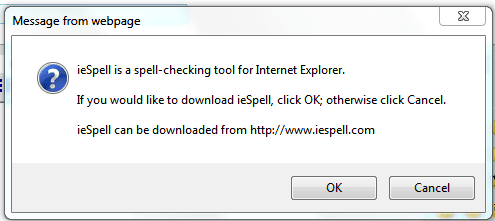
First for your PS regarding Spell check... you need to go to advanced when you post or reply to a post to use it. And you also will need to download iSpell...

ispell.PNG

As for your complaint regarding Libraries... they are actually a very cool feature once you learn them. I am baffled as to why when you saved a snip and pointed the save to documents that it showed up in pictures... I tried it with the above image and it remained in documents where I told it to save.

More info on Libraries:
Windows 7 Libraries - Organize and Find Files, Folders | TechNet
Inside Windows 7:Introducing Libraries
Get to Know Windows 7 Libraries Inside and Out
 

My Computer

Computer Manufacturer/Model Number
Homebrew PC - "Alpha_Dawg"
OS
Windows 7 Ultimate 64 bit Steve Ballmer Signature Edition
CPU
Intel Core 2 Quad - Q9550 - 2.83GHz stock - OC'd to 3.6GHz
Motherboard
Gigabyte EP45-UD3P
Memory
4GB DDR2 800MHz (PC6400) OCZ Reaper
Graphics Card(s)
Nvidia GE Force 8800 GTS
Sound Card
Asus Xonar DX
Monitor(s) Displays
Samsung SyncMaster 2333HD
Screen Resolution
1920 x 1080
Hard Drives
WD Caviar Black 750GB - 7200RPM - 32MB cache
WD Caviar Green 1.5TB - 5400RPM - 64MB cache
WD Caviar Green 2.0TB - 5400RPM - 64MB cache
PSU
PC Power & Cooling Silencer 750
Case
Gigabyte 3D Aurora
Cooling
Case is Air - 5ea. 120mm fans (mix of Arctic and Xigmatec)
Keyboard
MS Natural Wireless KB
Mouse
MS Wireless Mouse
Internet Speed
50 mbps down/5 mbps up
Other Info
AVerMedia - AVerTVHD G2 Dual Tuner Card
Back to OP.
Powell41 open up any library, near the top of the window it will have, say,
Documents Library
2 Locations

If you click the Locations you will see the folder in that particular one. If in the above example there are some folder you don't want/need in Documents you can delete them. This DOES NOT delete the folder, only the library junction point to it. I have mine set to include 1 Location in each default library, i.e, Pictures has only My Pictures. This makes them function as if you're opening the actual folder.
 

My Computer

Computer type
PC/Desktop
Computer Manufacturer/Model Number
Home Built Desktop By DataTech
OS
Windows 7 Ultimate X64 SP1
CPU
Intel i5-2550K, Differing ~4.4-4.8GHz No built in GPU
Motherboard
ASUS P8Z68-V PRO/GEN3
Memory
16GB G.Skill Sniper 1866MHz @ 2133MHz 2x8GB
Graphics Card(s)
ASUS GTX650TIB-DC2OC-2GD5, (650TI Boost)
Sound Card
Onboard Realtek 5-1
Monitor(s) Displays
Samsung P2570HD
Screen Resolution
1920x1080
Hard Drives
Samsung 840 Pro 256GB SSD for OS, 500GB Seagate Constellation (Enterprise drive) for Data
PSU
Corsair HX650W
Case
Inwin Dragon Rider
Cooling
Hyper 212 EVO w/two Noctua fans, push-pull, @1300 RPM
Keyboard
E-Z Eyes, bright yellow keys with large characters
Mouse
steelseries SENSEI Laser Pro Gaming
Internet Speed
48-51Mbs Mbs down, 11 Mbs up Xfinity Cable
Antivirus
Norton Internet Security 2013
Browser
IE 10, Opera, Pale Moon if needed
Other Info
4 case fans, LG BluRay-RE, ASUS DVD-RW, Mr. Fusion power supply, 1.21 gigawatts.
Darryl: Thanks for your reply.

I too ran Nero for about three years when I was using Windows XP and had no problems. My issues arose when I switched to Vista. Nero notified me that they had a new version that was compatible with Vista and for $35.00 I could download it. I did so, three times, and each time it immediately changed every icon on my computer to the Nero logo. This wa strike one, but I lived with it. The program never did run correctly and after a couple of monthe Nero then informed me that they had another updated version that was totally, absolutely compatible with Vista and for another $65.00 I could download it. That was strike two. Fool me once shame on you; fool me twice shame on me.
 

My Computer

Computer Manufacturer/Model Number
Dell Inspiron 620s
OS
Windows Home Premium, 64 4.096 bit
CPU
i3-2100
Motherboard
Dell 0DGGBY
Memory
Dimm0, Samsung 64 bit, 4.096 Mb; Dimm1, Hyundai 64 bit, 2.04
Graphics Card(s)
Intel HD Graphics Family
Sound Card
?
Monitor(s) Displays
Dell E197FP
Hard Drives
?
PSU
?
Case
?
Cooling
?
Hello Maguscreed:

Thanks for the replt re Firefox. That answers my question.

Regards
Powell Lucas
 

My Computer

Computer Manufacturer/Model Number
Dell Inspiron 620s
OS
Windows Home Premium, 64 4.096 bit
CPU
i3-2100
Motherboard
Dell 0DGGBY
Memory
Dimm0, Samsung 64 bit, 4.096 Mb; Dimm1, Hyundai 64 bit, 2.04
Graphics Card(s)
Intel HD Graphics Family
Sound Card
?
Monitor(s) Displays
Dell E197FP
Hard Drives
?
PSU
?
Case
?
Cooling
?
To all those who replied:

My concern is not about burning systems. I have two installed on my computer and they work just fine. My problem is with Libraries. I have had other replies to previous posts telling me how much I will like Windows 7 once I get the hang of it. I'm really not interested in getting the hang of it. I want it set up exactly like Vist with a simple list of Directories that I can open, modify, or delete files with a click of the button. I don't want my files left in their old location...that's why I move them. I have tried to get the directories to show up by clicking on default and I get nothing. When I click Libraries I get nothing. It sucks. It used to be a very simple process. Now it will require hours of reading just to get it to work. Who needs it!!

Regards
Powell Lucas
 

My Computer

Computer Manufacturer/Model Number
Dell Inspiron 620s
OS
Windows Home Premium, 64 4.096 bit
CPU
i3-2100
Motherboard
Dell 0DGGBY
Memory
Dimm0, Samsung 64 bit, 4.096 Mb; Dimm1, Hyundai 64 bit, 2.04
Graphics Card(s)
Intel HD Graphics Family
Sound Card
?
Monitor(s) Displays
Dell E197FP
Hard Drives
?
PSU
?
Case
?
Cooling
?
Well it's like getting a new car, all the knobs and stuff are in a different place than the old car. If you're not willing to learn the new one....I said how to configure Libraries. It is a computer, it needs input.
I'm sure if you bought a Vista disk you would be able to install it.
 

My Computer

Computer type
PC/Desktop
Computer Manufacturer/Model Number
Home Built Desktop By DataTech
OS
Windows 7 Ultimate X64 SP1
CPU
Intel i5-2550K, Differing ~4.4-4.8GHz No built in GPU
Motherboard
ASUS P8Z68-V PRO/GEN3
Memory
16GB G.Skill Sniper 1866MHz @ 2133MHz 2x8GB
Graphics Card(s)
ASUS GTX650TIB-DC2OC-2GD5, (650TI Boost)
Sound Card
Onboard Realtek 5-1
Monitor(s) Displays
Samsung P2570HD
Screen Resolution
1920x1080
Hard Drives
Samsung 840 Pro 256GB SSD for OS, 500GB Seagate Constellation (Enterprise drive) for Data
PSU
Corsair HX650W
Case
Inwin Dragon Rider
Cooling
Hyper 212 EVO w/two Noctua fans, push-pull, @1300 RPM
Keyboard
E-Z Eyes, bright yellow keys with large characters
Mouse
steelseries SENSEI Laser Pro Gaming
Internet Speed
48-51Mbs Mbs down, 11 Mbs up Xfinity Cable
Antivirus
Norton Internet Security 2013
Browser
IE 10, Opera, Pale Moon if needed
Other Info
4 case fans, LG BluRay-RE, ASUS DVD-RW, Mr. Fusion power supply, 1.21 gigawatts.
Britton 30:

Thanks for the reply and you may be correct. I do have a Vista disk and, in spite of what Dell says, I think I'll give it a try as soon as I finish this reply.

Regards
Powell Lucas
 

My Computer

Computer Manufacturer/Model Number
Dell Inspiron 620s
OS
Windows Home Premium, 64 4.096 bit
CPU
i3-2100
Motherboard
Dell 0DGGBY
Memory
Dimm0, Samsung 64 bit, 4.096 Mb; Dimm1, Hyundai 64 bit, 2.04
Graphics Card(s)
Intel HD Graphics Family
Sound Card
?
Monitor(s) Displays
Dell E197FP
Hard Drives
?
PSU
?
Case
?
Cooling
?
MS doesn't seem to have dealt with the issue of those of us who want to run our systems as we want to. Like yourself I don't use Libraries other than the real sort and you'll find ways to eliminate them from Explorer and dialogues if you peruse the Tutorials on this site - sorry I'm too lazy to find them for you. I have never used My documents and other such pointers (long-time XP user) and have always created my own data space, finding it easier to back-up and I always know where the actual data resides.

Apart from that I quite like Windows 7 even if I have to emasculate it to have it run as I want it to. Nice to know that Norton NIS seems to keep me safe from all the nasties even if that too has to be tamed.

I put it down to aiming for the lowest common denominater and would have switched to Linux ages ago if I thought it had as much to offer as most MS systems do which unfortunately I don't believe is the case.

:rolleyes: :rolleyes: :rolleyes: :cry:

ps I didn't initially like IE 9 but I don't mind it at all now even if I tend to use other browsers for much of the time.
 

My Computer

Computer Manufacturer/Model Number
Compaq desktop
OS
Windows 7 x64 SP1
CPU
Athlon II x2 215
Memory
4.0 GB
Graphics Card(s)
Onboard
Sound Card
Creative SB X-Fi Titanium HD (nice)
Monitor(s) Displays
24" Dell LCD
Screen Resolution
1900 x 1200
Hard Drives
320 GB, 500 GB and 750 GB 7200 rpm
PSU
430w
Keyboard
USB
Mouse
USB
Internet Speed
approx 10 Mbps
If anyone has any solutions as to how I can get Windows 7 to operate the way I want it to, I will be most appreciative.
In the "save as..." dialog, you can just navigate down through "Computer" instead of using the "Libraries" to set the target location for where you want to save whatever it is that you want to save. You are manually pointing to a target folder, just as you always did with 98, XP and Vista.

You can even "close up" the Libraries item in the dialog, so that it won't be expanded the next time you use it.

So, in "save as...", just navigate through Computer -> C -> Users -> <username> -> My Documents, etc. (if you want to put it there) or you can navigate to any other drive or folder on any hard drive (not necessarily under Users on C).

You are not obligated to use Libraries.
 

My Computer

Computer type
PC/Desktop
Computer Manufacturer/Model Number
Home-built, two systems (1) and (2)
OS
Windows 7 Pro x64 (1), Win7 Pro X64 (2)
CPU
i5-3350p 3.1Ghz/6MB-cache (1); E8400 3.0Ghz/6MB-cache (2)
Motherboard
ASUS P8Z77-V Pro (1); ASUS P5Q3 (2)
Memory
8GB PC3-12800 DDR3 (1); 4GB PC3-10600 DDR3 (2)
Graphics Card(s)
ATI HD7750 (1), (see TV cards); ATI R7 250 (2)
Sound Card
Realtek ALC892 HD Audio (1); Realtek ALC1200 HD Audio (2)
Monitor(s) Displays
Eizo HD2441W LCD, Eizo S2433W (1); Eizo 24" S2433W (2)
Screen Resolution
1920x1200, 1920x1200 (1); 1920x1200 (2)
Hard Drives
(1) 1TB SATA-II (7200RPM), 2x2TB SATA-III (7200RPM), 250GB SATA-III (10000RPM) for OS; 2x2TB external USB 3.0

(2) 320GB SATA-II (7200RPM), 750GB SATA-II (7200RPM), 150GB SATA-II (10000RPM) for OS; 2TB external USB 3.0
PSU
Nesteq ECS-6001 600W (1); Nesteq ECS-5001 500W (2)
Case
Acousti-Case 360 (1) and (2)
Cooling
Noctua NH-U12P SE2 for CPU, 2x120mm case fans (1) and (2)
Keyboard
IBM PS/2 (1) and (2)
Mouse
Logitech MX Revolution wireless (1); Microsoft wired (2)
Internet Speed
100mbps down / 10mbps up
Antivirus
Microsoft Security Essentials; Malwarebyte Anti-Malware Pro
Browser
Firefox
Other Info
Ceton InfiniTV 4-tuner cablecard-enabled TV card as well as Hauppauge HVR-2250 OTA/ATSC 2-tuner TV card in (1), running under Win7 WMC
One of the first things I do when I buy a new computer is create a partition purely for my own personal pictures, music, videos and Microsoft Office documents.

It is done with no ifs, buts, whys or wherefores - it just gets done.

I too, found Libraries confusing, so creating my own default save location suits me and protects my personal data when Windows decides to go walkabout.
 

My Computer

Computer Manufacturer/Model Number
HP Pavilion Elite 495UK
OS
Windows 7 Ultimate SP1 64-Bit
CPU
Intel Core i7 870 @ 2.93GHz
Motherboard
MSI 2A9C (CPU1)
Memory
8Gb Dual-Channel DDR3 @ 664MHz
Graphics Card(s)
nVidia GeForce GTX 460 1024MB dedicated RAM
Sound Card
Realtek HD Audio
Monitor(s) Displays
HP2310i
Screen Resolution
1920 x 1080
Hard Drives
1x1954GB Hitachi HDS22020ALA 330 (RAID), 1x1954GB Hitachi External for backup and storage
PSU
460W
Case
HP Elite
Cooling
Air cooled
Keyboard
Logitech K750 solar-powered keyboard
Mouse
Logitech Wireless M180 mouse
Internet Speed
2Mb
Other Info
Pure Avanti Flow Internet Radio with iPod Dock, 64Gb iPod, HP USB Speakers, Sony MDR-V500 Headphones, Sony Vaio F-Series Laptop

My Computer

Computer Manufacturer/Model Number
Too many to describe...
OS
Windows 7 x64 pro/ Windows 7 x86 Pro/ XP SP3 x86
On the other hand you can just use libraries to gather together similar items in different folders, partitions or drives while still keeping their separate identity in the file system. It makes sense to me.
 

My Computer

Computer type
Laptop
Computer Manufacturer/Model Number
Hewlett-Packard/G62-107SA Notebook
OS
Microsoft Windows 7 Home Premium 64-bit Service Pack 1
CPU
Intel(R) Core(TM) i3 CPU M 330 @ 2.13GHz
Motherboard
Hewlett-Packard 1425
Memory
8 GB DDR3
Graphics Card(s)
Intel(R) HD Graphics
Sound Card
Realtek High Definition Audio
Monitor(s) Displays
Builtin
Screen Resolution
1366 x 768 x 32 bits (4294967296 colors) @ 60 Hz
Hard Drives
250 GB SATA Hard Disk Drive 7200 rpm
2TB Seagate GoFlex USB 2 Drive
1TB Iomega Prestige USB 2 Drive
1.5TB Iomega Prestige USB 2 Drive (Samsung)
2TB WD MyBook Live NAS.
Mouse
Logitech Anywhere MX
Internet Speed
152 Mbs download 10 Mbs upload
Antivirus
Norton 360
Browser
Chrome
Libraries are pretty handy once you understand how they work. Still and all:

How to Disable “Libraries” Feature in Windows 7? - Tweaking with Vishal

I DID use the tutorials to diable Homegroup and did change some other things about Windows 7, but all in all, I think it's the best OS Microsoft has ever created and I find it way better than Vista.

Best Wishes,
Rªnce
 

My Computer

Computer type
PC/Desktop
Computer Manufacturer/Model Number
Dell Precision M6500 / Dell Insprion 3847
OS
Windows 7 Pro 32bit / Windows 7 Professional
CPU
Intel Core i7-620M Duel Core 2.66GHz / Intel Core i5-4460
Memory
4.0 GB / 8.0 GB
Graphics Card(s)
1.0 GB NVIDIA Quadro FX 2800M / Intel HD Graphics
Screen Resolution
1440x900 / 1920x1080
Hi Pincushion:

Many thanks for your reply. Perhaps you can answer my question.

I have just reloaded my O/S after trying to install Vista on this computer and so I'm stuck with Windows 7 unless I go back to my old machine. The problem I have is that I have no idea what the Libraries do. I've read through the Windows 7 for Dummies section on Libraries, I've read through the Tutorials on this site, and I've gone on line to get info. None of them tell me in plain language what Libraries is all about. I'm sitting here with five discs full of saved files and I don't have the faintest notion about where to install them. Do I click on Documents in the Start menu to set it up in the Library? Do I do the same thing for Pictures and Music? (even though I don't keep my on my computer I'd like to know where downloaded files are stored) What about a file for Videos? Do I make up a folder for this somewhere else and transfer it to Libraries. I tried this previously and nothing happened. When I clicked on Libraries I got a message telling me to open a library? I get the same thing now. When I open Documents from the Start menu it shows two items. When I then click on Libraries in this window I get a message telling me to open a library. What library? There's no library listed. I've already had two very large files disappear into never-never land. I figure Windows 7 decided on its own that I should send these files to some village chietain in Zamboanga. From the looks of it, I'll have to run everything from my discs because I have no idea what the system is going to do with them.

Regards
Powell Lucas
 

My Computer

Computer Manufacturer/Model Number
Dell Inspiron 620s
OS
Windows Home Premium, 64 4.096 bit
CPU
i3-2100
Motherboard
Dell 0DGGBY
Memory
Dimm0, Samsung 64 bit, 4.096 Mb; Dimm1, Hyundai 64 bit, 2.04
Graphics Card(s)
Intel HD Graphics Family
Sound Card
?
Monitor(s) Displays
Dell E197FP
Hard Drives
?
PSU
?
Case
?
Cooling
?
Powell, I think you read too much into those Libraries. They are just a colection of pointers (like an index) to folders. A standard system would come with e.g. a Pictures Library pointing to the folders of My Pictures and to Public Pictures.

If you store something to the Pictures library, that is the same as storing it to My Pictures which is the default folder. If, however, you have additional folders in the library or if you want to store to the Public Pictures, you have to select those specificly.

The default folder has a checkmark in Library Properties as you can see in my picture. What you can also see it that I have another My Pictures folder in a seperate data Partition D.

Libraries are very convenient when you have your data spread all over the place in seperate folders. They serve as common repository.
 

Attachments

  • 2011-09-30_2013.png
    2011-09-30_2013.png
    19.7 KB · Views: 0

My Computer

Computer Manufacturer/Model Number
HP, Dell, Gateway, Toshiba - 4 laptops and 2 desktops
OS
Vista, Windows7, Mint Mate, Zorin, Windows 8
CPU
from 1.6GHz Duo to i7
Monitor(s) Displays
2x HP w2207
Hard Drives
5x HDD, 7x SSD, 12x Externals
Keyboard
with trackball - no mices
Mouse
Trackball mice
Internet Speed
DSL 6000
Libraries is a junction point or shortcut to a folder, file, or groups thereof, whatever you add to them. They contain nothing at all but point to thing which do.
 

My Computer

Computer type
PC/Desktop
Computer Manufacturer/Model Number
Home Built Desktop By DataTech
OS
Windows 7 Ultimate X64 SP1
CPU
Intel i5-2550K, Differing ~4.4-4.8GHz No built in GPU
Motherboard
ASUS P8Z68-V PRO/GEN3
Memory
16GB G.Skill Sniper 1866MHz @ 2133MHz 2x8GB
Graphics Card(s)
ASUS GTX650TIB-DC2OC-2GD5, (650TI Boost)
Sound Card
Onboard Realtek 5-1
Monitor(s) Displays
Samsung P2570HD
Screen Resolution
1920x1080
Hard Drives
Samsung 840 Pro 256GB SSD for OS, 500GB Seagate Constellation (Enterprise drive) for Data
PSU
Corsair HX650W
Case
Inwin Dragon Rider
Cooling
Hyper 212 EVO w/two Noctua fans, push-pull, @1300 RPM
Keyboard
E-Z Eyes, bright yellow keys with large characters
Mouse
steelseries SENSEI Laser Pro Gaming
Internet Speed
48-51Mbs Mbs down, 11 Mbs up Xfinity Cable
Antivirus
Norton Internet Security 2013
Browser
IE 10, Opera, Pale Moon if needed
Other Info
4 case fans, LG BluRay-RE, ASUS DVD-RW, Mr. Fusion power supply, 1.21 gigawatts.
There are four libraries set up by default in seven. Documents, Pictures, Music and Videos. Each act as a collection of two folders, your documents etc and Public Documents etc. As mentioned previously the libraries themselves do not contain the files they merely act as a collection point for the folders which do. These real folders are located in the file system in your user folder as My Documents, my Pictures, My Music and My videos. These are the default folders which store files you add to the library. As mentioned earlier there is a corresponding set of public folders in the libraries. You can add any other folder you like to a library (there are some restrictions with flash drives and network locations), if you have a need to and similarly you can remove any of the default folders from a library. You can also create libraries of your own for any purpose you need.
 

My Computer

Computer type
Laptop
Computer Manufacturer/Model Number
Hewlett-Packard/G62-107SA Notebook
OS
Microsoft Windows 7 Home Premium 64-bit Service Pack 1
CPU
Intel(R) Core(TM) i3 CPU M 330 @ 2.13GHz
Motherboard
Hewlett-Packard 1425
Memory
8 GB DDR3
Graphics Card(s)
Intel(R) HD Graphics
Sound Card
Realtek High Definition Audio
Monitor(s) Displays
Builtin
Screen Resolution
1366 x 768 x 32 bits (4294967296 colors) @ 60 Hz
Hard Drives
250 GB SATA Hard Disk Drive 7200 rpm
2TB Seagate GoFlex USB 2 Drive
1TB Iomega Prestige USB 2 Drive
1.5TB Iomega Prestige USB 2 Drive (Samsung)
2TB WD MyBook Live NAS.
Mouse
Logitech Anywhere MX
Internet Speed
152 Mbs download 10 Mbs upload
Antivirus
Norton 360
Browser
Chrome
Libraries the sequel

Good Day Folks:

I have been wrestling with the Libraries function on this system ever since I started running Windows 7 about a week ago and I think I've finally figured out what it does. However I would like confirmation because I can't believe that anyone, even Microsoft, could be so stupid.

In Vista, when you opened an app, for example Documents, a side pane would open listing all the other apps in your Users directory and in the 'C' drive. From there you could switch apps with one click or move files between apps. Is this essentially what the Libraries function does?

If so, I am amazed that Microsoft laboured so long only to produce VistaBloat. What used to be a simple one click system now requires you to set up your folders using an additional step for each folder just to open the files in that folder, not to mention having to set up folders individually in the 'C' drive if you want to move files permanently from one folder to another. This is simply a fancy variation on the original DOS only obscured with a whole lot of jargon.

If the above is the case, the engineers and programmers could have put their time to better use coming up with a new version of Pong.

Regards
Powell Lucas :mad:
 

My Computer

Computer Manufacturer/Model Number
Dell Inspiron 620s
OS
Windows Home Premium, 64 4.096 bit
CPU
i3-2100
Motherboard
Dell 0DGGBY
Memory
Dimm0, Samsung 64 bit, 4.096 Mb; Dimm1, Hyundai 64 bit, 2.04
Graphics Card(s)
Intel HD Graphics Family
Sound Card
?
Monitor(s) Displays
Dell E197FP
Hard Drives
?
PSU
?
Case
?
Cooling
?
Back
Top