Library & external drive problems

masked

New member
Local time
10:23 PM
Messages
4
Hi. Looked through support & tutorials & can't seem to find an answer. Hope you don't mind me asking here. In XP I could monitor my Windows Media Player music files/folders to my external storage drive.That's where it would look & update them from the locations I specified. In Windows 7 no matter what I've tried to do so far it also creates these files/folders in my music library folder. If I delete them from there it also deletes them from the external drive. We're talking about approximately 4,000 mp3 files. This causes unnecessary wasted space on my hard drive. Is this a library problem & is there a workaround for it? I can't monitor my file locations through options in Windows Media Player anymore. I have to do it through the library folder. Can the default library folder be deleted? I think that's where the problem is but I'm guessing at this point.
Windows Media center creates another problem in that it will let me specify what locations to monitor; music, photos, etc. but when Wmc & Wmp are both enabled in Windows features I get an error saying "an error has occurred.
Not all of the features were successfully changed." Anyway that's what I'm trying to resolve. Thanks for listening & I appreciate in advance any help or advice you might have.
 

My Computer

Computer type
Laptop
Computer Manufacturer/Model Number
Hp Pavilion g6
OS
windows 7 home premium 64-bit SP-1
CPU
Intel(R) Core(TM) i3-2350M CPU @ 2.30GHz
Motherboard
Intel HM76 (Panther Point) HP 1841
Memory
4 gb
Graphics Card(s)
Intel® HD Graphics 3000
Sound Card
IDT High Definition Audio CODEC
Monitor(s) Displays
Built In Display
Screen Resolution
1366 x 768
Hard Drives
Seagate ST9500325AS
PSU
90 W
Case
Notebook
Cooling
Intel Panther Point PCH - Thermal Management Controller [C1]
Keyboard
Standard PS/2 Keyboard
Mouse
Logitech M310
Internet Speed
100 Mbps
Antivirus
Norton Internet Security 2014
Browser
Internet Explorer 10
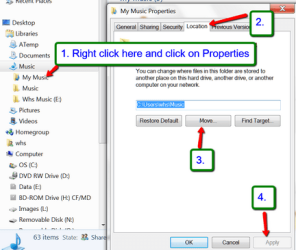
What you could possible do is to change the default location of your default music folder to the external drive (if that is a disk - USB stick might not work). The default location change is done in Properties > Location tab of the music folder. How this will work with Media Center I don't know because I never use that.
 

My Computer

Computer Manufacturer/Model Number
HP, Dell, Gateway, Toshiba - 4 laptops and 2 desktops
OS
Vista, Windows7, Mint Mate, Zorin, Windows 8
CPU
from 1.6GHz Duo to i7
Monitor(s) Displays
2x HP w2207
Hard Drives
5x HDD, 7x SSD, 12x Externals
Keyboard
with trackball - no mices
Mouse
Trackball mice
Internet Speed
DSL 6000
Thanks WHS. I already tried that. Changed my default music location in the music library folder to my F:\ drive which is my Seagate Free Agent storage drive. All my music still replicates itself in the music folder. And worse yet, when I delete the files from the music library folder on my hard drive it also removes them from Windows Media Player! Very strange. And the music library folder is then empty & asks for a default music location. I'm not sure but I seem to recall when I used WMC to set up my file locations that were in the external drive they didn't duplicate themselves to the hard drive. Can't be sure though because of the error problem when enabling both WMP & WMC. Seems I can't have them both enabled. Thought of going back to WMP 10 or 11 where folder monitoring is done in the player's options but with the way Windows 7 behaves I will need to back up my Seagate drive to dvd's first. I still don't understand the reason for having a library at all. Can it not be deleted. Any thoughts? Thanks
 

My Computer

Computer type
Laptop
Computer Manufacturer/Model Number
Hp Pavilion g6
OS
windows 7 home premium 64-bit SP-1
CPU
Intel(R) Core(TM) i3-2350M CPU @ 2.30GHz
Motherboard
Intel HM76 (Panther Point) HP 1841
Memory
4 gb
Graphics Card(s)
Intel® HD Graphics 3000
Sound Card
IDT High Definition Audio CODEC
Monitor(s) Displays
Built In Display
Screen Resolution
1366 x 768
Hard Drives
Seagate ST9500325AS
PSU
90 W
Case
Notebook
Cooling
Intel Panther Point PCH - Thermal Management Controller [C1]
Keyboard
Standard PS/2 Keyboard
Mouse
Logitech M310
Internet Speed
100 Mbps
Antivirus
Norton Internet Security 2014
Browser
Internet Explorer 10
I don't understand - when you change the default location of a folder, there will be only one folder. Where does this second folder come from.
 

My Computer

Computer Manufacturer/Model Number
HP, Dell, Gateway, Toshiba - 4 laptops and 2 desktops
OS
Vista, Windows7, Mint Mate, Zorin, Windows 8
CPU
from 1.6GHz Duo to i7
Monitor(s) Displays
2x HP w2207
Hard Drives
5x HDD, 7x SSD, 12x Externals
Keyboard
with trackball - no mices
Mouse
Trackball mice
Internet Speed
DSL 6000
Sorry if I wasn't clear on this. OK, my default location for all music mp3 files & folders are located on my external Seagate drive. How do I specify that my default folder location is located on drive F:\ through Windows Media Player when that option to monitor folders is no longer available in WMP. Now, when I remove the default music folder from the library all music in WMP is then rem oved & I'm asked to Click organize & then manage libraries to include folders in WMP & the only options are the default libraries located on the hard drive. After I do that WMP then becomes re-populated but also adds all the files/folders to the default music library folder. I know it's confusing WHS. I believe in keeping it simple myself. I just need to be able to have WMP point to the external drive without having to go through the hard drive in order to populate the music into WMP. As stated earlier, this can no longer be done through the monitor folders option in WMP. I hope this provides a better understanding of what is happening. I really am thankful for your patience. It just seems that what once was simple is no longer simple.
 

My Computer

Computer type
Laptop
Computer Manufacturer/Model Number
Hp Pavilion g6
OS
windows 7 home premium 64-bit SP-1
CPU
Intel(R) Core(TM) i3-2350M CPU @ 2.30GHz
Motherboard
Intel HM76 (Panther Point) HP 1841
Memory
4 gb
Graphics Card(s)
Intel® HD Graphics 3000
Sound Card
IDT High Definition Audio CODEC
Monitor(s) Displays
Built In Display
Screen Resolution
1366 x 768
Hard Drives
Seagate ST9500325AS
PSU
90 W
Case
Notebook
Cooling
Intel Panther Point PCH - Thermal Management Controller [C1]
Keyboard
Standard PS/2 Keyboard
Mouse
Logitech M310
Internet Speed
100 Mbps
Antivirus
Norton Internet Security 2014
Browser
Internet Explorer 10
I think you don't understand the approach. Forget your folder that you currently have on your external drive. What you must do is to move the ' My Music ' folder that is in the library and came with the system. You can move that to the external drive from the location tab in folder properties. Then work with that folder.
 

Attachments

  • 2013-12-03_2059.png
    2013-12-03_2059.png
    31.1 KB · Views: 8

My Computer

Computer Manufacturer/Model Number
HP, Dell, Gateway, Toshiba - 4 laptops and 2 desktops
OS
Vista, Windows7, Mint Mate, Zorin, Windows 8
CPU
from 1.6GHz Duo to i7
Monitor(s) Displays
2x HP w2207
Hard Drives
5x HDD, 7x SSD, 12x Externals
Keyboard
with trackball - no mices
Mouse
Trackball mice
Internet Speed
DSL 6000
Followed the screenshot & that didn't work either. Music files are still being replicated. But I do thank you for all the help. Every other tutorial & customization on the site has worked out great. This is an invaluable site & I thank you again WHS for all your help in trying to resolve this problem.
 

My Computer

Computer type
Laptop
Computer Manufacturer/Model Number
Hp Pavilion g6
OS
windows 7 home premium 64-bit SP-1
CPU
Intel(R) Core(TM) i3-2350M CPU @ 2.30GHz
Motherboard
Intel HM76 (Panther Point) HP 1841
Memory
4 gb
Graphics Card(s)
Intel® HD Graphics 3000
Sound Card
IDT High Definition Audio CODEC
Monitor(s) Displays
Built In Display
Screen Resolution
1366 x 768
Hard Drives
Seagate ST9500325AS
PSU
90 W
Case
Notebook
Cooling
Intel Panther Point PCH - Thermal Management Controller [C1]
Keyboard
Standard PS/2 Keyboard
Mouse
Logitech M310
Internet Speed
100 Mbps
Antivirus
Norton Internet Security 2014
Browser
Internet Explorer 10
Hmm, I am sorry. It should have worked because then there would be only 1 Music folder. I don't understand what went wrong.
 

My Computer

Computer Manufacturer/Model Number
HP, Dell, Gateway, Toshiba - 4 laptops and 2 desktops
OS
Vista, Windows7, Mint Mate, Zorin, Windows 8
CPU
from 1.6GHz Duo to i7
Monitor(s) Displays
2x HP w2207
Hard Drives
5x HDD, 7x SSD, 12x Externals
Keyboard
with trackball - no mices
Mouse
Trackball mice
Internet Speed
DSL 6000
Back
Top