
Library feature....I hate it...how to disable?

Status
Not open for further replies.
It's the best thing about Window 7, once you get it you will like it but until then you may not, there is a learning curve.

People need to understand that Libraries only point to the actual file that is stored in the user files. It doesn't waste any space at all actually. Once you understand that concept it's so much easier.

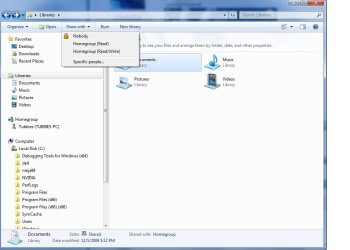
You also have full control over which folders are in the library and who you want to share them with. First pictures is to choose who you want to share with. Second is which folders will appear in the Library.
 

Attachments
  • Libraries share with.jpg
    Libraries share with.jpg
    53.3 KB · Views: 48
  • Homegroup sharing library's.PNG
    Homegroup sharing library's.PNG
    23 KB · Views: 53

My Computer My Computer

Computer type
PC/Desktop
Computer Manufacturer/Model Number
Home built
OS
Windows 7 Ult, Windows 8.1 Pro,
CPU
Q9650-4.275GHz, E8600 4.5GHz, E6750-3.8GHz
Motherboard
Evga 780i FTW
Memory
G.Skill PC2 9600 1200Mhz 5 5 5 15 2T
Graphics Card(s)
GTX480
Sound Card
Asus Xonar D2
Monitor(s) Displays
HannsG
Screen Resolution
1680X1050
Hard Drives
GSkill Phoenix Pro 120GB SSD
PSU
ThermalTake Toughpower 1000Watt modular
Case
ThermalTake XaserV
Cooling
Xigmatek S1283
Keyboard
Logitech G15
Mouse
Logitech G9
Internet Speed
T1
Apparently some people like the library and the new data storage structure being used in Win7/Vista. Personally, when I saw it in Vista I didn't like it -- seeing it retained in Win7 has been a disappointment.

I played around quite a bit with the new schema in Win7 yesterday (always willing to give sometime a second look) but was unable to configure it reasonably. A real shame since a lot of the other attributes of Win7 look like a real improvement over XP.

I want the old 'My Documents' folder schema back. Would it be too much to ask to have the user container ('Matthew' in my case) enabled with the right click option to change the location to another drive/location? Seems like such an easy fix.

Matthew.

Matthew,

What is missing? The old Documents and settings user structure is still present in Windows 7 with the ability to re-direct the location to another drive - It is augmented by the libraries feature not replaced. The only real change is the renaming of "Documents and settings" to "Users" which in my opinion is actually a more suitable title
 

My Computers My Computers

System One System Two

  • Computer type
    PC/Desktop
    Computer Manufacturer/Model Number
    ChillBlast - Custom to my design
    OS
    Windows 11 Pro x64 [Latest Release and Release Preview]
    CPU
    Ryzen 9 5950X, 3.8 - 5.2 MHz
    Motherboard
    Asus Prime X570-Pro
    Memory
    64GB [2 x 32GB] DDR4 3200MHz
    Graphics Card(s)
    4GB NVIDIA GEFORCE GTX 1650 Ti
    Sound Card
    On-board SPDIF to 5.1 System + HDMI [5.1 system]
    Monitor(s) Displays
    32" UHD 32 Bit HDR Monitor + 43" UHD 4K 32Bit HDR TV
    Screen Resolution
    2 x 3840 x 2160 @60Hz
    Hard Drives
    1TB M2 SSD OS, 500GB Fast Access SSD, 2 x 8TB Data + Various Externals from 1TB to 4TB, 10TB NAS
    PSU
    NZXT C750 80 PLUS Gold 750W Modular PSU
    Case
    Workstation Case [Matt Black]
    Cooling
    NZXT Kraken X63 280mm CPU Cooler +2x Quiet Case fans
    Keyboard
    Logitech Wireless MX Keys & K400 + others
    Mouse
    Logitech Wireless MX Master 3S
    Internet Speed
    920 MB Down 50 MB Up
    Antivirus
    BitDefender Total Security Pro
    Browser
    Chrome (always run latest Non-Beta)
    Other Info
    Also run ...
    Laptop - Quad 8GB - Windows 10 Pro x64
    Nexus 7 Android tablet x2
    Samsung 10.2" tablet
    Blackview TAB 8 4G Android Tablet c/w Keyboard
    Wacom Intuos Pro Medium Pen Pad
    Wacom Intuos Pro Small Pen Pad
    Wacom Expresskeys Remote
    Loopdeck+ Graphics Controller
    Shuttle Pro v2 Control
  • Computer type
    Laptop
    System Manufacturer/Model Number
    Dell XPS 17 10750H
    OS
    Windows 11 Pro x64 Latest RP
    CPU
    Intel I7 10750H 5.0GHz
    Motherboard
    Dell XPS
    Memory
    32GB [2x16GB] DDR4 2933 MHz
    Graphics Card(s)
    nVidia GTX1650Ti 4 GB GDDR6
    Sound Card
    Stock [Realtek] 4 Speaker
    Monitor(s) Displays
    17" IPS UHD+ Infinity Edge Touchscreen
    Screen Resolution
    3840 x 2400
    Hard Drives
    2TB M2 NVMe, 4TB External + various 500GB & 1TB External NVMe (also have access to spinner HDD from
    PSU
    Stock
    Case
    Stock XPS Aluminium & Carbon Fibre
    Cooling
    Stock - Active Fan Control
    Keyboard
    Backlit + Various Logitech
    Mouse
    Stock Track Pad + Logitech MX Trackball
    Internet Speed
    72 MB Down 18MB Up
    Browser
    Chrome
    Other Info
    Also run ...
    Laptop - Quad 8GB - Windows 10 Pro x64
    Nexus 7 Android tablet x2
    10.2" tablet
    Sony Z3 Android Smartphone
    Wacom Intuos Pro Medium Pen Pad
    Wacom Intuos Pro Small Pen Pad
    Wacom Expresskeys Remote
    Loopdeck+ Graphics Controller
    Shuttle Pro v2 Control Pad
    10TB NAS
I am getting used to the library and I rather like it. It saves hunting different locations for various files.
 

My Computer My Computer

Computer Manufacturer/Model Number
Home built
OS
Windows 7 Ultimate 32 bit
CPU
Intel(R) Pentium(R) 4 CPU 3.00GHz
Motherboard
ASUS P4P800-VM Motherboard Chipset: Intel 865G + ICH5
Memory
2.50 GB RAM
Graphics Card(s)
NVIDIA GeForce 7600 GS
Sound Card
SoundMax Integrated Digital Audio (Chip)
Monitor(s) Displays
ViewSonic VX 1962 wm
Screen Resolution
1680 X 1050
Hard Drives
Seagate Barracuda 7200.10 80 GB
ST380215A ATA Device 18.6 GB
Western Digital "My Book" external hard drive 750 GB
Cooling
Fan based
Keyboard
Microsoft Comfort Curve Keyboard 2000 v10 USB
Mouse
Logitec optic USB
Internet Speed
3.01 Mb/s download 0.64 Mb/s upload
I love it, if your as scatty and disorganised as me when saving folders then liabary is a god send, save folders how I like then add them to the Liabary.
Sactty folder system automatically organised. Can't see an issue with that!!
 

My Computer My Computer

Computer type
PC/Desktop
OS
openSUSE 13.1 64bit
CPU
i7
Motherboard
Gigabyte UD5
Memory
6gb Gskill matched DDR3
Graphics Card(s)
Radeon HD4600
Sound Card
All onboard
Monitor(s) Displays
HP 2159v
Hard Drives
120gb Samsung SSD for the OS
2 * 1tb WD Caviar Black for storage
PSU
Corsair 750w
Case
Antec 920
Cooling
Aksas Nero
I agree with most here.. When I first started using Libraries, I hated them. I was completely turned off, and resentful. Boy, was I in for a happy awakening... I started playing with them a bit.. Now, consider, I am one who has over 4 terabytes of files spanning multiple drives, external drives, network computers, servers, etc.. With libraries, I can group directories into what I see as a simple 'Virtual directory', and in one quick step, view contents spanning multiple drives, computers, directories, in one location.. As soon as I started leveraging this new functionality, I was completely sold, and have never looked back. I would say to those who do not like them.... for now, just set the standard "my documents" folder as the default save location for your documents library, and do the same for pics, movies, etc.. and you will hardly notice a difference in functionality. Then, over the course of time, consider adding another folder full of docs on a network location into the mix, and then, and then.. and see where that gets you..

Arrange by type, and you can select all word documents spanning mutiple drives/devices in one folder view sorted alphabetically, and it appears nearly instantly.. very useful imho..

Now, if you have very few files you need to manage in the first place, this feature will provide no real benefit for you. In short, it was not designed for you, but simply setting your default save locations in the library to be the folder you want, will essentially cause them to function just like the same old folders you have always known and loved.. For folks like me, who have tons of files.. it is incredibly useful..
 

My Computer My Computer

Computer Manufacturer/Model Number
Custom
OS
Windows 7 Ultimate
CPU
Amd 5400+ dual core overclocked to 3.0 ghz
Motherboard
EVGA 590 sli aM2
Memory
8gb 5-5-5-5-15 g-skill
Graphics Card(s)
Nvidia 9800gt 512mb
Sound Card
M-Audio Delta 2496
Monitor(s) Displays
Acer 22 inch lcd
Screen Resolution
1680 x 1050
Hard Drives
Hmm

4.0 terabytes total..
PSU
650 watts
Case
Antec Sonata II
Cooling
Zallmen Xpu cooler
Keyboard
some rubbish I found in my garage
Mouse
logitech
Internet Speed
caps at about 650kb down, 50kb up . Gigabit local network.
I decided about a couple weeks ago to use a library for all my photos, and within moments, I loved it. Now I am seriously considering giving it a go with my music files as well.:geek:
 

My Computer My Computer

Computer type
PC/Desktop
Computer Manufacturer/Model Number
Gigabyte Technology Co., Ltd.
OS
Win 7 Ultimate 64-bit SP1 (desktop)
CPU
Intel Core 2 Duo E8400
Motherboard
Gigabyte GA-EP35-DS3R
Memory
2x 2GB OCZ DDR II SDRAM PC2-6400
Graphics Card(s)
NVIDIA GeForce 9400GT
Monitor(s) Displays
HP 2009m(primary), Acer P191W
Screen Resolution
1600x900, 1440x900
Hard Drives
Internal:WD Caviar Black 640GB 32MB cache 7200RPM
External:Samsung Story Station 1TB HDD desktop drive
500GB Toshiba portable drive
PSU
Antec Earthwatts EA500D
Case
Antec Sonata III
Cooling
4 fans
Keyboard
Logitech Wave
Mouse
Logitech M-SBF90
Internet Speed
Slow due to home Wireless-G router
Antivirus
MSE, Hitman Pro, Malwarebytes
Browser
Chrome and Palemoon
Other Info
Laptop....Acer 5750Z-4835
15.6" HD Widescreen CineCrystal™ LED-backlit LCD Display: (1366x768 resolution, 16:9 aspect ratio)
Intel® Pentium® Processor B940 (2.0GHz, 2MB L3 cache)
Windows® 7 Home Premium,500GB Hard Drive,4GB DDR3 RAM, Intel® HD Graphics,8X DVD-Super Multi Double-Layer Drive
Multi-in-1 Digital Media Card Reader,802.11b/g/n Wi-Fi
Chrome and Palemoon, MSE, Hitman Pro
Matthew,

What is missing? The old Documents and settings user structure is still present in Windows 7 with the ability to re-direct the location to another drive - It is augmented by the libraries feature not replaced. The only real change is the renaming of "Documents and settings" to "Users" which in my opinion is actually a more suitable title[/QUOTE]

A couple of things are missing...

1. You can't store 'document' directory on most NAS -- Win7 insists on being able to index the files using it's own mechanism. Since almost all off-the-shelf NAS boxes are based on SAMBA (linux) -- I'm screwed.

2. Intuitively, I should be able to click on 'Matthew' on the main menu and see my stuff.

3. Intuitively, I should be able to right click on 'Matthew' on the main menu and have the option of setting the location of my choice. The option is offered if you dig around using Windows Explorer but not for the 'Matthew' container. Only on the pre-defined subfolders (e.g. Music, Documents, Videos).

4. I find it odd that I can't create new folders in the 'Matthew' container and set their direction. This right seems to be limited, once again, to the pre-determined folders.

For all the flexibility of the 'new' library functions -- they've always been there - I used shortcuts to points to data stores in many different locations. This is just a prettier implementation of the shortcut metaphor.

So...to answer the original posters question...you can't disable or override the library function although I've seen some people tinkering with registry settings to restore the functions that have been lost.

At the risk of being labelled a crank...it would be a nice philosophy for Microsoft to let people organize their stuff according to their tastes and interests. I resent having to reorganize my datastores in the predefined folders.

A couple of easy coding fixes (SP1) would restore the flexibility without upsetting those who like the library metaphor...
 

My Computer My Computer

OS
XP/Ubuntu
Well, I gave it a go last night with my music, and after a little tinkering, I do like it. So with photos and videos, I pronounce the libraries a good thing.:geek:
 

My Computer My Computer

Computer type
PC/Desktop
Computer Manufacturer/Model Number
Gigabyte Technology Co., Ltd.
OS
Win 7 Ultimate 64-bit SP1 (desktop)
CPU
Intel Core 2 Duo E8400
Motherboard
Gigabyte GA-EP35-DS3R
Memory
2x 2GB OCZ DDR II SDRAM PC2-6400
Graphics Card(s)
NVIDIA GeForce 9400GT
Monitor(s) Displays
HP 2009m(primary), Acer P191W
Screen Resolution
1600x900, 1440x900
Hard Drives
Internal:WD Caviar Black 640GB 32MB cache 7200RPM
External:Samsung Story Station 1TB HDD desktop drive
500GB Toshiba portable drive
PSU
Antec Earthwatts EA500D
Case
Antec Sonata III
Cooling
4 fans
Keyboard
Logitech Wave
Mouse
Logitech M-SBF90
Internet Speed
Slow due to home Wireless-G router
Antivirus
MSE, Hitman Pro, Malwarebytes
Browser
Chrome and Palemoon
Other Info
Laptop....Acer 5750Z-4835
15.6" HD Widescreen CineCrystal™ LED-backlit LCD Display: (1366x768 resolution, 16:9 aspect ratio)
Intel® Pentium® Processor B940 (2.0GHz, 2MB L3 cache)
Windows® 7 Home Premium,500GB Hard Drive,4GB DDR3 RAM, Intel® HD Graphics,8X DVD-Super Multi Double-Layer Drive
Multi-in-1 Digital Media Card Reader,802.11b/g/n Wi-Fi
Chrome and Palemoon, MSE, Hitman Pro
needs more work

because i havent found out how to actually go to a folder from the library (either you cant do it or i cant figure out how) makes this feature pretty useless unless you put everything you have in the librarys.

also the library builds the list of contents in it when you access it which can be annoying when i go to my music library and wait for 4 or so seconds while it builds the list of all my music. if i just go to the folder my music all my songs are displayed instantly.
 

My Computer My Computer

Computer Manufacturer/Model Number
hp hdx 18
OS
7 64bit
CPU
intel Q9000
Memory
4gb ddr3
Graphics Card(s)
nvidia geforce gt 130M
Monitor(s) Displays
1920x1080 x 2
Hard Drives
500gb
Matthew,

What is missing? The old Documents and settings user structure is still present in Windows 7 with the ability to re-direct the location to another drive - It is augmented by the libraries feature not replaced. The only real change is the renaming of "Documents and settings" to "Users" which in my opinion is actually a more suitable title

A couple of things are missing...

1. You can't store 'document' directory on most NAS -- Win7 insists on being able to index the files using it's own mechanism. Since almost all off-the-shelf NAS boxes are based on SAMBA (linux) -- I'm screwed.

Yes, you can. I am.


2. Intuitively, I should be able to click on 'Matthew' on the main menu and see my stuff.

You can.

3. Intuitively, I should be able to right click on 'Matthew' on the main menu and have the option of setting the location of my choice. The option is offered if you dig around using Windows Explorer but not for the 'Matthew' container. Only on the pre-defined subfolders (e.g. Music, Documents, Videos).

You have never been able to do this.

4. I find it odd that I can't create new folders in the 'Matthew' container and set their direction. This right seems to be limited, once again, to the pre-determined folders.

Statement doesn't make sense...yes, you can create new folders under 'Matthew.'

For all the flexibility of the 'new' library functions -- they've always been there - I used shortcuts to points to data stores in many different locations. This is just a prettier implementation of the shortcut metaphor.

So...to answer the original posters question...you can't disable or override the library function although I've seen some people tinkering with registry settings to restore the functions that have been lost.

At the risk of being labelled a crank...it would be a nice philosophy for Microsoft to let people organize their stuff according to their tastes and interests. I resent having to reorganize my datastores in the predefined folders.

A couple of easy coding fixes (SP1) would restore the flexibility without upsetting those who like the library metaphor...[/QUOTE]
 

My Computer My Computer

Computer Manufacturer/Model Number
Custom
OS
Windows 7 Ultimate RTM (Technet)
CPU
3.00 gigahertz Intel Core2 Duo E8400
Motherboard
ASUSTeK Computer INC. P5K/EPU Rev 1.xx
Memory
4GB
Graphics Card(s)
ATI Radeon X1950 Pro
Sound Card
Built in HD Audio
Monitor(s) Displays
22" Gateway LCD
Screen Resolution
1920 x 1200
Hard Drives
ST3160023A [Hard drive] (160.04 GB) -- drive 0, rev 8.01, ST3500630AS [Hard drive] (500.11 GB) -- drive 2, rev 3.AAK
ST3500630AS [Hard drive] (500.11 GB) -- drive 1, rev 3.AAK
Keyboard
Logitech G11
Mouse
Microsoft Wireless Laser Mouse 5000
Internet Speed
13.44 Mbps
New to Win7, I started to play with Libraries. I was expecting to be able to edit files & folders in the libraries without changing the source data.

Thats not the case. Well, as far as I can tell.

Windows help tells me "If you delete files or folders from within a library, they're also deleted from their original locations."

To me, this seems to make the whole thing pointless. I was epecting that a library was just a set of virtual links to the source data & that one could easily reorganise the library by deleting files & folders without risk of deleting the source data.

Am I missing something here ?
 

My Computer My Computer

OS
Windows7
Am I missing something here ?
Yes. Libraries takes real locations and aggregate the contents into one view. It does not virtualize the contents, that never was the point nor should it.
 

My Computer My Computer

Computer type
PC/Desktop
Computer Manufacturer/Model Number
Alienware Aurora ALX R4
OS
Windows 10 Pro (x64)
CPU
Intel Core i7-3930K (3.2GHz - 4.5GHz)
Motherboard
Alienware Aurora-R4 x79
Memory
4x Samsung 4GB PC3-12800 DDR3 (16GB 1600MHz)
Graphics Card(s)
Nvidia Geforce GTX 690
Sound Card
SteelSeries Siberia Elite
Monitor(s) Displays
Dell UltraSharp U3011
Screen Resolution
2560x1600
Hard Drives
Samsung 850 Pro 256 GB, Seagate 1TB Desktop Hybrid HDD, 2x Western Digital 4TB Green HDD
PSU
875W Some Dell PSU <.<
Case
Alienware Aurora ALX
Cooling
Custom Liquid Cooling (EK CPU & GPU blocks) dual EK 480RAD
Keyboard
Logitech G710+ Mechanical
Mouse
Logitech G700s
Internet Speed
Verizon Fios (50 mbps average)
Other Info
Server: Intel NUC D54250WYK: i5-4250U, 16GB, 256 GB mSATA, Windows Server 2012 R2
New to Win7, I started to play with Libraries. I was expecting to be able to edit files & folders in the libraries without changing the source data.

Thats not the case. Well, as far as I can tell.

Windows help tells me "If you delete files or folders from within a library, they're also deleted from their original locations."

To me, this seems to make the whole thing pointless. I was epecting that a library was just a set of virtual links to the source data & that one could easily reorganise the library by deleting files & folders without risk of deleting the source data.

Am I missing something here ?

I think you are trying to remove files/folders from the library. You can do that by modifying the locations which are included in that library.
 

My Computer My Computer

OS
Windows 7 RTM x86
Yes, I am trying to remove specific files & sub folders from a library.
By example, I add into the library a folder called 2007Photos from My Pictures (this was done for me automatically somehow by Windows anyway). This contains a lot of individual photos & subfolders (i.e StupidPartyShots for example) which I dont want in that partuclulary library.

I can see how to remove the whole 2007Photos folder, but not the lower folders or individual files. Is there a way to do this ?

If I build the library up by adding the individual sub folders, folder by folder from My Pictures then i can remove a specific folder from the library, without changing the source data. Ok sweet, so I presume thats how one is supposed to build up a library, bottom up.

But since the Library somehow automatically put all the files & subfolders from My Pictures into the Library, I thought, hey thats cool and so I expected to be able edit out the files & subfolders that I didnt want in that Library. If that possible then I will be happy!
 

My Computer My Computer

OS
Windows7
A Library is given a folder and everything in that folder is displayed, the items in that folder are not maintained by the library. Meaning you cannot exclude content from the library. A library is just a window into multiple folders at a given time.
 

My Computer My Computer

Computer type
PC/Desktop
Computer Manufacturer/Model Number
Alienware Aurora ALX R4
OS
Windows 10 Pro (x64)
CPU
Intel Core i7-3930K (3.2GHz - 4.5GHz)
Motherboard
Alienware Aurora-R4 x79
Memory
4x Samsung 4GB PC3-12800 DDR3 (16GB 1600MHz)
Graphics Card(s)
Nvidia Geforce GTX 690
Sound Card
SteelSeries Siberia Elite
Monitor(s) Displays
Dell UltraSharp U3011
Screen Resolution
2560x1600
Hard Drives
Samsung 850 Pro 256 GB, Seagate 1TB Desktop Hybrid HDD, 2x Western Digital 4TB Green HDD
PSU
875W Some Dell PSU <.<
Case
Alienware Aurora ALX
Cooling
Custom Liquid Cooling (EK CPU & GPU blocks) dual EK 480RAD
Keyboard
Logitech G710+ Mechanical
Mouse
Logitech G700s
Internet Speed
Verizon Fios (50 mbps average)
Other Info
Server: Intel NUC D54250WYK: i5-4250U, 16GB, 256 GB mSATA, Windows Server 2012 R2
Thread is hijacked anyway. My reminder to justify my dislike of libraries is : Where the new files are saved?.....again on C:\User ??....I dont get it. Is root feature in win organization like "My Documents" before in older OS. Took me long time to learn "How to" point my folders to different drive [D:....] and now again this doesnt work and I should deal with "imaginary branched folders"....sorry is to much right now for me to understand this logic.
 

My Computer My Computer

OS
Windows 7 x64
Thread is hijacked anyway. My reminder to justify my dislike of libraries is : Where the new files are saved?.....again on C:\User ??....I dont get it. Is root feature in win organization like "My Documents" before in older OS. Took me long time to learn "How to" point my folders to different drive [D:....] and now again this doesnt work and I should deal with "imaginary branched folders"....sorry is to much right now for me to understand this logic.

Libraries save where you want to save to. If you just choose the library and no subfolder or location it will save to the default location which you can pick. See the screen shot bellow. (The checkmark is the current default save location.)
 

Attachments

  • Untitled.png
    Untitled.png
    12.4 KB · Views: 15

My Computer My Computer

Computer type
PC/Desktop
Computer Manufacturer/Model Number
Alienware Aurora ALX R4
OS
Windows 10 Pro (x64)
CPU
Intel Core i7-3930K (3.2GHz - 4.5GHz)
Motherboard
Alienware Aurora-R4 x79
Memory
4x Samsung 4GB PC3-12800 DDR3 (16GB 1600MHz)
Graphics Card(s)
Nvidia Geforce GTX 690
Sound Card
SteelSeries Siberia Elite
Monitor(s) Displays
Dell UltraSharp U3011
Screen Resolution
2560x1600
Hard Drives
Samsung 850 Pro 256 GB, Seagate 1TB Desktop Hybrid HDD, 2x Western Digital 4TB Green HDD
PSU
875W Some Dell PSU <.<
Case
Alienware Aurora ALX
Cooling
Custom Liquid Cooling (EK CPU & GPU blocks) dual EK 480RAD
Keyboard
Logitech G710+ Mechanical
Mouse
Logitech G700s
Internet Speed
Verizon Fios (50 mbps average)
Other Info
Server: Intel NUC D54250WYK: i5-4250U, 16GB, 256 GB mSATA, Windows Server 2012 R2
For those like me just startin out with the "fun" of libraries I found in WMP Options Media Library Settings - "Delete files from computer when deleted from library"
Hey thats just what I wanted to disable! Now I can add a folder in WMP & delete individual files without deleting the originals.Cool.

I also get an unexpected situation. The Folders added into Picture Library via WMP automaticaly showup in the Picture Library in Libraries, & vice versa. So I thought ok same libary or "window". So now with the setting above unchecked, I delete individual files from the Picture Library in WMP, retaining the original. But hey - they are still in the Picture Libary in "Libraries" under the desktop.
Do I really have two Picture Libaries? Funny becasue one works like I want, in WMP, the other one doesnt. Its going to beconfusing two have two libraries, with the same name, automatically adding files to the other one, but not exactly the same.

Is there any way I can stop Folders that I add into Libraries in WMP, being added automatically in the "Libraries" under the desktop?

Or is there a way of making the Option "Delete files from computer when deleted from library", available in WMP, applicable to all Libraries?
 

My Computer My Computer

OS
Windows7
I am very confused by this thread and other threads on the subject of libraries - and there are more than one.

Libraries is a new feature in Windows 7. One may like it and use it, or one may dislike it and not use it. That's it. Why is this such a big deal to people? When people are asking to disable it - what exactly do you want to disable? Why not using it is not enough?

If you are not using it and you somehow resent seeing the link to Libraries in the Navigation pane, then you can use the tutorials to remove the link, see Brink's post earlier in the thread.

If some program you are using wants to save files in a Library and you don't like that - you can always change the default file location for that program. That's what I do for any new program I use, since there is no way the developers would know where do I want to store my files.

Finally, if you are complaining that Libraries somehow prevent you from creating your own folders structure - then you are mistaken, they are not. You can create you r own set of folders and customize then to your taste, and you can do that anywhere on your system, either within the C:\Users tree or not - I personally have never used the default "My ..." folders, so what, do I have to start a campaign for these folders to be removed? I actually did that once, back in Windows 2000, I wanted to get rid of those folders completely. But I learned that they are so embedded in to the Windows structure, that while it was in fact possible, it was simply not worth the effort. So I started to create my own folder tree for my files and ignore the fact that "My Music" and such exist. Now, I can create my own Libraries, which allows me to see the content of several folders at once, without changing anything about them. if you don't want to do this - then don't.
 

My Computer My Computer

Computer Manufacturer/Model Number
Dell Inspiron 530
OS
Windows 7 Ultimate (x64)
CPU
Q6600
Memory
8 GB
Graphics Card(s)
ATI Radeon HD 2600 XT
Monitor(s) Displays
Samsung Syncmaster P2450
Screen Resolution
1920x1080
Hard Drives
Samsung HD103UJ
Samsung HD501LJ
Internet Speed
25 Mb/s
   Note
Thread closed.

Please post your own separate issues with this as a New Thread instead for specific individual help on it. :)

Thank you,
Shawn
 

My Computer My Computer

Computer type
PC/Desktop
Computer Manufacturer/Model Number
Self built custom
OS
64-bit Windows 11 Pro for Workstations
CPU
Intel i7-8700K OC'd to 5 GHz
Motherboard
ASUS ROG Maximus XI Formula Z390
Memory
64 GB (4x16GB) G.SKILL TridentZ RGB DDR4 3600 MHz
Graphics Card(s)
ASUS ROG-STRIX-GTX1080TI-O11G-GAMING
Sound Card
Integrated
Monitor(s) Displays
2 x Samsung Odyssey G7 27"
Screen Resolution
2560x1440
Hard Drives
1TB Samsung 990 PRO M.2,
4TB Samsung 990 PRO PRO M.2,
TerraMaster F8 SSD Plus NAS
PSU
Seasonic Prime Titanium 850W
Case
Thermaltake Core P3
Cooling
Corsair Hydro H115i
Keyboard
Logitech wireless K800
Mouse
Logitech MX Master 4
Internet Speed
2 Gb/s Download and 100 Mb/s Upload
Antivirus
Malwarebyte Anti-Malware Premium
Browser
Google Chrome
Other Info
Logitech Z625 speaker system,
Logitech BRIO 4K Pro webcam,
HP Color LaserJet Pro MFP M477fdn,
APC SMART-UPS RT 1000 XL - SURT1000XLI,
Galaxy S23 Plus phone
Status
Not open for further replies.
Back
Top