
Solved Library folder at startup

I didn't see anything in the log which would be related to your problem.

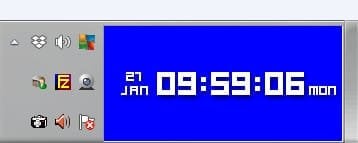
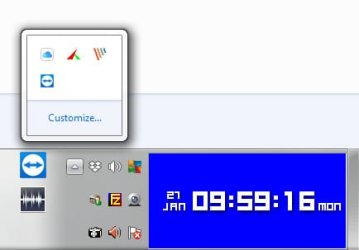
Next to the notification area in the system tray, is the Libraries shortcut icon there?

Hi,
This will need to be checked tomorrow.

Can you advise now what the next step will be should i reply yes / no just so i can continue and report back other than just a yes or no
 

My Computer

Computer type
Laptop
Computer Manufacturer/Model Number
Dell Inspiron P07T & Pc Windows 32 / 64 bit
OS
Microsoft Windows 7 Professional 64-bit 7601 Multiprocessor Free Service Pack 1
CPU
AMD Athlon(tm) II Neo K345 Dual-Core Processor
Motherboard
Dell Inc.
Memory
8.00 GB
Graphics Card(s)
ATI Mobility Radeon HD 4200 Series
Sound Card
(1) AMD High Definition Audio Device (2) High Definition A
Monitor(s) Displays
Generic PnP Monitor
Screen Resolution
1366 x 768 x 32 bits (4294967296 colors) @ 59 Hz
Hard Drives
(1) WDC WD3200BEKT-75PVMT0 ATA Device (2) Generic- Multi-Card USB Device
PSU
Dell 65w ac adapter model no LA65NS0-00
Keyboard
Standard Ps2 keyboard
Mouse
Ps2 compatible mouse
Internet Speed
Download 38.9Mbps Upload 18.1Mbps
Antivirus
Avg internet security 19.7.3103 (build 19.7.4674.524)
Browser
Google Chrome Version 76.0.3809.132 (Official Build) (64-bit
The first screen you see after logging in is Explorer with the Libraries or is when you click to open Explorer?
 

My Computers

System One System Two

  • Computer type
    PC/Desktop
    Computer Manufacturer/Model Number
    custom build
    OS
    Windows 7 HP 64
    CPU
    i5 6600K - 800MHz to 4200MHz
    Motherboard
    GA-Z170-HD3P
    Memory
    4+4G GSkill DDR4 3000
    Graphics Card(s)
    IG - Intel 530
    Monitor(s) Displays
    Samsung 226BW
    Screen Resolution
    1680x1050
    Hard Drives
    (1) -1 SM951 – 128GB M.2 AHCI PCIe SSD drive for Windows 7 and Lubuntu
    (2) -1 WD SATA 3 - 1T for Data
    (3) -1 WD SATA 3 - 1T for backup
    PSU
    Thermaltake 450W TR2 gold
    Keyboard
    Old and good Chicony mechanical keyboard
    Mouse
    Logitech mX performance - 9 buttons (had to disable some)
    Internet Speed
    500Mb/s
    Browser
    Firefox 64
    Other Info
    TinyWall firewall
  • Computer type
    Laptop
    System Manufacturer/Model Number
    Asus Q550LF
    OS
    Windows 7 Pro
    CPU
    i7-4500U 800MHz to 3.0GHz
    Motherboard
    Asus Q550LF
    Memory
    (4+4)G DDR3 1600
    Graphics Card(s)
    IG intel 4400 + NVIDIA GeForce GT 745M
    Sound Card
    Realtek
    Monitor(s) Displays
    LG Display LP156WF4-SPH1
    Screen Resolution
    1920 x 1080
    Hard Drives
    BX500 120G SSD for Windows and programs +
    1T HDD for data
    Internet Speed
    500 Mb/s
    Browser
    Firefox
    Other Info
    TinyWall firewall
When i login i see the white/blue page with the icons shown,like example photo above.
I do not click explorer.
The library page is shown all on its own accord.
 

My Computer

Computer type
Laptop
Computer Manufacturer/Model Number
Dell Inspiron P07T & Pc Windows 32 / 64 bit
OS
Microsoft Windows 7 Professional 64-bit 7601 Multiprocessor Free Service Pack 1
CPU
AMD Athlon(tm) II Neo K345 Dual-Core Processor
Motherboard
Dell Inc.
Memory
8.00 GB
Graphics Card(s)
ATI Mobility Radeon HD 4200 Series
Sound Card
(1) AMD High Definition Audio Device (2) High Definition A
Monitor(s) Displays
Generic PnP Monitor
Screen Resolution
1366 x 768 x 32 bits (4294967296 colors) @ 59 Hz
Hard Drives
(1) WDC WD3200BEKT-75PVMT0 ATA Device (2) Generic- Multi-Card USB Device
PSU
Dell 65w ac adapter model no LA65NS0-00
Keyboard
Standard Ps2 keyboard
Mouse
Ps2 compatible mouse
Internet Speed
Download 38.9Mbps Upload 18.1Mbps
Antivirus
Avg internet security 19.7.3103 (build 19.7.4674.524)
Browser
Google Chrome Version 76.0.3809.132 (Official Build) (64-bit
You did not answer: Who has activated the Administrator account?
 

My Computers

System One System Two

  • Computer type
    PC/Desktop
    Computer Manufacturer/Model Number
    custom build
    OS
    Windows 7 HP 64
    CPU
    i5 6600K - 800MHz to 4200MHz
    Motherboard
    GA-Z170-HD3P
    Memory
    4+4G GSkill DDR4 3000
    Graphics Card(s)
    IG - Intel 530
    Monitor(s) Displays
    Samsung 226BW
    Screen Resolution
    1680x1050
    Hard Drives
    (1) -1 SM951 – 128GB M.2 AHCI PCIe SSD drive for Windows 7 and Lubuntu
    (2) -1 WD SATA 3 - 1T for Data
    (3) -1 WD SATA 3 - 1T for backup
    PSU
    Thermaltake 450W TR2 gold
    Keyboard
    Old and good Chicony mechanical keyboard
    Mouse
    Logitech mX performance - 9 buttons (had to disable some)
    Internet Speed
    500Mb/s
    Browser
    Firefox 64
    Other Info
    TinyWall firewall
  • Computer type
    Laptop
    System Manufacturer/Model Number
    Asus Q550LF
    OS
    Windows 7 Pro
    CPU
    i7-4500U 800MHz to 3.0GHz
    Motherboard
    Asus Q550LF
    Memory
    (4+4)G DDR3 1600
    Graphics Card(s)
    IG intel 4400 + NVIDIA GeForce GT 745M
    Sound Card
    Realtek
    Monitor(s) Displays
    LG Display LP156WF4-SPH1
    Screen Resolution
    1920 x 1080
    Hard Drives
    BX500 120G SSD for Windows and programs +
    1T HDD for data
    Internet Speed
    500 Mb/s
    Browser
    Firefox
    Other Info
    TinyWall firewall
I doMy know.
I’ve run it like this for years
 

My Computer

Computer type
Laptop
Computer Manufacturer/Model Number
Dell Inspiron P07T & Pc Windows 32 / 64 bit
OS
Microsoft Windows 7 Professional 64-bit 7601 Multiprocessor Free Service Pack 1
CPU
AMD Athlon(tm) II Neo K345 Dual-Core Processor
Motherboard
Dell Inc.
Memory
8.00 GB
Graphics Card(s)
ATI Mobility Radeon HD 4200 Series
Sound Card
(1) AMD High Definition Audio Device (2) High Definition A
Monitor(s) Displays
Generic PnP Monitor
Screen Resolution
1366 x 768 x 32 bits (4294967296 colors) @ 59 Hz
Hard Drives
(1) WDC WD3200BEKT-75PVMT0 ATA Device (2) Generic- Multi-Card USB Device
PSU
Dell 65w ac adapter model no LA65NS0-00
Keyboard
Standard Ps2 keyboard
Mouse
Ps2 compatible mouse
Internet Speed
Download 38.9Mbps Upload 18.1Mbps
Antivirus
Avg internet security 19.7.3103 (build 19.7.4674.524)
Browser
Google Chrome Version 76.0.3809.132 (Official Build) (64-bit
I didn't see anything in the log which would be related to your problem.

Next to the notification area in the system tray, is the Libraries shortcut icon there?

Hello,

No there is not a Libraries shortcut/icon there
 

My Computer

Computer type
Laptop
Computer Manufacturer/Model Number
Dell Inspiron P07T & Pc Windows 32 / 64 bit
OS
Microsoft Windows 7 Professional 64-bit 7601 Multiprocessor Free Service Pack 1
CPU
AMD Athlon(tm) II Neo K345 Dual-Core Processor
Motherboard
Dell Inc.
Memory
8.00 GB
Graphics Card(s)
ATI Mobility Radeon HD 4200 Series
Sound Card
(1) AMD High Definition Audio Device (2) High Definition A
Monitor(s) Displays
Generic PnP Monitor
Screen Resolution
1366 x 768 x 32 bits (4294967296 colors) @ 59 Hz
Hard Drives
(1) WDC WD3200BEKT-75PVMT0 ATA Device (2) Generic- Multi-Card USB Device
PSU
Dell 65w ac adapter model no LA65NS0-00
Keyboard
Standard Ps2 keyboard
Mouse
Ps2 compatible mouse
Internet Speed
Download 38.9Mbps Upload 18.1Mbps
Antivirus
Avg internet security 19.7.3103 (build 19.7.4674.524)
Browser
Google Chrome Version 76.0.3809.132 (Official Build) (64-bit
Explorer can be set to run when windows start i 3 places:
- On the Startup folder (D:\Users"Name"\AppData\Roaming\Microsoft\Windows\Start Menu\Startup) and or C:\ProgramData\Microsoft\Windows\Start Menu\Programs\Startup)
- Under a Run in Register
- On Task Schedule

As you have already try MSConfig (that shows the first two), have a look at Task Schedule
 

My Computers

System One System Two

  • Computer type
    PC/Desktop
    Computer Manufacturer/Model Number
    custom build
    OS
    Windows 7 HP 64
    CPU
    i5 6600K - 800MHz to 4200MHz
    Motherboard
    GA-Z170-HD3P
    Memory
    4+4G GSkill DDR4 3000
    Graphics Card(s)
    IG - Intel 530
    Monitor(s) Displays
    Samsung 226BW
    Screen Resolution
    1680x1050
    Hard Drives
    (1) -1 SM951 – 128GB M.2 AHCI PCIe SSD drive for Windows 7 and Lubuntu
    (2) -1 WD SATA 3 - 1T for Data
    (3) -1 WD SATA 3 - 1T for backup
    PSU
    Thermaltake 450W TR2 gold
    Keyboard
    Old and good Chicony mechanical keyboard
    Mouse
    Logitech mX performance - 9 buttons (had to disable some)
    Internet Speed
    500Mb/s
    Browser
    Firefox 64
    Other Info
    TinyWall firewall
  • Computer type
    Laptop
    System Manufacturer/Model Number
    Asus Q550LF
    OS
    Windows 7 Pro
    CPU
    i7-4500U 800MHz to 3.0GHz
    Motherboard
    Asus Q550LF
    Memory
    (4+4)G DDR3 1600
    Graphics Card(s)
    IG intel 4400 + NVIDIA GeForce GT 745M
    Sound Card
    Realtek
    Monitor(s) Displays
    LG Display LP156WF4-SPH1
    Screen Resolution
    1920 x 1080
    Hard Drives
    BX500 120G SSD for Windows and programs +
    1T HDD for data
    Internet Speed
    500 Mb/s
    Browser
    Firefox
    Other Info
    TinyWall firewall
If you shift-right click hold on the Desktop icon (I assume you have one) and move it to the left, does Libraries show up?

Do you have a Libraries shortcut on your desktop?

Would you provide a screenshot of your desktop (at least the system tray).
 
Last edited:

My Computer

Computer type
Laptop
Computer Manufacturer/Model Number
Dell M6500 Precision Work Station
OS
Windows 7 Pro SP1 64 bit
Memory
8 GB
Screen Resolution
1920x
Internet Speed
30 Mbps
Antivirus
Norton Security
Browser
IE 11
Hi
There is no desktop icon.
I will check the other two steps tomorrow for you YC

Thanks.
 

My Computer

Computer type
Laptop
Computer Manufacturer/Model Number
Dell Inspiron P07T & Pc Windows 32 / 64 bit
OS
Microsoft Windows 7 Professional 64-bit 7601 Multiprocessor Free Service Pack 1
CPU
AMD Athlon(tm) II Neo K345 Dual-Core Processor
Motherboard
Dell Inc.
Memory
8.00 GB
Graphics Card(s)
ATI Mobility Radeon HD 4200 Series
Sound Card
(1) AMD High Definition Audio Device (2) High Definition A
Monitor(s) Displays
Generic PnP Monitor
Screen Resolution
1366 x 768 x 32 bits (4294967296 colors) @ 59 Hz
Hard Drives
(1) WDC WD3200BEKT-75PVMT0 ATA Device (2) Generic- Multi-Card USB Device
PSU
Dell 65w ac adapter model no LA65NS0-00
Keyboard
Standard Ps2 keyboard
Mouse
Ps2 compatible mouse
Internet Speed
Download 38.9Mbps Upload 18.1Mbps
Antivirus
Avg internet security 19.7.3103 (build 19.7.4674.524)
Browser
Google Chrome Version 76.0.3809.132 (Official Build) (64-bit
Thanks. By the way, I meant Shift left click hold. Sorry about that.
 

My Computer

Computer type
Laptop
Computer Manufacturer/Model Number
Dell M6500 Precision Work Station
OS
Windows 7 Pro SP1 64 bit
Memory
8 GB
Screen Resolution
1920x
Internet Speed
30 Mbps
Antivirus
Norton Security
Browser
IE 11
Evening.
I’ve noticed e over the last couple of weeks that my Library folder now decides to open when I switch on the pc.
My pc has a partition where that partition runs 64 bit software but my main use is the 32 bit side of things.

Anyway today I logged into the 64 bit & all fine.
32 bit side always open the start up folder.

In this a know issue as I can’t find a reason why this is happening.

Any advice please.

Many thanks.
I presume you're running a a dual boot arrangement here - 64 bit W7 and 32 bit W7 installed, but I'm not sure why you'd want to login to 32 bit Windows these days.

Anyway, when you manually open Windows Explorer, as you showed in #15, that's what you see by default - a page showing the libraries. The reason this is happening automatically is due to a number of causes, the main ones can be found here.

If you're going to tinker with the registry, as may be necessary be careful to back this up first, or easier still make a system restore point. You need to reboot after any registry tweaks. You should also have to hand a system repair disk or your W7 installation disk, to be able to access your system restore point, just in case after any registry tweaks and a reboot, you find you can't boot up at all.
 

My Computer

Computer type
PC/Desktop
Computer Manufacturer/Model Number
Dell Vostro
OS
Windows 7 Pro 64 Bit, Windows 10 Pro 64 Bit, Linux Mint 20.1 LTS
CPU
Intel Core i5-3470 3.2 GHz
Motherboard
Intel 7 Series C/216 Chipset
Memory
6GB RAM
Graphics Card(s)
Intel HD Graphics
Monitor(s) Displays
Asus VC239 (23.5")
Hard Drives
Western Digital WD10EZEX 1TB
Western Digital WD3200AAKS 320GB
PSU
Corsair 500W
Antivirus
Microsoft Essentials, Malwarebytes, Kapersky Rescue Disk
Browser
Firefox 87 64 Bit

My Computer

Computer type
Laptop
Computer Manufacturer/Model Number
Dell Inspiron P07T & Pc Windows 32 / 64 bit
OS
Microsoft Windows 7 Professional 64-bit 7601 Multiprocessor Free Service Pack 1
CPU
AMD Athlon(tm) II Neo K345 Dual-Core Processor
Motherboard
Dell Inc.
Memory
8.00 GB
Graphics Card(s)
ATI Mobility Radeon HD 4200 Series
Sound Card
(1) AMD High Definition Audio Device (2) High Definition A
Monitor(s) Displays
Generic PnP Monitor
Screen Resolution
1366 x 768 x 32 bits (4294967296 colors) @ 59 Hz
Hard Drives
(1) WDC WD3200BEKT-75PVMT0 ATA Device (2) Generic- Multi-Card USB Device
PSU
Dell 65w ac adapter model no LA65NS0-00
Keyboard
Standard Ps2 keyboard
Mouse
Ps2 compatible mouse
Internet Speed
Download 38.9Mbps Upload 18.1Mbps
Antivirus
Avg internet security 19.7.3103 (build 19.7.4674.524)
Browser
Google Chrome Version 76.0.3809.132 (Official Build) (64-bit

I presume you're running a a dual boot arrangement here - 64 bit W7 and 32 bit W7 installed, but I'm not sure why you'd want to login to 32 bit Windows these days.

Anyway, when you manually open Windows Explorer, as you showed in #15, that's what you see by default - a page showing the libraries. The reason this is happening automatically is due to a number of causes, the main ones can be found here.

If you're going to tinker with the registry, as may be necessary be careful to back this up first, or easier still make a system restore point. You need to reboot after any registry tweaks. You should also have to hand a system repair disk or your W7 installation disk, to be able to access your system restore point, just in case after any registry tweaks and a reboot, you find you can't boot up at all.


Hi,
Looking at step 2 there is nopath to advise me where to look for that entry.
There is no tick in restore previous folder.
 

My Computer

Computer type
Laptop
Computer Manufacturer/Model Number
Dell Inspiron P07T & Pc Windows 32 / 64 bit
OS
Microsoft Windows 7 Professional 64-bit 7601 Multiprocessor Free Service Pack 1
CPU
AMD Athlon(tm) II Neo K345 Dual-Core Processor
Motherboard
Dell Inc.
Memory
8.00 GB
Graphics Card(s)
ATI Mobility Radeon HD 4200 Series
Sound Card
(1) AMD High Definition Audio Device (2) High Definition A
Monitor(s) Displays
Generic PnP Monitor
Screen Resolution
1366 x 768 x 32 bits (4294967296 colors) @ 59 Hz
Hard Drives
(1) WDC WD3200BEKT-75PVMT0 ATA Device (2) Generic- Multi-Card USB Device
PSU
Dell 65w ac adapter model no LA65NS0-00
Keyboard
Standard Ps2 keyboard
Mouse
Ps2 compatible mouse
Internet Speed
Download 38.9Mbps Upload 18.1Mbps
Antivirus
Avg internet security 19.7.3103 (build 19.7.4674.524)
Browser
Google Chrome Version 76.0.3809.132 (Official Build) (64-bit
Explorer can be set to run when windows start i 3 places:
- On the Startup folder (D:\Users"Name"\AppData\Roaming\Microsoft\Windows\Start Menu\Startup) and or C:\ProgramData\Microsoft\Windows\Start Menu\Programs\Startup)
- Under a Run in Register
- On Task Schedule

As you have already try MSConfig (that shows the first two), have a look at Task Schedule

Hi,
there is nothing for Libaries in the Task schedule
 

My Computer

Computer type
Laptop
Computer Manufacturer/Model Number
Dell Inspiron P07T & Pc Windows 32 / 64 bit
OS
Microsoft Windows 7 Professional 64-bit 7601 Multiprocessor Free Service Pack 1
CPU
AMD Athlon(tm) II Neo K345 Dual-Core Processor
Motherboard
Dell Inc.
Memory
8.00 GB
Graphics Card(s)
ATI Mobility Radeon HD 4200 Series
Sound Card
(1) AMD High Definition Audio Device (2) High Definition A
Monitor(s) Displays
Generic PnP Monitor
Screen Resolution
1366 x 768 x 32 bits (4294967296 colors) @ 59 Hz
Hard Drives
(1) WDC WD3200BEKT-75PVMT0 ATA Device (2) Generic- Multi-Card USB Device
PSU
Dell 65w ac adapter model no LA65NS0-00
Keyboard
Standard Ps2 keyboard
Mouse
Ps2 compatible mouse
Internet Speed
Download 38.9Mbps Upload 18.1Mbps
Antivirus
Avg internet security 19.7.3103 (build 19.7.4674.524)
Browser
Google Chrome Version 76.0.3809.132 (Official Build) (64-bit
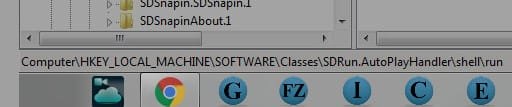
If you shift-right click hold on the Desktop icon (I assume you have one) and move it to the left, does Libraries show up?

Do you have a Libraries shortcut on your desktop?

Would you provide a screenshot of your desktop (at least the system tray).

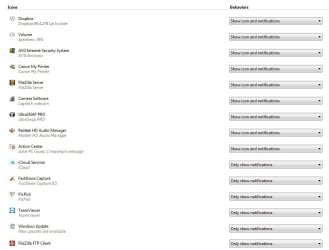
See attached photo.
 

Attachments

  • 6182.jpg
    6182.jpg
    7.2 KB · Views: 8
  • 6183.jpg
    6183.jpg
    12.5 KB · Views: 8
  • 6184.jpg
    6184.jpg
    53.2 KB · Views: 1
  • 6185.jpg
    6185.jpg
    37.7 KB · Views: 1

My Computer

Computer type
Laptop
Computer Manufacturer/Model Number
Dell Inspiron P07T & Pc Windows 32 / 64 bit
OS
Microsoft Windows 7 Professional 64-bit 7601 Multiprocessor Free Service Pack 1
CPU
AMD Athlon(tm) II Neo K345 Dual-Core Processor
Motherboard
Dell Inc.
Memory
8.00 GB
Graphics Card(s)
ATI Mobility Radeon HD 4200 Series
Sound Card
(1) AMD High Definition Audio Device (2) High Definition A
Monitor(s) Displays
Generic PnP Monitor
Screen Resolution
1366 x 768 x 32 bits (4294967296 colors) @ 59 Hz
Hard Drives
(1) WDC WD3200BEKT-75PVMT0 ATA Device (2) Generic- Multi-Card USB Device
PSU
Dell 65w ac adapter model no LA65NS0-00
Keyboard
Standard Ps2 keyboard
Mouse
Ps2 compatible mouse
Internet Speed
Download 38.9Mbps Upload 18.1Mbps
Antivirus
Avg internet security 19.7.3103 (build 19.7.4674.524)
Browser
Google Chrome Version 76.0.3809.132 (Official Build) (64-bit

Hi,
there is nothing for Libaries in the Task schedule

The Explorer default is to open on Libraries.

What you have to look is a command to open Explorer, not Libraries.
 

My Computers

System One System Two

  • Computer type
    PC/Desktop
    Computer Manufacturer/Model Number
    custom build
    OS
    Windows 7 HP 64
    CPU
    i5 6600K - 800MHz to 4200MHz
    Motherboard
    GA-Z170-HD3P
    Memory
    4+4G GSkill DDR4 3000
    Graphics Card(s)
    IG - Intel 530
    Monitor(s) Displays
    Samsung 226BW
    Screen Resolution
    1680x1050
    Hard Drives
    (1) -1 SM951 – 128GB M.2 AHCI PCIe SSD drive for Windows 7 and Lubuntu
    (2) -1 WD SATA 3 - 1T for Data
    (3) -1 WD SATA 3 - 1T for backup
    PSU
    Thermaltake 450W TR2 gold
    Keyboard
    Old and good Chicony mechanical keyboard
    Mouse
    Logitech mX performance - 9 buttons (had to disable some)
    Internet Speed
    500Mb/s
    Browser
    Firefox 64
    Other Info
    TinyWall firewall
  • Computer type
    Laptop
    System Manufacturer/Model Number
    Asus Q550LF
    OS
    Windows 7 Pro
    CPU
    i7-4500U 800MHz to 3.0GHz
    Motherboard
    Asus Q550LF
    Memory
    (4+4)G DDR3 1600
    Graphics Card(s)
    IG intel 4400 + NVIDIA GeForce GT 745M
    Sound Card
    Realtek
    Monitor(s) Displays
    LG Display LP156WF4-SPH1
    Screen Resolution
    1920 x 1080
    Hard Drives
    BX500 120G SSD for Windows and programs +
    1T HDD for data
    Internet Speed
    500 Mb/s
    Browser
    Firefox
    Other Info
    TinyWall firewall
Hi,
There is no mention at all of Exploere either
 

My Computer

Computer type
Laptop
Computer Manufacturer/Model Number
Dell Inspiron P07T & Pc Windows 32 / 64 bit
OS
Microsoft Windows 7 Professional 64-bit 7601 Multiprocessor Free Service Pack 1
CPU
AMD Athlon(tm) II Neo K345 Dual-Core Processor
Motherboard
Dell Inc.
Memory
8.00 GB
Graphics Card(s)
ATI Mobility Radeon HD 4200 Series
Sound Card
(1) AMD High Definition Audio Device (2) High Definition A
Monitor(s) Displays
Generic PnP Monitor
Screen Resolution
1366 x 768 x 32 bits (4294967296 colors) @ 59 Hz
Hard Drives
(1) WDC WD3200BEKT-75PVMT0 ATA Device (2) Generic- Multi-Card USB Device
PSU
Dell 65w ac adapter model no LA65NS0-00
Keyboard
Standard Ps2 keyboard
Mouse
Ps2 compatible mouse
Internet Speed
Download 38.9Mbps Upload 18.1Mbps
Antivirus
Avg internet security 19.7.3103 (build 19.7.4674.524)
Browser
Google Chrome Version 76.0.3809.132 (Official Build) (64-bit

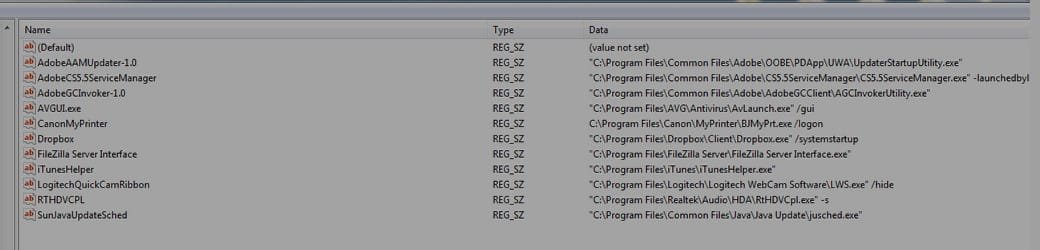
Open Regedit
- hit Ctrl+f
- search for run and set Look at keys & match whole string only

It will find many Run keys. It will stop at every Run key.
hit F3 to search again

Remember that you're searching for a Explorer CMD
 

My Computers

System One System Two

  • Computer type
    PC/Desktop
    Computer Manufacturer/Model Number
    custom build
    OS
    Windows 7 HP 64
    CPU
    i5 6600K - 800MHz to 4200MHz
    Motherboard
    GA-Z170-HD3P
    Memory
    4+4G GSkill DDR4 3000
    Graphics Card(s)
    IG - Intel 530
    Monitor(s) Displays
    Samsung 226BW
    Screen Resolution
    1680x1050
    Hard Drives
    (1) -1 SM951 – 128GB M.2 AHCI PCIe SSD drive for Windows 7 and Lubuntu
    (2) -1 WD SATA 3 - 1T for Data
    (3) -1 WD SATA 3 - 1T for backup
    PSU
    Thermaltake 450W TR2 gold
    Keyboard
    Old and good Chicony mechanical keyboard
    Mouse
    Logitech mX performance - 9 buttons (had to disable some)
    Internet Speed
    500Mb/s
    Browser
    Firefox 64
    Other Info
    TinyWall firewall
  • Computer type
    Laptop
    System Manufacturer/Model Number
    Asus Q550LF
    OS
    Windows 7 Pro
    CPU
    i7-4500U 800MHz to 3.0GHz
    Motherboard
    Asus Q550LF
    Memory
    (4+4)G DDR3 1600
    Graphics Card(s)
    IG intel 4400 + NVIDIA GeForce GT 745M
    Sound Card
    Realtek
    Monitor(s) Displays
    LG Display LP156WF4-SPH1
    Screen Resolution
    1920 x 1080
    Hard Drives
    BX500 120G SSD for Windows and programs +
    1T HDD for data
    Internet Speed
    500 Mb/s
    Browser
    Firefox
    Other Info
    TinyWall firewall
Hi,
Ive done that thanks but nothing there.
Ive attached photos just in case you see something
 

Attachments

  • 6203.jpg
    6203.jpg
    8.9 KB · Views: 7
  • 6202.jpg
    6202.jpg
    30.4 KB · Views: 2
  • 6201.jpg
    6201.jpg
    10.3 KB · Views: 7
  • 6200.jpg
    6200.jpg
    6 KB · Views: 7
  • 6199.jpg
    6199.jpg
    12.3 KB · Views: 2

My Computer

Computer type
Laptop
Computer Manufacturer/Model Number
Dell Inspiron P07T & Pc Windows 32 / 64 bit
OS
Microsoft Windows 7 Professional 64-bit 7601 Multiprocessor Free Service Pack 1
CPU
AMD Athlon(tm) II Neo K345 Dual-Core Processor
Motherboard
Dell Inc.
Memory
8.00 GB
Graphics Card(s)
ATI Mobility Radeon HD 4200 Series
Sound Card
(1) AMD High Definition Audio Device (2) High Definition A
Monitor(s) Displays
Generic PnP Monitor
Screen Resolution
1366 x 768 x 32 bits (4294967296 colors) @ 59 Hz
Hard Drives
(1) WDC WD3200BEKT-75PVMT0 ATA Device (2) Generic- Multi-Card USB Device
PSU
Dell 65w ac adapter model no LA65NS0-00
Keyboard
Standard Ps2 keyboard
Mouse
Ps2 compatible mouse
Internet Speed
Download 38.9Mbps Upload 18.1Mbps
Antivirus
Avg internet security 19.7.3103 (build 19.7.4674.524)
Browser
Google Chrome Version 76.0.3809.132 (Official Build) (64-bit

Then this last one,thanks
 

Attachments

  • 6204.jpg
    6204.jpg
    6.9 KB · Views: 7

My Computer

Computer type
Laptop
Computer Manufacturer/Model Number
Dell Inspiron P07T & Pc Windows 32 / 64 bit
OS
Microsoft Windows 7 Professional 64-bit 7601 Multiprocessor Free Service Pack 1
CPU
AMD Athlon(tm) II Neo K345 Dual-Core Processor
Motherboard
Dell Inc.
Memory
8.00 GB
Graphics Card(s)
ATI Mobility Radeon HD 4200 Series
Sound Card
(1) AMD High Definition Audio Device (2) High Definition A
Monitor(s) Displays
Generic PnP Monitor
Screen Resolution
1366 x 768 x 32 bits (4294967296 colors) @ 59 Hz
Hard Drives
(1) WDC WD3200BEKT-75PVMT0 ATA Device (2) Generic- Multi-Card USB Device
PSU
Dell 65w ac adapter model no LA65NS0-00
Keyboard
Standard Ps2 keyboard
Mouse
Ps2 compatible mouse
Internet Speed
Download 38.9Mbps Upload 18.1Mbps
Antivirus
Avg internet security 19.7.3103 (build 19.7.4674.524)
Browser
Google Chrome Version 76.0.3809.132 (Official Build) (64-bit
Back
Top