library folder in task bar

figured out snipping tool...I like that a lot.....
 

My Computer My Computer

At a glance

Windows Seven 64 bitAMD Phenom 9150e Quad-core 1.80 GHz5 gigsGeForce 9600 GT
Computer Manufacturer/Model Number
HP
OS
Windows Seven 64 bit
CPU
AMD Phenom 9150e Quad-core 1.80 GHz
Memory
5 gigs
Graphics Card(s)
GeForce 9600 GT
Sound Card
stock
Monitor(s) Displays
HP w2207h
Screen Resolution
1680x1050
Hard Drives
external Maxtor 250 gig
2nd internal 225 gig
Keyboard
HP
Mouse
MS Lasermouse 5000
Internet Speed
5 MB
and this is the icon that shows up in TASKBAR..it is the one inbetween IE and MS Office

This is "Computer" icon, not libraries... I don't know how you got there, both of the methods I described work for me.

I'm uploading a video on youtube with a recording that shows what you should do. Will be processed and be available soon.

[ame]http://www.youtube.com/watch?v=bwtgxjpU1dQ[/ame][ame="http://www.youtube.com/watch?v=bwtgxjpU1dQ"][/ame]
 

My Computer My Computer

At a glance

Windows 7 RC 7100 32bit/64bitIntel Core2Duo E4500 2.20 GHz2x1GB Kinsgston DDR2 800MHzNvidia 8500GT
Computer Manufacturer/Model Number
ENIAC
OS
Windows 7 RC 7100 32bit/64bit
CPU
Intel Core2Duo E4500 2.20 GHz
Motherboard
ASUS P5LD2-X/1333
Memory
2x1GB Kinsgston DDR2 800MHz
Graphics Card(s)
Nvidia 8500GT
Sound Card
Onboard High Definition Audio Device
Monitor(s) Displays
Sony Bravia 42"
Case
LINKW 2222
Cooling
Standard Intel
Keyboard
Some cheap one
Mouse
Microsoft Intellimouse something
Internet Speed
24MBps ADSL
  • Like
Reactions: Joe
Whao....I have no ideas either (obviously) how it got like that. I recall a few days ago dragging a folder to the start button to attach it to start menue, then this creeped up.
 

My Computer My Computer

At a glance

Windows Seven 64 bitAMD Phenom 9150e Quad-core 1.80 GHz5 gigsGeForce 9600 GT
Computer Manufacturer/Model Number
HP
OS
Windows Seven 64 bit
CPU
AMD Phenom 9150e Quad-core 1.80 GHz
Memory
5 gigs
Graphics Card(s)
GeForce 9600 GT
Sound Card
stock
Monitor(s) Displays
HP w2207h
Screen Resolution
1680x1050
Hard Drives
external Maxtor 250 gig
2nd internal 225 gig
Keyboard
HP
Mouse
MS Lasermouse 5000
Internet Speed
5 MB
The video is live now... refresh the page and watch...let me know where you get stuck
 

My Computer My Computer

At a glance

Windows 7 RC 7100 32bit/64bitIntel Core2Duo E4500 2.20 GHz2x1GB Kinsgston DDR2 800MHzNvidia 8500GT
Computer Manufacturer/Model Number
ENIAC
OS
Windows 7 RC 7100 32bit/64bit
CPU
Intel Core2Duo E4500 2.20 GHz
Motherboard
ASUS P5LD2-X/1333
Memory
2x1GB Kinsgston DDR2 800MHz
Graphics Card(s)
Nvidia 8500GT
Sound Card
Onboard High Definition Audio Device
Monitor(s) Displays
Sony Bravia 42"
Case
LINKW 2222
Cooling
Standard Intel
Keyboard
Some cheap one
Mouse
Microsoft Intellimouse something
Internet Speed
24MBps ADSL
That is what I do, but seems like wrong icon showing up?
 

My Computer My Computer

At a glance

Windows Seven 64 bitAMD Phenom 9150e Quad-core 1.80 GHz5 gigsGeForce 9600 GT
Computer Manufacturer/Model Number
HP
OS
Windows Seven 64 bit
CPU
AMD Phenom 9150e Quad-core 1.80 GHz
Memory
5 gigs
Graphics Card(s)
GeForce 9600 GT
Sound Card
stock
Monitor(s) Displays
HP w2207h
Screen Resolution
1680x1050
Hard Drives
external Maxtor 250 gig
2nd internal 225 gig
Keyboard
HP
Mouse
MS Lasermouse 5000
Internet Speed
5 MB
Are you sure you're clicking on libraries instead of Computer? :sarc:

If so, do something else...just change the icon on the one you already have!

To do so, right click on the pinned icon, right click again on the third icon that appears from bottom, and select properties...then go to shortcut tab, and "change icon"... At the path type %SystemRoot%\explorer.exe and it will bring you all the explorer.exe available icons. The last on the list is the one you want.

Hope it helps
 

My Computer My Computer

At a glance

Windows 7 RC 7100 32bit/64bitIntel Core2Duo E4500 2.20 GHz2x1GB Kinsgston DDR2 800MHzNvidia 8500GT
Computer Manufacturer/Model Number
ENIAC
OS
Windows 7 RC 7100 32bit/64bit
CPU
Intel Core2Duo E4500 2.20 GHz
Motherboard
ASUS P5LD2-X/1333
Memory
2x1GB Kinsgston DDR2 800MHz
Graphics Card(s)
Nvidia 8500GT
Sound Card
Onboard High Definition Audio Device
Monitor(s) Displays
Sony Bravia 42"
Case
LINKW 2222
Cooling
Standard Intel
Keyboard
Some cheap one
Mouse
Microsoft Intellimouse something
Internet Speed
24MBps ADSL
That is what I did.....the icon was for explorer, but it opened up the Libraries folder, so I changed up the icon back to the proper one, and poof...

I only wish I knew how this all happened. This type of stuff when something goes wrong is frustrating, but it is how we learn.

Always some good with the bad I guess! Thanks a lot for your help!
 

My Computer My Computer

At a glance

Windows Seven 64 bitAMD Phenom 9150e Quad-core 1.80 GHz5 gigsGeForce 9600 GT
Computer Manufacturer/Model Number
HP
OS
Windows Seven 64 bit
CPU
AMD Phenom 9150e Quad-core 1.80 GHz
Memory
5 gigs
Graphics Card(s)
GeForce 9600 GT
Sound Card
stock
Monitor(s) Displays
HP w2207h
Screen Resolution
1680x1050
Hard Drives
external Maxtor 250 gig
2nd internal 225 gig
Keyboard
HP
Mouse
MS Lasermouse 5000
Internet Speed
5 MB
Anytime, wheresjerry...

Glad it worked out for you eventually ;)
 

My Computer My Computer

At a glance

Windows 7 RC 7100 32bit/64bitIntel Core2Duo E4500 2.20 GHz2x1GB Kinsgston DDR2 800MHzNvidia 8500GT
Computer Manufacturer/Model Number
ENIAC
OS
Windows 7 RC 7100 32bit/64bit
CPU
Intel Core2Duo E4500 2.20 GHz
Motherboard
ASUS P5LD2-X/1333
Memory
2x1GB Kinsgston DDR2 800MHz
Graphics Card(s)
Nvidia 8500GT
Sound Card
Onboard High Definition Audio Device
Monitor(s) Displays
Sony Bravia 42"
Case
LINKW 2222
Cooling
Standard Intel
Keyboard
Some cheap one
Mouse
Microsoft Intellimouse something
Internet Speed
24MBps ADSL
Folks:

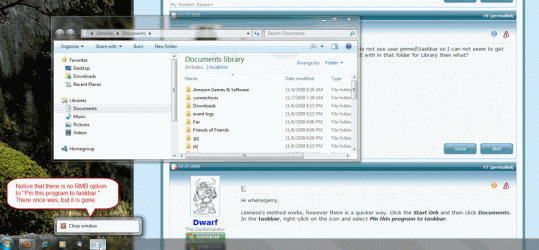
Somehow I unpinned the Libraries icon by mistake recently and now I can't get it back. Unfortunately, the solution shown in this thread doesn't work because the pin option does not show up when I right click. Attached is a screenshot showing the situation. I'm using retail W7 Pro.

One possible cause that I have found is related to registry changes to eliminate the shortcut arrow. I did experiment with that using WinBubbles 1.76 right before this happened, but I have the regular shortcut icon enabled now and the registry entry HKEY_CLASSES_ROOT\lnkfile\IsShortcut is present. Given the apparent complexity of the taskbar implementation, it wouldn't surprise me if this is what caused the problem, but I haven't found a solution yet. BTW, the pin option is present for other applications like SnagIt, regedit, etc.

Any more thoughts on how I can restore the right click option to "Pin this program to the taskbar." for use with explorer/libraries/documents?

Thanks.
 

Attachments

  • W7 unpinned explorer.gif
    W7 unpinned explorer.gif
    84.5 KB · Views: 125
Last edited:

My Computer My Computer

At a glance

Windows 7 Pro (Retail)2.13 GH Intel Core 2 Duo4 GBNVIDIA GeForce 7600 GS
Computer Manufacturer/Model Number
Silent PC
OS
Windows 7 Pro (Retail)
CPU
2.13 GH Intel Core 2 Duo
Motherboard
ASUSTeK Computer INC. P5B-Deluxe Rev 1.xx
Memory
4 GB
Graphics Card(s)
NVIDIA GeForce 7600 GS
Sound Card
SoundMAX Integrated Digital HD Audio
Monitor(s) Displays
ViewSonic VX2025wm, VX715
Screen Resolution
1680x1050, 1280x1024
Hard Drives
Drive 0: 750.14 GB Raid 1, Drive 1: WDC WD1600JS-00NCB1 160.04 GB
Internet Speed
DSL
Another way to add the Library to the taskbar is to right-click on MY DOCUMENTS, not the Library and Send to desktop as a shortcut. Then drag the shortcut to the taskbar - it will show up as the Library folder, not only the documents folder.
 

My Computer My Computer

At a glance

Windows 7, home premium 64 bit
OS
Windows 7, home premium 64 bit
Back
Top