library folder in task bar

wheresjerry

New member
Local time
5:04 PM
Messages
88
Ok....I can not seem to pin the folders library to the task bar. It somehow dissapeared, and when I go to drag/drop it on the taskbar, I get the red circle/slash do not allow symbol.
 

My Computer My Computer

At a glance

Windows Seven 64 bitAMD Phenom 9150e Quad-core 1.80 GHz5 gigsGeForce 9600 GT
Computer Manufacturer/Model Number
HP
OS
Windows Seven 64 bit
CPU
AMD Phenom 9150e Quad-core 1.80 GHz
Memory
5 gigs
Graphics Card(s)
GeForce 9600 GT
Sound Card
stock
Monitor(s) Displays
HP w2207h
Screen Resolution
1680x1050
Hard Drives
external Maxtor 250 gig
2nd internal 225 gig
Keyboard
HP
Mouse
MS Lasermouse 5000
Internet Speed
5 MB
Hello wheresjerry

Follow these simple steps:

1. Open Start menu and then open Computer.

2. At the computer window, click Libraries on the left pane.

3. You will see a libraries icon on your taskbar. Right-click on it and select "pin this program to the taskbar"

4. Done.

Hope it helps.
 

My Computer My Computer

At a glance

Windows 7 RC 7100 32bit/64bitIntel Core2Duo E4500 2.20 GHz2x1GB Kinsgston DDR2 800MHzNvidia 8500GT
Computer Manufacturer/Model Number
ENIAC
OS
Windows 7 RC 7100 32bit/64bit
CPU
Intel Core2Duo E4500 2.20 GHz
Motherboard
ASUS P5LD2-X/1333
Memory
2x1GB Kinsgston DDR2 800MHz
Graphics Card(s)
Nvidia 8500GT
Sound Card
Onboard High Definition Audio Device
Monitor(s) Displays
Sony Bravia 42"
Case
LINKW 2222
Cooling
Standard Intel
Keyboard
Some cheap one
Mouse
Microsoft Intellimouse something
Internet Speed
24MBps ADSL
I have tried that....I can do this for some icons, but not that one. The Library folder is an awesome starting point for accessing important folders I use...
 

My Computer My Computer

At a glance

Windows Seven 64 bitAMD Phenom 9150e Quad-core 1.80 GHz5 gigsGeForce 9600 GT
Computer Manufacturer/Model Number
HP
OS
Windows Seven 64 bit
CPU
AMD Phenom 9150e Quad-core 1.80 GHz
Memory
5 gigs
Graphics Card(s)
GeForce 9600 GT
Sound Card
stock
Monitor(s) Displays
HP w2207h
Screen Resolution
1680x1050
Hard Drives
external Maxtor 250 gig
2nd internal 225 gig
Keyboard
HP
Mouse
MS Lasermouse 5000
Internet Speed
5 MB
Are you right-clicking on the taskbar's icon displayed after you open Libraries window? Or the one in the window? I tried in my w7 several times and it works...
 

My Computer My Computer

At a glance

Windows 7 RC 7100 32bit/64bitIntel Core2Duo E4500 2.20 GHz2x1GB Kinsgston DDR2 800MHzNvidia 8500GT
Computer Manufacturer/Model Number
ENIAC
OS
Windows 7 RC 7100 32bit/64bit
CPU
Intel Core2Duo E4500 2.20 GHz
Motherboard
ASUS P5LD2-X/1333
Memory
2x1GB Kinsgston DDR2 800MHz
Graphics Card(s)
Nvidia 8500GT
Sound Card
Onboard High Definition Audio Device
Monitor(s) Displays
Sony Bravia 42"
Case
LINKW 2222
Cooling
Standard Intel
Keyboard
Some cheap one
Mouse
Microsoft Intellimouse something
Internet Speed
24MBps ADSL
Try this way:

Open C:\Users\_your_user_name\AppData\Roaming\Microsoft\Internet Explorer\Quick Launch\User Pinned\TaskBar

You will find all taskbar pinned items / shortcuts in there.

Right click in there and create a new shortcut, with the path %SystemRoot%\explorer.exe

Restart or logoff if necessary.

This should work.
 

My Computer My Computer

At a glance

Windows 7 RC 7100 32bit/64bitIntel Core2Duo E4500 2.20 GHz2x1GB Kinsgston DDR2 800MHzNvidia 8500GT
Computer Manufacturer/Model Number
ENIAC
OS
Windows 7 RC 7100 32bit/64bit
CPU
Intel Core2Duo E4500 2.20 GHz
Motherboard
ASUS P5LD2-X/1333
Memory
2x1GB Kinsgston DDR2 800MHz
Graphics Card(s)
Nvidia 8500GT
Sound Card
Onboard High Definition Audio Device
Monitor(s) Displays
Sony Bravia 42"
Case
LINKW 2222
Cooling
Standard Intel
Keyboard
Some cheap one
Mouse
Microsoft Intellimouse something
Internet Speed
24MBps ADSL
I get as far in the path as quick launch.......I do not see user pinned\taskbar so I can not seem to get farther than that. I am able to make a shortcut with in that folder for Library then what?
 

My Computer My Computer

At a glance

Windows Seven 64 bitAMD Phenom 9150e Quad-core 1.80 GHz5 gigsGeForce 9600 GT
Computer Manufacturer/Model Number
HP
OS
Windows Seven 64 bit
CPU
AMD Phenom 9150e Quad-core 1.80 GHz
Memory
5 gigs
Graphics Card(s)
GeForce 9600 GT
Sound Card
stock
Monitor(s) Displays
HP w2207h
Screen Resolution
1680x1050
Hard Drives
external Maxtor 250 gig
2nd internal 225 gig
Keyboard
HP
Mouse
MS Lasermouse 5000
Internet Speed
5 MB
Hi wheresjerry,

Limneos's method works, however there is a quicker way. Click the Start Orb and then click Documents. In the taskbar, right-click on the icon and select Pin this program to taskbar.
 

My Computer My Computer

At a glance

Windows 8.1 Pro RTM x64Intel Core-i5-3570K 4-core @ 3.4GHz (Ivy Brid...4 x 4GB DDR3-1600 Corsair Vengeance CMZ8GX3M2...MSI GeForce GTX770 Gaming OC 2GB
Computer type
PC/Desktop
Computer Manufacturer/Model Number
Dwarf Dwf/11/2012 r09/2013
OS
Windows 8.1 Pro RTM x64
CPU
Intel Core-i5-3570K 4-core @ 3.4GHz (Ivy Bridge) (OC 4.4GHz)
Motherboard
ASRock Z77 Extreme4-M
Memory
4 x 4GB DDR3-1600 Corsair Vengeance CMZ8GX3M2A1600C9B (16GB)
Graphics Card(s)
MSI GeForce GTX770 Gaming OC 2GB
Sound Card
Realtek High Definition on board solution (ALC 898)
Monitor(s) Displays
ViewSonic VA1912w Widescreen (VGA)
Screen Resolution
1440x900
Hard Drives
OCZ Agility 3 SSD 120GB SATA III x2 (RAID 0)
Samsung HD501LJ 500GB SATA II x2
Hitachi HDS721010CLA332 1TB SATA II
Iomega 1.5TB Ext USB 2.0
WD 2.0TB Ext USB 3.0
PSU
XFX Pro Series 850W Semi-Modular
Case
Gigabyte IF233
Cooling
1 x 120mm Front Inlet 1 x 120mm Rear Exhaust
Keyboard
Microsoft Comfort Curve Keyboard 3000 (USB)
Mouse
Microsoft Comfort Mouse 3000 for Business (USB)
Internet Speed
NetGear DG834Gv3 ADSL Modem/Router (Ethernet) ~4.0 Mb/s (O2)
Antivirus
Avast! 8.0.1497
Browser
IE 11
Other Info
Optical Drive: HL-DT-ST BD-RE BH10LS30 SATA Bluray
Lexmark S305 Printer/Scanner/Copier (USB)
WEI Score: 8.1/8.1/8.5/8.5/8.25
Asus Eee PC 1011PX Netbook (Windows 7 x86 Starter)
Hi wheresjerry,

Limneos's method works, however there is a quicker way. Click the Start Orb and then click Documents. In the taskbar, right-click on the icon and select Pin this program to taskbar.


I have done that, but those options to pin to taskbar do not show up....
 

My Computer My Computer

At a glance

Windows Seven 64 bitAMD Phenom 9150e Quad-core 1.80 GHz5 gigsGeForce 9600 GT
Computer Manufacturer/Model Number
HP
OS
Windows Seven 64 bit
CPU
AMD Phenom 9150e Quad-core 1.80 GHz
Memory
5 gigs
Graphics Card(s)
GeForce 9600 GT
Sound Card
stock
Monitor(s) Displays
HP w2207h
Screen Resolution
1680x1050
Hard Drives
external Maxtor 250 gig
2nd internal 225 gig
Keyboard
HP
Mouse
MS Lasermouse 5000
Internet Speed
5 MB
when I right click on my username at the top of start button options (upper right) I get an option to restore default libraries, selecting that, brings up the library folder.
 

My Computer My Computer

At a glance

Windows Seven 64 bitAMD Phenom 9150e Quad-core 1.80 GHz5 gigsGeForce 9600 GT
Computer Manufacturer/Model Number
HP
OS
Windows Seven 64 bit
CPU
AMD Phenom 9150e Quad-core 1.80 GHz
Memory
5 gigs
Graphics Card(s)
GeForce 9600 GT
Sound Card
stock
Monitor(s) Displays
HP w2207h
Screen Resolution
1680x1050
Hard Drives
external Maxtor 250 gig
2nd internal 225 gig
Keyboard
HP
Mouse
MS Lasermouse 5000
Internet Speed
5 MB
wheresjerry said:
I have done that, but those options to pin to taskbar do not show up....

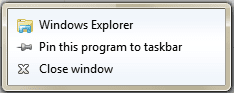
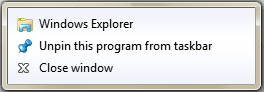
What options do you have when you do this? This is what I get, firstly when it is not pinned to the taskbar and secondly when it is.
Capture.PNG

Capture1.PNG
 

My Computer My Computer

At a glance

Windows 8.1 Pro RTM x64Intel Core-i5-3570K 4-core @ 3.4GHz (Ivy Brid...4 x 4GB DDR3-1600 Corsair Vengeance CMZ8GX3M2...MSI GeForce GTX770 Gaming OC 2GB
Computer type
PC/Desktop
Computer Manufacturer/Model Number
Dwarf Dwf/11/2012 r09/2013
OS
Windows 8.1 Pro RTM x64
CPU
Intel Core-i5-3570K 4-core @ 3.4GHz (Ivy Bridge) (OC 4.4GHz)
Motherboard
ASRock Z77 Extreme4-M
Memory
4 x 4GB DDR3-1600 Corsair Vengeance CMZ8GX3M2A1600C9B (16GB)
Graphics Card(s)
MSI GeForce GTX770 Gaming OC 2GB
Sound Card
Realtek High Definition on board solution (ALC 898)
Monitor(s) Displays
ViewSonic VA1912w Widescreen (VGA)
Screen Resolution
1440x900
Hard Drives
OCZ Agility 3 SSD 120GB SATA III x2 (RAID 0)
Samsung HD501LJ 500GB SATA II x2
Hitachi HDS721010CLA332 1TB SATA II
Iomega 1.5TB Ext USB 2.0
WD 2.0TB Ext USB 3.0
PSU
XFX Pro Series 850W Semi-Modular
Case
Gigabyte IF233
Cooling
1 x 120mm Front Inlet 1 x 120mm Rear Exhaust
Keyboard
Microsoft Comfort Curve Keyboard 3000 (USB)
Mouse
Microsoft Comfort Mouse 3000 for Business (USB)
Internet Speed
NetGear DG834Gv3 ADSL Modem/Router (Ethernet) ~4.0 Mb/s (O2)
Antivirus
Avast! 8.0.1497
Browser
IE 11
Other Info
Optical Drive: HL-DT-ST BD-RE BH10LS30 SATA Bluray
Lexmark S305 Printer/Scanner/Copier (USB)
WEI Score: 8.1/8.1/8.5/8.5/8.25
Asus Eee PC 1011PX Netbook (Windows 7 x86 Starter)
The above options do not apply when I right click my username....I get:

OPEN
RESTORE DEFAULT LIBRARIES
COPY
SHOW ON DESKTOP

Odd because it worked before....I have tried all the usual, including system restore, adware, etc....
 

My Computer My Computer

At a glance

Windows Seven 64 bitAMD Phenom 9150e Quad-core 1.80 GHz5 gigsGeForce 9600 GT
Computer Manufacturer/Model Number
HP
OS
Windows Seven 64 bit
CPU
AMD Phenom 9150e Quad-core 1.80 GHz
Memory
5 gigs
Graphics Card(s)
GeForce 9600 GT
Sound Card
stock
Monitor(s) Displays
HP w2207h
Screen Resolution
1680x1050
Hard Drives
external Maxtor 250 gig
2nd internal 225 gig
Keyboard
HP
Mouse
MS Lasermouse 5000
Internet Speed
5 MB
Hi wheresjerry,

Limneos's method works, however there is a quicker way. Click the Start Orb and then click Documents. In the taskbar, right-click on the icon and select Pin this program to taskbar.


ah-ha.....I was able to pin the Documents folder to the task bar finally using the above....brain cloud?

It opens my Documents folder now, instead of the Library folder, but works fine for me! THANKS!!
 

My Computer My Computer

At a glance

Windows Seven 64 bitAMD Phenom 9150e Quad-core 1.80 GHz5 gigsGeForce 9600 GT
Computer Manufacturer/Model Number
HP
OS
Windows Seven 64 bit
CPU
AMD Phenom 9150e Quad-core 1.80 GHz
Memory
5 gigs
Graphics Card(s)
GeForce 9600 GT
Sound Card
stock
Monitor(s) Displays
HP w2207h
Screen Resolution
1680x1050
Hard Drives
external Maxtor 250 gig
2nd internal 225 gig
Keyboard
HP
Mouse
MS Lasermouse 5000
Internet Speed
5 MB
I think that we are getting confused. If you follow the instructions in my earlier post (#7), does the following icon appear on the taskbar? It is this icon that I am referring to in my last post (#10).
Capture.PNG
 

My Computer My Computer

At a glance

Windows 8.1 Pro RTM x64Intel Core-i5-3570K 4-core @ 3.4GHz (Ivy Brid...4 x 4GB DDR3-1600 Corsair Vengeance CMZ8GX3M2...MSI GeForce GTX770 Gaming OC 2GB
Computer type
PC/Desktop
Computer Manufacturer/Model Number
Dwarf Dwf/11/2012 r09/2013
OS
Windows 8.1 Pro RTM x64
CPU
Intel Core-i5-3570K 4-core @ 3.4GHz (Ivy Bridge) (OC 4.4GHz)
Motherboard
ASRock Z77 Extreme4-M
Memory
4 x 4GB DDR3-1600 Corsair Vengeance CMZ8GX3M2A1600C9B (16GB)
Graphics Card(s)
MSI GeForce GTX770 Gaming OC 2GB
Sound Card
Realtek High Definition on board solution (ALC 898)
Monitor(s) Displays
ViewSonic VA1912w Widescreen (VGA)
Screen Resolution
1440x900
Hard Drives
OCZ Agility 3 SSD 120GB SATA III x2 (RAID 0)
Samsung HD501LJ 500GB SATA II x2
Hitachi HDS721010CLA332 1TB SATA II
Iomega 1.5TB Ext USB 2.0
WD 2.0TB Ext USB 3.0
PSU
XFX Pro Series 850W Semi-Modular
Case
Gigabyte IF233
Cooling
1 x 120mm Front Inlet 1 x 120mm Rear Exhaust
Keyboard
Microsoft Comfort Curve Keyboard 3000 (USB)
Mouse
Microsoft Comfort Mouse 3000 for Business (USB)
Internet Speed
NetGear DG834Gv3 ADSL Modem/Router (Ethernet) ~4.0 Mb/s (O2)
Antivirus
Avast! 8.0.1497
Browser
IE 11
Other Info
Optical Drive: HL-DT-ST BD-RE BH10LS30 SATA Bluray
Lexmark S305 Printer/Scanner/Copier (USB)
WEI Score: 8.1/8.1/8.5/8.5/8.25
Asus Eee PC 1011PX Netbook (Windows 7 x86 Starter)
It used to look that folder icon, now it it seems to open an Explorer icon, with those same folders the LIBRARY folder used to contain
 

My Computer My Computer

At a glance

Windows Seven 64 bitAMD Phenom 9150e Quad-core 1.80 GHz5 gigsGeForce 9600 GT
Computer Manufacturer/Model Number
HP
OS
Windows Seven 64 bit
CPU
AMD Phenom 9150e Quad-core 1.80 GHz
Memory
5 gigs
Graphics Card(s)
GeForce 9600 GT
Sound Card
stock
Monitor(s) Displays
HP w2207h
Screen Resolution
1680x1050
Hard Drives
external Maxtor 250 gig
2nd internal 225 gig
Keyboard
HP
Mouse
MS Lasermouse 5000
Internet Speed
5 MB
mmmmm...when I right click DOCUMENTS>PROPERTIES I see two seperate instances of LIBRARY locations, one for my username, and one for Public
 

My Computer My Computer

At a glance

Windows Seven 64 bitAMD Phenom 9150e Quad-core 1.80 GHz5 gigsGeForce 9600 GT
Computer Manufacturer/Model Number
HP
OS
Windows Seven 64 bit
CPU
AMD Phenom 9150e Quad-core 1.80 GHz
Memory
5 gigs
Graphics Card(s)
GeForce 9600 GT
Sound Card
stock
Monitor(s) Displays
HP w2207h
Screen Resolution
1680x1050
Hard Drives
external Maxtor 250 gig
2nd internal 225 gig
Keyboard
HP
Mouse
MS Lasermouse 5000
Internet Speed
5 MB
I attached a png of what comes up
 

Attachments

  • Untitled.png
    Untitled.png
    32.2 KB · Views: 25

My Computer My Computer

At a glance

Windows Seven 64 bitAMD Phenom 9150e Quad-core 1.80 GHz5 gigsGeForce 9600 GT
Computer Manufacturer/Model Number
HP
OS
Windows Seven 64 bit
CPU
AMD Phenom 9150e Quad-core 1.80 GHz
Memory
5 gigs
Graphics Card(s)
GeForce 9600 GT
Sound Card
stock
Monitor(s) Displays
HP w2207h
Screen Resolution
1680x1050
Hard Drives
external Maxtor 250 gig
2nd internal 225 gig
Keyboard
HP
Mouse
MS Lasermouse 5000
Internet Speed
5 MB
Can you also attach a screenshot of your icon giving you trouble?
 

My Computer My Computer

At a glance

Windows 7 RC 7100 32bit/64bitIntel Core2Duo E4500 2.20 GHz2x1GB Kinsgston DDR2 800MHzNvidia 8500GT
Computer Manufacturer/Model Number
ENIAC
OS
Windows 7 RC 7100 32bit/64bit
CPU
Intel Core2Duo E4500 2.20 GHz
Motherboard
ASUS P5LD2-X/1333
Memory
2x1GB Kinsgston DDR2 800MHz
Graphics Card(s)
Nvidia 8500GT
Sound Card
Onboard High Definition Audio Device
Monitor(s) Displays
Sony Bravia 42"
Case
LINKW 2222
Cooling
Standard Intel
Keyboard
Some cheap one
Mouse
Microsoft Intellimouse something
Internet Speed
24MBps ADSL
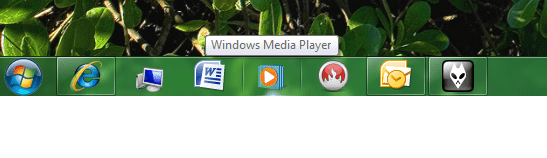
and this is the icon that shows up in TASKBAR..it is the one inbetween IE and MS Office
 

Attachments

  • Untitled.png
    Untitled.png
    31.4 KB · Views: 20

My Computer My Computer

At a glance

Windows Seven 64 bitAMD Phenom 9150e Quad-core 1.80 GHz5 gigsGeForce 9600 GT
Computer Manufacturer/Model Number
HP
OS
Windows Seven 64 bit
CPU
AMD Phenom 9150e Quad-core 1.80 GHz
Memory
5 gigs
Graphics Card(s)
GeForce 9600 GT
Sound Card
stock
Monitor(s) Displays
HP w2207h
Screen Resolution
1680x1050
Hard Drives
external Maxtor 250 gig
2nd internal 225 gig
Keyboard
HP
Mouse
MS Lasermouse 5000
Internet Speed
5 MB
I am having trouble resizing the entire screenshot down to a size I can upload...in VISTA I have ways of doing it
 

My Computer My Computer

At a glance

Windows Seven 64 bitAMD Phenom 9150e Quad-core 1.80 GHz5 gigsGeForce 9600 GT
Computer Manufacturer/Model Number
HP
OS
Windows Seven 64 bit
CPU
AMD Phenom 9150e Quad-core 1.80 GHz
Memory
5 gigs
Graphics Card(s)
GeForce 9600 GT
Sound Card
stock
Monitor(s) Displays
HP w2207h
Screen Resolution
1680x1050
Hard Drives
external Maxtor 250 gig
2nd internal 225 gig
Keyboard
HP
Mouse
MS Lasermouse 5000
Internet Speed
5 MB
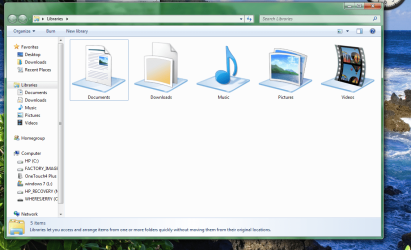
and here is a snap of the folder that opens when I click the icon on taskbar
 

Attachments

  • Untitled.png
    Untitled.png
    124.1 KB · Views: 34

My Computer My Computer

At a glance

Windows Seven 64 bitAMD Phenom 9150e Quad-core 1.80 GHz5 gigsGeForce 9600 GT
Computer Manufacturer/Model Number
HP
OS
Windows Seven 64 bit
CPU
AMD Phenom 9150e Quad-core 1.80 GHz
Memory
5 gigs
Graphics Card(s)
GeForce 9600 GT
Sound Card
stock
Monitor(s) Displays
HP w2207h
Screen Resolution
1680x1050
Hard Drives
external Maxtor 250 gig
2nd internal 225 gig
Keyboard
HP
Mouse
MS Lasermouse 5000
Internet Speed
5 MB
Back
Top