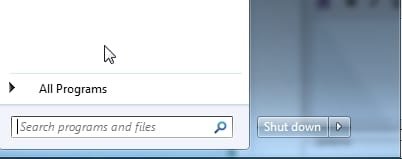
Location for OEM items in start menu

bparker

New member
Local time
6:16 PM
Messages
7
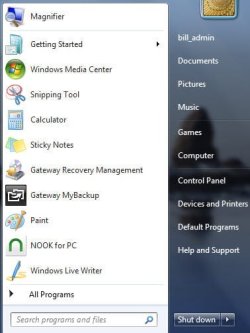
A new Gateway laptop has 10 links on the left side of the Start Menu for various Windows programs and Gateway programs. I am trying to find the location on the HDD or registry where these exist. Reading through tutorials and threads on Start Menu has not helped.

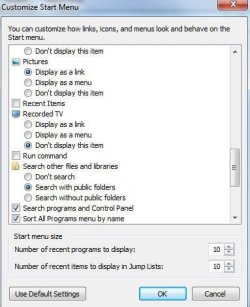
Recent Items is turned off and I started with no pinned items. None of the items in the list is included in
C:\Users\(User Name)\AppData\Roaming\Microsoft\Windows\Recent Items

If I drag a shortcut in this list to the top of the start menu, then that shortcut becomes "pinned" and there is a seperator line between it and other items below. Is there another place I can find this group of shortcuts?

Bill.
 

My Computer My Computer

OS
Windows 7 enterprise x64

My Computer My Computer

Computer type
Laptop
Computer Manufacturer/Model Number
Sager NP9170
OS
Win 7 Pro x64 / Win 10 Pro
CPU
Intel(R) Core(TM) i7-3630QM CPU @ 2.40GHz
Motherboard
CLEVO P170EM
Memory
12 GB
Graphics Card(s)
(1) Intel(R) HD Graphics 4000 (2) NVIDIA GeForce GTX 675M
Sound Card
(1) Realtek High Definition Audio (2) Intel(R) Display Aud
Monitor(s) Displays
17.3
Screen Resolution
1920x1080
Hard Drives
(1) Samsung 860 EVO 500GB(OS) (1) Samsung 860 EVO 500GB(Data)
Keyboard
Backlite
Antivirus
MSE, Malwarebytes Pro
Browser
Firefox
Other Info
DESKTOP: Custom-built.
OS: Win 10 Pro x64.
CASE: Rosewill R5.
CPU: Intel I5 4670K CPU @ 3.40GHz.
CPU COOLER: Cool Master Hyper 212 EVO.
MOTHERBOARD: Asus Z87-A.
MEMORY: Kingston HyperX 2x4 GB.
GPU: Nvidia Geforce 650 TI.
PSU: Corsair TX750.
DRIVES: (1) Samsung 840 120 GB SSD (2) Western Digital blue 500 GB 7200 RPM.
That's why I was looking to find a section other than recent items or pinned. Attached are screens.

Magnifier was originally below and there was no separator line. When I dragged it up it pinned to the top and Windows Live Writer was added to the bottom list. Most of those items have never been used by me. It was the list when I first turned it on.

Bill.
 

Attachments

  • startmenu.jpg
    startmenu.jpg
    25 KB · Views: 6
  • customize_start.jpg
    customize_start.jpg
    31.8 KB · Views: 5

My Computer My Computer

OS
Windows 7 enterprise x64
Some of those can be found at C:\ProgramData\Microsoft\Windows\Start Menu\Programs

What are you trying to do?
Jerry
 

My Computer My Computer

Computer type
Laptop
Computer Manufacturer/Model Number
Sager NP9170
OS
Win 7 Pro x64 / Win 10 Pro
CPU
Intel(R) Core(TM) i7-3630QM CPU @ 2.40GHz
Motherboard
CLEVO P170EM
Memory
12 GB
Graphics Card(s)
(1) Intel(R) HD Graphics 4000 (2) NVIDIA GeForce GTX 675M
Sound Card
(1) Realtek High Definition Audio (2) Intel(R) Display Aud
Monitor(s) Displays
17.3
Screen Resolution
1920x1080
Hard Drives
(1) Samsung 860 EVO 500GB(OS) (1) Samsung 860 EVO 500GB(Data)
Keyboard
Backlite
Antivirus
MSE, Malwarebytes Pro
Browser
Firefox
Other Info
DESKTOP: Custom-built.
OS: Win 10 Pro x64.
CASE: Rosewill R5.
CPU: Intel I5 4670K CPU @ 3.40GHz.
CPU COOLER: Cool Master Hyper 212 EVO.
MOTHERBOARD: Asus Z87-A.
MEMORY: Kingston HyperX 2x4 GB.
GPU: Nvidia Geforce 650 TI.
PSU: Corsair TX750.
DRIVES: (1) Samsung 840 120 GB SSD (2) Western Digital blue 500 GB 7200 RPM.
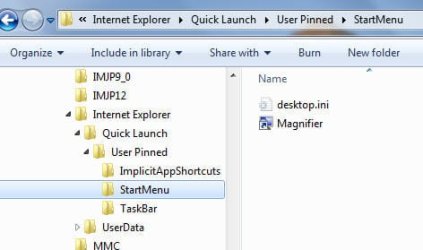
"%systemdrive%\Users\YourUserName\AppData\Roaming\Microsoft\Internet Explorer\Quick Launch\User Pinned"

It is hidden so you need to show hidden files in folder options.

reg entries are here:

HKEY_CURRENT_USER\Software\Microsoft\Windows\CurrentVersion\Explorer\StartPage2
 

My Computers My Computers

System One System Two

  • Computer type
    PC/Desktop
    OS
    7 X64
    CPU
    i5 8400
    Motherboard
    gigabyte b365m ds3h
    Memory
    2x8gb 3200mhz
    Hard Drives
    various
    PSU
    pure power 11 400w cm
    Case
    Coolermaster
    Cooling
    cryorig m9i
  • Computer type
    PC/Desktop
    OS
    7x64
    CPU
    g5400
    Motherboard
    ga b365m ds3h
    Memory
    8gb ddr4 2400
    PSU
    xfx pro 450w
User pinned is just the Magnifier item I dragged to the pinned area. I am trying to find the disk location of the other items (which are not in recent items). The initial reason was so I could restore the factory list if needed without having to restore complete factory image. But now it seems this is a differnt animal and I want to see how Gateway did it.

Bill.
 

Attachments

  • quicklaunch.jpg
    quicklaunch.jpg
    17.7 KB · Views: 2

My Computer My Computer

OS
Windows 7 enterprise x64
It would be easier to back up the startpage2 reg entries I posted earlier - make a backup, then delete the programscache entries. Refresh explorer - see what happens.
 

My Computers My Computers

System One System Two

  • Computer type
    PC/Desktop
    OS
    7 X64
    CPU
    i5 8400
    Motherboard
    gigabyte b365m ds3h
    Memory
    2x8gb 3200mhz
    Hard Drives
    various
    PSU
    pure power 11 400w cm
    Case
    Coolermaster
    Cooling
    cryorig m9i
  • Computer type
    PC/Desktop
    OS
    7x64
    CPU
    g5400
    Motherboard
    ga b365m ds3h
    Memory
    8gb ddr4 2400
    PSU
    xfx pro 450w
To refreh Explorer, press ctrl+shift while rt clicking a blank area on the right of the start menu - just above the shutdown button will be fine.

Select Exit Explorer.

Then restart explorer with ctrl+shift+esc for task mgr , select File>NewTask, type explorer, ok
 

My Computers My Computers

System One System Two

  • Computer type
    PC/Desktop
    OS
    7 X64
    CPU
    i5 8400
    Motherboard
    gigabyte b365m ds3h
    Memory
    2x8gb 3200mhz
    Hard Drives
    various
    PSU
    pure power 11 400w cm
    Case
    Coolermaster
    Cooling
    cryorig m9i
  • Computer type
    PC/Desktop
    OS
    7x64
    CPU
    g5400
    Motherboard
    ga b365m ds3h
    Memory
    8gb ddr4 2400
    PSU
    xfx pro 450w
Thanks guys. I have not found where these shortcuts are stored, but I have a much better appreciation for what is going on.

Bill.
 

My Computer My Computer

OS
Windows 7 enterprise x64
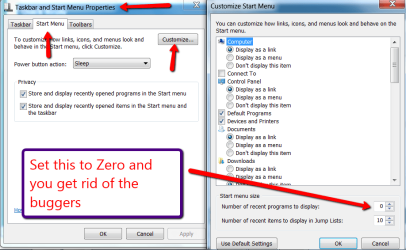
See Picture
 

Attachments

  • 2011-12-13_2218.png
    2011-12-13_2218.png
    36.9 KB · Views: 15

My Computer My Computer

Computer Manufacturer/Model Number
HP, Dell, Gateway, Toshiba - 4 laptops and 2 desktops
OS
Vista, Windows7, Mint Mate, Zorin, Windows 8
CPU
from 1.6GHz Duo to i7
Monitor(s) Displays
2x HP w2207
Hard Drives
5x HDD, 7x SSD, 12x Externals
Keyboard
with trackball - no mices
Mouse
Trackball mice
Internet Speed
DSL 6000

My Computers My Computers

System One System Two

  • Computer type
    PC/Desktop
    OS
    7 X64
    CPU
    i5 8400
    Motherboard
    gigabyte b365m ds3h
    Memory
    2x8gb 3200mhz
    Hard Drives
    various
    PSU
    pure power 11 400w cm
    Case
    Coolermaster
    Cooling
    cryorig m9i
  • Computer type
    PC/Desktop
    OS
    7x64
    CPU
    g5400
    Motherboard
    ga b365m ds3h
    Memory
    8gb ddr4 2400
    PSU
    xfx pro 450w
SIW2,
That was a good idea. But still no joy. It found the lnk in All Programs of start menu, but not the one on initial menu. Not found in registry either.

I was eager to see how Gateway did this, but I guess we all need to move on at this point.

Bill.
 

My Computer My Computer

OS
Windows 7 enterprise x64
I think you will find they are all in startpage2 reg entry.

If the only .lnk is in All programs - then that must be the one that is diplayed.

It is extremely simple to test.

I deleted the programscache entries from startpage2 - than refreshed explorer - they all disappeared.

blankspace-startmenu.jpg
 

My Computers My Computers

System One System Two

  • Computer type
    PC/Desktop
    OS
    7 X64
    CPU
    i5 8400
    Motherboard
    gigabyte b365m ds3h
    Memory
    2x8gb 3200mhz
    Hard Drives
    various
    PSU
    pure power 11 400w cm
    Case
    Coolermaster
    Cooling
    cryorig m9i
  • Computer type
    PC/Desktop
    OS
    7x64
    CPU
    g5400
    Motherboard
    ga b365m ds3h
    Memory
    8gb ddr4 2400
    PSU
    xfx pro 450w
Interesting, I reimaged with the factory image and now the items do ascend in the list as they are used more frequently. Originally they stayed in fixed places, until I moved one up to the user pinned area.

Deleted 3 programscache entries in startpage2 and refreshed explorer. When explorer came back the same start page entries were still there. I compared startpage2 entries with my backup. The first part looks the same - but it is a big entry.

So somehow it is being rebuilt?


Bill.
 

My Computer My Computer

OS
Windows 7 enterprise x64
I am not sure, but this might be related.

HKEY_CURRENT_USER\Software\Microsoft\Windows\CurrentVersion\Explorer\UserAssist\{CEBFF5CD-BLAA-BLAA-BLA-SOMETHING}\Count
HKEY_CURRENT_USER\Software\Microsoft\Windows\CurrentVersion\Explorer\UserAssist\{F4E57C4B-BLAA-BLAA-BLA-SOMETHING}\Count

I have deleted those Count sub keys and that part of Start menu turned empty.
 

My Computer My Computer

Computer type
PC/Desktop
OS
Windows 8.1 ; Windows 7 x86 (Dec2008-Jan2013)
Other Info
"The scale icon at the top right of a post or tutorial is how you can give rep to the member."
I started by deleting the keys in just
HKEY_CURRENT_USER\Software\Microsoft\Windows\CurrentVersion\Explorer\UserAssist\{F4E57C4B-BLAA-BLAA-BLA-SOMETHING}\Count

and then refreshing explorer. Start page entries were gone. The Count keys also stayed gone.

HKEY_CURRENT_USER\Software\Microsoft\Windows\CurrentVersion\Explorer\UserAssist\{CEBFF5CD-BLAA-BLAA-BLA-SOMETHING}\Count
entries in this key remained.

Opened notepad and it was added to the start page. Three entries were added to
HKEY_CURRENT_USER\Software\Microsoft\Windows\CurrentVersion\Explorer\UserAssist\{F4E57C4B-BLAA-BLAA-BLA-SOMETHING}\Count

So yes, that seems to be the connection.

Bill.
 

My Computer My Computer

OS
Windows 7 enterprise x64
Back
Top