Locked folders

moggimus

New member
Local time
6:39 PM
Messages
3
How can I access locked folders, like Documents and Settings? Checking the Security tab in properties shows that I have full permissions, but I still get "C:\Documents and Settings is not accessible. Access is denied."
 

My Computer

OS
Windows 7 x64
How can I access locked folders, like Documents and Settings? Checking the Security tab in properties shows that I have full permissions, but I still get "C:\Documents and Settings is not accessible. Access is denied."

Take the ownership of the folder and you can access the document and settings folder.

But its not a folder its a shortcut to c:\users folder.
 

My Computer

Computer Manufacturer/Model Number
wipro
OS
windows 7
CPU
wipro
Motherboard
intel
Memory
8 gb
Hard Drives
580 gb
That didn't work, but it seems the only two "locked" (with a padlock icon) folders I can't access are Documents and Settings and System Volume Information. The reason I'm concerned about Documents and Settings is to access Application Data and whatnot like in XP.
 

My Computer

OS
Windows 7 x64
How can I access locked folders, like Documents and Settings? Checking the Security tab in properties shows that I have full permissions, but I still get "C:\Documents and Settings is not accessible. Access is denied."

Hi moggimus,

Beginning with Vista, folders used on XP like "Documents and Settings" are just Symlinks or "Virtual Folders" that redirect requests to the new folder locations for applications running in Virtualized mode or "XP Compatibility Mode"...You cant access these "Virtual Folders" using explorer since there only their for app compatibility with applications written for XP ;)

Steven
 
Let me guess, you upgraded?
 

My Computer

Computer Manufacturer/Model Number
Dell 6400/My own build
OS
Windows 7 RTM x86/x64
CPU
Yonah/e6600 O.C. to 3.4GHz
Motherboard
Dell/EVGA
Memory
2GB/4GB
Graphics Card(s)
ATI/EVGA NVIDIA 8800
Sound Card
RealTek/Auzentech X-Meridian
Monitor(s) Displays
Built-in/65" Mitsubishi HDTV
Screen Resolution
1280x1800/1920x1280
Hard Drives
80GB Toshiba/Several
PSU
Dell Laptop/CoolerMaster
Case
Laptop/CoolerMaster Cosmos
Cooling
Air/Water
Keyboard
Standard/Media Center Kbd
Mouse
Touchpad/Bluetooth
Internet Speed
20MBPS
Hi moggimus,

Beginning with Vista, folders used on XP like "Documents and Settings" are just Symlinks or "Virtual Folders" that redirect requests to the new folder locations for applications running in Virtualized mode or "XP Compatibility Mode"...You cant access these "Virtual Folders" using explorer since there only their for app compatibility with applications written for XP ;)

Steven

Ok, can you tell me where that data is stored then?

edit: Nevermind, I found it. Thanks.
 

My Computer

OS
Windows 7 x64
Hi moggimus,

Beginning with Vista, folders used on XP like "Documents and Settings" are just Symlinks or "Virtual Folders" that redirect requests to the new folder locations for applications running in Virtualized mode or "XP Compatibility Mode"...You cant access these "Virtual Folders" using explorer since there only their for app compatibility with applications written for XP ;)

Steven

Ok, can you tell me where that data is stored then?

edit: Nevermind, I found it. Thanks.

OK. YOU found it. Can you tell us where, please?
 

My Computer

Computer Manufacturer/Model Number
Acer Aspire 5738PG
OS
Win 7 Home Premium
Memory
4GB
Monitor(s) Displays
Notebook LCD
Unlock the folder

I've had the same problem. Why on earth would the documents folder ever defualt to being a locked folder?

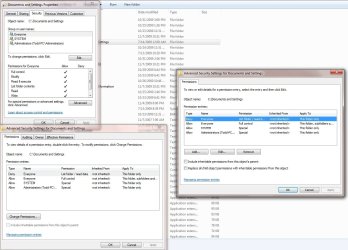
Anyway, I have been able to unlock the folder by right clicking on the folder and then clicking on the Security tab. Click on "Advanced". Then Select "Change Permissions" in the Advanced window. Another window should open that shows the Permission entries, one of which should be "Deny". Remove it and then apply it. Should unlock the folder. See attached JPG...
Tmurph62
 

Attachments

  • Permissions.jpg
    Permissions.jpg
    134.9 KB · Views: 24,162

My Computer

OS
vista 64
I've had the same problem. Why on earth would the documents folder ever defualt to being a locked folder?

Anyway, I have been able to unlock the folder by right clicking on the folder and then clicking on the Security tab. Click on "Advanced". Then Select "Change Permissions" in the Advanced window. Another window should open that shows the Permission entries, one of which should be "Deny". Remove it and then apply it. Should unlock the folder. See attached JPG...
Tmurph62

Are you talking about the lock icon that shows up on user folders? If so, all that means is that not all users have access to it. Just like XP and Vista, user folders are not available to other users - 7 just added a little lock to let you know that. I don't know about you, but in a multi-user environment, I certainly don't want anyone having access to my documents, unless I put them in a public folder for everyone to see.
 

My Computer

Computer Manufacturer/Model Number
Dell XPS 15 L502x
OS
Windows 7 Ultimate x64 SP1
CPU
Core i7-2670QM
Memory
8GB DDR3 PC3-10600
Graphics Card(s)
Intel HD Graphics 3000 + GeForce GT 540M
Screen Resolution
1920x1080
Hard Drives
1TB 5400RPM Seagate
I see your point if multiple users use the computer. I don't have to worry about that myself. Guess it depends on each user to to set it the way they want.
 

My Computer

OS
vista 64
I see your point if multiple users use the computer. I don't have to worry about that myself. Guess it depends on each user to to set it the way they want.

Yep. I just hope people figure out that the lock doesn't mean they have no access to files, and that user folder security is still the way it was in XP and Vista.
 

My Computer

Computer Manufacturer/Model Number
Dell XPS 15 L502x
OS
Windows 7 Ultimate x64 SP1
CPU
Core i7-2670QM
Memory
8GB DDR3 PC3-10600
Graphics Card(s)
Intel HD Graphics 3000 + GeForce GT 540M
Screen Resolution
1920x1080
Hard Drives
1TB 5400RPM Seagate
Locked folders in Win 7

Had the same problem but did what KEGOBEER suggested and it worked just fine@ Thanks!:D
 

My Computer

OS
Win 7 Pro
I've had the same problem. Why on earth would the documents folder ever defualt to being a locked folder?........

Better advice would be to leave it alone. You do not need to access Document and Settings. *sigh.....*
 

My Computer

Computer type
PC/Desktop
Computer Manufacturer/Model Number
Alienware Aurora ALX R4
OS
Windows 10 Pro (x64)
CPU
Intel Core i7-3930K (3.2GHz - 4.5GHz)
Motherboard
Alienware Aurora-R4 x79
Memory
4x Samsung 4GB PC3-12800 DDR3 (16GB 1600MHz)
Graphics Card(s)
Nvidia Geforce GTX 690
Sound Card
SteelSeries Siberia Elite
Monitor(s) Displays
Dell UltraSharp U3011
Screen Resolution
2560x1600
Hard Drives
Samsung 850 Pro 256 GB, Seagate 1TB Desktop Hybrid HDD, 2x Western Digital 4TB Green HDD
PSU
875W Some Dell PSU <.<
Case
Alienware Aurora ALX
Cooling
Custom Liquid Cooling (EK CPU & GPU blocks) dual EK 480RAD
Keyboard
Logitech G710+ Mechanical
Mouse
Logitech G700s
Internet Speed
Verizon Fios (50 mbps average)
Other Info
Server: Intel NUC D54250WYK: i5-4250U, 16GB, 256 GB mSATA, Windows Server 2012 R2
Better advice would be to leave it alone. You do not ne

I think I will be the one who deceides whether or not I "need" access or not.
 

My Computer

OS
Windows 7
I think I will be the one who deceides whether or not I "need" access or not.

And you do not need access to "Document and Settings", go to "Users".
 

My Computer

Computer type
PC/Desktop
Computer Manufacturer/Model Number
Alienware Aurora ALX R4
OS
Windows 10 Pro (x64)
CPU
Intel Core i7-3930K (3.2GHz - 4.5GHz)
Motherboard
Alienware Aurora-R4 x79
Memory
4x Samsung 4GB PC3-12800 DDR3 (16GB 1600MHz)
Graphics Card(s)
Nvidia Geforce GTX 690
Sound Card
SteelSeries Siberia Elite
Monitor(s) Displays
Dell UltraSharp U3011
Screen Resolution
2560x1600
Hard Drives
Samsung 850 Pro 256 GB, Seagate 1TB Desktop Hybrid HDD, 2x Western Digital 4TB Green HDD
PSU
875W Some Dell PSU <.<
Case
Alienware Aurora ALX
Cooling
Custom Liquid Cooling (EK CPU & GPU blocks) dual EK 480RAD
Keyboard
Logitech G710+ Mechanical
Mouse
Logitech G700s
Internet Speed
Verizon Fios (50 mbps average)
Other Info
Server: Intel NUC D54250WYK: i5-4250U, 16GB, 256 GB mSATA, Windows Server 2012 R2
Apparently old habits die hard. I beseech everyone that has been in this thread desirous of gaining access to the "Documents and Settings" folder, for whatever reason, to read the links in Logicearth's signature area.

Very informative reading. Again, I highly recommend it. You will realize that accessing the "Documents and Settings" folder gains you nothing...really. :)
 

My Computer

Computer Manufacturer/Model Number
Toshiba L355D
OS
Windows 7 Ultimate x64 SP1
CPU
Core2 Duo
Motherboard
Intel
Memory
4 GB
Graphics Card(s)
GM965 on-board
Sound Card
RealTek on-board
Monitor(s) Displays
19"+17"(laptop)
Screen Resolution
1440x900 (x 2)
Hard Drives
500GB Ext. 200GB Internal
PSU
N/A
Case
N/A
Cooling
N/A
As an Admin I see the reasons that you want to limit anyone from gaining access to these Folders, but as an Admin try adding a Shortcut to the All Users Folder when you can't access the folder.
Once again MS Screwed up!
 

My Computer

OS
All Windows
I understand your point, however, I assert the new "Users" directory structure should be understood and utilized for what you mention.

Take ownership of the "Users" directory as an admin if you find it necessary and leave the "Documents and Settings" folders be just what they are - junction points.

Things change. The directory structure regarding User files is just one of the many changes, presaged in Vista, in Windows 7. Just my humble opinion. It'll save a lot of heartache in the long run.

There is nothing in the "Documents and Settings" folder that is not in the "Users" directory tree. It's an anachronism in comparison to the world of Windows 7.
 

My Computer

Computer Manufacturer/Model Number
Toshiba L355D
OS
Windows 7 Ultimate x64 SP1
CPU
Core2 Duo
Motherboard
Intel
Memory
4 GB
Graphics Card(s)
GM965 on-board
Sound Card
RealTek on-board
Monitor(s) Displays
19"+17"(laptop)
Screen Resolution
1440x900 (x 2)
Hard Drives
500GB Ext. 200GB Internal
PSU
N/A
Case
N/A
Cooling
N/A
As an Admin I see the reasons that you want to limit anyone from gaining access to these Folders, but as an Admin try adding a Shortcut to the All Users Folder when you can't access the folder.
Once again MS Screwed up!

You are looking in the wrong place.
The All User's start menu is here: C:\ProgramData\Microsoft\Windows\Start Menu

It is you who screwed up here. None of this is new, this new structure was started all the way back in Windows Vista. This information is easy to find there is even an XP directories to Vista/7 directories list.
 

My Computer

Computer type
PC/Desktop
Computer Manufacturer/Model Number
Alienware Aurora ALX R4
OS
Windows 10 Pro (x64)
CPU
Intel Core i7-3930K (3.2GHz - 4.5GHz)
Motherboard
Alienware Aurora-R4 x79
Memory
4x Samsung 4GB PC3-12800 DDR3 (16GB 1600MHz)
Graphics Card(s)
Nvidia Geforce GTX 690
Sound Card
SteelSeries Siberia Elite
Monitor(s) Displays
Dell UltraSharp U3011
Screen Resolution
2560x1600
Hard Drives
Samsung 850 Pro 256 GB, Seagate 1TB Desktop Hybrid HDD, 2x Western Digital 4TB Green HDD
PSU
875W Some Dell PSU <.<
Case
Alienware Aurora ALX
Cooling
Custom Liquid Cooling (EK CPU & GPU blocks) dual EK 480RAD
Keyboard
Logitech G710+ Mechanical
Mouse
Logitech G700s
Internet Speed
Verizon Fios (50 mbps average)
Other Info
Server: Intel NUC D54250WYK: i5-4250U, 16GB, 256 GB mSATA, Windows Server 2012 R2
Back
Top