Log-off and Control Panel don't work

frostfrank

New member
Local time
3:18 AM
Messages
18
Win 7 64 bit SP1 Home Premium.
I have two problems that I have been trying to solve for some time.
1. System hangs at "Log Off" on shutdown or restart. Every time.
2. When I try to bring up "Control Panel" I get this error msg:
::{26EE0668-A00A-44D7-9371-BEB064C98683}\0
Application not found
This happens for all apps within control panel, but with different msg.
So I can't get to any control panel apps.

What I have tried:
. Works the same in safe mode. (Except for log-off)
. I have run the following programs for both virus and root-kit.
Malwarebytes Anti-Malware
RogueKiller
Spybot - Search & Destroy 2
SpywareBlaster
SUPERAntiSpyware
Avast
No reported errors.
. I have googled and found similar problems but not the same. Their fixes don't work.
. My two latest image backups have the same control panel problem.
I didn't notice it until the log-off problem started.
Please let me know if I need to post any logs or info.
I am not a computer wizard! That's why I am asking you guys.
Thanks in advance for any help.
Frank
 

My Computer

OS
Win7
The only times I've seen that Control Panel couldn't open, on various versions of Windows, was when the computer had serious infections.

As for "My two latest image backups have the same control panel problem", if the computer has problems they will be in the backup and restore to the same condition as when the backup was made. Or in other words, Windows has to be in good order before a good backup can be accomplished, so the problems probably existed before the earliest of those 2 backups.

Have you tried putting the words control panel in the Start, Search box then pressing Enter to see if that works?
 

My Computer

Computer type
PC/Desktop
Computer Manufacturer/Model Number
Customs, Dell, Gateway, HP, Toshiba, Acer, ASUS
OS
Windows 7 Ultimate 64-bit, Windows 8.1 64-bit, Mac OS X 10.10, Linux Mint 17, Windows 10 Pro TP
Keyboard
Microsoft
Mouse
Microsoft
Berton
Thanks for the reply.
Good point about clean OS before image backup, but I had no way of knowing when I did the backup!
Yes I have tried start, no luck.
 

My Computer

OS
Win7
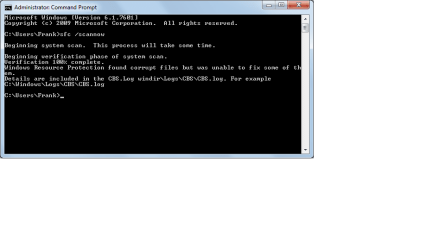
Since I posted I have run a sfc /scannow.
sfc scan.png
I have the CBS.log file and copied only the information starting when I started the scan. This is a large file, 215 pages.
I don't know enough to read it. If it would help to pinpoint the problem I will post it (if I can).

Anyone Have any ideas of where I should look?
I am beating my head against the wall!

Thanks,
Frank
 

My Computer

OS
Win7

My Computer

Computer type
PC/Desktop
Computer Manufacturer/Model Number
Custom Built
OS
Windows 10 Pro
CPU
AMD Ryzen 5 2400G Processor with Radeon RX Vega 11 Graphics
Motherboard
ASRock X470 Master SLI/AC AM4 AMD Promontory X470 SATA 6Gb/s
Memory
G.SKILL Ripjaws V Series 16GB (2 x 8GB) 288-Pin DDR4 SDRAM D
Graphics Card(s)
2047MB NVIDIA GeForce GTX 1060 6GB (EVGA)
Sound Card
Motherboard Built in
Monitor(s) Displays
Acer R240HY bidx 23.8-Inch IPS HDMI DVI VGA (1920 x 1080) Wi
Screen Resolution
1920 x 1080
Hard Drives
1TB Sandisk SSD PLUS (Main drive)
500 GB Seagate 7200 RPM (Games)
500 GB Western Digital 7200 RPM (Virtual Machines)
PSU
CORSAIR TX Series TX650M 650W 80+ Gold Modular Power Supply
Case
CORSAIR CARBIDE SPEC-02 Mid-Tower Gaming Case, Red LED Fan
Cooling
220mm, two 120mm, and four 60mm fans
Keyboard
Wired Dell keyboard
Mouse
Wireless Logitech mouse
Internet Speed
250mb down, 30mb up
Antivirus
Panda Cloud Antivirus
Browser
Chrome-ish x64
Other Info
Your awesome for reading this.
andrew129260 and all who replayed - THANKS.
.
andrew129260, I followed your instructions -Repair Install and did a upgrade(?).
This fixed the control panel problem but not the logoff problem.
I then did the "clean boot" in msconfig and restart (had to force shutdown).
When the system rebooted I <start> <restart> and logoff worked fine.
when sys restarted again I tried to <restart> again - logoff failed.
.
Am i right to think that win 7 is OK but I have a problem with an installed program?
If so how do I identify it?
Are there any logs created on logoff?
.
By the way I also did a SFC /scannow (1) with no errors.
.
Thanks again to all.
Frank
 

My Computer

OS
Win7
If clean boot solved the logoff problem then indeed some program is causing the issue. Unfortunately the only way is to uncheck them one by one until you find the culprit.
 

My Computer

Computer type
PC/Desktop
Computer Manufacturer/Model Number
Custom Built
OS
Windows 10 Pro
CPU
AMD Ryzen 5 2400G Processor with Radeon RX Vega 11 Graphics
Motherboard
ASRock X470 Master SLI/AC AM4 AMD Promontory X470 SATA 6Gb/s
Memory
G.SKILL Ripjaws V Series 16GB (2 x 8GB) 288-Pin DDR4 SDRAM D
Graphics Card(s)
2047MB NVIDIA GeForce GTX 1060 6GB (EVGA)
Sound Card
Motherboard Built in
Monitor(s) Displays
Acer R240HY bidx 23.8-Inch IPS HDMI DVI VGA (1920 x 1080) Wi
Screen Resolution
1920 x 1080
Hard Drives
1TB Sandisk SSD PLUS (Main drive)
500 GB Seagate 7200 RPM (Games)
500 GB Western Digital 7200 RPM (Virtual Machines)
PSU
CORSAIR TX Series TX650M 650W 80+ Gold Modular Power Supply
Case
CORSAIR CARBIDE SPEC-02 Mid-Tower Gaming Case, Red LED Fan
Cooling
220mm, two 120mm, and four 60mm fans
Keyboard
Wired Dell keyboard
Mouse
Wireless Logitech mouse
Internet Speed
250mb down, 30mb up
Antivirus
Panda Cloud Antivirus
Browser
Chrome-ish x64
Other Info
Your awesome for reading this.
You said........

......This fixed the control panel problem but not the logoff problem.
I then did the "clean boot" in msconfig and restart (had to force shutdown).
When the system rebooted I <start> <restart> and logoff worked fine.
when sys restarted again I tried to <restart> again - logoff failed.
.
Am i right to think that win 7 is OK but I have a problem with an installed program?
If so how do I identify it?

so I said....
If clean boot solved the logoff problem then indeed some program is causing the issue. Unfortunately the only way is to uncheck them one by one until you find the culprit.
 

My Computer

Computer type
PC/Desktop
Computer Manufacturer/Model Number
Custom Built
OS
Windows 10 Pro
CPU
AMD Ryzen 5 2400G Processor with Radeon RX Vega 11 Graphics
Motherboard
ASRock X470 Master SLI/AC AM4 AMD Promontory X470 SATA 6Gb/s
Memory
G.SKILL Ripjaws V Series 16GB (2 x 8GB) 288-Pin DDR4 SDRAM D
Graphics Card(s)
2047MB NVIDIA GeForce GTX 1060 6GB (EVGA)
Sound Card
Motherboard Built in
Monitor(s) Displays
Acer R240HY bidx 23.8-Inch IPS HDMI DVI VGA (1920 x 1080) Wi
Screen Resolution
1920 x 1080
Hard Drives
1TB Sandisk SSD PLUS (Main drive)
500 GB Seagate 7200 RPM (Games)
500 GB Western Digital 7200 RPM (Virtual Machines)
PSU
CORSAIR TX Series TX650M 650W 80+ Gold Modular Power Supply
Case
CORSAIR CARBIDE SPEC-02 Mid-Tower Gaming Case, Red LED Fan
Cooling
220mm, two 120mm, and four 60mm fans
Keyboard
Wired Dell keyboard
Mouse
Wireless Logitech mouse
Internet Speed
250mb down, 30mb up
Antivirus
Panda Cloud Antivirus
Browser
Chrome-ish x64
Other Info
Your awesome for reading this.
Did you figure it out and get it fixed?? What program was it?
 

My Computer

Computer type
PC/Desktop
Computer Manufacturer/Model Number
Custom Built
OS
Windows 10 Pro
CPU
AMD Ryzen 5 2400G Processor with Radeon RX Vega 11 Graphics
Motherboard
ASRock X470 Master SLI/AC AM4 AMD Promontory X470 SATA 6Gb/s
Memory
G.SKILL Ripjaws V Series 16GB (2 x 8GB) 288-Pin DDR4 SDRAM D
Graphics Card(s)
2047MB NVIDIA GeForce GTX 1060 6GB (EVGA)
Sound Card
Motherboard Built in
Monitor(s) Displays
Acer R240HY bidx 23.8-Inch IPS HDMI DVI VGA (1920 x 1080) Wi
Screen Resolution
1920 x 1080
Hard Drives
1TB Sandisk SSD PLUS (Main drive)
500 GB Seagate 7200 RPM (Games)
500 GB Western Digital 7200 RPM (Virtual Machines)
PSU
CORSAIR TX Series TX650M 650W 80+ Gold Modular Power Supply
Case
CORSAIR CARBIDE SPEC-02 Mid-Tower Gaming Case, Red LED Fan
Cooling
220mm, two 120mm, and four 60mm fans
Keyboard
Wired Dell keyboard
Mouse
Wireless Logitech mouse
Internet Speed
250mb down, 30mb up
Antivirus
Panda Cloud Antivirus
Browser
Chrome-ish x64
Other Info
Your awesome for reading this.
Back
Top