Solved logitech webcam instalation problem

chris2busy

New member
Member
Local time
5:01 AM
Messages
33
Hey guys!
I hope you all are having a great day..i recently reformated my pc(win 7 x64) and windows automatically installed drivers for my Logitech HD webcam C270..
Those are non functional so i tried to install the drivers from the original cd(tried the website ones too) but they all failed to instal because of the windows installed drivers already..
The end result is that my webcam does not function at all..
When i i enter device manager and uninstall the driver for the webcam, right after i hit scan for hardware changes, windows automatically adds the MS drivers for it again(even if i go offline)..

I also tried to update drivers and "locate drivers on pc location" and pointed to the installation CD, but that turned a message "latest drivers are already installed"..
I have no idea what to do now and i need the cam for skyping with my wife while she is away on buissiness.
Thanks in advance!
 

My Computer

OS
win 7
First off congratulations on choosing an awesome webcam! :D /coughcoughbiasedcough

Now to the problem; technically it's fine to leave the webcam working on generic drivers, it will still function exactly as it's supposed to. If you want the official Logitech ones though, along with the ability to use the software it comes with (allowing various special effects) then you need to get rid of those generic drivers.

In your Start menu, right click on Computer and hit up Manage. This will bring up the Computer Management window which you may or may not be familiar with. In the left hand pane toward the bottom you'll see Device manager, go ahead 'n' click it.
The middle pane will now change to show all your currently installed and plugged in hardware, so make sure the webcam is plugged in for this step.

In Imaging Devices you'll find Logitech HD Webcam 270, right click and then click Uninstall.
Once it's finished up (should only take a few seconds), set about installing the Logitech drivers. Voila! :D
 

My Computer

Computer Manufacturer/Model Number
Custom
OS
Windows 7 Ultimate 64-bit
CPU
AMD Phenom II X4 955 Black OC'ed 4.0GHz
Motherboard
Asus M5A88-V EVO
Memory
8GB Mushkin Enhanced Silverline (2x4GB) 1333
Graphics Card(s)
XFX Radeon HD6870 1024MB GDDR5 OC'ed 945MHz; 1151MHz
Sound Card
Soundblaster X-Fi Xtreme PCIe
Monitor(s) Displays
32" Hannspree SE32LMNB
Screen Resolution
1920 x 1080
Hard Drives
250GB Hitachi Deskstar (OS); 2TB Western Digital Elements
PSU
650W XFX XXX Edition 80PLUS Bronze Modular
Case
Cougar 6GR1 Evolution
Cooling
Corsair H60 p/p 120mm; Zalman VF3000A; x4 120mm; x1 140mm
Keyboard
Logitech G510
Mouse
CM Storm Sentinel Advance Zero-G
Internet Speed
Not fast enough :I
Other Info
No matter what your specs, my PC is better.
Hey mate!
Thanks for the fast reply :)
I really only trust logitech for the most of my peripheral! :D
But i already tried what you suggeste..i quote myself on the OP.
The end result is that my webcam does not function at all..
When i i enter device manager and uninstall the driver for the webcam, right after i hit scan for hardware changes, windows automatically adds the MS drivers for it again(even if i go offline)..
 

My Computer

OS
win 7
The problem is that you pressed "Scan for hardware changes". I just didn't want to point it out to you because it made me feel I was being patronising.
 

My Computer

Computer Manufacturer/Model Number
Custom
OS
Windows 7 Ultimate 64-bit
CPU
AMD Phenom II X4 955 Black OC'ed 4.0GHz
Motherboard
Asus M5A88-V EVO
Memory
8GB Mushkin Enhanced Silverline (2x4GB) 1333
Graphics Card(s)
XFX Radeon HD6870 1024MB GDDR5 OC'ed 945MHz; 1151MHz
Sound Card
Soundblaster X-Fi Xtreme PCIe
Monitor(s) Displays
32" Hannspree SE32LMNB
Screen Resolution
1920 x 1080
Hard Drives
250GB Hitachi Deskstar (OS); 2TB Western Digital Elements
PSU
650W XFX XXX Edition 80PLUS Bronze Modular
Case
Cougar 6GR1 Evolution
Cooling
Corsair H60 p/p 120mm; Zalman VF3000A; x4 120mm; x1 140mm
Keyboard
Logitech G510
Mouse
CM Storm Sentinel Advance Zero-G
Internet Speed
Not fast enough :I
Other Info
No matter what your specs, my PC is better.
The problem is that you pressed "Scan for hardware changes". I just didn't want to point it out to you because it made me feel I was being patronising.

Ohh!!
Don't worry :) i wasn't going to! to me its help enough that you even took time to read my post! thanks ! will try right away and report back!
 

My Computer

OS
win 7
It's no problem at all, s'what I'm here for after all!

Just one thing still bugs me, and that's why Windows isn't downloading the Logitech drivers anyway; it should be doing that by default. At least, mine does (just tested and verified).
 

My Computer

Computer Manufacturer/Model Number
Custom
OS
Windows 7 Ultimate 64-bit
CPU
AMD Phenom II X4 955 Black OC'ed 4.0GHz
Motherboard
Asus M5A88-V EVO
Memory
8GB Mushkin Enhanced Silverline (2x4GB) 1333
Graphics Card(s)
XFX Radeon HD6870 1024MB GDDR5 OC'ed 945MHz; 1151MHz
Sound Card
Soundblaster X-Fi Xtreme PCIe
Monitor(s) Displays
32" Hannspree SE32LMNB
Screen Resolution
1920 x 1080
Hard Drives
250GB Hitachi Deskstar (OS); 2TB Western Digital Elements
PSU
650W XFX XXX Edition 80PLUS Bronze Modular
Case
Cougar 6GR1 Evolution
Cooling
Corsair H60 p/p 120mm; Zalman VF3000A; x4 120mm; x1 140mm
Keyboard
Logitech G510
Mouse
CM Storm Sentinel Advance Zero-G
Internet Speed
Not fast enough :I
Other Info
No matter what your specs, my PC is better.
Just one thing still bugs me, and that's why Windows isn't downloading the Logitech drivers anyway; it should be doing that by default. At least, mine does (just tested and verified).
That thought occurred to me too. Might be a good idea just to make sure there are little nasties lurking about. An A/V scan a then Malwarebytes might be worth doing.
 

My Computer

Computer type
PC/Desktop
OS
Microsoft Windows 7 Home Premium 64-bit 7601 Multiprocessor Free Service Pack 1
CPU
Intel(R) Core(TM) i7-3770 CPU @ 3.40GHz
Motherboard
ASUSTeK COMPUTER INC. P8H77-M
Memory
8.00 GB
Graphics Card(s)
Intel(R) HD Graphics 4000
Sound Card
On Board
Monitor(s) Displays
Dell 24"
Screen Resolution
1920 x 1080
Hard Drives
(1) INTEL SSDSC2CT180A3 ATA Device (2) ST500DM002-1BD142 ATA Device (3) WDC WD3200AAKS-75L9A0 ATA Device (4) Generic- Compact Flash USB Device (5) Generic- MS/MS-Pro USB Device (6) Generic- SD/MMC USB Device (7) Generic- SM/xD-Picture USB
PSU
500w Corsair
Case
Cooler Master
Cooling
3 Fans
Keyboard
Logitech MK300
Mouse
Logitech WOM
Internet Speed
75Mb
Antivirus
Norton 360
Browser
Firefox, Opera, IE
Just one thing still bugs me, and that's why Windows isn't downloading the Logitech drivers anyway; it should be doing that by default. At least, mine does (just tested and verified).
That thought occurred to me too. Might be a good idea just to make sure there are little nasties lurking about. An A/V scan a then Malwarebytes might be worth doing.
I'd think it should as well...but it just persists to dl a generic version of webcam driver that does not work..thats what i get

https://www.box.com/shared/static/1x2se6mlog04n4za6kud.jpg
https://www.box.com/shared/static/vs95nt0pkqkl3e75lp7l.jpg
https://www.box.com/shared/static/41h9p5544x8mnx8ehcds.jpg

By the way...the green led light on camera seems to stay light up at all times..I believe it to be a part of those generic drivers screw up.

It's no problem at all, s'what I'm here for after all!

Just one thing still bugs me, and that's why Windows isn't downloading the Logitech drivers anyway; it should be doing that by default. At least, mine does (just tested and verified).

The box is malware free and clean as a whistle :s formated instalation just last night and installed A/V even before updates/drivers (had it disabled while installing those, but didnt do anything with the pc during that period).
P.S : just double checked :
https://www.box.com/shared/static/ny69f7tm2l737lggeqs5.jpg
https://www.box.com/shared/static/9rpfvx3pvjv0c9zvnr1m.png
 

My Computer

OS
win 7
Sorry never used Box and have no idea how it works. But why is it used just to download a driver for a webcam?
 

My Computer

Computer type
PC/Desktop
OS
Microsoft Windows 7 Home Premium 64-bit 7601 Multiprocessor Free Service Pack 1
CPU
Intel(R) Core(TM) i7-3770 CPU @ 3.40GHz
Motherboard
ASUSTeK COMPUTER INC. P8H77-M
Memory
8.00 GB
Graphics Card(s)
Intel(R) HD Graphics 4000
Sound Card
On Board
Monitor(s) Displays
Dell 24"
Screen Resolution
1920 x 1080
Hard Drives
(1) INTEL SSDSC2CT180A3 ATA Device (2) ST500DM002-1BD142 ATA Device (3) WDC WD3200AAKS-75L9A0 ATA Device (4) Generic- Compact Flash USB Device (5) Generic- MS/MS-Pro USB Device (6) Generic- SD/MMC USB Device (7) Generic- SM/xD-Picture USB
PSU
500w Corsair
Case
Cooler Master
Cooling
3 Fans
Keyboard
Logitech MK300
Mouse
Logitech WOM
Internet Speed
75Mb
Antivirus
Norton 360
Browser
Firefox, Opera, IE
Sorry never used Box and have no idea how it works. But why is it used just to download a driver for a webcam?

i just hostex the screenshots in box..
You can view them if u just click on the link and select "To download this file, please visit: "
 

My Computer

OS
win 7
Sorry bit thick today. Just seems a long way round to put a screenshot on the Forum. I don't think you have enough posts yet to be able to upload imges direct to the Forum. Go into advanced editor and check in the list of what you are allowed! Do you not use Snipping Tool for your screenshots. Much easier than your method and you can crop to where you want.
Back to your problem. Try this: Uninstall the drivers and in Control panel and in Devices and Printers Delete the webcam. UNPLUG the usb connector and insert the original CD. Run the install and connect the webcam when instructed to do so. See if that works>
 

My Computer

Computer type
PC/Desktop
OS
Microsoft Windows 7 Home Premium 64-bit 7601 Multiprocessor Free Service Pack 1
CPU
Intel(R) Core(TM) i7-3770 CPU @ 3.40GHz
Motherboard
ASUSTeK COMPUTER INC. P8H77-M
Memory
8.00 GB
Graphics Card(s)
Intel(R) HD Graphics 4000
Sound Card
On Board
Monitor(s) Displays
Dell 24"
Screen Resolution
1920 x 1080
Hard Drives
(1) INTEL SSDSC2CT180A3 ATA Device (2) ST500DM002-1BD142 ATA Device (3) WDC WD3200AAKS-75L9A0 ATA Device (4) Generic- Compact Flash USB Device (5) Generic- MS/MS-Pro USB Device (6) Generic- SD/MMC USB Device (7) Generic- SM/xD-Picture USB
PSU
500w Corsair
Case
Cooler Master
Cooling
3 Fans
Keyboard
Logitech MK300
Mouse
Logitech WOM
Internet Speed
75Mb
Antivirus
Norton 360
Browser
Firefox, Opera, IE
ok...So is there any way to COMPLETELY wipe the drivers for this device? generic ones from Microsoft, installed ones from Logitech...ALL of them. ? Because from the device manager, nothing happens.
 

My Computer

OS
win 7
Excuse me for asking a seemingly obvious question, but what do you mean by 'nothing'?
 

My Computer

Computer Manufacturer/Model Number
Custom
OS
Windows 7 Ultimate 64-bit
CPU
AMD Phenom II X4 955 Black OC'ed 4.0GHz
Motherboard
Asus M5A88-V EVO
Memory
8GB Mushkin Enhanced Silverline (2x4GB) 1333
Graphics Card(s)
XFX Radeon HD6870 1024MB GDDR5 OC'ed 945MHz; 1151MHz
Sound Card
Soundblaster X-Fi Xtreme PCIe
Monitor(s) Displays
32" Hannspree SE32LMNB
Screen Resolution
1920 x 1080
Hard Drives
250GB Hitachi Deskstar (OS); 2TB Western Digital Elements
PSU
650W XFX XXX Edition 80PLUS Bronze Modular
Case
Cougar 6GR1 Evolution
Cooling
Corsair H60 p/p 120mm; Zalman VF3000A; x4 120mm; x1 140mm
Keyboard
Logitech G510
Mouse
CM Storm Sentinel Advance Zero-G
Internet Speed
Not fast enough :I
Other Info
No matter what your specs, my PC is better.
My bad for being not too detailed..i delete any driver related to the webcam, but the green led light on the camera remains lit..after i do a restart and windows just auto-instals the generic drivers by itself..if i do not do a restart and proceed to installing the logitech drivers right away, the webcam stil does not function..it displays nothing, just a black screen..no matter what i do i cannot get it to work..thats why i ask if there is any way to delete anything related to these drivers for good, so that i can start over.
 

My Computer

OS
win 7
Is this while keeping the webcam plugged in at all times? I'd suggest what Mitchell suggested and unplug it, install the Logitech software and drivers, and only plug the webcam in when the installation sequence asks to?
 

My Computer

Computer Manufacturer/Model Number
Custom
OS
Windows 7 Ultimate 64-bit
CPU
AMD Phenom II X4 955 Black OC'ed 4.0GHz
Motherboard
Asus M5A88-V EVO
Memory
8GB Mushkin Enhanced Silverline (2x4GB) 1333
Graphics Card(s)
XFX Radeon HD6870 1024MB GDDR5 OC'ed 945MHz; 1151MHz
Sound Card
Soundblaster X-Fi Xtreme PCIe
Monitor(s) Displays
32" Hannspree SE32LMNB
Screen Resolution
1920 x 1080
Hard Drives
250GB Hitachi Deskstar (OS); 2TB Western Digital Elements
PSU
650W XFX XXX Edition 80PLUS Bronze Modular
Case
Cougar 6GR1 Evolution
Cooling
Corsair H60 p/p 120mm; Zalman VF3000A; x4 120mm; x1 140mm
Keyboard
Logitech G510
Mouse
CM Storm Sentinel Advance Zero-G
Internet Speed
Not fast enough :I
Other Info
No matter what your specs, my PC is better.
.after i do a restart and windows just auto-instals the generic drivers by itself...
It would not do that if you followed my advice. It wwill not install drivers for a USB device that is not plugged in. Of course the light will stay on the ewebcam, it picks up its power supply from the USB lead. If you follow advice given we will try o help you, if you don't then I for one will go off to watch some paint dry!
 

My Computer

Computer type
PC/Desktop
OS
Microsoft Windows 7 Home Premium 64-bit 7601 Multiprocessor Free Service Pack 1
CPU
Intel(R) Core(TM) i7-3770 CPU @ 3.40GHz
Motherboard
ASUSTeK COMPUTER INC. P8H77-M
Memory
8.00 GB
Graphics Card(s)
Intel(R) HD Graphics 4000
Sound Card
On Board
Monitor(s) Displays
Dell 24"
Screen Resolution
1920 x 1080
Hard Drives
(1) INTEL SSDSC2CT180A3 ATA Device (2) ST500DM002-1BD142 ATA Device (3) WDC WD3200AAKS-75L9A0 ATA Device (4) Generic- Compact Flash USB Device (5) Generic- MS/MS-Pro USB Device (6) Generic- SD/MMC USB Device (7) Generic- SM/xD-Picture USB
PSU
500w Corsair
Case
Cooler Master
Cooling
3 Fans
Keyboard
Logitech MK300
Mouse
Logitech WOM
Internet Speed
75Mb
Antivirus
Norton 360
Browser
Firefox, Opera, IE
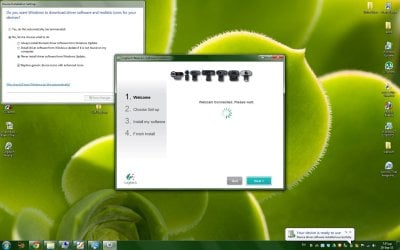
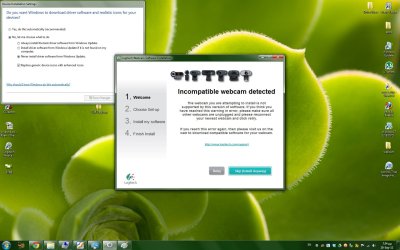
Ok...Just did it..i followed your advice to the letter...i even added the step to not get auto installing of drivers from microsoft store..(check top left corner of SS)..as soon as the installation asked me to plug the webcam , i did, but apparently the popup of windows driver auto instal thingy caught up and the installer gave me this error..

P.S : this IS the installer from the CD that came with the webcam...and i HAVE used it in previous windows (x32 bit though) installations.
 

Attachments

  • 1.jpg
    1.jpg
    336.1 KB · Views: 13
  • 2.jpg
    2.jpg
    378.9 KB · Views: 17

My Computer

OS
win 7

My Computer

Computer type
PC/Desktop
OS
Microsoft Windows 7 Home Premium 64-bit 7601 Multiprocessor Free Service Pack 1
CPU
Intel(R) Core(TM) i7-3770 CPU @ 3.40GHz
Motherboard
ASUSTeK COMPUTER INC. P8H77-M
Memory
8.00 GB
Graphics Card(s)
Intel(R) HD Graphics 4000
Sound Card
On Board
Monitor(s) Displays
Dell 24"
Screen Resolution
1920 x 1080
Hard Drives
(1) INTEL SSDSC2CT180A3 ATA Device (2) ST500DM002-1BD142 ATA Device (3) WDC WD3200AAKS-75L9A0 ATA Device (4) Generic- Compact Flash USB Device (5) Generic- MS/MS-Pro USB Device (6) Generic- SD/MMC USB Device (7) Generic- SM/xD-Picture USB
PSU
500w Corsair
Case
Cooler Master
Cooling
3 Fans
Keyboard
Logitech MK300
Mouse
Logitech WOM
Internet Speed
75Mb
Antivirus
Norton 360
Browser
Firefox, Opera, IE
Yes and yes...(as i said earlier i had it previously installed on win 7 32 bit..

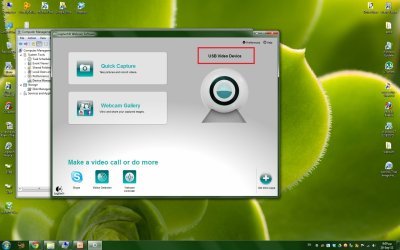
After i skipped the message and installed anyway, it still used the generic driver (see screenshot)..the result was the same..non functional camera. (black screen)

Truly, i have no idea what could it be...
 

Attachments

  • 3.jpg
    3.jpg
    340.5 KB · Views: 11

My Computer

OS
win 7
as soon as the installation asked me to plug the webcam , i did, but apparently the popup of windows driver auto instal thingy caught up and the installer gave me this error..
It did that because the software on the disc is as it says "incompatible", so Windows logically searched for an alternative!
 

My Computer

Computer type
PC/Desktop
OS
Microsoft Windows 7 Home Premium 64-bit 7601 Multiprocessor Free Service Pack 1
CPU
Intel(R) Core(TM) i7-3770 CPU @ 3.40GHz
Motherboard
ASUSTeK COMPUTER INC. P8H77-M
Memory
8.00 GB
Graphics Card(s)
Intel(R) HD Graphics 4000
Sound Card
On Board
Monitor(s) Displays
Dell 24"
Screen Resolution
1920 x 1080
Hard Drives
(1) INTEL SSDSC2CT180A3 ATA Device (2) ST500DM002-1BD142 ATA Device (3) WDC WD3200AAKS-75L9A0 ATA Device (4) Generic- Compact Flash USB Device (5) Generic- MS/MS-Pro USB Device (6) Generic- SD/MMC USB Device (7) Generic- SM/xD-Picture USB
PSU
500w Corsair
Case
Cooler Master
Cooling
3 Fans
Keyboard
Logitech MK300
Mouse
Logitech WOM
Internet Speed
75Mb
Antivirus
Norton 360
Browser
Firefox, Opera, IE
Back
Top