Solved logitech webcam instalation problem

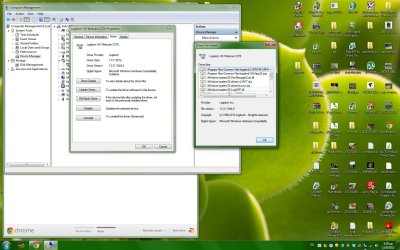
Could you post a screenshot of the Driver tab from that same window please?
 

My Computer

Computer Manufacturer/Model Number
Custom
OS
Windows 7 Ultimate 64-bit
CPU
AMD Phenom II X4 955 Black OC'ed 4.0GHz
Motherboard
Asus M5A88-V EVO
Memory
8GB Mushkin Enhanced Silverline (2x4GB) 1333
Graphics Card(s)
XFX Radeon HD6870 1024MB GDDR5 OC'ed 945MHz; 1151MHz
Sound Card
Soundblaster X-Fi Xtreme PCIe
Monitor(s) Displays
32" Hannspree SE32LMNB
Screen Resolution
1920 x 1080
Hard Drives
250GB Hitachi Deskstar (OS); 2TB Western Digital Elements
PSU
650W XFX XXX Edition 80PLUS Bronze Modular
Case
Cougar 6GR1 Evolution
Cooling
Corsair H60 p/p 120mm; Zalman VF3000A; x4 120mm; x1 140mm
Keyboard
Logitech G510
Mouse
CM Storm Sentinel Advance Zero-G
Internet Speed
Not fast enough :I
Other Info
No matter what your specs, my PC is better.

My Computer

Computer type
PC/Desktop
OS
Microsoft Windows 7 Home Premium 64-bit 7601 Multiprocessor Free Service Pack 1
CPU
Intel(R) Core(TM) i7-3770 CPU @ 3.40GHz
Motherboard
ASUSTeK COMPUTER INC. P8H77-M
Memory
8.00 GB
Graphics Card(s)
Intel(R) HD Graphics 4000
Sound Card
On Board
Monitor(s) Displays
Dell 24"
Screen Resolution
1920 x 1080
Hard Drives
(1) INTEL SSDSC2CT180A3 ATA Device (2) ST500DM002-1BD142 ATA Device (3) WDC WD3200AAKS-75L9A0 ATA Device (4) Generic- Compact Flash USB Device (5) Generic- MS/MS-Pro USB Device (6) Generic- SD/MMC USB Device (7) Generic- SM/xD-Picture USB
PSU
500w Corsair
Case
Cooler Master
Cooling
3 Fans
Keyboard
Logitech MK300
Mouse
Logitech WOM
Internet Speed
75Mb
Antivirus
Norton 360
Browser
Firefox, Opera, IE

Attachments

  • 4.jpg
    4.jpg
    209.4 KB · Views: 14

My Computer

OS
win 7
I'm still an older version, 13.30 but updating now to see if it causes me any issues...

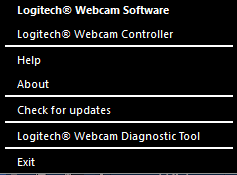
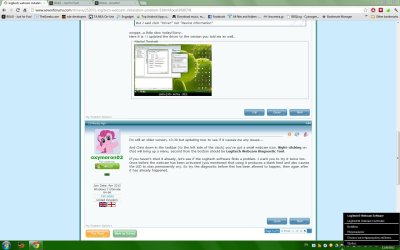
And Chris down in the taskbar (to the left side of the clock) you've got a small webcam icon. Right-clicking on that will bring up a menu, second from the bottom should be Logitech Webcam Diagnostic Tool.

If you haven't tried it already, let's see if the Logitech software finds a problem. I want you to try it twice too. Once before the webcam has been activated (you mentioned that using it produces a blank feed and also causes the LED to stay permanently on). So try the diagnostic before this has been allowed to happen, then again after it has already happened.
 

My Computer

Computer Manufacturer/Model Number
Custom
OS
Windows 7 Ultimate 64-bit
CPU
AMD Phenom II X4 955 Black OC'ed 4.0GHz
Motherboard
Asus M5A88-V EVO
Memory
8GB Mushkin Enhanced Silverline (2x4GB) 1333
Graphics Card(s)
XFX Radeon HD6870 1024MB GDDR5 OC'ed 945MHz; 1151MHz
Sound Card
Soundblaster X-Fi Xtreme PCIe
Monitor(s) Displays
32" Hannspree SE32LMNB
Screen Resolution
1920 x 1080
Hard Drives
250GB Hitachi Deskstar (OS); 2TB Western Digital Elements
PSU
650W XFX XXX Edition 80PLUS Bronze Modular
Case
Cougar 6GR1 Evolution
Cooling
Corsair H60 p/p 120mm; Zalman VF3000A; x4 120mm; x1 140mm
Keyboard
Logitech G510
Mouse
CM Storm Sentinel Advance Zero-G
Internet Speed
Not fast enough :I
Other Info
No matter what your specs, my PC is better.
I'm still an older version, 13.30 but updating now to see if it causes me any issues...

And Chris down in the taskbar (to the left side of the clock) you've got a small webcam icon. Right-clicking on that will bring up a menu, second from the bottom should be Logitech Webcam Diagnostic Tool.

If you haven't tried it already, let's see if the Logitech software finds a problem. I want you to try it twice too. Once before the webcam has been activated (you mentioned that using it produces a blank feed and also causes the LED to stay permanently on). So try the diagnostic before this has been allowed to happen, then again after it has already happened.

Sorry..i cannot seem to find it..
the option in the foreing language are
-help
-software information
-check for updates
-exit
 

Attachments

  • 5.jpg
    5.jpg
    133.3 KB · Views: 9

My Computer

OS
win 7
I'm still an older version, 13.30 but updating now to see if it causes me any issues...

And Chris down in the taskbar (to the left side of the clock) you've got a small webcam icon. Right-clicking on that will bring up a menu, second from the bottom should be Logitech Webcam Diagnostic Tool.

If you haven't tried it already, let's see if the Logitech software finds a problem. I want you to try it twice too. Once before the webcam has been activated (you mentioned that using it produces a blank feed and also causes the LED to stay permanently on). So try the diagnostic before this has been allowed to happen, then again after it has already happened.
Iam running the same driver as Chris but it does not show as an icon in the taskbar despite the "Show all icons" box being checked. It is in the list but doesn't show. I wonder if it shows on your system now you have updated?
 

My Computer

Computer type
PC/Desktop
OS
Microsoft Windows 7 Home Premium 64-bit 7601 Multiprocessor Free Service Pack 1
CPU
Intel(R) Core(TM) i7-3770 CPU @ 3.40GHz
Motherboard
ASUSTeK COMPUTER INC. P8H77-M
Memory
8.00 GB
Graphics Card(s)
Intel(R) HD Graphics 4000
Sound Card
On Board
Monitor(s) Displays
Dell 24"
Screen Resolution
1920 x 1080
Hard Drives
(1) INTEL SSDSC2CT180A3 ATA Device (2) ST500DM002-1BD142 ATA Device (3) WDC WD3200AAKS-75L9A0 ATA Device (4) Generic- Compact Flash USB Device (5) Generic- MS/MS-Pro USB Device (6) Generic- SD/MMC USB Device (7) Generic- SM/xD-Picture USB
PSU
500w Corsair
Case
Cooler Master
Cooling
3 Fans
Keyboard
Logitech MK300
Mouse
Logitech WOM
Internet Speed
75Mb
Antivirus
Norton 360
Browser
Firefox, Opera, IE
OK solved this little one.
Chris:
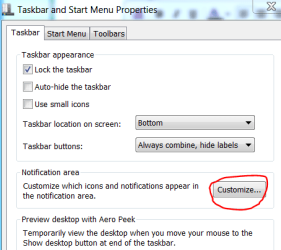
Right click anywhere in an empty space in the tasbar and click "Properties" Click "Customise" as in the screenshot. Scroll down to Logitech Webcam Software and select Show icon and notifications. You might get a notice saying this icon is not active. It will show when it is active. That's fine, close that and click OK in the main window. Now double click the Logitech icon that should be on your desktop. The little webcam icon at the bottom right will now show! Carry on as Oxy says.


Task bar.PNG
 

My Computer

Computer type
PC/Desktop
OS
Microsoft Windows 7 Home Premium 64-bit 7601 Multiprocessor Free Service Pack 1
CPU
Intel(R) Core(TM) i7-3770 CPU @ 3.40GHz
Motherboard
ASUSTeK COMPUTER INC. P8H77-M
Memory
8.00 GB
Graphics Card(s)
Intel(R) HD Graphics 4000
Sound Card
On Board
Monitor(s) Displays
Dell 24"
Screen Resolution
1920 x 1080
Hard Drives
(1) INTEL SSDSC2CT180A3 ATA Device (2) ST500DM002-1BD142 ATA Device (3) WDC WD3200AAKS-75L9A0 ATA Device (4) Generic- Compact Flash USB Device (5) Generic- MS/MS-Pro USB Device (6) Generic- SD/MMC USB Device (7) Generic- SM/xD-Picture USB
PSU
500w Corsair
Case
Cooler Master
Cooling
3 Fans
Keyboard
Logitech MK300
Mouse
Logitech WOM
Internet Speed
75Mb
Antivirus
Norton 360
Browser
Firefox, Opera, IE
OK solved this little one.
Chris:
Right click anywhere in an empty space in the tasbar and click "Properties" Click "Customise" as in the screenshot. Scroll down to Logitech Webcam Software and select Show icon and notifications. You might get a notice saying this icon is not active. It will show when it is active. That's fine, close that and click OK in the main window. Now double click the Logitech icon that should be on your desktop. The little webcam icon at the bottom right will now show! Carry on as Oxy says.


View attachment 231233

I always had that icon visible :)
It is visible in all of my screenshots too..it is always next to dropbox icon (blue box).
i just do not see the "diagnostics" option when i right click on that icon..there are other options, but not this 1.
 

My Computer

OS
win 7
Do you not get this when you right click the icon

webcam.PNG
 

My Computer

Computer type
PC/Desktop
OS
Microsoft Windows 7 Home Premium 64-bit 7601 Multiprocessor Free Service Pack 1
CPU
Intel(R) Core(TM) i7-3770 CPU @ 3.40GHz
Motherboard
ASUSTeK COMPUTER INC. P8H77-M
Memory
8.00 GB
Graphics Card(s)
Intel(R) HD Graphics 4000
Sound Card
On Board
Monitor(s) Displays
Dell 24"
Screen Resolution
1920 x 1080
Hard Drives
(1) INTEL SSDSC2CT180A3 ATA Device (2) ST500DM002-1BD142 ATA Device (3) WDC WD3200AAKS-75L9A0 ATA Device (4) Generic- Compact Flash USB Device (5) Generic- MS/MS-Pro USB Device (6) Generic- SD/MMC USB Device (7) Generic- SM/xD-Picture USB
PSU
500w Corsair
Case
Cooler Master
Cooling
3 Fans
Keyboard
Logitech MK300
Mouse
Logitech WOM
Internet Speed
75Mb
Antivirus
Norton 360
Browser
Firefox, Opera, IE
I have feeling I have found a clue! The software is now installed and the webcam just stalls. OK. In the opening Window of the install process you had to choose a language. I think that language needs to be the same as the language that the Windows 7 OS is set to. I think they may be different. Is that the case?
 

My Computer

Computer type
PC/Desktop
OS
Microsoft Windows 7 Home Premium 64-bit 7601 Multiprocessor Free Service Pack 1
CPU
Intel(R) Core(TM) i7-3770 CPU @ 3.40GHz
Motherboard
ASUSTeK COMPUTER INC. P8H77-M
Memory
8.00 GB
Graphics Card(s)
Intel(R) HD Graphics 4000
Sound Card
On Board
Monitor(s) Displays
Dell 24"
Screen Resolution
1920 x 1080
Hard Drives
(1) INTEL SSDSC2CT180A3 ATA Device (2) ST500DM002-1BD142 ATA Device (3) WDC WD3200AAKS-75L9A0 ATA Device (4) Generic- Compact Flash USB Device (5) Generic- MS/MS-Pro USB Device (6) Generic- SD/MMC USB Device (7) Generic- SM/xD-Picture USB
PSU
500w Corsair
Case
Cooler Master
Cooling
3 Fans
Keyboard
Logitech MK300
Mouse
Logitech WOM
Internet Speed
75Mb
Antivirus
Norton 360
Browser
Firefox, Opera, IE
Folks i think its a hardware problem..i am almost sure its my 6 year old psu (altohugh great brand-expensive model) failing..not enough power, or not consistent is going to the usb ports..all usb devices that are plugged are acting weird right now..mouse+keyboard lag,printer not printing e.g...

oh well..time to shell out a craptonof euros i guess...


You wouldn't happen to know any brilliant model of PSU , would you( over 600 Watts) ? i been off this kind of info for a while...
 

My Computer

OS
win 7
all usb devices that are plugged are acting weird right now..mouse+keyboard lag,printer not printing e.g...
Now you tell us. Thanks :sarc:
 

My Computer

Computer type
PC/Desktop
OS
Microsoft Windows 7 Home Premium 64-bit 7601 Multiprocessor Free Service Pack 1
CPU
Intel(R) Core(TM) i7-3770 CPU @ 3.40GHz
Motherboard
ASUSTeK COMPUTER INC. P8H77-M
Memory
8.00 GB
Graphics Card(s)
Intel(R) HD Graphics 4000
Sound Card
On Board
Monitor(s) Displays
Dell 24"
Screen Resolution
1920 x 1080
Hard Drives
(1) INTEL SSDSC2CT180A3 ATA Device (2) ST500DM002-1BD142 ATA Device (3) WDC WD3200AAKS-75L9A0 ATA Device (4) Generic- Compact Flash USB Device (5) Generic- MS/MS-Pro USB Device (6) Generic- SD/MMC USB Device (7) Generic- SM/xD-Picture USB
PSU
500w Corsair
Case
Cooler Master
Cooling
3 Fans
Keyboard
Logitech MK300
Mouse
Logitech WOM
Internet Speed
75Mb
Antivirus
Norton 360
Browser
Firefox, Opera, IE
all usb devices that are plugged are acting weird right now..mouse+keyboard lag,printer not printing e.g...
Now you tell us. Thanks :sarc:

sorry...not been sitting on ym thumbs...did quite extensive testing after mouse started acting up...i guess camera was the first one to show malfunction.

even bought voltage meter and everything..oh well..

Do you have any psu recommendations for me as i requested btw? :)
 

My Computer

OS
win 7
The XFX 650W is pretty good ;D And I am completely and utterly unbiased when I recommend that.

/cough
 

My Computer

Computer Manufacturer/Model Number
Custom
OS
Windows 7 Ultimate 64-bit
CPU
AMD Phenom II X4 955 Black OC'ed 4.0GHz
Motherboard
Asus M5A88-V EVO
Memory
8GB Mushkin Enhanced Silverline (2x4GB) 1333
Graphics Card(s)
XFX Radeon HD6870 1024MB GDDR5 OC'ed 945MHz; 1151MHz
Sound Card
Soundblaster X-Fi Xtreme PCIe
Monitor(s) Displays
32" Hannspree SE32LMNB
Screen Resolution
1920 x 1080
Hard Drives
250GB Hitachi Deskstar (OS); 2TB Western Digital Elements
PSU
650W XFX XXX Edition 80PLUS Bronze Modular
Case
Cougar 6GR1 Evolution
Cooling
Corsair H60 p/p 120mm; Zalman VF3000A; x4 120mm; x1 140mm
Keyboard
Logitech G510
Mouse
CM Storm Sentinel Advance Zero-G
Internet Speed
Not fast enough :I
Other Info
No matter what your specs, my PC is better.
The XFX 650W is pretty good ;D And I am completely and utterly unbiased when I recommend that.

/cough

Thank youuuuuu!!!!
I will now mark this thread as solved, since none can pretty much offer anything else!
Guys thank you and i love you for taking this time to help me!
You are the best!
+1 interweb to both of u :D
 

My Computer

OS
win 7
No problem Chris both of us (and all members of the forum) always happy to help :)

At the risk of sounding a bit vainglorious, don't forget to rep us both if we helped!
 

My Computer

Computer Manufacturer/Model Number
Custom
OS
Windows 7 Ultimate 64-bit
CPU
AMD Phenom II X4 955 Black OC'ed 4.0GHz
Motherboard
Asus M5A88-V EVO
Memory
8GB Mushkin Enhanced Silverline (2x4GB) 1333
Graphics Card(s)
XFX Radeon HD6870 1024MB GDDR5 OC'ed 945MHz; 1151MHz
Sound Card
Soundblaster X-Fi Xtreme PCIe
Monitor(s) Displays
32" Hannspree SE32LMNB
Screen Resolution
1920 x 1080
Hard Drives
250GB Hitachi Deskstar (OS); 2TB Western Digital Elements
PSU
650W XFX XXX Edition 80PLUS Bronze Modular
Case
Cougar 6GR1 Evolution
Cooling
Corsair H60 p/p 120mm; Zalman VF3000A; x4 120mm; x1 140mm
Keyboard
Logitech G510
Mouse
CM Storm Sentinel Advance Zero-G
Internet Speed
Not fast enough :I
Other Info
No matter what your specs, my PC is better.
No problem Chris both of us (and all members of the forum) always happy to help :)

At the risk of sounding a bit vainglorious, don't forget to rep us both if we helped!

already done :) would never forget to ! cheers !
 

My Computer

OS
win 7
I have a C270 with windows 7 64 bit. loaded fine, got video, but no audio, talked with tech, they troubleshooted sound settings, ok. So sent new device to me. I have installed new device, it was also recognized,now no audio!! Uninstalled, reinstalled. no video. What kind of quality does this company make???
 

My Computer

Computer type
PC/Desktop
Computer Manufacturer/Model Number
custom
OS
windows 7 64 bit
CPU
Intel i5 4670 cpu @3.40 GHz
Motherboard
gigabyte gtx 650 Ti
Memory
16 gb
Graphics Card(s)
Nvidia GeForce GTX 650 Ti, Intel Hd Graphic 4600
Hard Drives
2 internal hard drives, 1- 1tb, 1-3 tb, 2 external hd, 1-4 tb, 1-1tb
Antivirus
bitdefender antivirus plus 2016
Browser
Google Chrome
Hi, canonman2012:

I have a C270 with windows 7 64 bit. loaded fine, got video, but no audio, talked with tech, they troubleshooted sound settings, ok. So sent new device to me. I have installed new device, it was also recognized,now no audio!! Uninstalled, reinstalled. no video. What kind of quality does this company make???

Sorry to hear about your webcam issues.

The last reply in this thread was back in September 2012 and the OP has not been around here at the forum since 2014.
Much has changed for both Windows and Logitech devices since then.

If you need help with a current issue, we might be able to better assist you with individualized help if you would perhaps consider starting a new, separate, fresh topic.
(Alternatively, since you say Logitech sent you a new device, you might want to pursue their in-warranty support?)

<just a friendly suggestion>

Cheers,
MM
 

My Computer

Computer type
PC/Desktop
Computer Manufacturer/Model Number
Dell Studio XPS 8500
OS
OEM Windows 7 Ult (x64) SP1
CPU
Intel Core-i7 3770 @ 3.4 GHz
Motherboard
"Dell" branded
Memory
16 GB DDR3 SDRAM @ 1333 MHz
Graphics Card(s)
NVidia GeForce GT620 1 GB
Sound Card
THX TruStudio PC
Monitor(s) Displays
Dell U2410 Full HD
Hard Drives
2.0 TB SATA2 @ 7200 RPM
PSU
350W
Keyboard
MS 4000 Ergon - Wired
Mouse
Logitech Anywhere MX
Internet Speed
Cable HSI w/Turbo (router)
Antivirus
KIS-MBAM Premium-MBAE Premium
Browser
Fx (current version); IE
Other Info
And a Win7/64 Pro laptop; And a Win10/64 Pro desktop.
Back
Top