Solved Looking For Recommendation For "defraggler" for SSD

NewW7User

Member
Member
VIP
Local time
4:31 PM
Messages
152
My Machine has slowed down since I installed the SSD some time ago - I suspect the files need "defraggling". I'd appreciate a recommendation for a "defraggler" (or whatever name the software calls it) that works well and is safe and won't damage/lose files.
 

My Computers My Computers

  • At a glance

    W7 Pro 648G
    Computer type
    PC/Desktop
    Computer Manufacturer/Model Number
    Dell XPS 8300
    OS
    W7 Pro 64
    Memory
    8G
    Sound Card
    RealTek High Definition Audio
    Monitor(s) Displays
    Asus
    Hard Drives
    WD Elements, Samsung Story Station, Samsung EVO 860 / 870
    Mouse
    Logitech M310
    Antivirus
    Avast, Malwarebytes, SUPERAntiSpyware
    Browser
    Firefox, Avast Secure Browser
  • At a glance

    Win10
    Computer type
    Laptop
    System Manufacturer/Model Number
    HP
    OS
    Win10
    Keyboard
    external
    Mouse
    wireless
    Browser
    Firefox, Avast
    Antivirus
    Avast / Malwarebytes / Superantispyware
The answer is short and simple — do not defrag a solid state drive.
At best it won't do anything, at worst it does nothing for your performance and you will use up write cycles.

- - - Updated - - -

The answer is short and simple — do not defrag a solid state drive.
At best it won't do anything, at worst it does nothing for your performance and you will use up write cycles.

Taken from PCGAMER:
SSDs are now the storage of choice for enthusiasts and gamers alike. Some would even say they are the most impactful upgrade for your PC. They are smaller, faster, and have gotten much more reliable over the years. But do you need to defrag them? The short answer is no. The long answer is absolutely no.

Before we expand on this too much, it's worth explaining why defragging is beneficial for traditional hard drives.

HDDs operate using a physical spinning platter, with drive 'heads' that have to be positioned over the correct data. (Think of it like a vinyl record player, only much faster.) Data is stored on different sections of the platter in sequentially ordered blocks. In order to access a block for reading or writing, the drive heads need to be positioned over the correct sector, and then the desired block must pass under the drive heads. Combined, these two steps give the access time for a drive. For a typical 7,200 rpm drive, the rotational latency is 4.17ms (half of one rotation) and the seek time is around 8-12ms.

With usage, data that was once sequentially ordered on a drive can become split across different blocks. This is called fragmentation, and as this happens the drive heads need to access the data from two (or more—sometimes many more) different sections of the platter, drastically decreasing performance.

Defragmentation reorders the blocks of data sequentially and attempts to restore your hard drive's original performance. After the initial seek time to find the start of the data, everything after that is just sequentially pulling data from one block after another.

The reason there's no point defragmenting an SSD is that there's no seek time or rotational latency. Instead, SSDs access flash memory (NAND) at much higher speeds, typically less than 50us—that's 50 microseconds, or compared to a typical hard drive with a 15ms average access time, about 300 times faster. But there's more to the story than just speed.

SSDs don't just eliminate moving parts and improve access times, they also have built-in wear-leveling algorithms. The reason is that the NAND gates wear out over time, and are rated in program/erase cycles. Each cell in a modern SSD can be written to about 3,000 times before the cell stops working properly. To avoid individual cells that contain frequently changed data from wearing out faster, SSDs track usage of each block, and the wear-leveling algorithms ensure that over time, the cells on an SSD are written a similar number of times. There are also extra blocks that aren't user-accessible that the algorithms can use to keep the drives from wearing out.

Because of the way SSDs work, not only does data not become fragmented but running a defragmentation utility will actually burn through the program/erase cycles and potentially cause premature 'death' of your SSDs. It's not something that would happen quickly—a 500GB Samsung 850 Evo as an example is rated for 150TB of total writes, or the equivalent of writing to every block of the drive at least 300 times. With typical users writing less than 20GB per day on average, it would require more than 20 years to burn through 150TB of writes. But defragmenting could easily write hundreds of GB of data, which would wear out an SSD much faster.

The good news is that any defragmentation program worth its salt should also detect the presence of an SSD and warn you not to defrag it. In the case of Windows Defrag, when it detects an SSD, it simply gives you the option of Optimizing the Trim, which frees up segments that have been marked as erased—something that it will do automatically once a week anyway. So no, there's no need to defrag an SSD.

 

My Computer My Computer

At a glance

Windows 7 Ultimate 64 bit SP1DualCore Intel Pentium D 820, 2800 MHz (14 x ...Kingston DDR3 (PC3-10700H) 6.0GBAMD Radeon HD 6450
Computer type
PC/Desktop
Computer Manufacturer/Model Number
Homebuild
OS
Windows 7 Ultimate 64 bit SP1
CPU
DualCore Intel Pentium D 820, 2800 MHz (14 x 200)
Motherboard
Gigabyte EX58-UD3R
Memory
Kingston DDR3 (PC3-10700H) 6.0GB
Graphics Card(s)
AMD Radeon HD 6450
Sound Card
Realtek ALC882/D/M
Monitor(s) Displays
Samsung SyncMaster 2233SW
Screen Resolution
1920 x 1080
Hard Drives
Drive #1 - WDC WD2500JB-22REA0 (232 GB)
Drive #2 - WDC WD6400AAKS-65A7B0 (596 GB)
PSU
EVGA Supernova 750w G2 Gold
Cooling
5 x 80mm Generic Fans
Keyboard
Microsoft Comfort Curve 2000
Mouse
SteelSeries IKARI 62001-1 Laser or Microsoft Laser 6000
Internet Speed
1500/256
Antivirus
NOD32 v10.1.235.0
Browser
FireFox 59.0.2 X64bit
Other Info
Telstra Technicolor TG799vac Modem
LG HL-DT-ST DVDRAM GH20NS15 ATA Device
16X52X32X52 COMBO SCSI CDRom Device
Logitech Wave Keyboard
Microsoft 6000 Laser Mouse
Like what was mentioned, you don't defrag an SSD type of drive or any flash type of drive like NVMe, SD cards, USB, etc. The chief reason is that because you're using a chip to store data, there is no more such thing as fragmented data. In the sense of a platter hard drive that is where data is all over the disk. In a chip-based hard drive like an SSD the data is just "there" instantly. There is no fragmentation to worry about. In fact, I believe Windows 10 on up now disables defrag ability if it detects a flash based drive. Again, it's because both technologies are vastly different.

If you have a slow drive it could be software on your computer, Windows or the drive is not performing the way it used to. Especially if you never over provisioned the SSD to begin with.

When you install a new flash based drive like an SSD or NVMe drive you over provision by at least 10%. This means that if you have say a 1 TB SSD/NVMe drive, you mark a section of the drive as unallocated to the tune of 100GB. You can use Windows Disk Manager for this. Without getting into all of the details, this allows better garbage collection in the drive thereby increasing its life cycle. Here's some Info.
 

My Computer My Computer

At a glance

Windows 7 Ultimate x64
Computer type
PC/Desktop
OS
Windows 7 Ultimate x64
Thank you subyroo and F22 Simpilot for your explanations and for saving me from doing damage to the SSD. I expect that the over-provisioning setting has to be done before putting data on the SSD, though I'm not sure how that would work as the Samsung utility copies everything right away.
 

My Computers My Computers

  • At a glance

    W7 Pro 648G
    Computer type
    PC/Desktop
    Computer Manufacturer/Model Number
    Dell XPS 8300
    OS
    W7 Pro 64
    Memory
    8G
    Sound Card
    RealTek High Definition Audio
    Monitor(s) Displays
    Asus
    Hard Drives
    WD Elements, Samsung Story Station, Samsung EVO 860 / 870
    Mouse
    Logitech M310
    Antivirus
    Avast, Malwarebytes, SUPERAntiSpyware
    Browser
    Firefox, Avast Secure Browser
  • At a glance

    Win10
    Computer type
    Laptop
    System Manufacturer/Model Number
    HP
    OS
    Win10
    Keyboard
    external
    Mouse
    wireless
    Browser
    Firefox, Avast
    Antivirus
    Avast / Malwarebytes / Superantispyware
does it still need some trim or smth or does that happen automatically somehow via the same defrag tool in win10? aka the defrag tool has been replaced with a trim tool in the same "defrag" interface?
or is it just called "optimization" and that is still the same thing as defrag then?
 

My Computer My Computer

At a glance

32
Computer type
PC/Desktop
OS
32
TRIM is a command invoked via Windows...

Yes, it's automatic.

- - - Updated - - -

Let me rephrase that. It's automatic generally when the computer has been idle for some time.
 

My Computer My Computer

At a glance

Windows 7 Ultimate x64
Computer type
PC/Desktop
OS
Windows 7 Ultimate x64
is it the same thing as the defrag tool or something else and separate somewhere?
so if i disable the defrag and "optimization" in there, it will still do its trim commands somewhere at some point?
 

My Computer My Computer

At a glance

32
Computer type
PC/Desktop
OS
32
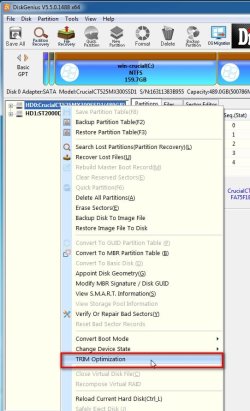
What is Trim? | Crucial.com


SSD Trim support

Microsoft® Windows® from 7 forward supports Trim. It runs automatically in the background unless you have turned it off. You can run it manually or check that Trim is enabled by looking at the Properties of the drive, then selecting Tools, and Optimize.


And to let everyone know. Optimize is a feature in Windows 10.
 

My Computer My Computer

At a glance

Windows 7 Ultimate x64
Computer type
PC/Desktop
OS
Windows 7 Ultimate x64
.... I expect that the over-provisioning setting has to be done before putting data on the SSD, though I'm not sure how that would work as the Samsung utility copies everything right away.
Over-provisioning deliberately sets aside some of the SSD's capacity so that the wear levelling algorithms will work efficiently. About 10% is sufficient.

But any free space will do, as long as you don't fill the SSD you shouldn't need over-provisioning.
 

My Computers My Computers

  • At a glance

    Windows 7 Home Premium x64AMD V1204GB
    Computer type
    Laptop
    Computer Manufacturer/Model Number
    Toshiba satellite C650D
    OS
    Windows 7 Home Premium x64
    CPU
    AMD V120
    Memory
    4GB
    Internet Speed
    150 Mbps
    Antivirus
    MSE
    Browser
    IE11, Edge, Firefox
    Other Info
    I also have W7 Pro on my System Two, and several W7 Hyper-V VMs. My other machines run Windows 10/11. Their specs are in my Ten Forums & Eleven Forum profiles.
  • At a glance

    Windows 7 Pro x64Intel i5-3320M8 GB
    Computer type
    Laptop
    System Manufacturer/Model Number
    Lenovo Thinkpad T430
    OS
    Windows 7 Pro x64
    CPU
    Intel i5-3320M
    Memory
    8 GB
    Hard Drives
    250GB Samsung SSD 860 EVO
    Antivirus
    MSE
I always over-provisionin by 10% because I'm a data pack rat. LOL
 

My Computer My Computer

At a glance

Windows 7 Ultimate x64
Computer type
PC/Desktop
OS
Windows 7 Ultimate x64
Does over-provisioning have to be set by the SSD manufacturer's software or is it okay to just have the free-space set by the user and let Windows deal with how it is used? I'm asking because I have a Samsung SSD but think the Samsung Magician app to be pretty naff software — I used to install it to my Windows 7 system but since moving to Windows 10 I have never installed it at all, thus far the drive is working just fine.
 

My Computer My Computer

At a glance

Windows 7 Pro. x64 SP1
Computer type
PC/Desktop
OS
Windows 7 Pro. x64 SP1
Just go into Disk Management and set aside a partition of allocated space of 10% of the drive's size.

Now for the nerd stuff. 1024 bytes equals a kilobyte. So say you want to set a partition to exactly 500 MB. Then take 500 * 1024 = 512,000 bytes.

Thus if you have a drive that's 1 TB in size, 10% of that is 100 GB. So 100,000 * 1024 = 102,400,000 bytes.

You don't necessarily have to make it perfect like that. You could just type in 100 GB or what ever. It just won't be exact.
 

My Computer My Computer

At a glance

Windows 7 Ultimate x64
Computer type
PC/Desktop
OS
Windows 7 Ultimate x64
Just go into Disk Management and set aside a partition of allocated space of 10% of the drive's size.

Couple of questions about that:

(1) I have the 10% done but have left it as having no file system (e.g. NTFS etc.), in other words it hasn't been formatted just left as a partition of 'Free Space' as reported by Windows Disk Management. Is this okay?

(2) I did not assign a Drive Letter to the partition. Is this okay? Can Windows know that this free space is for over provisioning even if there is no Drive Letter assigned?
 

My Computer My Computer

At a glance

Windows 7 Pro. x64 SP1
Computer type
PC/Desktop
OS
Windows 7 Pro. x64 SP1
1) Yes, Oui, Ja.

2) Ja, Oui, Yes.
 

My Computer My Computer

At a glance

Windows 7 Ultimate x64
Computer type
PC/Desktop
OS
Windows 7 Ultimate x64
well... there doesnt seem to be any optimization tool in win7(only defrag), so does it still do it automatically then or i would need to issue some command via cmd?
and win10 doesnt seem to have any defrag tool at all, so i should probably not change any of the default optimization settings in win10?
 

My Computer My Computer

At a glance

32
Computer type
PC/Desktop
OS
32
well... there doesnt seem to be any optimization tool in win7(only defrag), so does it still do it automatically then or i would need to issue some command via cmd?
You can set it to defrag on a schedule.

Disk Defragmenter Schedule- Turn On or Off

and win10 doesnt seem to have any defrag tool at all, so i should probably not change any of the default optimization settings in win10?
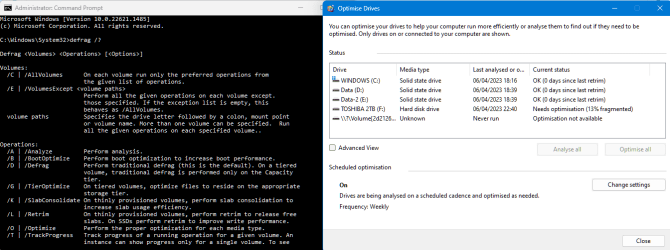
Defrag.exe is also in Windows 10 (and Windows 11) and can be run as a GUI and from the command line. In operation it looks the same as defrag.exe in Windows 7. When run as a GUI it is called 'Optimise Drives'. The GUI will not let you defrag an SSD, just trim it, but it will defrag any HDDs present. From the command line you can run any type of optimisation on any type of drive. You could, if you really want to, defrag an SSD from the command line (bad idea though, if you want a long life from your SSD).

image.png
 

My Computers My Computers

  • At a glance

    Windows 7 Home Premium x64AMD V1204GB
    Computer type
    Laptop
    Computer Manufacturer/Model Number
    Toshiba satellite C650D
    OS
    Windows 7 Home Premium x64
    CPU
    AMD V120
    Memory
    4GB
    Internet Speed
    150 Mbps
    Antivirus
    MSE
    Browser
    IE11, Edge, Firefox
    Other Info
    I also have W7 Pro on my System Two, and several W7 Hyper-V VMs. My other machines run Windows 10/11. Their specs are in my Ten Forums & Eleven Forum profiles.
  • At a glance

    Windows 7 Pro x64Intel i5-3320M8 GB
    Computer type
    Laptop
    System Manufacturer/Model Number
    Lenovo Thinkpad T430
    OS
    Windows 7 Pro x64
    CPU
    Intel i5-3320M
    Memory
    8 GB
    Hard Drives
    250GB Samsung SSD 860 EVO
    Antivirus
    MSE
defrag /e /d: /e: /o or defrag /e /d: /e: /L for ssd then?
i dont want to defrag any ssd, thats why i asked
 

My Computer My Computer

At a glance

32
Computer type
PC/Desktop
OS
32
defrag /e /d: /e: /o or defrag /e /d: /e: /L for ssd then?
i dont want to defrag any ssd, thats why i asked
Running defrag from the command line is powerful and potentially dangerous, you could end up defragmenting an SSD if you're not careful.

Running it from the GUI window is safe. If you run it from the GUI, either by selecting a drive and clicking the Optimise button. or by scheduling optimisation, then it will only perform the appropriate operation for the type of drive. That's a retrim for an SSD or defragmentation for an HDD.
 

My Computers My Computers

  • At a glance

    Windows 7 Home Premium x64AMD V1204GB
    Computer type
    Laptop
    Computer Manufacturer/Model Number
    Toshiba satellite C650D
    OS
    Windows 7 Home Premium x64
    CPU
    AMD V120
    Memory
    4GB
    Internet Speed
    150 Mbps
    Antivirus
    MSE
    Browser
    IE11, Edge, Firefox
    Other Info
    I also have W7 Pro on my System Two, and several W7 Hyper-V VMs. My other machines run Windows 10/11. Their specs are in my Ten Forums & Eleven Forum profiles.
  • At a glance

    Windows 7 Pro x64Intel i5-3320M8 GB
    Computer type
    Laptop
    System Manufacturer/Model Number
    Lenovo Thinkpad T430
    OS
    Windows 7 Pro x64
    CPU
    Intel i5-3320M
    Memory
    8 GB
    Hard Drives
    250GB Samsung SSD 860 EVO
    Antivirus
    MSE
thats what im talking about the whole time - there is NO optimization button/tool in win7, so do i need to issue the trim command manually somehow?
 

My Computer My Computer

At a glance

32
Computer type
PC/Desktop
OS
32

My Computers My Computers

  • At a glance

    7 X64i5 84002x8gb 3200mhz
    Computer type
    PC/Desktop
    OS
    7 X64
    CPU
    i5 8400
    Motherboard
    gigabyte b365m ds3h
    Memory
    2x8gb 3200mhz
    Hard Drives
    various
    PSU
    pure power 11 400w cm
    Case
    Coolermaster
    Cooling
    cryorig m9i
  • At a glance

    7x64g54008gb ddr4 2400
    Computer type
    PC/Desktop
    OS
    7x64
    CPU
    g5400
    Motherboard
    ga b365m ds3h
    Memory
    8gb ddr4 2400
    PSU
    xfx pro 450w
Back
Top