Losing Vista, Dual boot W7 and Linux on seperate drives. Help Sought.

johnwillyums

New member
Guru
Gold Member
VIP
Local time
6:14 PM
Messages
4,286
Location
Colne, Lancashire, UK
Hi all. Up until recently I have been triple booting W7x64, Vistax64 and Linux Mintx64.
Windows 7 and Linux Mint are on one 1TB drive, with Mint occupying 2 partitions that come to about 50GB.
On the other 1TB drive is Vista and a couple of storage/backup partitions.

Up until recently I was able to choose any of the three at startup via GRUB. A recent re-install of W7 has knocked out GRUB so I can no longer access Linux Mint.
This is not particularly a problem as I mainly use W7 and Linux Mint was there as a safety precaution.
Now I am thinking that it is time to get rid of Vista as all I do is update it now and then.

What I'd like would be to preserve my current W7 install as my main OS and have that remain where it is. Wipe the Linux install on that disk
On my other 1TB drive I'd like to do a fresh install of Linux Mint and get rid of Vista.

So I would like a dual boot with W7 and Linux mint on two seperate drives.
The remainder of the Linux drive could be partitioned for storage and backup.
Would anybody be so kind as to list the processes I need to carry out to achieve this.
I've looked through tutorials and there doesn't seem to be one that covers my particular situation.
As I say GRUB has now disappeared so I have the Windows boot presenting me with W7 and Vista in that order at startup.

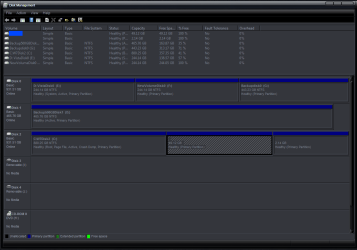
I attach a pic of disk management, as you can see Disk 0 is the Vista install plus two storage partitions. Disk 1 is a 500GB storage disk and Disk 2 has the Windows 7 install plus two Linux partititions (49GB and 2GB)

Thanks in advance for any help forthcoming, John:)
 

Attachments

  • Disk Management1.PNG
    Disk Management1.PNG
    34.4 KB · Views: 43

My Computer My Computer

At a glance

Windows 7 Home Premium 64 biti7 [email protected]2x4GB Corsair Vegeance DDR3XFX GTX 260 Black Edition
Computer Manufacturer/Model Number
The Monolith. 3.1
OS
Windows 7 Home Premium 64 bit
CPU
i7 [email protected]
Motherboard
Gigabyte Z77-D3H
Memory
2x4GB Corsair Vegeance DDR3
Graphics Card(s)
XFX GTX 260 Black Edition
Sound Card
none-through large stereo hi fi
Monitor(s) Displays
Croosover 27MDP LED IPS Dell 2408 WFP
Screen Resolution
2560x1440 1920x1200
Hard Drives
1x Samsung 840Pro 128GB SSD
1x Samsung Spinpoint F1 1TB
PSU
Corsair AX 850 Watt
Case
Cooler Master ACTS 840
Cooling
Be Quiet! Dark Rock Pro
Keyboard
Enermax Aurora
Mouse
Logitech Ballmouse
Internet Speed
20MBPS
Thanks for your input Madtowniniot but this seems to be about recovering GRUB.
I wish to erase both my Vista install and my Linux install and then do a fresh Linux install on the disk that previously held Vista.
I'm assuming I will get a fresh GRUB when I do the Linux install.
It's the deletion of Vista and Linux, the repartioning and the consequent repositioning of W7 and a dual boot off seperate disks that concerns me.

Thanks again, John:)
 

My Computer My Computer

At a glance

Windows 7 Home Premium 64 biti7 [email protected]2x4GB Corsair Vegeance DDR3XFX GTX 260 Black Edition
Computer Manufacturer/Model Number
The Monolith. 3.1
OS
Windows 7 Home Premium 64 bit
CPU
i7 [email protected]
Motherboard
Gigabyte Z77-D3H
Memory
2x4GB Corsair Vegeance DDR3
Graphics Card(s)
XFX GTX 260 Black Edition
Sound Card
none-through large stereo hi fi
Monitor(s) Displays
Croosover 27MDP LED IPS Dell 2408 WFP
Screen Resolution
2560x1440 1920x1200
Hard Drives
1x Samsung 840Pro 128GB SSD
1x Samsung Spinpoint F1 1TB
PSU
Corsair AX 850 Watt
Case
Cooler Master ACTS 840
Cooling
Be Quiet! Dark Rock Pro
Keyboard
Enermax Aurora
Mouse
Logitech Ballmouse
Internet Speed
20MBPS
I would:
go into msconfig and delete vista from the boot tab, then:

View attachment 98648

boot into linux mint live..
View attachment 98646

and from there
move everything off of disk 0,2 (the last partition of the disk vista is installed to)
start up gparted
View attachment 98647View attachment 98653
erase all partitions on disk 0 and create an ntfs partition with unformatted free space at the beginning of the drive (100 GB should be enough but that's your call)
erase the partitions on disk 2 that contained your prior install of linux
expand windows 7 partition to fill the entire disk 2
Install linux to disk 0 using the "use the largest contiguous free space" option
don't worry if it says "this computer has no operating systems on it".. grub will find your windows install
it actually took longer to come up with a way to explain this than it would have taken to just do it.. good luck
 
Last edited:
Thanks very much for that madtownidiot. I really appreciate your time and effort:)
Unfortunately I grew impatient to start before you posted so I went ahead and after several frustrating hours, I'm finally back on my original 7 install.
I used Barefoot Kid's tutorial:: Partition : Recover Space Used by an Older OS : http://www.sevenforums.com/tutorials/109752-partition-recover-space-used-older-os.html
With the Partition Wizard live cd I wiped the drive with the Vista install on it.
However when I tried to boot it would not boot into anything. I tried numerous tools on the Partition Wizard CD but could not get into my W7 install. I was told that this partition did not contain a boot.ini file.
I tried to install Linux Mint but that would not start either. It just wouldn't boot from the cd.
Eventually I did a fresh install of W7 on my newly wiped disk that had had the Vista install on it.
Once that had installed I used EasyBCD to change the MBR so that my original W7 install would boot.
I'm in that now and am currently downloading another ISO of Linux Mint as I can't really understand why that refused to boot and install.
So I now have two W7 installs. One that was my original with all programs on it etc and a very new and bare install on the disk I intend to put Linux Mint on.
What I'm wondering now is whether I can go back in with the Partition Wizard cd and delete the new W7 install. I'm not sure whether my old install now has a boot ini. file.
I imagine it didn't have one because this was originally a machine with Vista on it but will EasyBCD made it bootable?
Thanks again for your efforts, wish I'd waited, it would have saved me a lot of time and stress.
Any thoughts on whether I can get rid of the new W7 install?

Cheers, John
 

My Computer My Computer

At a glance

Windows 7 Home Premium 64 biti7 [email protected]2x4GB Corsair Vegeance DDR3XFX GTX 260 Black Edition
Computer Manufacturer/Model Number
The Monolith. 3.1
OS
Windows 7 Home Premium 64 bit
CPU
i7 [email protected]
Motherboard
Gigabyte Z77-D3H
Memory
2x4GB Corsair Vegeance DDR3
Graphics Card(s)
XFX GTX 260 Black Edition
Sound Card
none-through large stereo hi fi
Monitor(s) Displays
Croosover 27MDP LED IPS Dell 2408 WFP
Screen Resolution
2560x1440 1920x1200
Hard Drives
1x Samsung 840Pro 128GB SSD
1x Samsung Spinpoint F1 1TB
PSU
Corsair AX 850 Watt
Case
Cooler Master ACTS 840
Cooling
Be Quiet! Dark Rock Pro
Keyboard
Enermax Aurora
Mouse
Logitech Ballmouse
Internet Speed
20MBPS
check your disk manager.. the drive that has your boot manager will be labeled as such
if it hasn't been moved you can delete the new install from msconfig the same way you would have to deleted the vista entry (make sure to boot to your old install) and proceed the way I suggested in my last post

otherwise you've gone beyond my abilities with repairing windows installs.. My threshold is if it's going to take longer to fix than to start over, I just start over
 
Last edited:
Hello JW.


The first thing to do is to mark the Windows 7 that you want to keep as "Active" and do 3 separate startup repairs with a system restart between each repair to Windows 7 to create a set of boot files to that partition, then you can delete/remove the other partitions; have a look at this tutorial at the link below to get some info.

Startup Repair - Run 3 Separate Times


TBH, I'd do a partition specific wipe of the partitions that you want to delete BEFORE you delete them; have a look at Option Three in this tutorial.

Partition Wizard : Use the Bootable CD


Be sure to post back with any questions you may have.
 

My Computer My Computer

At a glance

W 7 64-bit UltimateIntel Q9550 Yorkfield8GB Dominator 8500C5DATI : XFX 5870
Computer Manufacturer/Model Number
* BFK Customs *
OS
W 7 64-bit Ultimate
CPU
Intel Q9550 Yorkfield
Motherboard
ASUS P5Q Pro
Memory
8GB Dominator 8500C5D
Graphics Card(s)
ATI : XFX 5870
Sound Card
Realtek HD Audio 7-1
Monitor(s) Displays
1x 47" LCD HDMI & 3x 26" LCD HDMI
Screen Resolution
1920x1080P & 1920x1200
Hard Drives
1x 80GB Intel X25-M G2 SSD : 1x 500GB & 1x 640GB WD Caviar Black(s)
PSU
Corsair 620HX
Case
Cooler Master RC-690
Cooling
Tuniq Tower 120, 2x 140mm and 3x 120mm case fans
Keyboard
Microsoft 500
Mouse
Razer Diamondback 3G
Internet Speed
14 Mb/s
Other Info
1x Koutech 3Gb/s SATA HDD Hot Swap Rack
Looks like it. Mine certainly says Healthy( Boot, Page File, etc. Whereas the new install W7 just says Healthy(System/Active,Primary Partition)

I'll give it a try:) Thanks again. EasyBCD must have restored the Boot file (hopefully)

John
 

My Computer My Computer

At a glance

Windows 7 Home Premium 64 biti7 [email protected]2x4GB Corsair Vegeance DDR3XFX GTX 260 Black Edition
Computer Manufacturer/Model Number
The Monolith. 3.1
OS
Windows 7 Home Premium 64 bit
CPU
i7 [email protected]
Motherboard
Gigabyte Z77-D3H
Memory
2x4GB Corsair Vegeance DDR3
Graphics Card(s)
XFX GTX 260 Black Edition
Sound Card
none-through large stereo hi fi
Monitor(s) Displays
Croosover 27MDP LED IPS Dell 2408 WFP
Screen Resolution
2560x1440 1920x1200
Hard Drives
1x Samsung 840Pro 128GB SSD
1x Samsung Spinpoint F1 1TB
PSU
Corsair AX 850 Watt
Case
Cooler Master ACTS 840
Cooling
Be Quiet! Dark Rock Pro
Keyboard
Enermax Aurora
Mouse
Logitech Ballmouse
Internet Speed
20MBPS
Hi BFK. It looks like it's ok so I was just going to go back in with Partition Wizard, delete the new W7 install and then try to install Linux on that drive. Hang on and I'll post a snip of Disk manager
 

My Computer My Computer

At a glance

Windows 7 Home Premium 64 biti7 [email protected]2x4GB Corsair Vegeance DDR3XFX GTX 260 Black Edition
Computer Manufacturer/Model Number
The Monolith. 3.1
OS
Windows 7 Home Premium 64 bit
CPU
i7 [email protected]
Motherboard
Gigabyte Z77-D3H
Memory
2x4GB Corsair Vegeance DDR3
Graphics Card(s)
XFX GTX 260 Black Edition
Sound Card
none-through large stereo hi fi
Monitor(s) Displays
Croosover 27MDP LED IPS Dell 2408 WFP
Screen Resolution
2560x1440 1920x1200
Hard Drives
1x Samsung 840Pro 128GB SSD
1x Samsung Spinpoint F1 1TB
PSU
Corsair AX 850 Watt
Case
Cooler Master ACTS 840
Cooling
Be Quiet! Dark Rock Pro
Keyboard
Enermax Aurora
Mouse
Logitech Ballmouse
Internet Speed
20MBPS
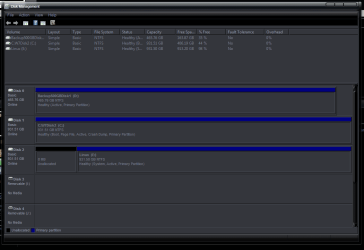
Hi. This my current Boot Management situation.:)
 

Attachments

  • DM19.9.10.PNG
    DM19.9.10.PNG
    22.4 KB · Views: 14

My Computer My Computer

At a glance

Windows 7 Home Premium 64 biti7 [email protected]2x4GB Corsair Vegeance DDR3XFX GTX 260 Black Edition
Computer Manufacturer/Model Number
The Monolith. 3.1
OS
Windows 7 Home Premium 64 bit
CPU
i7 [email protected]
Motherboard
Gigabyte Z77-D3H
Memory
2x4GB Corsair Vegeance DDR3
Graphics Card(s)
XFX GTX 260 Black Edition
Sound Card
none-through large stereo hi fi
Monitor(s) Displays
Croosover 27MDP LED IPS Dell 2408 WFP
Screen Resolution
2560x1440 1920x1200
Hard Drives
1x Samsung 840Pro 128GB SSD
1x Samsung Spinpoint F1 1TB
PSU
Corsair AX 850 Watt
Case
Cooler Master ACTS 840
Cooling
Be Quiet! Dark Rock Pro
Keyboard
Enermax Aurora
Mouse
Logitech Ballmouse
Internet Speed
20MBPS

My Computer My Computer

At a glance

W 7 64-bit UltimateIntel Q9550 Yorkfield8GB Dominator 8500C5DATI : XFX 5870
Computer Manufacturer/Model Number
* BFK Customs *
OS
W 7 64-bit Ultimate
CPU
Intel Q9550 Yorkfield
Motherboard
ASUS P5Q Pro
Memory
8GB Dominator 8500C5D
Graphics Card(s)
ATI : XFX 5870
Sound Card
Realtek HD Audio 7-1
Monitor(s) Displays
1x 47" LCD HDMI & 3x 26" LCD HDMI
Screen Resolution
1920x1080P & 1920x1200
Hard Drives
1x 80GB Intel X25-M G2 SSD : 1x 500GB & 1x 640GB WD Caviar Black(s)
PSU
Corsair 620HX
Case
Cooler Master RC-690
Cooling
Tuniq Tower 120, 2x 140mm and 3x 120mm case fans
Keyboard
Microsoft 500
Mouse
Razer Diamondback 3G
Internet Speed
14 Mb/s
Other Info
1x Koutech 3Gb/s SATA HDD Hot Swap Rack
The new W7 install is on the disk marked Linux. I reckon I can just delete with the partition wizaed disk it an then make a 50 or 100GB partition and install Linux on there.

What do you think?
 

My Computer My Computer

At a glance

Windows 7 Home Premium 64 biti7 [email protected]2x4GB Corsair Vegeance DDR3XFX GTX 260 Black Edition
Computer Manufacturer/Model Number
The Monolith. 3.1
OS
Windows 7 Home Premium 64 bit
CPU
i7 [email protected]
Motherboard
Gigabyte Z77-D3H
Memory
2x4GB Corsair Vegeance DDR3
Graphics Card(s)
XFX GTX 260 Black Edition
Sound Card
none-through large stereo hi fi
Monitor(s) Displays
Croosover 27MDP LED IPS Dell 2408 WFP
Screen Resolution
2560x1440 1920x1200
Hard Drives
1x Samsung 840Pro 128GB SSD
1x Samsung Spinpoint F1 1TB
PSU
Corsair AX 850 Watt
Case
Cooler Master ACTS 840
Cooling
Be Quiet! Dark Rock Pro
Keyboard
Enermax Aurora
Mouse
Logitech Ballmouse
Internet Speed
20MBPS
Yes it sis disk 1 c/
 

My Computer My Computer

At a glance

Windows 7 Home Premium 64 biti7 [email protected]2x4GB Corsair Vegeance DDR3XFX GTX 260 Black Edition
Computer Manufacturer/Model Number
The Monolith. 3.1
OS
Windows 7 Home Premium 64 bit
CPU
i7 [email protected]
Motherboard
Gigabyte Z77-D3H
Memory
2x4GB Corsair Vegeance DDR3
Graphics Card(s)
XFX GTX 260 Black Edition
Sound Card
none-through large stereo hi fi
Monitor(s) Displays
Croosover 27MDP LED IPS Dell 2408 WFP
Screen Resolution
2560x1440 1920x1200
Hard Drives
1x Samsung 840Pro 128GB SSD
1x Samsung Spinpoint F1 1TB
PSU
Corsair AX 850 Watt
Case
Cooler Master ACTS 840
Cooling
Be Quiet! Dark Rock Pro
Keyboard
Enermax Aurora
Mouse
Logitech Ballmouse
Internet Speed
20MBPS
The new W7 install is on the disk marked Linux. I reckon I can just delete with the partition wizaed disk it an then make a 50 or 100GB partition and install Linux on there.

What do you think?

Hi. This my current Boot Management situation.:)


Is the "Disk 1, C:" the Windows 7 partition that you want to keep?


Slow down JW and I'll help you, the one I bolded above is the Windows 7 that you are in right now, but you want to keep the "Disk 2, E:" install and do away with everything else?
 

My Computer My Computer

At a glance

W 7 64-bit UltimateIntel Q9550 Yorkfield8GB Dominator 8500C5DATI : XFX 5870
Computer Manufacturer/Model Number
* BFK Customs *
OS
W 7 64-bit Ultimate
CPU
Intel Q9550 Yorkfield
Motherboard
ASUS P5Q Pro
Memory
8GB Dominator 8500C5D
Graphics Card(s)
ATI : XFX 5870
Sound Card
Realtek HD Audio 7-1
Monitor(s) Displays
1x 47" LCD HDMI & 3x 26" LCD HDMI
Screen Resolution
1920x1080P & 1920x1200
Hard Drives
1x 80GB Intel X25-M G2 SSD : 1x 500GB & 1x 640GB WD Caviar Black(s)
PSU
Corsair 620HX
Case
Cooler Master RC-690
Cooling
Tuniq Tower 120, 2x 140mm and 3x 120mm case fans
Keyboard
Microsoft 500
Mouse
Razer Diamondback 3G
Internet Speed
14 Mb/s
Other Info
1x Koutech 3Gb/s SATA HDD Hot Swap Rack
I would just leave the linux disk unformatted, because the linux installer is going to overwrite any partitions you create with partition wizard anyway. once you have linux installed you can resize the ext4 and swap partitions and make an NTFS partition any size you choose with the linux install media
 
Thanks. Yeah I seem to recall that from the last (and only) time I installed it. It will take over the boot with GRUB I think. At least that's what happened before. Had to choose W7 in GRUB and then got to the Windows Boot choice- which then also included Vista of course. I'll report back shortly hopefully:)
 

My Computer My Computer

At a glance

Windows 7 Home Premium 64 biti7 [email protected]2x4GB Corsair Vegeance DDR3XFX GTX 260 Black Edition
Computer Manufacturer/Model Number
The Monolith. 3.1
OS
Windows 7 Home Premium 64 bit
CPU
i7 [email protected]
Motherboard
Gigabyte Z77-D3H
Memory
2x4GB Corsair Vegeance DDR3
Graphics Card(s)
XFX GTX 260 Black Edition
Sound Card
none-through large stereo hi fi
Monitor(s) Displays
Croosover 27MDP LED IPS Dell 2408 WFP
Screen Resolution
2560x1440 1920x1200
Hard Drives
1x Samsung 840Pro 128GB SSD
1x Samsung Spinpoint F1 1TB
PSU
Corsair AX 850 Watt
Case
Cooler Master ACTS 840
Cooling
Be Quiet! Dark Rock Pro
Keyboard
Enermax Aurora
Mouse
Logitech Ballmouse
Internet Speed
20MBPS
The new W7 install is on the disk marked Linux. I reckon I can just delete with the partition wizaed disk it an then make a 50 or 100GB partition and install Linux on there.

What do you think?

Hi. This my current Boot Management situation.:)


Is the "Disk 1, C:" the Windows 7 partition that you want to keep?


Slow down JW and I'll help you, the one I bolded above is the Windows 7 that you are in right now, but you want to keep the "Disk 2, E:" install and do away with everything else?


Did you see this post?
 

My Computer My Computer

At a glance

W 7 64-bit UltimateIntel Q9550 Yorkfield8GB Dominator 8500C5DATI : XFX 5870
Computer Manufacturer/Model Number
* BFK Customs *
OS
W 7 64-bit Ultimate
CPU
Intel Q9550 Yorkfield
Motherboard
ASUS P5Q Pro
Memory
8GB Dominator 8500C5D
Graphics Card(s)
ATI : XFX 5870
Sound Card
Realtek HD Audio 7-1
Monitor(s) Displays
1x 47" LCD HDMI & 3x 26" LCD HDMI
Screen Resolution
1920x1080P & 1920x1200
Hard Drives
1x 80GB Intel X25-M G2 SSD : 1x 500GB & 1x 640GB WD Caviar Black(s)
PSU
Corsair 620HX
Case
Cooler Master RC-690
Cooling
Tuniq Tower 120, 2x 140mm and 3x 120mm case fans
Keyboard
Microsoft 500
Mouse
Razer Diamondback 3G
Internet Speed
14 Mb/s
Other Info
1x Koutech 3Gb/s SATA HDD Hot Swap Rack
Yes Disk1,C is the original W7 install I had. I have extended that partition to remove the Linux Mint Install I had on that disk. It's now all W7, no partitions
The Disk that is now marked Linux(E:) is the one which had my Vista install on it. I wiped it using your tutorial. It now has a barebones W7 install on it about 20 GB.
I've just booted from the Linux Mint disk and tied to install it but it seems to want to install alongside the main W7 install on C/: (or delete it and install)
It refers to the disks differently so I've closed it again and I'm trying to figure out how to install it on the Linux e/; drive.
They're both 1TB Samsung's but one's an F1 whilst the other is an F3. so I'm going to see if I can differentiate them that way.
 

My Computer My Computer

At a glance

Windows 7 Home Premium 64 biti7 [email protected]2x4GB Corsair Vegeance DDR3XFX GTX 260 Black Edition
Computer Manufacturer/Model Number
The Monolith. 3.1
OS
Windows 7 Home Premium 64 bit
CPU
i7 [email protected]
Motherboard
Gigabyte Z77-D3H
Memory
2x4GB Corsair Vegeance DDR3
Graphics Card(s)
XFX GTX 260 Black Edition
Sound Card
none-through large stereo hi fi
Monitor(s) Displays
Croosover 27MDP LED IPS Dell 2408 WFP
Screen Resolution
2560x1440 1920x1200
Hard Drives
1x Samsung 840Pro 128GB SSD
1x Samsung Spinpoint F1 1TB
PSU
Corsair AX 850 Watt
Case
Cooler Master ACTS 840
Cooling
Be Quiet! Dark Rock Pro
Keyboard
Enermax Aurora
Mouse
Logitech Ballmouse
Internet Speed
20MBPS
HDD 0 in windows (the disk you want to install linux to) will be marked dev/sda in linux
HDD 1 will be labeled dev/sdb
HDD 2 .. you get the idea

If windows boots from HDD 2 by default now with no other OS listed, you can safely erase the HDD 0 (dev/SDA) with gparted from linux mint live.
leave your linux HDD unpartitioned, then run the linux installer, select to option to install to largest contiguous free space as previously posted.
Don't worry about where it says "this computer has no operating systems" when you check that option because grub will find windows 7 when it scans the HDDs

of course BFKs option is also viable if you're not averse to connecting and disconnecting HDDs repeatedly
 
Hello JW.


The easiest way to do away with boot issues between Windows and Linux is to use the BIOS one time boot menu to select which OS to boot at system startup.

If you have 2 separate Hard Disk Drives (HDD) and have one or the other installed to one HDD and you want to install the other; disconnect the HDD with the first OS installed on it and leave the HDD you want to install the second OS to connected.

Install the OS to the connected HDD and when complete and the system is booting good, power down and reconnect the second HDD with the first OS on it.

This way the OSs will boot independently of each other and there will be no boot conflicts between the 2 separate OSs to have to sort later.

If I remember correctly the hot-key for the one time boot menu for a Gigabyte mobo is F13 at boot.
 

My Computer My Computer

At a glance

W 7 64-bit UltimateIntel Q9550 Yorkfield8GB Dominator 8500C5DATI : XFX 5870
Computer Manufacturer/Model Number
* BFK Customs *
OS
W 7 64-bit Ultimate
CPU
Intel Q9550 Yorkfield
Motherboard
ASUS P5Q Pro
Memory
8GB Dominator 8500C5D
Graphics Card(s)
ATI : XFX 5870
Sound Card
Realtek HD Audio 7-1
Monitor(s) Displays
1x 47" LCD HDMI & 3x 26" LCD HDMI
Screen Resolution
1920x1080P & 1920x1200
Hard Drives
1x 80GB Intel X25-M G2 SSD : 1x 500GB & 1x 640GB WD Caviar Black(s)
PSU
Corsair 620HX
Case
Cooler Master RC-690
Cooling
Tuniq Tower 120, 2x 140mm and 3x 120mm case fans
Keyboard
Microsoft 500
Mouse
Razer Diamondback 3G
Internet Speed
14 Mb/s
Other Info
1x Koutech 3Gb/s SATA HDD Hot Swap Rack
Back
Top