
lsass.exe process very high ram usage

energydream2007

New member
Local time
9:28 AM
Messages
38
iv experiencing slowdowns in my machine, im noticing that the lsass.exe process is taking alot of memory all of a sudden - up to 2GB !

Here:
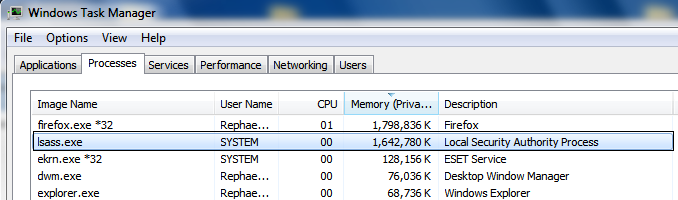
TZLhh.png


(Win7x64,Vertex2,Gtx460,i7-2600,8gb ram)

I wonder what can that be, suggestions plz
tnx.
 
Last edited:

My Computer

Computer type
PC/Desktop
OS
Microsoft Windows 7 Ultimate 64-bit 7601 Multiprocessor Free Service Pack 1
CPU
Intel(R) Core(TM) i7-2600K CPU @ 3.40GHz
Motherboard
ASUSTeK Computer INC. P8Z68 DELUXE/GEN3
Memory
8.00 GB
Graphics Card(s)
NVIDIA GeForce GTX 460
Sound Card
(1) Realtek High Definition Audio (2) ManyCam Virtual Micr
Monitor(s) Displays
Dell U2311H
Screen Resolution
1920 x 1080 x 32 bits (4294967296 colors) @ 60 Hz
Hard Drives
(1) ATA OCZ-VERTEX2 SCSI Disk Device (2) ATA WDC WD20EARS-00M SCSI Disk Device (3) ATA WDC WD20EARS-00M SCSI Disk Device (4) WD Ext HDD 1021 USB Device
PSU
1000W
Cooling
Noctua
Internet Speed
100Mbit
Antivirus
ESET 6
Hi!

I found this which might answer your question.

"lsass.exe" is the Local Security Authentication Server. It verifies the validity of user logons to your PC or server. Lsass generates the process responsible for authenticating users for the Winlogon service. This is performed by using authentication packages such as the default, Msgina.dll. If authentication is successful, Lsass generates the user's access token, which is used to launch the initial shell. Other processes that the user initiates then inherit this token.
space.gif

Note: The lsass.exe file is located in the folder C:\Windows\System32. In other cases, lsass.exe is a virus, spyware, trojan or worm!

Hope this helps!
 

My Computer

Computer Manufacturer/Model Number
Acer Aspire M5910
OS
Windows 7 x64 Ultimate
CPU
AMD Phenom II x9650
Motherboard
Acer standard Motherboard
Memory
4GB DDR2 1333
Sound Card
M-Audio Audiophile 192
Monitor(s) Displays
Acer P243W
Hard Drives
750GB SATA
although i knew it, tnx for the info
 

My Computer

Computer type
PC/Desktop
OS
Microsoft Windows 7 Ultimate 64-bit 7601 Multiprocessor Free Service Pack 1
CPU
Intel(R) Core(TM) i7-2600K CPU @ 3.40GHz
Motherboard
ASUSTeK Computer INC. P8Z68 DELUXE/GEN3
Memory
8.00 GB
Graphics Card(s)
NVIDIA GeForce GTX 460
Sound Card
(1) Realtek High Definition Audio (2) ManyCam Virtual Micr
Monitor(s) Displays
Dell U2311H
Screen Resolution
1920 x 1080 x 32 bits (4294967296 colors) @ 60 Hz
Hard Drives
(1) ATA OCZ-VERTEX2 SCSI Disk Device (2) ATA WDC WD20EARS-00M SCSI Disk Device (3) ATA WDC WD20EARS-00M SCSI Disk Device (4) WD Ext HDD 1021 USB Device
PSU
1000W
Cooling
Noctua
Internet Speed
100Mbit
Antivirus
ESET 6
Do you also know that it would be a fine time to run security scans. My lsass.exe is only 25k. If you already know this please pay no attention to this post.
 

My Computer

Computer type
PC/Desktop
Computer Manufacturer/Model Number
Home made Desktop
OS
Windows 10 Pro. 64/ version 1709 Windows 7 Pro/64
CPU
Intel i7-6800K @ 4.3
Motherboard
ASUS X-99 Deluxe II
Memory
Corsair Platinum 16 gig @2400
Graphics Card(s)
EVGA GTX 1070 OC
Monitor(s) Displays
Asus 27" LED LCD/VE278Q
Screen Resolution
1920-1080 or 1280-720 HDMI
Hard Drives
INTEL SSD 730-240 Gb Sata 3.0/
PSU
EVGA Platium 1200W
Case
Phanteks Luxe Tempered Glass 8 fans/ one radiator
Cooling
XSPC/ Water Cooled CPU
Keyboard
Das 4 Professional
Mouse
Logitech M705/MX Anywhere 2-S
Internet Speed
100 mbits
Antivirus
Microsoft Security Essentials/ Malwarebytes Premium 3.0/ SAS
Browser
I.E. 11 default/Firefox/ ISP Time Warner Cable/Spectrum
Other Info
LG BluRay Burner/
Sound system-KLipsch-THX/
Icy Dock ssd Hot Swap bays.
I just noticed the same problem except mine is using 3GB of Virtual memory and 2GB working set! That's idiotic. MS says they fixed this way back in W2K, I don't think so!
 

My Computer

OS
windows 7
I just noticed the same problem except mine is using 3GB of Virtual memory and 2GB working set! That's idiotic. MS says they fixed this way back in W2K, I don't think so!
Hello - sorry i didnt updated the thread until i see your post in the mail. iv solved this prob long ago - i uninstalled RSAT tools that i had - so if you have any administrative tools of some kind or remote control tools try to uninstall them completely with prog like Revo or alike and reboot 2 or 3 times
 

My Computer

Computer type
PC/Desktop
OS
Microsoft Windows 7 Ultimate 64-bit 7601 Multiprocessor Free Service Pack 1
CPU
Intel(R) Core(TM) i7-2600K CPU @ 3.40GHz
Motherboard
ASUSTeK Computer INC. P8Z68 DELUXE/GEN3
Memory
8.00 GB
Graphics Card(s)
NVIDIA GeForce GTX 460
Sound Card
(1) Realtek High Definition Audio (2) ManyCam Virtual Micr
Monitor(s) Displays
Dell U2311H
Screen Resolution
1920 x 1080 x 32 bits (4294967296 colors) @ 60 Hz
Hard Drives
(1) ATA OCZ-VERTEX2 SCSI Disk Device (2) ATA WDC WD20EARS-00M SCSI Disk Device (3) ATA WDC WD20EARS-00M SCSI Disk Device (4) WD Ext HDD 1021 USB Device
PSU
1000W
Cooling
Noctua
Internet Speed
100Mbit
Antivirus
ESET 6
I just noticed the same problem except mine is using 3GB of Virtual memory and 2GB working set! That's idiotic. MS says they fixed this way back in W2K, I don't think so!

Um, Virtual Memory and Working set do not translate to Physical memory.
 

My Computer

Computer type
PC/Desktop
Computer Manufacturer/Model Number
Alienware Aurora ALX R4
OS
Windows 10 Pro (x64)
CPU
Intel Core i7-3930K (3.2GHz - 4.5GHz)
Motherboard
Alienware Aurora-R4 x79
Memory
4x Samsung 4GB PC3-12800 DDR3 (16GB 1600MHz)
Graphics Card(s)
Nvidia Geforce GTX 690
Sound Card
SteelSeries Siberia Elite
Monitor(s) Displays
Dell UltraSharp U3011
Screen Resolution
2560x1600
Hard Drives
Samsung 850 Pro 256 GB, Seagate 1TB Desktop Hybrid HDD, 2x Western Digital 4TB Green HDD
PSU
875W Some Dell PSU <.<
Case
Alienware Aurora ALX
Cooling
Custom Liquid Cooling (EK CPU & GPU blocks) dual EK 480RAD
Keyboard
Logitech G710+ Mechanical
Mouse
Logitech G700s
Internet Speed
Verizon Fios (50 mbps average)
Other Info
Server: Intel NUC D54250WYK: i5-4250U, 16GB, 256 GB mSATA, Windows Server 2012 R2
I just noticed the same problem except mine is using 3GB of Virtual memory and 2GB working set! That's idiotic. MS says they fixed this way back in W2K, I don't think so!

Um, Virtual Memory and Working set do not translate to Physical memory.
From here: "The working set is the set of memory pages that were touched recently by the threads in the process. If free memory in the computer is above a threshold, pages are left in the working set of a process, even if they are not in use. When free memory falls below a threshold, pages are trimmed from working sets. "

Since with 4GB total physical memory, and using at the moment 3.5-3.6GB (no doubt above the threshold), my 2GB of working set size for this damn leaky process is huge. It's now up to over 8GB of virtual size and is thrashing like mad.
 

My Computer

OS
windows 7
Hello - sorry i didnt updated the thread until i see your post in the mail. iv solved this prob long ago - i uninstalled RSAT tools that i had - so if you have any administrative tools of some kind or remote control tools try to uninstall them completely with prog like Revo or alike and reboot 2 or 3 times
Thnks for the tip but i don't have the RSAT tools and the process is leaking memory like crazy.
 

My Computer

OS
windows 7

My Computer

Computer type
PC/Desktop
OS
Microsoft Windows 7 Ultimate 64-bit 7601 Multiprocessor Free Service Pack 1
CPU
Intel(R) Core(TM) i7-2600K CPU @ 3.40GHz
Motherboard
ASUSTeK Computer INC. P8Z68 DELUXE/GEN3
Memory
8.00 GB
Graphics Card(s)
NVIDIA GeForce GTX 460
Sound Card
(1) Realtek High Definition Audio (2) ManyCam Virtual Micr
Monitor(s) Displays
Dell U2311H
Screen Resolution
1920 x 1080 x 32 bits (4294967296 colors) @ 60 Hz
Hard Drives
(1) ATA OCZ-VERTEX2 SCSI Disk Device (2) ATA WDC WD20EARS-00M SCSI Disk Device (3) ATA WDC WD20EARS-00M SCSI Disk Device (4) WD Ext HDD 1021 USB Device
PSU
1000W
Cooling
Noctua
Internet Speed
100Mbit
Antivirus
ESET 6
Problem solved. Turned out to be ESET Smart Security, I don't know why since I've used it for years. Anyway I removed it and using MSE.
 

My Computer

OS
windows 7
Back
Top